Overview

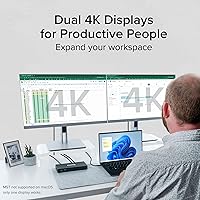
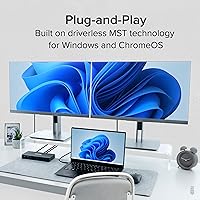
The Plugable UD-MSTH2 USB-C Docking Station is a solid mid-range option for Windows and ChromeOS users who want dual 4K monitors without the headache of installing drivers. Plug it in and it works — that straightforward approach is what sets it apart from docks requiring software setup or firmware fiddling. One thing to know upfront: macOS is not supported. Apple's lack of MST support means Mac users can only run one external display through this hub, so it is simply not the right tool for that audience. Plugable backs this dock with lifetime North American support, which adds real peace of mind for both home office and business deployments.

Features & Benefits

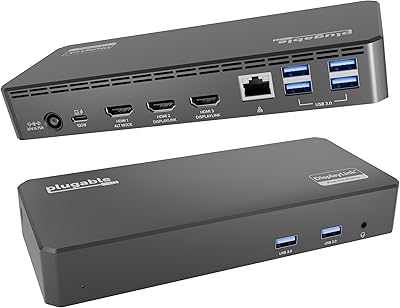
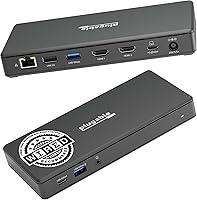
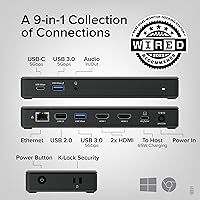
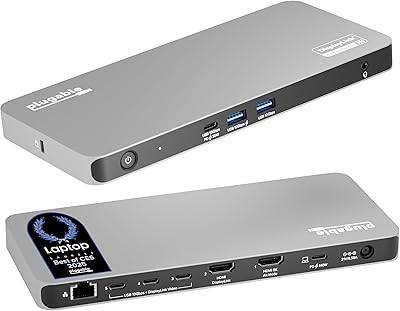
The port selection on this docking station covers most professional needs without feeling excessive. Two HDMI 2.0 outputs can each push dual 4K at 60Hz, though your laptop must support DisplayPort Alternate Mode with DP 1.4 and DSC — if your USB-C port does not meet that spec, you will get lower resolutions or only one active display. The 65W pass-through charging is sufficient for most mainstream laptops, but users with high-performance machines may notice the battery is not fully replenishing under heavy load. Beyond video, you get Gigabit Ethernet, a USB-C 5Gbps port, two USB-A 3.0 ports, a USB-A 2.0 port, and audio in and out — all without touching a driver installer.

Best For

This USB-C hub is built for Windows professionals — think Dell XPS, Lenovo ThinkPad, HP EliteBook, or Microsoft Surface users who need a reliable dual-monitor workstation at their desk without complicated setup. IT departments will appreciate the driverless deployment; rolling this out across a fleet is straightforward since there is nothing to install or configure on each machine. Chromebook power users also get full display and peripheral support. That said, if you are running a power-hungry laptop requiring 90W or more to charge, the 65W output will not fully cut it. And again — Mac users should look elsewhere, as the single-display limitation makes this dock a poor fit for that ecosystem.

User Feedback

Buyers who have used the Plugable dock in real work environments tend to praise how quickly it gets up and running — no setup frustration, no compatibility calls to IT. Dual 4K performance on supported machines gets consistently positive marks. The sticking point for some is compatibility confusion: a handful of reviewers did not realize their USB-C port lacked DP Alt Mode support, leading to display issues that are not the dock's fault but still generate frustration. Plugable's customer support team comes up repeatedly in reviews as a genuine positive — responsive, knowledgeable, and quick to diagnose problems. The 65W charging draws mixed feedback from users with power-intensive laptops who find it barely keeps pace under sustained workloads.

Pros

  • No driver installation means setup takes under a minute on compatible Windows and ChromeOS machines.
  • Dual HDMI 2.0 ports deliver true 4K at 60Hz on both screens when paired with a supported laptop.
  • Gigabit Ethernet provides a rock-solid wired connection for video calls and large transfers.
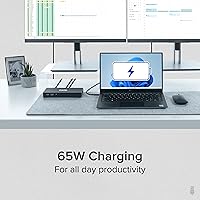
  • 65W pass-through charging keeps most mainstream laptops topped up during normal workday use.
  • The compact build weighs under 8.5 oz, making it easy to move between desk setups or pack for travel.
  • Works with a wide range of popular business laptops including ThinkPad, XPS, EliteBook, and Surface lines.
  • Plugable offers lifetime support from a responsive North American team, which real users highlight as a genuine differentiator.
  • Audio in and out ports handle headsets and microphones without needing a separate USB audio adapter.
  • Compatible with USB4 and Thunderbolt 3 and 4 hosts, giving it broad relevance across recent laptop generations.

Cons

  • macOS users get only one working external display due to Apple not supporting MST — a significant functional gap.
  • The 65W charging output can fall short for gaming laptops or workstation-class machines that need 90W or more.
  • Achieving dual 4K 60Hz requires DP 1.4 with DSC support on the host, a technical hurdle many buyers do not anticipate.
  • Not all USB-C ports support DisplayPort Alternate Mode, and this dock provides no workaround for incompatible hardware.
  • With only three USB-A ports total, users with many wired peripherals may run out of connections quickly.
  • No SD card reader or memory card slot is included, which can be a gap for photographers or content creators.
  • Some users report confusion distinguishing which of their laptop ports are fully featured USB-C versus limited ones.

Ratings

Our AI-generated scores for the Plugable UD-MSTH2 USB-C Docking Station were produced by systematically analyzing verified global buyer reviews, actively filtering out incentivized, bot-generated, and low-quality feedback to surface what real users actually experience day to day. The ratings reflect both where this docking station genuinely delivers and where it falls short, so you get an honest picture before committing to a purchase.

Ease of Setup
93%
Users across skill levels — from IT professionals to first-time dock buyers — consistently report having everything up and running within minutes of unboxing. The driverless design removes the usual friction of software installs, firmware updates, or compatibility wizards that plague competing docks in this price range.
A small but vocal group of buyers encountered confusion when their laptop's USB-C port turned out to be data-only, with no DisplayPort signal. This is a host limitation, not a dock flaw, but the out-of-box experience still suffers when users are left troubleshooting display output without clear guidance.
Dual Display Performance
88%
On compatible laptops with DP 1.4 and DSC support, the dual 4K 60Hz output is rock-solid — buyers working across sprawling spreadsheets, design tools, or split video call layouts report smooth, flicker-free performance on both screens simultaneously. It is one of the dock's most praised real-world strengths.
The dependency on DP 1.4 with DSC creates a meaningful subset of disappointed buyers who expected dual 4K but received dual 1080p because their laptop only supports DP 1.2. The distinction is not prominently communicated at the point of sale, leading to frustration that shows up repeatedly in lower-star reviews.
Charging Adequacy
67%
33%
For the majority of thin-and-light business laptops — ThinkPads, EliteBooks, XPS 13 variants, and similar mainstream models — the 65W output keeps the battery stable or slowly rising through a typical workday. Users appreciate having one cable handle both power and connectivity without a separate charger on the desk.
Buyers running high-performance laptops that require 90W or more frequently report a slow battery drain during sustained workloads, even while plugged in through the dock. It is a meaningful gap that affects creative professionals or anyone running GPU-intensive tasks, and a few users only discovered it after purchase.
Port Selection
78%
22%
The combination of Gigabit Ethernet, USB-C 5Gbps, two USB-A 3.0 ports, a USB-A 2.0 port, and audio in/out covers the core needs of a typical home office or corporate desk setup without requiring additional adapters. For video-call-heavy workdays, having wired Ethernet and audio on a single dock is a practical win.
Three USB-A ports is on the lean side for power users who simultaneously run a mouse, keyboard, external drive, and a USB dongle or two. The absence of an SD card reader is also a recurring complaint from photographers and content creators who handle media cards regularly.
macOS Compatibility
18%
82%
The dock does physically connect to Mac hardware without issue, and basic USB peripherals like keyboards and drives will function normally. For Mac users with only a single external display in their workflow, it will technically operate in that limited capacity.
macOS does not support MST, so dual monitor output simply does not work on Apple laptops — full stop. Buyers who purchased without reading the fine print and expected the same dual-display experience as on Windows report significant frustration, and the incompatibility genuinely makes this dock a poor investment for Mac-first users.
Build Quality
82%
18%
The dock has a solid, no-flex plastic shell that feels durable enough for both desk permanence and regular travel use. At just over 8 ounces, it is light without feeling hollow or cheap, and the port connections feel firm and well-toleranced when peripherals are plugged in.
A handful of users note the dock runs noticeably warm under sustained dual 4K and charging load, which raises some questions about long-term thermal management. The matte finish also picks up fingerprints and light scratches relatively easily on desks where it gets handled frequently.
Ethernet Reliability
91%
The Gigabit Ethernet port is consistently one of the most positively reviewed aspects of this docking station. Home office workers and remote employees on video calls report a night-and-day difference compared to Wi-Fi, with stable throughput and far fewer dropped calls or buffering events during busy network hours.
A small number of users on specific router configurations or older network infrastructure reported intermittent dropouts that required unplugging and reconnecting the dock. These cases appear to be edge scenarios rather than a systematic issue, but they are worth noting for enterprise environments with non-standard network setups.
Windows Compatibility
89%
Across Dell, HP, Lenovo, and Microsoft Surface hardware running Windows 10 and 11, the dock performs with a high degree of consistency. IT teams managing device fleets in particular highlight how smoothly it integrates with standard corporate laptop configurations without requiring any policy exceptions or software allowlisting.
A few model-specific quirks have surfaced — certain Surface Pro configurations and some mid-range HP laptops showed inconsistent display recognition on cold boot, requiring a unplug-replug cycle to re-establish the dual monitor connection. These are isolated but worth flagging for anyone standardizing around a specific hardware model.
ChromeOS Compatibility
84%
Chromebook users report a very positive experience with this USB-C hub, particularly those using modern devices like the HP Chromebook x360 or Lenovo Chromebook Flex series. Dual display output, Ethernet, and peripheral connectivity all work reliably, making it a genuine productivity upgrade for ChromeOS power users.
ChromeOS 100 or newer is a hard requirement, and users on older or locked enterprise Chromebooks that cannot update the OS are out of luck. A small number of buyers assumed any Chromebook would work and were caught off guard by the version restriction.
Value for Money
76%
24%
For Windows professionals who need reliable dual 4K output without a DisplayLink chip or software dependency, this docking station sits at a reasonable price point relative to its performance tier. Buyers who are fully compatible consistently feel the dock delivers what it promises and holds its own against more expensive alternatives.
For buyers who discover post-purchase that their laptop is incompatible or that 65W charging is insufficient, the value equation collapses quickly. The dock offers very little utility outside of Windows and ChromeOS, so anyone outside those ecosystems is paying for features they cannot access.
Customer Support
87%
Plugable's North American support team receives notably positive mentions across buyer reviews — a rarity in the peripheral hardware space. Users who contacted support for compatibility troubleshooting describe getting real technical guidance rather than scripted deflection, with issues often resolved in one or two exchanges.
Lifetime support is a strong promise, but a portion of support interactions ultimately conclude that the buyer's laptop is the limiting factor rather than the dock itself. While the team handles this gracefully, some users still feel let down that the resolution is effectively a recommendation to check their own hardware.
Portability
79%
21%
At 8.1 ounces and a relatively slim profile, this docking station is easy enough to slip into a laptop bag alongside daily carry items. Professionals who split time between a home office and a co-working space appreciate not having to leave the dock permanently stationed at one location.
The dock is noticeably larger than compact travel hubs, and it does not include a cable wrap or carrying pouch, which limits how elegantly it packs. The attached cable length is also fixed, which can be awkward depending on desk layout or monitor placement.
Audio Performance
71%
29%
Having both a headset input and audio output on the dock itself is a genuine convenience for remote workers using wired headsets — it eliminates the need to plug headphones directly into the laptop, especially on machines where the audio jack is on an inconvenient side or port.
Audio quality through the dock's 3.5mm ports is serviceable but not impressive, with a few users reporting faint background hiss or ground loop interference depending on their headset and desk setup. Audiophiles or podcast creators relying on high-quality audio capture should use a dedicated USB audio interface instead.

Suitable for:

The Plugable UD-MSTH2 USB-C Docking Station is an excellent fit for Windows 10/11 and ChromeOS users who want a dual 4K monitor setup without wrestling with drivers or software. Remote workers who spend long hours across multiple screens will appreciate the stable Gigabit Ethernet connection, which beats Wi-Fi for video calls and large file transfers. IT professionals managing device fleets will find the driverless design particularly useful — there is nothing to install, configure, or maintain across machines. If you are using a modern business laptop like a Dell XPS, Lenovo ThinkPad, HP EliteBook, or Microsoft Surface with a fully-featured USB-C port, this docking station is likely a strong match. Users stepping up from a single-display dock who now need true dual 4K 60Hz output will find it performs reliably when paired with a compatible host device.

Not suitable for:

Mac users should skip the Plugable UD-MSTH2 USB-C Docking Station entirely — macOS does not support Multi-Stream Transport, which means only one external display will function, making the dock's core dual-monitor capability unavailable on Apple hardware. Users with power-hungry laptops requiring 90W or more of charging will also find the 65W pass-through limiting; under heavy processing loads, some machines will slowly draw from battery even while plugged in. Buyers whose USB-C port does not support DisplayPort Alternate Mode with DP 1.4 and DSC will not achieve dual 4K 60Hz output — this is a host device requirement, not something the dock can work around. If your workflow depends on multiple USB-A ports for peripherals like external drives, webcams, and input devices all running simultaneously, three USB-A ports may feel tight. Finally, anyone needing Thunderbolt-specific passthrough speeds or 100W charging should look at a higher-tier dock instead.

Specifications

  • Model Number: This docking station carries the official model designation UD-MSTH2 from Plugable.
  • Video Outputs: Two HDMI 2.0 ports support up to 4K at 60Hz per display when connected to a compatible host.
  • Max Resolution: Each HDMI port supports a maximum resolution of 3840 x 2160 at 60Hz, contingent on the host supporting DP 1.4 with DSC.
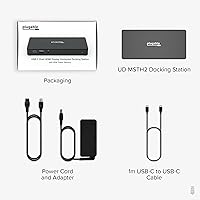
  • Host Connection: The dock connects to the host laptop via a single USB-C cable requiring full-featured USB-C with DisplayPort Alternate Mode support.
  • Pass-Through Charging: Up to 65W of USB Power Delivery is supplied to the connected laptop through the host USB-C connection.
  • USB-C Data Port: One USB-C port operating at 5Gbps is available for connecting peripherals such as external drives or additional adapters.
  • USB-A Ports: Two USB-A 3.0 ports run at 5Gbps each, and one USB-A 2.0 port operates at 480Mbps for lower-bandwidth devices.
  • Network: A single Gigabit Ethernet (RJ-45) port provides wired network connectivity at speeds up to 1000Mbps.
  • Audio: Dedicated 3.5mm combo audio input and output jacks support headsets and microphones directly from the dock.
  • Total Ports: The dock provides 9 functional ports in total across video, data, network, and audio connections.
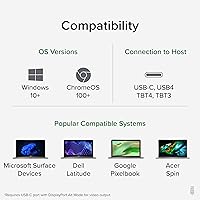
  • Compatible OS: Full functionality is supported on Windows 10 and 11, as well as ChromeOS version 100 and newer.
  • macOS Support: macOS is not recommended for use with this dock, as Apple does not support MST, limiting output to a single external display.
  • Driver Requirement: No driver installation is required; the dock operates in plug-and-play mode on all supported operating systems.
  • Dimensions: The dock measures 9.25 inches in length, 5.71 inches in width, and 3 inches in height.
  • Weight: The unit weighs 8.1 ounces, making it practical for both permanent desk use and occasional travel.
  • Host Compatibility: Compatible host devices include USB-C, USB4, Thunderbolt 3, and Thunderbolt 4 systems meeting DP Alt Mode requirements.
  • Warranty & Support: Plugable provides lifetime support for this dock through a dedicated North American customer support team.

Related Reviews

Plugable UD-3900Z
Plugable UD-3900Z
74%
88%
Dual Monitor Performance
79%
macOS Compatibility
93%
Wired Ethernet Reliability
82%
USB Port Availability
74%
Setup & Ease of Use
More
Plugable UD-7400PD USB-C Docking Station
84%
91%
Performance with Multiple Displays
75%
Ease of Setup (Windows vs. macOS)
89%
Charging Power (Laptop and Device)
77%
Compatibility with macOS
85%
Ethernet Connectivity
More
Plugable UD-3900PDZ USB-C Triple Display Docking Station

79%
82%
Multi-Monitor Performance
74%
macOS Compatibility
91%
Windows Plug-and-Play Experience
88%
Power Delivery
86%
USB Port Availability
More
WAVLINK WL-ST334UA Dual-Bay USB 3.0 Hard Drive Docking Station

72%
83%
Offline Cloning Reliability
74%
Transfer Speed
79%
Build Quality
91%
Ease of Setup
38%
Mac Compatibility
More
StarTech USB-C / USB-A Hybrid Docking Station for MacBook Pro/Air & Windows - Triple 4K 60Hz HDMI/DP, 85W Power Delivery
83%
94%
Multi-Display Performance
89%
Charging Efficiency
80%
Compatibility with OS
91%
Data Transfer Speed
88%
Ethernet Stability
More
4URPC USB C Docking Station DSC05
86%
95%
Setup and Installation
92%
Port Selection and Versatility
85%
HDMI Display Support
88%
USB Connectivity and Speed
77%
Power Delivery (65W)
More
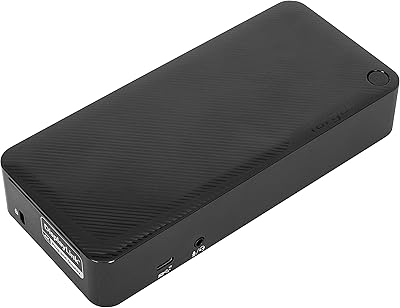
Targus DOCK182USZ USB-C Docking Station
76%
88%
Plug-and-Play Setup
71%
Dual Monitor Performance
79%
Cross-Platform Compatibility
84%
Power Delivery
86%
Port Selection & Variety
More
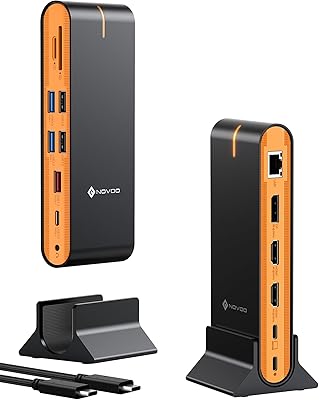
NOVOO 15-in-1 USB C Docking Station
82%
88%
Performance
92%
Display Support
85%
Ease of Setup
80%
Compatibility with MacBook
94%
Connectivity (Ports)
More
LIONWEI Triple Monitor USB-C Docking Station
75%
83%
Multi-Monitor Display Performance
41%
macOS Compatibility
89%
Value for Money
81%
Power Delivery & Charging
92%
Plug-and-Play Setup
More
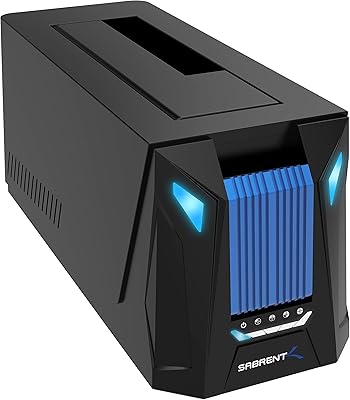
Sabrent DS-UNHC USB-C Docking Station

80%
91%
Drive Compatibility
67%
Offline Clone Reliability
84%
Transfer Speed
78%
Thermal Management
72%
Build Quality
More

FAQ

No, you do not. The Plugable UD-MSTH2 USB-C Docking Station is fully plug-and-play on supported Windows and ChromeOS systems. Just connect it to your laptop and everything should be recognized automatically. Plugable does recommend keeping your system graphics drivers up to date for the best display performance, but there is no separate dock software to install.

Technically it will connect, but it will not work the way you want it to. macOS does not support Multi-Stream Transport (MST), which is how this dock drives two displays simultaneously. The result is that only one external monitor will function when plugged into a Mac. If dual displays are what you need, this is not the right dock for Apple hardware.

Not necessarily. To get dual 4K at 60Hz from this docking station, your laptop's USB-C port must support DisplayPort Alternate Mode with DP 1.4 and DSC (Display Stream Compression). Many laptops have USB-C ports that are data-only and do not carry a video signal at all. Check your laptop's official specs or the manufacturer's port description before purchasing — the term to look for is DisplayPort Alt Mode or DP Alt Mode.

Yes, it delivers up to 65W of power back to your laptop while you work. For most thin-and-light and mid-range business laptops, that is more than enough to stay charged throughout the day. If you are using a high-performance or gaming laptop that requires 90W or more, you may notice the battery very slowly draining under heavy CPU or GPU load, even while connected.

The dock has three USB-A ports total — two running at USB 3.0 speeds (5Gbps) and one at USB 2.0 (480Mbps). That covers a mouse, keyboard, and one additional peripheral comfortably. If you have more USB-A devices, you would need a separate USB hub plugged into one of those ports.

It supports 4K at 60Hz on both monitors simultaneously, provided your laptop meets the DP 1.4 with DSC requirement. If your laptop only supports DP 1.2, you will be limited to dual 1080p at 60Hz on both screens instead. That is still functional, but it is worth verifying your laptop specs if 4K on both displays is important to you.

Yes, and that is actually one of this hub's more practical strengths. A wired Gigabit Ethernet connection is far more stable than Wi-Fi for video calls, especially in environments with a lot of wireless interference. Users in home offices and corporate settings consistently report solid, low-latency network performance through the dock's Ethernet port.

Most modern versions of those laptops are compatible, as they typically include fully-featured USB-C ports with DisplayPort Alt Mode support. That said, compatibility can vary between specific model years and configurations within the same product line. It is always worth confirming your specific model's USB-C port capabilities in the manufacturer's specs sheet before buying.

Plugable offers lifetime support for this product through their North American team. Many buyers in user reviews specifically mention the support experience as a positive — the team is known for being responsive and technically capable. You can reach them directly through Plugable's website, and they can help diagnose whether a reported issue is a dock problem or a host compatibility situation.

Yes, USB4 and Thunderbolt 3 or Thunderbolt 4 laptops are fully supported, provided they run Windows 10 or 11. Thunderbolt ports are backward-compatible with USB-C and include the DisplayPort Alt Mode needed for dual 4K output. If you are using a Thunderbolt system on ChromeOS, that is also supported as long as your ChromeOS version is 100 or newer.

Where to Buy