Overview

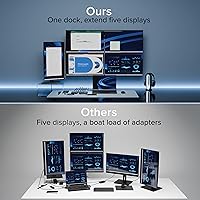
The Plugable UD-7400PD 5-Monitor USB-C Docking Station is a specialized, high-end dock built for one very specific job: powering five simultaneous 4K displays from a single USB-C cable, which alone sets it apart from virtually every other dock on the market. Before diving in, there is something critical to understand: this dock relies on DisplayLink technology, a software-based method that requires a driver on your host machine. Windows installs it automatically; macOS users must do it manually. It also works with base M1/M2/M3/M4 MacBooks — a genuinely rare capability — but this five-display dock is absolutely not a simple plug-and-play hub for casual, everyday use.
Features & Benefits

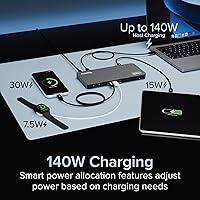
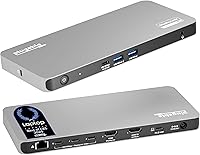
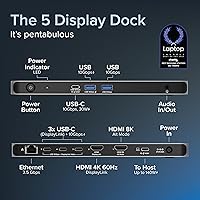
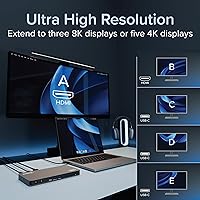
The port lineup is hard to argue with. The UD-7400PD offers one HDMI 2.1 output capable of up to 8K at 30Hz, one HDMI 2.0 port at 4K/60Hz, and three USB-C DisplayLink ports each handling 4K at 60Hz — five screens total. 140W Power Delivery means even demanding pro laptops charge at full speed, with an extra 30W available for a secondary device. The 2.5Gbps Ethernet port is a meaningful step up from standard gigabit for anyone moving large files or working on high-bandwidth connections. DockTag, an on-screen display feature, surfaces dock status and IT asset details on command. One firm limitation: HDCP-protected content — Netflix, Hulu, and similar services — will not play through this dock, full stop.

Best For

This DisplayLink docking station was clearly designed with two audiences in mind: IT departments and serious multi-display power users. On the IT side, the DockTag OSD and asset management tools make large-scale workstation deployments noticeably more organized. For individuals, the five-monitor capability is compelling for stock traders, video editors, or security professionals who need serious screen real estate without buying into a Mac Pro setup. It is also one of the very few docks that unlocks multiple external displays on base Apple Silicon MacBooks — something Apple's own software restrictions normally prevent. Casual users or anyone running a simpler single-screen setup should look elsewhere; this is specialized hardware that demands a bit of technical patience upfront.

User Feedback

With 84 ratings and a 4.0-star average, the UD-7400PD has earned a solid, if not unanimous, reception. Buyers who genuinely needed a five-display solution on a MacBook consistently report that this dock delivers where competitors fall short — and that is not a trivial accomplishment. The more common frustrations center on macOS driver setup, which catches users off guard who expected a simpler out-of-box experience. A handful of reviewers also discovered the HDCP limitation only after purchase, which led to real disappointment. Long-term stability under heavy multi-display load draws mixed remarks, though the rating pool is still relatively small and should be read with that in mind. Lifetime North American support is a genuine differentiator that more experienced buyers consistently flag as a plus.

Pros

  • One of very few docks that can drive five 4K displays simultaneously from a single USB-C connection.
  • Unlocks multi-monitor support on base Apple Silicon MacBooks that normally cannot run more than one external screen.
  • 140W Power Delivery is enough to fully charge even high-performance pro laptops without a separate charger.
  • 2.5Gbps Ethernet is a genuine upgrade over gigabit for users who move large files or run bandwidth-heavy applications.
  • DockTag OSD makes IT asset tracking and deployment significantly easier in multi-unit environments.
  • Broad compatibility covers USB-C, USB4, Thunderbolt 3 and 4, Windows 10/11, and macOS 11 and later.
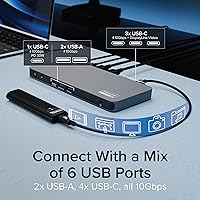
  • Eleven total ports, including seven USB ports with up to 10Gbps data throughput on USB-C, consolidate a full desk setup.
  • Lifetime support from a North American team is a meaningful long-term reassurance for a product this specialized.
  • HDMI 2.1 output supports resolutions up to 8K at 30Hz for users with very high-resolution display needs.

Cons

  • macOS requires a manual DisplayLink driver installation that catches many buyers off guard and causes early frustration.
  • HDCP support is completely absent, meaning Netflix, Hulu, and similar services will not play on dock-connected displays.
  • DisplayLink processing introduces a small but measurable latency overhead not present with native video output docks.
  • With only around 84 ratings at the time of writing, long-term reliability data is still thin and should be weighed accordingly.
  • Some users report initial setup confusion, particularly around understanding which ports handle video versus data only.
  • The dock is a sizeable piece of hardware at nearly three pounds, which may feel bulky on a smaller or minimalist desk.
  • Driver dependency means a system update on macOS could theoretically disrupt display functionality until drivers are updated to match.
  • The premium price point is hard to justify for anyone who does not specifically need five simultaneous display outputs.

Ratings

The scores below for the Plugable UD-7400PD 5-Monitor USB-C Docking Station were generated by our AI after analyzing verified buyer reviews from global markets, with spam, incentivized, and bot-flagged submissions actively filtered out before scoring. Each category reflects the honest distribution of real user experiences — not just the highs — so both the standout strengths and the genuine frustrations are represented in equal measure.
Multi-Display Performance
88%
Buyers who needed five simultaneous 4K screens consistently report that the UD-7400PD delivers exactly what it promises, something very few competing docks can claim. For professionals running trading dashboards, multi-camera surveillance feeds, or sprawling video editing timelines, the output quality across all five ports held up well under sustained workloads.
A subset of users noted occasional display flickering or brief signal drops when all five ports were active at once, particularly on macOS. These appear to be edge cases tied to specific monitor combinations or driver versions rather than a universal issue, but they do surface often enough to mention.
macOS Compatibility
79%
21%
The ability to run five external monitors from a base M1, M2, M3, or M4 MacBook is genuinely rare, and buyers who came specifically for that capability were largely satisfied. Apple Silicon users who had tried and failed with other docks found this DisplayLink docking station to be one of the only solutions that actually worked as advertised.
The manual driver installation process on macOS tripped up a meaningful number of buyers who expected plug-and-play behavior. Several reviews describe a frustrating first hour where nothing appeared to work until the DisplayLink driver was tracked down and installed, and at least some of those buyers returned the dock before discovering the fix.
Setup & Ease of Use
63%
37%
Windows users generally had a smoother onboarding experience, with the driver installing automatically in the background and displays coming online within minutes of plugging in. IT professionals who understood DisplayLink going in reported that deployment across multiple workstations was straightforward once the driver pipeline was established.
For less technical buyers, the setup experience is a real weak point. The driver dependency, combined with the need to configure display arrangements manually across five screens, created enough friction that initial confusion is one of the most recurring themes in negative reviews. The product rewards patience but punishes assumptions.
Laptop Charging Power
91%
The 140W Power Delivery rating impressed users running power-hungry machines like the 16-inch MacBook Pro and high-performance Windows laptops that often struggle to stay charged through a standard dock. Having a single cable handle both full-speed charging and five display outputs is a genuine quality-of-life improvement for cluttered desks.
A small number of users with lower-wattage laptops noted that 140W felt like overkill for their situation and wished the dock were priced accordingly. The secondary 30W device charging port, while useful, was occasionally reported as insufficient for fast-charging larger tablets under simultaneous load.
HDCP & Streaming Support
27%
73%
For users who went in knowing that HDCP-protected streaming would not work, this limitation had zero impact on their daily use. Professionals using the dock purely for productivity applications — code editors, design tools, spreadsheets, dashboards — never encountered this restriction in normal workflow.
The absence of HDCP support is the single most polarizing flaw in the buyer feedback pool. Reviewers who discovered mid-use that Netflix, Hulu, and similar services would not play on their dock-connected displays expressed genuine frustration, and several stated it was a dealbreaker they wished had been more prominently disclosed before purchase.
Build Quality
83%
The physical construction of this five-display dock reads as deliberate and professional rather than consumer-grade. The Space Grey finish is understated and looks at home on a clean desk setup, and the chassis does not feel like it will shift or flex under the weight of multiple cables.
At nearly three pounds, some users found the dock heavier and bulkier than expected for a desktop unit. A handful of reviews mentioned that the cable management around the back of the dock got unwieldy quickly with five display cables plus power and USB peripherals all plugged in simultaneously.
Ethernet Performance
86%
The 2.5Gbps Ethernet port earned consistent praise from users who work with large file transfers, high-bandwidth video streams, or NAS setups. In practical terms, real-world throughput noticeably outpaced what a standard gigabit dock would deliver, particularly when moving multi-gigabyte project files between machines.
A small number of users on older networking infrastructure reported that getting the full 2.5Gbps benefit required a compatible router or switch, which they had not anticipated needing to upgrade. Without that matching hardware, performance falls back to gigabit speeds, which negates the spec advantage.
Port Selection & Flexibility
81%
19%
Eleven total ports across a thoughtful mix of USB-A, USB-C, HDMI, and Ethernet means most users could retire several additional hubs and adapters just by adopting this dock. The three USB-C DisplayLink ports doubling as both video outputs and 10Gbps data ports is a smart design choice that reduces the trade-off between screens and peripherals.
Despite the generous port count, a few power users noted that running all five displays simultaneously consumed all the video-capable USB-C ports, leaving no spare USB-C slots for data peripherals without adding a secondary hub. This is a structural trade-off of the dock's design rather than a defect, but it catches some buyers off guard.
Windows Compatibility
89%
On Windows 10 and 11 machines with a compatible USB-C port, the dock performed reliably and the automatic driver installation removed the friction that macOS users faced. Corporate Windows deployments in particular benefited from the DockTag OSD feature, which simplified asset tracking across large fleets of workstations.
Occasional reports surfaced of Windows systems requiring a manual driver update after a major OS update, which temporarily interrupted display output. This is a minor and fixable inconvenience, but it does mean users should not treat the dock as entirely maintenance-free over a long deployment period.
DockTag & IT Management
84%
IT administrators who evaluated this DisplayLink docking station specifically for enterprise deployment flagged DockTag as a standout differentiator. The ability to surface dock status, firmware version, and asset details directly on screen — along with a scannable QR code for support — meaningfully reduces the time spent physically inspecting individual units.
For individual consumers or small home offices, DockTag adds no practical value and goes completely unused. Some reviewers found the on-screen status overlay unexpected the first time it appeared, briefly mistaking it for a hardware error before understanding its purpose.
DisplayLink Driver Stability
71%
29%
When the DisplayLink driver is properly installed and up to date, the majority of users report stable long-term operation without recurring crashes or display dropouts. Experienced IT professionals who have worked with DisplayLink technology before found the UD-7400PD to be as reliable as any other dock in its class.
Driver stability under heavy multi-display loads received mixed feedback, with a portion of users reporting that extended sessions with all five screens active occasionally led to a display reset requiring a driver restart. The frequency of these incidents varied enough across user reports to suggest environmental or configuration factors may play a role.
Value for Money
74%
26%
For the specific buyer who genuinely needs five 4K displays, 140W charging, and 2.5Gbps Ethernet in one box — especially on a base Apple Silicon MacBook — the value proposition is strong because no cheaper alternative does all of those things simultaneously. The lifetime support commitment also softens the upfront cost over a long ownership period.
For anyone who does not fully utilize the five-monitor capability, this dock is straightforwardly overpriced relative to simpler alternatives. The gap between what the dock costs and what a two- or three-display dock costs is hard to justify if those extra display ports are never used.
Thermal Management
76%
24%
Under moderate loads — three or four displays active with standard USB and Ethernet in use — the dock ran warm but not concerningly hot to the touch. Most users in typical office environments did not report thermal throttling or performance changes attributable to heat buildup during normal workday usage.
Under full five-display loads over extended periods, a subset of users reported the chassis becoming noticeably warm, and a few noted minor performance inconsistencies that appeared heat-related. Placement in well-ventilated desk areas is advisable; enclosed cable management boxes or tight shelf spaces could aggravate this.
Customer Support
87%
Plugable's North American support team received specific positive mentions across multiple reviews, with users citing fast response times and technically knowledgeable staff who could walk through driver issues and compatibility questions without deflecting to generic troubleshooting scripts. The lifetime support commitment was seen as a meaningful differentiator at this price tier.
A small number of users reported longer-than-expected wait times during what appeared to be peak support periods, and a few wished self-service documentation on the macOS driver installation process were more prominently placed in the box rather than requiring a QR code scan to locate.

Suitable for:

The Plugable UD-7400PD 5-Monitor USB-C Docking Station is built for a narrow but very real group of buyers who need serious multi-display capability from a single laptop connection. IT managers overseeing large deployments will appreciate the DockTag asset management feature, which makes identifying and troubleshooting individual units far less painful at scale. Apple Silicon MacBook users — particularly those on base M1, M2, M3, or M4 models that Apple artificially limits to one external display — will find this one of the only practical paths to running five screens without upgrading to a Mac Studio or Mac Pro. Windows professionals in data-heavy fields like algorithmic trading, video production, or physical security monitoring will also get genuine value here, where screen real estate directly translates to faster decision-making. Anyone building a clean, single-cable desk setup who also needs 140W laptop charging, 2.5Gbps wired networking, and a full port selection in one box will find this DisplayLink docking station covers a lot of ground.
Not suitable for:

The Plugable UD-7400PD 5-Monitor USB-C Docking Station is a poor fit for buyers who want to plug in and go without reading a setup guide. The DisplayLink technology it relies on requires a software driver — automatic on Windows, but a manual download-and-install process on macOS — and skipping that step means your video outputs simply will not work. Anyone who plans to watch Netflix, Hulu, Disney+, or any other HDCP-protected streaming content through their dock displays will be disappointed, as this dock does not support that kind of copy-protected video at all. Users who only need one or two external monitors will find this five-display dock overspecified and over-priced for their needs, since simpler and less expensive docks handle those scenarios more efficiently. Gamers or creative professionals who care about ultra-low latency display performance should also be cautious, as DisplayLink-based outputs carry a small but real processing overhead compared to native video outputs.

Specifications

  • Video Outputs: The dock provides five display outputs: one HDMI 2.1, one HDMI 2.0, and three USB-C DisplayLink ports.
  • Max Displays: Up to five external monitors can be connected and used simultaneously from a single host laptop.
  • Max Resolution: The HDMI 2.1 port supports up to 8K at 30Hz; all other display ports support up to 4K at 60Hz each.
  • Host Charging: The dock delivers up to 140W of Power Delivery to the connected host laptop through the upstream USB-C connection.
  • Device Charging: A secondary 30W charging port is available for powering a smartphone, tablet, or other USB-C device simultaneously.
  • Ethernet: A built-in 2.5Gbps Ethernet port provides wired network connectivity at speeds well above standard gigabit.
  • Host Connection: The dock connects to the host laptop via a single USB-C cable with a 10Gbps data transfer rate.
  • Total Ports: The unit includes 11 ports in total, comprising seven USB ports alongside the display and networking connections.
  • Chipset: Display output is powered by the DisplayLink DL-7400 chipset, which requires a software driver on the host machine.
  • Driver Requirement: A DisplayLink driver must be installed on the host: it installs automatically on Windows, but requires a manual download on macOS.
  • Compatibility: The dock supports USB-C, USB4, and Thunderbolt 3 and 4 hosts running Windows 10/11 or macOS 11 and later, including all M1 through M4 MacBooks.
  • HDCP Support: HDCP-protected content, including streaming video from services such as Netflix and Hulu, is not supported on any display output.
  • DockTag OSD: The integrated DockTag feature displays dock status, asset information, and a scannable QR code for setup and support access directly on connected screens.
  • Dimensions: The unit measures 9.09 x 5.71 x 2.91 inches, making it a mid-sized desktop dock rather than a compact travel accessory.
  • Weight: The dock weighs 2.81 pounds, which reflects its robust internal hardware and is best suited to a permanent desk setup.
  • Color: The dock is finished in Space Grey, designed to complement modern laptops and professional desktop environments.
  • Warranty: Plugable provides lifetime support through a North American-based team of connectivity specialists for the life of the product.

Related Reviews

Plugable UD-3900Z
Plugable UD-3900Z
74%
88%
Dual Monitor Performance
79%
macOS Compatibility
93%
Wired Ethernet Reliability
82%
USB Port Availability
74%
Setup & Ease of Use
More
Plugable UD-MSTH2 USB-C Docking Station
77%
93%
Ease of Setup
88%
Dual Display Performance
67%
Charging Adequacy
78%
Port Selection
18%
macOS Compatibility
More
Plugable UD-3900PDZ USB-C Triple Display Docking Station
79%
82%
Multi-Monitor Performance
74%
macOS Compatibility
91%
Windows Plug-and-Play Experience
88%
Power Delivery
86%
USB Port Availability
More
TobenONE UDS041W USB-C Triple Monitor Docking Station

77%
84%
Multi-Monitor Output
91%
Single-Display Performance
93%
Integrated 100W Charging
88%
Data Transfer Speed
79%
Ethernet Performance
More
LIONWEI Triple Monitor USB-C Docking Station
75%
83%
Multi-Monitor Display Performance
41%
macOS Compatibility
89%
Value for Money
81%
Power Delivery & Charging
92%
Plug-and-Play Setup
More
j5create USB-C Triple Monitor Docking Station JCD543
85%
89%
Setup & Installation
91%
Display Performance
85%
Build Quality
90%
Port Availability & Functionality
94%
Power Delivery
More
StarTech DK31C4DPPD Quad Monitor USB-C Dock
76%
88%
Multi-Monitor Performance
51%
Driver Setup Experience
74%
Power Delivery
91%
OS & Hardware Compatibility
83%
Build Quality
More
WAVLINK UMD05 USB-C Triple Display Docking Station
77%
74%
Display Performance
88%
Port Selection
83%
Power Delivery
86%
Setup & Compatibility
81%
Value for Money
More
CMSTEDCD SW532 KVM Docking Station

78%
88%
KVM Switch Reliability
84%
Multi-Monitor Display Performance
67%
Laptop Compatibility
79%
Power Delivery & Charging
91%
Port Selection & Variety
More
WAVLINK WL-ST334UA Dual-Bay USB 3.0 Hard Drive Docking Station
72%
83%
Offline Cloning Reliability
74%
Transfer Speed
79%
Build Quality
91%
Ease of Setup
38%
Mac Compatibility
More

FAQ

You do need to install a driver — this is not optional. The dock uses DisplayLink technology, which is a software-based method for driving multiple displays. On Windows, the driver typically installs automatically in the background. On macOS, you need to download and install it manually from the DisplayLink website before your video outputs will function. Skipping this step is the most common reason buyers think the dock is broken when it is actually just waiting on software.

Yes, and this is actually one of the strongest reasons to consider the UD-7400PD specifically. Apple Silicon MacBooks — including base M1, M2, M3, and M4 models — are restricted by Apple to a single external display using native video output. DisplayLink works around that limitation entirely because it processes video through software rather than the GPU's native output. Once you install the DisplayLink driver, you can run up to five external monitors from a base MacBook Air.

No, and this is a firm limitation worth knowing before you buy. The dock does not support HDCP, which is the copy-protection standard that streaming platforms like Netflix, Hulu, Disney+, and Amazon Prime Video require. Any attempt to play protected content on a display connected through this dock will either result in a black screen or an error message. If streaming on external monitors is important to you, this dock is not the right choice.

The dock passes up to 140W of Power Delivery to your laptop through the same USB-C cable that handles data and video. That is enough to fully charge a 16-inch MacBook Pro, which typically draws around 96 to 140W under load, as well as most high-performance Windows laptops. In practice, your laptop charges at whatever rate it accepts up to that 140W ceiling, so you are unlikely to run into a situation where the dock cannot keep up.

The two HDMI ports are not identical. The HDMI 2.1 port supports resolutions up to 8K at 30Hz, making it the best choice for a high-resolution primary display or a monitor that benefits from higher bandwidth. The HDMI 2.0 port tops out at 4K at 60Hz, which is still excellent for most professional monitors. If you have one particularly demanding screen, plug it into the HDMI 2.1 port.

DockTag is an on-screen display feature that shows you the dock's current status, firmware version, and asset details directly on one of your connected monitors — it also shows a QR code that links to setup instructions and support resources. For individual home office users, it is a nice diagnostic tool but not essential to daily use. For IT departments managing dozens or hundreds of units across an organization, it is genuinely useful for inventory tracking and remote troubleshooting without physically inspecting each dock.

Yes, Thunderbolt 4 is fully supported. The dock is also compatible with Thunderbolt 3, USB4, and standard full-featured USB-C ports. The key requirement is that your laptop's USB-C port must support video output — most modern laptops do, but some budget models have USB-C ports that handle charging and data only, which would prevent display output from working.

It can happen, though DisplayLink has historically been fairly quick to release updated drivers after major macOS releases. If Apple pushes a significant macOS update and your monitors stop working, the fix is almost always as simple as downloading the latest DisplayLink driver. It is a good habit to check for driver updates before installing a major macOS upgrade, just to avoid downtime.

For productivity work — documents, spreadsheets, web browsing, coding, and similar tasks — DisplayLink outputs look and feel indistinguishable from native video in everyday use. Where the difference becomes apparent is in fast-motion content like gaming or high-frame-rate video playback, where DisplayLink's software processing can introduce a subtle but perceptible latency compared to a native GPU output. For professional workflows that do not involve real-time gaming, this is generally not a concern.

At the time of writing, the dock has around 84 ratings with an average of 4.0 out of 5 stars. That is a reasonable signal but a relatively small sample size for a product at this price point, so it is worth reading through individual reviews carefully rather than relying solely on the aggregate score. The most consistent praise is for its ability to actually deliver five working displays on MacBooks, and the most consistent criticism centers on driver setup friction and the HDCP limitation catching buyers off guard.