Overview

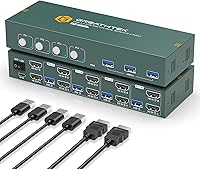
The EVATEK 4-Port Dual Monitor HDMI KVM Switch sits in the practical middle of the KVM market — capable enough for real multi-machine work, priced without the premium you would expect from enterprise-grade options. The core value is simple: one keyboard, one mouse, and two monitors shared across four computers, with you in control of who gets the display at any moment. No drivers required means setup is genuinely fast. Plug in your machines, connect your peripherals, press a button. It just works. That hands-off simplicity makes this KVM switch a natural fit for home office power users, small IT teams, and anyone managing multiple machines from a single desk.
Features & Benefits

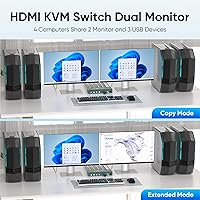
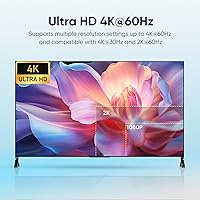
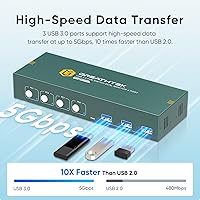
Both display outputs support full 4K at 60Hz, but only if your computers, HDMI cables, and monitors all actually support HDMI 2.0 — worth verifying before you buy. Assuming they do, the picture quality across both screens holds up well. The three USB 3.0 ports handle peripheral sharing at a genuinely fast clip, making it practical to share a printer or scanner between machines without network workarounds. The EVATEK dual-monitor switch offers extended and mirror modes: extended keeps each monitor independent per machine, while mirror duplicates the same image on both. Physically, it is a compact unit — easy to tuck out of sight behind a monitor stand.

Best For

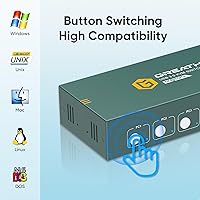
This four-port switcher makes the most sense for people who genuinely live at a multi-machine desk. Think the consultant who keeps a personal and work laptop side by side, or a small office where colleagues share a single printer without setting up a network print server. It is also a solid step up for anyone still on an older HDMI 1.4 KVM — the jump to true 4K at 60Hz is real and noticeable when you are staring at detailed design files or dense spreadsheets all day. One important caveat: if you expect keyboard shortcut switching, this is not the right fit. The EVATEK dual-monitor switch relies entirely on its front-panel buttons.

User Feedback

Buyers who do their homework on cable compatibility before ordering tend to have a positive experience. The most common praise is for stable 4K picture quality and how little time the initial setup takes — most people are up and running in minutes. The USB hub earns consistent appreciation from users sharing printers or external drives. Where satisfaction dips, it is usually one of two things: a brief signal flicker during the switch transition, or the realization that there is no hotkey support whatsoever. That second point has frustrated more than a few buyers who assumed button switching was the default, not the only option. EVATEK backs this KVM switch with a 24-month warranty, and reviewers who have contacted support generally report reasonable response times.

Pros

  • Plug-and-play setup requires no driver installation — most users are fully configured in under ten minutes.
  • Both monitor outputs support 4K at 60Hz, delivering genuinely sharp visuals when paired with compatible cables and hardware.
  • Three USB 3.0 ports let you share a printer, scanner, or flash drive across all four computers without a network workaround.
  • Extended and mirror display modes offer real flexibility depending on whether you want independent desktops or a duplicated view.
  • The compact chassis takes up minimal desk or shelf space despite handling four full computer connections simultaneously.
  • A 24-month warranty provides meaningful peace of mind for a mid-range peripheral that sits at the center of your whole workstation.
  • One-touch front-panel buttons make switching feel deliberate and reliable, with no software crashes or configuration drift to worry about.
  • HDCP 2.2 support means it handles protected content workflows without compatibility errors for most professional use cases.

Cons

  • No hotkey or keyboard shortcut switching — if you expected that feature, this four-port switcher will frustrate you immediately.
  • Some users report a brief flicker or black screen during the switching transition, which can be jarring mid-task.
  • 4K at 60Hz performance is entirely dependent on your cables and source hardware; the switch itself cannot compensate for HDMI 1.4 cables.
  • Only four computers are supported — larger multi-machine setups will need a different solution entirely.
  • No audio switching capability is included, so sound routing must be handled separately if you change machines frequently.
  • The manual-button-only design means physical access to the unit is always required, which is awkward if the switch is tucked away out of reach.
  • No USB-C input ports means laptop users with modern hardware will need adapters, adding another point of potential failure.
  • Early reviews suggest some inconsistency in build quality, with a small number of units showing connectivity issues out of the box.

Ratings

Our AI rating system analyzed verified global buyer reviews for the EVATEK 4-Port Dual Monitor HDMI KVM Switch, actively filtering out incentivized, bot-generated, and low-quality feedback to surface what real users actually experience day to day. Scores reflect both where this four-port switcher genuinely delivers and where it falls short, giving you an honest picture before you commit.

Ease of Setup
88%
Most buyers report being fully operational within minutes of unboxing — no drivers, no configuration utilities, no firmware to update. For home office users who just want to plug in and get back to work, that zero-friction start is a real advantage.
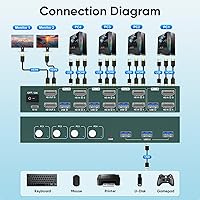
A small but consistent group of users ran into confusion around the two-HDMI-per-computer cabling requirement, which is not immediately obvious from the packaging. Those who skipped the diagram in the manual often had to backtrack and rewire from scratch.
4K Display Quality
79%
21%
When paired with proper HDMI 2.0 cables and compatible source hardware, the picture on both outputs is sharp and stable — graphic designers and developers working with dense text both comment on how clean the image looks at full resolution.
The catch is that cable compatibility is entirely the buyer's responsibility, and a meaningful share of users unknowingly plugged in HDMI 1.4 cables and blamed the switch for capped resolution. The unit itself cannot compensate for bottlenecks elsewhere in the chain.
Switching Reliability
74%
26%
For users who switch computers a handful of times per day, the two-to-four second transition is barely noticeable and the handoff itself is consistent — keyboard, mouse, and displays all transfer together without one lagging behind the other.
Some users report a brief black-screen flicker during the switch that their monitors handle poorly, occasionally requiring a manual input selection on the display itself. High-frequency switchers who move between machines dozens of times daily find the pause genuinely disruptive.
USB Hub Performance
84%
The three USB 3.0 ports are a practical highlight. Users sharing a laser printer or document scanner between two workstations consistently praise how reliably the peripherals transfer with each machine switch, eliminating the need for a separate print server.
Only the active computer controls the USB ports at any given moment, which catches some buyers off guard when they try to access a shared drive from a machine that is not currently selected. It works as designed, but the expectation mismatch is common.
Build Quality
71%
29%
The chassis feels appropriately solid for a mid-range unit — the front-panel buttons have a satisfying click and do not feel fragile under repeated daily use. The weight keeps it from sliding around a desk without needing adhesive feet.
A small number of early reviewers reported port wobble or loose HDMI connectors out of the box, suggesting some variance in manufacturing consistency. The plastic enclosure, while functional, does not inspire the same confidence as metal-clad competitors at higher price points.
Hotkey and Switching Options
38%
62%
For users who specifically want a pure hardware button switch and distrust software-dependent KVM solutions, the simplicity here is actually the point — nothing to break, nothing to configure, nothing that stops working after an OS update.
There is no hotkey support whatsoever, and this is the single most cited dealbreaker in negative reviews. Buyers who assumed keyboard shortcuts were standard on any modern KVM switch were caught off guard, and no firmware update or workaround exists to add that functionality.
Dual Monitor Flexibility
81%
19%
The ability to run both extended and mirror modes gives this four-port switcher useful range — extended mode suits developers running code on one screen and documentation on another, while mirror mode works well for small conference room setups.
Switching display modes requires navigating the physical controls, and some users found the mode-change process less intuitive than expected. There is also no independent control per monitor, so both screens always follow the same mode setting simultaneously.
Cable Compatibility
62%
38%
Once buyers use the right HDMI 2.0 cables throughout, the signal chain is stable and consistent. Users who did their homework on cable specs before ordering report no ongoing compatibility headaches after initial setup.
The EVATEK dual-monitor switch is highly sensitive to cable quality in a way that the product listing does not adequately warn about. Several reviewers went through multiple cable purchases before achieving the advertised resolution, which is a frustrating and avoidable experience.
Peripheral Sharing Range
83%
Keyboard, mouse, printers, scanners, cameras, and USB flash drives all share cleanly through the USB 3.0 ports. For small offices that previously had a dedicated printer per desk, consolidating to one shared device is a legitimate cost and space saver.
Audio devices are not covered by the sharing system — there is no audio switching built in, so users who need sound to follow the active computer must manage that separately through their monitors or an external audio switcher.
Value for Money
76%
24%
At its price point, this KVM switch delivers a feature set that would have cost significantly more just a few years ago. Four-computer support with dual 4K outputs and a USB hub is a compelling combination for buyers who need that specific configuration.
Buyers who end up needing to purchase new HDMI 2.0 cables for all ports effectively raise their total cost of ownership, which erodes the value proposition. Those comparing against single-monitor or two-computer KVM options may also find cheaper alternatives that fully cover their needs.
Compatibility Across OS
82%
18%
The plug-and-play design works consistently across Windows, macOS, and Linux without any special configuration. IT professionals managing mixed-OS environments particularly appreciate not needing to maintain separate driver packages for different machines.
A handful of macOS users noted that their system occasionally rearranges open application windows when the displays are handed off to another computer, which is an OS-level behavior but still a friction point that the KVM switch cannot address on its own.
Warranty and Support
77%
23%
A 24-month replacement warranty is above average for this product category, and buyers who contacted EVATEK support generally report receiving a response within a reasonable timeframe. Having a real technical team available for setup questions adds genuine reassurance.
The warranty covers quality defects but does not address buyer-error scenarios like cable incompatibility, which is where a disproportionate share of support requests originate. Response times during peak periods have drawn some criticism in more recent reviews.
Physical Footprint
86%
The compact size means it tucks neatly behind a monitor stand or along the back edge of a desk without demanding its own dedicated shelf space. Users in tight home office setups consistently mention the small chassis as a welcome surprise.
Precisely because it is small, users who mount it somewhere inconvenient and then need to press the front-panel buttons to switch computers find the placement quickly becomes an ergonomic issue. There is no remote or extension panel option to compensate.

Suitable for:

The EVATEK 4-Port Dual Monitor HDMI KVM Switch is a strong match for anyone managing two or more computers at a single dual-monitor desk who is tired of swapping cables or wrestling with two separate sets of peripherals. It particularly shines in home office scenarios where a personal laptop and a work machine share the same screen real estate, letting you flip between them with one button press and no software overhead. Small business environments will also find real value here, especially when a printer or scanner needs to be accessible from multiple computers without setting up a network share. IT professionals who maintain a test machine alongside their primary workstation will appreciate how quickly they can redirect keyboard and mouse focus. If your cables and source hardware genuinely support HDMI 2.0, the 4K picture quality on both outputs holds up well for tasks like photo editing, detailed spreadsheet work, or just enjoying sharp, clean text all day.
Not suitable for:

The EVATEK 4-Port Dual Monitor HDMI KVM Switch is a poor choice for anyone who expects to switch between computers using keyboard shortcuts or hotkey sequences — there is simply no such feature here, and that is a firm limitation, not a configuration issue. Power users who frequently switch machines many times per hour may also find the two-to-four second transition delay more disruptive than it sounds on paper, particularly in fast-paced production environments. If your monitors or computers are still running older HDMI 1.4 connections, you will not see the full 4K at 60Hz benefit and will need to audit your cables before assuming the resolution will be there. Gamers looking for zero-lag peripheral switching or ultra-fast display handoff will be disappointed, as this is fundamentally a productivity-oriented, hardware-button switcher. Anyone needing USB-C connectivity from their laptops will need adapters, which adds friction and potential compatibility headaches to what should otherwise be a clean setup.
Specifications

  • Video Standard: Both monitor outputs use HDMI 2.0, supporting the full bandwidth needed for high-resolution, high-refresh-rate display connections.
  • Max Resolution: Each output can drive a display at up to 3840x2160 at 60Hz, provided the connected computer and monitor both support HDMI 2.0.
  • Computer Inputs: The switch accepts connections from up to four separate computers, each requiring two HDMI cables and one USB connection.
  • Monitor Outputs: Two HDMI 2.0 output ports allow a dual-monitor configuration to be shared across all connected computers.
  • Display Modes: Users can select between extended mode, where each monitor acts independently per machine, and copy mode, which mirrors the same image across both displays.
  • USB Ports: Three USB 3.0 Type-A ports are available for shared peripheral connections, supporting data transfer at up to 5Gbps.
  • Switching Method: Computer selection is handled exclusively via front-panel push buttons, with no hotkey or software-based switching supported.
  • Switch Speed: After pressing the selection button, the display and peripherals transfer to the target computer in approximately 2 to 4 seconds.
  • HDCP Support: The switch is compliant with HDCP 2.2, making it compatible with protected content workflows that require authenticated display paths.
  • Data Bandwidth: The HDMI 2.0 implementation supports a maximum data rate of 18Gbps, sufficient for 4K at 60Hz with HDR signaling.
  • Driver Requirement: No software installation or driver configuration is needed; the switch operates as a plug-and-play device on all major operating systems.
  • Compatible Peripherals: In addition to keyboard and mouse, the USB 3.0 ports support shared printers, scanners, cameras, and USB flash drives.
  • Dimensions: The unit measures 2.95 x 5.12 x 1.38 inches, making it compact enough to sit behind a monitor base or mount out of sight.
  • Weight: At 2.18 pounds, the switch is light enough to reposition easily but substantial enough to stay put on a desk surface.
  • Power Requirements: The switch operates at 5 volts and draws up to 2 amps, typically powered via the included USB connection from a host computer.
  • Warranty: EVATEK provides a 24-month replacement warranty covering quality-related defects, with a dedicated technical support team available for assistance.
  • Brand: This switch is manufactured by EVATEK, a brand focused on KVM and display switching solutions for professional and home office environments.

Related Reviews

TRENDnet TK-440DP 4-Port Dual Monitor DisplayPort KVM Switch
85%
92%
Video Quality
85%
Ease of Use
90%
Compatibility
88%
Build Quality
87%
USB Hub Functionality
More
TESmart HKS403-P23 4-Port Triple Monitor KVM Switch
69%
78%
Display Performance
72%
EDID Emulation Reliability
74%
Switching Speed & Reliability
58%
USB Hub Performance
69%
Network Sharing
More
Scyniney 4-Port Triple-Monitor HDMI KVM Switch
74%
83%
Video Signal Stability
79%
4K Resolution Performance
74%
USB Hub Performance
81%
Switching Reliability
41%
Hotkey Switching Support
More
DGODRT KS604H 4-Port HDMI KVM Switch
80%
91%
Ease of Setup
74%
Switching Reliability
78%
Video Quality
79%
USB Peripheral Sharing
84%
Wired Remote Control
More
StarTech SV431HDU3A2 4-Port HDMI KVM Switch
73%
74%
Switching Reliability
69%
Video Quality
66%
USB 3.0 Hub Performance
71%
Audio Switching
83%
Setup & Installation
More
ANXQQ ANQ-8401B 4-Port HDMI KVM Switch
77%
91%
Ease of Setup
88%
Display Switching Reliability
86%
EDID Performance
67%
USB Device Recognition
61%
8K Resolution Capability
More
JideTech 64H2UA 4-Port HDMI KVM Switch
73%
84%
Video Output Quality
79%
EDID Emulation Reliability
81%
Switching Methods & Flexibility
62%
USB Hub Performance
77%
Audio Switching
More
GREATHTEK 4-Port HDMI KVM Switch
66%
89%
Video Signal Quality
74%
Switching Performance
83%
USB Peripheral Sharing
92%
Setup Experience
71%
Build Quality
More
NAWEN 4-Port HDMI KVM Switch
73%
93%
Ease of Setup
88%
Display Performance
84%
Switching Reliability
41%
Hotkey & Control Options
86%
USB 3.0 Performance
More
Steetek STK-S7415H 4-Port HDMI KVM Switch
74%
91%
Ease of Setup
83%
Switching Reliability
78%
Video Quality & Resolution
76%
Adaptive EDID Performance
69%
USB Peripheral Sharing
More

FAQ

No, nothing to install. The EVATEK 4-Port Dual Monitor HDMI KVM Switch is fully plug-and-play. Connect your computers and peripherals, power it up, and it is ready to use. Windows, macOS, and Linux all recognize it without any driver setup.
You always have to press the physical button on the front panel — there is no hotkey switching on this unit. If that is a feature you rely on, this particular switch will not meet your needs, and you should look at models that explicitly advertise hotkey support.

You can get true 4K at 60Hz, but only if every link in the chain supports it. That means your computers need to output 4K over HDMI 2.0, your monitors need to accept it, and your HDMI cables need to be rated for HDMI 2.0 as well. If any of those elements is HDMI 1.4, your resolution will be capped lower. Check your cables before assuming the switch is the problem.

Typically two to four seconds. During that window you will see the monitors go dark briefly before the new computer takes over. For most productivity tasks this is completely fine, but if you are switching dozens of times per hour it can feel like a small interruption to your flow.

Yes, that is one of the more useful things this four-port switcher does. Plug your printer into one of the USB 3.0 ports and whichever computer is currently active will have access to it. Just keep in mind that only one computer controls the USB ports at a time, so you need to switch to the correct computer before printing.

Yes, both modes are available. In extended mode each monitor acts as an independent display for the active computer, giving you a proper dual-screen workspace. Mirror mode duplicates the same image on both screens, which is handy for presentations or demos.

A brief flicker during the transition is normal behavior for KVM switches — the display signal is being re-established to a new source, and most monitors will show a black screen or a quick flash during that handoff. Persistent flickering or instability during normal use, however, is not expected and could point to a cable quality issue or a unit defect worth contacting support about.

Some computers will detect that the displays have gone away and may rearrange open windows onto a virtual screen. This is a known behavior with KVM switches rather than a flaw specific to this unit. Some users work around it by keeping the computers aware of the monitors through display emulation adapters, though those are sold separately.

It works with laptops as long as the laptop has standard HDMI output ports and can drive two external monitors simultaneously — that second condition is important and worth checking in your laptop specs. Laptops with only USB-C or Thunderbolt outputs will need a certified HDMI 2.0 adapter, and not all adapters reliably pass 4K at 60Hz.

EVATEK covers quality-related defects with a 24-month replacement warranty, which is solid for this category. Based on buyer feedback, their support team is generally reachable and responsive for troubleshooting help. If you run into issues during setup, contacting them directly is often the fastest path to a resolution rather than trying to diagnose independently.