Overview

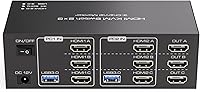
The TJCXELE 3-Monitor Dual-Computer HDMI KVM Switch is a mid-range solution for anyone tired of crawling under their desk to swap cables between two workstations. The core pitch is straightforward: one compact box lets two computers share three monitors and four USB peripherals simultaneously. The brand is relatively new — this dual-workstation switch launched in July 2025 and already sits at #108 in its category, which is encouraging but worth keeping in perspective. A notable detail is the included 12V DC adapter, which powers high-draw USB devices like external hard drives more reliably than bus power alone. Be aware upfront though: hotkey switching is not supported, and each connected computer requires three separate HDMI cables plugged in.
Features & Benefits

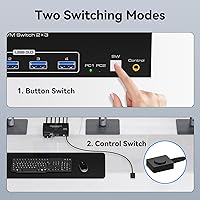
The headline feature here is triple 4K@60Hz output across all three monitors — a real advantage for video editors scrubbing through timelines, stock traders monitoring live data, or developers juggling multiple environments at once. Whether that resolution actually lands depends entirely on your GPU, source cables, and display inputs all supporting 4K@60Hz; the switch handles the routing, but it cannot compensate for bottlenecks elsewhere. For USB, the four USB 3.0 ports push data at up to 5Gbps, which is fast enough for shared external storage or a high-res webcam. Switching between computers can be done via the front panel button or the included wired controller — a small but practical inclusion for setups where the unit is tucked away. OS compatibility covers Windows, Mac, Linux, and Unix, so mixed-OS desks are fully supported.

Best For

This triple-monitor KVM switch is a solid pick for home office users running two machines — say, a work-issued laptop and a personal desktop — who want a clean desk without a cable jungle. Developers and designers who regularly switch between a Windows PC and a Mac will also find it practical, especially with three screens in play. Content creators needing 4K fidelity across all displays and fast USB access for drives will appreciate the hardware spec. The critical caveat: if you were hoping to toggle between computers via keyboard shortcut, this is not the right tool. Physical button switching only — that is a genuine workflow consideration. For buyers priced out of premium KVM brands but needing triple-monitor support, this dual-workstation switch represents a reasonable value proposition.

User Feedback

Early buyers are generally positive about setup, though the requirement to run three HDMI cables per computer catches some people off guard — the product listing does state this, but it is easy to miss. Those who read carefully and wire things correctly tend to report smooth display switching with no major lag. A handful of users mention a brief re-detection pause when monitors wake up after a switch, which is fairly typical for HDMI KVMs at this price. The wired external controller gets mostly positive mentions as a convenient desk-placement option rather than a workaround. 4K@60Hz performance appears to hold up in practice when proper cables and capable GPUs are involved. Given the brand is new, the review pool is still small — a worthwhile consideration before buying.

Pros

  • Supports three monitors at up to 4K@60Hz across both connected computers — a rare spec at this price point.
  • Four USB 3.0 ports with 5Gbps data speeds make sharing external drives, webcams, and printers genuinely practical.
  • The included wired external controller lets you place the switch out of sight while still toggling from your desktop.
  • A dedicated 12V DC power adapter improves stability for high-draw USB devices that bus power cannot reliably handle.
  • Works across Windows, Mac, Linux, and Unix — useful for mixed-OS home offices without extra configuration.
  • Older USB 2.0 and 1.1 peripherals connect without any compatibility issues, so existing gear does not need replacing.
  • Compact and lightweight at under 1.4 pounds, making it easy to position on or behind a desk.
  • Extended and Duplicate display modes work via standard OS shortcuts, requiring no proprietary software.

Cons

  • No hotkey switching at all — every computer toggle requires a physical button press, which disrupts fast-paced workflows.
  • Each computer must connect via three separate HDMI cables, meaning six cables total just for video alone.
  • A brief monitor re-detection delay when switching between computers is common and can interrupt focus.
  • HDMI-only outputs make this a poor fit for desks using DisplayPort or DVI monitors without adapters.
  • The brand launched in mid-2025 with a limited public review pool, so long-term reliability is still an open question.
  • 4K@60Hz performance depends entirely on the GPU, cables, and monitors — the switch cannot compensate for weaker hardware.
  • No KVM-level keyboard-and-mouse-only mode; you cannot switch USB control independently from video.
  • Computers without three native HDMI outputs will require adapters, adding cost and potential compatibility headaches.

Ratings

The scores below for the TJCXELE 3-Monitor Dual-Computer HDMI KVM Switch were generated by our AI after analyzing verified buyer reviews from multiple global markets, with spam, bot-submitted, and incentivized feedback actively filtered out. We looked at what real dual-workstation users experienced day-to-day — from first-time setup through months of regular use — and the ratings reflect both where this switch genuinely delivers and where it falls short.
Video Output Quality
83%
Users running content creation or financial trading setups consistently confirm that 4K output across all three screens looks clean and stable once everything is wired correctly. Colors and refresh rates hold up well during normal desktop use and video playback.
Reaching the full 4K@60Hz spec requires the right cables and a capable GPU on both connected computers, which not every buyer has. Users with older graphics cards or mixed cable qualities often end up at 4K@30Hz without fully understanding why.
Setup Experience
67%
33%
Buyers who read the instructions thoroughly and prepared six HDMI cables in advance generally found the physical setup logical and straightforward. The labeled ports and clear LED indicators helped confirm connections were correct without guesswork.
The six-HDMI-cable requirement trips up a meaningful number of buyers who did not realize each computer needs three separate connections. Several users reported a frustrating first hour of troubleshooting before understanding the full wiring scheme.
Switching Reliability
78%
22%
For most users toggling between a work PC and a personal machine a handful of times per day, the switch performs consistently without dropped signals or frozen USB states. The front panel button responds immediately and the active indicator light is a genuinely useful visual cue.
A recurring observation is a noticeable monitor re-detection delay of several seconds after each toggle, during which all three screens go dark before coming back. This is typical for HDMI KVM switches, but buyers expecting instant switching are sometimes caught off guard.
USB Performance
81%
19%
The USB 3.0 ports deliver real-world throughput that satisfies most shared peripheral needs, from webcams and keyboards to external SSDs during file transfers. The included power adapter meaningfully improves stability for high-draw devices like mechanical hard drives.
A small number of users reported intermittent recognition issues with certain USB hubs or older wireless receiver dongles plugged into the switch. The four-port limit can also feel tight for users who want to share more than a keyboard, mouse, webcam, and one storage device simultaneously.
Hotkey & Switching Convenience
41%
59%
The wired external controller is a practical inclusion that lets users place the switch out of sight behind a monitor or under a desk while still toggling from the desktop surface. For users who switch computers only a few times a day, this physical approach works fine.
The complete absence of hotkey switching is a genuine workflow disruption for users who expected keyboard-shortcut toggling — a standard feature on many competing KVM switches. Users who switch computers frequently throughout the day find the mandatory button press annoying enough to reconsider the purchase.
Build Quality
72%
28%
The chassis feels solid enough for a desk or shelf installation, and the port connections hold HDMI and USB cables securely without wobbling. Most buyers describe the physical construction as acceptable for the price tier.
The plastic housing does not feel particularly premium, and the wired external controller has a noticeably basic, lightweight build. For users used to handling enterprise-grade KVM equipment, the material quality reads as entry-level.
4K@60Hz Compatibility
69%
31%
When all conditions are met — HDMI 2.0 cables, a GPU with three HDMI 2.0 outputs, and monitors that support 4K@60Hz natively — the switch delivers on its spec without noticeable signal degradation. Buyers in this situation are consistently satisfied.
The switch cannot compensate for any weak link in the chain, and the listing does not make the cable and GPU requirements prominent enough. A portion of buyers discover after purchase that their existing setup does not actually support the advertised maximum resolution.
OS Compatibility
88%
Mixed Windows and Mac setups work without any driver installation, which is genuinely appreciated by developers and designers who split time between the two ecosystems. Linux users have also reported plug-and-play behavior without configuration issues.
A small subset of Mac users noted that display re-detection after switching takes slightly longer than on Windows machines, likely due to how macOS handles monitor handshake protocols. This is not a switch defect, but it is worth flagging for Mac-heavy workflows.
Value for Money
76%
24%
For users specifically needing a KVM switch for 3 monitors and 2 computers, this dual-workstation switch undercuts most established competitors at this feature level by a noticeable margin. Buyers who need triple-monitor KVM capability on a tighter budget see clear value here.
The missing hotkey feature and the setup complexity reduce the perceived value for buyers who expected a more polished out-of-box experience. A few reviewers noted they would have paid more for a version that included hotkey switching.
Cable Management Impact
58%
42%
Once fully installed, the TJCXELE KVM does eliminate the daily routine of swapping cables between computers, which is the core promise and it holds up. Users with permanently wired desks report a noticeably cleaner setup after initial installation.
Getting to that clean state requires routing six HDMI cables plus two USB cables plus the power adapter, which creates a significant cable bundle behind the desk during installation. Users with minimal cable management experience find the initial wiring intimidating.
Power Stability
82%
18%
The dedicated 12V DC power adapter is a meaningful advantage over bus-powered alternatives, providing consistent power to demanding USB devices like 2.5-inch external hard drives that would otherwise suffer from disconnects. Most users running hard drives through the switch report stable, uninterrupted performance.
A handful of users noted occasional USB device drops under heavy simultaneous load — for example, a hard drive transferring data at the same time as a high-resolution webcam streaming. These appear to be edge cases but are worth noting for the most demanding use scenarios.
Brand Trust & Support
53%
47%
TJCXELE advertises an accessible technical support team, and a few early buyers confirmed receiving helpful responses when they ran into setup questions. The product reaching #108 in its category shortly after launch suggests reasonable initial market acceptance.
As a brand with minimal public track record as of mid-2025, there is simply not enough long-term data to evaluate reliability over time or the consistency of after-sales support. Buyers who prioritize established brand warranties and proven longevity will have legitimate reasons to hesitate.
Display Mode Flexibility
71%
29%
Extended and Duplicate modes both work as expected, and because they are managed at the OS level rather than through proprietary switch software, the behavior is predictable and familiar to any user who has managed multiple monitors before.
The switch itself has no display configuration controls — mode selection is entirely dependent on the OS and GPU, which means users cannot pre-set or save display configurations per computer. Switching from a three-screen extended setup to a duplicated layout still requires manual OS interaction each time.

Suitable for:

The TJCXELE 3-Monitor Dual-Computer HDMI KVM Switch was built for a fairly specific but common situation: you have two computers on the same desk and you want all three monitors, your keyboard, mouse, and other USB devices to work with both without touching a single cable. That describes a lot of home office professionals who juggle a personal machine and a work-issued computer daily. Software developers and designers who run Windows and Mac side by side on a triple-monitor setup will find this dual-workstation switch particularly practical, since it handles mixed-OS environments without any driver installation. Content creators and video editors who need genuine 4K output across all three screens — and fast USB access for external drives — will also get real mileage here, provided their GPUs and cables are up to spec. The included 12V DC power adapter is a thoughtful touch that makes sharing high-draw USB devices like desktop hard drives far more stable than bus-powered alternatives.
Not suitable for:

If you rely on keyboard shortcuts to flip between computers throughout the day, the TJCXELE 3-Monitor Dual-Computer HDMI KVM Switch is simply not the right tool — hotkey switching is not supported, and every toggle requires a physical button press or reaching for the wired controller. That workflow friction can add up quickly for users who switch machines dozens of times a day. This dual-workstation switch also demands that each connected computer uses three separate HDMI cables, which means six HDMI connections total; if your computers lack three HDMI outputs each, you will need adapters or a different product entirely. Users hoping to connect DisplayPort or DVI monitors directly are also out of luck, as all outputs are HDMI only. Finally, as a brand with limited public review history as of mid-2025, buyers who prioritize long-term vendor support and established reliability track records may prefer waiting for the TJCXELE KVM to accumulate more real-world feedback before committing.
Specifications

  • Compatible Computers: This dual-workstation switch supports exactly 2 computers connected simultaneously via HDMI and USB.
  • Monitor Outputs: Three HDMI output ports allow all three connected monitors to display video from the active computer at once.
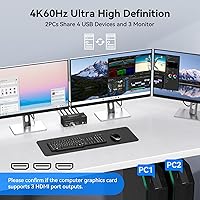
  • Max Resolution: Each HDMI output supports up to 4K at 60Hz, with backward compatibility down to 4K@30Hz, 1080p, and lower resolutions.
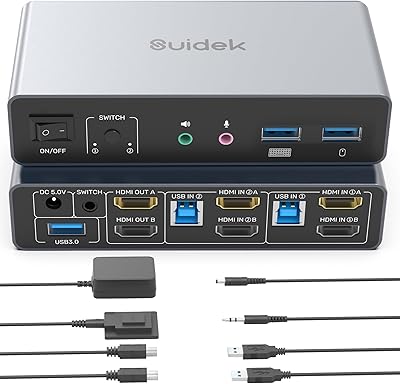
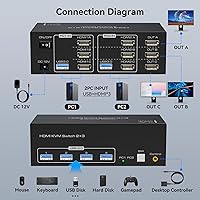
  • HDMI Input Requirement: Each connected computer requires 3 dedicated HDMI cables plugged into the switch, totaling 6 HDMI input connections across both machines.
  • USB Ports: Four USB 3.0 Type-A ports are available for sharing peripherals such as keyboards, mice, printers, webcams, and external drives.
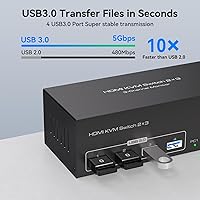
  • USB Transfer Speed: USB 3.0 ports deliver data transfer rates of up to 5Gbps, which is approximately 10 times faster than USB 2.0.
  • USB Compatibility: All four USB ports are backward compatible with USB 2.0 and USB 1.1 devices without requiring adapters or additional configuration.
  • Switching Methods: The active computer can be toggled using either the physical button on the front panel or the included wired external controller.
  • Hotkey Switching: Keyboard shortcut (hotkey) switching is not supported; a physical button press is always required to change the active computer.
  • Display Modes: Extended and Duplicate display modes are supported and are managed at the operating system level using the standard Windows+P shortcut or equivalent OS controls.
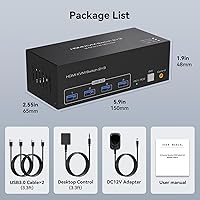
  • Power Supply: A 12V DC power adapter is included in the box to provide stable power for high-draw USB devices such as external hard drives.
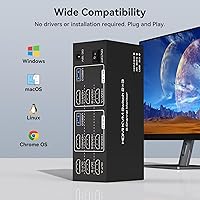
  • OS Support: The switch is compatible with Windows (including Vista and XP), Mac OS, Linux, and Unix operating systems.
  • Dimensions: The unit measures 7.87 x 5.71 x 2.56 inches, making it compact enough to sit on or mount near a desk without occupying significant space.
  • Weight: The switch weighs 1.39 pounds, light enough to reposition or mount without specialized hardware.
  • Brand: Manufactured by TJCXELE, a brand that entered the KVM switch market in mid-2025 with this triple-monitor model.
  • Connector Type: All video connections on this switch use the standard HDMI connector format; DisplayPort, DVI, and VGA are not natively supported.
  • Input Per Computer: Each computer connects to the switch via 3 HDMI cables for video and 1 USB cable for peripheral sharing.
  • Indicator Lights: LED indicator lights on the front panel show which computer is currently active, eliminating guesswork when switching.

Related Reviews
TJCXELE 4K 144Hz HDMI + DisplayPort KVM Switch for 4 Computers, 3 Monitors
83%
88%
Performance
70%
Ease of Setup
91%
Switching Flexibility
89%
USB Port Functionality
85%
Display Quality
More
Camgeet KVM Switch 3 Monitors 3 Computers HDMI+2 DisplayPort
88%
95%
Display Resolution Support
93%
Multi-Computer Switching
89%
USB Connectivity
82%
Setup and Installation
91%
Compatibility Across OS
More
AILVLVNG SW330 Dual Monitor KVM Switch

75%
86%
Video Signal Quality
83%
EDID Emulation
79%
Setup & Installation
71%
USB Peripheral Sharing
84%
Switching Speed
More
KCEVE KC-303X Triple Monitor KVM Switch
78%
88%
Setup & Installation
83%
Video Signal Quality
79%
Switching Speed & Reliability
71%
Remote Controller
81%
USB Peripheral Performance
More
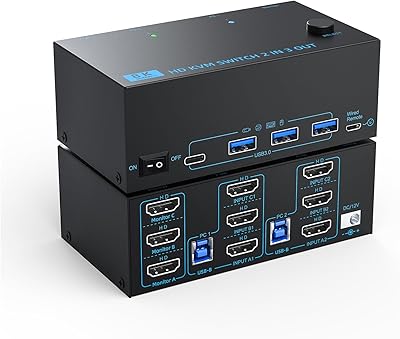
TESmart HKS402-P23 Dual Monitor KVM Switch
74%
72%
Display Signal Stability
88%
EDID Emulation Effectiveness
83%
USB 3.0 Hub Performance
69%
Switching Reliability
74%
Audio and Microphone Passthrough
More
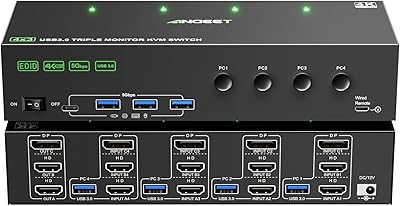
ANGEET Triple Monitor 4-Computer KVM Switch
81%
78%
EDID Performance
86%
Display Quality
91%
Setup Experience
83%
Switching Speed
81%
USB Hub Utility
More
SUIDEK SJW-KM202B Dual Monitor KVM Switch
73%
83%
Ease of Setup
71%
Switching Reliability
79%
Display Quality
91%
Desktop Controller Usability
77%
USB Peripheral Sharing
More
NAWEN 4-Port HDMI KVM Switch
73%
93%
Ease of Setup
88%
Display Performance
84%
Switching Reliability
41%
Hotkey & Control Options
86%
USB 3.0 Performance
More
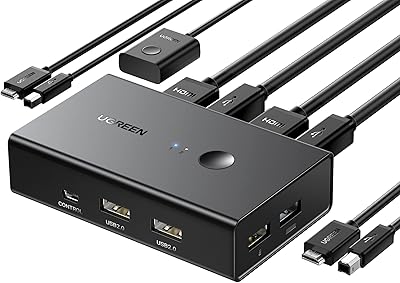
UGREEN 2-Computer HDMI KVM Switch
72%
84%
Ease of Setup
78%
Video Quality
71%
Switching Reliability
88%
Desktop Controller
69%
USB Peripheral Sharing
More
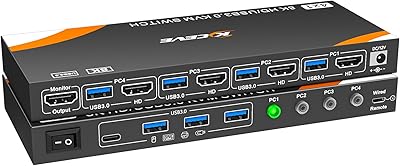
DXchip KVM8203 Triple Monitor HDMI KVM Switch
79%
83%
Video Signal Quality
71%
Switching Speed
74%
USB Peripheral Reliability
88%
Build Quality
86%
Cable & Accessory Inclusion
More

FAQ

That is correct — each of the two computers must connect to the switch using 3 separate HDMI cables, one per monitor. So yes, you will have 6 HDMI cables running into the back of the unit. It sounds like a lot, but that is the nature of triple-monitor KVM switching over HDMI; there is no compression or multiplexing happening, just direct cable routing.

No, hotkey switching is not supported on this dual-workstation switch. You have to either press the button on the front of the unit or use the included wired external controller. If keyboard-shortcut toggling is a must for your workflow, you will want to look at a different product before buying.

The switch itself supports 4K@60Hz per output, but whether you actually see that resolution depends on your GPU, the HDMI cables you use, and your monitors. All three parts of that chain need to support 4K@60Hz. If any one of them tops out at 4K@30Hz, that is what you will get. Using high-quality HDMI 2.0 cables and confirming your graphics card has three HDMI 2.0 outputs is worth doing before setup.

Yes, it does. The switch itself is OS-agnostic — it just routes video and USB signals. Mixed setups with one Windows machine and one Mac are fully supported, and both will share the same monitors and USB peripherals without any driver installation.

Technically yes, you can leave one or two monitor outputs unused, but each computer still needs to be connected with its full set of HDMI cables for the switch to function correctly. You cannot, for example, use this as a 2-monitor KVM and ignore the third port entirely without potentially affecting display detection.

User feedback on this is mixed but generally positive. Most buyers appreciate having it because it means you can tuck the main unit somewhere out of sight and still switch computers from your desk. Build quality is basic — it is a simple push-button on a cable — but it gets the job done. Do not expect it to feel like a premium accessory.

Yes. The four USB 3.0 ports run at up to 5Gbps, which is fast enough for meaningful external drive performance. The included 12V power adapter is specifically there to support high-draw USB devices like hard drives, which often cannot get reliable power from a computer's USB bus alone. That is a thoughtful inclusion at this price point.

There is a brief re-detection period after you toggle, which is normal for HDMI KVM switches. Most users report it takes a few seconds for all three monitors to wake up and display the newly active computer. It is not instant like a mechanical switch, but it is generally not long enough to be a serious frustration.

Each connected computer needs to provide three HDMI signals to the switch. If your computer has a mix of DisplayPort and HDMI outputs, you can use active DisplayPort-to-HDMI adapters to make up the difference, but the manufacturer notes that passive HDMI-to-DVI or HDMI-to-VGA cables are not recommended. Active adapters that output a true HDMI signal should work fine.

Extended and Duplicate modes are both handled at the operating system level, not by the switch itself. The switch just passes the three video signals through to your monitors. You select the display mode using Windows+P (or the equivalent on Mac and Linux) the same way you would without a KVM. The switch has no settings or menu of its own for display layout.