Overview

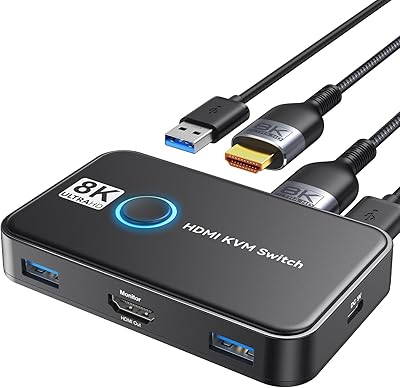
The KCEVE 2-Monitor 4-Computer KVM Switch sits in a practical sweet spot for anyone who needs to control multiple workstations without the chaos of duplicate peripherals cluttering their desk. If you have never used a KVM switch before, the concept is straightforward: one keyboard, one mouse, and two monitors shared across up to four computers, switched with a button press. This dual-monitor switcher pairs a compact chassis with a wired remote control, letting you stash the unit under the desk entirely. No drivers, no software configuration — just plug in and you are running.
Features & Benefits

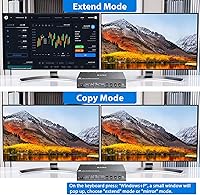
The KCEVE switcher offers two display modes worth understanding. In copy mode, your second screen mirrors the primary — useful for presentations or side-by-side demos. In extend mode, windows can be dragged across both displays as with any standard dual-monitor setup. The mixed output design — one HDMI port, one DisplayPort — covers most monitor combinations without adapters. Four USB 3.0 ports handle keyboard, mouse, and additional peripherals with solid transfer speeds. Resolution support reaches 4K at 144Hz for high-refresh work or gaming, and up to 8K at 30Hz — though hitting 8K demands compatible monitors, a capable GPU, and certified 8K cables throughout the chain.

Best For

This KVM switch earns its place on desks where two or more computers are a daily reality. Developers running a Windows and Mac combination will appreciate having one clean workspace without spinning their chair to face a different screen. Home office users balancing a work laptop against a personal machine get genuine value here. It also suits small studios or lab environments where up to four systems share the same display and peripheral stack. The mixed HDMI and DisplayPort output is a quiet but meaningful advantage for anyone whose monitors do not share the same connector type — no awkward adapters, no signal headaches.

User Feedback

Buyers generally respond well to the easy initial setup — most report being up and running within minutes, which is exactly what you want from a plug-and-play peripheral. The wired remote controller earns consistent praise for its size and tactile feel, making under-desk placement genuinely practical rather than a compromise. On the critical side, a handful of users note that achieving the advertised 8K resolution requires very specific hardware alignment, and some find the included cables fall short of those specs. A few also mention that switching speed carries a brief lag — not disqualifying, but noticeable. Build quality is broadly described as solid for the price tier.

Pros

  • No drivers or software needed — plug in the cables and it works immediately.
  • The wired remote makes under-desk placement practical, keeping the desktop surface clean.
  • Supports both copy and extend display modes, covering the two most common dual-monitor configurations.
  • Four USB 3.0 ports handle a full peripheral stack without requiring a separate hub.
  • The mixed HDMI and DisplayPort output is a genuine advantage for users with mismatched monitor inputs.
  • Stable day-to-day switching is consistently reported across coding, design, and general office work.
  • Works across Windows and macOS simultaneously with no compatibility issues or driver conflicts.
  • The remote controller has a solid tactile feel and a cable length suited for standard desk setups.
  • Compact body allows flexible placement without dominating the desk or cable management channels.
  • Ranked among the top KVM switches in its category, reflecting broad buyer satisfaction at this price tier.

Cons

  • The 8K resolution claim requires an entirely separate investment in compatible cables, GPU, and monitors.
  • A noticeable switching lag of roughly half a second frustrates users who switch computers frequently throughout the day.
  • The one-year warranty is shorter than what competitors offer on similarly priced hardware.
  • Some exotic or programmable USB peripherals experience re-enumeration delays after each computer switch.
  • The remote cable length limits placement options for standing desk setups or deeper workstation configurations.
  • DisplayPort output occasionally requires cable reseating or a system reboot to register correctly on first connection.
  • Linux users may need to manually adjust display resolution settings after switching due to inconsistent EDID passthrough.
  • The included cables in some kits fall short of the bandwidth needed for 4K at 144Hz, requiring aftermarket replacements.
  • The physical chassis button feels less responsive than the wired remote, creating an inconsistent interaction experience.

Ratings

The KCEVE 2-Monitor 4-Computer KVM Switch has been evaluated using AI-driven analysis of verified global buyer reviews, with spam, bot-generated, and incentivized feedback actively filtered out before scoring. The ratings below reflect an honest synthesis of real-world experiences — from home office setups to small studio environments — capturing both what this dual-monitor switcher does well and where it leaves some users wanting more.
Ease of Setup
91%
Most buyers report being fully operational within minutes of unboxing, with no driver installation or software configuration required. For users who are not particularly technical, that plug-and-play experience removes a significant barrier and is consistently cited as a first-impression win.
A small number of users found that getting the DisplayPort output to register correctly required reseating cables or rebooting connected machines. It is rare, but worth noting for anyone planning a quick same-day deployment.
Switching Reliability
83%
Day-to-day switching between computers is described as stable and consistent by the majority of buyers. Users running development environments or design workflows say the switcher holds signal without flickering during normal use, which is the baseline expectation for any KVM in this class.
A recurring pattern in critical reviews points to a brief but noticeable lag between pressing the switch button and the displays registering the new source. For fast-paced workflows, this half-second to one-second delay can become a minor but persistent irritant.
Dual-Monitor Configuration
86%
The combination of one HDMI and one DisplayPort output is genuinely practical for users with mixed monitor setups, eliminating the need for adapters. Both copy mode and extend mode work as advertised, and buyers running extended desktop configurations for coding or video editing report no major complaints.
Some users note that switching display modes requires physical interaction with the device rather than a software toggle, which can be inconvenient when the unit is stashed under a desk. The extend mode behavior also varies slightly depending on connected GPU and driver versions.
USB 3.0 Performance
82%
18%
Four USB 3.0 ports handle the typical peripheral stack — keyboard, mouse, and an external drive — without throttling. Users sharing USB printers or scanners across multiple workstations highlight the stable handoff between computers as a practical daily benefit.
A few buyers experienced occasional USB device re-enumeration delays when switching computers, where devices took a couple of seconds to become active again. This is a known characteristic of hardware KVM switches generally, but it caught some first-time KVM buyers off guard.
Wired Remote Control
88%
The upgraded wired remote controller is one of the most consistently praised aspects across buyer reviews. Its larger footprint and improved tactile feel make it satisfying to press, and the cable length is sufficient for placement on a desk surface while the main unit sits out of sight below.
The remote cable is not particularly long, which limits placement flexibility for larger desk setups or standing desk configurations where the main unit might sit at floor level. A wireless option would suit this use case better, though none is offered.
Resolution & Display Quality
74%
26%
At 4K and 144Hz via DisplayPort, the switcher performs well for users with high-refresh monitors used in design or gaming contexts. Several buyers running 4K workstation displays confirm clean, sharp output with no degradation in signal quality compared to a direct connection.
The 8K capability is heavily qualified in practice — it demands 8K-rated cables, a compatible GPU, and a monitor that supports the spec, none of which are included. Buyers who expected out-of-box 8K performance were disappointed, and the marketing language around this feature generates a disproportionate share of negative reviews.
Build Quality
77%
23%
The chassis feels solid enough for a device that will sit in a fixed location and rarely be moved. The connectors seat firmly, and the unit does not shift around during cable insertion, which matters when you have six or more cables plugged in simultaneously.
Some buyers describe the overall construction as adequate rather than premium, with a plastic shell that feels lighter than expected given the price point. The main switch button on the unit itself has a less satisfying click than the wired remote, which creates a slight inconsistency in perceived quality.
Cable & Connector Compatibility
68%
32%
The switcher works with standard HDMI and DisplayPort cables that most users already own, which reduces immediate out-of-pocket cost. For everyday 1080p or 1440p use cases, compatibility issues are uncommon and the included setup is sufficient.
Higher-resolution use cases expose a real weakness — the cables bundled in some kits do not always meet the bandwidth requirements for 4K at 144Hz or anything approaching 8K. Buyers who do not purchase separately rated cables report resolution caps or display handshake failures that are frustrating to diagnose.
Peripheral Sharing Accuracy
79%
21%
Keyboard and mouse switching is clean for most users, with inputs becoming immediately responsive on the newly selected computer. Buyers using mechanical keyboards and precision mice for design work report no input lag or key drop events under normal switching conditions.
A small subset of users with more exotic USB peripherals — certain programmable keyboards or gaming mice with onboard memory — report occasional initialization issues after switching. Standard HID-compliant devices are largely unaffected, but power users with specialized setups should test before committing.
Desk Organization & Form Factor
85%
The compact body and under-desk placement capability genuinely contribute to a cleaner workspace, which is a real priority for multi-computer users who already have significant cable runs. The form factor does not dominate the desk the way older rack-style KVM units once did.
Managing the cable bundle that inevitably connects four computers and two monitors to one device is a challenge regardless of how small the unit is. Users with tight desk configurations or cable management channels report that the physical cable load can undermine the tidy-desk benefit.
Value for Money
81%
19%
For a four-port, dual-monitor KVM with USB 3.0 and mixed HDMI plus DisplayPort support, the asking price sits at a reasonable point relative to comparable options in the category. Buyers replacing a two-KVM workaround or a manual cable-swapping routine see immediate tangible value.
The 8K marketing creates a perception gap — buyers who pay the mid-range price partly for that capability feel the spec is aspirational rather than functional without additional investment in cables and hardware. Stripping away that expectation reveals solid value, but it requires recalibrating expectations.
Multi-OS Compatibility
83%
Users running Windows and macOS simultaneously across two or more connected computers report no compatibility issues with switching or peripheral recognition. The driverless design means there is no software conflict between operating systems to manage.
A handful of Linux users note that certain display configurations require manual resolution adjustments after switching, since the KVM does not always pass through EDID data consistently across all OS and driver combinations. It is a niche concern but one that affects a real segment of the target audience.
Warranty & Support
72%
28%
The one-year manufacturer warranty provides a reasonable baseline assurance for a mid-range hardware purchase. Several buyers who contacted KCEVE support describe response times as acceptable and the team as willing to troubleshoot before requesting a return.
One year is on the shorter end for a device expected to sit in a fixed setup indefinitely, and some buyers note that post-warranty support is uncertain. For users building a long-term workstation environment, the limited coverage period is a mild but legitimate concern.

Suitable for:

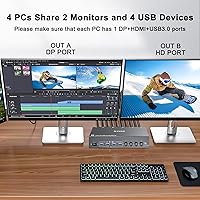
The KCEVE 2-Monitor 4-Computer KVM Switch is built for people who run multiple computers as part of their daily workflow and are tired of the inefficiency of swapping cables or spinning between separate workstations. Developers who keep a Windows machine for work and a Mac for personal projects will find this switcher genuinely useful — one keyboard, one mouse, and two monitors cover both machines without any physical rearrangement. Home office professionals balancing a company-issued laptop against a personal desktop get a clean, organized setup that makes context-switching between work and personal use nearly frictionless. Small studios, teaching labs, or collaborative workspaces with up to four systems sharing a single desk footprint are also a strong fit, particularly where keeping the physical space tidy is a priority. The mixed HDMI and DisplayPort output design quietly solves a real problem for users whose two monitors do not share the same connector standard, removing the need for dongles or adapters. If you already own a solid 4K or high-refresh monitor and want to drive it properly across multiple computers, this dual-monitor switcher delivers that capability without requiring a complex software-defined solution.
Not suitable for:

The KCEVE 2-Monitor 4-Computer KVM Switch is not the right tool for buyers expecting a fully realized 8K experience straight out of the box — achieving that resolution requires a GPU capable of 8K output, monitors that support the spec, and separately purchased 8K-certified cables, none of which are bundled. Users who need instantaneous, zero-lag switching — such as competitive gamers who split time across two gaming rigs — will find the brief but real switching delay frustrating enough to look elsewhere. If your peripheral setup includes highly specialized USB devices like programmable macro pads, certain gaming mice with complex firmware, or proprietary input hardware, there is a meaningful risk of initialization hiccups that standard keyboards and mice do not trigger. Anyone needing more than two simultaneous display outputs, or who wants to drive three or four monitors across their computers, will quickly find this switcher architecturally limiting. Buyers planning a long-term infrastructure build may also find the one-year warranty period insufficient assurance for a device that will run continuously for years. Finally, if both of your monitors use the same connector type — two DisplayPort displays, for example — the mixed-output design becomes a mild constraint rather than an advantage.

Specifications

  • Brand: Manufactured by KCEVE under model number KCDZUS402DH.
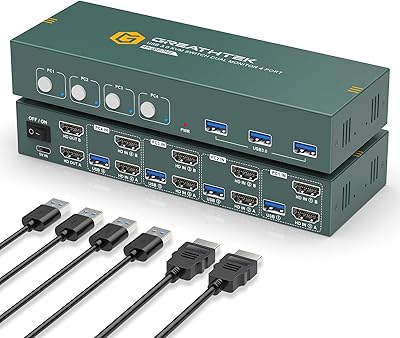
  • Computer Inputs: Supports up to 4 computers connected simultaneously via dedicated input ports.
  • Monitor Outputs: Provides one HDMI output and one DisplayPort output for driving two displays at once.
  • Max Resolution: Supports up to 8K@30Hz over DisplayPort and up to 4K@144Hz depending on cable and hardware capability.
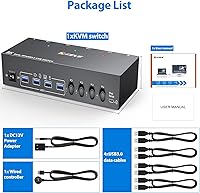
  • USB Ports: Equipped with 4 USB 3.0 ports for sharing peripherals such as keyboards, mice, printers, and scanners.
  • Display Modes: Operates in two modes: copy mode mirrors the primary display to the secondary, while extend mode allows windows to span both screens.
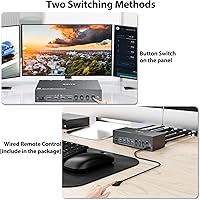
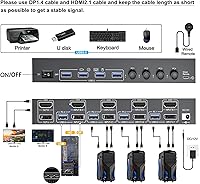
  • Control Method: Can be operated via a physical button on the unit or through the included wired remote controller.
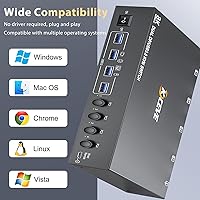
  • Driver Requirement: No drivers or software installation required; the device is fully plug-and-play on supported operating systems.
  • Operating Voltage: Runs at 5 volts DC with a current rating of 2 amps.
  • Package Weight: The complete package weighs 2.12 lbs including all included accessories.
  • Package Dimensions: Packaged dimensions measure 10.35 x 5.98 x 2.64 inches for shipping and storage reference.
  • Connector Types: Uses USB Type-A connectors for peripheral ports alongside HDMI and DisplayPort video connectors.
  • Contact Material: Internal switch contacts are constructed from metal for reliable long-term conductivity.
  • Circuit Type: Operates on a 2-way circuit design supporting the dual-monitor output architecture.
  • Number of Positions: Provides 4 selectable input positions corresponding to up to 4 connected computers.
  • Warranty: Covered by a one-year manufacturer warranty with direct support contact available through KCEVE.
  • Category Rank: Ranked #58 in the KVM Switches category on Amazon at time of listing.
  • Release Date: First made available for purchase on February 19, 2025.

Related Reviews

EVATEK 4K@60Hz HDMI KVM Switch for 4 Computers & 2 Monitors
83%
89%
Performance
93%
Ease of Setup
91%
Resolution Quality (4K@60Hz)
87%
USB 3.0 Port Functionality
85%
Switching Speed
More
TESmart HKS402-P23 Dual Monitor KVM Switch
74%
72%
Display Signal Stability
88%
EDID Emulation Effectiveness
83%
USB 3.0 Hub Performance
69%
Switching Reliability
74%
Audio and Microphone Passthrough
More
SUIDEK SJW-KM202B Dual Monitor KVM Switch
73%
83%
Ease of Setup
71%
Switching Reliability
79%
Display Quality
91%
Desktop Controller Usability
77%
USB Peripheral Sharing
More
CMSTEDCD SW330 Dual Monitor KVM Switch
77%
91%
EDID & Window Layout Preservation
88%
4K Display Quality
84%
Switching Speed & Responsiveness
79%
USB 3.0 Peripheral Sharing
61%
Setup & Initial Configuration
More
UGREEN AK500 Dual Monitor KVM Switch
77%
91%
Ease of Setup
88%
Switching Reliability
86%
Video & Display Quality
78%
USB Peripheral Sharing
83%
Build Quality & Materials
More
TJCXELE 4K@144Hz Dual-Monitor DisplayPort KVM Switch
75%
88%
Video Output Quality
63%
Setup & Installation
82%
Switching Reliability
84%
Desktop Controller Usability
67%
USB Device Recognition
More
ANGEET HDMI KVM Switch 2 Monitors 2 Computers 4K@60Hz
85%
91%
Display Quality
88%
Ease of Setup
85%
USB Performance
93%
Compatibility with Systems
87%
Build Quality
More
EVATEK 8K@60Hz DisplayPort KVM Switch 2 Monitors 2 Computers USB 3.0
84%
88%
Performance
91%
Value for Money
78%
Setup & Installation
94%
Display & Visuals
89%
Ease of Use
More
Viagkiki 2-Computer 1-Monitor KVM Switch
73%
91%
Ease of Setup
76%
Switching Reliability
68%
Video Quality & Resolution
61%
Build Quality & Durability
83%
Value for Money
More
ANGEET KVM Switch 3 Monitors 4 Computers
87%
90%
Performance Stability
93%
Ease of Setup
85%
Display Quality
88%
Compatibility with Multiple OS
91%
Switching Convenience (Wired Remote)
More

FAQ

No, you do not. The KCEVE 2-Monitor 4-Computer KVM Switch is fully plug-and-play, meaning you just connect your computers and monitors, and it works immediately. There is no software to install on any of the connected machines, which also means it works cleanly across Windows and macOS without conflict.
Technically yes, but with important conditions. To reach 8K output you need a GPU capable of 8K, a monitor that supports 8K, and separately purchased 8K-certified cables — none of these come in the box. For most users, the practical ceiling is 4K at 144Hz over DisplayPort, which is where this switcher performs reliably without extra investment.

Not at all. The included wired remote controller is specifically designed so you can keep the main unit tucked under your desk and switch computers from the surface. The remote has a noticeably tactile button and a comfortable form factor, making it one of the more practical aspects of this setup.

Yes, both modes are supported. In extend mode you can drag windows between your two displays just as you would with any standard dual-monitor setup. Copy mode is also available if you want both screens to show the same content, which is handy for presentations or reference use.

That is exactly the configuration this switcher is designed for. One output is HDMI and the other is DisplayPort, so if your two monitors use different connection standards you do not need any adapters — just plug each directly into the matching output.

There is a brief lag, typically less than a second, between pressing the switch and your displays recognizing the new source. For most everyday tasks like coding, writing, or general office work it is barely disruptive. If you need instantaneous switching — for example, between two gaming rigs — it may become a more noticeable frustration over time.

The switcher provides four USB 3.0 ports, so you can share up to four peripherals simultaneously — typically a keyboard, mouse, and one or two additional devices like a printer or external drive. All four devices switch together whenever you change the active computer input.

It works on Linux, but with a caveat. Some Linux users report that display resolution settings occasionally need to be adjusted manually after switching, because the unit does not always pass EDID data consistently across all Linux GPU driver combinations. For Windows and macOS it works without any such adjustments in the vast majority of cases.

You can connect computers with only HDMI outputs to the HDMI monitor, but the DisplayPort monitor will not receive a signal from that machine without an active HDMI-to-DisplayPort adapter on the source computer side. It is worth checking that your computers collectively cover both output types before purchasing.

The unit is solid enough for a fixed installation — connectors seat firmly, and it does not shift around under cable tension. That said, buyers describe the construction as functional rather than premium; the plastic shell feels lighter than the price might suggest. For a device that will sit under your desk and rarely be touched directly, that trade-off is generally acceptable.