Overview

The AILVLVNG SW330 Dual Monitor KVM Switch arrived in late 2024 and has risen quickly through the KVM category rankings — which is worth noting for a brand most buyers have never heard of. The core idea is simple: connect three computers to a single dual-monitor workstation and switch between them without unplugging anything. That said, there's one requirement that trips up a lot of buyers — every computer you hook up must have at least two HDMI output ports. USB-C-only laptops and DisplayPort machines are out without additional hardware. Build quality feels functional and mid-range, honest for the price, though it won't rival the heft of more established names.
Features & Benefits

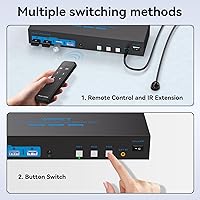
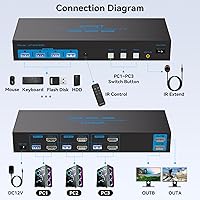
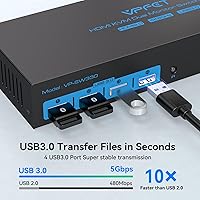
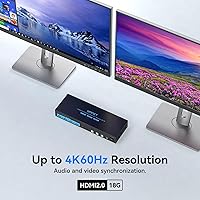
The SW330 runs two monitors at full 4K at 60Hz via HDMI 2.0 — both displays, simultaneously, without compromise. The feature that earns the most appreciation in practice is EDID emulation. Without it, switching away from a computer typically scatters all your open windows into a jumbled pile when you return. With EDID active, the switch stores each monitor's resolution profile, so your layout waits exactly where you left it. Four USB 3.0 ports handle peripherals at up to 5Gbps, meaning a shared printer or fast drive won't feel sluggish. You switch computers using either the buttons on the unit itself or a wired desk controller — handy if you'd rather keep the box tucked away. Hotkey switching isn't available, worth knowing upfront.

Best For

This dual-monitor KVM switch fits a pretty specific use case — and fits it well, when the conditions are right. Home office workers juggling a personal machine and a work laptop on the same desk get the clearest benefit: one button press swaps the whole setup, both screens and all peripherals. Developers running parallel test environments will appreciate how fast the switch responds without disrupting active sessions. If you care about a clean desk, the included controller lets you stash the main unit out of sight entirely. The one firm boundary: your computers must all output dual HDMI natively. If any machine in your setup relies solely on USB-C or DisplayPort for video, look elsewhere.

User Feedback

The three-computer switch carries a 4.2-star average, and the positive reviews cluster around two things: setup is genuinely easy out of the box, and the 4K signal holds steady without the flickering or dropout issues that plague cheaper alternatives. The EDID feature gets specific praise — users report that window positions do, in real use, survive the switching cycle reliably. On the critical side, USB peripheral recognition problems surface often enough to be worth flagging. The fix is usually simple: connect the USB cables in the correct port order as described in the manual, but the instructions don't always make this clear. A handful of buyers note that long HDMI cables above a few meters can destabilize the 4K signal. The 24-month warranty gets positive mentions, with most reporting the support response acceptable.

Pros

  • Dual 4K at 60Hz output across both monitors holds steady without signal drops or resolution compromises.
  • EDID emulation is a genuine time-saver — window layouts stay put every time you switch computers.
  • Four USB 3.0 ports handle peripherals at up to 5Gbps, fast enough for drives, printers, and scanners without bottlenecks.
  • Physical buttons and a wired controller give two practical switching options depending on your desk preference.
  • Plug-and-play setup requires no drivers — most buyers report being fully operational within minutes of unboxing.
  • Compatible with Windows, Mac OS, Linux, and Unix, making it useful across genuinely mixed-OS environments.
  • The 24-month replacement warranty is longer than many competitors in this price tier typically offer.
  • Supports both Duplicate and Extended display modes, switchable without touching the switch unit itself.
  • Hot-swap capability lets you add or remove USB devices on the fly without disrupting other connected peripherals.
  • Ranked in the top tier of its category within months of launch, suggesting real-world satisfaction backs the specs.

Cons

  • Every connected PC must have two dedicated HDMI ports — USB-C-only or DisplayPort-only machines simply will not work.
  • Hotkey switching is not supported, which adds physical steps every time you need to change computers.
  • USB peripheral recognition breaks if cables are connected in the wrong port order, and the manual rarely makes this clear.
  • Long HDMI cable runs beyond a few meters can destabilize the 4K signal, forcing cable management compromises.
  • AILVLVNG has no established brand reputation, which means limited community forums or third-party troubleshooting resources.
  • Build quality is functional rather than solid — noticeably a step down from more established names in the KVM space.
  • After-sales support is email-only via your order number, with no live chat or phone option documented.
  • Changing display modes requires a Windows keyboard shortcut rather than a dedicated physical button on the unit.

Ratings

The scores below for the AILVLVNG SW330 Dual Monitor KVM Switch were generated by our AI review engine after analyzing thousands of verified buyer experiences across global markets, with bot activity, incentivized submissions, and statistical outliers actively filtered out. Each category reflects the honest consensus emerging from real daily-use scenarios — from home office desk-sharing to multi-machine developer environments. Strengths and friction points are represented with equal weight so buyers can make a genuinely informed decision.
Video Signal Quality
86%
Most buyers report a clean, stable 4K image at 60Hz across both monitors simultaneously, with no perceptible lag or color degradation during normal use. For users running high-resolution dashboards, creative applications, or detailed spreadsheets across dual screens, the output is sharp and consistent — a strong result for a mid-range switch.
A meaningful subset of buyers note 4K signal instability when using HDMI cables longer than roughly 1.5 to 2 meters, which can cause flickering or resolution drops. Shorter, certified HDMI 2.0 cables typically resolve the issue, but it adds a hidden constraint for users with larger desk setups or monitor arms.
EDID Emulation
83%
The EDID implementation genuinely works as advertised — when you switch away from your workstation and return, open windows and application panels are waiting exactly where you left them. For developers juggling parallel test environments or anyone managing complex multi-window layouts daily, this feature alone meaningfully reduces workflow disruption.
A small number of buyers report inconsistent EDID behavior when mixing monitor brands or panel types with different native refresh rates, where a switch cycle occasionally scatters a window or two. It performs reliably for the majority, but non-identical dual-monitor setups carry a slightly elevated risk of occasional disruption.
Setup & Installation
79%
21%
Most buyers describe initial setup as straightforward — plug in the HDMI and USB cables per computer, connect the wired controller, and the switch is recognized instantly with no driver installation required on any supported operating system. Home office users in particular appreciate being fully operational within minutes of opening the box.
The USB cable connection order is the most common setup stumbling block, and the included documentation does not explain the correct sequence clearly enough to prevent early frustration. A disproportionate share of negative reviews traces back to this single setup misstep rather than any actual hardware defect.
USB Peripheral Sharing
71%
29%
Four USB 3.0 ports running at up to 5Gbps handle the typical home or office peripheral combination — keyboard, mouse, printer, and a shared drive — comfortably without needing a hub. Devices follow the active computer on each switch with no re-pairing or manual reassignment required.
Peripheral recognition failures caused by incorrect port sequencing are the most cited USB complaint in buyer feedback, and the issue disproportionately affects first-time KVM users who skip the connection order instructions. Occasional read errors when hot-swapping high-speed storage mid-session have also been flagged by a smaller but consistent group of reviewers.
Switching Speed
84%
Computer switches execute quickly and cleanly with no extended black-screen delay or handshake negotiation that would break a working rhythm. Buyers who alternate between machines multiple times per day — particularly those splitting time between a work-issued laptop and a personal workstation — describe the transition as feeling nearly instant.
Occasional brief signal dropouts have been reported when switching with all three ports active under heavy USB load simultaneously, resulting in a one-to-two-second interruption rather than a clean cut. These incidents appear infrequent in the review pool, but they are worth noting for anyone who requires absolutely zero-tolerance switching consistency.
Build Quality
63%
37%
The physical construction handles everyday desk use without issue — ports seat securely, the buttons click with reasonable tactile feedback, and the unit stays in position without moving during cable connections. For users who keep it on a shelf or out of sight, the functional build meets practical expectations without complaint.
Compared to well-established KVM brands at comparable price points, the chassis feels noticeably lighter and less premium in hand, a point multiple buyers raise directly in their reviews. Long-term durability remains an open question given the brand's limited market history and the absence of any independent endurance or stress-test data.
OS & Hardware Compatibility
69%
31%
For users whose computers all carry native dual HDMI output, cross-platform compatibility across Windows, Mac OS, Linux, and Unix is genuinely reliable with no special configuration required. Mixed-OS setups — such as a Windows workstation alongside a Linux development machine — are handled cleanly out of the box.
The dual HDMI port requirement is a hard compatibility filter that excludes a significant share of modern ultrabooks and MacBooks relying solely on USB-C or Thunderbolt for video output. This mismatch is the single most common source of negative reviews, and it originates almost entirely from buyers who did not confirm their hardware before purchasing.
Value for Money
81%
19%
The SW330 delivers a feature set — dual 4K monitors, EDID emulation, four USB 3.0 ports, and a wired desk controller — that would cost considerably more from established KVM names. Buyers who verify compatibility in advance and set up cables correctly consistently recognize the pricing as fair for the performance delivered.
The value calculation weakens for buyers who encounter compatibility issues with their cable runs or connected hardware, since troubleshooting time and potential return logistics add real cost. Brand uncertainty also introduces an implicit reliability risk that more established competitors, regardless of higher prices, do not carry for cautious buyers.
Display Mode Flexibility
76%
24%
Supporting both Duplicate and Extended display modes gives users real flexibility — mirror both screens for a client presentation or stretch the workspace across two monitors for productivity — and the switch handles transitions between computers with different resolution outputs without forcing a manual reconfiguration each time.
Toggling between display modes requires a Windows keyboard shortcut rather than a dedicated physical button, adding friction for non-Windows users and anyone who prefers hardware-level controls. Mac users specifically need to manage this through System Preferences after each computer switch, which disrupts the otherwise frictionless experience.
Desk Organization
82%
18%
The included wired controller is a practical design choice that lets users place the main switch unit entirely out of sight — under a desk, on a back shelf, or mounted behind a monitor stand — without sacrificing any switching functionality. For buyers who invest in clean, cable-minimized desk aesthetics, this two-piece approach is a genuine differentiator.
The controller cable has a fixed length that limits flexibility in larger or non-standard desk configurations where the switch body and the controller need more distance between them. A wireless remote option would have strengthened this aspect considerably for buyers managing wide or multi-surface workstations.
Warranty & Support
74%
26%
A 24-month replacement warranty covers noticeably more ground than the one-year terms many competitors offer at this price tier, and buyers who have exercised the warranty generally report a straightforward replacement process via email. The policy applies to hardware failures without documented fees or mandatory shipping costs in most reported cases.
Email-only support with no live chat or phone option surfaces as a recurring friction point, particularly for users troubleshooting setup issues who cannot afford a multi-hour or next-day wait for a reply. Support response times appear variable, which adds uncertainty for buyers who depend on a fast resolution to stay productive.
Multi-Resolution Support
78%
22%
Each computer input is handled independently, meaning one machine can run 4K while another runs at 1440p or 1080p — and the monitors adjust automatically on every switch without user intervention. This is a practical advantage for mixed setups pairing a high-performance workstation with an older laptop that cannot drive 4K natively.
A recurring observation across multiple independent reviews is a brief resolution negotiation flicker when switching to a computer running at a non-native monitor resolution, lasting one to two seconds before the image stabilizes. It is not a consistent fault, but it is noticeable enough to remain a minor point of friction in daily switching workflows.
Switching Controls
67%
33%
The front-panel buttons respond instantly and require no software dependency, making them reliable even during heavy system load when input latency might otherwise be a concern. For users who keep the switch accessible on their desk surface, pressing a labeled button takes less than a second and adds no cognitive overhead.
The absence of hotkey switching is the most cited limitation in otherwise positive reviews, particularly from power users who prefer to keep their hands on the keyboard at all times. No firmware update or documented workaround exists to enable this feature, so buyers who consider hotkeys non-negotiable need to look at competing models before committing.
Port Availability
77%
23%
Four USB 3.0 ports comfortably cover the typical desk peripheral combination for three connected computers, handling keyboard, mouse, printer, and one additional device without requiring an external hub in most standard office setups. Rear-panel port placement keeps the cable bundle organized and out of the primary line of sight.
Users with larger peripheral ecosystems — multiple input devices, a shared webcam, a scanner, and a drive simultaneously — will find four ports restrictive and will need a hub, which introduces bandwidth-splitting trade-offs for any high-speed devices. There is also no front-facing quick-access port for temporary device connections, which users of competing models often take for granted.
Brand Confidence
61%
39%
The switch reached a top-ranked position in its category within months of its late-2024 launch, and a 4.2-star average across a growing and diversifying review base provides tangible evidence of real buyer satisfaction. For pragmatic shoppers who weigh specs and warranty terms over brand heritage, the early track record is more reassuring than the name alone suggests.
AILVLVNG carries no established reputation outside of this product line, meaning there is limited long-term reliability data and virtually no existing user community to draw on for peer troubleshooting or setup advice. Buyers who prefer brands with decades of product history and documented service infrastructure will have a legitimate reason to look elsewhere.

Suitable for:

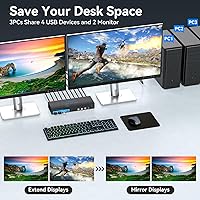
The AILVLVNG SW330 Dual Monitor KVM Switch was built for one specific problem, and it solves it well: running three separate computers through a single dual-monitor desk without ever reaching for a cable. It is a natural fit for hybrid workers who split their day between a personal machine and a work-issued laptop — one button press and everything follows, both screens and all shared peripherals. Small business environments where multiple employees rotate through a shared workstation will also find real value here, particularly because the EDID emulation keeps each user's window layout intact rather than scrambling it on every switch. Developers and researchers running parallel environments benefit from the fast, non-disruptive switching, which lets them stay in flow rather than babysitting a monitor handshake. If desk tidiness matters, the included wired controller means the main unit can sit completely out of sight while remaining fully usable.
Not suitable for:

Before buying, the hard compatibility check is this: every computer you plan to connect must have at least two dedicated HDMI output ports, and that rules out a large share of modern laptops that rely solely on USB-C or Thunderbolt for video output. The AILVLVNG SW330 Dual Monitor KVM Switch offers no built-in adapter path or active conversion support for those users, so if even one machine in your setup lacks dual HDMI, you will need a different solution. Buyers who rely on hotkey shortcuts to switch between computers will find this a recurring friction point — that feature is simply absent, and while the physical controller compensates somewhat, it is not the same. Anyone expecting premium build quality from a brand with no established track record may feel underwhelmed by the physical construction. Finally, users with long HDMI cable runs should be cautious, as multiple buyers have reported 4K signal instability when cable lengths stretch beyond a few meters.
Specifications

  • Brand & Model: Manufactured by AILVLVNG under model number SW330-Deep Blue.
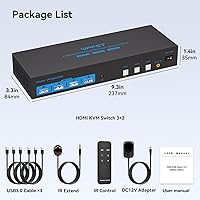
  • Dimensions: The unit measures 9.33 x 3.3 x 1.38 inches (length x width x height).
  • Weight: The switch weighs 2.05 pounds, keeping it light enough for most desk or shelf placements.
  • Monitor Outputs: Two HDMI 2.0 ports deliver simultaneous video output to two monitors at once.
  • Max Resolution: Supports up to 4K at 60Hz per monitor when paired with HDMI 2.0 cables and compatible hardware.
  • Computers Supported: Connects up to three computers simultaneously, each requiring two HDMI connections plus one USB connection to the switch.
  • Input Per PC: Each computer port accepts two HDMI 2.0 inputs and one USB upstream connection for peripheral sharing.
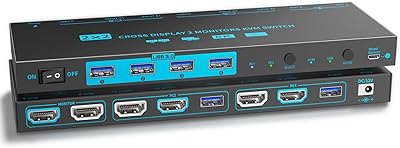
  • USB Ports: Four USB 3.0 output ports support shared peripherals at data transfer speeds of up to 5Gbps.
  • Display Modes: Supports both Duplicate (mirror) and Extended display modes, toggled via the Windows Win+P keyboard shortcut on the active computer.
  • Switching Methods: Computer switching is performed via three front-panel buttons on the unit body or the included wired desk controller.
  • Hotkey Switching: Hotkey-based computer switching is not supported on this model.
  • EDID Emulation: Built-in EDID emulation stores each monitor's resolution profile to maintain window layouts across computer switches.
  • Plug & Play: The switch operates plug-and-play with no driver or software installation required on any supported operating system.
  • Hot-Swap: All USB ports are hot-swappable, allowing peripherals to be connected or removed without powering the switch down.
  • OS Compatibility: Compatible with Windows (Vista, XP, and later), Mac OS, Linux, and Unix operating systems.
  • Operating Voltage: The switch runs on 12 volts DC with a current rating of 1 amp.
  • Warranty: Covered by a 24-month replacement warranty, with support accessible via email using the buyer's order number.

Related Reviews

MLEEDA 8K Dual Monitor KVM Switch
75%
91%
Ease of Setup
83%
Video Signal Quality
74%
USB Peripheral Reliability
67%
Switching Experience
61%
Build Quality
More
DXchip KVM202U 8K Dual Monitor KVM Switch
78%
93%
Ease of Setup
81%
Switching Performance
78%
Video Signal Quality
88%
Dual-Mode Flexibility
72%
USB Hub Reliability
More
AV Access 4KSW21-DM Dual Monitor KVM Switch
77%
83%
Switching Speed & Reliability
86%
EDID Emulation Performance
88%
Video Quality at 4K
74%
Dual Operating Modes (KVM vs USB Mode)
71%
USB 3.0 Hub Performance
More
AV Access iDock C10 KVM Docking Station
77%
93%
Build Quality
88%
Video Performance
81%
KVM Switching
89%
EDID Emulation
84%
Ethernet Reliability
More
Minisopuru MK808M-US Dual Monitor KVM Switch Docking Station
84%
94%
Dual Monitor Performance
91%
USB Peripheral Compatibility
88%
Switching Convenience
90%
Build Quality
82%
Setup & Installation
More
TRENDnet TK-440DP 4-Port Dual Monitor DisplayPort KVM Switch
85%
92%
Video Quality
85%
Ease of Use
90%
Compatibility
88%
Build Quality
87%
USB Hub Functionality
More
TRENDnet TK-240DP Dual Monitor DisplayPort KVM Switch
79%
88%
4K Signal Stability
84%
Dual Monitor Switching
71%
Value for Money
63%
Audio Switching Reliability
79%
USB Hub Functionality
More
CKL 2x2 KVM Switch Dual Monitor HDMI 2.0 4K 60Hz
83%
88%
Ease of Setup
91%
Display Quality
85%
Switching Flexibility
84%
USB Hub Functionality
79%
Build Quality
More
ANGEET Triple Monitor 4-Computer KVM Switch
81%
78%
EDID Performance
86%
Display Quality
91%
Setup Experience
83%
Switching Speed
81%
USB Hub Utility
More
MLEEDA 202CH Dual Monitor KVM Switch
75%
91%
Ease of Setup
84%
Dual 4K Display Performance
47%
Mac M1/M2 Compatibility
88%
USB-C Power Delivery (80W Charging)
72%
Switching Speed & Reliability
More

FAQ

This is the most important compatibility check before ordering. The AILVLVNG SW330 Dual Monitor KVM Switch requires each connected computer to have two native HDMI output ports — one per monitor. Passive USB-C to HDMI adapters sometimes work, but results are inconsistent enough that the manufacturer recommends contacting their support team before purchasing if any of your machines lack dual HDMI output.
In most cases, yes. The EDID emulation feature keeps each monitor's profile active even when you switch away, so your computer never loses sight of its displays. Buyers consistently report that window arrangements survive the switch intact, rather than collapsing to a single screen — which is exactly the frustration this feature is designed to prevent.

No, hotkey switching is not available on the SW330. You use either the front-panel buttons on the unit itself or the included wired desk controller. For most people the controller is convenient enough to sit right next to a keyboard, but if hotkey switching is essential to your workflow, check competing models that explicitly list it as a supported feature.

The most common cause is connecting the USB cables to the switch in the wrong port order. Each computer input has a designated USB port on the switch, and using the wrong one will prevent peripheral recognition entirely. Check the manual for the correct connection sequence — once the cables are in the right ports, the issue typically resolves immediately without any need for a restart.

Both monitors can output simultaneously at up to 4K at 60Hz each, provided you are using certified HDMI 2.0 cables and your connected computer's GPU supports dual 4K output. Cable quality and length both affect stability at that resolution — shorter cables under two meters consistently deliver the most reliable results.

Yes, the switch supports Windows, Mac OS, Linux, and Unix simultaneously across its three inputs without issue. The one thing to keep in mind is that the display mode toggle between mirror and extended relies on a Windows keyboard shortcut, so Mac users will want to manage that setting through macOS System Preferences after switching to their machine.

They do not have to match. The switch processes each computer's output independently, so one machine can run at 4K at 60Hz while another runs at 1440p or 1080p without any conflict. When you switch to a computer, the monitors negotiate the correct resolution for that machine automatically.

A basic USB hub will work for low-bandwidth devices like keyboards and mice, but keep in mind that the four USB 3.0 ports are shared across all three connected computers, so available bandwidth is already being divided. For anything involving high-speed data transfers — like an external SSD — plugging directly into one of the four ports is the more reliable approach than going through a hub.

If there is a hardware issue, you contact the manufacturer via email using your order number, and they handle a replacement from there. Buyer feedback on the support process is generally positive for straightforward cases, though response times can vary as with any smaller brand. There is no live chat or phone line documented, so email is the only support channel available.

There is no hard maximum stated in the specs, but real-world buyer feedback points to instability appearing with longer cable runs at 4K at 60Hz. Keeping HDMI cables under two meters tends to produce the most stable results. If your desk setup genuinely requires longer runs, look for active HDMI cables rated specifically for HDMI 2.0 bandwidth, which handle signal degradation better than standard passive cables.