Overview

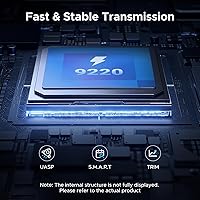
The UGREEN 20Gbps M.2 NVMe SATA SSD Enclosure sits in a sweet spot for anyone who wants genuinely fast external storage without committing to Thunderbolt pricing. What sets this drive caddy apart from a crowded field is its support for both PCIe NVMe and SATA NGFF drives — most budget enclosures pick one or the other. Under the hood, it runs the RTL9220 chipset paired with the USB 3.2 Gen 2x2 standard, which is where that 20Gbps headline figure comes from. UGREEN has built a solid reputation making reliable cables and peripherals, and this enclosure fits that pattern. That said, 20Gbps is the ceiling, not a guarantee — you will only hit those numbers if your computer's USB port actually supports Gen 2x2, which many don't.
Features & Benefits

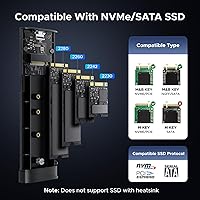
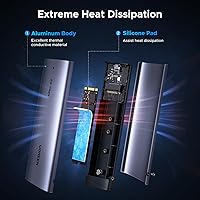
The headline feature is the USB 3.2 Gen 2x2 interface, which doubles the bandwidth of the more common 10Gbps Gen 2 standard — meaning this M.2 enclosure can push sequential speeds that standard Gen 2 boxes physically cannot match, assuming you have the right port. It handles M Key and B+M Key drives across four form factors — 2230, 2242, 2260, and 2280 — so whether you are pulling an old drive from a compact ultrabook or a full-size desktop SSD, it will fit. The aluminum shell does a respectable job of passive heat management during longer transfers thanks to a built-in thermal pad. Installation takes under two minutes: one screw, plug in, done. Both a USB-C to C and a USB-C to A cable ship in the box, which saves a last-minute scramble for adapters.

Best For

This drive caddy is a natural fit for anyone who has just swapped the SSD in their laptop and wants to repurpose the old one as fast portable storage. Video editors, photographers, and other creatives who regularly move large files will benefit — provided their machine has a USB 3.2 Gen 2x2 port, which is becoming more common on recent hardware but is still far from universal. IT folks who juggle drives of different sizes will appreciate the broad form factor support. It also makes sense for anyone who wants a capable external solution without the cost of Thunderbolt gear. One firm caveat: if your ports top out at USB 3.2 Gen 1 or standard Gen 2, the speed advantage disappears entirely, and there are cheaper enclosures that would serve you just as well. mSATA drives are not supported.

User Feedback

Buyers generally respond well to the UGREEN enclosure's build quality — the aluminum chassis feels more substantial than the price suggests, and that observation recurs across verified reviews. Most frustration, however, stems from speed expectations. Quite a few users plug this into a standard Gen 2 port, see 10Gbps-level results, and assume something is wrong; the enclosure is fine, but the host hardware is the bottleneck. Thermal performance during sustained transfers earns positive marks — the body warms up but stays within comfortable handling range. A handful of compatibility hiccups with lesser-known SSD brands have surfaced, though mainstream drives appear to work without issue. Overall satisfaction trends positive, with most buyers recommending it for everyday use, while power users note it performs best when paired with genuinely capable host hardware.

Pros

  • Supports both PCIe NVMe and SATA NGFF drives, removing the need to buy separate enclosures for different SSD types.
  • The aluminum chassis feels substantially more premium than the price suggests — a consistent observation across buyer feedback.
  • Four supported form factors (2230, 2242, 2260, 2280) mean this drive caddy works with drives pulled from ultrabooks, gaming handhelds, and full-size desktops alike.
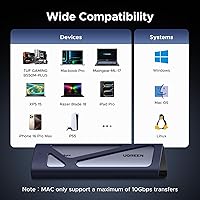
  • Plug-and-play across Windows, macOS, Linux, Android, and iOS — no driver installs, no configuration headaches.
  • Both a USB-C to C and USB-C to A cable are included, covering the two most common connection scenarios out of the box.
  • TRIM support helps maintain long-term SSD health, which matters when repurposing a former boot drive for ongoing external use.
  • The built-in thermal pad keeps temperatures manageable during typical transfer sessions without any active cooling noise.
  • UASP support improves queue efficiency, translating to better sustained transfer consistency compared to bulk-only enclosures.
  • Single-screw installation takes under three minutes regardless of technical experience level.
  • Short-circuit and over-current protection adds a layer of reassurance when working with drives holding irreplaceable data.

Cons

  • The 20Gbps speed advantage is completely inaccessible unless the host machine has a USB 3.2 Gen 2x2 port, which many older computers lack.
  • In-box documentation is too thin to warn less experienced buyers about the Gen 2x2 host requirement — a frequent source of avoidable frustration.
  • mSATA drives are not supported, and this distinction is easy to miss for buyers unfamiliar with the difference between mSATA and M.2 SATA.
  • No protective sleeve or carry pouch is included, leaving the enclosure vulnerable to cosmetic scratching when carried loose in a bag.
  • The bundled cables feel functional rather than durable — not ideal for permanent desktop routing or repeated daily stress.
  • A small but notable number of users encountered intermittent disconnects under sustained peak-load transfers with demanding NVMe drives.
  • The single retention screw feels undersized relative to the chassis and can be fiddly when installing smaller 2230-form drives.
  • Long-term reliability data is still limited given the product only launched in late 2024 — buyers prioritizing proven durability may want to wait.
  • Niche or off-brand SSD models occasionally require a reconnect or host reboot before the enclosure registers them correctly.

Ratings

The scores below reflect an AI-driven analysis of verified global buyer reviews for the UGREEN 20Gbps M.2 NVMe SATA SSD Enclosure, with spam, bot-generated, and incentivized submissions actively filtered out before scoring. Each category captures the full spectrum of real user sentiment — the genuine strengths that keep buyers coming back and the friction points that surface repeatedly across independent feedback. Nothing is glossed over.

Build Quality
88%
The aluminum alloy shell consistently earns praise that buyers find surprising at this price point. Users handling it for the first time frequently note it feels closer to a mid-tier accessory than something budget-adjacent — solid edges, no flex, and a finish that holds up after repeated pocket-and-bag cycles.
A small but consistent group of buyers noted the single retention screw feels undersized relative to the chassis, and a few reported minor cosmetic scratches arriving out of the box. The fit and finish is good, not flawless.
Transfer Speed Performance
74%
26%
Users with USB 3.2 Gen 2x2-capable hosts — typically found on recent laptops and desktops from 2022 onward — report genuinely impressive sequential read speeds that make large file moves feel noticeably faster than their previous 10Gbps enclosures. For video editors working with raw 4K footage, the difference is tangible.
This score is dragged down significantly by the volume of buyers who never hit anywhere near 20Gbps because their machines only support standard Gen 2 or Gen 1. The enclosure is not at fault, but the confusion is real and widespread, and the product packaging does not warn buyers clearly enough.
SSD Compatibility
83%
Supporting both PCIe NVMe and SATA NGFF protocols across four form factors — 2230 through 2280 — gives this drive caddy genuine versatility. IT professionals and hobbyists who swap drives from multiple generations of hardware appreciate not needing separate enclosures for different drive types.
mSATA drives are flatly unsupported, and buyers who miss the fine print feel burned. A handful of verified reviews also flagged compatibility hiccups with niche or off-brand SSDs, particularly older SATA drives from smaller manufacturers, requiring reconnection or a host reboot to register properly.
Thermal Management
79%
21%
During sustained transfers lasting several minutes — think cloning an entire drive or moving a large media library — the aluminum body does a respectable job of staying manageable. The built-in thermal pad makes contact with the SSD and disperses heat passively without any fan noise or active cooling.
At truly extended workloads beyond 20–30 minutes, the enclosure gets noticeably warm, not painfully hot, but warm enough that some users set it down rather than hold it. A small number of buyers reported thermal throttling with high-performance NVMe drives pushing consistent write loads.
Ease of Installation
93%
Single-screw installation with no driver software required is the kind of setup experience that genuinely earns goodwill. Users across all experience levels — from first-time SSD handlers to seasoned builders — agree that inserting a drive and getting it recognized takes under three minutes on any supported OS.
The included screwdriver or retention hardware is minimal, and a few buyers with larger hands found the screw fiddly to seat on smaller 2230-form drives. Nothing deal-breaking, but a magnetic screwdriver tip is worth having nearby.
Cable Inclusion & Accessory Value
86%
Shipping both a USB-C to C and a USB-C to A cable in the box is a practical decision that buyers genuinely appreciate once they open the packaging. It removes the immediate friction of hunting for a compatible cable, which is a common annoyance with competing enclosures that include only one type.
Cable quality is functional but not premium — a few users noted the cables feel slightly thin and would not confidently route them in a permanent desktop setup. They are fine for occasional portable use but are not the cables you would choose for a long-term installed connection.
OS & Device Compatibility
91%
The plug-and-play behavior holds up consistently across Windows, macOS, Linux, and even Android and iOS when paired with the right adapter. Users who move between a MacBook at home and a Windows workstation at the office report no reconfiguration needed between switches.
Linux users running less common distributions noted occasional mount delays, and one recurring thread flagged intermittent recognition issues with certain Android OTG setups — not universal, but worth knowing if mobile use is a primary use case.
Value for Money
84%
At its price point, the UGREEN enclosure competes against enclosures that offer either the speed or the build quality, rarely both. Buyers comparing it directly against similarly priced alternatives consistently rank it higher for the combination of aluminum construction, dual-protocol support, and bundled cables.
Users who cannot leverage the full 20Gbps bandwidth due to their hardware end up paying a modest premium for a feature they cannot use, making cheaper Gen 2 enclosures a smarter call for that group. The value equation is genuinely port-dependent.
Port & Chipset Reliability
81%
19%
The RTL9220 chipset has a solid track record in the enclosure market, and most buyers report stable, uninterrupted connections across normal daily use. UASP support helps keep transfer queues efficient, and the over-current protection has reassured users who work with SSDs holding irreplaceable data.
A small percentage of buyers encountered intermittent disconnects during peak transfer loads, particularly with high-performance NVMe drives that draw more power at burst speeds. These reports are not dominant, but they appear consistently enough to flag as a real edge-case concern.
Portability & Form Factor
87%
At roughly 134 grams and a compact footprint, the UGREEN enclosure disappears into a laptop bag without adding meaningful bulk. Photographers and field technicians who carry it alongside other gear regularly call out its size-to-performance ratio as a key reason they chose it over bulkier alternatives.
The enclosure has no carrying pouch or protective sleeve included, which is a minor but notable omission at this tier. Users who toss it loose in a bag risk cosmetic scratching over time — a basic sleeve would have been a low-cost addition.
Documentation & Setup Guidance
67%
33%
For technically minded buyers, the hardware is intuitive enough that documentation barely matters — the setup is physically self-explanatory, and the plug-and-play behavior kicks in without any reference to a manual.
For less experienced users, the included documentation is thin and does not adequately explain the Gen 2x2 port requirement. This is the single biggest source of negative reviews and support questions — better in-box guidance would substantially reduce buyer frustration and misplaced disappointment.
Long-Term Durability
76%
24%
Users who have owned the enclosure for several months report no degradation in connection quality or physical condition. The aluminum construction resists the kind of wear that plastic-chassis competitors show after regular handling, and the drive slot retains its tension well over time.
The product launched in late 2024, so long-term reliability data is still accumulating and cannot yet be fully validated. Early indicators are positive, but buyers looking for multi-year track records will need to check back as the review pool matures.
TRIM & UASP Support
82%
18%
TRIM support is a feature many buyers in this category overlook until they research SSD longevity, and finding it included here is a genuine plus. Users who have migrated SSDs from primary boot duty to external use appreciate that the drive can still perform garbage collection properly, extending usable lifespan.
UASP functionality depends on the host controller recognizing and enabling it, and a small number of users on older or budget host chipsets found it either disabled or inconsistently applied — reducing the real-world performance benefit versus standard bulk transfer mode.

Suitable for:

The UGREEN 20Gbps M.2 NVMe SATA SSD Enclosure is a strong pick for anyone who has recently upgraded their laptop or desktop SSD and wants to repurpose the old drive as fast, portable external storage rather than let it collect dust. Creative professionals — video editors, photographers, and audio producers — who regularly shuttle large files between machines will appreciate the bandwidth ceiling here, as long as their workstation or laptop has a USB 3.2 Gen 2x2 port, which is increasingly standard on hardware released from 2022 onward. IT technicians who handle drives of mixed generations will find the dual NVMe and SATA support genuinely useful, since it removes the need to keep separate enclosures for different protocol types. The broad form factor coverage — from compact 2230 drives pulled from Surface devices and Steam Decks all the way to full-size 2280 drives — adds real practical flexibility. For anyone who wants a capable, well-built external drive solution without paying for Thunderbolt-tier hardware, this drive caddy occupies a sensible middle ground.
Not suitable for:

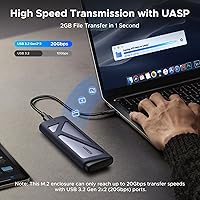
If your computer's USB ports top out at USB 3.2 Gen 1 (5Gbps) or the more common Gen 2 (10Gbps), the UGREEN 20Gbps M.2 NVMe SATA SSD Enclosure is not the right tool — you would be paying for bandwidth your system cannot deliver, and a cheaper enclosure would produce identical real-world results. Buyers hoping to house an mSATA drive should look elsewhere entirely, as that format is not supported despite the surface-level similarity to M.2; this is a firm hardware limitation, not a firmware fix. Users who need a truly ruggedized enclosure for harsh field environments — construction sites, outdoor shoots in dusty or wet conditions — will find the aluminum chassis protective against drops but not rated for anything beyond everyday handling. Anyone expecting Thunderbolt-class performance on older host hardware will be disappointed, and the thin included documentation does not do enough to set those expectations upfront. If your primary use case involves sustained multi-hour write workloads with a high-performance NVMe drive, occasional thermal throttling under extreme sustained loads is worth factoring into your decision.
Specifications

  • Interface: Connects via USB 3.2 Gen 2x2, delivering a theoretical maximum bandwidth of 20Gbps to compatible host ports.
  • Chipset: Powered by the Realtek RTL9220 controller, a widely trusted chipset in the mid-range enclosure market for stable, consistent throughput.
  • Protocols: Supports both PCIe NVMe and SATA NGFF M.2 drives; mSATA is explicitly not compatible.
  • Key Types: Accepts M Key and B+M Key M.2 drives, covering the vast majority of consumer and prosumer SSDs on the market.
  • Form Factors: Compatible with M.2 drives in 2230, 2242, 2260, and 2280 sizes, from compact ultrabook drives to full-length desktop SSDs.
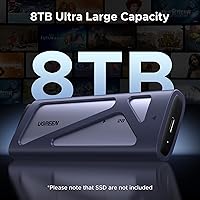
  • Max Capacity: Supports M.2 SSDs with a formatted capacity of up to 8TB, accommodating high-density consumer drives.
  • Material: Enclosure body is constructed from aluminum alloy, providing passive heat dissipation and structural rigidity over plastic alternatives.
  • Thermal Solution: A pre-installed thermal pad makes direct contact with the inserted SSD to channel heat into the aluminum chassis during sustained transfers.
  • Dimensions: Measures 5.12 x 5.12 x 0.69 inches, keeping it compact enough to slip into a jacket pocket or laptop bag side pouch.
  • Weight: Weighs 133.8 grams without an SSD installed, light enough for daily portable carry without adding meaningful load.
  • Cables Included: Ships with one USB-C to USB-C cable and one USB-C to USB-A cable, covering both modern and legacy host port configurations.
  • Driver Requirement: No software drivers are required; the enclosure operates as a plug-and-play device on all supported operating systems.
  • OS Compatibility: Works natively with Windows, macOS, Linux, Android, and iOS without additional configuration or third-party software.
  • Performance Features: UASP (USB Attached SCSI Protocol) and TRIM are both supported, improving queue efficiency and helping maintain long-term SSD health.
  • Protection: Onboard short-circuit and over-current protection safeguards both the inserted SSD and connected host device during operation.
  • Drive Installation: The SSD is secured with a single retention screw; no additional tools, brackets, or adhesive pads are required for installation.
  • Power Source: Bus-powered entirely through the USB connection; no external power adapter or separate power supply is needed.
  • Max Devices: Designed to house one M.2 SSD at a time, functioning as a single-drive external storage solution.

Related Reviews

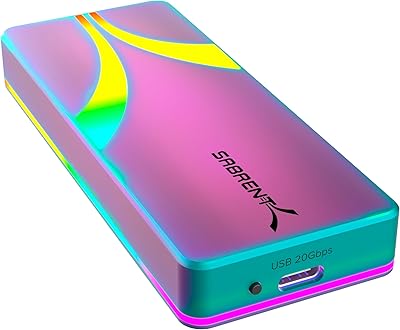
Sabrent Rocket RGB USB-C 20Gbps M.2 SATA/NVMe SSD Enclosure
85%
88%
Performance
94%
Ease of Setup
75%
Build Quality
85%
Heat Management
90%
Compatibility with M.2 SSDs
More
dockteck DH0002 M.2 NVMe/SATA SSD Enclosure
84%
88%
Transfer Speed (NVMe)
76%
SATA Drive Performance
83%
Build Quality
93%
Ease of Setup
79%
Thermal Management
More
WAVLINK Dual-Bay NVMe M.2 SSD Cloner
75%
83%
Offline Cloning Reliability
78%
Transfer Speed
71%
Compatibility Range
76%
Build Quality
86%
Ease of Setup
More
UGREEN Thunderbolt 5 NVMe SSD Enclosure
74%
83%
Transfer Speed Performance
91%
Build Quality
86%
Thermal Management
52%
Compatibility Clarity
58%
Cable & Port Requirements
More
Alxum NVME M.2 SATA IDE SSD Enclosure
86%
94%
Data Transfer Speed
90%
Ease of Use (Tool-Free Setup)
88%
Compatibility with Drive Types
85%
Build Quality
82%
Heat Dissipation
More
Cenmate 5-Bay Hybrid HDD/NVMe Enclosure
73%
83%
Build Quality
78%
Thermal Management
71%
Transfer Speed
69%
RAID Functionality
76%
Drive Compatibility
More
ineo C2605-NVMe M.2 NVMe SSD Enclosure
77%
88%
Write Protection Reliability
79%
Transfer Speed Performance
82%
Thermal Management
61%
Fan Noise Level
76%
Build Quality & Materials
More
Cable Matters USB4 40Gbps M.2 NVMe Enclosure
80%
88%
Data Transfer Performance
83%
Build Quality & Materials
79%
Thermal Management & Cooling
91%
Portability & Form Factor
74%
Compatibility Range
More
Plugable M.2 NVMe SSD Enclosure
87%
94%
Ease of Setup
92%
Data Transfer Speed
88%
Build Quality
90%
Port Compatibility
87%
Cooling & Thermal Management
More
ORICO TCM2 M.2 NVMe SSD Enclosure
78%
83%
Transfer Speed
61%
Thermal Management
74%
Build Quality
91%
Ease of Installation
86%
Cable Bundle Quality
More

FAQ

Only if your computer has a USB 3.2 Gen 2x2 port, which supports 20Gbps. If your port is a standard USB 3.2 Gen 2 (10Gbps) or Gen 1 (5Gbps), you will hit those lower ceilings regardless of the enclosure. Check your laptop or desktop specs before buying — Gen 2x2 ports are increasingly common on hardware from 2022 onward but are still not universal.

It supports both. The UGREEN 20Gbps M.2 NVMe SATA SSD Enclosure handles PCIe NVMe and SATA NGFF M.2 drives without any manual switching or configuration — you just install the drive and plug it in. The one format it does not support is mSATA, which looks similar but uses a different connector.
Yes. Both devices use 2230-form M.2 drives, which is the smallest form factor this enclosure supports. It fits all four standard M.2 sizes — 2230, 2242, 2260, and 2280 — so drives from compact devices through full-size desktops all work fine.

It does warm up noticeably during extended workloads, which is expected for any passively cooled aluminum enclosure. The built-in thermal pad helps move heat from the SSD into the chassis, and most users find it stays within comfortable handling range for typical sessions. If you are planning very long sustained write operations — think multi-hour drive cloning — give it a break every 30 minutes or so.

No. Plug it in and your operating system should recognize it immediately. This applies to Windows, macOS, Linux, and even Android and iOS with compatible adapters. There is nothing to install and no configuration menu to navigate — it just shows up as an external drive.

You get both a USB-C to USB-C and a USB-C to USB-A cable, which covers the two most common connection scenarios. Most buyers will not need to purchase anything extra to get started. The included cables are functional for everyday use, though if you plan to leave it permanently connected to a desktop setup, a higher-quality third-party cable might be worth considering.

No, mSATA is not supported. Although mSATA drives look somewhat similar to M.2 SATA drives, they use a different physical connector and are not electrically compatible with this enclosure. If you have an mSATA drive, you will need a dedicated mSATA enclosure instead.

It is straightforward — one screw holds the drive in place, and the whole process takes two or three minutes at most. You do not need special tools beyond a small Phillips screwdriver, and the drive slot is clearly designed to accept the M.2 form factor at the correct angle. Most users with no prior hardware experience handle it without any issues.

In many cases, yes. The drive caddy works with Android devices that support USB OTG and with iOS devices using a compatible USB-C adapter. That said, results can vary depending on your specific device and its USB controller — a small number of Android users have reported the drive taking a moment to register on certain OTG setups, requiring a reconnect.

The build quality — aluminum chassis, reputable RTL9220 chipset, UASP and TRIM support, plus onboard protection circuitry — puts it well above throwaway territory. UGREEN is an established accessories brand with a broad product range, and this drive caddy reflects their typical approach of solid construction at a competitive price. The main caveat is that it only launched in late 2024, so multi-year reliability data is still accumulating, but early indicators from buyer feedback are consistently positive.

Where to Buy