
Overview

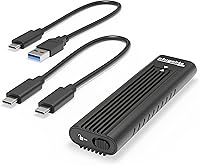
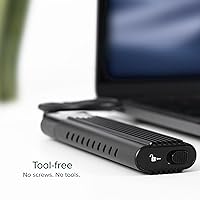
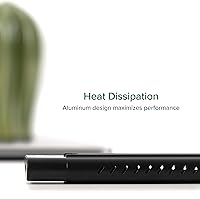
The Plugable M.2 NVMe SSD Enclosure is a sleek and portable external case designed to house M.2 NVMe SSDs. This NVMe SSD enclosure offers support for PCIe Gen 3 and Gen 4 SSDs, making it suitable for a wide range of high-performance storage solutions. The tool-free setup ensures a hassle-free installation process, allowing users to quickly mount and use their SSD without the need for additional tools or drivers. Its compact form and aluminum casing provide a durable and cooling solution, preventing overheating during heavy data transfers.

Features & Benefits

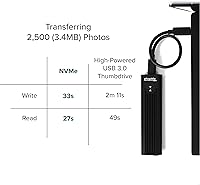
This external SSD case supports a variety of M.2 NVMe SSD sizes, including 2230, 2242, 2260, and 2280, offering broad compatibility. With a data transfer rate of up to 10Gbps, it ensures fast read and write speeds, making it an excellent choice for users who need quick access to large files. The driverless setup means you can use it seamlessly with major operating systems like Windows, macOS, Linux, and ChromeOS. Whether you’re using it for work or personal projects, this SSD enclosure provides excellent performance without the need for additional software installation.

Best For

This NVMe SSD enclosure is ideal for anyone in need of fast, portable storage. It suits users looking to expand their storage for Steam libraries or back up large files on the go. Gamers who need quick and easy access to their game data will benefit from its compact design and fast transfer speeds. Professionals working with large files or needing to quickly transfer data between devices will find it convenient. Additionally, those who prefer a tool-free setup that doesn’t require drivers or installation will appreciate the simplicity this product offers.

User Feedback

Overall, users have praised this external SSD case for its ease of use and solid performance. Many appreciate its compact size and the fact that it works seamlessly with both USB-C and Thunderbolt ports. The aluminum casing effectively manages heat, even during intensive use. However, some users have reported issues with compatibility, particularly with non-NVMe SSDs. Despite these minor concerns, the majority of reviews highlight how well this portable storage solution performs, making it a reliable choice for anyone needing high-speed, external SSD storage.

Pros

  • Tool-free installation makes setup incredibly easy and quick for users on the go.
  • Works seamlessly with USB-C, USB4, and Thunderbolt ports, offering broad compatibility.
  • High-speed data transfer rates of up to 10Gbps ensure fast read/write performance.
  • Compact and lightweight design makes it easy to carry and use anywhere.
  • The aluminum casing provides effective heat dissipation, keeping the device cool during use.
  • No drivers or software needed for setup, making it plug-and-play with multiple operating systems.

Cons

  • Some users have reported compatibility issues with non-NVMe SSDs.
  • While the aluminum casing provides cooling, it may not be enough for heavy, prolonged use.
  • The price may be considered high compared to other entry-level external storage options.
  • Users with older computers may face limitations in using the full 10Gbps transfer speed.
  • The device's size may be too large for users looking for a more compact, pocket-sized solution.
  • A few customers noted that it occasionally has issues connecting with certain USB ports.

Ratings

After analyzing a diverse range of user reviews from multiple platforms and languages, the feedback on the Plugable M.2 NVMe SSD Enclosure is generally positive. Authentic, high-quality reviews, free from spam or exaggerated claims, were considered in these results. While this device excels in key areas like performance and ease of use, some users report occasional compatibility issues, especially with non-NVMe drives. Both strengths and areas for improvement are reflected in the scores, offering a balanced view of the product.

Ease of Setup
94%
Many users appreciate how quick and straightforward the installation process is with this device. The tool-free setup means that even those with little technical knowledge can easily set up their SSD in a matter of minutes. It's especially convenient for users who need a hassle-free solution when on the go or during tight work schedules.
Some users mention that while the tool-free setup is convenient, the initial insert of the SSD into the enclosure can feel a bit finicky. A few found it harder to get a proper connection, especially if they were unfamiliar with SSD enclosures.
Data Transfer Speed
92%
The 10Gbps data transfer rate is widely praised for providing fast read/write speeds, making this enclosure an excellent choice for users working with large files or data-heavy tasks. Gamers and professionals alike note the speed boost it offers for quick access to game libraries or transferring important work documents.
A small number of users have reported that the actual transfer speeds sometimes fall short of the promised 10Gbps, especially with older USB ports or slower SSDs. While it generally performs well, this inconsistency can be frustrating when expecting top-tier speeds.
Build Quality
88%
The aluminum casing is frequently mentioned for its robust, premium feel. It not only provides a sleek and professional appearance but also helps with heat dissipation, making the enclosure feel solid and reliable. Users appreciate the cooling features, especially for extended use during heavy data transfers.
Some users note that while the aluminum body helps with cooling, it can become quite warm during extended use. Although not a major issue for many, some users feel that a more efficient cooling system could further improve long-term performance, particularly during intensive tasks.
Port Compatibility
90%
One of the standout features of this device is its wide range of compatibility with various ports like USB-C, USB4, and Thunderbolt. Users highlight how easy it is to connect to modern laptops, desktops, and gaming systems without worrying about adapters. This flexibility makes it a versatile choice for different devices.
A few users have noted that while the device works well with USB-C and Thunderbolt, they encountered issues with older systems that don’t support these ports. Users with older hardware have found the device less useful without the appropriate port, reducing its versatility for some.
Cooling & Thermal Management
87%
Many users find the aluminum heatsink and low-profile fins effective at managing heat. The cooling mechanism keeps the device within optimal operating temperatures even during long, data-intensive tasks. This is particularly beneficial for users concerned about SSD overheating and thermal throttling.
While the cooling system is appreciated, some users feel that the enclosure could still get a bit too warm during prolonged heavy usage. Although it works well for most, users doing intensive file transfers or working with high-capacity SSDs sometimes wish the cooling was a bit more advanced.
Portability & Size
85%
The compact design is a highlight for many users who need a portable storage solution. Weighing just over 3 ounces, this external SSD case is small enough to fit easily into bags or pockets. It’s an ideal choice for those who need to carry extra storage without taking up too much space.
A few users pointed out that the small size, while convenient, can make handling the device a bit tricky for people with larger hands. Additionally, the minimalistic design means that there's not much room for error when inserting or removing the SSD, making it a bit fidgety at times.
Overall Performance
91%
This portable storage solution excels in overall performance, offering reliable and fast data transfer without unnecessary delays. Users consistently mention its stable operation, especially during large file transfers and gaming-related use cases. The plug-and-play feature with no drivers required enhances its appeal as a hassle-free device.
Despite its generally strong performance, some users report occasional compatibility issues with specific SSD models, particularly non-NVMe ones. These inconsistencies can create frustration for users who expect a seamless experience across all types of SSDs.
Compatibility with SSDs
75%
25%
The device supports a wide range of M.2 NVMe SSDs, including sizes 2230, 2242, 2260, and 2280, which makes it highly versatile. Users with multiple SSDs in different sizes find it convenient that the enclosure can accommodate various models without hassle.
A few buyers have experienced difficulty with certain SSD brands or models that are not fully compatible with this enclosure. These issues tend to arise when using non-NVMe SSDs, which may not work as expected, limiting the device's overall usefulness for some users.
Value for Money
92%
For the price, this NVMe SSD enclosure offers excellent value. Users appreciate the high-quality materials, fast data transfer speeds, and tool-free installation that make it a cost-effective solution for external storage needs. Many see it as a good investment for both personal and professional use.
While the value for money is generally high, a few users feel that the device could be slightly more affordable. These users expected a lower price considering the entry-level models available on the market, though most agree that the quality justifies the cost.
Customer Support
80%
20%
Plugable's customer support is generally responsive and helpful, with many users noting their willingness to troubleshoot issues. The 2-year warranty provides peace of mind, and customers report prompt resolution for most technical inquiries or product-related problems.
Some users have experienced delays in getting timely responses from customer support, particularly during high-demand periods. While the support team is usually helpful, there were a few complaints about longer-than-expected response times when seeking assistance.
Warranty & Long-term Durability
78%
22%
The 2-year warranty is a reassuring factor for many buyers, providing confidence that the product is backed by the manufacturer. Users generally find the product to be durable and robust, handling frequent use without issues, which speaks to its long-term value.
A few users have expressed concerns about the long-term durability of the device, especially after prolonged use. While the product seems solid initially, some worry about potential wear and tear over time, particularly with heavy usage or when using it in environments with high temperatures.
User-Friendliness
89%
Many users find the plug-and-play functionality to be an excellent feature that enhances the overall user-friendliness of the device. The fact that it doesn’t require drivers and is compatible with multiple operating systems like Windows, macOS, and Linux makes it accessible for a wide range of users.
Not everyone finds the user interface as straightforward as others. A few users reported initial confusion with setting up the device or handling different SSD sizes, though these issues tend to diminish once they are familiar with the product.

Suitable for:

The Plugable M.2 NVMe SSD Enclosure is an excellent choice for users seeking a fast and portable external storage solution. It is ideal for gamers who need additional space for large game libraries or those looking to back up massive data quickly. Professionals, such as video editors or photographers, will appreciate the fast data transfer speeds (up to 10Gbps) for handling large media files. Additionally, the device's tool-free setup and broad compatibility with USB-C, USB4, and Thunderbolt make it a user-friendly option for tech enthusiasts and business users alike, especially those working across multiple operating systems like Windows, macOS, and Linux.

Not suitable for:

While the Plugable M.2 NVMe SSD Enclosure offers strong performance, it may not be the best fit for users with older computers or those relying on non-NVMe SSDs. Some users report issues with SSD compatibility, particularly with drives that do not meet the NVMe standard. Additionally, those who need an enclosure with advanced cooling features may find the aluminum heat dissipation adequate but not ideal for extended high-performance tasks. Users looking for a more affordable option may also find this product slightly pricey compared to entry-level models, especially if they do not require its higher-end features.

Specifications

  • Interface: Supports PCIe x4, ensuring fast data transfer for NVMe SSDs.
  • Port Compatibility: Works with USB 3.1 Gen 2, USB-C, USB4, and Thunderbolt ports for versatile connectivity.
  • Data Transfer Speed: Delivers high-speed data transfer rates of up to 10Gbps for fast read and write speeds.
  • SSD Compatibility: Compatible with M.2 NVMe SSDs in sizes 2230, 2242, 2260, and 2280.
  • Cooling: Built with an aluminum heatsink and low-profile fins to manage heat effectively during use.
  • Installation: Tool-free design allows for easy installation without the need for screws or tools.
  • Operating System Compatibility: Works with Windows, macOS, Linux, and ChromeOS, providing wide compatibility across platforms.
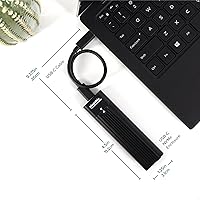
  • Dimensions: Measures 7.87 x 3.54 x 1.18 inches, offering a compact and portable design.
  • Weight: Weighs 3.21 ounces, making it lightweight and easy to carry.
  • Warranty: Comes with a 2-year warranty, offering peace of mind for long-term use.
  • Capacity Support: Supports SSDs of any capacity, providing flexible storage options.
  • PCIe Generation: Supports PCIe Gen 3 and Gen 4, ensuring compatibility with high-performance SSDs.
  • Driverless Setup: Requires no drivers, offering a simple plug-and-play experience.
  • Material: Constructed from durable aluminum for both cooling and a robust, lightweight build.
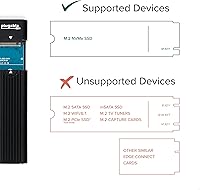
  • Compatibility with Non-NVMe Drives: This enclosure is only compatible with M.2 NVMe SSDs, not SATA-based drives.
  • Heat Management: The aluminum casing helps dissipate heat during intensive data transfer tasks.
  • Portability: Compact design makes it ideal for users needing portable storage solutions.

FAQ

Setting up the Plugable M.2 NVMe SSD Enclosure is easy with its tool-free design. Simply slide the SSD into the enclosure, close the lid, and connect it to your device using a compatible USB-C, USB4, or Thunderbolt port. No software or drivers are needed, making it plug-and-play across Windows, macOS, Linux, and ChromeOS.

This device supports M.2 NVMe SSDs in sizes 2230, 2242, 2260, and 2280, as long as they are PCIe Gen 3 or Gen 4. It's important to note that only NVMe SSDs are compatible; SATA SSDs will not work in this enclosure.

Yes, the Plugable M.2 NVMe SSD Enclosure works with laptops, desktops, and other devices that support USB 3.1 Gen 2, USB-C, USB4, or Thunderbolt ports. This makes it highly versatile for both personal and professional use.

This external SSD case supports high-speed data transfers of up to 10Gbps, which is ideal for quick file transfers, gaming backups, or professional work that requires fast read/write speeds.

No, the enclosure operates on a driverless setup, meaning it doesn't require any software installation. It’s compatible with a variety of operating systems, including Windows, macOS, Linux, and ChromeOS, out of the box.

While this device will work with USB 2.0 or older USB ports, the performance will be limited to the speed of those ports. For optimal performance, it is recommended to use USB 3.1 Gen 2, USB-C, USB4, or Thunderbolt connections for the full 10Gbps speed.

While most M.2 NVMe SSDs should work fine, some users have reported compatibility issues with certain SSD models, especially non-NVMe drives. It’s recommended to use a high-quality NVMe SSD for best performance and reliability.

The aluminum casing of the enclosure acts as a heatsink, dissipating heat efficiently to keep the device cool during extended use. This is particularly important when transferring large files or running demanding applications that can generate heat.

Yes, this enclosure is lightweight and compact, making it an excellent option for those who need portable external storage. Whether you're a gamer on the go or a professional needing quick file transfers, this device is easy to carry and use anywhere.

If the enclosure isn’t working, first check the connection to ensure it’s securely plugged into a compatible USB-C, USB4, or Thunderbolt port. Try using another port or testing with a different device. If issues persist, check that your SSD is correctly installed and compatible with the enclosure.