ineo C2605-NVMe M.2 NVMe SSD Enclosure

Overview
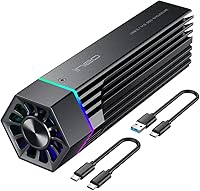
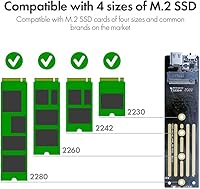
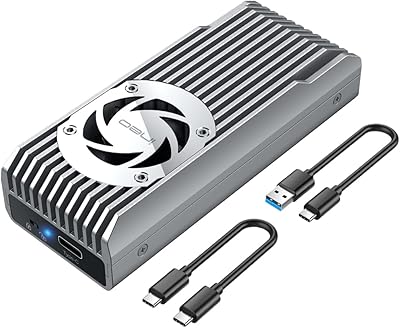
The ineo C2605-NVMe M.2 NVMe SSD Enclosure sits in the mid-range aluminum housing category, but it brings one feature that most rivals at this price skip entirely: a physical write protection switch. Built around the reliable JMS583 chipset, it supports USB 3.2 Gen2 for 10Gbps throughput and accepts NVMe drives in 2230, 2242, 2260, and 2280 form factors. One thing to be clear about upfront — this NVMe enclosure does not support SATA or NGFF M.2 drives. If your spare SSD uses the SATA protocol, this is simply not the right enclosure for you.
Features & Benefits
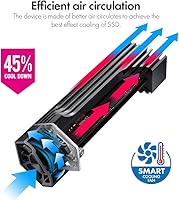
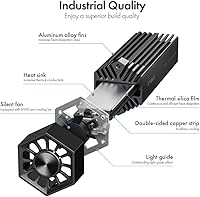
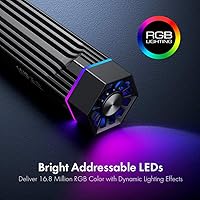
The standout here is the write protection switch. Flip it to the locked position and the drive goes into read-only mode — nothing can write to it, which matters when you are plugging into a borrowed laptop or a shared computer at a library or hotel. Ransomware and accidental overwrites simply cannot touch a locked drive. Beyond security, the ineo enclosure handles heat through a two-layer approach: the aluminum body absorbs heat passively, and a built-in cooling fan picks up the slack during longer, sustained transfers. A silicone thermal pad is included to improve contact between the drive and chassis. Assembly requires minimal effort.
Best For
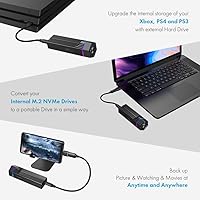
This drive caddy makes the most sense for a few specific types of users. Privacy-focused professionals — IT staff, journalists, researchers — who regularly carry sensitive data and plug into unfamiliar machines will find the write protection switch genuinely useful rather than a gimmick. It is also a solid pick for video editors or photographers who transfer large batches of files and want consistent speeds without throttling caused by heat buildup. Got an old NVMe drive sitting in a drawer after upgrading your laptop? This is one of the cleaner ways to put it back to work as a portable backup drive or even a bootable system drive.
User Feedback
Across more than 300 ratings, this NVMe enclosure holds a 4.3 out of 5 average — a score that reflects genuine, broad satisfaction rather than a small sample of enthusiasts. Buyers frequently call out the write protection switch as the primary reason they chose it over cheaper options, noting it is a genuinely rare feature at this price point. On the downside, the fan noise is real: it is not loud enough to be disruptive in a busy office, but if you prefer silence during late-night work sessions, you will notice it. A few users also found that actual transfer speeds, while solid, did not always reach the theoretical maximum.
Pros
- The physical write protection switch blocks all writes at the hardware level — far more reliable than any software-based lock.
- Supports all four common NVMe drive lengths: 2230, 2242, 2260, and 2280.
- The built-in cooling fan prevents thermal throttling during long, sustained file transfers.
- JMS583 chipset with USB 3.2 Gen2 delivers real-world speeds that noticeably outpace older USB 3.0 enclosures.
- Aluminum build feels solid and dissipates heat passively before the fan even needs to engage.
- Plug-and-play on both Windows and macOS — no driver installation required.
- Bundled silicone thermal pad improves heat transfer between the drive and chassis right out of the box.
- Compact and light enough to carry daily without adding meaningful bulk to a laptop bag.
- Assembly is straightforward and quick, even for users who have never installed an M.2 drive before.
- The write protection feature makes this NVMe enclosure a practical choice for bootable or backup drives that should never be accidentally overwritten.
Cons
- The cooling fan runs constantly — even at idle — making it unsuitable for noise-sensitive environments.
- SATA-based M.2 drives are completely unsupported, which catches many buyers off guard at checkout.
- Real-world transfer speeds fall meaningfully short of the advertised 10Gbps ceiling on most host machines.
- The stock USB cable is short and feels flimsy relative to the quality of the aluminum enclosure.
- The write protection switch is physically small and easy to knock out of position accidentally during handling.
- No visual or software indicator confirms whether the drive is currently in read-only or write-enabled mode once connected.
- The tiny securing screw for the SSD tip is easy to strip or lose during first-time installation.
- Long-term fan bearing reliability is uncertain — moving parts carry more wear risk than passive enclosures.
- Linux compatibility is inconsistent across kernel versions and not officially supported.
- Intermittent drive detection issues have been reported by a subset of users, typically resolved by switching USB ports.
Ratings
The ineo C2605-NVMe M.2 NVMe SSD Enclosure has been scored by our AI system after processing verified buyer reviews from multiple global markets, with spam, incentivized, and bot-flagged submissions actively filtered out. Scores reflect the real distribution of user sentiment — not a polished average — so both the genuine strengths and the frustrations that keep showing up in reviews are transparently represented below.
Write Protection Reliability
Transfer Speed Performance
Thermal Management
Fan Noise Level
Build Quality & Materials
SSD Compatibility Range
Ease of Assembly
Portability & Form Factor
Cable Quality & Connectivity
Driver & Software Compatibility
Value for Money
Heat Distribution During Extended Use
Packaging & Unboxing Experience
Long-Term Durability
Suitable for:
The ineo C2605-NVMe M.2 NVMe SSD Enclosure is built for people who carry sensitive data into unpredictable environments and need a hardware-level way to protect it. IT technicians who plug into client machines, journalists working in the field, or anyone who regularly accesses files on shared or public computers will find the physical write protection switch genuinely useful — it stops anything from writing to the drive at the hardware level, which no software lock can reliably replicate. Content creators who move large video or photo libraries between workstations will also appreciate the active cooling setup, since it helps maintain consistent transfer speeds over longer sessions without throttling. It is equally well-suited to anyone who pulled a working NVMe drive from a laptop upgrade and wants to put it back into service as a fast, portable external storage option. If your priority is a capable, thermally managed enclosure with a real security feature built in, this drive caddy delivers meaningful value.
Not suitable for:
The ineo C2605-NVMe M.2 NVMe SSD Enclosure is a poor match for anyone whose spare M.2 drive uses the SATA protocol rather than NVMe — and this trips up more buyers than you might expect, since both drive types share the same physical M.2 connector. If you are unsure which protocol your drive uses, check its spec sheet before ordering, because the ineo enclosure simply will not recognize a SATA M.2 drive regardless of how it is installed. Users who need absolute silence during work — late-night editors, podcast recorders, people in open-plan offices where ambient noise matters — may find the continuously running cooling fan irritating over time; it is not loud, but it never fully stops. Those chasing peak theoretical throughput on a tight budget might also find competing passive enclosures deliver similar real-world speeds for less money, particularly if their drives do not generate enough heat to need active cooling. Finally, Linux power users or anyone running an unusual operating system should verify compatibility before committing, as driver support outside of Windows and macOS is inconsistent.
Specifications
- Brand: Manufactured by ineo, a brand specializing in storage accessories and enclosures.
- Model Number: The official model designation is C2605-NVMe, as listed by the manufacturer.
- Chipset: Powered by the JMS583 bridge chipset, a widely trusted controller for USB 3.2 Gen2 NVMe enclosures.
- Interface: Connects via USB 3.2 Gen2, supporting a maximum theoretical bandwidth of 10Gbps.
- Drive Compatibility: Compatible exclusively with M.2 NVMe (PCIe) SSDs; SATA and NGFF M.2 drives are not supported.
- Form Factors: Accepts M.2 NVMe drives in 2230, 2242, 2260, and 2280 sizes, covering the most common laptop and desktop drive lengths.
- Housing Material: The outer chassis is constructed from aluminum, providing passive heat dissipation and a durable exterior finish.
- Cooling System: Features a built-in active cooling fan combined with a bundled silicone thermal pad for improved heat transfer during sustained use.
- Write Protection: Includes a physical write protection switch that places the drive into read-only mode when engaged, preventing any data from being written to the SSD.
- Max Devices: Designed to house a single M.2 NVMe SSD at a time; no multi-drive configuration is supported.
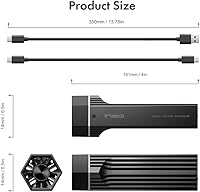
- Package Dimensions: The retail package measures 6.5 x 3.78 x 2.01 inches, keeping the overall footprint compact for storage and shipping.
- Item Weight: The complete unit weighs approximately 9.9 ounces (0.28 kg), light enough for everyday portable carry.
- Connector Type: Uses a USB connector with a cable included in the box; no additional adapters are required for standard use.
- OS Compatibility: Plug-and-play operation is confirmed on Windows; macOS compatibility is also widely reported, though Linux support may vary by kernel version.
- Thermal Pad: Ships with a pre-cut silicone thermal pad designed to improve contact and heat transfer between the installed SSD and the aluminum shell.
- First Available: The product was first listed for sale in August 2020 and has accumulated over 315 verified ratings since launch.
- Category Rank: Holds a Best Sellers Rank of number 179 in the Enclosures category on Amazon at time of review.
- User Rating: Carries an aggregate customer rating of 4.3 out of 5 stars based on over 315 global ratings.
Related Reviews
ineo C2598 10Gbps NVMe SSD Enclosure

dockteck DH0002 M.2 NVMe/SATA SSD Enclosure

WAVLINK Dual-Bay NVMe M.2 SSD Cloner

Cable Matters USB4 40Gbps M.2 NVMe Enclosure

Plugable M.2 NVMe SSD Enclosure

GRAUGEAR G-M2U4-40G-F USB4 NVMe SSD Enclosure

ORICO TCM2 M.2 NVMe SSD Enclosure
elecacc Dual Bay NVMe SATA SSD Enclosure
ANYOYO TB502Pro NVMe SSD Enclosure