Overview

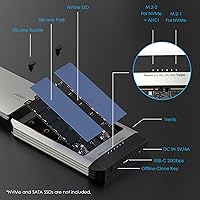
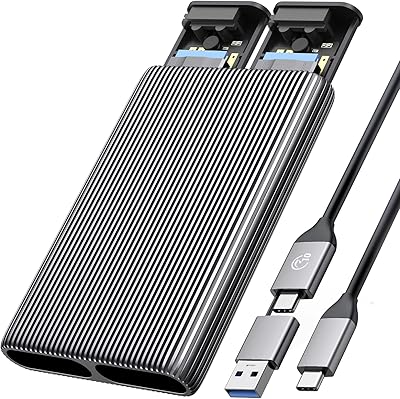
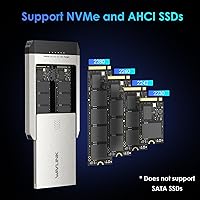
The WAVLINK Dual-Bay NVMe M.2 SSD Cloner is a compact metal enclosure built to do one thing well: clone or transfer data between two NVMe drives without needing a computer. That last part matters more than it might seem. Before tools like this, moving your OS to a faster drive meant wrestling with cloning software, boot quirks, and a live system that could complicate everything. This dual-bay SSD dock cuts through all of that. It supports PCIe NVMe and AHCI protocols across all common M.2 form factors, but be clear going in — SATA and mSATA drives are not compatible here, full stop.
Features & Benefits

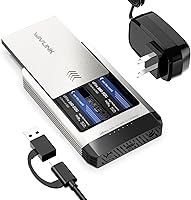
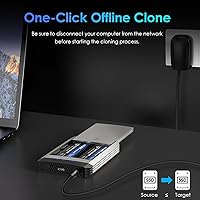
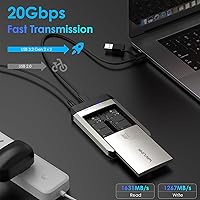
The interface here is USB 3.2 Gen 2x2, which means a theoretical ceiling of 20Gbps throughput — and in practice, read speeds can approach 1,631MB/s depending on the drives you insert. Real-world performance will vary, but paired with fast NVMe drives, transfers move quickly. The offline clone function is the standout: power the dock on, slot the source drive in bay one and the target in bay two, press the single clone button, and four LED indicators walk you through progress in 25% increments. No laptop required, no software to install. The enclosure fits 2230, 2242, 2260, and 2280 form factors, comes with thermal pads and silicone retention buckles, and supports up to 8TB across both bays.

Best For

This NVMe cloner is a natural fit for anyone upgrading storage on a laptop or desktop — particularly if you want to carry over an existing OS install rather than starting fresh. Steam Deck owners and compact laptop users will appreciate the support for smaller 2230 and 2242 form factors, which are not always covered by cheaper docks. IT technicians who move data between drives regularly will find the standalone cloning workflow much faster than spinning up a computer each time. It also works well for direct drive-to-drive transfers when you need speed without routing files through a network or cloud. Just keep in mind this only covers NVMe drives — not SATA M.2.

User Feedback

Across several hundred verified reviews, the WAVLINK cloner earns its 4-star average honestly — not because it's perfect, but because it does its primary job reliably. Buyers consistently highlight cloning reliability as the standout strength, with many reporting successful drive migrations on the first attempt. That said, a handful of users have run into compatibility friction with certain NVMe firmware versions, and a few mentioned the included power adapter felt underwhelming for the price. Build quality gets generally positive marks given the metal housing, though some expected a more premium feel. LED progress indicators are appreciated, but a couple of reviewers found the 25% increment feedback too coarse for longer cloning sessions.

Pros

  • One-button offline cloning works without a connected computer — just power and two NVMe drives.
  • Supports all four common M.2 form factors, including the compact 2230 size used in Steam Deck upgrades.
  • Metal housing feels noticeably more solid than plastic enclosures at a similar price point.
  • No software installation required — works identically across Windows, macOS, Linux, or standalone.
  • USB 3.2 Gen 2x2 interface delivers genuinely fast transfers when paired with capable NVMe drives.
  • Tool-free drive insertion makes swapping SSDs quick and accessible without any technical background.
  • Thermal pads and silicone retention buckles are included, reducing the need for extra accessories.
  • Supports up to 8TB across two bays, covering even high-capacity modern NVMe drives.
  • Compact enough to carry in a laptop bag for on-site IT work or travel storage tasks.
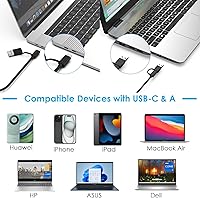
  • OTG support and USB-A adapter expand connectivity to smartphones and tablets when needed.

Cons

  • Clone failures have been reported with certain SSD controllers, and there is no error code to help diagnose the cause.
  • The bundled power adapter feels underdone and has caused instability for some users during long cloning sessions.
  • LED progress only updates at 25% increments, leaving no way to estimate remaining time on large drives.
  • SATA M.2 drives are completely unsupported — a detail that catches many buyers off guard after purchase.
  • No active cooling means the dock runs warm during extended dual-drive operations in enclosed spaces.
  • The included USB-C cable is short, limiting where you can position the dock on a desk relative to your host machine.
  • Drive bay labeling is not prominent enough, and inserting source and target in the wrong order silently prevents cloning from starting.
  • No companion app or diagnostic tool means troubleshooting a failed clone is largely trial and error.

Ratings

Based on a thorough AI analysis of verified buyer reviews worldwide — with spam, bot-generated, and incentivized feedback actively filtered out — the WAVLINK Dual-Bay NVMe M.2 SSD Cloner earns a nuanced picture across its core strengths and real-world limitations. Most buyers come to this dual-bay SSD dock for one reason: to clone drives without the hassle of a live computer, and that capability is where it genuinely delivers. At the same time, a consistent set of edge-case complaints around compatibility and accessory quality keep it from being a universally frictionless tool.
Offline Cloning Reliability
83%
The one-button offline clone function is what most buyers purchase this dock for, and the majority report it works exactly as advertised on the first attempt. For users migrating an OS from an aging 1TB NVMe to a brand-new 2TB drive, the process typically completes without any software intervention or troubleshooting.
A recurring minority of buyers — particularly those using certain Micron or Phison-controller SSDs — report cloning failures or drives not being recognized at all. The 25% LED increment feedback makes it hard to gauge whether a stalled clone is still running or has silently failed mid-transfer.
Transfer Speed
78%
22%
When paired with fast Gen 4 NVMe drives, real-world throughput is noticeably strong for a USB-based dock, and large file transfers that would take minutes over USB 3.2 Gen 1 finish considerably faster. Users backing up game libraries or video archives appreciate the reduced wait time compared to older enclosures.
The headline 20Gbps figure applies to the interface ceiling, not the drives themselves — a point many buyers learn after purchase. Users with mid-tier or Gen 3 NVMe drives will not see headline speeds, and a few noted that sustained writes over long sessions showed some throttling.
Compatibility Range
71%
29%
Supporting all four mainstream M.2 form factors — 2230, 2242, 2260, and 2280 — makes this dock genuinely versatile across laptops, compact PCs, and handheld gaming devices like the Steam Deck. IT professionals dealing with a mix of drive sizes in a single workflow find this breadth practical.
The NVMe-only restriction catches a meaningful number of buyers off guard, particularly those who assumed any M.2 enclosure handles SATA M.2 as well. Users with SATA-based M.2 drives — which are still common in older ultrabooks — will need to return or shelf this dock entirely.
Build Quality
76%
24%
The metal housing gives the dock a solid, no-flex feel that stands apart from the all-plastic enclosures crowding the same price bracket. Most buyers handling it for the first time describe it as feeling denser and more purposeful than expected given the price.
A handful of users felt the overall finish and port tolerances did not quite match the premium impression the metal shell initially creates. The USB-C port on some units received comments about feeling slightly loose after repeated cable insertions over a few weeks of active use.
Ease of Setup
86%
Tool-free SSD insertion lowers the barrier significantly — most users have both drives seated and the clone process initiated within a few minutes of unboxing. The single-button operation means there is genuinely no learning curve for someone doing this for the first time.
The instructions included in the box are minimal and lean heavily on diagrams rather than written guidance. A few first-time users loaded the source and target drives into the wrong bays, which prevents cloning from initiating — an easy but frustrating mistake that better labeling could prevent.
LED Progress Indicators
62%
38%
Having any visual progress feedback on a standalone cloner is more useful than nothing, and the four-stage LED system at least confirms the process is running and advancing. For short cloning jobs under 30 minutes, the 25% increments are sufficient.
For large drives — think 2TB to 4TB migrations that run over an hour — the coarse 25% step increments leave users with no way to estimate remaining time or confirm activity between milestones. Several reviewers described watching an LED stuck at 75% for extended periods with no way to tell if the clone was progressing or frozen.
Power Supply Quality
58%
42%
The included DC 5V/4A adapter is functional and sufficient to power the dock under typical single-drive usage. Users running casual enclosure tasks without simultaneous heavy cloning rarely raised concerns about power delivery.
During demanding offline clone operations — especially with two larger NVMe drives inserted — some buyers reported instability that they traced back to the bundled power adapter. The adapter feels noticeably lightweight relative to the dock itself, and a few users swapped it for a higher-quality aftermarket unit to resolve intermittent issues.
Accessory Completeness
73%
27%
The inclusion of thermal pads, silicone retention buckles, a USB-C to C cable, and a USB-A adapter covers most connection scenarios out of the box. For buyers connecting to a smartphone or tablet via OTG, having the adapter included saves an extra purchase.
The USB-C cable included is functional but on the shorter side, limiting placement flexibility on a desk. Some buyers noted the thermal pads were adequate in size but felt thin relative to what premium enclosures typically include.
Thermal Management
67%
33%
The metal housing acts as a passive heatsink that does a reasonable job of dissipating warmth during transfers, and the included thermal pads make contact between drive and chassis more effective than a bare enclosure. Under light-to-moderate workloads the drives stay cool enough that throttling is not a concern.
During extended cloning sessions with two high-performance NVMe drives running simultaneously, the dock gets noticeably warm to the touch. There is no active cooling, and users cloning very large drives in warm ambient conditions have mentioned throttling that stretched overall clone time.
Form Factor & Portability
81%
19%
At just over a pound and not much larger than a deck of cards, this dual-bay SSD dock fits easily into a laptop bag or tech kit. IT technicians who carry it between offices or job sites find it unobtrusive and easy to stow.
The requirement to carry a dedicated DC power adapter alongside the dock reduces its portability advantage somewhat. Unlike bus-powered single-bay enclosures, this one cannot simply run off a laptop USB port — which is a trade-off most informed buyers accept but some find inconvenient.
Value for Money
79%
21%
For a metal-built NVMe cloner with offline capability and 20Gbps throughput, the pricing sits in a reasonable range compared to name-brand competitors that charge significantly more for comparable specs. Buyers who use it for even one successful drive migration typically feel the tool paid for itself.
Buyers who run into compatibility issues with specific SSD controllers or firmware versions feel the value proposition collapses quickly, since a dock that does not clone their particular drive is effectively worthless. The power adapter quality also feels like a cost-cutting decision that does not quite match the asking price.
Software Independence
88%
The complete absence of required software is a genuine relief for users who have spent hours troubleshooting Macrium Reflect or Clonezilla on temperamental systems. The standalone workflow means it works identically on Windows, macOS, and Linux hosts — or with no host at all.
The flip side of having no software is having no diagnostic output when something goes wrong. If a clone fails, there is no log, no error code, and no feedback beyond a blinking LED — leaving users to guess whether the problem is the drive, the cable, the power supply, or the dock itself.
NVMe Protocol Support
74%
26%
Supporting both PCIe NVMe and AHCI under the same M.2 key interface means users do not need to verify protocol compatibility for most modern drives before purchasing. This is particularly helpful for IT professionals handling a variety of enterprise and consumer NVMe drives.
The lack of SATA M.2 support remains the single biggest compatibility gap and the most common source of one-star reviews from buyers who did not read the spec sheet carefully. In a market where SATA M.2 drives are still in wide circulation, this is a meaningful exclusion worth prominent disclosure.

Suitable for:

The WAVLINK Dual-Bay NVMe M.2 SSD Cloner is a strong fit for anyone who has ever tried to migrate a full OS installation and ended up deep in forum threads about bootable USB drives and partition alignment errors. It cuts all of that out — you slot in your source and target NVMe drives, press one button, and walk away. Laptop upgraders who want to move everything from a stock drive to a larger or faster NVMe without reinstalling Windows will find the offline workflow genuinely practical. Steam Deck owners and compact PC builders benefit especially from the support for smaller 2230 and 2242 form factors, which many competing docks quietly omit. IT technicians managing regular drive migrations across multiple machines will appreciate having a self-contained tool that does not depend on a host system being functional or even present. Power users who want fast drive-to-drive transfers without routing files through a network share or cloud storage will also find the high-bandwidth USB 3.2 Gen 2x2 interface a meaningful advantage over older enclosures.
Not suitable for:

Anyone with SATA-based M.2 drives should stop here — the WAVLINK Dual-Bay NVMe M.2 SSD Cloner does not support SATA or mSATA interfaces, and this single limitation is responsible for the majority of the frustrated reviews the product has received. If your older ultrabook or budget laptop uses an M.2 2242 SATA drive rather than NVMe, this dock will not recognize it, full stop. Casual users who only need to occasionally read files off an external drive — rather than clone or transfer between two NVMe drives — are also over-buying here; a simpler single-bay enclosure would be more appropriate and less expensive. Buyers who expect enterprise-level diagnostic feedback when something goes wrong will find the four-LED progress system frustrating, since there is no error reporting or logging if a clone fails. Anyone sensitive to the bundled accessories should be aware the included power adapter has drawn criticism for feeling underpowered during heavy dual-drive cloning sessions, which may require an aftermarket replacement to resolve.
Specifications

  • Interface: Connects via USB 3.2 Gen 2x2, supporting a maximum theoretical bandwidth of 20Gbps for high-speed drive transfers.
  • Read Speed: Sequential read speeds reach up to 1,631MB/s depending on the NVMe drives inserted and the host system's USB controller.
  • Write Speed: Sequential write speeds reach up to 1,267MB/s under optimal conditions with compatible high-performance NVMe drives.
  • Form Factors: Supports M.2 SSD sizes 2230, 2242, 2260, and 2280, covering the full range of common NVMe drive lengths.
  • Protocols: Compatible with PCIe NVMe and AHCI M.2 drives using M-key or B+M-key connectors; SATA and mSATA M.2 drives are not supported.
  • Max Capacity: Accommodates up to 8TB of total storage across both bays, equivalent to two 4TB NVMe SSDs installed simultaneously.
  • Offline Cloning: One-button offline cloning operates without a host computer, copying all data from the source drive to the target drive autonomously.
  • Clone Indicators: Four blue LED indicators display cloning progress at 25%, 50%, 75%, and 100% completion stages.
  • Power Supply: Powered by an included DC 5V/4A external power adapter connected via a dedicated DC-IN port on the enclosure.
  • Dimensions: The enclosure measures 5.91 x 3.94 x 2.36 inches, making it compact enough for a laptop bag or desktop toolkit.
  • Weight: The unit weighs 1.01 pounds, offering a balance of solid build presence without being cumbersome for transport.
  • Material: The outer shell is constructed from metal, providing passive heat dissipation and a more durable feel than plastic alternatives.
  • Included Accessories: Package includes a USB-C to C cable, USB-A adapter, OTG support cable, two silicone retention buckles, and two thermally conductive silicone pads.
  • Drive Installation: Both SSD bays use a tool-free insertion mechanism, requiring no screwdrivers for standard drive mounting.
  • Host Connectivity: Features a single USB-C port for data and enclosure use, plus OTG support for connecting smartphones and tablets directly.
  • Brand: Manufactured and sold by WAVLINK, a brand specializing in connectivity and storage expansion accessories.
  • Model Number: The official model designation is NVMe + NVMe, reflecting its dual NVMe-only bay configuration.
  • Thermal Management: Two included thermally conductive silicone pads improve heat transfer between the installed drives and the metal enclosure body.

Related Reviews
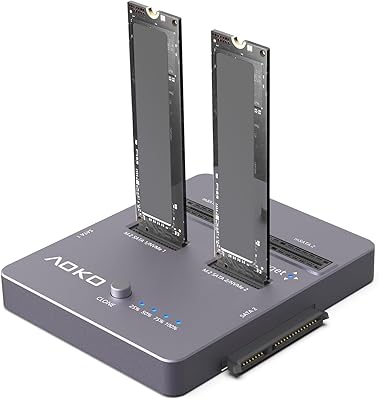
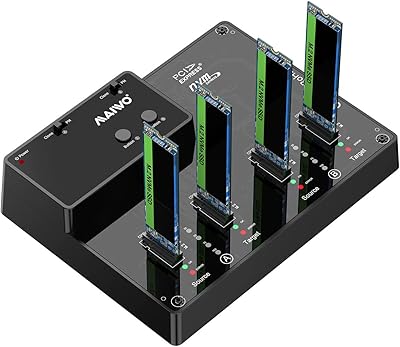
AOKO 4-in-1 M.2 NVMe Hard Drive Duplicator
76%
88%
Ease of Use
83%
Drive Compatibility
86%
Cloning Speed
74%
Offline Cloning Reliability
81%
Build Quality
More
MAIWO M.2 NVMe SSD Cloner Duplicator 4 Bay Docking Station
86%
89%
Cloning Speed
92%
Ease of Setup
87%
Build Quality
90%
Heat Dissipation
93%
Compatibility with M.2 Sizes
More
ORICO Dual M.2 NVMe SSD Enclosure
79%
88%
Build Quality
84%
Thermal Management
82%
Transfer Speed
71%
Drive Compatibility
91%
Ease of Installation
More
IO CREST SY-ENC50127 USB 3.2 Type-C Dual Bay HDD + M.2 NVMe External Enclosure
83%
88%
Performance
93%
Ease of Setup
91%
Build Quality
87%
Data Transfer Speed
90%
Cooling/Heat Management
More
ACASIS EC-6604 M.2 NVMe SSD Duplicator

78%
83%
Cloning Reliability
88%
Build Quality
71%
Cooling Performance
77%
Drive Compatibility
74%
Transfer Speed
More
dockteck DH0002 M.2 NVMe/SATA SSD Enclosure

84%
88%
Transfer Speed (NVMe)
76%
SATA Drive Performance
83%
Build Quality
93%
Ease of Setup
79%
Thermal Management
More
ineo C2605-NVMe M.2 NVMe SSD Enclosure

77%
88%
Write Protection Reliability
79%
Transfer Speed Performance
82%
Thermal Management
61%
Fan Noise Level
76%
Build Quality & Materials
More
SanDisk 2TB SSD Plus M.2 NVMe SSD
86%
89%
Performance
92%
Ease of Installation
88%
Reliability
91%
Value for Money
90%
Capacity
More
Cable Matters USB4 40Gbps M.2 NVMe Enclosure

80%
88%
Data Transfer Performance
83%
Build Quality & Materials
79%
Thermal Management & Cooling
91%
Portability & Form Factor
74%
Compatibility Range
More
Vansuny 1TB NVMe M.2 SSD
87%
94%
Performance (Speed)
88%
Reliability
72%
Compatibility
91%
Value for Money
85%
Build Quality
More

FAQ

Only NVMe. This is the single most important thing to verify before buying. If your drive uses a SATA interface — even if it physically fits an M.2 slot — this dock will not recognize it. Check your drive's spec sheet or the label on the drive itself before ordering.

No, and that is the whole point of the offline clone feature. You just plug the dock into its power adapter, insert your source drive in bay one and your target drive in bay two, then hold the clone button for a few seconds. The dock handles everything independently — no host machine needed.

No. Like virtually all hardware cloners, this dual-bay SSD dock requires the target drive to be equal to or larger in capacity than the source. Trying to clone a 1TB drive onto a 500GB drive will fail. If your source data fits within the target capacity but the drive is technically larger, results may vary by drive firmware.

It depends entirely on how much data is on the source drive and the speed of both drives. A 500GB drive that is half full might finish in 20 to 40 minutes, while a near-full 2TB drive could run for two hours or more. The LED indicators only update at 25% milestones, so long jobs can feel uncertain toward the end.

Yes, you can use either or both bays as standard external storage enclosures connected to a computer via USB-C. The cloning function is a bonus mode — day to day, it works just like any other high-speed NVMe enclosure for reading and writing files.

Yes, and it is actually one of the better options for Steam Deck upgrades specifically because it supports the 2230 form factor that the Steam Deck uses. You can clone your existing Steam Deck drive to a larger 2230 NVMe without needing a PC at all, which is a significant convenience.

Cloning simply will not start. The dock is designed so the source must go in the designated source bay and the target in the target bay — swapping them does not trigger the clone process. The bay labeling on the unit itself is not always prominently marked, so double-check the quick-start guide before pressing the clone button.

Because the offline clone mode requires no host computer at all, it is platform-agnostic for cloning. When used as a regular enclosure connected to a Mac, it works fine — macOS recognizes it as a standard USB storage device. Just note that macOS may prompt you to initialize a freshly cloned drive depending on the partition scheme used.

For light use and quick transfers it is generally fine, but during long offline clone sessions with two NVMe drives running simultaneously, some users have reported instability that resolved after switching to a higher-quality 5V/4A adapter. If you plan to use this dock heavily for cloning, having a reliable aftermarket power supply on hand is a reasonable precaution.

In most cases, yes. Hardware-level cloning copies everything sector by sector, so the resulting drive should be bootable without reinstallation. That said, occasional issues with Windows activation or boot configuration can arise depending on partition layout and whether the drive uses MBR or GPT. Booting into Windows Recovery or running a quick startup repair usually resolves any post-clone boot hiccups.