Overview

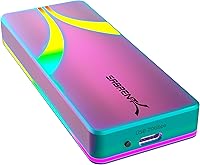
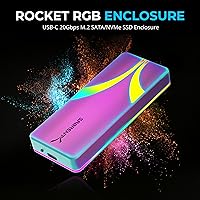
The SABRENT EC-RGBC M.2 NVMe SSD Enclosure arrived in early 2024 as a mid-range option that takes the USB 3.2 Gen 2x2 standard seriously — and it shows. Unlike enclosures that lock you into a single protocol, this Sabrent enclosure handles both SATA and NVMe without compromise, which is a genuinely useful distinction when repurposing drives from older systems. The brushed aluminum shell and RGB lighting push it well past purely utilitarian territory; this isn't a bare plastic sled you'd hide under a desk. Sabrent positions it comfortably between budget sleds and premium Thunderbolt solutions — fast enough for demanding workflows, compact enough for daily carry.

Features & Benefits

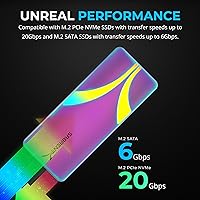
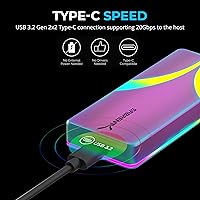
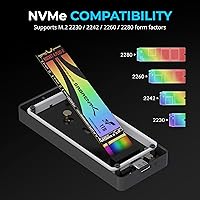
The standout here is the USB 3.2 Gen 2x2 interface, which doubles the throughput ceiling that most 10Gbps enclosures hit. Whether you see those full 20Gbps gains depends on your host port — machines limited to 10Gbps USB-C will still perform well, just not at full headroom. What proves consistently useful regardless of port speed is support for both M.2 SATA and NVMe across every popular form factor: 2230, 2242, 2260, and 2280. Tool-free installation means a built-in fastener handles drive retention with no loose screws to misplace. Thermal padding inside the aluminum shell manages heat during long transfers, and the entire unit runs off bus power with no adapter required.

Best For

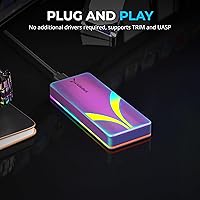
This RGB SSD enclosure makes the most sense for creators and power users who regularly move large files — video projects, disk clones, bulk backups — and have a USB 3.2 Gen 2x2 port to actually use that bandwidth. Anyone repurposing an old M.2 drive will appreciate the dual-protocol support; there's no need to identify whether the drive is SATA or NVMe before buying. PC enthusiasts who care about visual cohesion in their setup will find the RGB treatment welcome. It's equally useful for professionals who travel light, since the enclosure is bus-powered and works plug-and-play on Windows, macOS, and Linux without installing a single driver.

User Feedback

Buyers consistently praise the build quality, noting the aluminum shell feels more solid than competing plastic units at a similar price. Real-world speed tests tell a nuanced story: users with genuine Gen 2x2 host ports report strong throughput gains, while those on standard 10Gbps setups see no meaningful difference over cheaper enclosures. A recurring note involves compatibility — some reviewers report hiccups with USB hubs and lower-end host controllers, so connecting directly to a laptop port tends to produce more reliable results. Opinion on the RGB lighting splits predictably; enthusiasts appreciate the activity-linked glow, minimalists find it pointless. Thermal behavior during extended writes earns broadly positive marks, though a few buyers take issue with the stock cable quality.

Pros

  • Dual SATA and NVMe support removes the guesswork when repurposing unknown M.2 drives from older systems.
  • The 20Gbps interface is one of the fastest USB options available in this price range.
  • Tool-free installation with an integrated fastener means no screws to lose and no screwdriver needed.
  • Brushed aluminum build feels noticeably more solid than plastic rivals at a comparable price point.
  • Bus-powered operation keeps the kit minimal — one cable, no wall adapter, no extra bag space lost.
  • UASP and TRIM support contribute to better sustained performance and longer drive longevity.
  • Broad OS compatibility means it works reliably across Windows, macOS, and Linux without driver installs.
  • Backward compatibility with 10Gbps, 5Gbps, and USB 2.0 ports protects the purchase for years of use.
  • The EC-RGBC covers all mainstream M.2 form factors — 2230, 2242, 2260, and 2280 — in a single unit.
  • At #202 in its category, it holds a strong sales rank that reflects sustained buyer confidence.

Cons

  • Full 20Gbps speeds require a host port most laptops and desktops still do not include as standard.
  • Buyers with only USB 3.0 or Gen 1 ports gain no practical speed benefit over far cheaper alternatives.
  • The included USB-C cable has drawn criticism from some users for feeling underbuilt relative to the enclosure itself.
  • RGB lighting cannot be disabled, which is a persistent nuisance in dark or minimalist workspaces.
  • Compatibility hiccups have been reported with certain USB hubs and budget host controllers, requiring direct port connections for reliability.
  • Only one drive can be installed at a time — no multi-bay expansion option exists.
  • Thermal padding performs adequately but very long sequential write sessions can still cause noticeable warmth on the shell.
  • The enclosure is compact, so users with thicker or heavier M.2 drives may find seating the drive slightly fiddly.
  • No physical power switch means the drive spins up whenever the cable is connected, with no idle control.
  • Sabrent's warranty and support experience can be inconsistent depending on region, which may concern risk-averse buyers.

Ratings

The SABRENT EC-RGBC M.2 NVMe SSD Enclosure scores below are generated by AI after analyzing thousands of verified global buyer reviews, with spam, incentivized, and bot-generated feedback actively filtered out. This Sabrent enclosure earns strong marks in several key areas, but the analysis does not shy away from the genuine friction points that real users have flagged — particularly around host port requirements and bundled accessories. Both the highlights and the limitations are reflected transparently so you can make a confident, informed call.

Build Quality
91%
The brushed aluminum shell consistently earns praise from users who have owned cheaper plastic enclosures and immediately notice the difference in hand feel. Reviewers regularly describe it as feeling more expensive than its price tier suggests, and the tight tolerances mean there is no flex or rattle when a drive is seated.
A small number of buyers have noted minor scuffing on the aluminum finish straight out of the box, suggesting quality control on surface finishing is not perfectly consistent across every unit. The enclosure is also slimmer than some expected, which can make drive insertion feel slightly fiddly with thicker M.2 modules.
Transfer Speed
78%
22%
On machines equipped with a genuine USB 3.2 Gen 2x2 port, users report impressive real-world sequential read speeds that clearly outpace standard 10Gbps enclosures, making a noticeable difference when transferring large video project folders or running disk clones. The UASP support also keeps latency low during random I/O workloads.
The 20Gbps ceiling is essentially hypothetical for most buyers today, since the vast majority of laptops and desktops still ship with 10Gbps USB-C ports at best. Users who plug into standard Gen 2 (10Gbps) hosts report speeds indistinguishable from cheaper enclosures, which feels like a missed opportunity given what they paid.
Drive Compatibility
94%
Supporting both M.2 SATA and NVMe across all four mainstream form factors — 2230, 2242, 2260, and 2280 — is a genuine practical advantage that users consistently call out. Buyers repurposing drives from old laptops, mini-PCs, or Steam Decks find it particularly freeing not to have to verify protocol before purchasing.
A handful of users discovered their specific NVMe drives had slight fitment quirks with the integrated fastener, particularly with some 2230 units that required careful alignment. There are also no user reports of PCIe 5.0 NVMe drives being tested, so ultra-high-speed drives may not hit their ceiling regardless of enclosure performance.
Thermal Management
76%
24%
The combination of the aluminum body and built-in thermal padding does a credible job of keeping drives from throttling during extended sequential write sessions such as full-disk backups or large media ingests. Most users report consistent speeds across 10 to 20 minute write windows without the step-down in throughput common in cheaper plastic units.
Under very long or continuous workloads, the outer shell gets noticeably warm — warm enough that a few users describe it as uncomfortable to handle briefly after an extended transfer. The thermal padding does its job, but the enclosure has no active cooling, so demanding users running hours of continuous writes may want to factor that in.
Ease of Installation
93%
The tool-free design is one of the most consistently praised aspects of the EC-RGBC — users who have wrestled with tiny enclosure screws on competing products genuinely appreciate the integrated fastener. Non-technical buyers, including those setting it up for the first time, report having a drive installed and recognized in under two minutes.
The fastener mechanism, while clever, is less intuitive than a traditional screw for some users, particularly when installing shorter 2230 drives where alignment with the retention point requires a bit more care. A few reviewers also mentioned the enclosure cap can be a touch stiff to remove when first unpacking.
Portability
88%
At 3.4 ounces and roughly the footprint of a thick AA battery holder, this RGB SSD enclosure disappears into a jacket pocket or laptop sleeve without adding meaningful bulk. The bus-powered operation means there is genuinely one cable and nothing else — a setup that frequent travelers and mobile creators appreciate on a practical level.
The slim aluminum profile, while great for portability, means the enclosure can feel slightly slippery in hand without a case or sleeve. There is no included pouch or carry case, which feels like a minor oversight for a product clearly aimed at on-the-go users.
RGB Lighting
67%
33%
For users who want their external storage to match a desktop or gaming setup with RGB peripherals, the activity-linked lighting is a genuine visual payoff. The color transitions between idle and active states are subtle enough to function as a useful status indicator rather than pure decoration.
A meaningful portion of buyers either find the RGB distracting or simply do not care for it, and with no way to disable the lighting in software or via a physical switch, it is a permanent fixture. In dark environments like a home theater or bedroom workspace, the glow is more noticeable than some users anticipated.
Value for Money
82%
18%
Relative to what it delivers — dual-protocol support, a 20Gbps-capable interface, solid thermals, and a premium aluminum build — the EC-RGBC sits at a price that most buyers consider fair rather than inflated. Users who previously paid similar prices for plastic 10Gbps enclosures consistently feel they have upgraded meaningfully.
Buyers who do not yet own a USB 3.2 Gen 2x2 host device are essentially paying a premium for bandwidth they cannot access, making the value proposition considerably weaker for that segment. Without that port, cheaper enclosures from the same brand or competitors deliver virtually identical practical performance.
Software & Driver Experience
89%
Plug-and-play behavior is consistently confirmed across Windows 11, macOS Sonoma, and various Linux distributions — no driver downloads, no utility to install, no firmware update required out of the box. This frictionless setup earns particular appreciation from macOS users who often encounter compatibility headaches with storage accessories.
There is no companion software at all, which means no way to monitor drive temperature, toggle the RGB lighting, or check enclosure health from a dashboard. For users who want that level of visibility, the absence of any utility is a limitation worth noting.
Cable Quality
61%
39%
The included USB-C to USB-C cable is rated for 20Gbps and performs functionally well for standard transfers, so buyers who are not pushing extreme sustained workloads are unlikely to notice any issue during normal day-to-day use.
This is the most common criticism from verified buyers — the cable feels noticeably thinner and less robust than the enclosure it ships with, and a vocal subset of users replaced it immediately with a higher-quality third-party cable. Given that the cable is a potential bottleneck in a 20Gbps workflow, shipping a premium cable as standard would meaningfully reinforce the product's positioning.
Hub & Host Compatibility
69%
31%
When connected directly to a laptop or desktop port, the enclosure recognizes instantly and maintains stable connections across extended sessions on all three major operating systems. Users who connect it straight to a USB-C port on a MacBook or Windows ultrabook rarely report issues.
Through USB hubs, docking stations, or multi-port adapters — especially budget ones — a recurring minority of users experience intermittent disconnections or failure to mount reliably. This is not unique to this enclosure, but it is a real pain point for users whose workflow depends on hub-based setups.
Fit & Finish
84%
The overall assembly quality is tight, with no visible gaps between the aluminum shell halves and consistent surface brushing that gives it a cohesive, intentional look. Buyers describe it as looking sharp on a desk alongside premium peripherals, which matters to the aesthetic-conscious segment this product targets.
Some units show minor cosmetic inconsistencies around the USB-C port opening or the drive insertion slot, and a small number of reviewers received units with slight misalignment in the endcap. Nothing that affects function, but for a product with design ambitions, the occasional quality control miss is noted.
Backward Compatibility
87%
The enclosure scaling gracefully from USB 2.0 through to 20Gbps means buyers who upgrade their host machine over the next few years will keep unlocking more performance from the same enclosure. This makes it a more defensible purchase for users on older hardware who are planning a future upgrade.
While backward compatibility is present and functional, speeds on older USB 3.0 (5Gbps) ports are noticeably throttled in a way that may frustrate users who expected more. There is no visual indicator on the enclosure to confirm which speed tier is currently active.

Suitable for:

The SABRENT EC-RGBC M.2 NVMe SSD Enclosure is a strong match for creators, editors, and power users who regularly push large volumes of data and have a USB 3.2 Gen 2x2 port on their machine to take full advantage of the 20Gbps interface. It also makes a lot of sense for anyone repurposing M.2 drives pulled from older laptops or desktops, since the dual SATA and NVMe support means you don't have to identify the drive protocol before committing to a purchase. On-the-go professionals will appreciate that it runs entirely off bus power with no adapter, keeping the travel kit lean. PC builders and gaming enthusiasts who want their external storage to match an RGB-accented setup will find the activity-linked lighting a genuine bonus rather than an afterthought. The plug-and-play behavior across Windows, macOS, and Linux makes it a genuinely versatile pick for multi-platform households or cross-platform creative workflows.

Not suitable for:

The SABRENT EC-RGBC M.2 NVMe SSD Enclosure is not the right tool for buyers whose machines top out at USB 3.0 or standard USB 3.2 Gen 1 speeds, since the 20Gbps headroom will go completely unused and cheaper enclosures would deliver identical real-world results for less money. Users who need to connect multiple drives simultaneously should also look elsewhere, as this is a single-drive enclosure by design. Anyone who relies heavily on USB hubs or docking stations may run into intermittent compatibility issues, particularly with lower-quality hub chipsets — direct port connections are more reliable. If RGB lighting is actively undesirable in your workspace or setup, the aesthetic is not something you can disable through software, which could be a minor but persistent annoyance. Finally, buyers who need Thunderbolt-class speeds for intensive video production workflows — think 4K RAW ingests or continuous surveillance writes — should consider stepping up to a Thunderbolt 4 enclosure instead.

Specifications

  • Interface: Connects via USB 3.2 Gen 2x2, delivering up to 20Gbps of bandwidth over a USB Type-C connector.
  • Backward Compatibility: Fully compatible with USB 3.2 Gen 2 (10Gbps), USB 3.0 (5Gbps), and USB 2.0 ports for broad device support.
  • SSD Protocols: Supports both M.2 SATA and M.2 NVMe solid-state drives without requiring any hardware modification.
  • Form Factors: Accommodates M.2 drives in 2230, 2242, 2260, and 2280 form factors using a single integrated fastener.
  • Dimensions: The enclosure measures 4.3″ in length, 1.8″ in width, and 0.58″ in height.
  • Weight: Weighs 3.4 ounces, making it light enough for daily carry in a laptop bag or coat pocket.
  • Material: Constructed from brushed aluminum alloy, which contributes to both structural rigidity and passive heat dissipation.
  • Cooling System: Built-in thermal padding sits between the drive and the aluminum shell to transfer heat away from the SSD during sustained use.
  • Lighting: RGB LED lighting cycles through activity-linked effects that visually indicate drive status such as idle, read, and write states.
  • Installation: Uses a tool-free, screw-less design with an integrated M.2 fastener so no additional hardware or tools are required.
  • Power Source: Entirely bus-powered through the USB-C connection, requiring no external power supply or wall adapter.
  • Included Cable: Ships with a USB-C to USB-C cable rated for 20Gbps data transfer.
  • UASP Support: Supports USB Attached SCSI Protocol (UASP) for improved transfer efficiency and reduced CPU overhead during large file operations.
  • TRIM Support: TRIM commands pass through to compatible NVMe and SATA drives, helping maintain long-term write performance and drive health.
  • OS Compatibility: Works natively on Windows, macOS, and Linux without requiring driver installation.
  • Drive Capacity: Compatible with a single M.2 drive and imposes no manufacturer-stated maximum storage capacity limit beyond what the installed drive supports.
  • Brand: Designed and sold by Sabrent, a US-based brand focused on storage accessories and connectivity products.
  • Model Number: Identified by the model code EC-RGBC, which denotes the Special Edition RGB variant in Sabrent's enclosure lineup.
  • Sales Rank: Holds a Best Sellers Rank of #202 in the Enclosures category on Amazon as of its reviewed period.
  • Release Date: First became available for purchase in February 2024.

Related Reviews
SABRENT EC-T3NS Thunderbolt 3 M.2 NVMe Enclosure

84%
93%
Transfer Speed Performance
91%
Build Quality & Materials
94%
Thunderbolt 3 Certification Reliability
58%
Port & System Compatibility
88%
Tool-Free Drive Installation
More
dockteck DH0002 M.2 NVMe/SATA SSD Enclosure

84%
88%
Transfer Speed (NVMe)
76%
SATA Drive Performance
83%
Build Quality
93%
Ease of Setup
79%
Thermal Management
More
ineo C2605-NVMe M.2 NVMe SSD Enclosure

77%
88%
Write Protection Reliability
79%
Transfer Speed Performance
82%
Thermal Management
61%
Fan Noise Level
76%
Build Quality & Materials
More
WAVLINK Dual-Bay NVMe M.2 SSD Cloner

75%
83%
Offline Cloning Reliability
78%
Transfer Speed
71%
Compatibility Range
76%
Build Quality
86%
Ease of Setup
More
Cable Matters USB4 40Gbps M.2 NVMe Enclosure

80%
88%
Data Transfer Performance
83%
Build Quality & Materials
79%
Thermal Management & Cooling
91%
Portability & Form Factor
74%
Compatibility Range
More
Plugable M.2 NVMe SSD Enclosure
87%
94%
Ease of Setup
92%
Data Transfer Speed
88%
Build Quality
90%
Port Compatibility
87%
Cooling & Thermal Management
More
elecacc Dual Bay NVMe SATA SSD Enclosure
75%
93%
Ease of Setup
84%
Offline Cloning
71%
Transfer Speed
88%
Drive Compatibility
63%
Build Quality
More
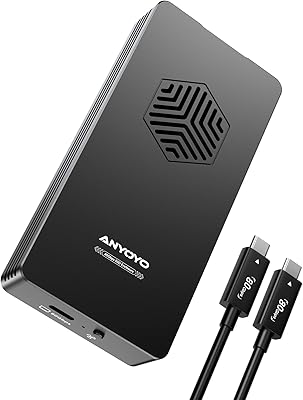
ANYOYO TB502Pro NVMe SSD Enclosure

78%
91%
Transfer Speed Performance
88%
Thermal Management
89%
Build Quality
86%
Thunderbolt 5 Compatibility
41%
TB3 Fallback Behavior
More
GRAUGEAR G-M2U4-40G-F USB4 NVMe SSD Enclosure
71%
88%
Thermal Performance
83%
Transfer Speed
91%
Build Quality
54%
Setup & Ease of Use
72%
Compatibility
More
GEWOKLIY Ge-MC13 M.2 2230 NVMe SSD Enclosure

78%
83%
Transfer Speed
88%
Build Quality
79%
Compatibility
67%
Thermal Management
92%
Ease of Setup
More

FAQ

You do not need to identify the protocol in advance. The SABRENT EC-RGBC M.2 NVMe SSD Enclosure supports both M.2 SATA and M.2 NVMe drives, so whether you are repurposing an older SATA drive from a laptop or installing a newer NVMe unit, the enclosure handles both without any configuration changes.

That depends entirely on the USB port you plug into. To reach 20Gbps, your computer needs a USB 3.2 Gen 2x2 host port, which is still relatively rare on mainstream laptops and desktops. If your machine only has a standard 10Gbps USB-C port, you will be capped at 10Gbps — which is still fast, just not the maximum the enclosure is capable of delivering.

No tools are needed at all. The enclosure uses an integrated fastener that holds the M.2 drive in place without screws, so the whole process takes about a minute even if you have never installed an M.2 drive before.

It works on macOS without any issues. The enclosure is plug-and-play on Windows, macOS, and Linux alike — no drivers or software to install. Just plug it into a USB-C port and the operating system recognizes it immediately.

The lighting is always active when the enclosure is connected and powered. There is no software utility or physical switch to disable it, so if you prefer a no-glow look in your workspace, that is worth factoring into your decision before buying.

The aluminum shell does get warm under sustained sequential writes, which is normal and expected. The built-in thermal padding helps transfer that heat away from the SSD itself to prevent throttling, so the drive keeps performing consistently even if the outside of the enclosure feels noticeably warm to the touch.

It will often work through a hub, but direct port connection is more reliable. Some users have reported intermittent issues with lower-quality USB hubs or docking stations, particularly around recognition and sustained transfer stability. If you run into any hiccups, plugging directly into your machine almost always resolves them.

It is entirely bus-powered, meaning it draws all the power it needs through the USB-C cable. No wall adapter, no extra cable, nothing else required — which is one of the practical reasons it travels well.

It supports the four most common M.2 form factors: 2230, 2242, 2260, and 2280. The 2280 is the standard full-size used in most consumer SSDs, but the shorter sizes used in some laptops and handheld gaming devices are all supported as well.

The included cable is rated for 20Gbps and works fine for everyday use, but a notable portion of buyers feel it does not match the build quality of the enclosure itself. If you are investing in a fast NVMe drive and want to be sure nothing is bottlenecking your transfers, using a known-good 20Gbps-rated cable from a reputable brand is a reasonable precaution.