UGREEN Thunderbolt 5 NVMe SSD Enclosure





Overview
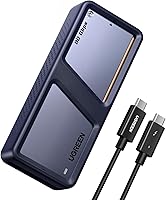
The UGREEN Thunderbolt 5 NVMe SSD Enclosure arrived in late 2024 as one of the earliest consumer-friendly options to harness the full 80Gbps bandwidth that TB5 unlocks. Built around the JHL9480 controller chip, it pushes theoretical read speeds to 7000MB/s — a figure that matters enormously if you regularly move massive video files or run a scratch drive during editing. The aluminum chassis also houses an active cooling fan to keep thermals in check under sustained load. One thing to set straight immediately: hitting those top speeds requires a Thunderbolt 5 cable and a TB5 port. This TB5 enclosure is backward compatible with TB4, TB3, and USB4, but USB 2 and USB 3 are not supported at all.
Features & Benefits
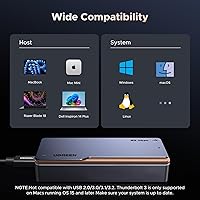
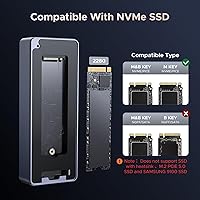
The headline number is 7000MB/s, but real-world sustained speeds will land below that ceiling, as they always do. For 4K and 8K video editing workflows, even the practical throughput here leaves USB-based enclosures far behind. The built-in fan only spins up once internal temperature hits 40°C, staying silent during light use and activating specifically when extended transfers push heat up — a smarter thermal approach than passive-only designs that throttle quietly. Compatibility is broad across TB5, TB4, TB3, and USB4, but do not install a SATA M.2 drive, a PCIe 5.0 SSD, or a Samsung 9100; none work here. TB3 users also need macOS 15 or higher. The UGREEN NVMe enclosure fits M.2 2280 NVMe drives up to 8TB capacity.
Best For
This Thunderbolt 5 drive enclosure is a natural fit for video editors and cinematographers who routinely work with large ProRes or RAW files and cannot afford the slowdown of a standard USB enclosure in the edit suite. Mac M4 Pro users in particular will find it pairs well with their machine's available TB5 bandwidth. It also suits professionals who travel frequently — the compact aluminum shell and included silicone sleeve make it genuinely road-ready. If you are coming from a USB 3.x enclosure, the jump in real-world throughput is substantial and immediately noticeable. For anyone building a future-proof rig, this is a reasonable bet as TB5 ports become standard on more laptops over the next few years.
User Feedback
Buyers consistently highlight the build quality as a strong point — the enclosure feels substantial, and the silicone case is a practical touch that many reviewers mention specifically. Real-world speeds vary considerably depending on the SSD installed, the host port, and cable quality, so manage expectations around the theoretical ceiling. The fan earns mixed reactions: some find it inaudible in most conditions; others notice it in quiet rooms during long transfers. Cable and compatibility confusion comes up repeatedly — several buyers assumed USB 3 would work, which it does not. A handful of users also reported SSD recognition issues with certain drives. At this price tier, most buyers feel the performance justifies the cost, though a few note it is a significant outlay for an enclosure alone.
Pros
- Thunderbolt 5 support delivers some of the fastest external NVMe speeds currently available in a consumer enclosure.
- The JHL9480 chip is a proven controller that handles sustained transfers without the instability seen in cheaper alternatives.
- Active cooling fan engages when needed, preventing throttling during long video transfers without running constantly.
- Solid aluminum construction feels premium and durable — noticeably more robust than plastic enclosures at lower price points.
- Supports NVMe drives up to 8TB, giving serious headroom for high-capacity storage builds.
- Backward compatibility with TB4, TB3, and USB4 means it remains usable across a range of current host devices.
- The included silicone case is a thoughtful addition that genuinely protects the enclosure during travel.
- Compact dimensions make it easy to pocket or toss in a camera bag without adding meaningful bulk.
- Strong community of Mac M4 Pro users reporting clean, reliable performance when paired with proper TB5 cables.
Cons
- Requires a Thunderbolt 5 cable and port to reach advertised speeds — neither is always included or available.
- Real-world throughput falls noticeably short of the 7000MB/s theoretical ceiling in everyday use.
- No USB 2 or USB 3 support makes it incompatible with a wide range of older computers and hubs.
- TB3 users must be running macOS 15 or later, which excludes many existing setups without an OS upgrade.
- Several buyers reported SSD recognition issues with certain drives, requiring trial and error to resolve.
- SATA M.2, PCIe 5.0 SSDs, and the Samsung 9100 are explicitly unsupported — easy to overlook before purchasing.
- Fan noise, while intermittent, is noticeable to some users working in quiet recording or editing environments.
- Premium pricing is hard to justify unless your workflow genuinely demands sustained high-bandwidth transfers.
- Compatibility fine print is dense and easy to miss, leading to frustration among buyers who skim the specs.
Ratings
Our AI rating system analyzed verified global buyer reviews for the UGREEN Thunderbolt 5 NVMe SSD Enclosure, actively filtering out incentivized, bot-generated, and low-signal feedback to surface what real users consistently experienced. Scores reflect both the genuine strengths this TB5 enclosure delivers and the friction points that affected satisfaction — nothing is glossed over. The result is a balanced, data-driven snapshot designed to help you decide whether this enclosure fits your actual workflow and hardware setup.
Transfer Speed Performance
Build Quality
Thermal Management
Compatibility Clarity
Cable & Port Requirements
SSD Compatibility Range
Portability
Setup & Ease of Use
Fan Noise Level
Value for Money
Software & Driver Experience
Durability & Longevity
OS Compatibility
Suitable for:
The UGREEN Thunderbolt 5 NVMe SSD Enclosure is built for a fairly specific kind of buyer — one who actually has the ports and cables to take advantage of it. Video editors and cinematographers working with large ProRes, RAW, or multi-stream 4K and 8K footage will feel the throughput difference immediately compared to any USB-based solution. Mac M4 Pro users are a natural fit, since their machines ship with the TB5 ports needed to unlock full bandwidth. Traveling professionals who need a reliable, fast scratch drive or backup solution will also appreciate how compact and well-protected this TB5 enclosure is, especially with the included silicone sleeve. It also makes sense for anyone investing in a storage setup they want to last — as TB5 becomes more common across laptops and workstations, this enclosure will grow into its potential rather than age out of it quickly.
Not suitable for:
The UGREEN Thunderbolt 5 NVMe SSD Enclosure is simply the wrong tool for a large portion of the market, and buying it without checking your port situation first is an easy and expensive mistake. If your computer only has USB 3.x ports, this enclosure will not work at all — USB 2 and USB 3 are not supported, full stop. Buyers on TB3 also face an additional hurdle: macOS 15 or higher is required, which rules out older Mac setups running earlier operating systems. Anyone hoping to repurpose an existing SATA M.2 drive, a PCIe 5.0 SSD, or a Samsung 9100 will be disappointed, as none of these are compatible. Budget-conscious buyers who just need reliable external storage for everyday documents, photos, or backups will find the price hard to justify — this is a tool built for sustained, high-throughput workloads, not casual use.
Specifications
- Interface: Connects via Thunderbolt 5 (80Gbps) and is backward compatible with Thunderbolt 4, Thunderbolt 3, and USB4; USB 2 and USB 3 are not supported.
- Controller Chip: Built around the Intel JHL9480 controller, which enables the enclosure to fully utilize Thunderbolt 5 bandwidth for high-throughput transfers.
- Max Transfer Speed: Theoretical maximum read speed reaches 7000MB/s under Thunderbolt 5 with a certified TB5 cable and a TB5-equipped host device.
- Drive Form Factor: Accepts M.2 2280 NVMe SSDs in M-Key and M&B-Key configurations only; SATA NGFF, B-Key-only, PCIe 5.0, and Samsung 9100 drives are not compatible.
- Max SSD Capacity: Supports NVMe drives up to 8TB, accommodating most current prosumer and professional-grade M.2 SSD options.
- Cooling System: Uses a dual-approach thermal design combining an aluminum alloy chassis for passive heat dissipation and an active internal fan that spins up automatically at 40°C.
- Body Material: Enclosure shell is machined aluminum alloy, which contributes to both structural rigidity and passive thermal management during operation.
- Dimensions: Measures 4.65 x 0.91 x 0.63 inches, making it one of the more compact enclosures available at this performance tier.
- Weight: Weighs 343.3 grams (12.1 ounces) fully assembled, which is substantial but manageable for a portable professional storage accessory.
- OS Support: Compatible with Windows, Linux, and macOS; Thunderbolt 3 functionality on macOS specifically requires macOS 15 (Sequoia) or later.
- Included Accessories: Ships with a silicone protective case that wraps the enclosure body, providing basic drop and scratch protection during transport.
- Color: Available in blue anodized aluminum finish as the standard retail colorway.
- Model Number: Officially designated as model 45789 by UGREEN (Ugreen Group Limited).
- ASIN: Listed on Amazon under ASIN B0DP9GYKVX, first available in November 2024.
- BSR Ranking: Holds a Best Sellers Rank of #62 in the Enclosures category on Amazon as of the time of publication.
Related Reviews

Cable Matters USB4 40Gbps M.2 NVMe Enclosure

Cenmate 5-Bay Hybrid HDD/NVMe Enclosure
SABRENT EC-T3NS Thunderbolt 3 M.2 NVMe Enclosure
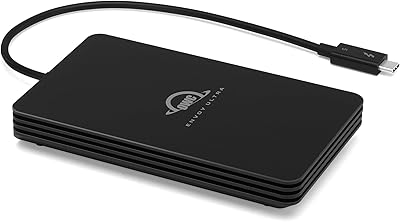
OWC Envoy Ultra 2TB Thunderbolt 5 Portable SSD
OWC Envoy Ultra 4TB Thunderbolt 5 SSD
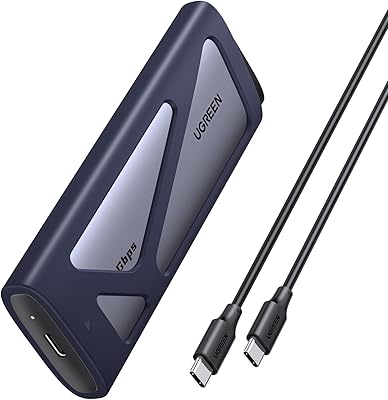
UGREEN 20Gbps M.2 NVMe SATA SSD Enclosure

ineo C2605-NVMe M.2 NVMe SSD Enclosure

WAVLINK Dual-Bay NVMe M.2 SSD Cloner

ikuai 3.5″ USB 3.0 Hard Drive Enclosure
