UBOTIE Wireless Keyboard and Mouse Combo


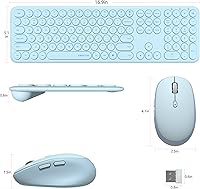
Overview
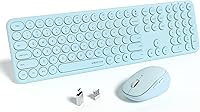
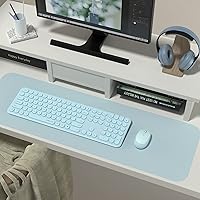
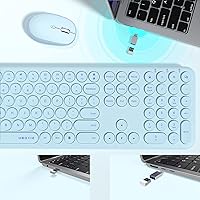
The UBOTIE Wireless Keyboard and Mouse Combo is a budget-conscious pick that punches a bit above its price class in looks and day-to-day usability. The slim, lightweight build keeps your desk from feeling crowded, and that Crystal Blue finish with round keycaps genuinely stands out — it is not trying to look like every other black slab keyboard on the market. Under the hood, scissor-switch keys sit somewhere between a mushy membrane board and a full mechanical setup. Plug in the single USB receiver and you are up and running in seconds — no driver installation, no Bluetooth headaches, just a clean and tidy workspace.
Features & Benefits
The round keycap design is the first thing you notice, and it is genuinely polarizing — some people love the retro-modern look, while others need a few days to adjust after years of standard key shapes. That said, the scissor-switch mechanism does its job: keystrokes feel lighter and quieter than a typical rubber-dome board, which matters in shared offices or late-night sessions. The full-size layout, complete with a numpad, keeps number-heavy tasks covered without requiring a separate accessory. The mouse offers adjustable DPI, so sensitivity can be tuned to your screen size and personal preference. One nano-receiver handles both devices simultaneously — no extra ports needed.
Best For
This keyboard-and-mouse duo makes the most sense for remote workers and students who want a quiet, organized desk setup without breaking the bank. If you spend hours on heavy-touch typing or want deep mechanical feedback, this is probably not your long-term endgame — but for email, spreadsheets, browsing, and light data entry, the UBOTIE set handles the daily grind without issue. It also travels well; the slim weight means tossing it in a bag for a library or coworking session is genuinely practical. Broad device compatibility across PCs, laptops, smart TVs, and projectors adds extra flexibility for people who regularly switch between screens.
User Feedback
With over 850 verified ratings and a 4.3-star average, this wireless combo has built a solid real-world track record since launching in early 2023. Most buyers highlight the quiet keystroke experience and the standout visual design as the main reasons they chose it. Where sentiment splits is the mouse: it runs on the lighter side, which suits users with a relaxed grip but puts off those who prefer something with more heft in hand. The round keycaps generate occasional comments from typists who found the adjustment period a bit awkward. Battery life comes up in a handful of reviews — not a dealbreaker, but keeping spare batteries handy is sensible advice.
Pros
- Plug-and-play setup via a single nano-receiver — no drivers, no pairing screens, no fuss.
- Scissor-switch keys run noticeably quieter than rubber-dome boards, great for shared spaces.
- The round keycap aesthetic is genuinely distinctive and refreshes the look of any desk.
- Full-size layout with a numpad makes data entry and spreadsheet work practical.
- Adjustable DPI on the mouse lets you tune sensitivity for different screen sizes and tasks.
- Slim and light enough to carry in a laptop bag for library or coworking sessions.
- Broad compatibility covers PCs, laptops, smart TVs, and projectors out of the box.
- Over 850 verified ratings with a 4.3-star average signals consistent real-world satisfaction.
- Wireless freedom clears cable clutter without needing Bluetooth or extra software.
Cons
- Battery life under heavy daily use falls short of what many buyers expect.
- The mouse feels too light for users who prefer a grounded, heavier grip.
- Round keycap shape requires an adjustment period that frustrates some touch-typists.
- Keycap legends show visible wear after several months of intensive daily use.
- The nano-receiver has no onboard storage slot, making it easy to lose during travel.
- Mouse DPI levels are poorly documented, making precise sensitivity tuning difficult.
- Glossy surfaces on the mouse attract fingerprints and smudges more than a matte finish would.
- Signal consistency can dip in 2.4GHz-congested environments like busy apartment buildings.
- Mac and Linux compatibility is not officially confirmed and may involve remapped or missing keys.
Ratings
The scores below were generated by AI after systematically analyzing hundreds of verified buyer reviews for the UBOTIE Wireless Keyboard and Mouse Combo from global marketplaces, with spam, incentivized, and bot-flagged submissions actively filtered out. The result is an honest, data-driven picture of where this keyboard-and-mouse duo genuinely delivers and where real users consistently ran into friction. Both the highlights and the frustrations are reflected as they actually appear in the review pool.
Value for Money
Typing Experience
Keycap Design & Aesthetics
Mouse Performance
Wireless Connectivity & Range
Build Quality & Materials
Noise Level
Setup & Ease of Use
Portability
Battery Life
Full-Size Layout & Numpad
Compatibility
Visual Design & Color Options
Adjustable DPI Mouse Sensitivity
Suitable for:
The UBOTIE Wireless Keyboard and Mouse Combo is a strong fit for remote workers, students, and casual home office users who want a clean, quiet desk setup without spending a lot of money. If your daily workload involves email, document editing, browsing, and the occasional spreadsheet, this keyboard-and-mouse duo covers all of that reliably without asking much in return. People who share a workspace — a bedroom, a coworking table, a dorm room — will particularly appreciate how quietly the scissor-switch keys operate compared to a standard membrane board. The round keycap design and Crystal Blue colorway also appeal strongly to buyers who care about how their desk looks, not just how it functions. It also suits people who move between locations regularly, since the slim, lightweight build genuinely fits in a laptop bag without adding noticeable weight. Anyone stepping up from a years-old wired keyboard-and-mouse set will likely find this wireless combo a meaningful, worthwhile upgrade at its price point.
Not suitable for:
The UBOTIE Wireless Keyboard and Mouse Combo is not the right choice for buyers who depend on their keyboard for high-volume, all-day typing and need deep tactile feedback to stay comfortable — scissor-switch keys at this price simply do not deliver that experience. Dedicated mechanical keyboard enthusiasts will find the keystrokes too shallow and too quiet, missing the satisfying resistance they expect. Touch-typists with deeply ingrained muscle memory around standard keycap shapes may also struggle with the round keycaps, and the adjustment period can last several days; for some, it never fully clicks. The mouse is noticeably lightweight, which is a dealbreaker for users who prefer a heavier, palm-filling grip during long work sessions. Mac and Linux users should also be cautious, as compatibility is not fully guaranteed and some key mappings may be inconsistent. Finally, if you need a compact tenkeyless or 60-percent layout to save desk space, the full-size footprint of this set will likely feel too wide for a small or crowded work surface.
Specifications
- Brand: Manufactured and sold by UBOTIE, a peripheral brand focused on budget-friendly wireless accessories.
- Switch Type: The keyboard uses scissor-switch mechanisms, offering lower travel distance and quieter actuation than standard rubber-dome keyboards.
- Key Count: The keyboard includes 111 keys in a full-size layout, retaining a dedicated numpad for numerical and data entry tasks.
- Keycap Shape: All keys feature a round keycap profile, which gives the board a distinctive retro-modern look but may require an adjustment period for touch-typists.
- Connectivity: Both the keyboard and mouse connect via a single 2.4GHz wireless nano USB receiver — no Bluetooth pairing or driver installation required.
- Mouse DPI: The included mouse supports adjustable DPI settings, allowing users to tune cursor sensitivity to suit different screen sizes and personal preferences.
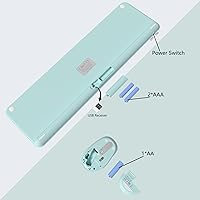
- Battery: The set requires 1 AA battery (specific device not confirmed in documentation — typically the keyboard), which is not included in the package.
- Package Dimensions: The retail package measures 17.68 x 5.39 x 2.2 inches, sized to accommodate both the full-size keyboard and mouse together.
- Item Weight: The total packaged weight is 2.05 pounds, reflecting the slim and lightweight construction of both devices.
- Color Option: The reviewed variant is Crystal Blue, featuring a consistent solid color finish across both the keyboard and mouse.
- Compatible Devices: The combo is compatible with PCs, laptops, gaming consoles, projectors, and smart televisions that support a USB-A input.
- Wireless Protocol: The set uses the 2.4GHz RF wireless band for communication, which provides stable short-to-mid range performance in typical home and office environments.
- Layout Standard: The keyboard follows a full-size layout with a standard QWERTY key arrangement, including function row, navigation cluster, and numpad.
- Best Sellers Rank: Ranked #147 in the Computer Keyboard and Mouse Combos category on Amazon as of available data, indicating strong market traction.
- User Rating: The product holds a 4.3 out of 5 star rating based on 858 verified ratings across the Amazon marketplace.
- Availability Date: First made available for purchase on February 28, 2023, making it a relatively recent addition to the budget wireless peripheral segment.
- Manufacturer: The listed manufacturer is UBOTIE, which also handles the brand warranty and customer support inquiries for this product.
Related Reviews

Arteck HW192 Wireless Keyboard and Mouse Combo

CHESONA Multi-Device Wireless Keyboard and Mouse Combo

Vssoplor Wireless Keyboard and Mouse Combo

QUASIO Wireless Keyboard and Mouse Combo

HP 18H24AA Wireless Keyboard and Mouse Combo

MPTOG S801AG Wireless Keyboard and Mouse Combo

TKVPJYYI Wireless Retro Typewriter Keyboard and Mouse Combo
MARVO Wireless Keyboard and Mouse Combo
Arcwares Wireless Keyboard and Mouse Combo
