UBOTIE Retro 84-Key Wireless Bluetooth Keyboard
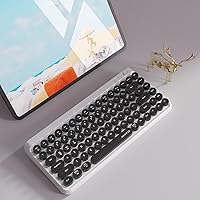
UBOTIE Retro 84-Key Wireless Bluetooth Keyboard — image 1

UBOTIE Retro 84-Key Wireless Bluetooth Keyboard — image 2
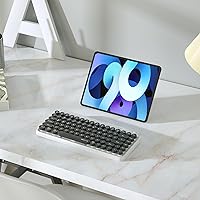
UBOTIE Retro 84-Key Wireless Bluetooth Keyboard — image 3
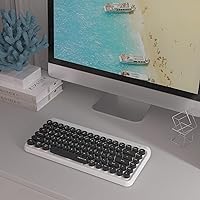
UBOTIE Retro 84-Key Wireless Bluetooth Keyboard — image 4
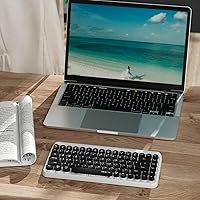
UBOTIE Retro 84-Key Wireless Bluetooth Keyboard — image 5
UBOTIE Retro 84-Key Wireless Bluetooth Keyboard — image 6
UBOTIE Retro 84-Key Wireless Bluetooth Keyboard — image 7
UBOTIE Retro 84-Key Wireless Bluetooth Keyboard — image 8
UBOTIE Retro 84-Key Wireless Bluetooth Keyboard — image 9
78%
22%

Overview

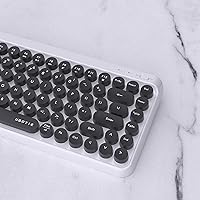
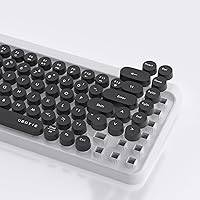
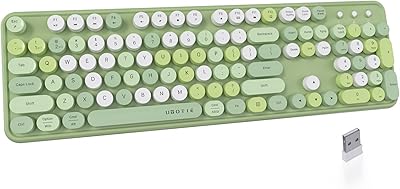
The UBOTIE Retro 84-Key Wireless Bluetooth Keyboard is one of those rare peripherals that leads with personality rather than performance specs. Built around vintage typewriter aesthetics, its round, colorful keycaps turn an ordinary desk into something worth photographing. It's compact, cutting the numpad to keep the footprint small, and it connects to Windows, macOS, iOS, and Android devices without fuss. But let's be upfront: this retro wireless keyboard is designed for style-conscious casual users and light typists, not for anyone who needs deep key travel or all-day heavy input. Know what it is, and it genuinely delivers.

Features & Benefits

The standout practical feature is three Bluetooth channels, letting you pair a laptop, tablet, and phone simultaneously and hop between them with a simple key combo. That means if you're answering emails on your MacBook in the morning and need to reply to a text on your iPhone at lunch, there's no re-pairing involved. The wireless range stretches to around 10 meters, and an auto-sleep mode alongside a physical On/Off switch helps this colorful Bluetooth keyboard stretch its AAA batteries as far as possible. The dimensions — roughly 12.6 by 5.51 inches — keep it genuinely portable, and single-color backlighting handles dim environments without clashing with the retro vibe.

Best For

This colorful Bluetooth keyboard is a natural fit for anyone whose desk setup is as intentional as their wardrobe. Home office workers who treat their workspace as a creative environment will appreciate it immediately. Students switching between a tablet for notes and a laptop for assignments get genuine value from the multi-channel Bluetooth. Travelers benefit from the slim profile — it slips into a bag without adding meaningful bulk. It also makes a genuinely thoughtful gift for someone who loves tech with a visual twist. What it's not built for is marathon typing sessions or anyone who depends on tactile, high-travel keystrokes to stay productive.

User Feedback

With close to 6,000 ratings and a solid 4.2-star average, the UBOTIE keyboard has clearly earned its place in the market. Reviewers consistently highlight the visual appeal — the colors look vibrant in real life, and the keyboard fits naturally into aesthetic desk setups. The multi-device switching also gets genuine praise from people juggling daily workflows across devices. On the flip side, buyers used to mechanical keyboards frequently note that the key travel feels shallow and soft. Battery life draws mixed feedback; lighter users report decent longevity, but those typing heavily find themselves reaching for fresh AAAs sooner than expected. A small number of users on older Android devices have also run into Bluetooth pairing hiccups, though this appears to be the exception rather than the rule.

Pros

  • Three Bluetooth channels let you switch between a phone, tablet, and laptop without any re-pairing hassle.
  • The retro round keycap design genuinely stands out and makes any desk setup more visually interesting.
  • Compatible with Windows, macOS, iOS, and Android — practically any device you already own.
  • Compact 84-key layout saves meaningful desk space without feeling cramped for casual typing tasks.
  • Auto-sleep mode and a physical On/Off switch help stretch AAA battery life between replacements.
  • Nearly 6,000 ratings and a 4.2-star average signal broad, real-world satisfaction for casual use.
  • Fade-resistant keycap colors in the 2024 updated version hold up better than older iterations reportedly did.
  • Single-color backlighting makes this colorful Bluetooth keyboard usable in dim or low-light environments.
  • Weighing just 1.34 pounds, it travels easily without adding noticeable bulk to a bag.
  • A 10-meter wireless range gives genuine flexibility in where you sit relative to your paired device.

Cons

  • Key travel is noticeably shallow — extended typing sessions can feel imprecise and physically tiring.
  • Runs on AAA batteries with no rechargeable option, meaning ongoing costs and a need to keep spares handy.
  • No dedicated numpad makes data entry tasks slower for anyone who relies on one regularly.
  • Occasional Bluetooth pairing instability has been reported on older Android devices, disrupting workflows unexpectedly.
  • Soft, membrane-like typing feel will disappoint anyone accustomed to mechanical or high-quality chiclet keyboards.
  • Battery life under heavy daily use falls shorter than many buyers initially expect.
  • The retro aesthetic, while a draw for many, can feel out of place in formal or minimalist work settings.
  • No USB-C or built-in rechargeable cell means you cannot simply plug in to restore power on the go.
  • Backlighting is limited to a single color with no RGB or customization options for users who want more control.

Ratings

The UBOTIE Retro 84-Key Wireless Bluetooth Keyboard scores below were generated by AI after analyzing thousands of verified global buyer reviews, with spam, incentivized, and bot-generated feedback actively filtered out before any score was calculated. The ratings transparently reflect both where this colorful Bluetooth keyboard earns genuine praise and where real-world frustrations repeatedly surfaced across the review pool. Strengths and pain points carry equal weight in how each category was scored, so you get a clear, honest picture before committing.

Design & Aesthetics
93%
The round retro keycaps are the single biggest reason people buy this keyboard, and they rarely disappoint in person. Buyers consistently report that the colors look even more vibrant on their desk than in product photos, and the keyboard regularly earns unprompted compliments from coworkers and roommates alike.
Aesthetics are personal, and the bold color palette — while broadly loved — will not suit every workspace. A segment of buyers finds the styling too playful for corporate or minimalist environments, and the retro look can feel visually mismatched next to sleek, modern ultrawide monitor setups.
Typing Experience
58%
42%
For casual tasks — replying to emails, jotting notes, or browsing on a paired tablet — the soft membrane switches are perfectly adequate and get the job done without friction. The quiet keystroke also makes it a considerate choice in shared spaces like open-plan offices or library study rooms.
Anyone who types intensively quickly notices the shallow key travel and soft, imprecise feedback; there simply is not enough tactile response to sustain fatigue-free accuracy over long sessions. Multiple reviewers who tried it for coding or extended document writing described it as better suited to a secondary role than a dedicated daily driver.
Multi-Device Connectivity
86%
The three-channel Bluetooth system is one of the most frequently praised features across verified reviews. People who switch between a work laptop in the morning, a tablet at lunch, and a phone in the evening call the channel-switching fast, reliable, and genuinely convenient once all three devices are paired.
A recurring subset of users on older Android models reports inconsistent reconnections where the keyboard fails to lock onto the correct device on the first attempt. It remains a minority experience, but it is a real enough pattern to note for anyone whose primary device is legacy Android hardware.
Battery Life
63%
37%
Light to moderate users — those writing a few emails and switching devices a couple of times each day — find the AAA batteries last a reasonable stretch, especially with auto-sleep doing its job in the background. The physical On/Off switch adds deliberate control for users who want to preserve charge during weekends or travel.
Heavy users consistently flag battery life as a genuine frustration; several hours of daily typing can drain a set of AAAs faster than expected. There is also the ongoing inconvenience and cost of keeping replacement batteries stocked, which feels like a real step backward compared to USB-C rechargeable competitors sitting at a comparable price.
Value for Money
79%
21%
For buyers who prioritize aesthetics and multi-device portability, the asking price feels well-justified — a keyboard this visually distinctive from a recognized brand would cost considerably more elsewhere. The wide OS compatibility across Windows, macOS, iOS, and Android further strengthens the overall value argument for casual users.
Buyers who expected strong typing performance from the price point often feel the trade-offs are steeper than anticipated, and ongoing AAA battery costs push the true long-term cost higher than the sticker price suggests. Rechargeable alternatives now exist at similar price points, making this limitation more visible than it was at launch.
Build Quality
71%
29%
The keyboard feels solid enough for everyday desk and travel use — it does not flex noticeably under normal typing pressure, and the overall fit and finish looks better in person than its price tier might suggest. Most users report no structural deterioration after months of regular light use.
The plastic housing feels slightly hollow when tapped, and keycap legends on some units have shown wear under extended daily use. The 2024 version addressed color fading, but the underlying construction remains firmly in the entry-level tier and would not survive rough handling or repeated drops well.
Wireless Range
82%
18%
The 10-meter Bluetooth range holds up reliably in typical home and office environments, letting users type comfortably from across a room without noticeable dropouts. Couch-to-TV setups and standing desks positioned across moderate-sized studios work well within the rated distance under normal conditions.
In environments with heavy wireless interference — crowded apartment buildings or dense office floors with many active Bluetooth devices — some users notice occasional stuttering at the outer edges of the rated range. Walls and large obstructions reduce effective distance meaningfully below the advertised 10 meters.
Portability
88%
At 1.34 pounds and just under an inch thick, this retro wireless keyboard slides easily into a laptop sleeve or daypack without adding meaningful weight or bulk. Frequent travelers and daily commuters consistently mention it as one of the more bag-friendly options they have tried at this form factor.
The compact layout sacrifices the numpad, which frustrates occasional users who need it for spreadsheet work or numeric entry while traveling. The AAA battery requirement also means packing spare cells for longer trips — a small but real logistical consideration that rechargeable alternatives eliminate entirely.
Compatibility
89%
Broad OS support across Windows, macOS, iOS, and Android is a genuine strength — pairing requires no driver installation, making this one of the most universally usable options in its category. Students and multi-platform workers especially appreciate not needing a different keyboard for each operating system ecosystem.
A portion of reviewers using less common OS configurations or older device firmware have reported inconsistent Bluetooth behavior that required repeated pairing attempts. There is also no wired fallback connection, which limits troubleshooting options when wireless pairing becomes unreliable on a specific device.
Ease of Setup
91%
Pairing is handled through standard Bluetooth with no proprietary software, dongle, or account required — hold the channel button, select the device in your Bluetooth settings, and you are typing within a minute. Nearly every reviewer who commented on setup described the process as quick and frustration-free.
The initial three-channel setup can briefly confuse users unfamiliar with multi-device Bluetooth keyboards, as the included manual is sparse and each channel must be paired individually in sequence. A clearer quick-start guide in the box would meaningfully reduce the modest but real learning curve for first-time users.
Backlight
67%
33%
The single-color backlight is bright enough to work comfortably in a dim room or late at night without straining to read the keycaps. For users who need functional illumination rather than elaborate effects, it delivers the basics without disrupting the overall retro aesthetic of the keyboard.
There is no brightness adjustment and no RGB mode, leaving users who want to coordinate lighting with the rest of their desk setup disappointed. The backlight also lacks an automatic sensor, requiring manual toggling — a minor but recurring irritant noted across a meaningful number of verified reviews.
Key Accuracy
73%
27%
The 84-key layout covers everything most casual users interact with daily, and the generous spacing between round keycaps reduces accidental keypresses for moderate typists working on emails, chat messages, or short notes. Accuracy at a relaxed pace is rarely flagged as an issue by this keyboard's target audience.
The compact layout takes a short adjustment period for users migrating from full-size keyboards, and a few reviewers noted that the function layer shortcuts lack sufficiently clear labeling. The absence of a dedicated numpad is a real limitation for anyone handling spreadsheets or numeric data entry regularly.
Noise Level
84%
The membrane switches produce a noticeably muted keystroke that will not irritate officemates or disrupt video calls — a genuine advantage over clicky mechanical keyboards in shared environments. Several remote workers specifically called out the quiet typing sound as a reason they chose to keep it as their go-to desk keyboard.
The soft sound is a direct consequence of the shallow membrane design, so the quietness and the absence of satisfying tactile feedback are inseparable trade-offs. Buyers who find auditory or physical click feedback motivating during long typing sessions will consistently notice — and miss — its absence.
Durability
74%
26%
The 2024 updated version specifically addressed the color fading issues flagged in earlier iterations, and buyers who have used it under normal desk conditions for several months report the keycap finish holding up noticeably better than predecessor versions. The unit also has no complex moving parts prone to early mechanical failure.
Long-term durability data beyond six months remains limited given the product's budget-tier construction, and some users report keycap legends showing visible wear under heavy daily use over time. The lightweight plastic housing, while acceptable at the price, is unlikely to withstand drops or rough travel conditions without cosmetic or structural damage.

Suitable for:

The UBOTIE Retro 84-Key Wireless Bluetooth Keyboard is a strong pick for anyone who wants their desk setup to reflect their personality without spending a lot. Home office workers, students, and remote workers who regularly bounce between a laptop in the morning, a tablet at midday, and a phone in the evening will get real daily value from the three-channel Bluetooth switching — no re-pairing, no friction. Casual typists who mainly write emails, reply to messages, or edit light documents will find the typing experience perfectly adequate for those tasks. It is also a practical travel companion: slim enough to slip into a laptop bag and light enough not to notice. And if you are hunting for a gift that looks genuinely thoughtful and works across practically every device someone might own, this retro wireless keyboard is hard to beat at its price point.

Not suitable for:

The UBOTIE Retro 84-Key Wireless Bluetooth Keyboard is not the right tool if serious typing output is a core part of your daily routine. Writers, coders, or data entry professionals who spend hours at a keyboard will likely find the shallow, soft key travel frustrating — the tactile feedback simply is not there for sustained, high-volume work. Anyone who wants a no-maintenance setup will also run into friction; this colorful Bluetooth keyboard runs on AAA batteries, and heavy users may find themselves swapping them out more often than expected. If you work exclusively on one device and need a dependable workhorse keyboard above all else, the multi-channel feature set will not justify those trade-offs. Users with older Android devices should proceed with caution as well, since a small but consistent number of buyers have reported pairing instability that can disrupt a workflow at the worst moments.

Specifications

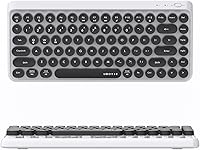
  • Key Layout: Uses a compact 84-key arrangement that omits the dedicated numpad, reducing the overall footprint while retaining a full function row and standard alphanumeric keys.
  • Connectivity: Connects wirelessly via Bluetooth with three independent pairing channels — BT1, BT2, and BT3 — allowing simultaneous pairing to three separate devices.
  • Wireless Range: Rated for a wireless operating distance of up to 10 meters (approximately 33 feet) under normal, unobstructed conditions.
  • OS Compatibility: Officially compatible with Windows, macOS, iOS, and Android operating systems without requiring additional driver installation.
  • Power Source: Powered by 2 AAA batteries; the keyboard has no built-in rechargeable cell and does not support USB charging.
  • Dimensions: Measures 12.6″ long by 5.51″ wide by 0.98″ tall, making it genuinely compact and portable.
  • Weight: Listed at 1.34 pounds as stated by the manufacturer, batteries not included in that figure.
  • Keycap Style: Features circular, retro-inspired keycaps designed to evoke the look and feel of vintage typewriter keys.
  • Backlight: Supports single-color backlighting for low-light usability; full RGB illumination or per-key lighting customization is not available.
  • Power Management: Includes an automatic sleep mode that activates during inactivity, alongside a physical On/Off switch for manual battery conservation.
  • Key Switches: Uses membrane-style switches that produce a soft, quiet keystroke with relatively shallow key travel compared to mechanical alternatives.
  • Color Finish: Keycap colors are described by the manufacturer as fade-resistant, with this durability improvement introduced in the 2024 updated version.
  • Brand: Sold under the UBOTIE brand and manufactured by KKT; first made available in October 2020.
  • Market Rank: Holds a Best Sellers Rank of approximately #110 in the Computer Keyboards category, supported by close to 6,000 customer ratings.

Related Reviews
Logitech POP ICON Keys Wireless Keyboard
81%
91%
Multi-Device Switching
93%
Aesthetic Design
88%
Key Noise Level
74%
Typing Comfort
83%
Build Quality
More
Links9+ Retro Typewriter Wireless Keyboard

74%
91%
Design & Aesthetics
62%
Typing Feel
76%
Wireless Connectivity
58%
Build Quality
83%
Value for Money
More
UBOTIE Wireless Keyboard and Mouse Combo
79%
88%
Value for Money
74%
Typing Experience
83%
Keycap Design & Aesthetics
67%
Mouse Performance
81%
Wireless Connectivity & Range
More
Rii RT518S Wireless Keyboard
75%
78%
Trackpad Responsiveness
83%
Dual-Mode Connectivity
61%
Build Quality
67%
Backlight Quality
81%
Battery Life
More
Logitech K480 Multi-Device Bluetooth Keyboard
79%
93%
Multi-Device Switching
91%
Cross-Platform Compatibility
88%
Battery Life
84%
Built-In Device Cradle
72%
Typing Comfort
More
Logitech POP Keys Mechanical Wireless Keyboard
76%
88%
Typing Feel
84%
Build Quality
81%
Wireless Reliability
91%
Battery Life
93%
Design & Aesthetics
More
YUNZII B307 Wireless Typewriter Keyboard
74%
91%
Design & Aesthetics
61%
Typing Feel
84%
Wireless Connectivity
88%
Integrated Stand
67%
Build Quality
More
Keychron K4 Bluetooth Wireless Mechanical Keyboard
86%
91%
Build Quality
88%
Battery Life
85%
Typing Experience
90%
Connectivity & Versatility
82%
RGB Backlighting
More
Keychron B1 Pro Wireless Bluetooth Keyboard
86%
88%
Overall Performance
91%
Typing Experience
93%
Battery Life
89%
Portability & Size
84%
Build Quality
More
Lenovo Multi-Device Wireless Keyboard ZG38C05810
83%
88%
Multi-Device Switching
83%
Typing Feel & Key Response
92%
Portability & Form Factor
76%
Battery Life
91%
USB-C Charging Convenience
More

FAQ

Yes — the UBOTIE Retro 84-Key Wireless Bluetooth Keyboard supports three simultaneous Bluetooth pairings across its BT1, BT2, and BT3 channels. You pair each device once, and from then on switching between them is just a single keypress. You never have to go through the pairing process again unless you want to replace one of the three devices.

Each of the three Bluetooth channels has a dedicated shortcut key on the keyboard. Once your devices are paired to their respective channels, you just press the corresponding key to jump to that device. The reconnection is quick — usually within a second or two — so it doesn't interrupt your workflow noticeably.

It varies quite a bit depending on how heavily you type. Casual users who write emails and light documents throughout the day typically report getting several weeks out of a single set of batteries, especially with the auto-sleep feature helping conserve power. If you are typing heavily for hours every day, expect to replace them more often. Keeping a spare set of AAAs nearby is a smart habit.

Honestly, it is not the best tool for that kind of work. The membrane switches have shallow key travel and soft feedback, which gets tiring and imprecise during marathon typing sessions. This retro wireless keyboard is really designed for casual, lighter use — emails, short notes, browsing. If you spend most of your workday typing intensively, a proper mechanical keyboard will serve you much better.

For most Android devices it works without any issues. The pairing process is standard Bluetooth, and it connects quickly. That said, a small number of users with older Android devices have reported occasional instability when connecting. If you are using a relatively recent Android phone or tablet, you are unlikely to run into any trouble.

It is functional rather than decorative — bright enough to read the keys clearly in a dim room or at night. That said, it is a single-color backlight with no brightness adjustment or RGB effects, so do not expect anything elaborate. For working after dark without turning on overhead lights, it does exactly what you need.

This was a legitimate concern with earlier versions, and the manufacturer addressed it in the 2024 update by introducing a fade-resistant keycap finish. If you are buying the current version, you should be in much better shape than early adopters were. If color vibrancy over the long term matters to you, just confirm you are getting the updated version before purchasing.

It is actually a very solid gift choice for that type of person. The multi-device Bluetooth pairing covers their laptop, phone, and tablet all at once, and the slim profile fits easily into a bag without adding much weight. The eye-catching retro design also makes it feel like a thoughtful, considered pick rather than a generic tech accessory. Just keep in mind it suits light to moderate typists best.

It is quite quiet. The membrane switches produce a soft, muted sound that is nowhere near as loud as a mechanical keyboard. You can type through a video meeting or in a shared office without drawing attention. If low noise is a priority, this colorful Bluetooth keyboard is a comfortable choice.

No drivers or software are required. The keyboard uses standard Bluetooth HID protocol, which Windows, macOS, iOS, and Android all support natively. You just turn it on, hold the pairing button for your chosen channel, find it in your device's Bluetooth settings, and connect. It usually takes under a minute from unboxing to typing.