Overview

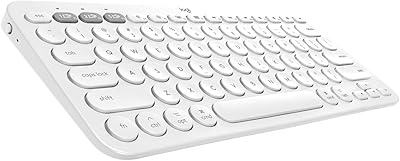
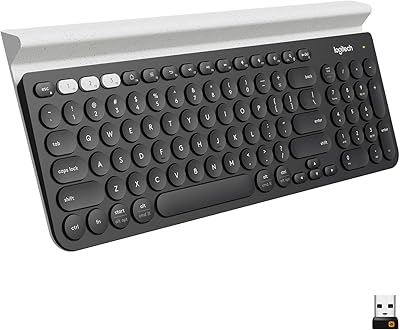
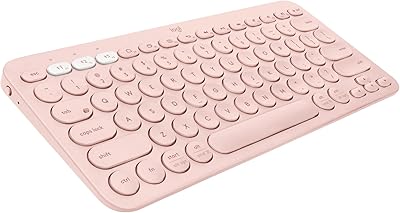
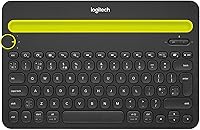
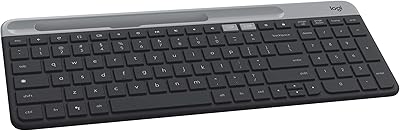
The Logitech K480 Multi-Device Bluetooth Keyboard is built for one specific kind of person: someone who constantly bounces between a laptop, a tablet, and a phone and is tired of reaching for a different keyboard each time. The defining feature is a physical Easy-Switch dial that lets you hop between three paired devices almost instantly. It works across Windows, macOS, iOS, and Android, covering pretty much every setup imaginable. There is also a built-in front cradle that props up your phone or tablet at a comfortable angle. Full-size layout, mid-range price, and a slightly hefty build — expectations set.
Features & Benefits

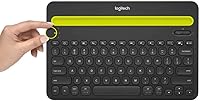
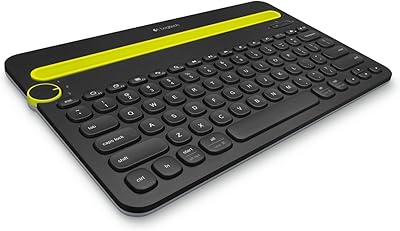
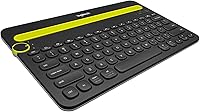
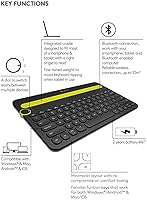
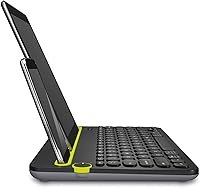
The Easy-Switch dial is the standout here — turn it to 1, 2, or 3 and you are typing on a different device within a second, no re-pairing needed. That alone makes a cluttered desk feel a lot more manageable. The built-in cradle sits along the front edge and holds a phone or tablet upright, which is genuinely useful when you are glancing at reference material while typing on your computer. Keys are full-size with decent spacing, and Logitech has included OS-specific shortcut keys so the layout feels native on both Apple and Android devices. Two AA batteries power the whole thing, and they tend to last a surprisingly long time.

Best For

This multi-device keyboard makes the most sense for people who work across multiple devices at the same desk every day. Think students juggling a MacBook and an iPad, or remote workers switching between a work laptop and a personal Android tablet. If you have been managing that workflow with two separate keyboards or constantly re-pairing a single one, the K480 offers a noticeably cleaner desk setup. It is also a solid pick for iPad users who want a physical keyboard without overpaying for a brand-specific option. That said, if you prioritize key feel or travel often and need something ultra-light, this probably is not your best match.

User Feedback

Across buyer reviews, the dial-switching mechanism gets the most consistent praise — people who use it daily say it genuinely simplifies their workflow rather than being a novelty. The cradle also earns frequent positive mentions for being sturdier than expected. On the flip side, typing feel is where opinions diverge; this is a membrane keyboard, and while it is comfortable enough for long writing sessions, anyone coming from a mechanical board will notice the difference immediately. A handful of Android users have flagged intermittent Bluetooth reconnection delays, which is worth knowing upfront. And more than a few buyers mention the weight — at nearly two pounds, this Bluetooth keyboard is not something you will toss in a bag without a second thought.

Pros

  • The Easy-Switch dial lets you move between three paired devices in under a second, with no re-pairing required.
  • Works across Windows, macOS, iOS, and Android, making it one of the most universally compatible options in its class.
  • The built-in front cradle holds a phone or tablet securely at a comfortable viewing angle while you type.
  • OS-specific shortcut keys mean the layout feels native whether you are on an Apple device or a PC.
  • AA battery life is strong — most users report several months of regular use before needing replacements.
  • Full-size key spacing keeps extended typing sessions comfortable, even for larger hands.
  • Removing cable clutter from a multi-device desk is a real, everyday benefit that builds up over time.
  • Logitech's build quality and brand reliability come at a mid-range price that does not strain a tight budget.

Cons

  • The membrane key feel will disappoint anyone accustomed to mechanical or even high-end scissor-switch keyboards.
  • At nearly two pounds, this multi-device keyboard is noticeably heavy compared to slim portable alternatives.
  • Some Android users report intermittent Bluetooth reconnection delays that interrupt focus at critical moments.
  • The footprint is large for a peripheral marketed toward multi-device, on-the-go flexibility.
  • No rechargeable battery means you need to keep spare AA cells on hand rather than just plugging in a cable.
  • The cradle width may not comfortably accommodate larger tablets in bulkier protective cases.
  • Occasional lag when switching devices has been noted by a small but consistent group of buyers.
  • There is no backlight, which limits usability in dim environments or evening work sessions.

Ratings

The scores below for the Logitech K480 Multi-Device Bluetooth Keyboard were generated by AI after analyzing thousands of verified global buyer reviews, with spam, bot submissions, and incentivized feedback actively filtered out. Each category reflects honest patterns from real-world use — both what this Bluetooth keyboard consistently gets right and where it genuinely falls short. No aspect has been glossed over to protect the overall score.
Multi-Device Switching
93%
The Easy-Switch dial is the single most praised feature across buyer reviews worldwide. Users who manage a laptop, tablet, and phone on the same desk describe it as transformative for their daily workflow — a quick turn and they are typing on a different device with no lag, no re-pairing, and no frustration.
A small but consistent group of Android users report that the switch occasionally requires a second or two longer to reconnect, which breaks the otherwise fluid experience. It is a minor issue but worth noting if Android is your primary platform.
Cross-Platform Compatibility
91%
Supporting Windows, macOS, iOS, and Android in a single keyboard is genuinely rare at this price tier. Students and professionals with mixed-ecosystem setups particularly value not needing separate peripherals for each device they own.
While compatibility is broad, some platform-specific shortcut keys are better optimized for Apple devices than for Android, meaning Android power users may find a few key mappings less intuitive than expected.
Battery Life
88%
Running on two AA batteries, the K480 consistently impresses buyers who dread constant recharging. Many users report going six months or more on a single set under daily office use, which is a real advantage over keyboards with built-in rechargeable cells.
The reliance on disposable AA batteries means you need to keep spares on hand, and there is no on-device battery indicator to warn you before power runs out unexpectedly during a critical work session.
Built-In Device Cradle
84%
The front cradle is one of those features that sounds minor on paper but earns consistent praise in real use. Writers and coders who prop up a tablet for reference material while typing on their computer find it genuinely useful, and buyers frequently describe it as sturdier than they expected.
The cradle has clear width limitations that can leave larger tablets in chunky protective cases sitting at an unstable angle. Users with ruggedized or heavily cased devices may find it more frustrating than helpful.
Typing Comfort
72%
28%
For casual writing, note-taking, or email, the full-size layout with standard key spacing is comfortable enough for extended sessions. Buyers who type for an hour or two at a time rarely complain about fatigue, and the quiet membrane action is well-suited to shared office spaces.
Anyone coming from a mechanical keyboard or even a premium laptop keyboard will notice the shallow key travel and soft feedback almost immediately. Speed typists and coders consistently rate the typing experience as the K480's weakest point.
Build Quality
79%
21%
Logitech's reputation for durable peripherals holds up here. The plastic construction feels solid rather than cheap, and the overall rigidity of the keyboard gives it a desk presence that matches its slightly hefty weight. Most buyers report no flex, rattle, or key wobble.
The all-plastic body does show fingerprints and light surface scratches over time, and the design lacks the premium texture or metal accents found on keyboards at higher price points. It looks functional, not sophisticated.
Portability
54%
46%
The K480 is not truly portable, but for users who occasionally move it between a home office and a work desk, it is manageable. Its relatively flat profile means it can slide into a laptop bag with some effort.
At nearly two pounds and with a footprint close to a standard desktop keyboard, this is one of the more common buyer complaints. Travelers and commuters who expected something lightweight based on the Bluetooth branding often feel misled by the bulk.
Setup & Pairing Ease
89%
Pairing all three devices takes only a few minutes and requires no software, drivers, or USB receivers. Buyers with varying levels of technical experience consistently describe setup as straightforward, which reduces the out-of-box frustration that plagues some Bluetooth peripherals.
Occasionally, particularly on first setup with certain Android devices, the initial pairing does not take on the first attempt and requires a reset of the Bluetooth connection. It is not a widespread issue but crops up in enough reviews to be worth mentioning.
Key Layout & Shortcuts
81%
19%
The inclusion of OS-specific shortcut keys is a thoughtful design choice that pays off in daily use. Switching to a Mac-paired slot and finding functional media keys and system shortcuts already mapped saves real time compared to reconfiguring a generic keyboard.
The layout does not include a numeric keypad, which frustrates users who rely on number entry for spreadsheets or accounting work. The shortcut key placement can also feel slightly unfamiliar for a week or two until muscle memory adjusts.
Desk Footprint
67%
33%
For a stationary desk setup, the K480 occupies a predictable, well-defined space that most users plan around comfortably. The built-in cradle integrates device storage into the keyboard's footprint rather than adding to it, which is a net space benefit.
The overall desk footprint is larger than many buyers anticipate based on product images. Users with compact desks or tight dual-monitor setups sometimes find placement awkward, especially when a mouse needs to share the same surface.
Value for Money
83%
At its mid-range price point, the K480 offers a level of multi-device functionality that genuinely justifies the cost for its target user. Comparable multi-device keyboards from other brands either cost significantly more or compromise on build quality.
For users who end up using only one or two of the three pairing slots, the value proposition weakens considerably. If multi-device switching is not central to your workflow, more capable single-device keyboards are available for less.
Bluetooth Stability
69%
31%
For the majority of buyers on Windows, macOS, and iOS, the Bluetooth connection is reliable and stays stable throughout the workday. Reconnection after waking a sleeping device is generally quick and does not require manual intervention.
Android reliability is notably inconsistent compared to other platforms. A recurring subset of Android users across multiple device brands report reconnection delays or dropped connections that make the experience feel less polished than on Apple or Windows devices.
Aesthetic Design
71%
29%
The clean black colorway and understated modern styling fit naturally into most home office or professional desk setups. It does not draw attention to itself, which is exactly what many buyers want from a peripheral.
The design has not been refreshed in years and looks dated compared to newer keyboards from competing brands that offer slimmer profiles and more modern matte or two-tone finishes. It is functional rather than stylish.
Noise Level
86%
Membrane switches produce noticeably less sound than mechanical alternatives, which makes the K480 a genuinely good choice for shared offices, libraries, or quiet home environments. Most users and their colleagues report finding the typing noise completely unobtrusive.
The keystroke sound, while quiet, lacks the satisfying tactile click that some typists use as audio feedback for accuracy. Users who type by feel and sound may find the near-silent action slightly disorienting at first.

Suitable for:

The Logitech K480 Multi-Device Bluetooth Keyboard is an excellent fit for anyone whose daily routine involves hopping between two or three devices at the same desk. Students who write notes on a MacBook, annotate PDFs on an iPad, and check messages on an Android phone will find the dial-switching setup genuinely practical rather than gimmicky. Remote workers trying to keep their workspace tidy will appreciate having one keyboard handle everything without extra cables or constant re-pairing rituals. iPad and Android tablet owners who want a physical keyboard for longer writing sessions — but don't want to pay a premium for a brand-specific model — get solid value here. If your priority is desk convenience and broad compatibility over raw typing performance, this Bluetooth keyboard delivers exactly what it promises.
Not suitable for:

The Logitech K480 Multi-Device Bluetooth Keyboard is not the right tool for everyone, and it's worth being honest about where it falls short. Writers, coders, or data-entry professionals who spend hours at a keyboard and care deeply about key travel, tactile feedback, or actuation precision will likely find the membrane typing experience underwhelming. Frequent travelers or commuters looking for a portable companion should think twice — at nearly two pounds, it adds real weight to a bag, and its footprint is closer to a desktop keyboard than a travel-friendly slab. Users who rely heavily on Android devices may also encounter occasional Bluetooth hiccups that interrupt their workflow. And if you only ever use one device at a time, the multi-pairing feature that justifies the design adds no practical benefit, making more compact single-device options a smarter buy.

Specifications

  • Brand: Manufactured by Logitech, a widely trusted peripheral brand with broad retail and warranty support.
  • Model: The keyboard carries the model designation K480, part of Logitech's multi-device input lineup.
  • Connectivity: Connects via Bluetooth to up to three devices simultaneously, with no USB dongle or wired connection required.
  • Device Switching: An Easy-Switch dial on the top-left corner lets you toggle between three paired Bluetooth connections instantly.
  • Compatibility: Works with Windows, macOS, iOS, and Android operating systems across computers, tablets, and smartphones.
  • Key Layout: Full-size keyboard layout with OS-specific shortcut keys optimized for both Apple and non-Apple device environments.
  • Key Type: Membrane key switches provide a quiet, low-profile typing feel suited to office and shared workspace use.
  • Device Cradle: A built-in front cradle runs along the bottom edge to hold a smartphone or tablet upright at a comfortable viewing angle.
  • Power Source: Powered by two standard AA batteries, which are required for operation and not rechargeable via USB.
  • Battery Life: Battery life is rated for up to two years under typical usage conditions with two AA batteries installed.
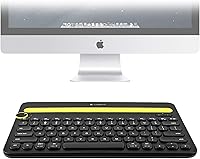
  • Dimensions: The keyboard measures 12.28 x 8.07 x 1.65 inches, giving it a full desktop footprint.
  • Weight: The unit weighs 1.75 pounds, making it noticeably heavier than most slim portable Bluetooth keyboards.
  • Color: Available in Black with a modern, understated aesthetic suited to professional desk setups.
  • Wireless Range: Standard Bluetooth range of approximately 10 meters (33 feet) in open, unobstructed environments.
  • Bluetooth Version: Uses Bluetooth wireless technology compatible with Bluetooth 3.0 or higher on paired host devices.
  • Recommended Use: Designed primarily for office and home-office environments where multi-device productivity is a priority.
  • Package Contents: The box includes the keyboard itself and documentation; batteries are required but typically not included in all bundles.
  • Manufacturer: Logitech International, headquartered in Lausanne, Switzerland, with global distribution and support.

Related Reviews

Logitech K480 Bluetooth Multi-Device Keyboard
77%
94%
Device Switching
58%
Typing Feel
91%
Battery Life
89%
Multi-Device Compatibility
71%
Device Cradle
More
Logitech K380 Bluetooth Keyboard for Mac
76%
93%
Multi-Device Switching
91%
Battery Life
89%
Mac Layout & Compatibility
88%
Portability
67%
Typing Experience
More
Lenovo Multi-Device Wireless Keyboard ZG38C05810
83%
88%
Multi-Device Switching
83%
Typing Feel & Key Response
92%
Portability & Form Factor
76%
Battery Life
91%
USB-C Charging Convenience
More
Logitech K780 Multi-Device Wireless Keyboard
83%
93%
Multi-Device Switching
82%
Typing Comfort
91%
Noise Level
88%
Device Cradle Utility
79%
Build Quality & Durability
More
Logitech K580 Slim Multi-Device Wireless Keyboard
82%
90%
Ease of Use with Multiple Devices
93%
Battery Life
80%
Typing Comfort
88%
Connectivity Options
84%
Build Quality
More
Logitech K585 Slim Wireless Keyboard
76%
83%
Multi-Device Switching
74%
Typing Experience
88%
Battery Life
79%
Build Quality
81%
Wireless Reliability
More
Arteck HB305-2 Bluetooth Keyboard
81%
88%
Multi-Device Switching
83%
Typing Experience
79%
Battery Life
61%
Build Quality
72%
Bluetooth Connectivity Stability
More
Logitech K380 Pebble Bluetooth Keyboard
80%
93%
Multi-Device Switching
84%
Bluetooth Reliability
74%
Typing Experience
91%
Portability
81%
Build Quality
More
Bnnwa Multi-Device Bluetooth Keyboard with Touchpad
75%
88%
Value for Money
83%
Multi-Device Switching
61%
Touchpad Performance
67%
Bluetooth Reliability
71%
Typing Comfort
More
Arteck HB305-3 Bluetooth Keyboard and Mouse Combo
78%
86%
Multi-Device Switching
82%
Keyboard Typing Experience
63%
Mouse Comfort & Ergonomics
88%
Battery Life
61%
Build Quality & Materials
More

FAQ

You hold down one of the dial positions (1, 2, or 3) until the corresponding LED blinks, then put your device into Bluetooth pairing mode and connect. Repeat that process for each slot with a different device. Once all three are paired, switching between them is just a turn of the dial.

Yes, it pairs with any Bluetooth-enabled iOS device, including iPhones. The cradle can hold a phone upright too, which makes it handy if you are replying to messages or working in a mobile app that benefits from a physical keyboard.

They do. The K480 has OS-aware shortcut keys, so when you are connected to a Mac you get keys mapped to macOS functions like Mission Control and Spotlight. When you switch over to a Windows machine, those same keys behave like standard Windows shortcuts instead.

Most users report getting several months to close to a year out of a set of AA batteries depending on how heavily they type. Logitech rates it up to two years under typical conditions, which is realistic if you are not using it all day every day.

It can work in a pinch, but it is not really designed for travel. At nearly two pounds and with a full desktop footprint, it takes up real space in a bag. If portability is a top priority, a slimmer foldable or tenkeyless Bluetooth keyboard will serve you better on the road.

For most users the switch is near-instant — a quick turn of the dial and you are typing on the next device within a second or two. A small number of Android users have reported occasional reconnection delays, but this appears to be device-specific rather than a universal issue.

It depends on the case. A slim folio-style case usually fits fine, but bulkier protective cases with thick rubber bumpers can push the limits of the cradle width. It is worth checking your tablet dimensions before assuming a snug fit.

No, the K480 does not have a backlit keyboard. If you regularly work in dim environments or at night, that is a genuine limitation worth factoring into your decision.

No software or drivers are required. It connects over standard Bluetooth, so as long as your device supports Bluetooth 3.0 or later, you just pair and type. There is no receiver dongle and no app needed.

It feels broadly similar to a mid-range laptop keyboard — quiet, reasonably comfortable for longer sessions, and with decent key spacing. It is not as satisfying as a mechanical keyboard, but for everyday writing tasks most people find it perfectly adequate. If you are a fast typist who cares about tactile feedback, you may want to try it before committing.

Where to Buy