Overview

The Rii RT518S Wireless Keyboard is built around a simple idea: give couch-based users one device that handles typing, navigation, and media control without reaching for a desk. It connects via both Bluetooth and a 2.4GHz RF dongle, so you can pair it with a smart TV and a laptop without re-pairing constantly. The built-in trackpad is larger than what you typically find on keyboards at this price, and the rechargeable battery means no hunting for AA batteries. It won't replace a proper desktop setup, but for a media room or TV cabinet, it covers the basics without unnecessary bulk.

Features & Benefits

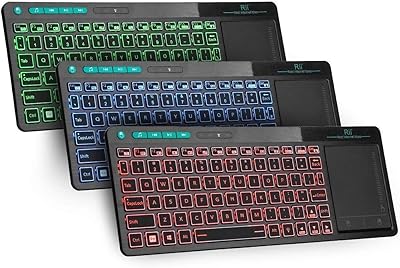
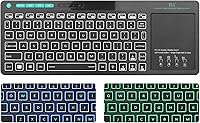
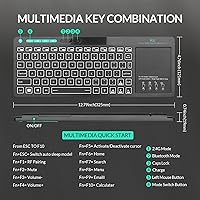
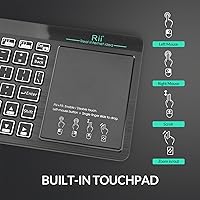
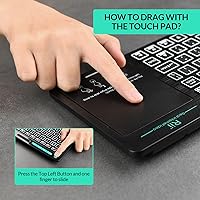
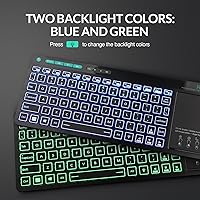
Switching between Bluetooth and RF modes takes a single button press, which is handy if you're bouncing between an Android TV Box and a Windows machine. The blue and green backlight works well enough in a dark living room — just don't expect RGB or red tones, because neither is available here. The trackpad handles two-finger zoom and basic multi-point gestures reliably for casual browsing. Green-colored multimedia keys sit along the top row for quick playback and volume adjustments. Charging over USB keeps running costs low, and compatibility spans Android, Windows, Mac OS, and most smart TVs, with one notable caveat for newer Samsung TVs that may not support all functions.

Best For

This keyboard-trackpad combo is a natural fit for anyone running a home theater PC or Android TV Box from the sofa. If you're tired of balancing a separate mouse on your armrest while navigating Kodi or Plex, the integrated trackpad genuinely reduces that frustration. It also works well on IPTV setups, streaming sticks, and tablets where a full-size keyboard would feel excessive. Budget-conscious buyers setting up a media center for the first time will find the all-in-one form factor particularly practical. It's less suited to productivity tasks or office use, where a traditional keyboard and mouse will always be more comfortable.

User Feedback

Buyers frequently call out the trackpad responsiveness as a pleasant surprise given the price point — most expected something sluggish and got something reasonably accurate instead. Battery life draws mostly positive comments, with users reporting several weeks of casual use per charge. That said, some owners report trackpad drift or inconsistent sensitivity after extended use, which is worth noting. Build quality is functional rather than impressive — the slim profile feels light in hand, and key travel is shallow. The Samsung compatibility limitation has frustrated a handful of buyers who didn't catch the disclaimer. The 12-month warranty provides some peace of mind, though long-term durability remains a mild concern for heavier users.

Pros

  • Single device replaces both keyboard and mouse for couch-based TV and media center control.
  • Switching between Bluetooth and RF 2.4GHz takes one button press, no re-pairing required.
  • The oversized trackpad handles smart TV navigation and basic gestures better than expected at this price.
  • Built-in rechargeable battery eliminates the ongoing cost and hassle of disposable AA cells.
  • Blue and green backlit keys make typing in a dark living room genuinely practical.
  • Dedicated multimedia shortcut keys speed up playback and volume control without opening menus.
  • Compatible with Android TV Box, Windows, most smart TVs, HTPC, tablets, and IPTV setups.
  • Lightweight at just over one pound — easy to hold in two hands or rest on your lap.
  • The Rii RT518S Wireless Keyboard ranks in the top tier of its Amazon category, reflecting strong real-world adoption.
  • USB dongle provides a stable RF connection as a reliable fallback when Bluetooth acts up.

Cons

  • Trackpad sensitivity can drift over time, occasionally requiring a restart to restore accuracy.
  • No battery level indicator means the first sign of low charge is usually an unresponsive device mid-use.
  • Key travel is too shallow for comfortable extended typing sessions beyond short search queries.
  • Newer Samsung smart TV models have known function gaps that limit the keyboard's usefulness on that platform.
  • The mode-switch button lacks any indicator light to confirm which connection mode is currently active.
  • Glossy trackpad surface attracts fingerprints and smudging faster than a matte finish would.
  • Bluetooth reliability drops in environments with heavy 2.4GHz interference from other nearby devices.
  • Mac OS media key support is only partial, making the shortcut row less useful for Apple users.
  • Plastic chassis flexes slightly under firm typing pressure, which erodes confidence in long-term durability.
  • Wireless range falls short of advertised distances in larger rooms or when used through walls.

Ratings

The Rii RT518S Wireless Keyboard scores here are generated by an AI system that analyzed thousands of verified global user reviews, actively filtering out incentivized, duplicate, and bot-driven feedback to surface what real buyers actually experienced. This keyboard-trackpad combo earned notably consistent praise in some areas while showing clear patterns of frustration in others — and both sides are reflected honestly in the scores below.

Trackpad Responsiveness
78%
22%
For a compact all-in-one device at this price tier, the trackpad regularly surprised users who expected sluggish or inaccurate behavior. Scrolling through streaming menus and navigating Android TV interfaces felt fluid enough that most buyers stopped missing a dedicated mouse within a day or two.
Some users reported sensitivity drift after a few weeks of regular use, requiring recalibration or a device restart to restore accuracy. Multi-touch gesture recognition, while functional, occasionally misfired during two-finger scrolling on certain TV platforms.
Dual-Mode Connectivity
83%
The ability to switch between Bluetooth and RF 2.4GHz with a single button press made this keyboard-trackpad combo genuinely practical in mixed-device households. Users running both an Android TV Box and a Windows PC on the same entertainment unit particularly appreciated not having to re-pair from scratch each time.
A small number of buyers reported occasional Bluetooth dropout, especially with older smart TVs that have weaker Bluetooth stacks. The RF dongle resolves this in most cases, but it does occupy a USB port permanently, which bothered users with limited ports on their TV box.
Build Quality
61%
39%
The slim 0.74-inch profile keeps the keyboard easy to store and handle from the couch, and the overall layout feels intentionally designed for lean-back use rather than desk work. For casual media navigation, the construction holds up adequately in everyday conditions.
Key travel is notably shallow, and the chassis flexes slightly under firm typing pressure — something more noticeable when entering long search queries or passwords. Several buyers described the plastic feel as acceptable but not confidence-inspiring for long-term daily use.
Backlight Quality
67%
33%
Having any backlight at all on a budget wireless keyboard is genuinely useful when watching content in a dark living room. The blue and green illumination provides enough visibility to type search terms or navigate menus without fumbling.
Buyers expecting RGB or even a standard white backlight were disappointed — the two-color limitation (blue and green only, no red) is easy to overlook before purchasing. The brightness level is also modest, which means it can wash out in rooms that are only partially dim rather than fully dark.
Battery Life
81%
19%
Rechargeable via USB rather than disposable batteries, this wireless keyboard delivered several weeks of typical couch use between charges for the majority of reviewers. Users who only pick it up for movie-night browsing and occasional searches found the battery demands very manageable.
Heavy daily users, such as those using it as a primary input device for a home office TV setup, reported shorter intervals between charges than casual users. There is no battery level indicator, so the first sign of low charge is often an unresponsive keyboard mid-session.
Compatibility Range
74%
26%
The breadth of supported platforms — Android TV Box, HTPC, Windows, Mac OS, tablets, and most smart TVs — means most buyers can use this keyboard-trackpad combo across multiple devices they already own. Setup was largely plug-and-play across tested platforms.
Newer Samsung smart TVs have a well-documented compatibility gap where certain keyboard functions simply do not register, and this frustrated buyers who purchased specifically for that use case. Mac OS compatibility also comes with partial media key support, which is a letdown for Apple-ecosystem users.
Value for Money
86%
Relative to what this device offers — dual-mode wireless, an oversized trackpad, backlit keys, and a rechargeable battery — most buyers felt the asking price was fair or even generous. The combination of features typically requires spending significantly more to find in a single peripheral.
The value perception dips for buyers who encounter trackpad drift or build-quality concerns early, as the cost of replacement undermines the savings made upfront. Those expecting desktop-grade typing comfort or full Samsung TV support may feel the trade-offs outweigh the price advantage.
Multimedia Shortcut Keys
72%
28%
The dedicated green-colored media keys along the top row made controlling playback, volume, and navigation noticeably faster during actual TV use. Users running Kodi or Plex praised the immediacy of having those controls without diving into on-screen menus.
Not all media keys functioned as expected across every platform — some shortcuts that worked perfectly on a Windows HTPC did nothing on certain Android boxes. The green color coding, while visually distinct, was described by a few users as looking cheap against the keyboard's overall aesthetic.
Setup & Ease of Use
88%
Most buyers had this keyboard-trackpad combo up and running in under three minutes. The included USB dongle for RF mode required no driver installation, and Bluetooth pairing followed a standard process that even less tech-savvy users navigated without consulting any documentation.
The mode-switching button, while functional, lacks any LED indicator to confirm which mode is currently active — a minor but recurring complaint. A small number of users also found the printed manual sparse when troubleshooting Bluetooth pairing on less common devices.
Typing Comfort
58%
42%
For short bursts of typing — search queries, usernames, brief messages — the key layout and spacing work well enough in a couch-use context. The keyboard is light enough to hold in both hands and type with thumbs, similar to a game controller, which some users actually preferred.
Extended typing sessions exposed the shallow key travel and soft feedback as real limitations. Writers or users who need to input longer text regularly found the experience tiring compared to even basic office keyboards, and the compact layout caused occasional mis-presses on edge keys.
Portability & Form Factor
82%
18%
At just over a pound and roughly 12.79 inches long, this wireless keyboard sits in a comfortable middle ground — large enough to type on properly, small enough to tuck beside a couch cushion or store in a TV cabinet. The flat profile slides easily under remotes and other accessories.
The size, while good for lap use, is slightly awkward to pack for travel compared to ultra-compact mini keyboards. A few users noted the glossy surface on the trackpad area picked up fingerprints quickly and showed smudging more than they would have liked.
Wireless Range
75%
25%
Across typical living room distances — roughly 10 to 16 feet from the TV or receiver — performance was stable and input lag was negligible in normal use. The RF dongle in particular held a consistent connection without noticeable dropouts in standard home environments.
At longer distances or through walls, both Bluetooth and RF modes showed reduced reliability. Users in larger open-plan spaces reported needing to stay closer to the receiver than the advertised range suggested, particularly when other 2.4GHz devices were active nearby.
Warranty & Support
66%
34%
The 12-month warranty gave many buyers a reasonable degree of confidence at this price point, and several users reported that the support team responded to queries without excessive delays. Knowing there is a fallback option matters when buying a budget peripheral.
Warranty claims involving hardware defects were sometimes met with requests for extensive documentation before replacements were processed. A handful of international buyers also noted that support response quality varied depending on region, making the warranty feel less consistent than the 12-month term implies.

Suitable for:

The Rii RT518S Wireless Keyboard was built with one core use case in mind: controlling a media setup from the couch, and it delivers on that premise well. Android TV Box owners who are tired of hunting through on-screen keyboards with a remote will find the integrated trackpad genuinely changes how they interact with their device. HTPC users running Kodi, Plex, or similar software will appreciate having playback shortcuts, a working mouse alternative, and a full keyboard in one lightweight unit. It also suits anyone setting up a budget streaming station — think a repurposed mini PC hooked to the living room TV — where spending heavily on peripherals makes little sense. Casual smart TV users who mostly need to type in search queries, log into apps, or navigate menus in a dimly lit room will get solid mileage from the backlit keys without needing anything more sophisticated. If your priority is convenience over precision and you want one device that covers everything without desk space or cable clutter, this keyboard-trackpad combo fits that bill at a price that is hard to argue with.

Not suitable for:

Buyers who need a primary typing tool for extended writing, coding, or office work should look elsewhere — the shallow key travel and soft tactile feedback make prolonged sessions uncomfortable, and this keyboard-trackpad combo was never engineered for that purpose. Anyone hoping for RGB backlighting or even a neutral white backlight will be disappointed; the two colors available are blue and green, and that is the full extent of the lighting options. Owners of newer Samsung smart TVs should approach with caution, since documented compatibility gaps mean certain keyboard functions may simply not register, and that is a meaningful limitation if Samsung TV control is the primary reason for buying. Mac OS users who rely heavily on media shortcut keys will find partial support at best, making the multimedia row less useful in Apple-centric setups. Those with demanding wireless range requirements — such as controlling a projector PC from across a large room — may find both the Bluetooth and RF modes fall short of advertised distances in real-world conditions. Finally, anyone who places high value on long-term build durability should factor in the plastic construction and light chassis before committing, as the 12-month warranty, while reassuring, does not cover the full lifespan most buyers would expect from a daily-use peripheral.

Specifications

  • Brand: Manufactured by Riitek under the Rii product line, a brand focused on compact wireless input devices.
  • Model Number: The exact model identifier for this keyboard is RT518S.
  • Dimensions: The keyboard measures 12.79″ in length, 4.76″ in width, and 0.74″ in height, making it slim enough to store beside a couch cushion.
  • Weight: The unit weighs 1.01 pounds, light enough to hold comfortably in both hands during lap use.
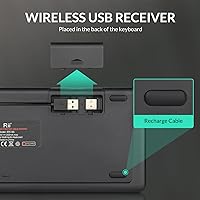
  • Connectivity: Supports dual wireless modes: Bluetooth for cable-free pairing and RF 2.4GHz via an included USB dongle for a more stable connection.
  • Mode Switching: A dedicated Mode button on the keyboard allows instant toggling between Bluetooth and RF 2.4GHz without re-pairing.
  • Backlight Colors: The keyboard offers two LED backlight colors — blue and green — with no red or white backlight option available.
  • Trackpad Size: Features an oversized multi-touch trackpad that supports two-finger zoom gestures and multi-point touch input.
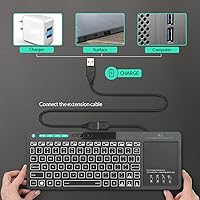
  • Battery Type: Equipped with a built-in rechargeable battery that charges via a standard USB cable, eliminating the need for disposable batteries.
  • USB Dongle: A 2.4GHz RF USB dongle is included in the package for plug-and-play wireless connectivity without Bluetooth setup.
  • Multimedia Keys: Dedicated green-colored shortcut keys along the top row provide direct access to media playback, volume, and navigation functions.
  • Compatibility: Works with Android TV Box, Windows PC, Mac OS (partial media key support), Smart TV, Tablet, HTPC, and IPTV devices.
  • Samsung TV Note: Certain functions may not operate correctly on newer Samsung smart TV models due to platform-level compatibility limitations.
  • Mac OS Support: Basic input functions work on Mac OS, but some media shortcut keys are not fully supported on Apple operating systems.
  • Keyboard Layout: Standard QWERTY layout designed for general typing, search input, and media navigation rather than high-speed productivity work.
  • Warranty: Covered by a 12-month manufacturer warranty with support available through the Rii customer service team.
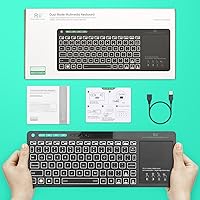
  • Package Contents: The package includes the wireless keyboard, a 2.4GHz USB receiver dongle, a USB charging cable, and a basic user manual.
  • Best Sellers Rank: Ranked #351 in the Computer Keyboards category on Amazon, reflecting strong and sustained buyer adoption since its release.

Related Reviews
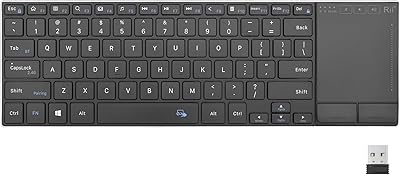
Rii K22S Wireless Keyboard with Touchpad
84%
88%
Connectivity Performance
81%
Ergonomics & Comfort
85%
Battery Life
91%
Ease of Setup
72%
Touchpad Responsiveness
More
Rii K18 Plus Wireless Keyboard with Trackpad
83%
88%
Battery Life
85%
Trackpad Performance
91%
Portability
80%
Build Quality
79%
Compatibility
More
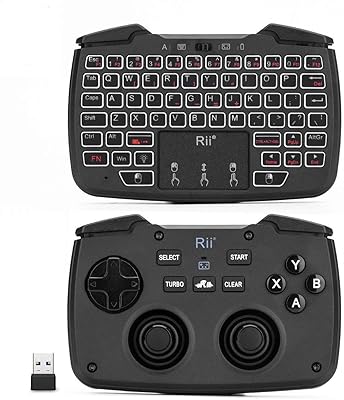
Rii RK707 3-in-1 Wireless Game Controller, Keyboard, and Mouse Combo
83%
86%
Ease of Use
80%
Build Quality
84%
Performance in Gaming
88%
Battery Life
65%
Ergonomics
More
Arteck HW192 Wireless Keyboard and Mouse Combo
78%
78%
Build Quality
72%
Typing Experience
63%
Mouse Comfort & Ergonomics
81%
Battery Life
69%
Wireless Connectivity
More
X9 Wireless Ergonomic Keyboard
84%
89%
Comfort & Ergonomics
92%
Wireless Connectivity
84%
Build Quality
90%
Battery Life
75%
Typing Experience
More
Links9+ Wireless Bluetooth Keyboard
86%
89%
Typing Comfort
85%
Build Quality
78%
Connectivity Stability
90%
Battery Life
91%
Design & Aesthetics
More
Soueto WK713 Wireless Keyboard
86%
89%
Typing Experience
94%
RGB Lighting Customization
87%
Battery Life
75%
Build Quality
80%
Device Holder Utility
More
Arteck HW305 Wireless Keyboard
79%
91%
Value for Money
94%
Ease of Setup
74%
Typing Experience
63%
Build Quality
69%
Battery Life
More
JOYACCESS JKB888BP Wireless Keyboard
87%
93%
Typing Comfort
88%
Build Quality
95%
Key Noise
91%
Connectivity Reliability
89%
Setup Ease
More
FENIFOX Wireless Keyboard and Mouse
86%
88%
Ergonomics
91%
Quiet Typing Experience
85%
Battery Life
89%
Wireless Connectivity
84%
Build Quality
More

FAQ

It works with Fire TV devices since they run Android, and pairing via Bluetooth is straightforward. Roku has more limited Bluetooth keyboard support depending on the model, so results can vary — RF mode is not an option there since Roku does not expose a standard USB host port on most units.

No, the keyboard operates in one mode at a time. You press the Mode button to switch between Bluetooth and RF 2.4GHz — it does not broadcast to both simultaneously. That said, switching is quick and you do not need to re-pair each time once both connections are set up.

Neither, unfortunately. The Rii RT518S Wireless Keyboard only offers blue and green backlight options — there is no white, red, or RGB mode. If you are expecting a neutral white glow or full color cycling, this keyboard will disappoint on that front.

Most casual users report several weeks between charges with typical couch-use patterns — think a few hours of browsing and media control per day. If you are using it more intensively as a near-daily input device, expect to charge it more frequently, perhaps every week or two.

Partially. Basic typing and navigation tend to work, but Samsung has changed how their newer smart TV models handle external keyboards, and some function keys or media shortcuts may simply not respond. It is worth checking your specific Samsung TV model against known compatibility before buying if Samsung TV control is your primary use case.

For media center navigation and couch browsing, yes — it handles the job well. For precision tasks like graphic editing or detailed desktop work, no. Think of it as a TV remote upgrade rather than a desktop mouse replacement, and you will not be disappointed.

No drivers are required for the RF dongle — just plug it in and the keyboard is recognized immediately on Windows, Android, and most smart TV platforms. Bluetooth pairing follows the standard process your device already uses for other Bluetooth accessories.

There is no dedicated sensitivity adjustment button on the keyboard itself. On devices that allow pointer speed settings in their system menu — like Windows or Android — you can tune it from there. A small number of users have reported sensitivity drift over time, which a device restart usually resolves temporarily.

In a typical living room setup, roughly 10 to 15 feet works reliably with either connection mode. At greater distances or through walls, you may notice occasional lag or dropout, particularly if other 2.4GHz devices are active in the same space.

The dongle is a proprietary receiver paired to the specific keyboard, so a standard generic dongle will not work as a replacement. You would need to contact Rii support to request a replacement receiver, or switch to using the keyboard exclusively in Bluetooth mode, which does not require the dongle at all.