Overview

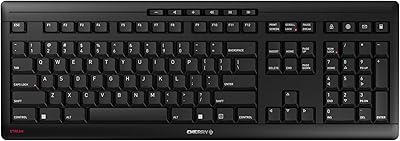
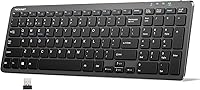
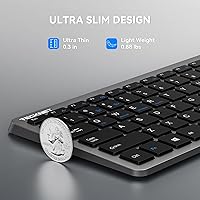
The TECKNET TK-KB041 Wireless Keyboard arrived on the market in mid-2025 and quickly earned a spot in Amazon's top 400 keyboards — not bad for a budget peripheral that punches above its price class. At under a pound and barely half an inch thick, this wireless keyboard is genuinely portable without sacrificing a full layout, including a numeric keypad. It connects to up to three devices simultaneously through Bluetooth 5.0 and a 2.4GHz USB dongle, and the built-in rechargeable battery can stretch through weeks of daily use on a single charge. For anyone tired of cable clutter or dead AA batteries, the value proposition here is hard to ignore.
Features & Benefits

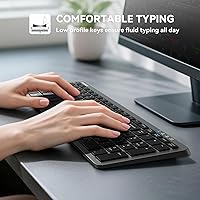
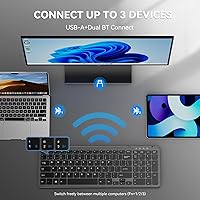
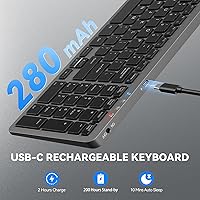
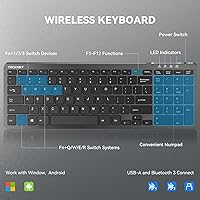
The scissor switches are the standout here — they produce a low, muffled click that won't irritate coworkers or household members even during heavy typing sessions. Charging over USB-C takes about two hours and, crucially, you can keep typing while it tops up, so there's no forced downtime. Multi-device switching is where this slim multi-device keyboard earns its keep for busy users: press FN+1 to jump to your laptop, FN+2 for your tablet, FN+3 for your desktop — it takes less than a second. The auto-sleep kicks in after ten minutes of idle time, which genuinely helps stretch battery life. OS-switching shortcuts round out a feature set that feels thoughtfully assembled for the price.

Best For

This slim multi-device keyboard hits a sweet spot for people who work across multiple screens without wanting to pay a premium for it. Think of a student who bounces between a personal laptop and a shared PC, or a freelancer whose desk has a desktop and a tablet within reach. The number pad makes it genuinely practical for anyone doing regular data entry, budgeting, or spreadsheet work — that's a real differentiator at this size and price. It's also a solid pick for open-plan offices where noise matters, and for travelers who want a full keyboard in their bag without the weight penalty. Minimalist setups will appreciate the wire-free convenience.

User Feedback

Most buyers highlight the quiet typing experience as the biggest win, especially those coming from noisier membrane or clicky keyboards. The battery life generally holds up well in real-world use, which puts the advertised figures in a credible light. On the flip side, some users note that key travel is shallower than expected — a fair point if you prefer a deeper, more tactile press. Build quality draws the most mixed reactions: the plastic body feels functional rather than premium, and a few reviewers mention the chassis has a bit of flex. The USB dongle slot on the back gets quiet praise for keeping things tidy. Device switching, for most, works reliably enough for daily use with only occasional lag reported.

Pros

  • Multi-device switching between three paired devices works reliably for everyday productivity tasks.
  • The scissor switches are genuinely quiet — a considerate choice for shared offices and study spaces.
  • USB-C charging with pass-through use means you are never forced off the keyboard mid-task.
  • Includes a numeric keypad, which is rare to find in such a slim and lightweight form factor.
  • Battery life holds up well in real-world use, with weeks between charges for typical workloads.
  • The USB dongle tucks neatly into a slot on the back, reducing the risk of losing it during travel.
  • OS-switching shortcuts make it easy to move between Windows and Mac environments without reconfiguring.
  • The 36-month support window is longer than most rivals offer at this budget tier.
  • Setup is quick — the USB dongle works plug-and-play on Windows with no driver installation required.
  • Indicator lights for connection mode and caps lock remove guesswork when switching between paired devices.

Cons

  • Key travel is shallower than many typists prefer, which can cause fatigue during long writing sessions.
  • The plastic chassis develops a noticeable flex when typing firmly near the center of the board.
  • Bluetooth reconnection after idle sleep can be slow or require manual re-pairing on some devices.
  • Spacebar and Enter key stabilizers occasionally produce a faint rattle at certain press angles.
  • The 36-month support guarantee requires product registration, which many buyers miss or skip.
  • LED indicators are dim and hard to read clearly under strong ambient or natural light.
  • The included user manual provides limited guidance for pairing with iOS or less common Android devices.
  • Fingerprints and smudges accumulate quickly on the grey plastic finish, especially on darker surfaces.
  • Function key behavior on tablets is inconsistent and depends heavily on the active app or OS version.

Ratings

The TECKNET TK-KB041 Wireless Keyboard scores below are generated by AI after analyzing verified global user reviews, with spam, bot activity, and incentivized feedback actively filtered out. This slim multi-device keyboard drew a wide range of buyers — from students to office workers — and the scores reflect both where it genuinely delivers and where it falls short of expectations. Nothing here is sugarcoated: the strengths and frustrations you see are drawn directly from real purchase experiences.
Value for Money
91%
For a full-size keyboard with multi-device support, USB-C charging, and scissor switches, most buyers feel they got considerably more than they paid for. Reviewers regularly cite it as one of the better-equipped budget keyboards they have owned, especially given the number pad inclusion at this price tier.
A handful of users expected more premium materials given the feature count, and felt the plastic construction revealed the true cost when placed next to mid-range competitors. For buyers who prioritize feel over function, the value equation looks slightly less favorable.
Typing Feel & Key Response
78%
22%
The scissor switches offer a noticeably crisper, more controlled press than typical membrane keyboards, which most users find satisfying for extended typing sessions. People who write reports, fill spreadsheets, or work long hours at a desk generally appreciate the low-profile key action.
Key travel is shallower than some users prefer, and a few touch-typists noted that the feedback can feel a bit flat after prolonged use. Those coming from mechanical keyboards may find the experience underwhelming in terms of tactile response.
Noise Level
93%
This is one of the most consistently praised aspects across reviews. Colleagues in open offices and library regulars both report that the keyboard produces almost no audible click, making it a genuinely considerate choice in shared spaces.
A small number of users note that while the keys are quiet, the stabilizers on larger keys like the spacebar and Enter can produce a faint rattle at certain press angles — not loud, but noticeable in very quiet environments.
Multi-Device Switching
82%
18%
For users juggling a work laptop, personal desktop, and tablet, the FN+1/2/3 switching shortcut is a genuine daily convenience. Most buyers report that switching between a connected PC and a Bluetooth tablet takes under two seconds and works reliably across sessions.
A recurring complaint involves occasional lag or the need to re-pair after the keyboard wakes from sleep, particularly on the Bluetooth channels. It is not a dealbreaker for most, but users who switch devices constantly may find it mildly irritating.
Build Quality & Materials
63%
37%
The keyboard feels solid enough for daily desk use, and the low-profile ABS body keeps weight down without the chassis feeling hollow. Most casual users are perfectly satisfied with the construction for the price point.
Flex in the middle of the keyboard body is a common observation, especially when typing firmly near the center. The plastic finish also picks up fingerprints easily and does not communicate durability to buyers who handle the unit with premium expectations.
Battery Life
84%
Real-world battery longevity broadly aligns with the advertised figures for most users, particularly those who type several hours a day in typical office conditions. The auto-sleep feature clearly contributes, with many users going weeks between charges.
Heavy users who keep the keyboard active for eight-plus hours daily report shorter intervals between charges than the spec sheet suggests. A few reviewers also noted that wake-from-sleep occasionally requires a longer keypress than the stated three seconds.
USB-C Charging Convenience
88%
The shift to USB-C is widely welcomed, and the ability to charge while continuing to type removes one of the most common frustrations with rechargeable peripherals. Most users already have USB-C cables on their desk, making the included cable a bonus rather than a necessity.
The charging port position on the keyboard could be more accessible depending on desk layout, and a couple of reviewers wished for a charging indicator that was slightly more visible from a distance rather than requiring a direct glance.
Wireless Connectivity Stability
79%
21%
The 2.4GHz USB dongle connection is consistently stable with virtually no reported dropouts during active use, which is the standard most buyers rely on for productivity. The stored dongle slot on the back of the keyboard is a thoughtful touch that prevents loss during travel.
Bluetooth connectivity is somewhat less consistent, with occasional disconnection events reported when the keyboard is left idle and then brought back into use. This appears more common on Android tablets than on Windows or Mac systems.
Portability & Size
86%
At under a pound, this slim multi-device keyboard slips into a laptop bag without adding meaningful bulk, which frequent travelers genuinely appreciate. The full-size layout with number pad manages to stay compact enough that it does not dominate a small desk or tray table.
It is slightly wider than truly compact keyboards precisely because of the number pad, which can be a tight fit in smaller bags or pouches. Buyers expecting a tenkeyless footprint may be surprised by the full width on arrival.
Number Pad Usability
81%
19%
For anyone doing regular data entry, accounting work, or spreadsheet navigation, the number pad inclusion at this form factor is a practical win. Reviewers in finance and administration roles specifically call it out as the reason they chose this over smaller alternatives.
The number pad keys feel slightly shallower than the main keyboard keys to some users, and the num lock indicator — while present — is small enough that a few buyers have accidentally typed numbers when expecting text input.
Indicator Lights
71%
29%
Having visible indicators for caps lock, num lock, charging state, and active connection mode genuinely reduces guesswork, especially for the multi-device channels. Users switching between Bluetooth and the USB dongle appreciate being able to confirm the active connection at a glance.
The indicator LEDs are on the dim side and can be difficult to read in bright ambient light or on a sun-lit desk. Some users also wished the charging light stayed on continuously rather than shutting off when the lid angle changes.
OS Compatibility & Shortcuts
76%
24%
The dedicated OS-switching shortcuts mean this keyboard can move between a Windows desktop and a Mac laptop without reconfiguring anything, which hybrid workers find genuinely useful. Most standard shortcuts and function keys map correctly out of the box on both platforms.
The key labeling is designed with Windows as the primary reference, so Mac users occasionally have to mentally remap a few shortcuts. Some tablet users also report that the multimedia function keys behave inconsistently depending on the app in focus.
Setup & Pairing Ease
87%
First-time pairing on all three channels is straightforward, and the included USB dongle works immediately on Windows without any driver installation. Most reviewers describe the initial setup as taking under five minutes from box to first keystroke.
Pairing on iOS and certain Android devices requires a few extra steps that are not fully covered in the included manual, leading to some confusion for less tech-savvy buyers. The manual itself is brief and could benefit from clearer illustrated pairing instructions.
Desk Aesthetics & Profile
74%
26%
The flat, low-profile grey design fits naturally into clean, modern desk setups without drawing attention. Buyers who prefer an unobtrusive peripheral that blends into the background rather than making a visual statement tend to rate the look positively.
The design plays it very safe and does not stand out against competing keyboards at a similar price point. Users who wanted a backlit keyboard or a more premium color option will need to look elsewhere, as there is no lighting and limited color variety.
After-Sales Support
69%
31%
The 36-month support window is longer than most competitors offer at this price point, and registered users report that TECKNET customer service responds to queries within a reasonable timeframe. For a budget peripheral, having multi-year coverage provides meaningful peace of mind.
The support period requires product registration, which some buyers overlook or find inconvenient. A few users also note that troubleshooting responses can feel scripted and do not always address the specific connectivity issues being reported.

Suitable for:

The TECKNET TK-KB041 Wireless Keyboard was built for the kind of buyer who needs a practical, no-fuss peripheral that covers a lot of ground without a heavy price tag. It makes the most sense for remote workers and students who routinely switch between two or three devices — imagine finishing a report on a laptop, then hopping over to a tablet for a video call, all without reaching for a second keyboard. Data-entry professionals and anyone who works heavily in spreadsheets will appreciate that the number pad is included without adding excessive bulk to the footprint. Open-plan office workers and library regulars will find the scissor-switch noise level genuinely courteous to those around them. Frequent travelers who want a full keyboard that disappears into a bag will also find the weight and dimensions genuinely workable. For minimalist desk setups where cable clutter is a real frustration, the rechargeable battery and wireless connectivity tick both boxes at once.
Not suitable for:

The TECKNET TK-KB041 Wireless Keyboard is not the right choice for buyers who place build quality and material feel above feature count. If you are used to a premium aluminum keyboard or a high-end mechanical board and you are hoping this will replicate that experience, the ABS plastic construction will likely disappoint — it flexes under firm pressure and does not carry the reassuring solidity of more expensive options. Gamers should also look elsewhere: there is no per-key lighting, the Bluetooth latency is not optimized for fast-paced input, and the key travel is too shallow for the kind of tactile feedback gaming sessions demand. Touch-typists who rely on pronounced physical feedback to maintain accuracy may find the low-profile scissor switches unsatisfying over long sessions. Buyers who need rock-solid Bluetooth reliability for professional presentations or time-critical workflows should note that occasional reconnection delays have been reported, particularly on the wireless channels after idle periods. If you are shopping for a keyboard to last many years of heavy daily abuse, the build at this price point is honest but not exceptional.
Specifications

  • Dimensions: The keyboard measures 14.42″ long by 5″ wide by 0.46″ high, keeping it slim enough for most laptop bags without sacrificing a full key layout.
  • Weight: At 14.1 ounces (approximately 0.88 lbs), this wireless keyboard is light enough to carry daily without adding meaningful bulk to a bag.
  • Switch Type: Scissor switches are used across all keys, providing a low-profile, quieter keystroke compared to standard membrane or mechanical alternatives.
  • Connectivity: Connects via Bluetooth 5.0 on two independent channels and a 2.4GHz USB-A wireless dongle, supporting up to three paired devices simultaneously.
  • Wireless Range: The keyboard maintains a stable connection at distances of up to 33 feet from the paired device under typical indoor conditions.
  • Battery: A built-in 280mAh rechargeable lithium battery powers the keyboard for up to 200 hours of use on a full charge under standard conditions.
  • Charging: Charges via a USB-C port and reaches a full charge in approximately 2 hours; the keyboard remains fully functional during charging.
  • Auto-Sleep: An automatic power-saving mode activates after 10 minutes of inactivity, requiring a 3-second keypress to wake the keyboard from sleep.
  • Device Switching: Users can switch between three paired devices instantly using the FN+1, FN+2, or FN+3 keyboard shortcuts without re-pairing.
  • OS Compatibility: Compatible with Windows, macOS, and tablet operating systems, with dedicated OS-switching shortcuts accessible via FN+Q, FN+W, FN+E, or FN+R.
  • Layout: Full-size layout includes a numeric keypad on the right, a full F1–F12 function row, and dedicated delete and multimedia shortcut keys.
  • Indicator Lights: On-board LED indicators display active connection mode, caps lock status, num lock status, and current charging state.
  • Material: The keyboard body is constructed from ABS plastic, keeping the overall weight low while providing a smooth, flat typing surface.
  • Dongle Storage: The USB-A wireless dongle stores in a dedicated slot on the underside of the keyboard, preventing loss during transport or storage.
  • Included Items: The box contains the wireless keyboard, one USB-A wireless dongle, one USB-C charging cable, and a printed user manual.
  • Warranty & Support: TECKNET provides 36 months of customer support coverage, which requires product registration to activate and maintain eligibility.
  • Profile Height: The keyboard sits at a flat 0.46-inch profile, placing wrists and palms at a natural angle without the need for an external wrist rest.
  • Model Number: The official model number for this keyboard is TK-KB041, which should be referenced when contacting support or searching for accessories.

Related Reviews

TECKNET TK-EKB01040BS01 Wireless Keyboard
76%
83%
Ergonomic Comfort
86%
Typing Noise Level
79%
Wireless Reliability
62%
Build Quality
88%
Value for Money
More
TECKNET TK-KB002 Gaming Keyboard
86%
89%
Comfort and Ergonomics
93%
RGB Customization
88%
Key Responsiveness
90%
Durability and Build Quality
84%
Water Resistance
More
TECKNET TK-HS012 Wireless Bluetooth Headset
88%
91%
Comfort for All-Day Wear
88%
Noise Cancellation Effectiveness
95%
Battery Life
84%
Dual Device Connectivity
85%
Sound Quality
More
TECKNET TK-HS016 Wireless Headset with Mic
86%
94%
Noise Cancellation
88%
Comfort and Fit
91%
Battery Life
85%
Sound Quality
76%
Microphone Performance
More
TECKNET X315 Wireless Keyboard and Mouse Combo
78%
91%
Value for Money
74%
Typing Experience
62%
Mouse Comfort & Ergonomics
83%
Wireless Connectivity & Stability
86%
Noise Level
More
Arteck HW192 Wireless Keyboard and Mouse Combo
78%
78%
Build Quality
72%
Typing Experience
63%
Mouse Comfort & Ergonomics
81%
Battery Life
69%
Wireless Connectivity
More
SHUNJINRUN KB426 Wireless Full-Size Keyboard
77%
83%
Typing Feel & Key Response
88%
Noise Level
67%
Build Quality & Materials
79%
Wireless Connectivity & Reliability
91%
Value for Money
More
JLab JBuds Wireless Keyboard
88%
87%
Typing Comfort
94%
Multi-Device Switching
85%
Build Quality
92%
Battery Life
90%
Portability
More
Logitech K270 Wireless Keyboard
86%
91%
Battery Life
88%
Build Quality
85%
Typing Comfort
83%
Wireless Range
92%
Ease of Setup
More
Redragon BK7114 Wireless Keyboard
85%
91%
Typing Experience
89%
Connectivity Options
85%
Design and Build Quality
93%
Quietness of Keypress
88%
Compatibility with Multiple Devices
More

FAQ

No drivers are needed if you are using the USB dongle on a Windows PC — just plug it in and start typing. Bluetooth pairing on Windows and Mac also works without additional software. The only scenario where you might need to dig into settings is if your tablet requires manual Bluetooth device approval during the initial pairing process.

Yes, it works with tablets on both Bluetooth channels. iPads and most Android tablets will recognize it as a standard Bluetooth keyboard during pairing. Keep in mind that some multimedia function keys may behave differently depending on the tablet OS and which app is active, but standard typing and navigation keys work reliably across platforms.

Once you have paired the keyboard to three separate devices — say a work laptop on channel 1, a personal PC on channel 2, and a tablet on channel 3 — you switch between them by pressing FN and the corresponding number key. The switch itself takes about one to two seconds. It is a genuinely useful feature if you regularly move between devices at the same desk, though on Bluetooth channels there can occasionally be a brief reconnection delay after the keyboard has been asleep.

You can use it while it charges, which is one of the more practical aspects of the USB-C setup. There is no forced downtime — just plug in the cable and keep working. A full charge from empty takes roughly two hours.

The advertised 200-hour figure assumes moderate use with auto-sleep doing its job, and most regular users find they charge it every few weeks. If you type for six to eight hours a day and keep the keyboard active most of that time, expect shorter intervals — some heavy users report charging every week or so. The auto-sleep feature after 10 minutes of inactivity makes a real difference in extending battery life between charges.

There is no backlighting on this keyboard. The only lights are small indicator LEDs for caps lock, num lock, connection mode, and charging state. If you work in low-light conditions and need illuminated keys, you will need to look at a different model.

It works with macOS, though the key labels are printed with Windows conventions in mind. You can switch the keyboard to Mac mode using the FN+W shortcut, which remaps certain keys to better match macOS behavior. A few shortcuts may still require mental remapping if you are a heavy Mac user, but everyday typing and navigation work without issues.

There is a small slot on the underside of the keyboard specifically for storing the USB dongle when it is not in use. It clicks in securely, so it will not fall out in a bag. This is a detail that frequent travelers in particular tend to appreciate, since losing a tiny dongle mid-trip is a real frustration with wireless keyboards that lack this feature.

It is genuinely quiet for office use. The scissor switches produce a soft, muffled press rather than a sharp click, and most coworkers sitting nearby will not find it disruptive. The spacebar and larger keys can occasionally produce a faint rattle if pressed at an unusual angle, but under normal typing conditions the noise level is very low.

TECKNET covers this keyboard with a 36-month support period, which is longer than most brands offer at this price point. The key requirement is that you register the product after purchase to activate that coverage — if you skip registration, you may not be eligible. Support is handled directly by TECKNET, and most users report reasonable response times for common issues like connectivity troubleshooting or replacement requests.