





Overview
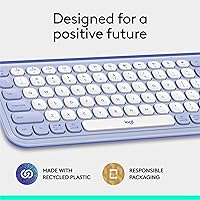
The Logitech POP ICON Keys Wireless Keyboard is Logitech's bid to prove that practical and personality-driven aren't mutually exclusive. The lilac and off-white colorway isn't a tack-on — it's been clearly thought through, and it looks sharper in person than most product shots suggest. The compact, tenkeyless layout fits comfortably into minimal desk setups without demanding attention like a full-size board does. Logitech has built a long track record for keyboards that simply work, and the POP line extends that dependability toward a younger, style-focused crowd. Worth setting expectations early: this wireless keyboard targets comfort and convenience over deep key travel, so mechanical enthusiasts and numpad-dependent workers should probably look elsewhere.
Features & Benefits
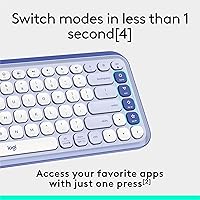
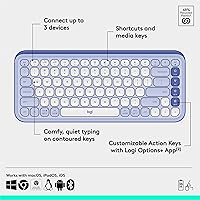
The POP ICON Keys' standout feature is its Easy-Switch button — a single press moves you from your work laptop to your iPad or phone without digging into Bluetooth menus. That kind of friction-free switching adds up over a day. The 15 Action Keys, set up through the Logi Options+ app, let you wire in shortcuts for AI tools, streaming platforms, or whatever workflow modes you actually use; setup takes minutes and most people configure it once and forget it. Keys are quiet and low-profile with a scissor mechanism that mimics good laptop typing. Battery life is genuinely generous — two AAA batteries, included, powering the board for up to three years of typical use.
Best For
This Logitech board hits a sweet spot for students and remote workers who routinely switch between a laptop, tablet, and phone throughout the day — the multi-device switching alone justifies the price for that crowd. If you're building out a considered desk setup where everything coordinates, the color scheme here does its job without trying too hard. It's also a natural fit for anyone in a library, coffee shop, or open-plan office where quiet typing matters. Who should skip it? Heavy typists who want meaningful key depth, anyone who relies on a numpad, and gamers looking for responsiveness. This is a comfort-and-convenience board, and it doesn't apologize for that.
User Feedback
Across 548 ratings averaging 4.4 out of 5, the consensus is mostly positive but not without genuine gripes. Buyers frequently mention that the build quality punches above expectations for the price — it doesn't rattle or flex the way cheaper boards do. Color accuracy also comes up repeatedly; people are pleasantly surprised that the lilac in person matches what they ordered. The device switching draws consistent praise. On the other side, a recurring complaint is the absence of a Logi Bolt USB receiver, which many expected to find in the box. Some users also flag an initial learning curve with the function key layout, and dedicated typists note that the shallow key travel becomes tiring during longer sessions.
Pros
- Hardware Easy-Switch button moves you between three paired devices instantly — no digging through Bluetooth menus required.
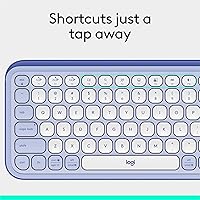
- Fifteen Action Keys are fully configurable through Logi Options+, covering AI shortcuts, streaming apps, and custom workflow modes.
- Quiet, low-profile keys keep this wireless keyboard genuinely unobtrusive in libraries, shared offices, and cafes.
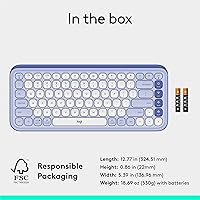
- Two AAA batteries are included and rated for up to three years of use with the auto-sleep mode active.
- Cross-platform Bluetooth support spans Windows, macOS, iPadOS, ChromeOS, Linux, and iOS in one compact package.
- The lilac and off-white colorway holds up in person — color accuracy matches product photos more reliably than most competitors.
- At 530 grams with a slim tenkeyless profile, this Logitech board is easy to carry between home, office, and campus.
- Plastic components contain up to 70% recycled content, making it a notably greener choice in its price category.
- Build quality feels more solid than the price would suggest — minimal flex and a stable base under regular daily use.
Cons
- No Logi Bolt USB receiver is included in the box, a frustrating omission that forces a separate purchase for dongle users.
- The function key row has a non-standard default behavior that requires an adjustment period for users coming from typical layouts.
- Shallow scissor-switch keys offer limited travel depth, which causes typing fatigue during long document, coding, or writing sessions.
- There is no numpad, making the POP ICON Keys impractical for accountants, spreadsheet-heavy users, and data entry work.
- Full customization is locked behind the Logi Options+ app, which requires a separate download not all users will bother installing.
- Bluetooth-only connectivity means users in interference-prone environments or on older hardware may encounter occasional dropout issues.
- The claimed three-year battery life is based on light usage patterns; heavy daily users will realistically see shorter intervals between changes.
- Color options are narrow, and buyers who do not connect with the lilac or off-white palette have limited alternatives within this line.
Ratings
The scores below for the Logitech POP ICON Keys Wireless Keyboard were generated by our AI rating engine after analyzing hundreds of verified buyer reviews from global markets, with our system actively filtering out incentivized, bot-submitted, and duplicate feedback. Each category score reflects the honest distribution of real user sentiment — strong marks where the board genuinely earns them, and lower scores where recurring pain points emerged without apology. Both the highlights and the shortcomings are represented transparently so you can make a fully informed decision before buying.
Multi-Device Switching
Aesthetic Design
Key Noise Level
Typing Comfort
Build Quality
Battery Life
Key Travel & Feedback
Software & Customization
OS Compatibility
Connectivity Reliability
Portability
Value for Money
Setup & Pairing
Eco-Friendly Design
Suitable for:
The Logitech POP ICON Keys Wireless Keyboard is built for the kind of person who genuinely rotates between multiple devices every single day — think a student hopping from a MacBook during class to an iPad for notes to a phone in between, all without wanting to touch a Bluetooth settings menu. Remote workers who share a home office or sit in open-plan spaces will appreciate how unobtrusive the quiet keys are; you won't be that person everyone hears typing across the room. If building a cohesive, visually considered desk setup matters to you, this is one of the few keyboards at this price that actually looks intentional rather than purely functional. Existing Logitech users will find the Logi Options+ integration fast to configure and easy to maintain across their existing gear. Sustainability-conscious buyers will also find the recycled plastic construction and FSC-certified packaging genuinely worth noting, not just marketing language.
Not suitable for:
If your work involves long daily typing sessions — extended writing, programming, or heavy data entry — the Logitech POP ICON Keys Wireless Keyboard will likely disappoint; the low-profile scissor keys offer limited travel, and many dedicated typists report real fatigue during prolonged use. Anyone who depends on a numpad for accounting, spreadsheets, or number-heavy work will find the tenkeyless layout a non-starter, and that is not a trade-off that can be worked around. Gamers should not consider this board at all — it has no anti-ghosting, no optimized response times, and no features that competitive or casual gaming demands. Buyers expecting a complete Bluetooth solution out of the box should also know that no Logi Bolt USB receiver is included, which is a real inconvenience in environments with Bluetooth interference. If tactile, mechanical feedback is important to how you type, this Logitech board simply does not offer it, and no amount of customization through Logi Options+ will change that fundamental feel.
Specifications
- Connectivity: Connects via Bluetooth to up to 3 devices simultaneously, toggled instantly using a dedicated hardware Easy-Switch button.
- Key Type: Low-profile, quiet scissor-style keys with contoured keycaps engineered to reduce finger fatigue during moderate daily use.
- Customizable Keys: Includes 15 programmable Action Keys configurable through the free Logi Options+ app for shortcuts, macros, and app-specific functions.
- Battery Life: Powered by 2 AAA batteries (included in the box) with a manufacturer-rated lifespan of up to 36 months under typical usage conditions.
- Auto-Sleep: Built-in auto-sleep mode activates automatically during inactivity periods to conserve battery life without any manual intervention.
- Dimensions: Measures 324.5 × 137 × 22 mm, offering a compact tenkeyless footprint well-suited to minimal or space-constrained desk setups.
- Weight: Weighs 530 g (approximately 1.17 lb), light enough to carry between home, office, and campus without adding meaningful bulk.
- OS Support: Officially compatible with Windows, macOS, iPadOS, iOS, ChromeOS, Linux, and Android operating systems over Bluetooth.
- Form Factor: Compact tenkeyless layout with no dedicated numpad, prioritizing desk space efficiency and portability over full-size key coverage.
- Special Keys: Ships with a dedicated emoji menu key, an AI shortcut key, and multiple Action Keys beyond the standard alphanumeric layout.
- Recycled Content: Plastic components are made from 37% to 70% recycled plastic, with the exact percentage varying by color variant.
- Packaging: Outer packaging and product wrap are sourced from FSC-certified forests and other controlled sources as part of Logitech's sustainability commitments.
- Logi Bolt: A Logi Bolt USB receiver is not included in the box; Bluetooth is the sole out-of-the-box connection method.
- Color Variant: Reviewed in the Lilac and Off-White colorway, applied consistently across both the keyboard frame and the keycap surfaces.
- Software: Full Action Key customization requires the free Logi Options+ desktop app; core typing and switching functions work without any software installation.
- Sales Rank: Ranked #69 in the Computer Keyboards category on Amazon at the time of review, with a 4.4-out-of-5 average from 548 verified ratings.
Related Reviews
Logitech POP Keys Mechanical Wireless Keyboard
Logitech MX Keys S
Logitech MX Keys
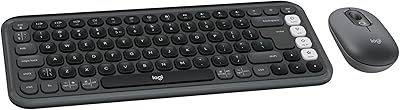
Logitech POP ICON Combo
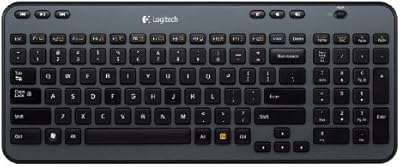
Logitech K360 Wireless Compact Keyboard
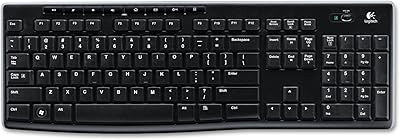
Logitech K270 Wireless Keyboard
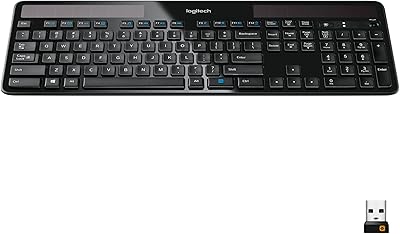
Logitech K750 Wireless Solar Keyboard
Logitech K480 Multi-Device Bluetooth Keyboard
Logitech Wireless Illuminated Keyboard K800
