Overview

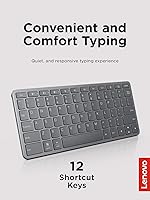
The Lenovo Multi-Device Wireless Keyboard ZG38C05810 arrived in late 2024 as a compact, mid-range option aimed squarely at people juggling multiple devices throughout their day. At just 180g and measuring 10.1″ across, it is genuinely pocketable — sliding into a jacket pocket or slim bag without complaint. The ability to pair with up to three devices is the headline feature, letting you hop between an iPad, Android phone, and Windows laptop without re-pairing each time. It charges via USB-C and claims up to 60 hours per charge, numbers that, if accurate, put it well ahead of many competitors at this price tier. Early ratings sit at 4.4 out of 5 stars, a solid start for a keyboard with just over a hundred reviews.
Features & Benefits

The multi-device keyboard's defining practical feature is its three-device quick-switch capability — dedicated shortcut keys let you jump from one paired device to another in seconds, no fussing with Bluetooth menus. The keys have a 1.3mm travel distance, which keeps typing quiet and reasonably tactile without the mushiness you sometimes find in ultra-thin designs. Twelve customizable shortcut keys cover platform-specific functions across iOS, Android, and Windows, so you are not hunting for workarounds. The USB-C charging is a genuine convenience win here; no more searching for AA batteries mid-trip. At just 0.22″ thin, it slides alongside a tablet in most sleeves without adding meaningful bulk.

Best For

This slim Bluetooth keyboard suits anyone who regularly bounces between devices — the student typing notes on an iPad in class then switching to a Windows laptop at home, or the remote worker keeping a phone, tablet, and computer all live at once. It is also a strong pick for light travelers who want a proper typing surface without carrying a full-size keyboard or a mouse combo. Minimalist desk setups benefit from the low-profile form factor, and anyone still tolerating AA-battery keyboards will appreciate the USB-C recharge convenience. If you primarily use one device or need a full-size layout, though, the compact key arrangement may ask more of you than you would like.

User Feedback

Buyers have responded positively overall, with the typing feel being a recurring highlight — several reviewers note it is more comfortable than expected given how thin the keyboard is. Multi-device switching draws consistent praise for being quick and reliable. On the downside, touch typists with larger hands mention a short adjustment period due to the compact layout, and a handful of users flag that key spacing feels slightly cramped compared to full-size boards. Battery life appears to hold up under moderate daily use, though heavy users may see fewer hours than the stated 60. For a branded keyboard at this price point, overall value is cited frequently as the deciding factor.

Pros

  • Pairs with up to three devices and switches between them with a single key press.
  • USB-C charging means no disposable batteries — ever.
  • At just 180g, it is light enough to carry daily without noticing the weight.
  • Works across iOS, Android, and Windows without any driver installation.
  • Typing noise is quiet enough for shared offices, libraries, and coffee shops.
  • Battery life holds up well for moderate daily users, often lasting several weeks per charge.
  • Clean, slim profile fits easily alongside a tablet in most standard sleeves and bags.
  • Shortcut keys adapt to platform-specific functions on each connected device automatically.
  • Feels more solid and premium than its price tier typically delivers.
  • Strong early buyer satisfaction, ranking in the top 15 in its category shortly after launch.

Cons

  • No USB-C cable is included in the box despite USB-C charging being a selling point.
  • The compact key layout requires an adjustment period that can last a week or more.
  • Keys can feel slightly cramped for users with larger hands during extended sessions.
  • Keyboard tends to slide on smooth or glass desk surfaces due to limited grip on the base.
  • Shortcut customization is shallow — no macro support or remapping software is available.
  • Real-world battery life for heavy users falls noticeably short of the stated 60-hour figure.
  • Occasional Bluetooth reconnection delays reported when waking paired devices from sleep.
  • Plastic construction shows flex under firm pressure along the center of the board.
  • No integrated stand or tablet slot, so a separate accessory is needed for a proper tablet setup.
  • Some shortcut key functions behave inconsistently on older Android or non-standard Windows builds.

Ratings

The Lenovo Multi-Device Wireless Keyboard ZG38C05810 has been scored by our AI system after analyzing verified buyer reviews from global markets, with spam, bot-generated, and incentivized feedback actively filtered out. Scores reflect the honest balance of what real users appreciate and where this slim Bluetooth keyboard falls short in everyday use. Both standout strengths and recurring frustrations are transparently represented in each category below.
Multi-Device Switching
88%
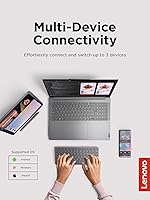
Users consistently call out the three-device pairing as the keyboard's strongest asset. Switching between an iPad, a Windows laptop, and an Android phone takes a single key press, and reviewers report the transition is fast enough to feel natural during busy work sessions rather than disruptive.
A small number of users experienced occasional lag or a need to re-press the switch key when devices were in sleep mode. It is a minor friction point, but it surfaces often enough in reviews to be worth noting for anyone relying on instant switching throughout the day.
Typing Feel & Key Response
83%
For a keyboard this thin, the typing experience earns genuine praise. The 1.3mm key travel hits a comfortable middle ground — quiet enough for coffee shop use, but with just enough resistance that extended typing sessions do not feel like pressing on glass.
Touch typists moving from full-size mechanical or even standard membrane keyboards will notice the shallower travel and tighter key spacing. Several reviewers needed a week or more to adjust, and a few reported occasional misfires on the smaller keys during that period.
Portability & Form Factor
92%
At 180g and just 0.22″ thick, this slim Bluetooth keyboard disappears into most laptop bags and tablet sleeves without effort. Reviewers who travel frequently for work specifically mention it as the most packable full-function keyboard they have found at this price tier.
The compact 10.1″ width is a deliberate trade-off, and users with larger hands flag that the key layout feels slightly cramped compared to a standard keyboard. It is not a dealbreaker for most, but it is a real consideration for anyone who types for hours at a stretch.
Battery Life
76%
24%
Lenovo's stated 60-hour figure holds up reasonably well under moderate daily use. Reviewers who use the keyboard for a few hours each day report going weeks between charges, which largely eliminates the low-battery anxiety that plagues lesser portable keyboards.
Heavy users — those typing for six or more hours daily — report the real-world figure sits noticeably below the 60-hour claim. The manufacturer figure appears to reflect light intermittent use, so daily power users should temper expectations and keep the USB-C cable accessible.
USB-C Charging Convenience
91%
Switching to USB-C recharging is a meaningful practical improvement over keyboards that still require AA or AAA batteries. Reviewers repeatedly mention that being able to charge via the same cable as their phone or laptop removes one more item from their travel bag.
There is no pass-through charging, and the cable is not included in the box according to several buyers. For most people this is a non-issue since USB-C cables are now ubiquitous, but it is worth knowing before you assume a full kit arrives in the packaging.
Cross-Platform Compatibility
84%
The keyboard handles iOS, Android, and Windows without needing driver installs or app downloads, and the 12 shortcut keys adapt to platform-specific functions on each connected device. iPad users in particular highlight that media controls and brightness shortcuts work exactly as expected.
A handful of reviewers noted that some shortcut key functions behave inconsistently on older Android versions or non-standard Windows configurations. It is not a widespread issue, but the keyboard works most reliably on current OS versions rather than legacy setups.
Build Quality & Materials
77%
23%
The Iron Grey finish has a clean, professional look that holds up well against casual scratches and daily handling. For a mid-range product, the chassis feels more solid than the price might suggest, and the keys have a uniform, well-seated feel straight out of the box.
The keyboard is primarily plastic, and a few reviewers describe a slight flex along the center when pressed firmly. It does not affect typing under normal use, but it gives the impression of a more budget-oriented construction when compared to aluminum-bodied competitors.
Ease of Setup & Pairing
86%
Initial Bluetooth pairing took reviewers under two minutes in the majority of cases, and re-connecting to a previously paired device is automatic on wake. The dedicated pairing keys are clearly labeled, making the process straightforward even for users who rarely configure Bluetooth peripherals.
A small proportion of users encountered pairing difficulties specifically with certain iPad Pro models and Windows 11 machines, requiring a full reset of the keyboard's Bluetooth memory. These cases appear to be edge scenarios, but they do show up across multiple independent reviews.
Key Noise Level
89%
The low-profile keys produce a soft, muted click that reviewers consistently describe as acceptable for open-plan offices and library settings. Multiple buyers specifically purchased this keyboard to replace a louder model after receiving complaints from coworkers or family members nearby.
It is not completely silent — a light tapping sound is audible in quiet rooms, which a small number of users found more noticeable than expected. Those specifically seeking a near-silent typing experience may want to compare against keyboards marketed explicitly for whisper-quiet operation.
Shortcut Key Customization
71%
29%
Having 12 dedicated shortcut keys across three platforms adds real flexibility for power users who rely on media playback, brightness control, or app switching throughout the day. Reviewers who work across iOS and Windows particularly value not having to remap functions manually.
The customization depth is limited compared to keyboards with dedicated software configuration tools. Users wanting to remap keys beyond the preset functions or create macros will find the options thin, which may disappoint productivity-focused buyers expecting deeper programmability.
Lightweight Daily Carry
90%
At 180g, this Lenovo keyboard barely registers in a bag, making it a natural choice for students and commuters who already carry a tablet and chargers. Several reviewers switched from heavier folding keyboards specifically because of the weight difference over long days.
The lightweight construction means the keyboard can shift slightly on smooth desk surfaces without a rubber-grip base. A few users noted they had to reposition it more often than expected, particularly when typing on glass-topped desks or polished conference room tables.
Value for Money
82%
18%
For a branded keyboard with three-device Bluetooth, USB-C charging, and a slim profile, most reviewers feel the price sits in a fair range relative to the feature set. The Lenovo name provides some added confidence for buyers wary of lesser-known alternatives at similar price points.
A few reviewers note that with slightly more budget, competing options offer aluminum builds or deeper key travel, making this feel like a compromise for buyers at the upper edge of what they are willing to spend on a portable keyboard.
Compatibility with Tablets
87%
iPad and Android tablet users are among the most satisfied buyers, frequently pairing this keyboard with a tablet stand to create a lightweight laptop-like setup. The keyboard size aligns well with most 10-inch and 11-inch tablet screen widths, making the combination feel intentional.
There is no integrated kickstand or tablet slot, so users need a separate stand to complete the setup. Reviewers who expected a case-keyboard combo were occasionally disappointed by this, having confused it with tablet keyboard covers in the same category listing.
Product Packaging & Included Accessories
63%
37%
The keyboard arrives in clean, minimal packaging consistent with Lenovo's standard product presentation. It includes the rechargeable battery pre-installed, meaning it is ready to pair almost immediately upon unboxing without needing to source components separately.
Several buyers express frustration that no USB-C cable is included in the box. For a rechargeable peripheral being marketed partly on the convenience of USB-C, the omission feels like a cost-cutting decision that leaves a small but real negative impression at first use.

Suitable for:

The Lenovo Multi-Device Wireless Keyboard ZG38C05810 is a strong fit for anyone whose daily routine involves more than one device — particularly remote workers, students, and mobile professionals who toggle between a tablet, laptop, and smartphone throughout the day. If you spend mornings typing notes on an iPad, afternoons replying to emails on a Windows machine, and occasionally need to tap out a quick message from your Android phone, this keyboard handles all three without requiring you to re-pair each time. Tablet-first users will find it especially practical, as the compact footprint pairs naturally with a 10-inch or 11-inch tablet on a stand, creating a lightweight workstation that fits in a tote bag. Light travelers who have grown tired of hunting for AA batteries or lugging a full-size keyboard will appreciate both the weight and the USB-C charging setup. It also suits minimalist desk workers who want a tidy single-keyboard solution for a multi-screen setup without the bulk or cable clutter.
Not suitable for:

The Lenovo Multi-Device Wireless Keyboard ZG38C05810 is not the right choice for everyone, and it is worth being honest about where it falls short. If you are a dedicated touch typist who spends six or more hours a day typing and relies on full-size key spacing and deep key travel for accuracy and comfort, this keyboard's compact layout and shallow 1.3mm travel will likely frustrate rather than satisfy. Writers, coders, or data entry professionals who depend on sustained, high-volume typing should seriously consider whether the adjustment to a smaller form factor is worth the trade-off. The absence of a built-in tablet slot or kickstand means you will need a separate stand to create a proper tablet-and-keyboard setup, which adds cost and extra gear. Users who prefer or require deep shortcut customization or macro programming will also find the options limited compared to keyboards with dedicated configuration software. And if you primarily use a single device at a fixed desk, the multi-device feature is simply wasted value — a full-size keyboard at a similar price would serve you better.
Specifications

  • Brand: Manufactured and sold under the Lenovo brand, a globally recognized technology company headquartered in Beijing, China.
  • Model Number: The official model identifier for this keyboard is ZG38C05810.
  • Dimensions: The keyboard measures 10.1″ in length, 4.2″ in width, and 0.22″ in height, making it one of the slimmest options in its category.
  • Weight: The keyboard weighs 180g, light enough to carry daily in a jacket pocket or slim tablet sleeve without noticeable bulk.
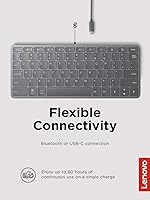
  • Connectivity: Supports both Bluetooth wireless pairing and wired USB-C connection, giving users two reliable options for connecting to devices.
  • Device Pairing: Can be paired with up to 3 devices simultaneously, with dedicated shortcut keys to switch between them instantly.
  • Compatible OS: Fully compatible with iOS, Android, and Windows operating systems, covering the majority of mainstream consumer devices.
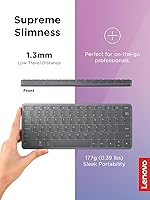
  • Key Travel: Keys feature a 1.3mm low-travel distance, designed to balance quiet operation with a responsive, tactile typing feel.
  • Shortcut Keys: Includes 12 customizable shortcut keys that adapt to platform-specific functions depending on the active connected device.
  • Battery Life: Manufacturer-rated battery life is up to 60 hours of continuous use on a single charge under typical operating conditions.
  • Charging Port: Charges via USB-C, eliminating the need for disposable batteries and allowing use of standard modern charging cables.
  • Battery Type: Powered by one built-in rechargeable P76 battery, which comes pre-installed and ready to use out of the box.
  • Profile: Ultra-slim low-profile design keeps the keyboard nearly flat, reducing wrist strain during extended typing sessions.
  • Color: Available in Iron Grey, a neutral tone that suits both professional desk setups and personal mobile workstations.
  • Key Noise: Keys are engineered for quiet operation, producing a soft keystroke sound suitable for shared workspaces and quiet environments.
  • Included Items: Package contents include the keyboard only; a USB-C charging cable is not included in the box.
  • Availability Date: This keyboard was first made available for purchase on December 18, 2024, making it a late-2024 product release.
  • Seller Ranking: Ranked #12 in Tablet Keyboards and #92 in Computer Keyboards on Amazon at the time of review compilation.
  • User Rating: Holds a 4.4 out of 5 star average rating based on 105 verified customer ratings across global marketplaces.
  • Style: Described as a modern standalone keyboard with a slim, minimalist aesthetic suited to both mobile and fixed workstation use.

Related Reviews
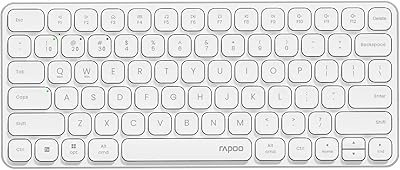
Rapoo E9050L Multi-Device Wireless Keyboard
88%
94%
Battery Life
88%
Typing Comfort
91%
Portability
89%
Build Quality
85%
Device Compatibility
More
Logitech K780 Multi-Device Wireless Keyboard
83%
93%
Multi-Device Switching
82%
Typing Comfort
91%
Noise Level
88%
Device Cradle Utility
79%
Build Quality & Durability
More
Bnnwa Multi-Device Wireless Bluetooth Keyboard with Touchpad
83%
91%
Value for Money
88%
Ease of Use
72%
Touchpad Responsiveness
94%
Device Switching
85%
Portability
More
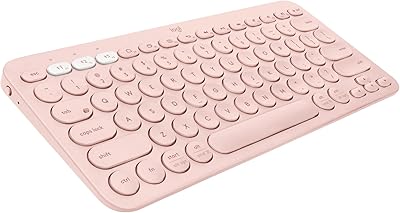
Logitech K580 Slim Multi-Device Wireless Keyboard
82%
90%
Ease of Use with Multiple Devices
93%
Battery Life
80%
Typing Comfort
88%
Connectivity Options
84%
Build Quality
More
Logitech K585 Multi-Device Slim Wireless Keyboard
88%
92%
Value for Money
88%
Performance
94%
Battery Life
90%
Device Switching
85%
Typing Experience
More
Logitech K380 Pebble Wireless Multi-Device Keyboard
88%
96%
Multi-Device Compatibility
92%
Battery Life
84%
Typing Experience
93%
Portability & Weight
89%
Build Quality
More
Rapoo 9050S Multi-Device Wireless Keyboard and Mouse Combo
87%
94%
Ease of Device Switching
89%
Typing Experience
91%
Battery Life
85%
Comfort and Ergonomics
90%
Multi-Device Compatibility
More
VEILZOR Wireless Multi-Device Keyboard with Numeric Pad & Tablet Holder

84%
89%
Typing Comfort
94%
Ease of Setup
92%
Battery Life
87%
Build Quality
90%
Ergonomics
More
HUO JI Wireless Keyboard Multi-Device Bluetooth 2.4G Dual Mode
85%
91%
Device Switching Ease
93%
Connectivity & Compatibility
85%
Build Quality
88%
Battery Life
89%
Ergonomics & Typing Comfort
More
Lenovo 300 Wireless Keyboard
86%
89%
Quiet Key Operation
85%
Build Quality
92%
Ease of Setup
80%
Ergonomics & Comfort
91%
Compact Design
More

FAQ

Each of the three paired devices is assigned to a dedicated shortcut key on the keyboard. To switch, you just press the corresponding key for the device you want to use, and the connection transfers within a second or two. There is no need to go into your device's Bluetooth settings each time.

Yes, it pairs with iPads running current versions of iPadOS just like any standard Bluetooth keyboard. Several buyers specifically use it as their go-to iPad typing solution, and the shortcut keys for media and brightness work as expected on iOS without any additional setup.

No, a USB-C cable is not included. The keyboard ships with the battery pre-installed and ready to pair, but you will need to supply your own USB-C cable when it eventually needs recharging. Most people already have one on hand, but it is worth knowing before you open the box.

Lenovo does not publish an official charge time, but based on the battery capacity, most users report a full charge taking roughly one to two hours from a standard USB-C power source. Given that the battery life runs for several weeks under moderate use, you will not need to charge it often.

Yes, the keyboard supports both USB-C wired connection and Bluetooth, so if you prefer a wired setup or need a backup connection option, you can plug it directly into a device with a USB-C port. This is handy if Bluetooth is unavailable or if you are in a signal-congested environment.

The keyboard is compact at 10.1″ wide, which means the key spacing is tighter than a standard full-size keyboard. Most users adapt within a few days, but if you have large hands or are a fast touch typist, expect a short adjustment period where you may hit wrong keys occasionally until muscle memory kicks in.

The keyboard is officially listed as compatible with iOS, Android, and Windows. Chromebooks and Linux machines are not explicitly supported, but since it functions as a standard Bluetooth HID device, basic typing typically works fine. Shortcut key behavior may be limited or unpredictable on unsupported platforms.

In most cases, yes — the keyboard reconnects automatically when the paired device wakes up. A small number of users have reported that occasionally the keyboard needs a quick key press or a re-press of the device shortcut key to re-establish the connection after a longer sleep period.

The 60-hour figure is Lenovo's manufacturer-stated number under controlled conditions. In practice, moderate users — roughly two to four hours of typing per day — report the battery lasting several weeks between charges, which broadly supports the claim. If you are typing for six or more hours daily, expect real-world life to fall below that headline figure.

No software installation is required to use the keyboard. It connects via Bluetooth and works out of the box on all supported platforms. The shortcut key customization is limited to the preset platform-specific functions, and there is no dedicated companion app for deeper remapping or macro programming.