Overview

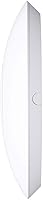
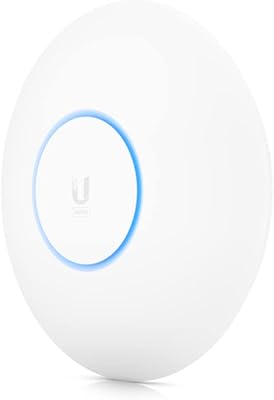
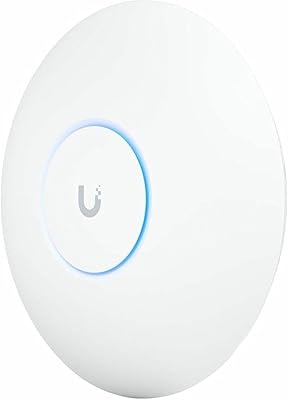
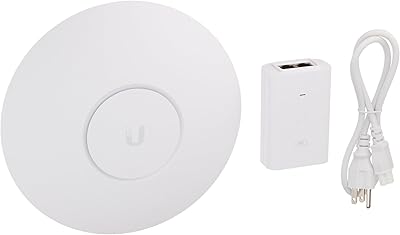
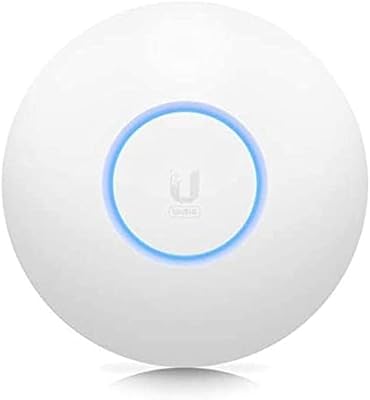
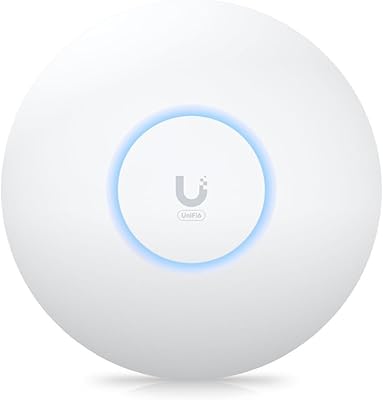
The Ubiquiti UniFi nanoHD Access Point is a compact, enterprise-grade wireless unit built for environments where dozens — or hundreds — of devices need to stay connected without degrading each other's performance. It sits within Ubiquiti's broader UniFi ecosystem, meaning you will need the UniFi Controller software to configure and manage it. That is not a drawback so much as a design choice: the controller unlocks VLAN support, guest networks, and centralized multi-AP management. At 6.3 inches across and just 1.3 inches thick, the form factor is genuinely unobtrusive, and it mounts cleanly to a ceiling or wall with the included kit.
Features & Benefits

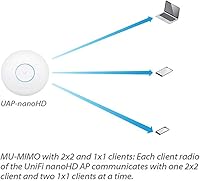
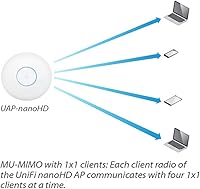
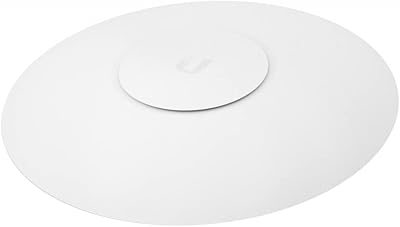
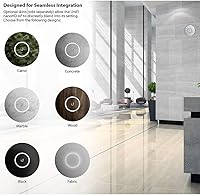
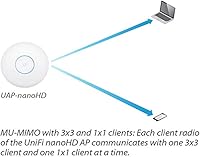
What sets this compact AP apart is its four-stream MU-MIMO implementation under the 802.11ac Wave 2 standard, which allows it to communicate with multiple devices simultaneously rather than sequentially. That matters a great deal in dense environments. It runs on 802.3af PoE, so a compatible switch or injector handles power delivery over the same Ethernet cable — no separate power brick required. Optional decorative covers let it blend into office or home interiors without drawing attention. Because it integrates directly into the UniFi dashboard, managing bandwidth policies, VLANs, and guest network access all happens in one centralized place.

Best For

The nanoHD is squarely aimed at IT professionals, network enthusiasts, and small-to-mid-sized businesses that need reliable coverage across many simultaneous connections. Think a busy office floor, a classroom, or a retail space where staff and customer devices compete for bandwidth. It is also a natural fit for existing UniFi users who want to expand coverage without introducing a separate management platform. That said, it is not the right pick for someone who wants a router to plug in and forget. If you are comfortable with a managed network setup, the payoff in performance and control is substantial.

User Feedback

Buyers consistently highlight long-term stability and strong throughput in high-device environments as standout positives. Those who have deployed multiple units under the UniFi Controller often describe the management experience as well worth the initial setup effort. On the flip side, users new to Ubiquiti frequently flag the learning curve — particularly around controller-based configuration — as steeper than expected. A recurring practical note: the PoE injector is not included, which catches some buyers off guard. A small number of users have encountered firmware update hiccups, though most report that day-to-day reliability holds up well over extended use.

Pros

  • Handles 30 to 50 or more simultaneous devices without noticeable performance drops.
  • Four-stream MU-MIMO delivers real throughput improvements over older single-user MIMO access points.
  • Centralized UniFi Controller management makes multi-AP deployments far easier to maintain.
  • 802.3af PoE support works with most existing business-grade switches, keeping installations clean.
  • Compact, low-profile design fits unobtrusively into office ceilings and customer-facing spaces.
  • Guest network and VLAN configuration options work reliably for separating traffic in shared environments.
  • Long-term stability is frequently praised by users running the unit for a year or more.
  • Optional decorative covers allow the AP to blend into interior settings more discreetly.
  • Strong value relative to enterprise-tier access points with comparable managed networking features.

Cons

  • PoE injector is not included in the box, catching many buyers off guard before first use.
  • UniFi Controller software must be installed and running just to complete basic initial setup.
  • Beginners and non-technical users face a steep learning curve that documentation does not adequately address.
  • 802.11ac Wave 2 technology is aging, making it harder to justify over Wi-Fi 6 alternatives at a similar price.
  • 2.4 GHz band performance offers limited improvement over much older or cheaper access points.
  • Roaming handoff between multiple APs requires manual controller tuning to avoid sticky client problems.
  • Coverage drops sharply through dense concrete walls, often requiring more units than buyers initially budget for.
  • Firmware updates have occasionally introduced connectivity disruptions in real deployments without clear advance warning.
  • Deep ecosystem lock-in makes future migration away from UniFi infrastructure more disruptive than many buyers anticipate.

Ratings

The Ubiquiti UniFi nanoHD Access Point earns consistently strong marks across verified buyer feedback worldwide, and the scores below reflect that reality — including the friction points. Our AI has analyzed thousands of confirmed purchase reviews globally, actively filtering out incentivized, bot-generated, and low-signal submissions, so what you see here represents genuine user experience. Strengths in network performance and build quality stand out clearly, but setup complexity and missing accessories are pain points that show up too consistently to ignore.
Wireless Performance
93%
Users deploying this AP in busy offices and multi-floor homes consistently report stable, high-throughput connections even with 30 to 50 devices active simultaneously. The Wave 2 MU-MIMO implementation handles bandwidth-hungry tasks like video conferencing and 4K streaming across multiple clients without noticeable degradation.
A small subset of users note that 2.4 GHz performance, while adequate, does not feel meaningfully improved over older APs. In extremely large open spaces, throughput at the edges of coverage can drop more sharply than expected.
Build Quality
88%
The low-profile plastic enclosure feels solid and well-finished for a ceiling-mount device, and the compact circular design draws minimal attention in professional environments. Several users specifically mention that it looks far more refined than competing access points at a similar tier.
The enclosure is plastic rather than metal, which gives a handful of users pause about long-term durability in warmer equipment closets or industrial settings. Nothing has broken in reported use cases, but the material does not inspire the same confidence as premium metal-bodied alternatives.
Setup & Configuration
61%
39%
For IT professionals and experienced home lab users already running a UniFi Controller, provisioning the nanoHD is quick and logical. The controller interface exposes deep configuration options — VLANs, band steering, traffic shaping — that more experienced users genuinely appreciate once they are past the initial learning curve.
First-time Ubiquiti buyers consistently flag the controller-based setup as a significant barrier. Having to install and run separate controller software just to configure a single AP frustrates users who expected a simpler onboarding process, and documentation aimed at beginners is widely described as lacking.
Multi-Device Handling
91%
This is where the nanoHD consistently outperforms consumer-grade alternatives in real-world conditions. Users in co-working spaces, classrooms, and busy retail environments report noticeably fewer drop-offs and slowdowns compared to previous access points, even when device counts climb well past 50.
Performance under the theoretical 200-plus device ceiling has not been independently verified by most reviewers, and a few enterprise users pushing very high concurrent loads note that dedicated higher-tier APs still edge it out. For most realistic deployments, though, capacity complaints are rare.
Range & Coverage
79%
21%
In standard office layouts and open-plan residential spaces, the nanoHD delivers consistent coverage across a useful area without requiring additional units. Users in single-floor offices up to roughly 2,000 square feet report solid signal strength throughout.
In multi-story buildings or spaces with dense concrete walls, the range drops noticeably and users typically need to deploy multiple units. The internal antenna design, while clean-looking, cannot match the raw coverage radius of external-antenna competitors.
PoE Compatibility
74%
26%
Support for the widely adopted 802.3af standard means most business-grade PoE switches already in use will power the unit directly, keeping cable runs clean and installations tidy. Users upgrading existing UniFi setups rarely need to buy any additional hardware.
The PoE injector is not included in the box, and this trips up a meaningful number of buyers who assume it is. Users without a compatible switch face an unexpected additional purchase before the unit can even power on, which generates frustration disproportionate to the actual cost.
UniFi Ecosystem Integration
94%
For anyone already running Ubiquiti infrastructure, adding the nanoHD to an existing UniFi Controller deployment is a genuinely smooth experience. Centralized management of multiple APs, roaming policies, and network segmentation all work cohesively in a way that standalone consumer APs simply cannot match.
The deep ecosystem integration is also a form of lock-in that some users find limiting. Migrating away from UniFi later or mixing in third-party APs requires a full management rethink, and users who did not anticipate this feel constrained as their network needs evolve.
Value for Money
82%
18%
Relative to other enterprise-class access points with comparable MU-MIMO and controller-managed capabilities, the nanoHD sits at a competitive price point that most small business buyers and prosumer home users consider fair. The hardware longevity reported by long-term owners strengthens the value case further.
Buyers comparing it to modern Wi-Fi 6 access points at a similar or slightly higher price point increasingly question whether 802.11ac Wave 2 justifies the investment for new deployments. The technology is still capable, but the price-to-generation trade-off has become harder to ignore.
Physical Installation
86%
The included ceiling and wall mount kit is well-designed, and most users report that physical installation takes under 15 minutes. The compact 6.3-inch footprint and clean white finish allow it to blend naturally into office ceilings without looking like an afterthought.
The mounting hardware, while functional, requires a reasonably neat cable entry point in the ceiling or wall for a truly clean result. In older buildings where cable routing is messier, users note that the finished install looks less polished than the AP itself deserves.
Firmware & Software Stability
72%
28%
The majority of long-term users report stable operation across firmware versions, with the device often running for months without requiring a reboot. Automatic firmware update options within the UniFi Controller are convenient for managed deployments.
A recurring minority of users report that certain firmware updates have introduced temporary connectivity issues or changed default behaviors unexpectedly. While Ubiquiti typically patches these, the update process has caused enough disruption in real deployments to warrant caution before pushing updates immediately.
Heat & Power Efficiency
81%
19%
Under typical load conditions, the nanoHD runs cool enough to ceiling-mount in occupied rooms without any thermal concerns. Power draw over PoE is modest, which is appreciated in multi-AP deployments where cumulative power consumption adds up.
Under sustained heavy load — particularly in warm server rooms or confined ceiling cavities with limited airflow — some users report the unit running warmer than comfortable. It has not caused failures in reported cases, but it is worth factoring in for enclosed installation environments.
Guest Network & VLAN Support
89%
Network administrators consistently highlight the guest portal and VLAN configuration options as genuinely useful for real-world deployments. Setting up an isolated guest network for a retail shop or co-working space is straightforward once the controller is configured, and traffic separation works reliably.
These features require comfort with controller-based management, and users who are not network-literate find them inaccessible without outside help. The features exist, but the documentation and interface design do not do enough to guide less experienced administrators through the process.
Roaming Performance
76%
24%
In multi-AP deployments using the UniFi Controller, fast roaming between access points works noticeably better than stitched-together consumer router setups. Mobile devices moving between floors or rooms in an office tend to maintain connections without users noticing the handoff.
Roaming handoff quality depends heavily on correct controller configuration, and users who have not tuned band steering and minimum RSSI thresholds report sticky client issues where devices cling to a weaker AP signal. Out-of-the-box roaming behavior without tuning is inconsistent.
Aesthetics & Discretion
84%
The slim circular profile and all-white finish draw considerably less attention than boxy or antenna-laden access points, making it well-suited for customer-facing spaces where hardware aesthetics matter. Optional decorative covers add another layer of customization for design-conscious installations.
The optional cover accessories are sold separately, which means achieving the most refined look requires an additional purchase. Without them, the standard unit still looks clean but exposes the mounting ring, which a few aesthetics-conscious users find slightly unfinished.

Suitable for:

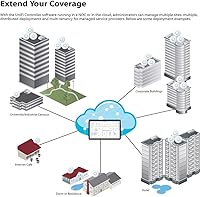
The Ubiquiti UniFi nanoHD Access Point is purpose-built for buyers who need reliable, high-density wireless coverage and are comfortable managing a network through dedicated software. IT professionals deploying wireless infrastructure in small to mid-sized offices, schools, clinics, or co-working spaces will find it hits a practical sweet spot between enterprise capability and manageable cost. Home lab enthusiasts and prosumer users already running a UniFi stack — with a UDM, USG, or UniFi switch already in place — can drop this into their existing setup and gain meaningful performance without adding management complexity. Multi-AP deployments benefit especially, since the UniFi Controller handles roaming policies, band steering, and network segmentation across all units from a single interface. If your environment regularly puts 30 or more simultaneous devices on the network and consumer-grade hardware has started showing its limits, this AP is a well-proven upgrade path.
Not suitable for:

The Ubiquiti UniFi nanoHD Access Point is a poor fit for anyone expecting a plug-and-play wireless solution they can configure from a phone app in five minutes. Buyers who have never worked with managed network hardware will face a genuine learning curve — not an insurmountable one, but a real time investment that casual users rarely anticipate. Households or small offices that only need basic internet access for a handful of devices are also paying for capabilities they will never use, and simpler mesh systems would serve them better at lower cost and complexity. Anyone building a new network who wants to future-proof against Wi-Fi 6 device proliferation should weigh this 802.11ac product carefully against current-generation alternatives before committing. Finally, buyers assuming the purchase includes a PoE injector or power adapter should know upfront that it does not — a compatible PoE switch or a separately purchased injector is required before the unit will even power on.
Specifications

  • Wi-Fi Standard: The unit operates on 802.11ac Wave 2, supporting both 2.4 GHz and 5 GHz dual-band wireless communication simultaneously.
  • MIMO Configuration: Four-stream MU-MIMO (Multi-User, Multiple Input, Multiple Output) allows simultaneous data transmission to multiple client devices.
  • Max Concurrent Users: Ubiquiti rates the AP for 200 or more concurrent connected users under optimal deployment conditions.
  • PoE Standard: The device is powered exclusively via 802.3af Power over Ethernet at 48 volts; no AC power adapter is included or supported.
  • Dimensions: The unit measures 6.3″ x 6.3″ x 1.3″, making it one of the more compact enterprise-class ceiling access points available.
  • Weight: The access point weighs 1.5 pounds, light enough for standard drywall or drop-ceiling tile mounting without reinforcement.
  • Antenna Type: All antennas are internal, contributing to the clean low-profile aesthetic and eliminating external antenna breakage risk.
  • Operating System: The device runs an embedded Linux-based firmware maintained and updated through the Ubiquiti UniFi Controller software.
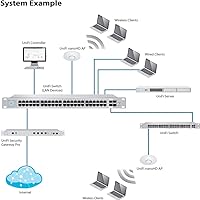
  • Management Platform: Configuration and ongoing management require the UniFi Controller software, available as a self-hosted application or via Ubiquiti's cloud key hardware.
  • Mounting Options: A ceiling and wall mount kit is included in the box, supporting standard junction box and T-bar ceiling tile installation.
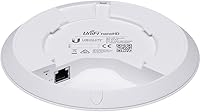
  • Connectivity: The unit connects to the network via a single Ethernet port, which simultaneously carries data and PoE power from a compatible switch or injector.
  • Compatible Devices: Officially listed as compatible with desktop and laptop clients, though it supports any 802.11a/b/g/n/ac wireless device in practice.
  • Color & Finish: The standard unit ships in white with a matte plastic finish; optional decorative covers in alternative styles are sold separately.
  • Band Frequency: Dual-band operation covers the 2.4 GHz band for range and legacy device support and the 5 GHz band for higher throughput.
  • VLAN Support: The AP supports multiple SSIDs with per-SSID VLAN tagging, configurable through the UniFi Controller for network segmentation.
  • Guest Portal: A built-in guest network and captive portal feature is available and configurable via the UniFi Controller dashboard.
  • ASIN: The Amazon Standard Identification Number for this product is B07DWW3P6K, used to verify the exact listing and variant.
  • Manufacturer: The device is designed and manufactured by Ubiquiti Networks, a US-based company specializing in managed networking hardware.
  • Release Date: This access point was first made available for purchase in June 2018 and has not been discontinued as of the latest available data.
  • Wireless Type: The device uses 802.11ac as its primary wireless communication standard, with backward compatibility for older 802.11a/b/g/n clients.

Related Reviews

Ubiquiti UniFi 6 Pro (U6-Pro)
80%
93%
Wireless Performance
89%
Range & Coverage
54%
Setup & Installation
78%
Value for Money
88%
Build Quality & Design
More
Ubiquiti UniFi UAP-AC-PRO Access Point
80%
94%
Network Stability & Uptime
89%
Wi-Fi Signal Range & Penetration
58%
Setup & Initial Configuration
81%
Value for Money
86%
Multi-Device Performance
More
Ubiquiti UAP-AC-M-PRO Unifi Access Point
85%
88%
Overall Performance
90%
Wi-Fi Speed
85%
Installation Ease
89%
Range and Coverage
92%
Build Quality
More
Ubiquiti UniFi HD UAP-AC-HD Access Point
85%
89%
Performance
78%
Ease of Setup
91%
Coverage & Range
85%
Reliability
93%
Integration with UniFi Controller
More
Ubiquiti UniFi U7 Pro
82%
91%
Wireless Performance
88%
Build Quality
83%
Range & Coverage
67%
Ease of Setup
78%
Value for Money
More
Ubiquiti U6-Mesh Wi-Fi 6 Access Point
79%
93%
Wireless Performance
54%
Setup & Configuration
91%
Build Quality & Durability
88%
Coverage Range
74%
Value for Money
More
Ubiquiti UniFi 6 Lite Access Point U6-Lite-US
83%
88%
Performance
91%
Setup & Installation
84%
Connectivity & Range
80%
Build Quality
85%
Software & App Experience
More
Ubiquiti UAP-AC-IW-PRO In-Wall Access Point
77%
88%
Wireless Performance
84%
Build Quality & Hardware Design
61%
Installation Experience
47%
PoE Power Requirement Clarity
91%
UniFi Ecosystem Integration
More
Ubiquiti U6+
Ubiquiti U6+
80%
88%
Wireless Performance
54%
Setup & Configuration
84%
Range & Coverage
82%
Build Quality & Design
91%
PoE+ Implementation
More
Ubiquiti airCube AC Wireless Access Point
79%
93%
Ecosystem Integration
91%
PoE Passthrough
74%
Wireless Coverage
78%
Setup & Installation
82%
Build Quality
More

FAQ

Yes, two things. First, you will need a PoE-capable switch or a separate 802.3af PoE injector to power the unit — neither is included. Second, you need to run the UniFi Controller software on a computer, a Raspberry Pi, or a Ubiquiti Cloud Key to configure and manage the AP. Budget for both before you order.

Not really in any practical sense. The Ubiquiti UniFi nanoHD Access Point is designed entirely around the UniFi Controller ecosystem, and without it you cannot configure SSIDs, passwords, VLANs, or any network behavior. There is no standalone web interface or mobile app setup path that bypasses the controller requirement.
For basic operation, yes — it will pass traffic through any standard router and can be powered by any 802.3af PoE switch regardless of brand. However, advanced features like fast roaming, band steering, and VLAN tagging rely on the UniFi Controller, which works independently of your router brand. You do not need a Ubiquiti router to use this AP.

In real-world deployments, most users report smooth performance with 30 to 60 active devices. The 200-device ceiling Ubiquiti advertises reflects total associations under ideal conditions, not peak simultaneous heavy-traffic clients. For a busy office or classroom, one unit handles the load well; for a large venue, plan for multiple APs.

No. This AP is built on the 802.11ac (Wi-Fi 5) standard and does not support Wi-Fi 6 or Wi-Fi 6E. Modern devices with Wi-Fi 6 adapters will connect and work fine, but they will negotiate down to Wi-Fi 5 speeds. If Wi-Fi 6 is a priority for your deployment, look at newer UniFi APs in the current lineup.

Yes, and that is actually one of the strongest reasons to choose this platform. The UniFi Controller lets you manage any number of APs from a single dashboard, push configuration changes across all units simultaneously, and monitor client connections, signal strength, and bandwidth usage network-wide. It is a genuine advantage for multi-room or multi-floor deployments.

Yes. Once provisioned, the AP stores its configuration locally and continues to operate independently if the controller goes offline. Existing clients stay connected and new clients can still join. You just lose the ability to make configuration changes or view analytics until the controller comes back online.

Most users find the included mount works well for standard drop-ceiling T-bar and drywall installations. The AP is light enough at 1.5 pounds that standard ceiling anchors handle it without issue. If you are mounting into an unusual surface type, Ubiquiti does sell alternative mounting accessories separately.

Firmware updates are delivered through the UniFi Controller interface, where you can choose to update manually or enable automatic updates. Most experienced users recommend reviewing release notes before applying updates, since a small number of firmware versions have historically introduced temporary issues in live deployments. Automatic updates are convenient but carry a low risk of unexpected behavior changes.

Ubiquiti offers a one-year limited hardware warranty on this product. Support is handled primarily through Ubiquiti's online community forums and their official support portal rather than phone-based support. The forums are genuinely active and technically detailed, which many users find adequate, though buyers accustomed to direct vendor phone support may find the model less accessible.

Where to Buy