Overview

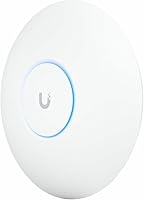
The Ubiquiti UniFi U7 Pro is Ubiquiti's ceiling-mount access point built around the WiFi 7 standard, and it sits firmly in the professional tier of the UniFi ecosystem alongside switches, gateways, and other managed infrastructure. Unlike consumer routers you plug in and forget, this access point is designed to be deployed as part of a coordinated network managed through UniFi's Network controller software — a free application that runs locally or in the cloud. Without it, you lose most of the intelligence that makes the hardware worth buying. That said, for IT administrators, forward-thinking businesses, and serious home networkers who want enterprise-grade reliability, the U7 Pro competes well against far pricier alternatives.
Features & Benefits

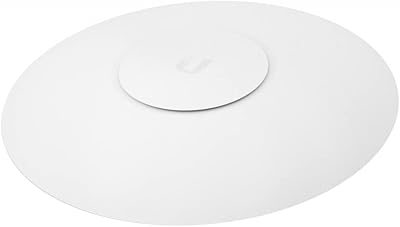
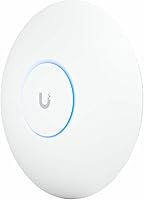
WiFi 7 brings meaningful real-world improvements over WiFi 6E, and this WiFi 7 AP takes full advantage. The tri-band radio covers 2.4 GHz, 5 GHz, and a dedicated 6 GHz band — that third band is where the performance gains become tangible in dense environments because it carries far less interference than the crowded lower frequencies. Combined with six spatial streams, the U7 Pro can handle substantially more concurrent connections without the quality degradation that plagued older 802.11ac hardware. It draws power over a standard PoE+ connection, keeps cabling clean, and at just 8.1 inches across, mounts flush against a ceiling without drawing attention. The UniFi dashboard then gives administrators granular control over VLANs, traffic priorities, and client statistics.

Best For

This access point is purpose-built for managed environments. IT teams running UniFi deployments across offices, schools, or hotels will find it integrates naturally with existing infrastructure — no third-party controller headaches, no compatibility gaps. Power users at home who already run a UniFi gateway or switch will appreciate having the same management depth without paying commercial-grade prices. The 6 GHz band particularly shines in high-density scenarios: conference rooms, open-plan offices, or apartments surrounded by competing networks. Anyone who needs proper VLAN segmentation, isolated guest Wi-Fi, or per-device QoS policies — and wants it managed from a single pane of glass — will get genuine value from deploying this WiFi 7 AP.

User Feedback

Owners consistently praise the stable connections, solid build quality, and how cleanly this access point integrates into an existing UniFi setup. The most recurring complaint, though, is hard to ignore: the PoE+ adapter is not in the box, which means first-time buyers often face an unexpected extra purchase. New UniFi users also mention a learning curve — the controller software is powerful but assumes some networking familiarity. On the RF side, a few users note that the 6 GHz band loses range through walls faster than the 5 GHz band, so it rewards open-plan installations more than older buildings with dense construction. Firmware has generally been reliable, though some users prefer running a local controller rather than depending on cloud access.

Pros

  • WiFi 7 support delivers lower latency and higher throughput, especially noticeable in high-device-count environments.
  • The dedicated 6 GHz band keeps fast clients off congested lower frequencies in busy offices or apartments.
  • Six spatial streams allow far more concurrent connections without the performance drop older APs suffered under load.
  • Deep UniFi dashboard integration makes VLAN setup, guest networks, and traffic shaping straightforward for experienced admins.
  • Competitive pricing compared to Cisco Meraki or Aruba alternatives with equivalent managed feature sets.
  • Backward compatible with WiFi 6, WiFi 6E, and older clients — no device-side changes needed during rollout.
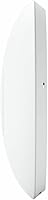
  • Slim 1.8-inch ceiling profile and clean white finish blend into most commercial and residential spaces without drawing attention.
  • Firmware updates apply reliably through the controller with minimal disruption to live network traffic.
  • Included mounting plate and hardware kit make ceiling installation practical without sourcing additional hardware.
  • Multi-AP roaming in UniFi environments is consistently described as smooth and reliable by long-term users.

Cons

  • PoE+ adapter not included — buyers without existing PoE infrastructure face an immediate additional purchase.
  • First-time UniFi users frequently underestimate the controller software setup before the AP becomes fully functional.
  • The 6 GHz band loses wall penetration quickly, limiting its real-world benefit in older or dense-construction buildings.
  • Full functionality is locked to the UniFi ecosystem, making this a poor fit for mixed or third-party network environments.
  • Only available in white, which limits options for darker ceiling schemes or design-conscious residential installs.
  • Cloud-based controller reliance during firmware updates makes some IT admins uncomfortable in air-gapped or high-security environments.
  • WiFi 7 client device adoption remains limited, meaning the headline performance gains are partly future-oriented for most buyers.
  • The management dashboard has a steep learning curve once users move past basic configuration into advanced traffic policies.

Ratings

The Ubiquiti UniFi U7 Pro earns strong marks across the board in our AI-driven analysis, which processed verified buyer reviews from global markets while actively filtering out incentivized, bot-generated, and spam submissions. Scores reflect where this WiFi 7 access point genuinely excels and where real-world frustrations consistently surfaced. Both the standout strengths and the legitimate pain points are represented transparently so you can make an informed decision.
Wireless Performance
91%
Users deploying this access point in open-plan offices and large homes report noticeably faster throughput and more stable connections compared to their previous WiFi 6 hardware. The 6 GHz band in particular draws praise for its cleanliness — in dense apartment buildings and corporate environments with dozens of competing networks, the difference is measurable.
A subset of reviewers note that real-world WiFi 7 gains depend heavily on having client devices that actually support the standard, which remains uncommon in most device fleets as of early 2024. Managed expectations matter here; the hardware leads the ecosystem.
Build Quality
88%
The U7 Pro feels reassuringly solid for a ceiling-mount unit — reviewers consistently describe the housing as premium and note it installs without flex or wobble. At 1.5 pounds it is substantial enough to feel durable without being awkward to position during a solo install.
A handful of users mention the white plastic finish attracts dust more visibly than darker alternatives, and a few noted minor scuff marks from the mounting hardware if care is not taken during installation. Nothing structurally concerning, but cosmetically imperfect at the margins.
Range & Coverage
83%
In open spaces — warehouses, open offices, large living areas — the coverage radius draws consistent praise, with users reporting strong signal well beyond what their previous APs managed at the same mounting height. Multi-AP deployments with roaming enabled are described as rock-solid.
The 6 GHz band loses penetration through walls and floors faster than many buyers expect, which has led to disappointment in older buildings with brick or concrete construction. Users in these environments often find themselves relying more on the 5 GHz band, which partially offsets the upgrade rationale.
Ease of Setup
67%
33%
For anyone already running a UniFi network, adoption is described as painless — the controller detects the U7 Pro immediately and the configuration options are familiar. Experienced users report going from unboxing to fully configured in under fifteen minutes.
First-time UniFi buyers frequently underestimate the onboarding investment. The controller software — whether run on a local machine, a Cloud Key, or a UniFi Dream Machine — is a prerequisite that surprises newcomers. Several one-star reviews trace directly to this expectation gap rather than any hardware flaw.
Value for Money
78%
22%
Relative to Cisco Meraki, Aruba Instant, or Extreme Networks access points with comparable feature sets, the U7 Pro is priced aggressively for what it delivers. IT buyers managing larger rollouts consistently describe the per-unit cost as justifiable given the management depth included at no additional subscription fee.
The missing PoE+ adapter is the single most cited grievance in user reviews and meaningfully affects the true out-of-pocket cost, particularly for buyers who do not already own a PoE+ switch. When that cost is factored in, the value equation tightens for smaller or one-off deployments.
UniFi Ecosystem Integration
93%
Buyers who are already invested in the UniFi stack describe integration as the U7 Pro's strongest selling point. VLANs, traffic shaping, guest portal configuration, and per-client statistics all surface cleanly in the dashboard without requiring CLI work or third-party tools.
The tight ecosystem integration is also a form of lock-in — this access point delivers its full value only within UniFi infrastructure. Users attempting to manage it with third-party controllers or run it as a standalone unit find themselves with significantly reduced functionality.
Device Capacity
89%
In high-density environments — classrooms, hotel floors, conference centers — the U7 Pro handles large concurrent device counts without the latency spikes or dropped connections that plagued older dual-band hardware under load. The six spatial streams are a genuine architectural improvement.
A small number of enterprise reviewers pushing very large client counts note that even this hardware has practical limits in extreme scenarios, and that proper AP placement planning remains essential regardless of the hardware generation.
Firmware Reliability
81%
19%
The majority of long-term users report stable, uneventful firmware behavior — updates apply cleanly through the controller and regressions are rare. Several IT administrators describe running this access point in production environments for months without a forced reboot.
A recurring minority complaint involves cloud-based management dependencies during firmware updates, with some users preferring an air-gapped or fully local configuration to avoid any reliance on Ubiquiti's cloud infrastructure. Occasional beta firmware releases have introduced short-lived bugs before being patched.
Mounting & Installation
84%
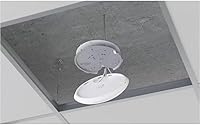
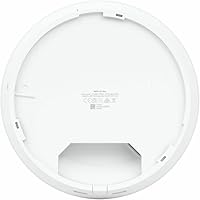
The included mounting plate and hardware kit are practical and well-designed — reviewers describe a clean install process with the ceiling plate securing independently before the AP snaps into place. The circular form factor at 8.1 inches sits unobtrusively against standard ceiling tiles.
The mounting system requires a junction box or existing ceiling infrastructure for a truly clean install; surface-mounted cable runs look less polished. A few reviewers also note the ceiling plate alignment requires patience to get perfectly flush on uneven surfaces.
6 GHz Band Effectiveness
74%
26%
In environments where 6 GHz shines — open floor plans, modern construction, rooms within direct line of sight — users report a tangible reduction in interference and notably consistent speeds on compatible devices. Early WiFi 7 adopters with newer laptops and phones are particularly enthusiastic.
The real-world impact of the 6 GHz band is context-dependent in a way that the spec sheet does not fully communicate. Dense walls, long distances, or older client hardware can reduce the practical benefit considerably, and some buyers feel the 6 GHz advantage is undersold for their specific environment.
Management Interface (UniFi Dashboard)
86%
Seasoned UniFi administrators describe the dashboard experience as a meaningful step up from the older UniFi Network interface — cleaner data visualization, more granular per-AP statistics, and responsive client monitoring that proves useful for troubleshooting real connectivity complaints in live environments.
The dashboard has a learning curve that steepens quickly once users move beyond basic setup into advanced features like traffic routing or per-SSID QoS. Documentation quality is inconsistent, and community forums remain a necessary supplement for less common configuration scenarios.
Backward Compatibility
87%
The U7 Pro handles WiFi 6, WiFi 6E, and older 802.11ac and 802.11n clients without configuration headaches. Mixed-device environments — the reality for most offices and homes — transition to the new AP without requiring any client-side changes or driver updates.
While backward compatibility works reliably, older clients naturally do not benefit from the WiFi 7 improvements, which means the hardware investment is somewhat future-oriented. Buyers hoping for immediate network-wide speed improvements across legacy devices may find the upgrade impact underwhelming in the short term.
Power Requirements (PoE+)
62%
38%
For network installers and IT teams who already run PoE+ switches in their infrastructure, the power delivery approach is clean and practical — no power bricks, no additional cabling, just a single Ethernet run to the ceiling. It is the right call for professional deployments.
The absence of an included PoE+ adapter is a recurring source of frustration, particularly for residential buyers or small-business owners who do not have existing PoE infrastructure. It is a meaningful hidden cost that several reviewers feel should be disclosed more prominently before purchase.
Aesthetics & Form Factor
82%
18%
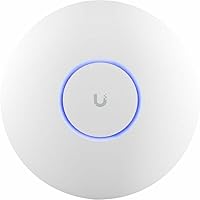
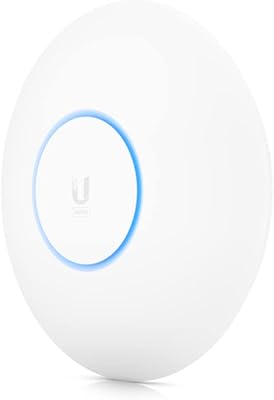
The circular white design is understated enough to disappear into most residential and commercial ceilings without drawing attention. At 1.8 inches deep, the profile is slim relative to competing enterprise APs, and several reviewers specifically mention their non-technical colleagues or clients did not notice it post-installation.
The white finish is the only option available, which limits compatibility with dark or colored ceiling schemes. A small number of design-conscious residential buyers would welcome a darker or paintable variant to better blend into their interiors.

Suitable for:

The Ubiquiti UniFi U7 Pro is built for buyers who need more than a consumer router can offer and are prepared to invest some time in setting up a properly managed network. IT administrators overseeing multi-access-point deployments in offices, schools, hotels, or retail environments will find it slots naturally into existing UniFi infrastructure without friction. Prosumers and technically inclined home users who already run a UniFi gateway, switch, or Dream Machine will get the most from this access point, since the controller software unlocks the full depth of VLAN configuration, guest network isolation, and per-device traffic control. Businesses with dense device environments — think open-plan offices with dozens of laptops, phones, and IoT devices all competing for bandwidth — will appreciate the dedicated 6 GHz band and the six spatial streams working together to reduce congestion. Anyone upgrading from aging 802.11ac hardware in a managed environment will notice a meaningful jump in both capacity and stability, particularly in open-plan or modern construction spaces where the 6 GHz band can propagate effectively.
Not suitable for:

The Ubiquiti UniFi U7 Pro is genuinely not the right purchase for buyers who want a simple plug-and-play wireless upgrade. If you do not already own a PoE+ switch or injector, you will need to add that to your budget — the adapter is not included, and this catches a surprising number of buyers off guard. The access point requires the UniFi Network controller application to configure and manage it properly; without that software running somewhere on your network, the hardware operates in a severely limited state. Buyers without any prior networking experience or patience for a learning curve are likely to feel frustrated early in the setup process, and community forums become a practical necessity rather than an optional resource. If your home or office has older construction with thick brick or concrete walls, the 6 GHz band will underperform expectations, and you may find yourself getting results that do not justify the step up from a good WiFi 6 router. Finally, anyone looking for a standalone access point that works independently of a larger managed ecosystem should look elsewhere — this hardware is purpose-designed for the UniFi stack and rewards commitment to that platform.
Specifications

  • WiFi Standard: The U7 Pro operates on the 802.11be (WiFi 7) standard with backward compatibility for 802.11ax (WiFi 6/6E), 802.11ac, 802.11n, and earlier protocols.
  • Frequency Bands: Tri-band operation covers 2.4 GHz, 5 GHz, and 6 GHz simultaneously, allowing clients to be distributed across all three bands.
  • Spatial Streams: Six total spatial streams are distributed across the three bands, increasing aggregate capacity and supporting more concurrent high-throughput connections than prior-generation hardware.
  • Form Factor: Circular ceiling-mount design measuring 8.1 × 8.1 × 1.8 inches, intended for flush overhead installation in commercial or residential spaces.
  • Weight: The unit weighs 1.5 pounds, which is within the range supported by standard ceiling junction boxes without additional reinforcement.
  • Power Input: Powered exclusively via PoE+ (IEEE 802.3at); no AC power adapter or DC barrel connector is present, and no PoE+ adapter is included in the box.
  • Included Accessories: The package includes a mounting plate and a hardware kit for ceiling installation; no PoE+ injector, Ethernet cable, or controller hardware is bundled.
  • Management: Full configuration and monitoring require the UniFi Network controller software, which can run on a local machine, a UniFi Cloud Key, a Dream Machine, or via Ubiquiti's cloud portal.
  • Color: Available exclusively in white, with no officially supported alternative color variants at the time of release.
  • Model Number: The official model designation is U7-PRO, and the US retail variant carries the suffix U7-Pro-US to indicate regional configuration.
  • Manufacturer: Designed and manufactured by Ubiquiti Networks, headquartered in New York, USA, and released to market in February 2024.
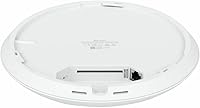
  • Ethernet Port: The access point includes a single PoE+ Ethernet uplink port used for both data connectivity and power delivery from a compliant switch or injector.
  • VLAN Support: The U7 Pro supports multiple SSIDs with per-SSID VLAN tagging, enabling traffic segmentation for corporate, IoT, and guest network isolation.
  • Compatibility: Compatible with existing UniFi infrastructure including UniFi switches, gateways, Dream Machines, and Cloud Keys running current UniFi Network software versions.
  • Dimensions: The physical footprint measures 8.1 inches in diameter and 1.8 inches in depth, making it unobtrusive when ceiling-mounted in standard commercial tile grids or drywall ceilings.
  • Amazon Rating: Carries a 4.6 out of 5 star average rating based on 383 verified ratings on Amazon, ranking second in the Computer Networking Wireless Access Points category.

Related Reviews

Ubiquiti UniFi Dream Machine Pro UDM-Pro
86%
94%
Performance
88%
Ease of Use
90%
Reliability
92%
Connectivity
85%
Network Security Features
More
Ubiquiti UniFi Protect G4-PRO Camera
86%
91%
Video Quality
94%
Ease of Setup
88%
Weather Resistance
80%
Software Integration
85%
Night Vision Performance
More
Ubiquiti UniFi 6 Pro (U6-Pro)
80%
93%
Wireless Performance
89%
Range & Coverage
54%
Setup & Installation
78%
Value for Money
88%
Build Quality & Design
More
Ubiquiti UAP-AC-M-PRO Unifi Access Point
85%
88%
Overall Performance
90%
Wi-Fi Speed
85%
Installation Ease
89%
Range and Coverage
92%
Build Quality
More
Ubiquiti UniFi UAP-AC-PRO Access Point
80%
94%
Network Stability & Uptime
89%
Wi-Fi Signal Range & Penetration
58%
Setup & Initial Configuration
81%
Value for Money
86%
Multi-Device Performance
More
Ubiquiti Networks UniFi USW-Pro-48-POE Gen2 Switch
85%
92%
Performance & Speed
87%
Ease of Setup
90%
PoE+ Power Delivery
88%
Build Quality & Durability
73%
Software & Firmware Experience
More
Ubiquiti UniFi UAP-AC-IW-PRO Wireless Access Point
84%
91%
Performance
67%
Ease of Installation
88%
Connectivity & Range
85%
Value for Money
90%
Discreet Design
More
Ubiquiti USW-Pro-24
Ubiquiti USW-Pro-24
87%
94%
Network Performance
91%
Build Quality
93%
Layer 3 Routing Capabilities
89%
Port Density and Flexibility
85%
Setup and Installation
More
Ubiquiti UniFi Switch Aggregation
85%
91%
Performance & Speed
88%
Ease of Installation
89%
Build Quality & Durability
85%
Network Management Features
83%
Power Efficiency
More
Ubiquiti US-8 Unifi Switch
87%
90%
Performance & Speed
94%
PoE Functionality
86%
Build Quality
88%
Ease of Use
91%
Integration with Unifi System
More

FAQ

Yes, and this is probably the most common surprise for new buyers. The U7 Pro draws all its power through a PoE+ Ethernet connection, and no injector or adapter comes in the box. If your network switch already supports PoE+, you are covered. If not, you will need to budget for a PoE+ injector or a compatible switch before the unit will power on.

Technically the hardware will broadcast a basic wireless signal without the controller, but you lose nearly all the features that justify the purchase — VLANs, guest networks, traffic analytics, roaming configuration, and firmware management all require the controller. Running it without the controller is essentially wasting the hardware. The controller software itself is free; you just need somewhere to run it, whether that is a spare PC, a Raspberry Pi, a Cloud Key, or a Dream Machine.

The access point can technically connect to any router via Ethernet, but its management features will not integrate with non-UniFi gateways. You would still need the UniFi controller running on your network to configure the AP itself. Most buyers in this situation either add a UniFi device as the gateway or run the controller in a limited capacity just to manage the access points.

Ubiquiti does not publish a hard client limit, but the six spatial streams and tri-band design mean the U7 Pro is comfortably rated for demanding environments with 100 or more concurrent client devices. Real-world performance depends heavily on what those devices are doing — video conferencing and large file transfers stress the AP more than light browsing or IoT sensors.

It depends on your environment. In open spaces — modern open-plan offices, large living areas, unobstructed hotel floors — the 6 GHz band provides genuinely cleaner, faster connectivity for compatible devices because it faces far less interference than the 5 GHz band. However, it does not penetrate walls and floors as well, so if your space has thick masonry or multiple floors between the AP and clients, many devices will stay on 5 GHz and the 6 GHz advantage shrinks considerably.

Yes, and it handles guest network setup well. Through the UniFi controller you can create a dedicated SSID with VLAN tagging that keeps guest traffic fully isolated from your main network. You can also configure a captive portal, bandwidth limits, and session timeouts — all from the dashboard without touching a command line.

Your existing wireless network will keep running if the cloud goes down — connected clients stay connected and the hardware keeps operating normally. What you lose is remote management access via the cloud portal. If you run the controller locally on a device inside your network, you retain full local management access regardless of cloud availability, which is why many IT admins prefer a local controller deployment for production environments.

Physically it can be mounted on a wall using the included hardware, but the antenna design and radio patterns are optimized for ceiling placement broadcasting downward. Wall mounting will work and is better than not deploying the AP at all in a difficult space, but you may see uneven coverage patterns compared to a proper overhead installation.

The U7 Pro adds WiFi 7 support, the 6 GHz band, and more spatial streams compared to the U6 Pro, which was a WiFi 6 dual-band unit. In practice, the biggest real-world improvement is the 6 GHz band availability in environments where interference on 2.4 and 5 GHz is a genuine problem. If your current network performs well and your devices do not support WiFi 6E or WiFi 7, the upgrade impact will be modest in the short term but positions you well for newer client hardware.

Firmware updates applied through the UniFi controller typically cause a brief disconnection — usually 10 to 30 seconds — as the AP reboots into the new firmware. For most environments this is negligible, but if you are managing a live production deployment, scheduling updates during off-peak hours is a sensible precaution. The controller lets you schedule or defer updates rather than applying them automatically the moment a new version is available.