Overview

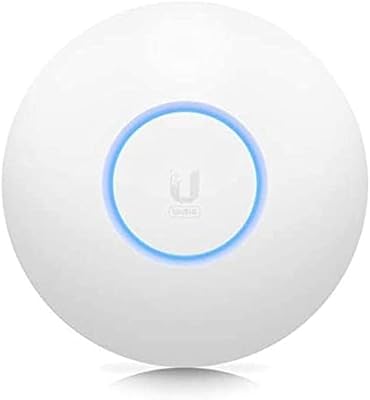
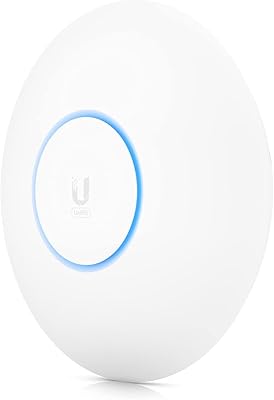
The Ubiquiti UniFi 6 Pro (U6-Pro) sits in a specific, well-defined niche — a prosumer-grade WiFi 6 access point built for people who want infrastructure-level reliability without enterprise-level costs. Designed to mount flush on a ceiling or wall, this access point looks at home in a small office, retail space, or a tech-forward household. Before ordering, there is a critical detail most buyers miss: PoE is not included, so you will need either a PoE switch or a separate injector. It also requires the UniFi Network controller to operate — this is not a plug-and-play router replacement. If you are comparing it to a consumer mesh system at a similar price, understand you are buying into a different philosophy entirely.
Features & Benefits

On the 5 GHz band, the U6-Pro runs 4x4 MU-MIMO with support for 160 MHz channel widths — a combination that pushes real-world throughput well beyond what most consumer APs can offer when client devices support it. The 2.4 GHz radio handles wider coverage with 2x2 MIMO, contributing to the 5.3 Gbps aggregate figure. More practically, supporting over 300 concurrent clients means a busy office floor or a classroom full of laptops and tablets will not choke the network. The built-in Guest Traffic Isolation feature is genuinely useful too — it keeps visitor devices walled off from your internal network without requiring complex VLAN configuration. The hardware itself is slim and unobtrusive, barely noticeable once ceiling-mounted.

Best For

This UniFi AP is a natural fit for IT-savvy home users and small business owners who are already running — or ready to commit to — the UniFi ecosystem. It particularly shines in high-density environments: open offices, co-working spaces, schools, or homes loaded with smart devices and streaming clients. If you are upgrading from an older WiFi 5 setup and want something that will not need replacing for years, this access point is a solid long-term investment. Network administrators will appreciate the granular controls, VLAN support, and per-client analytics the controller provides. One practical note: if you already have a PoE-capable switch, the total cost of ownership drops noticeably and the installation becomes significantly cleaner.

User Feedback

Across hundreds of verified reviews, two things come up repeatedly: long-term stability and strong signal coverage that leaves consumer-grade routers well behind. Many users describe running this access point for months without a single reboot. On the flip side, the most common frustration is not the hardware — it is the setup process. Non-technical buyers who expected a straightforward install often hit a wall with the UniFi controller, particularly around device adoption. The missing PoE adapter continues to catch people off guard. Still, overall satisfaction is high, and a telling pattern emerges: many buyers who start with one unit expand to multiple APs once they grow comfortable with the platform.

Pros

  • Exceptional long-term stability — many users report months of uptime without a single reboot or dropout.
  • Handles 300-plus concurrent clients without performance degradation, making it ideal for dense environments.
  • 4x4 MU-MIMO on 5 GHz delivers strong real-world throughput for bandwidth-heavy households and offices.
  • Guest Traffic Isolation works reliably out of the box, providing practical network segmentation without deep VLAN expertise.
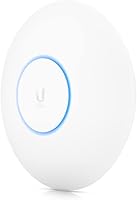
  • Slim, low-profile disc design blends into ceilings cleanly — barely noticeable in professional or client-facing spaces.
  • Scales naturally into multi-AP deployments; adding units later under one controller is straightforward.
  • Strong signal penetration outperforms most consumer-grade alternatives in open-plan and multi-room environments.
  • For buyers already on a UniFi stack, integration with existing gateways and switches is essentially plug-and-play.
  • 160 MHz channel width support offers meaningful performance headroom as newer client devices become more common.

Cons

  • PoE adapter is not included — buyers without a PoE switch must purchase an injector separately before setup is even possible.
  • The UniFi Network controller is mandatory; there is no fallback standalone mode for simpler configurations.
  • Device adoption inside the controller is not intuitive and frequently trips up first-time UniFi users.
  • Controller software must be hosted somewhere — a Cloud Key, local server, or cloud subscription — adding hidden cost or complexity.
  • Firmware updates have occasionally introduced regressions that required manual troubleshooting or device re-adoption.
  • 2.4 GHz radio is limited to 2x2 MIMO, which can bottleneck environments with many legacy or IoT-only devices.
  • Running Ethernet to a ceiling mount requires pre-existing structured cabling or professional installation work.
  • Total setup cost is higher than the sticker price once PoE hardware and a controller device are factored in.
  • Performance gains from 160 MHz channels are only realized if client devices support that channel width, limiting near-term benefit for many buyers.

Ratings

The Ubiquiti UniFi 6 Pro (U6-Pro) earns consistently high marks across thousands of verified global reviews, and the scores below reflect an AI-driven analysis that actively filters out incentivized, bot-generated, and outlier feedback to surface what real buyers actually experience. This access point performs exceptionally well in its intended environment, though a few recurring pain points — particularly around setup complexity and missing accessories — keep certain scores grounded. Both the strengths and the frustrations are represented honestly here.

Wireless Performance
93%
Users in multi-device households and open-plan offices consistently report that this access point handles simultaneous connections without degradation — something consumer routers visibly struggle with. The 5 GHz throughput is strong enough that bandwidth-heavy tasks like 4K streaming and large file transfers coexist without fighting each other.
Performance gains from 160 MHz channel width are only realized when client devices also support it, which limits the benefit for users with older hardware. A handful of reviewers in heavily congested RF environments noted more interference than expected on the 2.4 GHz band.
Range & Coverage
89%
The signal reaches comfortably across large open floors and through multiple interior walls, outperforming most consumer mesh nodes in raw penetration. Reviewers upgrading from WiFi 5 APs frequently describe noticeably fewer dead zones after installation.
In multi-story buildings with concrete slabs or heavy structural interference, a single unit may not provide uniform coverage throughout. Some users in older buildings with thick walls recommend planning for a second unit rather than relying on one.
Setup & Installation
54%
46%
For anyone already comfortable with the UniFi ecosystem, getting the U6-Pro online is straightforward — physical mounting is clean, and the controller software handles the rest logically once you know your way around it.
Non-technical buyers frequently report frustration with the device adoption process inside the UniFi Network controller, which is not intuitive without prior experience. Several reviewers explicitly wished for a standalone mode, noting that the controller requirement felt like an unexpected barrier for a home deployment.
Value for Money
78%
22%
Compared to consumer mesh systems at a similar price, this access point offers substantially more control, better multi-client handling, and a hardware platform that scales as needs grow. IT professionals and prosumers consistently describe it as well-priced for what it delivers.
The headline cost does not tell the full story — buyers who do not own a PoE switch also need to budget for an injector, and those without an existing UniFi setup may need a controller device too. For a purely casual home user, the total investment can feel harder to justify.
Build Quality & Design
88%
The low-profile disc form factor sits flush against a ceiling without drawing attention, which matters in client-facing spaces like offices or retail environments. The physical construction feels solid and the finish holds up well over time according to long-term owners.
The mounting hardware, while functional, is not the most elegant solution for drywall installations without proper backing. A small number of users noted the power cable routing at the mount point could be tidier in exposed-ceiling installations.
Stability & Uptime
94%
Long-term uptime is arguably the most praised quality across the entire review pool — many users report running the U6-Pro for six months or more without a single reboot or dropped connection. This is particularly valued in small business settings where network reliability directly impacts productivity.
A small subset of users reported firmware updates occasionally causing brief disruptions or requiring manual re-adoption of the device in the controller. These occurrences appear infrequent, but they do surface in reviews from users managing single-AP setups without redundancy.
Multi-Client Handling
91%
In classrooms, co-working spaces, and dense apartment settings, the U6-Pro manages dozens of simultaneous active clients without the packet loss or latency spikes that plague consumer APs under similar load. The MU-MIMO implementation on the 5 GHz radio makes a tangible difference during peak usage hours.
The 2x2 MIMO configuration on 2.4 GHz is noticeably less capable than the 5 GHz radio, which can become a bottleneck in environments with many older IoT devices that only connect on that band. Reviewers managing large smart-home deployments occasionally flagged this limitation.
Software & Management
72%
28%
The UniFi Network controller provides a genuinely powerful management interface with per-client visibility, traffic analytics, VLAN configuration, and scheduled upgrades — tools that small business owners and home lab enthusiasts genuinely use and appreciate.
The software has a real learning curve, and the controller itself must be hosted somewhere — whether on a Cloud Key, a local server, or Ubiquiti's cloud service. Reviewers who expected router-style simplicity found the management layer more demanding than anticipated.
Security Features
84%
Guest Traffic Isolation works reliably out of the box and provides meaningful network segmentation without requiring deep VLAN expertise. Users running mixed environments — staff devices alongside guest or IoT networks — frequently highlight this as a standout practical feature.
Advanced security configurations beyond guest isolation require controller-level knowledge that not every buyer possesses. Some users noted that setting up proper firewall rules between VLANs still demands more networking know-how than many prospective buyers realize upfront.
PoE & Power Setup
61%
39%
For users already operating a PoE-capable switch, power delivery is completely clean — no adapters, no extra cables cluttering the installation. The 48V DC requirement is standard and compatible with most managed PoE switches on the market.
The missing PoE adapter is the single most common source of negative reviews and one-star ratings from otherwise satisfied buyers who simply did not notice the omission before purchasing. Ubiquiti does not bundle an injector, and this detail is not prominently communicated at point of sale.
Ecosystem Integration
87%
Inside a full UniFi stack — with a UniFi gateway, switches, and multiple APs — the U6-Pro integrates exceptionally well, enabling unified dashboards, roaming profiles, and network-wide analytics that no consumer system comes close to matching.
Outside the UniFi ecosystem, its utility is significantly reduced. It cannot function as a standalone router replacement, and without the controller it cannot be configured at all, which makes it a poor fit for buyers who want a simple, self-contained solution.
Physical Installation
82%
18%
The included wall and ceiling mount is well-designed, and the overall installation footprint is compact enough to suit professional environments where aesthetics matter. The disc profile makes it one of the less intrusive ceiling APs available in this class.
Running an Ethernet cable to the ceiling mount location requires planning, and buyers without existing structured cabling may underestimate the installation effort. A few reviewers in finished spaces noted the cabling work added meaningful cost when done professionally.
Firmware & Update Experience
69%
31%
Ubiquiti regularly releases firmware updates that add features and address known issues, and the controller handles update notifications cleanly. Users who stay current with updates generally report a stable, improving experience over the product lifecycle.
Firmware updates have occasionally introduced regressions that affected specific hardware configurations, requiring rollbacks or manual troubleshooting. The update process is not fully automatic by default, which means less attentive administrators may fall behind on security patches.

Suitable for:

The Ubiquiti UniFi 6 Pro (U6-Pro) is purpose-built for buyers who want infrastructure-grade wireless performance and are prepared to manage it properly. IT-savvy home users running structured cabling and a PoE switch will get the most out of it, as will small business owners who need reliable coverage across open-plan offices, classrooms, or co-working spaces where dozens of devices connect simultaneously. Network administrators who value per-client analytics, VLAN segmentation, and centralized multi-AP management will find the UniFi controller genuinely useful rather than burdensome. It is also an excellent long-term investment for anyone upgrading from WiFi 5 hardware who wants a platform that scales — buying a second or third unit later and folding it into the same controller is straightforward. If you already own a UniFi gateway or switch, this access point slots in naturally and rounds out a cohesive, well-integrated network stack.

Not suitable for:

The Ubiquiti UniFi 6 Pro (U6-Pro) is a poor fit for anyone expecting a simple, self-contained wireless solution they can unbox and configure in ten minutes. It requires the UniFi Network controller to function at all — there is no standalone web interface or app-based setup like you would find on a consumer router — which means non-technical buyers face a real learning curve before they see a single connected device. The missing PoE adapter is another practical barrier: if you do not already own a PoE switch or injector, that is an additional purchase to factor in before the hardware is even usable. Renters, casual home users, or anyone who just wants reliable WiFi without managing software infrastructure would be better served by a consumer mesh system. It is also worth being direct: outside the UniFi ecosystem, this access point offers no meaningful advantages over simpler, cheaper alternatives.

Specifications

  • WiFi Standard: This access point uses 802.11ax (WiFi 6), the current mainstream standard offering improved efficiency, higher throughput, and better performance in dense multi-device environments compared to WiFi 5.
  • Frequency Bands: Dual-band operation covers both 2.4 GHz for wider range and legacy device compatibility, and 5 GHz for high-throughput connections to modern clients.
  • 5 GHz MIMO: The 5 GHz radio uses 4x4 MU-MIMO, allowing simultaneous data streams to multiple devices and delivering a maximum throughput rate of 4.8 Gbps on that band.
  • 2.4 GHz MIMO: The 2.4 GHz radio operates with 2x2 MIMO, providing a throughput rate of 573.5 Mbps and broader signal coverage for range-sensitive or legacy devices.
  • Aggregate Throughput: Combined across both bands, the U6-Pro supports a total aggregate throughput of 5.3 Gbps under optimal conditions.
  • Channel Width: The 5 GHz radio supports channel widths up to 160 MHz, which enables peak WiFi 6 throughput when connected client devices also support this channel width.
  • Client Capacity: The access point is rated to handle 300 or more concurrent client connections, making it suitable for dense office, classroom, or high-device-count home environments.
  • Power Input: The U6-Pro is powered via 48V DC Power over Ethernet (PoE); no PoE adapter or power injector is included in the box.
  • Dimensions: The unit measures 7.76 x 7.76 x 1.38 inches, with a low-profile circular disc form factor designed to mount flush against a ceiling or wall.
  • Weight: The access point weighs 1.32 pounds (approximately 600 grams), keeping the ceiling or wall mount load minimal.
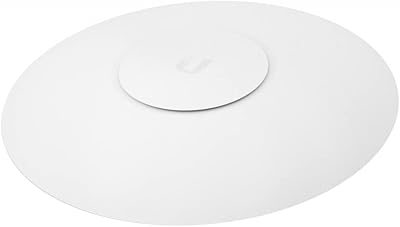
  • Mounting: A wall and ceiling mount bracket is included in the box; the installation requires a single Ethernet cable routed to the mount location.
  • Management: Configuration and ongoing management require the UniFi Network controller software, which can be hosted locally on a server or Cloud Key, or accessed via Ubiquiti's cloud service.
  • Security Feature: Guest Traffic Isolation is built in, allowing administrators to segment guest or visitor devices from the internal network without configuring a separate VLAN manually.
  • Operating Voltage: The device operates at 48 volts DC delivered over a standard 802.3at (PoE+) or compatible PoE connection from a switch or injector.
  • Color & Finish: The unit ships in a clean white finish (manufacturer code X2925) that blends unobtrusively into standard commercial and residential ceiling surfaces.
  • Included Components: The box contains the access point unit and a wall and ceiling mounting bracket; no PoE injector, Ethernet cable, or controller hardware is included.
  • Operating System: The access point runs Ubiquiti's proprietary UniFi firmware and is managed exclusively through the UniFi Network platform.
  • Product Series: The U6-Pro belongs to Ubiquiti's UniFi 6 access point lineup, which also includes entry-level and long-range variants designed for different coverage and budget requirements.

Related Reviews
Ubiquiti UniFi 6 Long-Range (U6-LR)
86%
92%
Performance
90%
Coverage Range
88%
Speed and Throughput
85%
Multi-Device Performance
80%
Ease of Setup
More
Ubiquiti UniFi 6 Lite Access Point U6-Lite-US
83%
88%
Performance
91%
Setup & Installation
84%
Connectivity & Range
80%
Build Quality
85%
Software & App Experience
More
Ubiquiti UniFi U6-MESH Wi-Fi 6 Access Point
87%
93%
Wi-Fi Performance
88%
Coverage Area
85%
Ease of Setup
91%
Speed and Stability
82%
App Experience
More
Ubiquiti UniFi Dream Machine Pro UDM-Pro
86%
94%
Performance
88%
Ease of Use
90%
Reliability
92%
Connectivity
85%
Network Security Features
More
Ubiquiti UniFi Protect G4-PRO Camera
86%
91%
Video Quality
94%
Ease of Setup
88%
Weather Resistance
80%
Software Integration
85%
Night Vision Performance
More
Ubiquiti UAP-AC-M-PRO Unifi Access Point
85%
88%
Overall Performance
90%
Wi-Fi Speed
85%
Installation Ease
89%
Range and Coverage
92%
Build Quality
More
Ubiquiti UniFi UAP-AC-PRO Access Point
80%
94%
Network Stability & Uptime
89%
Wi-Fi Signal Range & Penetration
58%
Setup & Initial Configuration
81%
Value for Money
86%
Multi-Device Performance
More
Ubiquiti UniFi U7 Pro
82%
91%
Wireless Performance
88%
Build Quality
83%
Range & Coverage
67%
Ease of Setup
78%
Value for Money
More
Ubiquiti UniFi UAP-AC-IW-PRO Wireless Access Point
84%
91%
Performance
67%
Ease of Installation
88%
Connectivity & Range
85%
Value for Money
90%
Discreet Design
More
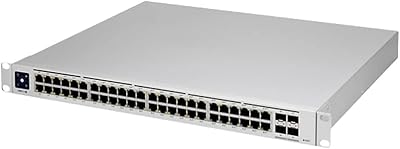
Ubiquiti Networks UniFi USW-Pro-48-POE Gen2 Switch
85%
92%
Performance & Speed
87%
Ease of Setup
90%
PoE+ Power Delivery
88%
Build Quality & Durability
73%
Software & Firmware Experience
More

FAQ

Yes, two things. First, you need a PoE source — either a PoE-capable network switch or a standalone PoE injector — since none is included in the box. Second, you need access to the UniFi Network controller software to configure and manage the device. The controller can run on a Ubiquiti Cloud Key, a local machine, or via Ubiquiti's cloud-hosted option, but it is not optional.

No. The Ubiquiti UniFi 6 Pro (U6-Pro) is an access point only — it has no routing, DHCP, or NAT functionality. It must be connected to an existing router or gateway, and it cannot be configured at all without the UniFi controller. If you are looking for a simple all-in-one solution, this is not it.

It depends on your comfort level. The physical installation — mounting the unit and connecting an Ethernet cable — is straightforward. The part that trips people up is the UniFi controller: adopting the device, understanding network settings, and navigating the interface all have a learning curve. It is manageable if you are willing to spend a few hours learning, but it is not beginner-friendly out of the box.

The U6-Pro requires 802.3at PoE+ (48V) to operate at full capacity. Most managed PoE+ switches from brands like Ubiquiti, Netgear, or TP-Link will work. If you are buying a dedicated injector, make sure it is rated for PoE+ and not just basic PoE, as underpowered injectors can cause instability.

They serve different purposes. A mesh system is designed for ease of use — simple app-based setup, automatic optimization, and a self-contained package. This access point is designed for control, scalability, and performance in multi-device environments. You get more granular management, better multi-client handling, and a platform that grows with your network, but you trade away simplicity. If you just want reliable home WiFi without configuration work, a mesh system is probably the better fit.

Yes, and this is actually where the platform shines. The UniFi controller manages all your access points from a single interface, supports seamless roaming between units, and lets you configure consistent network policies across all of them. Many buyers start with one unit and add more as they get comfortable with the system.

It can, but only if your devices support it. Most current laptops and phones with WiFi 6 chips do support 160 MHz, and when they connect at that width the throughput improvement is real — particularly for large file transfers or high-bitrate video. Older devices will connect at narrower widths and see no difference. In crowded RF environments, 160 MHz channels can also be more prone to interference, so some administrators deliberately limit to 80 MHz for consistency.

Relatively, yes — it is one of the more accessible features in the UniFi controller. The Guest Traffic Isolation option is available as a toggle within the network settings and does not require you to manually configure VLAN rules to get basic isolation working. For more advanced segmentation, you will need to dig deeper into the controller, but for most small office or home use cases the built-in guest network option handles it cleanly.

UniFi hardware tends to have a long service life. Many users report running older Ubiquiti access points for five or more years without hardware failure. Ubiquiti also provides firmware support across product generations for an extended period. The practical longevity concern is more about whether future WiFi standards make it feel outdated rather than physical failure.

Yes, it will work as an access point behind any router that provides a wired Ethernet connection. You do not need a Ubiquiti gateway or switch to use this AP — just connect it to any router via Ethernet, power it via PoE, and adopt it in the UniFi controller. That said, advanced features like deep traffic inspection and unified network dashboards work best when the whole stack is UniFi.