
Overview

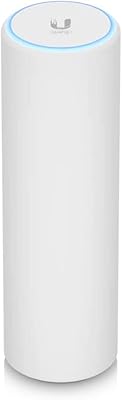
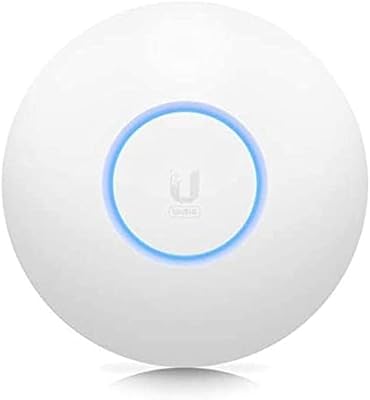
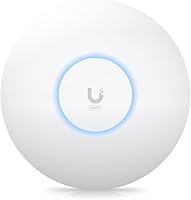
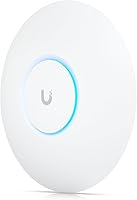
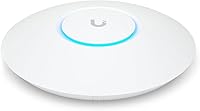
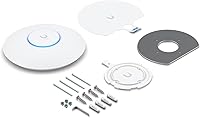
The Ubiquiti U6+ is a dual-band Wi-Fi 6 access point built squarely for small and medium business deployments, not for someone looking to replace a home router. It lives inside the UniFi ecosystem, which means a UniFi Network Controller — hardware or cloud-based — is required to unlock its full management capabilities. The compact, low-profile housing mounts cleanly to ceilings or walls without drawing attention. With a combined throughput ceiling of 3 Gbps across 2.4 GHz and 5 GHz bands, this Wi-Fi 6 AP sits at a competitive price point for what it delivers in the prosumer market.

Features & Benefits

Wi-Fi 6 brings meaningful real-world advantages in crowded environments: OFDMA and MU-MIMO allow the U6+ to handle dozens of simultaneous connections without the congestion that bogs down older access points. A Gigabit Ethernet uplink ensures the wired backhaul stays out of the way, and PoE+ support (up to 25.5W) means you can run a single cable to the ceiling without hunting for a nearby outlet. Security is handled through WPA3 encryption. Inside the UniFi application, you get granular controls — VLANs, guest portals, traffic shaping — features that no consumer-grade AP at this price even attempts to offer.

Best For

This UniFi access point makes the most sense for IT administrators or technically confident buyers already invested in the UniFi platform. If you have a UniFi Dream Machine, Cloud Key, or a self-hosted controller, adding the U6+ to your stack is straightforward. It suits offices, retail floors, or classrooms with 30 to 60 connected devices that need consistent throughput rather than peak speeds. Businesses upgrading aging Wi-Fi 5 infrastructure will notice a genuine improvement in dense environments. It also pairs cleanly with most PoE+ switches, whether Ubiquiti-branded or third-party.

User Feedback

Across hundreds of verified purchases, this Wi-Fi 6 AP holds a 4.6 out of 5 rating — a solid result for a prosumer device that demands some networking knowledge to configure. Buyers consistently highlight long-term stability and minimal maintenance once deployed. Range in open-plan offices is frequently mentioned as a strength. The recurring criticism is fair: setup is not intuitive for anyone unfamiliar with UniFi, and the controller dependency frustrates users expecting a standalone experience. Those who approach it with the right expectations tend to stick with it for years; those who don't often regret the purchase quickly.

Pros

  • Wi-Fi 6 efficiency makes a tangible difference in offices and classrooms with dozens of simultaneous devices.
  • Long-term reliability is outstanding — most buyers report near-zero unplanned downtime after initial setup.
  • PoE+ support means a single Ethernet cable handles both data and power at the ceiling mount.
  • Deep UniFi integration unlocks VLANs, guest portals, and traffic shaping without extra licensing fees.
  • WPA3 security and per-SSID isolation give IT teams solid tools for protecting internal networks.
  • The low-profile housing mounts cleanly to ceilings or walls without looking out of place in professional spaces.
  • Gigabit Ethernet uplink keeps the wired backhaul from becoming a performance bottleneck.
  • Compatible with both Ubiquiti and third-party PoE+ switches, giving installers flexibility in hardware choices.
  • At its price point, the U6+ delivers a feature set that consumer-grade APs simply cannot match.

Cons

  • Requires a UniFi controller to function properly — there is no meaningful standalone management mode.
  • New UniFi users face a steep learning curve that can turn a quick install into a multi-hour project.
  • No PoE injector or power adapter included — buyers without a PoE+ switch face an unplanned extra cost.
  • Firmware updates across the UniFi platform have a history of occasionally introducing new issues alongside fixes.
  • Real-world throughput is significantly lower than the 3 Gbps combined spec in typical mixed-device environments.
  • Very dense deployments pushing past 60 active clients will start to see per-device performance degrade.
  • The controller dependency creates ecosystem lock-in — migrating away from UniFi means replacing the hardware.
  • Older community guides and video tutorials are often outdated due to frequent UniFi interface changes.

Ratings

The Ubiquiti U6+ scores here reflect AI-driven analysis of verified global buyer reviews, with spam, incentivized, and bot-flagged feedback actively filtered out before scoring. The result is an honest look at where this Wi-Fi 6 access point genuinely delivers for business deployments — and where it creates friction. Both the strengths and the real pain points are reflected transparently in every category below.

Wireless Performance
88%
In open-plan offices and retail environments, buyers consistently report strong, stable throughput across 30 to 60 connected devices without the drop-offs common on older Wi-Fi 5 hardware. The Wi-Fi 6 efficiency gains via OFDMA are tangible in dense environments rather than just on paper.
Real-world speeds fall well short of the 3 Gbps combined ceiling in typical deployments — client hardware and interference conditions play a large role. Users expecting headline speeds in mixed-device environments will find results more modest than the spec sheet implies.
Setup & Configuration
54%
46%
For IT administrators already fluent in the UniFi ecosystem, the setup process is logical and well-documented. Experienced installers report getting the U6+ online and fully configured in under 30 minutes when a controller is already in place.
This is the most common source of frustration in buyer reviews. Without prior UniFi experience, the controller dependency creates a steep learning curve that catches many buyers off guard. Several reviewers explicitly warned others that this is not a device you can plug in and immediately use.
Range & Coverage
84%
Signal strength in large open spaces — classrooms, open offices, retail floors — is one of the most frequently praised aspects. Buyers replacing older single-band or Wi-Fi 5 APs often describe noticeably improved coverage consistency across the same physical area.
In environments with thick concrete walls or heavy structural interference, the coverage radius shrinks considerably. Some multi-room office deployments found a single U6+ insufficient, requiring an additional unit sooner than expected.
Build Quality & Design
82%
18%
The low-profile circular housing feels solid and mounts flush against ceilings or walls without looking out of place in a professional environment. At under 12 ounces, it is light enough that the included mounting hardware holds it securely without any wobble.
The plastic casing, while clean-looking, does not inspire the same confidence as higher-end enterprise units. A few buyers noted minor cosmetic scuffs straight out of the box, though structural complaints are rare.
PoE+ Implementation
91%
The single-cable PoE+ deployment is consistently flagged as a practical advantage in real installs — particularly for ceiling mounts where running a separate power line would be costly or disruptive. Compatibility with both Ubiquiti and third-party 802.3at switches is reliable.
Buyers without an existing PoE+ switch face an additional upfront cost that is easy to overlook when budgeting. A small number of users reported compatibility hiccups with older or budget PoE injectors that technically met the spec but delivered inconsistent power.
UniFi Ecosystem Integration
89%
Within an established UniFi environment, the U6+ slots in cleanly and inherits all the controller-side capabilities — VLANs, guest portals, traffic shaping, and network-wide visibility — without any special configuration steps. It is treated as a first-class citizen in the UniFi dashboard.
The tight ecosystem integration is also its biggest lock-in risk. Users who later want to switch away from UniFi management cannot repurpose the device in a meaningful standalone capacity, which limits long-term flexibility.
Security Features
86%
WPA3 support combined with robust VLAN segmentation through the UniFi controller gives IT teams solid tools for isolating guest traffic, protecting internal networks, and meeting basic compliance requirements without purchasing additional hardware.
The security feature set is only as accessible as the administrator managing it. Without someone who understands network segmentation, the advanced options go unused — and a misconfigured VLAN setup has caused connectivity issues for less experienced buyers.
Value for Money
83%
At its price point in the prosumer segment, the U6+ offers a compelling feature-to-cost ratio compared to consumer Wi-Fi 6 routers or entry-level enterprise APs. For businesses already in the UniFi ecosystem, the incremental cost per AP is easy to justify.
Factor in the cost of a UniFi controller (hardware or subscription) for buyers starting from scratch, and the total outlay climbs noticeably. Standalone AP buyers can find simpler Wi-Fi 6 options at a lower all-in cost without the ecosystem overhead.
Long-Term Reliability
92%
This is arguably the strongest point in the buyer record. Users running the U6+ in production for over a year report minimal firmware-related disruptions and near-zero unplanned downtime once the initial configuration is stable. It runs quietly and consistently.
A small subset of buyers experienced firmware update issues that temporarily disrupted connectivity across their network — a risk inherent to any managed device that applies updates automatically unless the administrator disables that behavior.
Management Interface
79%
21%
The UniFi Network application is feature-rich and well-organized once you understand its structure. Administrators managing multiple sites or dozens of devices genuinely benefit from the unified dashboard and the depth of per-device analytics available.
The interface has a noticeable learning curve and has changed significantly across versions, which means older tutorials and community guides are sometimes misleading. First-time UniFi users frequently describe the initial navigation as confusing.
Installation Process
71%
29%
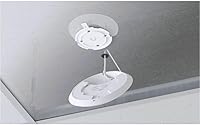
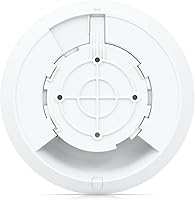
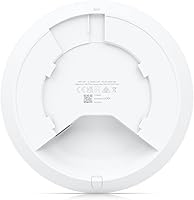
Physically mounting the device is quick — the included hardware covers both ceiling and wall scenarios, and the unit clips into place cleanly. Experienced installers can complete the physical portion of a multi-AP deployment in a very short time.
The software side of installation is where time gets spent. Adopting the device into the controller, running setup wizards, and configuring SSIDs correctly takes considerably longer than the hardware work, especially for first-time deployments.
Device Capacity
81%
19%
Buyers deploying in environments with 40 to 60 concurrent devices — busy classrooms, open coworking floors, small retail spaces — report that the U6+ handles the load without visible degradation in per-device performance, which was a pain point with older APs.
Pushing beyond 60 active clients starts to show in real-world throughput per device. Very dense environments, like conference halls or high-traffic hospitality venues, typically require multiple units or a step up to a higher-capacity model.
Firmware & Software Updates
67%
33%
Ubiquiti maintains a reasonably active firmware release cadence, and critical security patches are generally addressed without long delays. The UniFi controller handles update distribution centrally, which saves time for multi-AP deployments.
A pattern in community feedback involves firmware releases introducing new bugs alongside fixes — a frustration shared across the UniFi product line. Some administrators hold off on updates for weeks to let early adopters surface issues first, which is not ideal.
Packaging & Included Accessories
74%
26%
The box includes all the hardware needed for a clean ceiling or wall mount, which is not something every access point manufacturer bothers to include at this price. Nothing feels excessive or wasteful in the packaging.
There is no PoE injector or power adapter included — buyers without a PoE switch need to source one separately. This is a known convention in the prosumer space, but it still catches some buyers off guard who do not read the specs carefully.

Suitable for:

The Ubiquiti U6+ was built for a specific kind of buyer — one who already understands, or is willing to learn, how managed networking works. IT administrators deploying wireless infrastructure across offices, retail stores, or classrooms will feel right at home here, especially if a UniFi Dream Machine, Cloud Key, or self-hosted controller is already part of the stack. Small businesses making the jump from aging Wi-Fi 5 access points will notice a real difference in how the network handles 30 to 60 simultaneous devices without the congestion and slowdowns that plagued older hardware. The PoE+ input is a genuine practical advantage for ceiling-mount installs where pulling a separate power cable would mean additional cost or construction work. Installers and MSPs who manage multiple client sites through the UniFi dashboard will find the U6+ integrates cleanly and scales without friction. If you are technically confident, already invested in the UniFi ecosystem, and need a reliable mid-range Wi-Fi 6 AP that will run quietly for years, this is a strong fit.

Not suitable for:

The Ubiquiti U6+ is not the right choice for anyone expecting a plug-and-play experience. If your idea of network setup involves connecting a cable and logging into a simple browser interface, this device will frustrate you quickly — without a UniFi controller already running, you cannot manage it properly, and setting one up from scratch adds meaningful time and, depending on the hardware path you choose, extra cost. Home users looking to replace a consumer router will find the ecosystem requirements excessive for a single-location setup with a handful of devices. Buyers without a PoE+ capable switch will also need to budget for one, since no power adapter or injector is included in the box. Those who want the flexibility to manage their access point independently or switch ecosystems later without replacing hardware should look elsewhere. And if your environment pushes well beyond 60 active clients simultaneously, a higher-capacity model would serve the load more reliably than this one.

Specifications

  • Wi-Fi Standard: The device supports IEEE 802.11ax (Wi-Fi 6) along with backwards compatibility across 802.11 a/b/g/n/ac on both bands.
  • Frequency Bands: Dual-band operation covers both 2.4 GHz and 5 GHz simultaneously for flexible client distribution.
  • Max Throughput: Combined theoretical maximum throughput is 3 Gbps across both bands under ideal conditions.
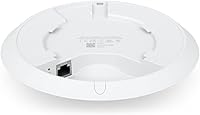
  • Ethernet Port: A single Gigabit Ethernet (1000 Mbps) port handles both data uplink and PoE+ power input via a single cable.
  • Power Input: Accepts PoE+ (802.3at) input delivering up to 25.5W through the Ethernet port — no separate power adapter required.
  • MIMO Technology: Supports MU-MIMO and OFDMA for efficient simultaneous communication with multiple client devices.
  • Security: WPA3 encryption and data protection are supported, with advanced network segmentation available through the UniFi controller.
  • Management: Managed exclusively via the UniFi Network application, available as a local hardware controller or cloud-based deployment.
  • Dimensions: The unit measures 7.8 x 7.2 x 2.1 inches in its installed profile.
  • Weight: The access point weighs 11.8 ounces, light enough for secure ceiling mounting with the included hardware.
  • Form Factor: Designed for ceiling or wall mounting, with all necessary mounting hardware included in the box.
  • In the Box: Package includes the Access Point U6+ unit and wall/ceiling mounting hardware — no PoE injector or power supply is included.
  • Firmware & OS: Runs on Ubiquiti airOS firmware managed through the UniFi Network software platform.
  • Special Features: WPS is supported for simplified initial client connectivity where required.
  • Wireless Encryption: Supports WPA2 and WPA3 personal and enterprise modes for flexible deployment security requirements.
  • Model Number: The official Ubiquiti model identifier for this unit is U6US.
  • Manufacturer: Designed and produced by Ubiquiti Networks, headquartered in New York, United States.
  • First Available: This product was first made available for purchase on Amazon in July 2023.

Related Reviews
Ubiquiti UniFi 6 Long-Range (U6-LR)
86%
92%
Performance
90%
Coverage Range
88%
Speed and Throughput
85%
Multi-Device Performance
80%
Ease of Setup
More
Ubiquiti UniFi U6-MESH Wi-Fi 6 Access Point
87%
93%
Wi-Fi Performance
88%
Coverage Area
85%
Ease of Setup
91%
Speed and Stability
82%
App Experience
More
Ubiquiti UniFi 6 Lite Access Point U6-Lite-US
83%
88%
Performance
91%
Setup & Installation
84%
Connectivity & Range
80%
Build Quality
85%
Software & App Experience
More
Ubiquiti NanoStation LocoM5
86%
91%
Ease of Installation
85%
Signal Range and Performance
88%
Durability and Weatherproofing
93%
Setup Time
87%
Network Reliability in Rural Areas
More
Ubiquiti EdgeRouter 4
86%
88%
Ease of Setup
91%
Performance
86%
EdgeOS Features
92%
Build Quality
89%
Reliability
More
Ubiquiti UniFi Switch Aggregation
85%
91%
Performance & Speed
88%
Ease of Installation
89%
Build Quality & Durability
85%
Network Management Features
83%
Power Efficiency
More
Ubiquiti USW-Pro-24
Ubiquiti USW-Pro-24
87%
94%
Network Performance
91%
Build Quality
93%
Layer 3 Routing Capabilities
89%
Port Density and Flexibility
85%
Setup and Installation
More
Ubiquiti USW-Flex-Mini
80%
94%
UniFi Ecosystem Integration
88%
Value for Money
77%
Port Count & Configuration
92%
Power Flexibility (USB-C & PoE-In)
61%
Build Quality & Durability
More
Ubiquiti NanoStation loco M2
86%
89%
Performance & Range
84%
Setup & Installation
91%
Build Quality & Durability
88%
Weather Resistance
87%
Connectivity Stability
More
Ubiquiti Rocket AC R5AC-LITE
86%
89%
Performance
93%
Ease of Installation
80%
Signal Reliability
88%
Build Quality
85%
Range/Coverage
More

FAQ

Yes, and this is the most important thing to understand before buying. The Ubiquiti U6+ requires a UniFi Network Controller to be fully managed and configured. You can run the controller software for free on a local computer, a Raspberry Pi, or a cloud server — or you can purchase dedicated hardware like a UniFi Dream Machine or Cloud Key. Without a controller, you cannot properly set up SSIDs, security policies, or monitor the device.

No, this is not a router and it does not work as one on its own. It is a managed access point that handles wireless connectivity, but you still need a separate router and, as mentioned, a UniFi controller for management. It is designed for business and prosumer deployments, not as a simple home networking solution.

You need a PoE+ switch or injector that supports the 802.3at standard and can deliver at least 25.5W per port. Ubiquiti sells compatible switches in the UniFi line, but most reputable third-party PoE+ switches work fine as well. Standard 802.3af PoE switches deliver less power and may not work reliably with this unit, so double-check the spec on your switch before buying.

Most buyers find it handles 30 to 60 concurrent active devices comfortably in real-world office or classroom use. Beyond that range, per-device performance starts to degrade noticeably. If you are running a very dense environment — a large conference venue or a high-traffic hospitality setting — you would be better served by multiple units or a higher-capacity model.

Honestly, yes — if you have never used UniFi before, expect a learning curve. The physical installation is straightforward, but adopting the device into a controller, configuring VLANs, and setting up SSIDs correctly takes time and some networking knowledge. There are good community guides and YouTube tutorials available, but they vary in quality and some are outdated due to software updates. If you are not comfortable with managed networking concepts, this may not be the right choice.

It will connect to any standard Ethernet switch for its uplink, and clients on any Wi-Fi device can connect to it wirelessly. However, the management side requires a UniFi controller — it does not integrate into other vendors management platforms like Cisco Meraki or TP-Link Omada. Think of the controller dependency as the main compatibility constraint, not the hardware connectivity.

Yes, the UniFi controller makes guest portal setup straightforward. You can create isolated guest SSIDs with bandwidth limits, splash pages, and separate VLAN assignments to keep guest traffic completely off your internal network. It is one of the more practical features for small businesses that want to offer customer Wi-Fi without security risks.

In a single-device scenario, you probably will not notice a huge difference in raw speed. Where this Wi-Fi AP pulls ahead is in environments with many simultaneous devices — the Wi-Fi 6 efficiency features, combined with the management capabilities of the UniFi platform, make it far more stable under load than most consumer routers. The trade-off is that consumer routers are vastly easier to set up and manage for non-technical users.

Yes, wall mounting is fully supported and the hardware in the box covers both scenarios. The unit is designed to sit flush against a flat surface either way. Ceiling mounting is generally preferred in open spaces for the best omnidirectional coverage, but wall mounting works well in corridors or rooms where a ceiling mount is not practical.

Ubiquiti releases firmware updates fairly regularly, but the UniFi community has a well-known habit of waiting a few weeks before applying major updates — and for good reason. Occasionally a new release introduces bugs that affect connectivity or dashboard functionality. In a production environment, it is generally wise to monitor the Ubiquiti community forums for a couple of weeks after a new firmware drops before pushing the update across your devices.