
Overview

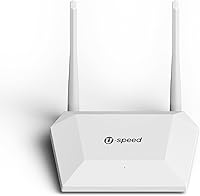
The U-SPEED N300 T1 Pro WiFi Router is a no-frills, single-band networking device that launched in mid-2024, targeting renters, small households, and light office setups that don't need cutting-edge speeds. U-SPEED isn't a household name, but this compact router holds its own at its price point — small enough to tuck behind a desk, with two external antennas that make a genuine effort to push signal into the corners of a room. It supports multiple operating modes right out of the box, which is useful for a device in this tier. With a 4.0-star rating across over 140 Amazon reviews, there's enough real-world feedback here to paint a fair picture.

Features & Benefits

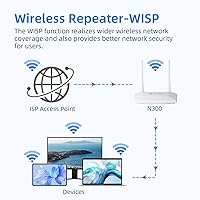
The N300 T1 Pro's most practical trick is its three operating modes — standard router, wireless repeater to extend an existing network, or WISP mode to bridge a wireless ISP connection. That kind of flexibility is rare at this price. The two 5dBi antennas help, though you shouldn't expect miracles in a large home — this is a 2.4GHz-only device, which means bandwidth-heavy tasks like 4K streaming or competitive gaming aren't really its wheelhouse. For lighter workloads, the built-in QoS controls and internet access restrictions give admins a surprising degree of control, and WPA2 encryption keeps the network reasonably locked down for everyday use.

Best For

This budget wireless router makes the most sense for people with straightforward connectivity needs — think a one-bedroom apartment, a small rental, or a back-office workstation that just needs a reliable signal for browsing and video calls. It's also a solid pick for IoT and security cameras, since those devices almost universally run on 2.4GHz anyway. If you're eyeing it as a range extender for a larger home, the repeater mode works, but manage expectations — it won't rescue a basement with thick concrete walls. Anyone who streams in 4K or handles large file transfers regularly will want to consider a dual-band option instead.

User Feedback

Buyers who leave positive reviews consistently praise ease of setup and the value of getting a multi-mode router at this price — several mention having it running in under ten minutes. The repeater mode earns decent marks for basic extension use cases. On the flip side, a recurring complaint involves limited range in larger spaces, which isn't surprising given the hardware class. A handful of users found the web interface dated and occasionally confusing without consulting the manual. Long-term durability is harder to assess given the product's relatively short track record, but no alarming failure patterns stand out. Overall, feedback aligns with what a capable, modest entry-level device should deliver.

Pros

  • Straightforward setup that most users complete in under fifteen minutes without needing technical knowledge.
  • Three operating modes — router, repeater, and WISP — add genuine flexibility rarely found at this price tier.
  • Built-in QoS controls let you prioritize specific devices, which is a useful feature for a budget device.
  • Internet access control makes it easy to manage or restrict connectivity for guests or children.
  • Compact and lightweight design fits neatly on a desk or shelf without cluttering the space.
  • WPA2 encryption provides a solid baseline of wireless security for everyday home use.
  • Wired Ethernet ports give you a reliable fallback for devices that benefit from a direct connection.
  • Solid 4.0-star rating across a meaningful number of real buyer reviews suggests consistent performance at its level.
  • Good value as an emergency replacement for a failed ISP-provided router when you need connectivity fast.

Cons

  • Single-band 2.4GHz only means no option to offload bandwidth-heavy devices to a faster 5GHz channel.
  • Maximum 300Mbps throughput will bottleneck households with high-speed internet plans above that threshold.
  • Range in larger homes or multi-story buildings is limited despite the dual external antennas.
  • The web-based admin interface feels outdated and can be confusing without referring to the manual.
  • No mobile app for setup or management, which is increasingly standard on competing routers.
  • U-SPEED has a limited track record, so long-term firmware updates and support are not guaranteed.
  • Fast Ethernet ports cap wired speeds at 100Mbps, which is a bottleneck for local network transfers.
  • Repeater mode, while functional, may show inconsistent performance in environments with significant signal interference.
  • No USB port means no option for basic network storage or printer sharing down the line.

Ratings

The U-SPEED N300 T1 Pro WiFi Router was evaluated by our AI rating system after analyzing verified global buyer reviews, with spam, bot activity, and incentivized feedback actively filtered out to ensure the scores reflect genuine user experiences. The result is a transparent breakdown that captures both where this compact router genuinely delivers and where it falls short for certain buyers. Strengths and frustrations are weighted equally so you can make a clear-headed decision before purchasing.

Ease of Setup
88%
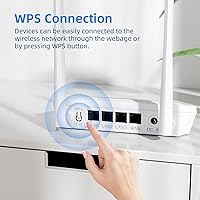
A clear majority of buyers got this budget wireless router running in under fifteen minutes without any prior networking knowledge. The web-based setup wizard is guided enough that even first-time router owners rarely needed to call for help, and WPS support makes connecting compatible devices even faster.
A smaller but consistent group of users found the initial login page difficult to locate without consulting the manual, and a few reported that mode-switching between router and repeater required a factory reset rather than a simple menu toggle — a friction point that could trip up less patient users.
WiFi Coverage
63%
37%
For compact living spaces — studios, one-bedroom apartments, or small open-plan offices — the two external antennas do a reasonable job of keeping signal consistent across the area. Devices like security cameras and smart plugs stationed within a single floor tend to connect reliably without frequent drops.
Coverage falls off noticeably in multi-story homes or any space with thick internal walls. Several buyers reported dead zones in adjacent rooms, and using this as a primary router in a house larger than around 800 square feet consistently draws complaints about weak signal at the edges.
Wireless Speed
58%
42%
For the intended use cases — web browsing, standard-definition video calls, smart home device communication, and light file transfers — the N300 T1 Pro delivers adequate throughput without noticeable lag. IoT device users and security camera owners in particular rarely push anywhere near the 300Mbps ceiling.
The 2.4GHz-only, 300Mbps maximum is a hard ceiling that becomes painful quickly in modern households. Anyone subscribing to a high-speed broadband plan will see significant underutilization, and households that stream 4K or handle simultaneous downloads frequently report congestion even with just a few active devices.
Value for Money
83%
Considering the price tier, the feature set here is genuinely hard to argue with. Three operating modes, QoS controls, and internet access management packed into a compact unit represent solid utility for buyers who truly only need basic connectivity and do not want to overspend on features they will never use.
The value equation shifts if your needs grow. Buyers who later wished they had dual-band or gigabit ports noted feeling like they needed to replace it sooner than expected, which undercuts the savings. It is excellent value for a narrow use case but a false economy if purchased for a bandwidth-heavy home.
Repeater Performance
67%
33%
When positioned correctly in a small space — ideally within clear line of sight of the primary router — the repeater mode extends usable coverage in a practical way, particularly for IoT devices and cameras that just need a stable low-bandwidth connection at the far end of an apartment.
Real-world repeater performance degrades quickly with distance and obstacles. Several users noted that the extended signal was noticeably weaker than their primary router's output, and a handful experienced periodic disconnections that required rebooting the unit to restore the repeater link.
Build Quality
61%
39%
The unit feels reasonably solid for its weight class — at just 4.5 ounces it is clearly lightweight, but the casing does not feel flimsy in hand. The antennas attach securely and hold their position without drooping, which is a common failure point on cheaper routers.
The plastic housing picks up smudges easily and has a distinctly entry-level feel. A number of longer-term owners raised concerns about the unit running warm after extended use, and there are not enough years of field data yet to make confident claims about multi-year durability.
Admin Interface
54%
46%
All the core settings are accessible through the browser-based panel — SSID configuration, password management, QoS setup, and access control are all reachable without too many layers of navigation. For users who just want to set it and forget it, the interface does enough.
The design is noticeably dated compared to competitors who offer clean mobile apps or modern dashboards. Several buyers described the layout as confusing when trying to locate less common settings, and there is no companion smartphone app, which feels like an omission in a market that has widely adopted app-based management.
QoS Controls
72%
28%
Having bandwidth prioritization at this price point is a genuine bonus. Small office users who need to ensure a work laptop gets priority over a streaming tablet found the QoS settings functional and effective enough for straightforward device-level control without requiring technical expertise.
The QoS implementation is basic — it lacks the granular per-application or real-time monitoring features found on mid-range routers. Users wanting fine-grained traffic shaping or detailed bandwidth reporting will find the controls too rudimentary to meet those needs.
Security Features
74%
26%
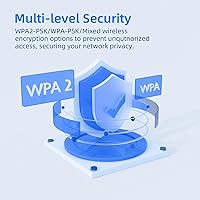
WPA2-PSK encryption is the current standard for home network protection, and having the option to run mixed-mode compatibility for older devices without fully downgrading security is a practical touch. Internet access control also adds a useful layer for households that want to restrict specific users.
There is no indication of automatic firmware security updates, and U-SPEED's track record for proactively patching vulnerabilities is not yet established. Buyers who take network security seriously should check whether firmware updates have been issued since the July 2024 release.
Connection Stability
66%
34%
Under light loads and in uncrowded wireless environments, the N300 T1 Pro holds its connection steadily. Users running a handful of IoT devices and a laptop report consistent uptime without needing to restart the router regularly in typical usage scenarios.
In denser wireless environments — apartment buildings with many competing networks on the 2.4GHz band — interference causes noticeable instability. A recurring pattern in negative reviews involves periodic drops that required power cycling, suggesting the router's band-steering and interference management is limited.
WISP Mode Utility
69%
31%
WISP mode is a genuinely useful capability for niche situations like rural wireless ISP setups, temporary office locations, or shared building internet services where you want your own private routed network layered on top. Buyers in these situations praised it as a feature they could not find elsewhere at this price.
Documentation on configuring WISP mode is thin, and several users who attempted it without prior networking knowledge found it frustrating to get working correctly on the first try. Support resources from U-SPEED for this specific mode are limited compared to more established brands.
Compatibility
81%
19%
Backward compatibility with 802.11b and 802.11g devices means older hardware connects without issue — useful for anyone running legacy IoT sensors, older laptops, or dated gaming consoles that do not support newer standards. Buyers who needed to extend support to mixed-age device fleets found it handled them all without configuration headaches.
The lack of 5GHz means that newer devices capable of faster standards will be held back to 2.4GHz performance, which is a frustrating underutilization of modern smartphones, tablets, and laptops that support 802.11ac or Wi-Fi 6.
Package Contents
77%
23%
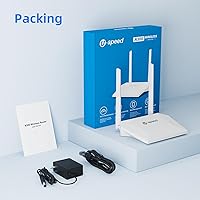
The inclusion of an Ethernet cable alongside the router, power adapter, and printed manual means most buyers can get started immediately without sourcing accessories separately — a small but appreciated detail that not every budget router brand bothers with.
The Ethernet cable included is short, which limits placement flexibility if you need the router positioned away from your modem. The manual, while adequate for basic setup, lacks depth for configuring the more advanced features like WISP mode or granular QoS.

Suitable for:

The U-SPEED N300 T1 Pro WiFi Router is a practical fit for anyone who needs basic, reliable wireless coverage without the complexity or cost of a more advanced device. Renters in studio or one-bedroom apartments will find it more than adequate for everyday browsing, video calls, and streaming at standard definition. It also works well as a dedicated connection point for smart home devices and security cameras, since most of those gadgets only communicate over 2.4GHz anyway. Small offices or home workspaces that need simple bandwidth prioritization and guest access controls will appreciate those built-in features at this price point. The repeater and WISP modes make it genuinely versatile for someone who needs a secondary network node without purchasing a separate extender. If your priority is getting online quickly with minimal fuss, this compact router covers the basics honestly.

Not suitable for:

Anyone living in a mid-size or larger home should think carefully before relying on the U-SPEED N300 T1 Pro WiFi Router as their primary router, since single-band 2.4GHz hardware has real ceiling on both speed and range. Households that stream 4K video on multiple devices simultaneously, or where someone works from home on large file transfers and video conferencing, will likely run into congestion and frustration. Gamers in particular should look elsewhere — latency-sensitive applications demand dual-band or Wi-Fi 6 hardware that this device simply does not offer. The web interface has been described by some users as dated and not especially intuitive, so buyers who want a polished app-based setup experience will be disappointed. This is also not the right choice for anyone expecting enterprise-grade reliability or long-term firmware support from a lesser-known brand.

Specifications

  • Brand: Manufactured by U-SPEED, a growing networking hardware brand that launched this model in mid-2024.
  • Model: The T1 Pro is the specific variant in the N300 product line from U-SPEED.
  • Max Speed: Supports wireless data rates of up to 300Mbps on the 2.4GHz band under optimal conditions.
  • Frequency Band: Operates exclusively on the 2.4GHz single-band frequency, with no 5GHz band available.
  • Standards: Compatible with IEEE 802.11b, 802.11g, and 802.11n wireless communication standards.
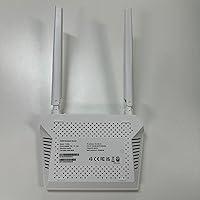
  • Antennas: Equipped with two external 5dBi omni-directional antennas to improve signal coverage and stability.
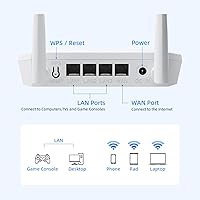
  • Ethernet Ports: Includes Fast Ethernet ports supporting 10/100Mbps wired connections for directly connected devices.
  • Operating Modes: Supports three modes: standard wireless router, wireless repeater for range extension, and WISP for bridging a wireless ISP signal.
  • Security: Provides WPA2-PSK, WPA-PSK, and Mixed encryption options for securing the wireless network.
  • Special Features: Includes QoS bandwidth control, WPS, WLAN scheduling, and internet access control for user management.
  • Dimensions: Measures 5.9 x 4.9 x 5.9 inches, making it a compact unit suitable for desk or shelf placement.
  • Weight: Weighs 4.5 ounces, making it lightweight and easy to reposition or mount as needed.
  • Color: Available in white only.
  • In the Box: Package includes the N300 T1 Pro router unit, a power adapter, one Ethernet cable, and a printed user manual.
  • Compatibility: Works with smartphones, tablets, PCs, gaming consoles, security cameras, and other 2.4GHz-compatible devices.
  • Connectivity: Supports both Wi-Fi wireless connectivity and wired connections via RJ45 Ethernet ports.
  • Buyer Rating: Holds a 4.0 out of 5 star average rating based on 143 customer reviews on Amazon as of the review date.

Related Reviews
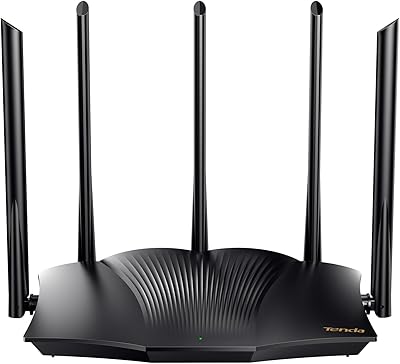
Tenda RX12 Pro AX3000 WiFi 6 Router
77%
88%
Value for Money
91%
Setup & Ease of Use
83%
WiFi Speed & Performance
71%
Coverage & Range
79%
VPN Support
More
ASUS RT-AX88U PRO WiFi 6 Router
77%
88%
Wireless Performance
84%
Range & Coverage
91%
Multi-Device Handling
57%
Setup Experience
79%
Build Quality
More
Tenda BE5100 WiFi 7 Router
79%
83%
Wireless Performance
91%
Setup Experience
74%
Signal Coverage
88%
Value for Money
63%
App & Management Interface
More
TUOSHI LT15F 4G LTE Modem Router
69%
83%
Setup & Ease of Use
71%
Carrier Compatibility
78%
Signal Reception & Antenna Performance
66%
LTE Speed & Performance
72%
Wi-Fi Coverage & Range
More
TP-Link Archer AX72 Pro WiFi 6 Router
87%
89%
WiFi Performance
92%
Value for Money
94%
Ease of Setup
88%
Security Features
83%
Range and Coverage
More
Cudy N300 WiFi Unlocked 4G LTE Modem Router LT400
84%
85%
Performance & Speed
91%
Ease of Setup
88%
VPN Functionality
78%
Range & Coverage
70%
Signal Reliability in Rural Areas
More
ASUS ROG Rapture GT-AX11000 Pro
77%
91%
Wireless Performance
93%
Wired Port Flexibility
82%
Gaming Features
61%
Setup & Configuration
89%
Network Security
More
ASUS ROG Rapture GT-BE98 Pro
81%
93%
Wireless Performance
91%
Wired Connectivity
89%
Gaming Performance
78%
Setup & App Experience
86%
Build Quality & Design
More
ASUS ZenWiFi BQ16 Pro WiFi 7 Mesh Router
77%
91%
Wireless Performance
78%
Coverage & Range
86%
Setup & App Experience
63%
Firmware Stability
88%
10G Port Utility
More
Router Guard Large WiFi Router EMF Shield
83%
91%
Ease of Installation
88%
Effectiveness of EMF Blocking
85%
Build Quality
90%
Fit for Large Routers
87%
Compatibility with 5G Routers
More

FAQ

Setup is genuinely straightforward. You plug it in, connect to the default network, open a browser, and follow the on-screen prompts. Most users report being fully connected within ten to fifteen minutes. The included manual walks through each step clearly if you get stuck.

Yes, the N300 T1 Pro has a dedicated repeater mode that lets it connect wirelessly to your main router and rebroadcast the signal. It works reasonably well for light tasks, though in large homes or buildings with thick walls you should temper your expectations — it is still a budget-class device with a single band.

WISP mode is useful if your internet provider delivers a wireless signal directly — common in rural areas, RV parks, or shared building setups. In WISP mode, this compact router connects to that incoming wireless signal and redistributes it as its own local network, giving you proper router features like NAT and firewall on top of it.

No, this budget wireless router is single-band and only operates on 2.4GHz. If you need 5GHz for faster speeds or to reduce interference, you will need to look at a dual-band router instead.

Honest answer: not ideally. The 300Mbps ceiling and 2.4GHz-only band can struggle when multiple devices are competing for bandwidth, especially for high-definition video or latency-sensitive gaming. It handles standard-definition streaming and casual browsing well, but power users should budget for something more capable.

Through the router's web admin panel, you can block specific devices from accessing the internet entirely or set schedules for when certain devices can connect. It is a basic but practical parental control tool — good enough for limiting kids' screen time or blocking an unfamiliar device from using your bandwidth.

Unfortunately, no. The Fast Ethernet ports on the U-SPEED N300 T1 Pro WiFi Router cap wired speeds at 100Mbps, and wireless throughput tops out around 300Mbps under ideal conditions. If you have a high-speed plan above those thresholds, this router will be the bottleneck, and you would be better served by a gigabit-class device.

For light use — browsing, email, smart home sensors — it can handle around ten to fifteen connected devices without major issues. Beyond that, or if several devices are actively streaming or downloading simultaneously, you may notice slowdowns. It is best suited to small households or offices with modest device counts.

It is functional but dated in appearance. Most settings are accessible without too much digging, but a handful of users have found the layout less intuitive than modern app-based routers. Keeping the manual nearby for the first session is a good idea, especially if you want to configure QoS or access control.

U-SPEED offers standard manufacturer support, though as a smaller brand their support infrastructure is more limited than established names like TP-Link or ASUS. It is worth checking their website or the Amazon product page for current warranty terms before purchasing, as these can vary by region and may have been updated since the product launched.