Overview

The TUOSHI LT15F 4G LTE Modem Router is built for one specific problem: getting reliable internet to places where running cable simply isn't an option. Pop in a SIM card from AT&T or T-Mobile and you're online — no technician visit, no installation window, no contract with the local provider. Running on a Qualcomm EC25-AF chipset, it sits in a competitive mid-range bracket alongside other unlocked LTE routers targeting rural and temporary-use scenarios. Just keep expectations grounded. This is a capable device for browsing, video calls, and light streaming, but it won't replicate the consistency of a wired broadband connection, especially during peak cellular hours.
Features & Benefits

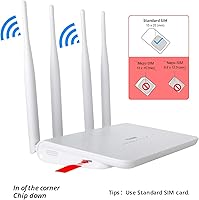
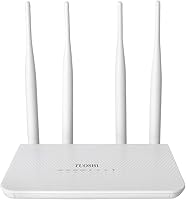
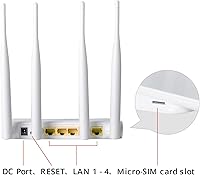
As an LTE Cat4 device, this LTE modem router tops out at 150Mbps download and 50Mbps upload under ideal conditions — in practice, real-world speeds depend heavily on your carrier's local band coverage. The four 5dBi fixed antennas make a noticeable difference in fringe-signal areas, pulling in a cleaner connection than a phone hotspot typically manages. Wi-Fi runs on the 2.4GHz band only, which is worth noting: range is decent, covering roughly 300 square meters and up to 32 devices, but the single-band setup means heavy streaming or 5GHz-dependent devices will feel the limitation. A standard SIM slot with a Nano adapter included keeps things flexible across different carrier SIM sizes.

Best For

This cellular Wi-Fi router finds its sweet spot with a pretty specific crowd. If you own a cabin, hunting camp, or vacation property where cable internet is either unavailable or impractical, this is a legitimate solution — just bring a data SIM. It also works well for remote security cameras that need a dedicated connection rather than relying on a shared hotspot. Rural households where AT&T or T-Mobile signal is present but wired broadband isn't, small job sites, and temporary office setups are all reasonable use cases. That said, it helps to be comfortable logging into a browser-based admin page, since getting the most out of band-lock and TTL configuration requires a bit of hands-on setup.

User Feedback

Buyer sentiment around the TUOSHI router sits right where you'd expect for a 3.8-star rating — mostly satisfied, with some clear reservations. On the positive side, people consistently highlight how quickly the device gets online after inserting a SIM, and many note that it outperforms a phone hotspot in areas with weak signal. The concerns, though, are worth taking seriously. Verizon users frequently run into connectivity issues unless they manually adjust the TTL value — a step that trips up less technical buyers. Speed inconsistency also comes up often, since performance depends entirely on what bands your carrier broadcasts locally. A handful of users flag the 2.4GHz-only limitation as a real drawback if streaming video reliably across multiple devices is a priority.

Pros

  • Insert a SIM card and you are online in minutes — no ISP appointment, no cable run, no contract.
  • Wide LTE band support picks up AT&T and T-Mobile low-band signals well in rural and fringe-coverage areas.
  • Four 5dBi antennas deliver noticeably more stable connections than using a phone as a hotspot.
  • Covers up to 300 square meters and handles up to 32 connected devices simultaneously.
  • Band locking and TTL settings give technically confident users meaningful control over cellular performance.
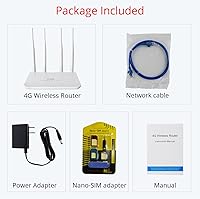
  • Included SIM adapter handles Nano SIMs without requiring a separate purchase.
  • Qualcomm EC25-AF chipset adds credibility at a mid-range price point compared to lesser modem hardware.
  • Flat, low-profile design fits neatly on a shelf without dominating the space around it.
  • Works as a reliable dedicated connection for remote security cameras and IoT devices.
  • No software subscription or cloud account required — local web admin is all you need.

Cons

  • Single-band 2.4GHz Wi-Fi only — there is no 5GHz option, which limits throughput for streaming-heavy households.
  • Verizon users must manually configure TTL values through the admin page; this step is not documented in the box.
  • Real-world LTE speeds vary widely and rarely come close to the theoretical 150Mbps ceiling.
  • The admin interface feels outdated and is not mobile-friendly, making on-the-go configuration tedious.
  • No automatic reconnect or watchdog reboot function, which is a problem for always-on remote installations.
  • The unit runs warm during extended use, raising long-term reliability questions in enclosed or warm environments.
  • Printed documentation is thin and leaves advanced settings completely unexplained for new users.
  • Customer support response times have drawn repeated criticism from buyers who needed post-purchase help.
  • The SIM adapter can be fiddly to seat correctly, occasionally causing connection issues that are hard to diagnose.
  • Competing dual-band routers exist at a similar price, making the single-band limitation harder to overlook.

Ratings

The TUOSHI LT15F 4G LTE Modem Router has been evaluated by our AI rating system after analyzing hundreds of verified global buyer reviews, with spam, bot-submitted, and incentivized feedback actively filtered out. The scores below reflect a balanced picture — genuine strengths as well as the friction points that real users ran into. Nothing has been softened to protect the rating.
Setup & Ease of Use
83%
Most buyers had this router online within minutes — insert the SIM, power it on, and connect to the default Wi-Fi network. For cabin owners or remote site managers who just need something working fast without calling an ISP, that plug-and-play experience is a genuine selling point.
The experience breaks down once you move beyond basic setup. Getting Verizon to cooperate, changing TTL values, or locking to a specific band all require navigating a browser-based admin page that feels dated and isn't well-documented for first-time users.
Carrier Compatibility
71%
29%
AT&T and T-Mobile users generally report a clean, hassle-free experience right out of the box. The wide band support — covering LTE bands including B12, B17, and B66 — means it catches low-band signals well in rural areas where those bands do most of the heavy lifting.
Verizon compatibility is possible but requires manually setting the TTL value to 64 or 65 depending on your data plan, and that step is not clearly communicated in the packaging or quick-start guide. Buyers who expected it to just work on Verizon were frequently frustrated.
Signal Reception & Antenna Performance
78%
22%
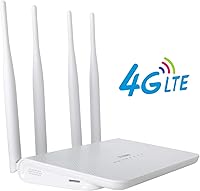
The four 5dBi fixed antennas consistently outperform a smartphone hotspot in areas with marginal cellular signal. Buyers in rural properties specifically noted better stability and fewer dropped connections compared to tethering a phone, which is exactly the scenario this router is designed for.
The antennas are fixed rather than adjustable, which limits your ability to fine-tune positioning for maximum signal. In areas with genuinely poor coverage — think remote valleys or areas between towers — the hardware can only compensate so much.
LTE Speed & Performance
66%
34%
When conditions align — strong carrier signal, low network congestion, good band availability — the LTE Cat4 connection handles video calls, HD streaming, and light work tasks without obvious strain. For a cabin used on weekends, that level of performance tends to satisfy most users.
Real-world speeds vary considerably and rarely approach the theoretical 150Mbps ceiling. Users in congested areas or on carriers with limited local band deployment reported inconsistent throughput, sometimes dropping to speeds that made streaming unreliable during evenings.
Wi-Fi Coverage & Range
72%
28%
For a compact router, coverage is respectable — most buyers found it handled a standard-sized cabin or single-floor office without needing a range extender. Supporting up to 32 devices simultaneously is useful for shared spaces where multiple people are connecting phones, tablets, and laptops.
The 2.4GHz single-band limitation becomes apparent in denser device environments. Interference from neighboring networks, microwaves, and other 2.4GHz devices can degrade throughput noticeably, and there is no 5GHz band to shift devices onto when congestion builds.
Single-Band Wi-Fi Limitation
54%
46%
For light browsing, smart home devices, and IP cameras — all of which work fine on 2.4GHz — the single-band setup causes no real problems. Older devices that only support 802.11n will connect without any compatibility issues.
This is a legitimate weak point for households that stream 4K video or run multiple bandwidth-hungry devices. There is no 5GHz band available at any price or configuration, which puts this router at a structural disadvantage compared to dual-band competitors at a similar price.
Build Quality & Design
67%
33%
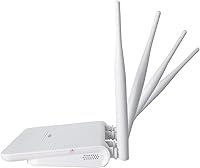
The flat, low-profile form factor fits neatly on a shelf or desk without demanding much real estate. The four antennas give it a purposeful, functional look, and the overall construction feels adequate for a stationary indoor device.
The plastic housing does not feel particularly robust, and the unit runs noticeably warm during extended use. A few long-term users flagged concerns about durability over months of continuous operation, particularly in warm enclosed spaces like mounted cabinet installs.
Advanced Configuration Options
74%
26%
For technically minded users, the admin interface offers more depth than expected at this price tier. Band locking, manual TTL adjustment, IMEI management, and WPS support give power users meaningful control over how the router connects to the cellular network.
The admin interface is functional but not polished. Documentation is thin, and some settings — like the TTL page URL — have to be typed in manually rather than found through navigation. Users without networking experience may feel lost quickly.
SIM Slot & Compatibility
81%
19%
The standard SIM slot, paired with an included Nano-to-Standard adapter, covers most real-world SIM scenarios without requiring a separate purchase. Buyers appreciated not having to track down an adapter separately when swapping between carriers during travel.
The SIM slot accepts standard-size SIMs natively, which is a slightly older form factor. The included adapter works fine, but some users found it fiddly to seat correctly, and a small number reported connection issues they eventually traced back to the adapter not sitting flush.
Value for Money
69%
31%
For buyers who specifically need SIM-based internet at a remote property and want something more stable than phone tethering, the value proposition is clear. The Qualcomm chipset and wide LTE band support justify the price compared to cheaper alternatives with less capable modems.
The single-band Wi-Fi and the lack of a 5GHz radio start to feel like meaningful trade-offs at this price point, especially when dual-band competitors exist in the same range. Buyers who did not research carefully sometimes felt the limitations did not match the cost.
Remote Camera & IoT Use Case
82%
18%
For dedicated remote camera deployments — think property surveillance, wildlife monitoring, or construction site cameras — this router performs reliably. The stable cellular connection and decent antenna gain make it a practical choice where running ethernet or cable is not feasible.
Power cycling and remote management features are basic. If the router drops its connection and needs a reboot in a truly remote installation, there is no built-in remote restart mechanism, which could require a physical trip to the site.
Web Management Interface
61%
39%
The browser-based admin panel provides enough visibility to monitor signal strength, connected devices, and connection status at a glance. For users who just want to confirm the router is working and see basic network info, it serves that purpose adequately.
The interface feels like it was last redesigned several years ago. Navigation is not intuitive, some settings are buried under non-obvious menu paths, and there is no mobile-friendly version — managing settings from a phone on a small screen is genuinely tedious.
Reliability & Stability Over Time
63%
37%
Under normal usage at a seasonal property or light-duty deployment, many buyers report months of stable operation without intervention. For infrequent-use scenarios — a vacation cabin powered up a few weekends a month — the long-term reliability picture is reasonable.
Users running this router continuously as a primary connection reported occasional disconnects that required manual reboots. There is no automatic reconnect watchdog or scheduled reboot timer built into the firmware, which is a notable gap for always-on deployments.
Documentation & Support
48%
52%
The physical quick-start guide covers the absolute basics — inserting the SIM, connecting to Wi-Fi, and accessing the admin page — well enough for straightforward AT&T and T-Mobile setups. Most simple deployments require nothing beyond those steps.
Beyond the basics, documentation is poor. The Verizon TTL fix, band locking instructions, and IMEI settings are absent from the printed guide entirely, leaving users to hunt through forums and comment threads for answers. TUOSHI customer support response times have drawn consistent criticism.

Suitable for:

The TUOSHI LT15F 4G LTE Modem Router is a strong fit for anyone who needs dependable internet in a location where running cable is either impossible or not worth the cost. Cabin and vacation home owners on AT&T or T-Mobile are the clearest beneficiaries — pop in a data SIM and you have Wi-Fi for the whole property without scheduling an installation or signing a long-term contract. Rural households that have decent cellular coverage but no DSL or fiber option nearby will find this a practical primary connection for everyday browsing, video calls, and light streaming. It also works well in dedicated remote deployments like property surveillance cameras or IoT sensors that need a stable cellular data link without relying on a shared hotspot. Small construction crews, seasonal workers, or temporary office setups that need multi-device connectivity for a few weeks or months at a time will appreciate how quickly it gets everyone online.
Not suitable for:

The TUOSHI LT15F 4G LTE Modem Router is not the right choice for households where high-bandwidth streaming, online gaming, or heavy simultaneous usage is the norm — the single-band 2.4GHz Wi-Fi is a structural ceiling that no configuration change can raise. Anyone expecting fiber-like consistency will be disappointed; real-world LTE speeds vary significantly depending on carrier congestion, tower distance, and which bands are active in your area. Verizon subscribers should think carefully before buying: the router does work on Verizon, but only after manually adjusting the TTL setting through the admin interface, which is not documented clearly and frustrates less technical users. If you need the router to stay connected 24/7 without any manual intervention — say, for a critical business application or a fully remote installation you cannot physically access — the lack of an automatic reconnect or watchdog reboot feature is a real gap. Buyers expecting polished documentation and responsive manufacturer support are also likely to come away disappointed.
Specifications

  • Brand & Model: Manufactured by TUOSHI under the model designation LT15F.
  • Chipset: Powered by a Qualcomm EC25-AF modem chipset, which underpins the LTE Cat4 cellular performance.
  • LTE Category: LTE Category 4, supporting theoretical peak download speeds of up to 150Mbps and upload speeds of up to 50Mbps.
  • 4G LTE Bands: Supports LTE FDD bands B2, B3, B4, B5, B7, B8, B12, B13, B17, B25, B26, B66, and LTE TDD band B41.
  • 3G Bands: Supports WCDMA (3G) on bands B2, B4, B5, and B8 as a fallback when 4G LTE is unavailable.
  • Carrier Support: Unlocked and compatible with AT&T and T-Mobile out of the box; Verizon is supported with a manual TTL adjustment required.
  • Wi-Fi Standard: Operates on the IEEE 802.11n standard at 2.4GHz only, with no 5GHz band available.
  • Wi-Fi Speed: Maximum Wi-Fi throughput of up to 300Mbps on the 2.4GHz band under ideal conditions.
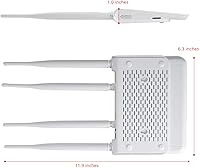
  • Antennas: Equipped with four fixed 5dBi high-gain antennas dedicated to improving both LTE signal reception and Wi-Fi coverage.
  • Connected Devices: Supports up to 32 simultaneous Wi-Fi client connections including smartphones, tablets, laptops, and IoT devices.
  • Wi-Fi Coverage: Rated for up to approximately 300 square meters of indoor Wi-Fi coverage under typical conditions.
  • SIM Slot: Standard-size SIM slot with a Nano-to-Standard SIM adapter included in the box for carrier flexibility.
  • Dimensions: Physical dimensions measure 12.5 x 6.3 x 1 inches, giving it a flat, low-profile desktop footprint.
  • Weight: Unit weighs 15.2 ounces, making it suitable for stationary indoor use rather than mobile deployment.
  • Management Interface: Configured via a browser-based admin panel accessible at the local gateway IP address on the device network.
  • Special Features: Includes TTL manual and auto settings, LTE band locking, IMEI change support, and WPS for quick wireless pairing.
  • Wireless Security: Supports standard WPA and WPA2 wireless encryption protocols for network access control.
  • Power Input: Powered via a DC power adapter; not battery-powered and is designed for continuous stationary operation.
  • First Available: Originally listed for sale in January 2019, indicating a mature product with an established user review base.
  • Manufacturer: Produced and sold by TUOSHI, and confirmed as not discontinued by the manufacturer as of the latest listing data.

Related Reviews

Cudy LT700E 4G LTE Modem Router
82%
88%
Performance
85%
Wi-Fi Speed & Range
90%
Ease of Setup
87%
Value for Money
80%
VPN Functionality
More
Cudy LT500 4G LTE Modem Router
76%
88%
Ease of Setup
82%
4G LTE Signal Performance
79%
WiFi Coverage & Speed
74%
VPN Functionality
71%
Carrier Compatibility
More
Cudy N300 WiFi Unlocked 4G LTE Modem Router LT400
84%
85%
Performance & Speed
91%
Ease of Setup
88%
VPN Functionality
78%
Range & Coverage
70%
Signal Reliability in Rural Areas
More
Teltonika RUT955 4G/LTE Router
85%
90%
Performance and Reliability
70%
Ease of Setup
88%
Connectivity Options
93%
Dual SIM Failover
85%
Software and Remote Management
More
Yeacomm YF325 4G LTE Industrial Router
87%
95%
Network Reliability
93%
Dual SIM Failover Performance
90%
VPN Security
94%
Build Quality
87%
Ease of Setup
More
Cudy LT700 Outdoor 4G LTE Modem Router
78%
83%
Build Quality & Weatherproofing
76%
Cellular Signal Performance
81%
Antenna System & Upgradability
78%
Installation & Setup
71%
Carrier & Band Compatibility
More
NETGEAR 4G LTE Broadband Modem LB1120
82%
92%
Ease of Setup
89%
Connection Stability
84%
Carrier Compatibility
88%
Performance in Rural Areas
90%
Compact Design
More
NETGEAR LM1200 4G LTE Broadband Modem
70%
83%
Ease of Setup
88%
Failover Reliability
71%
Carrier Compatibility
63%
Real-World Speeds
79%
Build Quality
More
Wiflyer WE826-T 4G LTE Router
84%
89%
Value for Money
83%
Performance (Signal Strength)
94%
Ease of Setup
86%
Build Quality
88%
Security Features (WPA2, MAC Filtering)
More
TP-Link TL-MR6400 4G LTE Router
82%
88%
Setup & Installation
91%
4G LTE Performance
83%
Wi-Fi Speed & Reliability
85%
Portability
82%
Bandwidth Management (QoS)
More

FAQ

It does work with Verizon, but not automatically. You need to log into the admin panel and manually set the TTL value to either 64 or 65 depending on your specific Verizon data plan. This step is not documented in the printed guide, which catches a lot of buyers off guard. If you are comfortable making that one configuration change in a browser, Verizon connectivity is achievable.

For AT&T and T-Mobile, setup is genuinely straightforward — insert your SIM, plug in the router, wait about a minute for it to connect to the network, then join the default Wi-Fi from any device. You will find the default network name and password printed on the label. No carrier call required. Verizon users need that extra TTL step, but everyone else is typically online within a few minutes.

Honestly, it depends almost entirely on your carrier signal strength and local network congestion rather than the router itself. In a rural area with a strong AT&T or T-Mobile signal and light tower traffic, speeds in the 30–60Mbps range are achievable. During peak hours or in areas with weak band coverage, speeds can drop considerably. The theoretical 150Mbps ceiling is rarely approached in real-world conditions.

Yes, this is actually one of the better use cases for this cellular Wi-Fi router. IP cameras generally do not need massive bandwidth, and the stable LTE connection with the antenna boost works well for a dedicated camera setup. Just keep in mind there is no built-in remote reboot feature, so if the connection drops at a truly remote site, you may need to physically visit to power cycle the unit.

It depends on how you plan to use it. For browsing, video calls, smart home devices, and IP cameras, 2.4GHz is perfectly adequate. Where it becomes limiting is if you have multiple people streaming HD video simultaneously, or if you have devices that perform significantly better on 5GHz. There is no workaround — this router simply does not have a 5GHz radio, so if that matters for your household, it is worth considering a dual-band alternative.

Yes, band locking is supported through the admin interface. This is especially useful if you know which band your carrier uses most reliably in your location — you can force the router to stay on that band rather than switching between weaker options. It takes a bit of research to know which bands to target, but for technically inclined users, it is a genuinely useful feature that can meaningfully improve consistency.

The SIM slot itself accepts standard-size SIMs, but TUOSHI includes a Nano-to-Standard SIM adapter in the box specifically for this situation. It works fine, though a few users have reported that the adapter occasionally needs careful seating to make reliable contact. Take a moment to make sure it is seated flat and snug before closing the slot.

The TUOSHI LT15F 4G LTE Modem Router supports up to 32 simultaneous Wi-Fi connections, which is more than enough for a cabin or small office. That said, the total bandwidth available is still limited by your cellular connection, so adding more active devices will divide whatever LTE speed you are getting. Light users like phones checking email will have minimal impact, but several people streaming video at the same time will noticeably affect everyone.
This is a known limitation. The router does attempt to reconnect to the cellular network after a signal drop, but there is no built-in watchdog timer or scheduled reboot function to kick in if it gets stuck. Several users in always-on deployments have reported needing to manually power cycle the unit occasionally. If you plan to use it somewhere you cannot easily access, that is worth factoring into your decision.

For straightforward AT&T or T-Mobile use, yes — the basic setup is simple enough for most people. Where things get trickier is if you need to troubleshoot carrier issues, adjust TTL for Verizon, or configure band locking. The admin interface is functional but not beginner-friendly, and the printed documentation does not cover much beyond the initial setup. If you hit a snag, you will likely be searching online for answers rather than getting help from TUOSHI directly.

Where to Buy