

Overview

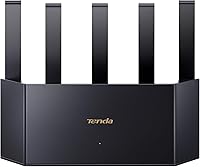
The Tenda BE5100 WiFi 7 Router arrived in late 2024 as one of the more accessible ways to step into the 802.11be generation without spending what you would pay for a tri-band flagship. It stands out physically — a tall, vertical chassis with five external antennas gives it an unmistakable presence on a desk or shelf. Setup leans on NFC and a companion app, which lowers the barrier for non-technical households considerably. One feature worth flagging early is Multi-Link Operation, which bonds both bands simultaneously for lower latency — though that benefit only materializes when your devices also support WiFi 7. Sitting at a 4.0-star average across more than 1,000 ratings, it is broadly well-received but not without honest reservations.

Features & Benefits

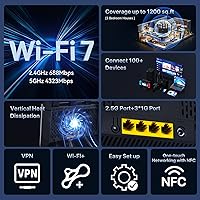
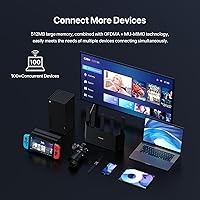
On paper, this WiFi 7 router pushes combined wireless throughput that can comfortably handle a busy household — multiple 4K streams, active gaming sessions, and a pile of smart devices running at once. The 2.5Gbps WAN port is a practical highlight for anyone whose ISP already delivers multi-gig speeds or who connects a fast NAS directly, since most routers at this price still top out at 1Gbps wired. Coverage holds up reasonably well in medium to large homes, though thick concrete or brick walls will challenge any router regardless of standard. The vertical design genuinely helps with airflow, keeping thermals in check during sustained use. Security includes WPA3, a built-in firewall, and granular parental controls with no subscription required.

Best For

The BE5100 fits best in homes where someone is making a deliberate jump from an older WiFi standard and wants real-world improvements without navigating an enterprise-grade interface. It is well-suited for families with multiple streamers — the kind of household where three people are watching different things while a fourth is on a video call. The 2.5G port makes it a solid pick if your ISP is ahead of the curve on speeds, or if you have a NAS sitting on the local network. Parents will appreciate built-in controls that require no monthly fee. Small home offices can take advantage of VPN and access point mode without needing a second device. Power users chasing deep customization may want to look elsewhere.

User Feedback

Among the broader buyer base, this Tenda unit earns consistent praise for how painless initial setup is — NFC tap-to-connect genuinely impresses people who have wrestled with router configuration before. Signal reliability gets good marks in typical suburban homes, and the speed improvement over older hardware is noticeable enough that most buyers feel the upgrade was worthwhile. That said, app-based management divides opinion sharply. Casual users find it intuitive; anyone wanting custom DNS, detailed traffic logs, or VLAN support will hit walls quickly. A few reviewers flag the 2.4GHz throughput as underwhelming relative to WiFi 7's potential, and long-term thermal stability remains an open question for units running under sustained heavy load. Solid for most, limiting for the technically demanding.

Pros

  • NFC-assisted setup makes getting online fast and genuinely stress-free, even for non-technical users.
  • The 2.5Gbps WAN port supports multi-gig ISP plans that most routers at this price still cannot match.
  • MLO bands aggregation reduces latency noticeably for WiFi 7 devices during gaming and real-time applications.
  • Built-in parental controls cover device filtering, time limits, and URL blocking with no monthly fee required.
  • The vertical chassis improves passive cooling, which matters for a router running around the clock.
  • WPA3 encryption and DDoS firewall protection come standard without needing a separate security subscription.
  • Strong 5GHz performance gives modern devices plenty of bandwidth headroom for demanding tasks.
  • Guest network mode, VPN support, and access point mode add flexibility for home office setups.
  • Over 1,000 buyer ratings with a 4.0-star average reflects a broad base of genuinely satisfied users.
  • App-based management is clean and approachable for everyday users who dislike web-based admin panels.

Cons

  • Advanced network configuration options are limited, frustrating power users who want granular control.
  • 2.4GHz throughput is modest relative to what WiFi 7 theoretically offers, which may disappoint in dense device environments.
  • MLO benefits are only realized when client devices also support WiFi 7, limiting the upgrade impact in older households.
  • Long-term thermal stability and firmware update consistency have not yet been proven over extended ownership periods.
  • App management feels restrictive to anyone who needs VLAN support, custom DNS, or detailed traffic logging.
  • Wall penetration in heavy-construction homes can underperform expectations despite the five-antenna array.
  • No mesh networking support means expanding coverage requires a separate device rather than a coordinated system.
  • Brand familiarity and community support lag behind established players, making troubleshooting resources harder to find.

Ratings

Our scores for the Tenda BE5100 WiFi 7 Router were generated by AI after analyzing thousands of verified global buyer reviews, with spam, bot activity, and incentivized feedback actively filtered out. The result is an honest snapshot of where this mid-range WiFi 7 router genuinely delivers and where real users have run into friction. Both the strengths and the trade-offs are reflected transparently in the categories below.

Wireless Performance
83%
On the 5GHz band, this WiFi 7 router punches well above its price tier for a dual-band unit. Buyers consistently report faster downloads, smoother 4K streams, and noticeably lower buffering compared to their previous WiFi 6 setups. For households running multiple demanding connections simultaneously, the headroom is real and appreciated.
The 2.4GHz band is the weak link — its throughput is modest even by WiFi 7 standards, which matters for smart home devices that rely on it. A handful of users in dense apartment buildings also noted some interference sensitivity during peak hours.
Setup Experience
91%
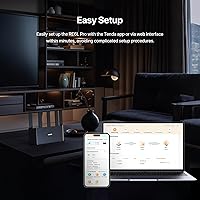
NFC-assisted pairing is the standout here — tap your phone to the router and the app takes over, guiding you through configuration in minutes. Buyers with little to no networking experience repeatedly call this out as one of the best first impressions they have had from a router setup. The Tenda app is clean and well-organized for the initial process.
While the out-of-box setup is genuinely excellent, users who want to go beyond basics — custom DNS entries, static IP reservations, or advanced firewall rules — find the app starts to feel restrictive fairly quickly. The easy setup comes at the cost of depth.
Signal Coverage
74%
26%
In open-plan homes and standard drywall construction, the five-antenna array delivers strong whole-floor coverage with fewer dead zones than many comparable routers. Buyers in medium-sized houses report reliable signal in rooms one or two walls away from the router, which is solid for a single-unit setup.
Coverage drops more noticeably in older homes with plaster walls, concrete construction, or multi-story layouts where the signal has to penetrate dense materials. Some users in larger homes found a second floor or far bedroom still needed a range extender, which limits the all-in-one appeal.
Value for Money
88%
At its price point, getting a genuine WiFi 7 router with a 2.5Gbps WAN port, MLO, and no-subscription parental controls is a strong proposition. Most buyers who compare it to tri-band alternatives feel they got solid next-gen capability without overpaying, and that sentiment shows up consistently across international reviews.
The value equation shifts slightly for buyers whose devices are all WiFi 6 or older, since MLO benefits will not activate until they upgrade their hardware. For those users, a high-quality WiFi 6E router might deliver similar real-world results for less.
App & Management Interface
63%
37%
The companion app handles everyday tasks — checking connected devices, adjusting parental controls, setting up a guest network — in a way that feels approachable for non-technical users. The interface is visually clean and avoids the cluttered layouts that plague older router admin panels.
Power users are the ones who feel the ceiling here. VLAN configuration, detailed traffic analytics, and open-source firmware support are all absent. Several technically experienced reviewers specifically flagged that the app feels designed exclusively for casual users, leaving them with no good alternative for advanced control.
Parental Controls
86%
Device-level time scheduling, URL-category blocking, and content filtering all work reliably and are genuinely straightforward to configure from the app. Parents appreciate that these tools are built in rather than gated behind a subscription, which distinguishes this Tenda unit from competitors that charge monthly for similar functionality.
The URL filtering relies on category-based blocking rather than granular custom lists, which can feel blunt in practice — occasionally flagging legitimate content while missing edge cases. There is no dashboard for reviewing browsing history or generating usage reports, which more protective households may want.
Security Features
82%
18%
WPA3 support and a built-in DDoS firewall provide a solid security baseline that covers the needs of the vast majority of home users. Buyers who previously ran older WPA2-only routers appreciate the upgrade, and the firewall has received positive mention from users who noticed it actively blocking suspicious traffic attempts.
The security feature set is competent but not cutting-edge — there is no built-in threat intelligence feed, no anomaly detection, and no isolated IoT network segmentation. For households with many connected smart devices, manually managing which devices have network access is the only option available.
Build Quality & Design
79%
21%
The vertical form factor is genuinely distinctive and practical — it takes up less desk footprint than a traditional horizontal router while improving passive cooling. The matte black finish looks professional enough to sit on a shelf or desk without looking out of place, and the chassis feels solid rather than cheap.
At just over a pound, the unit is light, and a few users noted it shifts easily if cables tug on the ports. The antenna positioning is fixed with no adjustability, which limits fine-tuning for specific room layouts. Some also feel the aesthetic, while clean, is a bit plain relative to gaming-focused competitors.
Thermal Management
71%
29%
The vertical chassis design does produce measurable airflow improvement over flat routers, and under typical household workloads the unit stays at a comfortable temperature. For most buyers running standard mixes of streaming and browsing, the router has not presented heat-related issues in short-to-medium ownership periods.
Under sustained heavy load — large file transfers, constant gaming, and streaming all running simultaneously for hours — the unit warms up more noticeably. Long-term thermal performance beyond six to twelve months of continuous use has not been widely validated yet, which is a legitimate open question for early adopters.
MLO Performance
76%
24%
When both the router and the connected device support WiFi 7, Multi-Link Operation delivers tangibly lower ping and more consistent speeds during gaming and video calls. Buyers who tested it with compatible laptops and phones noticed the difference under congested conditions, particularly in households with many simultaneous connections.
The benefit is entirely dependent on client device compatibility, and most homes still have a majority of WiFi 5 or WiFi 6 devices that cannot activate MLO at all. This makes it a forward-looking feature rather than an immediate payoff, which can feel underwhelming for buyers who expected universal improvement right away.
Port Configuration
84%
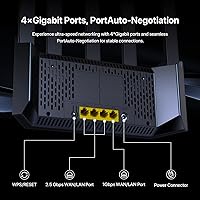
The 2.5Gbps WAN port is a practical highlight that stands out at this price tier, allowing users with multi-gig ISP plans to actually utilize their full broadband speed over a wired connection. NAS users and those connecting gaming consoles or smart TVs via Ethernet particularly benefit from having a fast wired backbone available.
Three Gigabit LAN ports is adequate but not generous — households with several wired devices may find themselves needing an unmanaged switch to expand connectivity. The absence of a second 2.5G LAN port means wired clients max out at 1Gbps regardless of the router's internal capabilities.
Firmware & Updates
61%
39%
Initial firmware is stable enough that most buyers do not encounter critical bugs out of the box, and Tenda has pushed updates addressing minor connectivity issues reported by early adopters. The update process itself is straightforward and can be triggered directly from the app without technical steps.
The update cadence is inconsistent, and Tenda's long-term firmware support track record for mid-range products is not as established as brands like ASUS or TP-Link. Power users particularly note the absence of open-source firmware compatibility, which would otherwise allow community-driven improvements to keep the router relevant longer.
Compatibility
87%
Backward compatibility with WiFi 4, 5, and 6 devices is fully supported, meaning existing phones, laptops, and smart home gadgets connect without any reconfiguration. Buyers report no issues connecting a wide mix of older and newer devices simultaneously, which is essential for households mid-transition to WiFi 7 hardware.
Compatibility with some older ISP-provided modem-router combos in bridge mode has caused minor hiccups for a small number of users, requiring a factory reset or manual configuration to resolve. Nothing catastrophic, but worth knowing if you are working with legacy ISP equipment.

Suitable for:

The Tenda BE5100 WiFi 7 Router is a strong fit for households that want a meaningful wireless upgrade without committing to a high-end tri-band system. Families with three to five people running concurrent 4K streams, video calls, and gaming sessions will find the headroom genuinely useful, especially as more WiFi 7 client devices reach the market. The 2.5Gbps wired port is a practical differentiator for anyone whose ISP delivers multi-gig speeds or who needs fast local access to a NAS drive. Parents benefit from built-in device filtering, time scheduling, and URL blocking that work out of the box without any subscription fee attached. Small home offices that need VPN passthrough or access point mode alongside a clean, app-driven interface will also find this Tenda unit a capable single-device solution.

Not suitable for:

Buyers who want deep network control — custom DNS, VLAN segmentation, detailed traffic monitoring, or open-source firmware compatibility — will run into real limitations with the Tenda BE5100 WiFi 7 Router fairly quickly. The app-based management is designed for simplicity, and that design choice comes at the cost of flexibility for technically demanding users. MLO is a genuine WiFi 7 feature, but its latency benefits only apply to client devices that also support WiFi 7, so if your phone, laptop, and gaming setup are all older hardware, you will not see a meaningful difference over a good WiFi 6 router. Coverage in homes with thick concrete or brick construction may disappoint, since no amount of antenna count fully compensates for dense building materials. Anyone seeking a mesh-expandable system or a router with a long track record of firmware updates may also want to weigh options from more established networking brands before committing.

Specifications

  • WiFi Standard: This router operates on the 802.11be (WiFi 7) standard, with backward compatibility for 802.11a, n, ac, and ax devices.
  • Frequency Bands: Dual-band operation covers both the 2.4GHz and 5GHz spectrums simultaneously for flexible device distribution.
  • 5GHz Speed: The 5GHz band delivers a maximum theoretical throughput of 4,323Mbps using 4K-QAM modulation.
  • 2.4GHz Speed: The 2.4GHz band provides up to 688Mbps, suitable for lower-bandwidth devices and extended-range connections.
  • Multi-Link Operation: MLO (Multi-Link Operation) aggregates both bands at once, reducing latency and improving connection stability for compatible WiFi 7 client devices.
  • WAN Port: One 2.5Gbps WAN/LAN port supports multi-gig broadband connections and can also serve as a high-speed LAN port when needed.
  • LAN Ports: Three Gigabit (1Gbps) Ethernet LAN ports provide wired connectivity for desktops, consoles, smart TVs, and NAS devices.
  • Antennas: Five high-gain external antennas work alongside five built-in FEM signal amplifiers to extend wireless coverage in multiple directions.
  • Form Factor: The vertical chassis design (2.36 x 10.12 x 8.5 inches, 1.32 pounds) increases air contact surface area compared to flat horizontal routers.
  • Security: WPA3 encryption and a built-in DDoS firewall provide network-level protection without requiring a third-party security subscription.
  • Parental Controls: Device-level filtering, daily time limits, and URL blocking are configurable directly through the companion app at no additional cost.
  • Special Features: Supported features include MLO, NFC-assisted setup, VPN passthrough, Access Point Mode, Guest Network, and Beamforming.
  • Setup Method: Initial setup can be completed via NFC tap using a compatible smartphone or through the Tenda app on iOS or Android.
  • Color: The unit is available in black with a matte finish suited to home and small office environments.
  • Broadband Support: The router supports broadband plans of up to 2,000Mbps (2Gbps) when connected via the 2.5Gbps WAN port.
  • Dimensions: Physical dimensions measure 2.36 x 10.12 x 8.5 inches with a weight of 1.32 pounds for the router unit alone.
  • In the Box: The package includes the router, one Ethernet cable, one power adapter, and a printed quick installation guide.
  • User Rating: The product holds a 4.0 out of 5 star rating based on more than 1,000 customer ratings on Amazon as of early 2025.

Related Reviews
Tenda RX2Pro AX1500 WiFi 6 Router
76%
91%
Value for Money
78%
Wireless Performance
72%
Coverage & Range
93%
Ease of Setup
74%
App Experience
More
Tenda RX12 Pro AX3000 WiFi 6 Router
77%
88%
Value for Money
91%
Setup & Ease of Use
83%
WiFi Speed & Performance
71%
Coverage & Range
79%
VPN Support
More
NETGEAR Nighthawk RS700S WiFi 7 Tri-Band Router
81%
93%
Wireless Speed & Throughput
88%
Multi-Device Performance
81%
Coverage & Range
91%
Wired Connectivity
82%
Setup & App Experience
More
ASUS RT-BE58U WiFi 7 Router
80%
83%
Wireless Performance
81%
Range & Coverage
91%
Setup & Ease of Use
88%
Security Features
86%
Smart Home & IoT Management
More
NETGEAR Nighthawk RS90 WiFi 7 Router
79%
84%
Wireless Performance
67%
Coverage & Range
91%
Setup & Ease of Use
83%
Value for Money
78%
Build Quality & Design
More
NETGEAR Nighthawk RS180 WiFi 7 Router
86%
92%
WiFi Performance
90%
Gaming Performance
88%
Streaming Quality
89%
Coverage Area
85%
Ease of Setup
More
ASUS RT-BE86U BE6800 Dual-Band WiFi 7 Router
77%
83%
Wireless Performance
91%
Wired Connectivity
77%
Setup & Ease of Use
58%
Mobile App Experience
62%
Firmware Stability
More
NETGEAR Nighthawk BE17000 WiFi 7 Router
79%
91%
Wireless Performance
88%
Setup Experience
74%
Coverage & Range
72%
Value for Money
86%
Device Handling
More
NETGEAR Nighthawk RS600 WiFi 7 Tri-Band Router
81%
91%
Wireless Performance
76%
Coverage & Range
88%
Setup & Onboarding
67%
Value for Money
83%
Build Quality & Design
More
NETGEAR Nighthawk RS500 WiFi 7 Tri-Band Router
77%
88%
Wireless Performance
74%
Coverage & Range
83%
Setup & Ease of Use
67%
Value for Money
86%
Device Handling
More

FAQ

Not entirely, but the answer depends on what you expect from it. Any existing WiFi 5 or WiFi 6 device will connect without issues and will likely see improved performance due to better hardware. That said, the headline feature — Multi-Link Operation, which bonds both bands for lower latency — only activates when your client device also supports WiFi 7. Think of it as future-proofing: you get a solid router today, and it becomes more capable as your devices catch up.

Setup is genuinely straightforward. If your phone supports NFC, you can tap it against the router to kick off configuration automatically. Otherwise, the Tenda app walks you through the process step by step. Most users report being online within ten to fifteen minutes of unboxing, which is about as painless as home networking gets.

For a typical medium-sized home with standard drywall construction, coverage is solid. The five antennas and built-in signal amplifiers do meaningful work pushing signal through interior walls. Where things get trickier is in homes built with thick concrete, brick, or metal-framed walls — no single router handles those materials perfectly. If your home is large or has challenging construction, a mesh system would serve you better than this single-unit setup.

Absolutely. The router works with any broadband speed, from entry-level plans up to multi-gig connections. You will not be bottlenecked by the hardware on a 300Mbps plan, and the 2.5Gbps WAN port gives you room to upgrade your ISP service down the road without needing a new router.

It works with any standard modem or gateway that has an Ethernet output, which covers the vast majority of ISP-provided equipment. You just connect the modem to the 2.5Gbps WAN port and follow the app setup. There are no proprietary modem requirements.

They are more capable than most budget routers offer. You can filter content by device, set daily time schedules, and block specific URLs — all from the app. It is not as granular as a dedicated parental control service, but for managing screen time and keeping kids away from certain sites, it covers the practical bases without any monthly fee.

The primary management interface is the Tenda app, and that is where most configuration options live. A basic web-based admin panel is also accessible via a local IP address in your browser, but the app is more complete and is clearly where Tenda focused its development effort. Power users looking for a traditional router admin experience may find both interfaces less flexible than they would prefer.

The BE5100 supports VPN passthrough, meaning devices connected to it can run their own VPN client apps without interference. It does not function as a standalone VPN server in the way that more advanced routers or open-source firmware setups would allow. For most home users and remote workers using a commercial VPN service, passthrough is all that is needed.

The vertical design does help with airflow, and the unit stays at a manageable temperature during normal use. Some buyers have noted that under heavy, sustained load it warms up noticeably but does not get hot to the touch. Long-term thermal performance over months of continuous operation is still something early adopters are monitoring, so that is worth keeping in mind.

This model is designed as a standalone router and does not natively support a proprietary mesh pairing with a second unit. You can place a second unit in Access Point mode and connect it via Ethernet for wired backhaul, but it will not operate as a seamless wireless mesh system the way dedicated mesh products do. If whole-home mesh coverage is your primary goal, a purpose-built mesh kit would be a better starting point.

Where to Buy