Overview

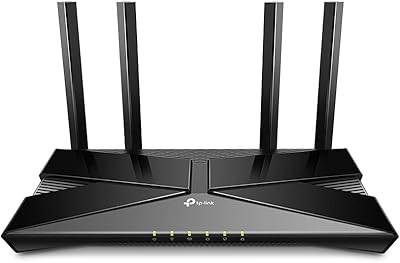
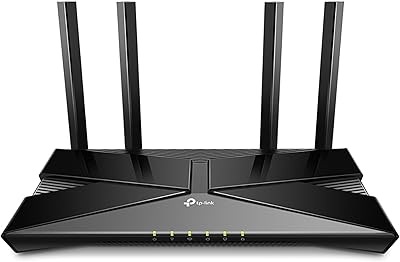
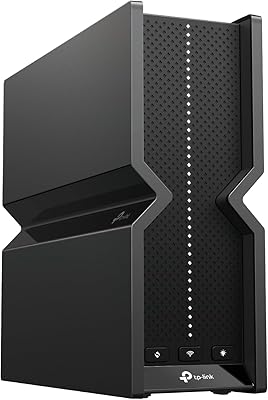
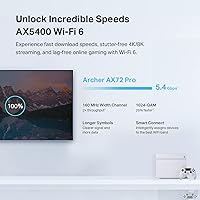
The TP-Link Archer AX72 Pro WiFi 6 Router sits in a sweet spot for households that have outgrown their aging WiFi 5 setup but don't want to spend big on a full mesh system. What immediately sets it apart at this price tier is the 2.5 Gbps multi-gig port — a feature you'd typically pay significantly more for. WiFi 6 (802.11ax) brings real improvements to congested homes: better handling of multiple devices, lower latency, and more efficient use of available bandwidth. The AX5400 class means a combined theoretical max of around 5.4 Gbps, though real-world speeds are always lower. Physically, it's slim and unobtrusive, with a low-profile build just under 11 inches wide — easy to tuck onto a shelf without dominating the space.
Features & Benefits

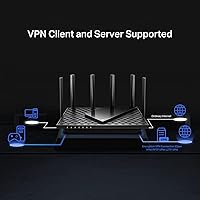
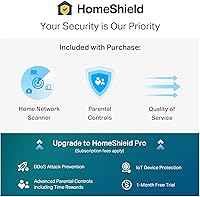
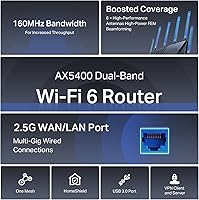
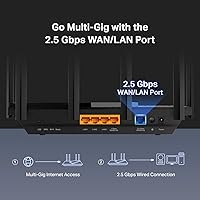
The 2.5 Gbps WAN/LAN port is the headline spec here, and it genuinely matters if your ISP offers a multi-gig plan or you're connecting a NAS device at full speed. Six external antennas combined with Beamforming mean the router focuses its signal toward your devices rather than blasting in all directions and hoping for the best. On busy networks, MU-MIMO and OFDMA work together to serve multiple devices concurrently, which noticeably cuts down on the lag you'd feel during peak household usage. The built-in VPN server and client means your entire home network can route through a VPN without installing anything on individual devices. The USB 3.0 port adds light NAS or printer-sharing capability, and HomeShield covers basic security scanning and parental controls for free — though deeper features require a paid subscription.

Best For

This WiFi 6 router makes the most sense for households moving up from an older WiFi 5 router — particularly if you want multi-gig readiness without the hassle and cost of a full mesh setup. Remote workers and gamers will appreciate the low-latency performance when several people are online simultaneously. If your ISP already delivers 1 Gbps or more, that 2.5 Gbps port means you won't hit a bottleneck at the WAN connection. It's also a natural fit for home labs and small office setups that need VPN functionality built in. Smart-home users with lots of IoT devices — bulbs, cameras, thermostats — will benefit from HomeShield's traffic management. Just note: this is a single-unit router, so coverage in very large or multi-floor homes may fall short of expectations.

User Feedback

With over 8,700 ratings and a 4.4-star average, the Archer AX72 Pro has clearly landed well with most buyers. The Tether app setup gets consistent praise — most people report being up and running in under 15 minutes. Strong range and the value of having a multi-gig port at this price are the two most frequently mentioned positives. On the flip side, some users flag occasional inconsistencies on the 2.4 GHz band and minor app connectivity hiccups. Firmware updates draw a mixed reaction — some buyers see steady improvements, while others report stability regressions after certain releases. TP-Link support responsiveness also divides opinion. Power users tend to appreciate the advanced feature set; more casual users occasionally find the interface a bit overwhelming to navigate confidently.

Pros

  • The 2.5 Gbps multi-gig port is rare at this price point and genuinely future-proofs your setup for faster ISP plans.
  • Setup via the Tether app is consistently praised — most users report being fully connected in under 15 minutes.
  • Six external antennas with Beamforming deliver solid range across typical medium-sized homes.
  • Built-in VPN server and client support removes the need for per-device VPN software — a real convenience for home offices.
  • WiFi 6 efficiency improvements noticeably reduce congestion when many devices are active simultaneously.
  • The USB 3.0 port doubles as a light NAS or shared printer connection without any extra hardware.
  • WPA3 security and HomeShield basic protection offer a meaningful security layer at no extra cost.
  • At its price tier, the Archer AX72 Pro packs a feature set that typically costs considerably more from competing brands.
  • Voice assistant compatibility with Alexa and Google Assistant adds convenient hands-free guest network control.
  • The slim, low-profile design fits neatly on a shelf without looking like a satellite dish.

Cons

  • Some users report intermittent inconsistency on the 2.4 GHz band, which can affect older smart-home devices.
  • HomeShield's most useful features — detailed reporting, advanced parental controls — require a recurring paid subscription.
  • Firmware updates have a mixed track record; some releases have introduced stability issues for a subset of users.
  • TP-Link customer support responsiveness gets mixed reviews, which matters if you hit a configuration snag.
  • The interface can feel overwhelming for less technical users who just want simple, no-fuss network management.
  • This is a single-unit router with no mesh expansion option, limiting coverage in larger or multi-floor homes.
  • The Tether app occasionally loses connection to the router interface, requiring a restart to restore access.
  • Theoretical AX5400 speeds are lab-ideal figures — real-world throughput will be noticeably lower in typical home conditions.

Ratings

Based on AI analysis of thousands of verified global user reviews for the TP-Link Archer AX72 Pro WiFi 6 Router — with spam, bot activity, and incentivized feedback actively filtered out — the scores below reflect an honest, balanced picture of where this router genuinely excels and where real buyers have run into friction. Both the standout strengths and the recurring frustrations are transparently represented so you can make a confident, informed decision.

Value for Money
88%
Buyers consistently note that getting a 2.5 Gbps multi-gig port, built-in VPN support, and WiFi 6 efficiency at this price tier is genuinely difficult to match from competing brands. Many users coming from older budget routers describe the upgrade as immediately noticeable in daily streaming and remote work stability.
A handful of users feel the value proposition weakens once you factor in the HomeShield Pro subscription needed to unlock the more useful parental control and reporting features. Without that paid layer, a few buyers felt the security suite was less complete than advertised.
WiFi Speed & Throughput
83%
On the 5 GHz band, users in medium-sized homes report strong, consistent speeds that hold up well when multiple people are streaming or gaming simultaneously. The OFDMA and MU-MIMO combination makes a real difference in households where five or more devices are active at once.
The theoretical AX5400 figure is a lab maximum that real-world conditions never replicate — most buyers see significantly lower throughput in practice. Some users also note that speeds can vary noticeably depending on device placement and the number of walls between the router and client.
2.4 GHz Reliability
62%
38%
For basic IoT devices like smart bulbs, plugs, and thermostats, the 2.4 GHz band handles steady low-bandwidth connections without trouble. Users with primarily modern devices rarely mention 2.4 GHz as an issue at all.
A recurring complaint across user reviews is inconsistency on the 2.4 GHz band — some buyers report intermittent drops or sluggish speeds specifically on that frequency, which disproportionately affects households with older smart-home gear. A few users needed to tweak channel settings manually to stabilize their 2.4 GHz connections.
Setup & Ease of Use
86%
The Tether app-guided setup is one of the most frequently praised aspects of this router — most buyers report going from box to working network in under 15 minutes without needing to touch a web browser. The onboarding flow is clear enough that non-technical users rarely report getting stuck during initial configuration.
Once you move past basic setup into advanced features like VPN configuration or QoS tuning, the interface becomes noticeably more demanding. Casual users have flagged that the advanced settings feel designed for network enthusiasts, and the Tether app occasionally loses its connection to the router mid-session.
WiFi Range & Coverage
79%
21%
In typical two- to three-bedroom homes, the six external antennas with Beamforming deliver reliable coverage throughout, with most users reporting no dead zones in living areas, bedrooms, and outdoor patios nearby. Signal strength at moderate distances holds up better than many previous-generation routers at this price.
Buyers in larger homes or multi-story layouts are more likely to encounter weak spots, since this is a single-unit router with no mesh expansion capability. A few users in open-plan spaces noted that signal degradation through thick concrete walls was more pronounced than expected.
VPN Performance
77%
23%
Having both VPN server and client modes baked into the router firmware is a feature that home lab users and remote workers particularly appreciate — it means the entire household network can tunnel through a VPN without configuring individual devices. Users who set it up correctly report stable and functional throughput for typical remote access use cases.
Configuration is not beginner-friendly, and a portion of buyers who attempted VPN setup reported confusion navigating the settings without prior networking experience. VPN throughput also carries an inherent overhead that slightly reduces speeds compared to a direct connection, which some users noticed during large file transfers.
App Experience
68%
32%
For day-to-day tasks — checking connected devices, toggling the guest network, running a speed test — the Tether app is quick and accessible. Voice assistant integration via Alexa and Google Assistant adds a convenient layer for users who prefer hands-free guest network control.
Stability complaints about the Tether app appear regularly in user feedback; some buyers experience the app losing its connection to the router and requiring a full router restart to reconnect. The interface design also received criticism for becoming cluttered when HomeShield features are expanded.
Build Quality & Design
81%
19%
The low-profile matte black chassis looks clean and unobtrusive on a shelf or desk, and buyers consistently describe it as feeling more premium than its price suggests. At just 1.52 pounds, it is light enough to reposition easily without being flimsy.
A few users mention that the external antennas feel slightly stiff to adjust and position optimally, and one or two buyers noted minor flex in the plastic housing under firm handling. It is not a concern for normal use but worth noting for buyers expecting a tank-like build.
Security Features
74%
26%
WPA3 support keeps the router current with modern security standards, and HomeShield's free tier does a respectable job of scanning for vulnerabilities and identifying IoT devices on the network — more than most competing routers offer at no cost.
The most meaningful security tools, including advanced threat reports and granular network monitoring, sit behind a paid HomeShield Pro subscription that not all buyers anticipated needing. Some users expressed frustration that what felt like core security features turned out to be paywalled.
Parental Controls
66%
34%
The free tier of HomeShield covers basic content filtering and device-level controls that work adequately for households with younger children who need only simple restrictions. Setup through the Tether app is approachable and does not require any technical knowledge to apply basic rules.
Parents with more specific needs — time-based schedules, category-level filtering, per-device usage reports — will hit the ceiling of the free tier quickly and need to subscribe to HomeShield Pro. Several parent users mentioned feeling misled by the marketing around parental controls given how limited the free version actually is.
Firmware & Updates
63%
37%
TP-Link has maintained a reasonably consistent firmware release cadence since the router launched in early 2023, and several updates have brought tangible stability and performance improvements that users noticed without needing to do anything beyond accepting the update.
A notable segment of user reviews reports that specific firmware versions introduced new connectivity bugs or caused intermittent reboots that were not present before the update. The inconsistency in update quality has made some users wary of installing new firmware without first checking community forums.
Port Selection
84%
The combination of one 2.5 Gbps port, one additional gigabit WAN/LAN port, and three gigabit LAN ports gives this router a more versatile wired setup than most competitors in this price range. Buyers with a NAS, desktop, smart TV, and gaming console to wire up simultaneously find the port count adequate without reaching for a switch.
There is no 10 Gbps port, which limits the ceiling for users with very high-end multi-gig ISP plans or professional NAS setups that could theoretically push beyond 2.5 Gbps. Users wanting more than four simultaneous wired connections will still need an external switch.
Customer Support
58%
42%
TP-Link does offer multiple support channels including chat, email, and a community forum that contains reasonably detailed troubleshooting guides for common issues with this router. Some users report getting useful responses when dealing with straightforward technical problems.
Support responsiveness is a consistent sore point in user feedback, with a meaningful number of buyers describing long wait times or unhelpful generic responses when dealing with more complex issues. The experience appears to vary widely depending on region and the nature of the problem being reported.
USB & NAS Functionality
71%
29%
For light file sharing — documents, photos, media libraries — the USB 3.0 port works reliably as a makeshift NAS and saves buyers from needing a separate device for basic network storage. Users who just want family photo access across the home find it more than adequate.
Transfer speeds through the USB NAS function are noticeably slower than a dedicated NAS appliance, and some users note that performance can degrade when the router is simultaneously handling heavy WiFi traffic. It is a convenient bonus feature, but not a replacement for a real NAS solution.

Suitable for:

The TP-Link Archer AX72 Pro WiFi 6 Router is a strong pick for households that have hit a wall with their older WiFi 5 setup — particularly those dealing with slowdowns when multiple people are streaming, gaming, or on video calls at the same time. If your ISP already delivers gigabit speeds or you're eyeing a multi-gig plan, the 2.5 Gbps WAN port means you won't be leaving paid-for bandwidth on the table the way you would with a standard gigabit router. Remote workers who need a reliable, low-latency connection during peak household hours will find the MU-MIMO and OFDMA improvements genuinely useful in practice. It's also well-suited to home lab enthusiasts and small office setups that want a built-in VPN server without paying for a separate appliance. Smart-home users juggling a large number of IoT devices will appreciate the traffic prioritization and basic security scanning that HomeShield provides, even on the free tier.
Not suitable for:

Buyers expecting whole-home coverage in a large or multi-story property should know that the TP-Link Archer AX72 Pro WiFi 6 Router is a single-unit router — it won't blanket a sprawling layout the way a mesh system would, and adding nodes isn't an option here. If you're on a budget ISP plan capped well below 1 Gbps, the 2.5 Gbps multi-gig port is a feature you'll simply never use, making it harder to justify over cheaper alternatives. Users who rely heavily on the 2.4 GHz band — common with older smart-home devices — may run into occasional inconsistency issues that a number of buyers have flagged. Those expecting a full-featured security suite out of the box should also note that HomeShield's more advanced parental controls and detailed reporting sit behind a paid subscription. Finally, buyers who prefer a simple, set-and-forget experience with a minimal interface may find the feature depth more of a burden than a benefit.
Specifications

  • WiFi Standard: This router uses the 802.11ax (WiFi 6) standard, offering improved efficiency and lower latency compared to the previous WiFi 5 (802.11ac) generation.
  • Frequency Bands: Dual-band operation covers both the 2.4 GHz band (up to 574 Mbps theoretical) and the 5 GHz band (up to 4804 Mbps theoretical) simultaneously.
  • Multi-Gig Port: One 2.5 Gbps WAN/LAN port supports multi-gigabit ISP connections and high-speed NAS devices, bypassing the bottleneck of standard gigabit ports.
  • LAN Ports: Three gigabit LAN ports and one additional gigabit WAN/LAN port provide wired connectivity for desktops, smart TVs, and other devices.
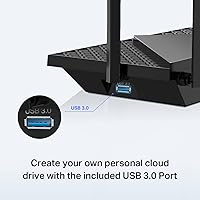
  • USB Port: A single USB 3.0 port enables basic network-attached storage or shared printer functionality without requiring additional hardware.
  • Antennas: Six external high-performance antennas work alongside Beamforming technology to direct signals toward connected devices rather than broadcasting omnidirectionally.
  • Key Technologies: MU-MIMO and OFDMA are both supported, allowing the router to serve multiple devices concurrently and reduce effective latency during peak usage.
  • Security: WPA3 encryption is supported alongside TP-Link HomeShield, which provides basic IoT device identification, security scanning, and network protection on the free tier.
  • VPN Support: Both VPN server and VPN client modes are built into the router firmware, allowing whole-network VPN routing without per-device software installation.
  • Parental Controls: Basic parental controls are included under HomeShield at no cost, while more advanced scheduling and filtering features require a paid HomeShield Pro subscription.
  • Voice Assistants: The router is compatible with both Amazon Alexa and Google Assistant, enabling voice commands for functions such as toggling the guest network on and off.
  • Dimensions: The unit measures 10.73 x 5.8 x 1.94 inches, giving it a slim, low-profile footprint suitable for shelf or desk placement.
  • Weight: At 1.52 pounds, the router is lightweight and easy to reposition or wall-mount if needed.
  • Color: The router ships in black with a matte finish that blends into most home and office environments without drawing attention.
  • QoS: Quality of Service controls are available through the HomeShield dashboard on the free tier, allowing bandwidth prioritization across connected devices.
  • App Management: The TP-Link Tether app for iOS and Android handles initial setup, network monitoring, guest network management, and basic parental controls remotely.
  • In-Box Contents: The package includes the router unit, a power adapter, one RJ45 Ethernet cable, and a quick installation guide.
  • Release Date: The Archer AX72 Pro first became available in February 2023, placing it in a well-matured product generation with an established firmware update history.

Related Reviews

TP-Link Archer AX6000 WiFi 6 Router
80%
88%
Wireless Performance
91%
Multi-Device Handling
86%
Setup & Ease of Use
93%
Wired Connectivity
82%
Range & Coverage
More
TP-Link Archer AX73
TP-Link Archer AX73
79%
88%
Wireless Speed & Throughput
91%
Multi-Device Performance
74%
Coverage & Range
93%
Setup & Ease of Use
79%
Build Quality & Design
More
TP-Link Archer AX10 WiFi 6 Router
77%
91%
Value for Money
78%
Wireless Performance
63%
Range & Coverage
93%
Ease of Setup
82%
Network Stability
More
TP-Link Archer AX23 WiFi 6 Router
78%
91%
Value for Money
93%
Ease of Setup
74%
WiFi Speed Performance
67%
Range & Coverage
83%
Connection Stability
More
TP-Link Archer A7 AC1750 WiFi Router
77%
91%
Setup Experience
88%
Connection Stability
79%
WiFi Speed Performance
74%
Coverage & Range
86%
Value for Money
More
TP-Link Archer A54
TP-Link Archer A54
74%
91%
Value for Money
88%
Ease of Setup
71%
Wi-Fi Range
74%
Wi-Fi Speed & Performance
86%
Security Features
More
TP-Link Archer BE900 Wi-Fi 7 Router
80%
91%
Wireless Performance
93%
Wired Connectivity
88%
Range & Coverage
86%
Setup & Ease of Use
71%
Touchscreen & LED Interface
More
TP-Link Archer BE700 WiFi 7 Router
79%
89%
Wireless Performance
83%
Setup & Ease of Use
78%
Build Quality
76%
Range & Coverage
91%
Wired Connectivity
More
TP-Link Archer BE550
76%
83%
Wireless Performance
91%
Wired Port Quality
88%
Setup & Ease of Use
67%
Coverage & Range
58%
HomeShield Security & Parental Controls
More
TP-Link Archer AXE75
78%
83%
Wireless Performance
71%
6 GHz Band Utility
91%
Setup & Ease of Use
86%
Value for Money
68%
Range & Coverage
More

FAQ

If your ISP plan tops out at 500 Mbps or less, you likely won't notice the difference right now. But if you're on a gigabit plan or thinking about upgrading to a multi-gig tier in the future, the 2.5 Gbps port means this router won't become your network's weakest link. It's also useful if you have a NAS device and want fast local file transfers over a wired connection.

Most buyers find the setup straightforward. You download the Tether app, plug in the router, and follow the on-screen steps — the whole process typically takes under 15 minutes. The app walks you through the basics clearly. That said, if you want to configure advanced features like VPN or QoS, those sections do assume some familiarity with networking concepts.

For a typical medium-sized home — think two to three bedrooms on a single floor — coverage is generally solid. However, this is a single-unit router, not a mesh system, so very large homes or multi-story layouts may still have dead zones in far corners. If whole-home coverage is a priority, you might want to evaluate a mesh setup instead.

The free tier covers basic security scanning, IoT device identification, fundamental parental controls, QoS prioritization, and a basic weekly or monthly usage report. The paid HomeShield Pro subscription unlocks more granular parental scheduling, detailed content filtering, and richer reporting. For most households, the free tier is functional, but parents wanting tight content controls will likely want the paid plan.

Yes — the TP-Link Archer AX72 Pro WiFi 6 Router works with all major ISPs including Comcast, Spectrum, AT&T, Verizon, Xfinity, Starlink, and others. You will still need a separate modem for most cable or DSL providers; the router handles the WiFi and routing side, not the modem function.
It supports both VPN server mode (so devices outside your home can securely connect back in) and VPN client mode (so all your home traffic routes through an external VPN provider). Setting it up correctly does require reading through TP-Link's documentation and a bit of patience — it's not a one-tap process. But once configured, every device on your network benefits without needing individual VPN apps.

Fairly well, thanks to MU-MIMO and OFDMA, which allow the router to communicate with multiple devices at the same time rather than serving them one by one. HomeShield also identifies IoT devices on your network and can flag unusual behavior. One caveat: some users have noted occasional inconsistency on the 2.4 GHz band, which is the frequency many older smart-home devices rely on.

TP-Link does release firmware updates for this router, and many have brought genuine improvements to stability and features. That said, buyer feedback is mixed — a portion of users report that specific updates introduced new bugs or connectivity issues. It's worth checking the TP-Link community forums before applying a major firmware update, just to see if other users have flagged any problems with it.

Yes, the USB 3.0 port supports basic NAS functionality, so you can plug in an external drive and access it from devices on your network. It won't match the performance of a dedicated NAS device, but for light file sharing — photos, documents, media — it works without any extra hardware or subscription.

Absolutely. WiFi 6 routers are fully backward compatible, so your older laptops, phones, and smart-home devices will connect without any issues — they'll just operate at their own maximum supported speeds rather than WiFi 6 speeds. The efficiency improvements of WiFi 6 still benefit the overall network even when older devices are connected alongside newer ones.

Where to Buy