Overview

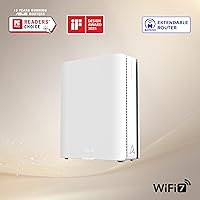
The ASUS ZenWiFi BQ16 Pro WiFi 7 Mesh Router sits firmly at the premium end of home networking, built for people who genuinely need serious whole-home coverage rather than those chasing specs on paper. Unlike older tri-band systems, the quad-band design dedicates a full band to backhaul traffic, which means your devices are not competing for the same airtime. A single node handles homes up to around 4,000 square feet, and you can add more nodes within the AiMesh ecosystem as needed. Think of that ecosystem as a long-term platform rather than a standalone purchase — it grows with you. That said, the price is steep, and it only makes sense if your home, workload, or device count actually demands it.
Features & Benefits

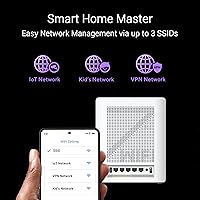
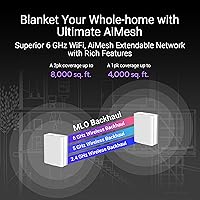
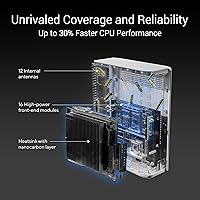
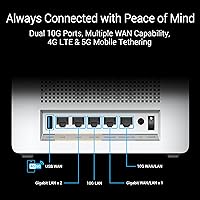
WiFi 7's headline capability is Multi-Link Operation, which lets devices transmit and receive across multiple bands simultaneously — in practice, that means lower latency and more consistent speeds when the network is busy. The dual 10G ports on each node are genuinely useful if you run a NAS, a home server, or wired gaming rigs, since most competing mesh systems still ship with 2.5G. Twelve internal antennas and sixteen front-end modules push signal in every direction, which makes a real difference in multi-story homes or buildings with thick walls. Multi-SSID support lets you keep smart home gadgets isolated on their own network. The USB port also supports 4G/5G dongle tethering as a backup WAN — a small feature that matters enormously when your ISP goes down.

Best For

This mesh router is a strong fit for owners of larger homes — sprawling ranch layouts or multi-story houses — where a single conventional router cannot reliably reach every corner. Home office professionals who rely on video calls, large file transfers, or remote server access will appreciate the 10G wired backbone. Smart home enthusiasts juggling dozens of connected devices benefit from network segmentation without complicated manual configuration. Gamers running wired connections will find the 10G ports particularly useful for latency-sensitive titles. And if you already own ASUS AiMesh hardware, the BQ16 Pro slots in as a natural ecosystem upgrade without requiring a complete overhaul of your existing setup.

User Feedback

Buyers consistently highlight how straightforward initial setup is through the ASUS Router app, and most report a noticeable jump in wireless performance over their previous WiFi 6 hardware. AiMesh roaming gets positive marks, with devices switching nodes without obvious drops. On the downside, some users note the unit runs noticeably warm under sustained heavy traffic — worth considering if you plan to house it in an enclosed cabinet. Firmware reliability has drawn mixed reactions, a recurring pattern with ASUS routers, so checking community forums before applying updates is a sensible habit. A handful of buyers also found the parental controls and VPN configuration less intuitive than expected, suggesting a steeper learning curve for less technical users.

Pros

  • WiFi 7 Multi-Link Operation delivers noticeably lower latency and more consistent speeds when the network is under real load.
  • Dual 10G ports per node are a rare feature at this tier, directly benefiting NAS users and wired gaming setups.
  • Quad-band design dedicates a full band to backhaul, keeping client performance high even when many devices are active.
  • AiProtection Pro security comes included at no recurring cost, unlike comparable suites on competing platforms.
  • The ASUS Router app makes initial setup accessible to non-technical users in under fifteen minutes.
  • USB port supports 4G and 5G dongle tethering as a backup WAN, providing a safety net when the primary ISP goes down.
  • Multi-SSID support lets you isolate IoT devices from trusted hardware without manual firewall configuration.
  • AiMesh compatibility means the system can grow incrementally — add nodes later rather than replacing everything.
  • AiMesh roaming handoffs between nodes are smooth enough that video calls and streaming rarely notice a node switch.
  • Site-to-site VPN support goes well beyond what most consumer mesh routers offer at any price.

Cons

  • Firmware updates have a documented history of introducing connectivity issues — always check community forums before applying them.
  • The chassis runs noticeably warm under sustained heavy loads, making enclosed cabinet placement a risky choice.
  • Real-world coverage in older homes with dense walls frequently falls short of the advertised square footage.
  • VPN and advanced network configuration require genuine networking knowledge; the documentation does not cover edge cases well.
  • Parental control filtering is blunt and lacks the granularity that families switching from dedicated parental control services will expect.
  • The price is difficult to justify unless your use case specifically demands WiFi 7 throughput, 10G ports, or large-scale coverage.
  • Sticky client behavior — where a device clings to a distant node rather than switching to the nearest one — surfaces in larger multi-node deployments.
  • Smart home device management, while functional, lacks a polished visual interface compared to dedicated network management platforms.
  • App sync delays between settings changes and actual hardware behavior have been flagged by a consistent subset of reviewers.
  • Committing to the AiMesh ecosystem creates long-term vendor lock-in that complicates any future switch to a competing platform.

Ratings

The scores below were produced by our AI after analyzing verified buyer reviews from across the globe, with spam, bot-generated, and incentivized submissions actively filtered out before any scoring was applied. Based on that analysis, the ASUS ZenWiFi BQ16 Pro WiFi 7 Mesh Router earns strong marks in raw performance and ecosystem depth, while a few real-world pain points around thermal management, firmware consistency, and outright cost keep it from a clean sweep. Both sides of that picture are reflected honestly here.
Wireless Performance
91%
Users upgrading from WiFi 6 hardware consistently report a tangible jump in speeds, particularly in homes with multiple simultaneous 4K streams, video calls, and cloud backups running at once. The quad-band architecture keeps backhaul traffic from choking client connections, which shows up as lower ping and fewer buffering moments during peak hours.
A portion of buyers note that the headline throughput figures only materialize under near-ideal conditions — open floor plans with minimal interference. In older homes with thick plaster or concrete walls, real-world speeds land noticeably below what the spec sheet suggests.
Coverage & Range
78%
22%
In open-plan homes and newer construction, the single-node coverage is genuinely impressive, reaching areas where previous routers left dead zones. Multi-story townhouses in particular see a meaningful improvement over tri-band predecessors, with signal holding up on floors above and below the router.
The advertised square footage is a best-case figure, and buyers in homes with dense building materials or complex layouts frequently report needing a second node to fully close coverage gaps. Managing expectations here is important — treat the coverage rating as a ceiling, not a guarantee.
Setup & App Experience
86%
The ASUS Router app draws consistent praise for making the initial configuration accessible even to buyers who have never set up mesh hardware before. Node pairing, network naming, and basic security settings are all handled through a clean, guided flow that takes most users under fifteen minutes.
Advanced features like site-to-site VPN and multi-SSID segmentation require navigating deeper menus that feel less polished than the initial setup flow. A handful of reviewers also report occasional app sync issues where changes take longer than expected to push to the hardware.
Firmware Stability
63%
37%
When running a stable firmware version, the BQ16 Pro operates reliably for weeks without intervention. Users who research recommended firmware builds before updating tend to have a much smoother experience, and ASUS does push updates with meaningful feature additions over time.
Firmware reliability is the most recurring criticism across verified reviews. Several buyers report connectivity drops or degraded performance following an automatic update, a pattern that has followed ASUS routers across multiple product generations. Checking community forums before applying any new firmware release is strongly advisable.
10G Port Utility
88%
For NAS users and home lab enthusiasts, having a 10G port available without needing a separate switch is a practical convenience that most competing mesh systems do not offer at this price point. Wired gamers also benefit from a predictable, low-latency connection that wireless simply cannot replicate.
The value of these ports is almost entirely irrelevant unless your devices and ISP connection can actually take advantage of 10G throughput. For buyers with a standard gigabit internet plan and no NAS or high-throughput local hardware, these ports are present but largely unused.
Heat Management
61%
39%
Under typical mixed-use conditions — browsing, streaming, moderate smart home traffic — the unit runs at an acceptable temperature and shows no signs of throttling. The internal heat dissipation design does handle everyday workloads without audible fan noise, since the router operates passively.
Under sustained heavy loads such as continuous large file transfers or extended multi-device stress, the chassis gets noticeably warm. Buyers who place the unit in enclosed entertainment cabinets or media consoles report more frequent thermal-related slowdowns, and ventilation clearance is worth planning for.
Smart Home & IoT Management
82%
18%
The multi-SSID feature is a practical solution for households running a mix of trusted devices and cheaper IoT gadgets like smart plugs, cameras, and thermostats. Keeping those devices on a segregated network without manual firewall rules is a meaningful convenience for technically aware buyers.
The IoT segmentation tools, while present, are not quite as polished as dedicated smart home platforms. Users expecting a fully visual network map or drag-and-drop device assignment will find the interface more utilitarian than intuitive.
Security Features
84%
AiProtection Pro being included without a recurring subscription fee is a genuine differentiator at this price tier — comparable security suites from competing brands often carry annual costs. The one-tap security scan gives less technical users a quick confidence check without needing to interpret logs.
Security-conscious buyers who dig into the feature set note that the threat database updates depend on Trend Micro's infrastructure, which raises questions about long-term support timelines. The VPN configuration, while comprehensive, is not beginner-friendly and requires some networking knowledge to set up correctly.
VPN Support
74%
26%
The range of VPN options — including site-to-site support — is broader than most consumer mesh routers offer, making the BQ16 Pro a viable choice for remote workers who need a persistent tunnel back to an office network. Frequent travelers also appreciate having a trusted home VPN endpoint.
Multiple reviewers flag that getting VPN up and running requires more effort than the marketing implies. Non-technical users often report giving up partway through the configuration, and the documentation does not always cover edge cases or ISP-specific settings that affect tunnel stability.
Parental Controls
67%
33%
Time scheduling and content filtering are present and functional, covering the basic needs of families looking to limit screen time or block inappropriate categories. The controls work across the whole network rather than requiring per-device app installations, which is a practical advantage.
Parents expecting a granular, easy-to-manage experience similar to dedicated parental control services will likely find the interface underwhelming. Age-based filtering profiles are fairly blunt, and several reviewers mention that determined teenagers encounter the restrictions less than intended.
AiMesh Ecosystem Value
83%
For buyers already owning ASUS AiMesh-compatible hardware, the BQ16 Pro integrates cleanly and allows mixing older nodes at lower price points to fill coverage gaps. The ecosystem approach means future upgrades can be incremental rather than requiring a full system replacement.
The ecosystem lock-in is a real consideration — once you are deep into AiMesh, moving to a competing platform means starting over. New buyers without existing ASUS hardware should weigh whether the ecosystem benefits are worth committing to one vendor for the long term.
Roaming & Handoff
79%
21%
In households using a two-node setup, device roaming between nodes is generally smooth, with smartphones and laptops transitioning without noticeable drops during normal movement around the home. Video calls and music streaming in particular handle handoffs well in reported use cases.
Some users in larger setups report occasional sticky client behavior, where a device holds onto a farther node rather than connecting to the nearest one. This is a known challenge across mesh platforms generally, but it surfaces more noticeably in three-node or larger deployments.
WAN Flexibility & Failover
77%
23%
The USB port supporting 4G and 5G dongle tethering as a backup WAN source is an underrated feature that competing mesh systems rarely include. For home offices or households where internet downtime is genuinely costly, having a mobile backup option without additional hardware is a practical buffer.
The failover process is not fully automated out of the box, and configuring dual-WAN or tethering backup requires navigating settings that are not prominently surfaced in the app. Buyers expecting plug-and-play redundancy may be disappointed by the manual steps involved.
Value for Money
58%
42%
For buyers who genuinely need WiFi 7 performance, 10G wired connections, subscription-free security, and a scalable ecosystem in a single device, the BQ16 Pro stacks up reasonably well against assembled alternatives that would cost more across multiple components. The feature density is hard to match at the price.
For the majority of households — those with average internet speeds, fewer than twenty connected devices, and no NAS or wired gaming setup — the price demands a difficult justification. Capable WiFi 6E mesh systems cost significantly less and would cover most real-world needs without leaving unused headroom.

Suitable for:

The ASUS ZenWiFi BQ16 Pro WiFi 7 Mesh Router is built for a specific kind of buyer, and for that buyer it genuinely delivers. If you own a large home — think sprawling single-story layouts or multi-floor houses where a single router has never quite reached the back bedroom or the garage — this system is engineered to close those gaps. Remote workers who depend on rock-solid connectivity for video calls, large file syncs, or VPN tunnels back to an office network will find the wired 10G ports and robust backhaul particularly valuable. Gamers running wired rigs will appreciate having a high-throughput connection that does not share bandwidth with the rest of the household. Smart home enthusiasts juggling dozens of connected devices — cameras, thermostats, smart speakers, and the rest — benefit from the ability to segment IoT gadgets onto a separate network without touching a single firewall rule. Finally, existing ASUS AiMesh users looking to anchor their setup with a more capable node will find the BQ16 Pro slots in cleanly, letting them keep older hardware as satellite nodes rather than replacing everything at once.
Not suitable for:

Buyers who expect the ASUS ZenWiFi BQ16 Pro WiFi 7 Mesh Router to be a plug-and-forget device for a modest apartment or a straightforward two-bedroom home will likely feel they have significantly overspent. If your internet plan tops out at standard gigabit speeds and you have fewer than fifteen or twenty connected devices, a well-regarded WiFi 6E mesh system at a fraction of the cost will cover your actual needs without leaving a pile of unused capability sitting on a shelf. Buyers who are not comfortable occasionally checking firmware release notes or community forums before applying updates may also find the ownership experience more hands-on than anticipated, since firmware-related hiccups have been a recurring theme across ASUS router generations. People hoping for beginner-friendly VPN setup or intuitive parental controls comparable to dedicated family safety services will likely find the interface falls short of those expectations. And if you live in an older home with thick plaster or concrete walls, be realistic — coverage will not match the best-case figures, and you may need a second node regardless.
Specifications

  • WiFi Standard: The BQ16 Pro operates on the 802.11be (WiFi 7) standard, with backward compatibility for 802.11ax, 802.11ac, and 802.11n devices.
  • Band Configuration: Quad-band architecture splits traffic across four separate radio bands, dedicating capacity to backhaul separately from client connections.
  • Max Throughput: Combined theoretical throughput across all bands reaches up to 30,000 Mbps under optimal, interference-free conditions.
  • Coverage Area: A single node covers up to 4,000 sq ft in open layouts; a two-pack extends whole-home coverage to up to 8,000 sq ft.
  • Wired Ports: Each node includes two 10G ports that can be configured flexibly for WAN or LAN use, supporting high-throughput wired devices.
  • Internal Antennas: Twelve internal antennas are paired with sixteen high-power front-end modules to push signal coverage in all directions.
  • Security Suite: AiProtection Pro, powered by Trend Micro, provides commercial-grade threat detection and blocking with no subscription fee required.
  • VPN Support: The router supports multiple VPN protocols including site-to-site VPN configurations, suitable for connecting home and office networks persistently.
  • SSID Management: Up to three separate SSIDs can be created simultaneously, enabling network segmentation for IoT devices, guests, and primary users.
  • USB & Failover: A built-in USB port supports 4G and 5G mobile dongle tethering as a secondary WAN source for internet redundancy.
  • Ecosystem: Fully compatible with the ASUS AiMesh platform, allowing integration with other AiMesh-capable routers as satellite nodes to expand coverage.
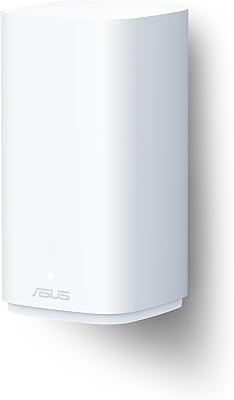
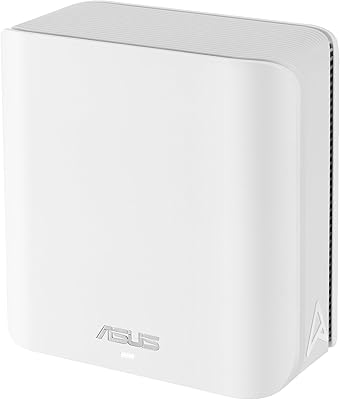
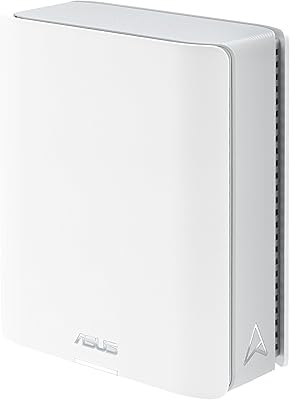
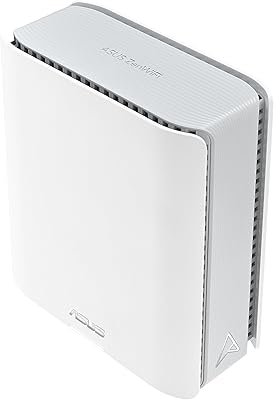
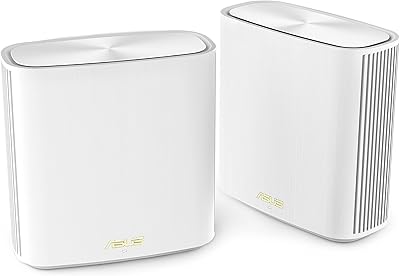
  • Dimensions: Each node measures 6.9 x 2.8 x 8.6 inches, with a slim vertical form factor designed to minimize desk or shelf footprint.
  • Weight: Each unit weighs 2.9 pounds, making it straightforward to reposition during initial placement and coverage testing.
  • Color & Finish: The BQ16 Pro is finished in white with a clean, minimal aesthetic intended to blend into home and office environments.
  • In the Box: Each package includes the BQ16 Pro node, a power adapter, an RJ-45 cable, a quick start guide, and a warranty card.
  • Wireless Modes: The unit supports multiple operating modes including primary router, AiMesh node, and access point mode for flexible network deployment.
  • Modulation: WiFi 7 4096-QAM modulation increases data density per transmission cycle, contributing to higher real-world throughput compared to WiFi 6 or 6E.
  • Multi-Link Operation: Multi-Link Operation allows compatible client devices to simultaneously use multiple frequency bands, reducing latency during congested network conditions.

Related Reviews

ASUS ZenWiFi BD5 Outdoor WiFi 7 Router
83%
88%
Wireless Performance
91%
Build Quality & Durability
93%
Weather Resistance
89%
Temperature Range & Climate Versatility
86%
Installation & Mounting
More
ASUS ZenWiFi BD4 Dual-Band WiFi 7 Mesh Router
86%
93%
Wi-Fi Performance
89%
Setup & Installation
91%
Security Features
88%
Gaming & Streaming Performance
84%
Value for Money
More
ASUS ZenWiFi BT6 Tri-Band WiFi 7 Mesh Router
83%
91%
WiFi Performance
88%
Security Features (AiProtection Pro)
84%
Mesh Network Expansion
75%
Setup and Installation
89%
Build Quality
More
ASUS ZenWiFi BT8 WiFi 7 Mesh Router
77%
83%
Wireless Performance
71%
Coverage & Range
54%
Firmware Reliability
88%
Setup Experience
67%
App & Management
More
ASUS ROG Rapture GT-BE98 Pro
81%
93%
Wireless Performance
91%
Wired Connectivity
89%
Gaming Performance
78%
Setup & App Experience
86%
Build Quality & Design
More
ASUS RT-BE82U WiFi 7 Dual-Band Router
84%
88%
Wireless Performance
93%
Wired Connectivity
82%
Setup & Ease of Use
74%
Firmware & Software
86%
AiMesh Integration
More
ASUS RT-BE86U BE6800 Dual-Band WiFi 7 Router
77%
83%
Wireless Performance
91%
Wired Connectivity
77%
Setup & Ease of Use
58%
Mobile App Experience
62%
Firmware Stability
More
ASUS RT-BE58U WiFi 7 Router
80%
83%
Wireless Performance
81%
Range & Coverage
91%
Setup & Ease of Use
88%
Security Features
86%
Smart Home & IoT Management
More
ASUS ZenWiFi XD6 Mesh WiFi 6 System
86%
93%
Wi-Fi Coverage
85%
Ease of Setup
89%
Performance and Speed
80%
App Experience
91%
Parental Controls
More
ASUS RT-AX88U PRO WiFi 6 Router
77%
88%
Wireless Performance
84%
Range & Coverage
91%
Multi-Device Handling
57%
Setup Experience
79%
Build Quality
More

FAQ

It is genuinely a best-case figure measured under ideal conditions. In a modern open-plan home or a newer build with standard drywall, single-node coverage is impressive. However, if your home has older thick plaster walls, concrete floors, or a complex multi-story layout, you will likely want a second node to close the gaps. Always treat the coverage rating as a ceiling rather than a guarantee.

Yes, the BQ16 Pro is fully AiMesh compatible, which means it can pair with most other AiMesh-capable ASUS routers as satellite nodes. The older hardware will not pass on WiFi 7 speeds, but it can still extend coverage effectively and be managed through the same app. It is one of the practical advantages of committing to the ASUS ecosystem.

AiProtection Pro is genuinely free with no time-limited trial involved — ASUS includes it as a permanent feature. You do not need to enter a credit card or renew anything. The threat database is maintained through ASUS and Trend Micro and updates automatically as long as the router is connected.

For basic setup — getting the internet running, naming your network, and setting a password — the ASUS Router app walks you through clearly and most people finish in under fifteen minutes. Where things get more involved is if you want to configure VPN, set up multi-SSID segmentation, or fine-tune parental controls. Those deeper features require some patience and willingness to explore the interface.

This is a legitimate concern worth taking seriously. ASUS has a track record across multiple router generations of firmware updates occasionally introducing connectivity or performance issues. The practical advice is to turn off automatic updates, check the ASUS community forums or Reddit before applying any new firmware, and only update if users with your specific setup are reporting positive results.

To get value from the 10G ports, you ideally need a device capable of 10G wired connectivity — like a NAS, a high-end desktop with a 10G network card, or a managed switch connecting multiple wired devices. If your home internet plan tops out at standard gigabit speeds and you only have typical laptops and phones, the 10G ports will be present but largely untouched.

You plug in a compatible 4G or 5G USB dongle from a mobile carrier, and the ASUS ZenWiFi BQ16 Pro WiFi 7 Mesh Router can use that cellular connection as a secondary WAN source. It does not switch over fully automatically out of the box without some configuration, so budget a bit of time to set up the failover rules in the interface. Once configured, it is a solid safety net for home offices where downtime is costly.
Absolutely. The BQ16 Pro is backward compatible with WiFi 5 (802.11ac), WiFi 6 (802.11ax), and even older 802.11n devices. They will connect and work normally, just at their native maximum speeds rather than WiFi 7 speeds. Only WiFi 7 client devices will be able to take full advantage of Multi-Link Operation and the higher throughput.

Honestly, for most households with a standard gigabit plan and everyday usage patterns, the answer is probably not yet. A capable WiFi 6E mesh system costs significantly less and handles gigabit internet with room to spare. Where the BQ16 Pro makes sense is if you have heavy local network traffic — large file transfers between devices, a NAS, or multi-gig internet — or if you are specifically planning ahead for a multi-gig ISP upgrade.

Under everyday mixed usage it runs warm but not alarmingly so. The concern comes under sustained heavy loads — extended large file transfers or running the unit at near-capacity for hours. If you plan to place it inside an enclosed media cabinet or a tight shelf with no airflow, that is where thermal throttling becomes a realistic issue. Give it a few inches of clearance on all sides and it handles normal household workloads without problems.

Where to Buy