Overview

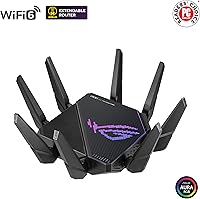
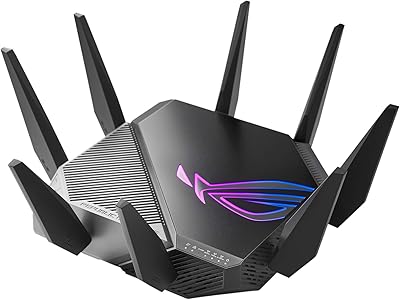
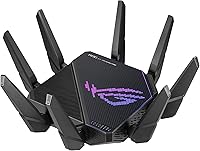
The ASUS ROG Rapture GT-AX11000 Pro sits firmly at the top of the home networking market, built for users who genuinely push their networks hard. Unlike standard dual-band routers that split traffic across just two bands, this ROG router runs three separate bands simultaneously, reducing congestion when multiple devices compete for bandwidth. The 10G and 2.5G wired ports are a real forward-looking touch — most routers at any price still max out at 1G. What also stands out is the subscription-free security suite, which many competitors lock behind an annual fee. The ROG brand carries a reputation for delivering on performance promises, and this router largely upholds that.
Features & Benefits

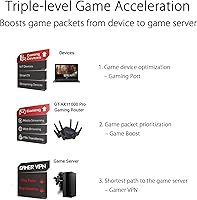
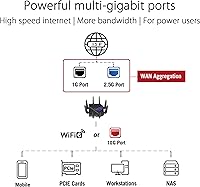
WiFi 6 with 160 MHz channels means the GT-AX11000 Pro can move significantly more data per transmission than older WiFi 5 routers — a practical difference you notice when several devices are active at once. The quad-core 2.0 GHz processor handles that load without throttling, which matters when routing heavy traffic across multiple bands simultaneously. The dual high-speed ports — one 10G, one 2.5G — can each be assigned as either WAN or LAN, a flexibility most competitors skip entirely. Triple-level game acceleration prioritizes gaming traffic at the device level, optimizes routing through the router itself, then works to find the lowest-latency path to game servers. RangeBoost Plus improves signal consistency across walls and floors rather than just inflating raw signal strength numbers.

Best For

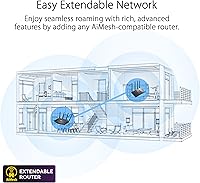
This gaming router makes most sense in households where network demands are genuinely high — think four or five people streaming, gaming, and on video calls at the same time. Console and PC gamers with competitive instincts will appreciate the traffic prioritization features, though the biggest gains show up when the network is congested, not on a quiet single-user connection. Anyone running a NAS or a modem with a 2.5G or 10G port will finally have a router that can match those speeds end-to-end. It also suits home office setups that need solid QoS and parental controls without paying for a separate service. AiMesh compatibility means adding coverage nodes later without starting from scratch.

User Feedback

With over a thousand ratings and a strong overall score, buyer sentiment for the GT-AX11000 Pro skews positive — but it is not unanimous. Owners consistently highlight wired throughput and stability under sustained load as standout strengths, and several note that the advanced UI rewards users who invest time in configuring it properly. The physical size is a recurring reality check: this is a large, heavy unit with an aggressive aesthetic that will not blend into every living space. Firmware updates have drawn mixed reactions, with some users reporting smooth experiences and others noting occasional hiccups post-update. Setup is manageable but not plug-and-play. Most buyers ultimately feel the long-term reliability justifies what they paid.

Pros

  • Tri-band WiFi 6 handles congested multi-device households far better than standard dual-band routers.
  • The 10G and 2.5G ports unlock full wired speeds for compatible modems and NAS devices.
  • AiProtection Pro blocks malicious sites and intrusion attempts with zero annual subscription cost.
  • Traffic prioritization delivers measurable ping stability for gamers when the network is under real load.
  • AiMesh support lets you expand coverage later without replacing your existing hardware investment.
  • The quad-core processor keeps routing performance consistent even when multiple heavy users are active simultaneously.
  • Parental controls and QoS are built in and functional without needing a third-party service.
  • Long-term stability earns strong loyalty from buyers who keep routers for several years.

Cons

  • Setup complexity regularly frustrates less experienced users, especially during initial ISP configuration.
  • Firmware updates have an inconsistent track record and can occasionally disrupt custom configurations.
  • The physical size demands a dedicated open surface — it cannot be tucked into an entertainment cabinet.
  • The aggressive ROG aesthetic divides buyers and looks out of place in many home environments.
  • Gaming performance gains are situational and mostly noticeable only on congested networks, not quiet ones.
  • Only one 10G and one 2.5G port limits wired flexibility without adding a separate switch.
  • USB-attached storage performance is adequate for casual sharing but not suited to demanding media server use.
  • The mobile app lacks polish and still requires the full browser interface for advanced configuration tasks.

Ratings

The ASUS ROG Rapture GT-AX11000 Pro scores below are generated by AI after analyzing thousands of verified global user reviews, with spam, bot-submitted, and incentivized feedback actively filtered out. This router draws a passionate and technically demanding audience, and their assessments reflect both genuine enthusiasm and real frustrations. Strengths and pain points are represented with equal weight so buyers can make a fully informed decision.
Wireless Performance
91%
Users in dense, multi-device households consistently report that the tri-band setup holds up under real pressure — multiple 4K streams running alongside active gaming sessions without noticeable degradation. The 160 MHz channel support on the 5 GHz bands delivers noticeably higher throughput compared to previous routers many buyers upgraded from.
A handful of users note that peak wireless speeds require optimal placement and clear line-of-sight, and that walls or floors can cut performance more than expected for a router at this price point. The 2.4 GHz band, while useful for smart home devices, is not where this router shines.
Wired Port Flexibility
93%
The combination of a 10G and a 2.5G port — both switchable between WAN and LAN — is something buyers with NAS devices or high-speed modems genuinely appreciate. Owners who upgraded from 1G-only routers describe the wired throughput improvement as immediately tangible during large local file transfers.
Only one of each high-speed port is included, so users who need multiple 10G connections will find themselves adding a separate switch. Some buyers expected more standard gigabit ports than the four provided alongside the high-speed ones.
Gaming Features
82%
18%
The triple-level game acceleration draws consistent praise from competitive PC gamers who notice lower ping variance during peak evening hours when the network is congested. Traffic prioritization works as advertised when multiple users share the connection, keeping gaming sessions stable while others stream.
More casual gamers who are the only active user on a network report minimal perceptible difference from the gaming-specific features. The benefits are real but situational — buyers expecting dramatic improvements on an already uncongested connection may feel underwhelmed.
Setup & Configuration
61%
39%
Users with prior router configuration experience generally find the ASUS web UI logical and appreciate the granular control it offers over QoS, VPN, port forwarding, and parental controls. The mobile app provides a reasonable starting point for initial setup.
First-time ASUS router owners and less technical buyers frequently cite setup complexity as a significant frustration. The sheer volume of options can overwhelm, and some users report spending hours troubleshooting default settings that did not suit their ISP configuration out of the box.
Network Security
89%
AiProtection Pro blocks malicious sites, scans for vulnerability exploits on connected devices, and provides two-way intrusion prevention — all without requiring a subscription. Buyers who previously paid annual fees for equivalent protection on competing routers explicitly call this out as a deciding factor.
The security dashboard can feel technical and sparse for users who want plain-language summaries of threats blocked. A few users noted they were unaware the feature needed to be manually enabled during setup, meaning they ran without it for some time.
Build Quality & Design
74%
26%
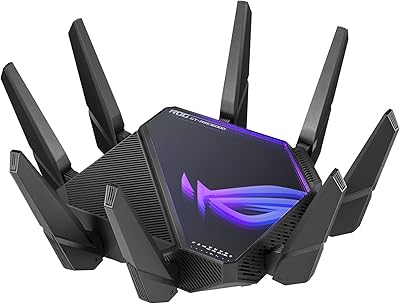
The construction feels solid and premium — this is not a lightweight plastic shell. The angular ROG aesthetic with its aggressive lines and subtle RGB accents is genuinely appealing to buyers who already inhabit a gaming setup aesthetic.
The design is polarizing. Multiple reviewers mention that the bold look is out of place in living rooms or shared home office spaces. At nearly five pounds and over 13 inches wide, it also demands a dedicated shelf or open surface — it does not tuck away easily.
Coverage & Range
77%
23%
RangeBoost Plus earns genuine praise for improving signal consistency in mid-sized homes, particularly in reducing dead zones near the edges of coverage areas. Several buyers in two-story homes note improved signal on upper floors compared to their previous routers.
In larger homes above 3,000 square feet, some users find the single-router range still insufficient and need to add AiMesh nodes. Coverage claims in marketing feel optimistic for homes with thick concrete or brick walls.
Firmware & Software Stability
66%
34%
When firmware updates go smoothly, users appreciate that ASUS delivers them with meaningful feature additions and security patches. The core routing software has a long track record and a large community of users who share configuration tips online.
Firmware reliability is a recurring complaint — some users report that certain updates introduced Wi-Fi dropping issues or reset custom configurations unexpectedly. The inconsistency is frustrating for a router at this price tier, and rollback options are not straightforward for average users.
Value for Money
78%
22%
Buyers who use the 10G port, benefit from AiProtection Pro, and actively use game acceleration generally conclude that the total package justifies the cost when factoring in what a subscription-based security suite alone would cost annually. Long-term stability earns repeat loyalty from ASUS users.
For buyers who primarily need reliable basic Wi-Fi coverage without complex features, the price is hard to justify against capable competitors at lower price points. The value equation tilts heavily toward power users who will actually configure and use what they are paying for.
AiMesh & Network Expansion
84%
Buyers who later added AiMesh nodes to expand coverage describe the experience as straightforward, with the GT-AX11000 Pro reliably serving as a capable backbone node. The ability to build a whole-home mesh without switching ecosystems is a practical long-term advantage.
AiMesh performance can vary depending on the node model chosen, and some users note that the mesh handoff between nodes is not always as smooth as dedicated mesh systems. Getting the best results requires some research into compatible node options.
Heat Management
71%
29%
Under sustained heavy load, the router manages thermals reasonably well for a fanless design. Most users report it running warm but stable, with no thermal throttling noted during extended gaming or download sessions.
The unit does get noticeably hot to the touch during prolonged use, which concerns some buyers about long-term component longevity. Placement in enclosed spaces or cabinets is inadvisable, which further limits where it can practically be positioned.
Parental Controls
79%
21%
The built-in parental controls offer time scheduling, content filtering by category, and per-device management without any additional subscription. Parents who need basic-to-intermediate controls find this more than adequate for managing children's screen time.
Power users who want detailed reporting, per-app blocking, or cloud-synced profiles will find the controls functional but not sophisticated. Compared to dedicated parental control services, the feature set covers the basics without going much further.
USB & Storage Features
63%
37%
The USB 3.2 port allows users to attach a drive and create a basic network-attached storage share, which occasional users find handy for media sharing across the home without a dedicated NAS device.
NAS performance through USB is adequate for casual file access but not fast enough for demanding media server applications or simultaneous multi-user access. Buyers expecting robust NAS functionality should set expectations accordingly.
Mobile App Experience
67%
33%
The ASUS Router app handles the core tasks well — checking connected devices, running speed tests, and adjusting basic settings remotely without needing to access the full web interface. For routine monitoring it works reliably.
Several users describe the app as functional but behind the curve compared to competitors with more polished mobile interfaces. Advanced settings still require accessing the full browser-based UI, and the app can occasionally lose connection to the router without clear explanation.

Suitable for:

The ASUS ROG Rapture GT-AX11000 Pro is built for households where the network is genuinely under pressure — multiple people streaming, gaming, and working from home at the same time, all fighting for bandwidth. Competitive PC and console gamers who notice ping spikes during peak evening hours will find the traffic prioritization features make a tangible difference in those specific conditions. Anyone who already owns or plans to buy a modem, switch, or NAS with a 2.5G or 10G port will appreciate that this gaming router can finally match those speeds end-to-end over a wired connection, something most routers simply cannot do. Home office users who need dependable QoS and robust parental controls without paying for a separate subscription service will find real, practical value here. Tech-forward buyers who anticipate expanding their network over time will also benefit from AiMesh compatibility, which lets them add coverage nodes without abandoning the ecosystem they have already invested in.
Not suitable for:

The ASUS ROG Rapture GT-AX11000 Pro is a poor fit for buyers who want a simple, plug-in-and-forget networking solution. The configuration depth that power users celebrate is the same thing that frustrates less technical buyers — setup requires patience, and getting the most out of its features demands a willingness to spend time in the settings. Anyone living in a smaller apartment with light internet usage and only a handful of devices will likely find they are paying a significant premium for capabilities they will never actually use. The large physical footprint and bold ROG aesthetic also make it a difficult fit for living rooms, shared spaces, or minimalist home setups where a discreet, low-profile device is preferred. If firmware reliability is a top priority and you have no tolerance for occasional update-related hiccups, this router's track record gives some reason for caution. Finally, buyers who need several high-speed wired ports rather than just one 10G and one 2.5G connection will need to budget for an additional switch.
Specifications

  • WiFi Standard: This router operates on WiFi 6 (802.11ax), supporting legacy standards including 802.11a, b, g, n, and ac for backward compatibility with older devices.
  • Band Configuration: Tri-band architecture splits traffic across one 2.4 GHz band and two separate 5 GHz bands, reducing congestion in high-device households.
  • Combined Speed: Maximum combined wireless throughput is rated at 11,000 Mbps across all three bands under ideal conditions.
  • 2.4 GHz Band: The 2.4 GHz band delivers up to 1,148 Mbps and is best suited for smart home devices and lower-bandwidth connections.
  • 5 GHz Bands: Each of the two 5 GHz bands supports up to 4,804 Mbps with 160 MHz channel support for higher throughput on compatible devices.
  • 10G Port: One 10-Gigabit port is included and can be configured as either a WAN input or a LAN output depending on network requirements.
  • 2.5G Port: One 2.5-Gigabit port is also configurable as WAN or LAN, providing flexibility for high-speed modem or NAS connections.
  • Standard LAN Ports: Four standard Gigabit LAN ports are included for connecting wired devices such as desktop PCs, consoles, and switches.
  • Processor: A 64-bit 2.0 GHz quad-core CPU handles packet processing and routing tasks without throttling under simultaneous heavy loads.
  • Memory: The router includes 256 MB of flash storage and 1 GB of RAM to support concurrent connections, VPN services, and security functions.
  • USB Ports: One USB 3.2 Gen 1 port and one USB 2.0 port are provided for attaching external storage drives or printers to the network.
  • Dimensions: The unit measures 13.94 × 13.94 × 7.6 inches, requiring a dedicated open surface for proper ventilation and placement.
  • Weight: At 4.81 pounds, this is a substantial desktop unit not intended to be wall-mounted or stored in enclosed spaces.
  • Security Suite: AiProtection Pro provides malicious site blocking, two-way intrusion prevention, and infected device detection at no subscription cost.
  • Mesh Support: Full AiMesh compatibility allows this router to serve as the primary node in a multi-unit whole-home mesh network using supported ASUS devices.
  • Game Acceleration: Triple-level game acceleration prioritizes gaming traffic at the device level, optimizes routing through the router, and selects lower-latency paths to game servers.
  • Range Technology: ASUS RangeBoost Plus improves signal consistency and coverage area by optimizing antenna signal transmission and reception across the available bands.
  • Power Input: The included power adapter accepts AC input of 110V to 240V at 50–60 Hz, making it compatible with standard outlets in most countries.
  • Included Contents: The package includes the GT-AX11000 Pro router, a power adapter, a quick start guide, one RJ-45 cable, and a warranty card.
  • Color & Finish: The router ships in black with the angular ROG aesthetic and subtle RGB lighting elements characteristic of the Republic of Gamers product line.

Related Reviews
ASUS ROG Rapture GT-BE98 Pro
81%
93%
Wireless Performance
91%
Wired Connectivity
89%
Gaming Performance
78%
Setup & App Experience
86%
Build Quality & Design
More
ASUS ROG Rapture GT-AXE16000 WiFi 6E Gaming Router
86%
91%
Performance for Gaming
89%
WiFi Speed & Stability
65%
Ease of Setup
92%
Build Quality
87%
Software & Firmware Features
More
ASUS ROG Rapture GT-AXE11000 WiFi 6E Gaming Router
81%
91%
Gaming Performance
89%
WiFi Speed & Coverage
87%
Network Stability
85%
Setup & Installation
64%
Compatibility with Older Devices
More
ASUS ROG Rapture GT-AX6000 WiFi 6 Gaming Router
86%
94%
Gaming Performance
91%
Connection Stability
78%
Setup/Installation Ease
88%
Value for Money
85%
Build Quality
More
ASUS ROG Rapture GT6 Tri-Band WiFi 6 Gaming Router
87%
94%
Gaming Performance
84%
Setup Ease
91%
Wi-Fi Coverage
89%
Value for Money
87%
Speed Consistency
More
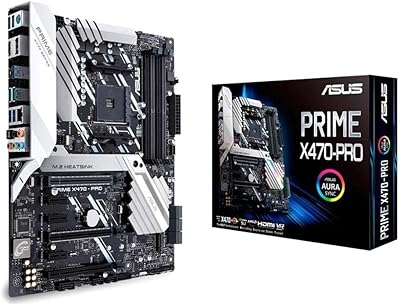
ASUS Prime X470-Pro Motherboard
86%
89%
Overall Performance
91%
Build Quality
85%
Ease of Setup
88%
Cooling Efficiency
83%
RGB Customization
More
ASUS ROG Maximus Z790 Hero
87%
94%
Overclocking Performance
89%
Cooling Effectiveness
91%
Build Quality
86%
Networking Capabilities
93%
Power Delivery & Stability
More
ASUS ROG Maximus Z890 Hero Motherboard
88%
96%
Performance
94%
Thermal Design & Cooling
92%
Power Delivery & Stability
90%
Connectivity (WiFi 7 & Thunderbolt 4)
89%
AI Features (Overclocking & Cooling)
More
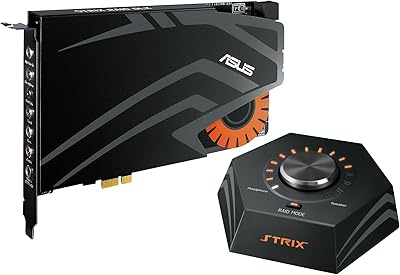
ASUS Strix RAID PRO
ASUS Strix RAID PRO
68%
83%
Audio Quality
88%
Headphone Amplifier
41%
Software Experience
46%
Driver Stability
79%
RAID MODE Functionality
More
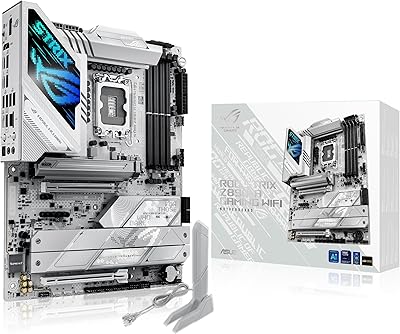
ASUS ROG STRIX Z890-A GAMING WIFI
91%
96%
Performance Stability
94%
Overclocking Capability
92%
Thermal Management
90%
Build Quality
88%
Ease of Installation
More

FAQ

It depends on your situation. The game acceleration and traffic prioritization features make a genuine difference when your household network is congested — for example, when someone is streaming 4K while you are trying to game. On an otherwise quiet network where you are the only active user, the practical improvement is minimal. The benefit is real, but it is most noticeable under load.

Yes, absolutely. Both the 10G and 2.5G ports can be assigned as either WAN or LAN in the router settings, which is one of the more flexible arrangements available at this level. If your ISP modem or ONT has a 10G output, you can connect it directly and take full advantage of the throughput.

Honestly, this router rewards users who are comfortable poking around network settings. The ASUS app simplifies the initial connection, but getting the most out of features like QoS, game acceleration, VPN, and AiProtection Pro requires navigating a fairly deep web interface. If you just want something that works out of the box without configuration, this may not be the right fit.

It is genuinely free with no subscription required — this is not a trial. AiProtection Pro is powered by Trend Micro technology and covers malicious site blocking, intrusion prevention, and infected device quarantine at no ongoing cost. ASUS has maintained this as a included feature across its AiProtection-enabled routers for several years.

It is large. At just under 14 inches wide and over 7 inches tall, it needs a clear, open surface with room around it for ventilation. It will not fit inside a media cabinet or on a cramped shelf, and the aggressive design with protruding antennas means it takes up more visual space than its footprint alone suggests. Plan for it to be visible.

Yes, and this is one of the more practical long-term advantages of the ASUS ROG Rapture GT-AX11000 Pro. It works as the main node in an AiMesh network, and you can add compatible ASUS routers as satellite nodes to extend coverage without replacing your main hardware. Performance of the mesh system varies depending on which node model you pair it with.

Yes, the standard WAN port handles 1G connections just fine, so you are not locked out of using it with a conventional modem. You simply would not be taking full advantage of the 2.5G or 10G port capabilities until your modem or ISP connection catches up. It is a reasonable future-proofing investment even if your current setup is 1G.

Firmware updates can be set to apply automatically or manually — it is configurable in the settings. The recommendation from experienced users is to apply updates manually after checking community forums first, since some updates have historically introduced Wi-Fi stability issues for certain users before being patched. It is not a chronic problem, but it is worth being aware of.

Yes, the GT-AX11000 Pro supports WPA3 personal encryption, which provides stronger protection against brute-force attacks compared to WPA2. You can run it in mixed WPA2/WPA3 mode to maintain compatibility with older devices that do not yet support WPA3 natively.

You can connect a USB drive to the USB 3.2 port and share it over the network using the router's built-in media server and file sharing features. It works well for casual file access and media streaming to a few devices, but it is not a substitute for a dedicated NAS if you need fast simultaneous multi-user access or large-volume backups.