Overview

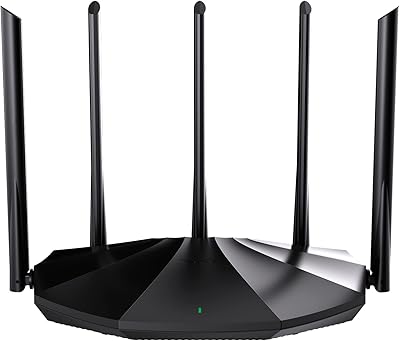
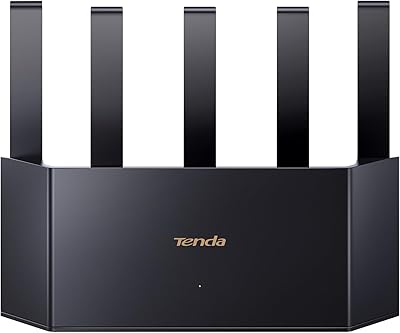
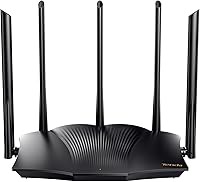
The Tenda RX12 Pro AX3000 WiFi 6 Router is one of the more compelling options if you're hunting for a legitimate WiFi 6 upgrade without spending a fortune. At under $60, it sits in a competitive price tier where a few routers genuinely deliver, and this one largely holds its own. The dual-band AX3000 classification means combined theoretical speeds, not simultaneous real-world throughput — worth keeping in mind. Physically, it's a fairly compact unit with five external antennas giving it an assertive presence on a shelf or desk. It's not a tri-band powerhouse or an enterprise solution, but for most homes, it doesn't need to be.
Features & Benefits

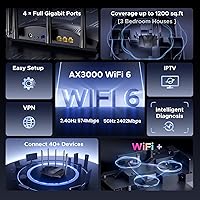
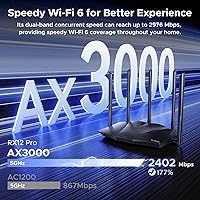
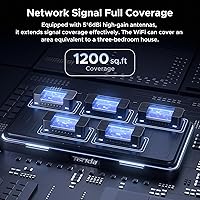
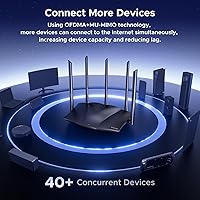
The RX12 Pro runs on WiFi 6's core technologies — MU-MIMO and OFDMA — which in plain terms means it handles multiple devices talking to it at once without the usual traffic pileup. The 5 GHz band can push up to 2402 Mbps, which is plenty for 4K streaming or online gaming in rooms close to the router, while the 2.4 GHz band handles farther-reaching, lower-bandwidth tasks. Five high-gain antennas work alongside internal signal modules to extend coverage further, though results still vary by home layout. For remote workers, built-in VPN support covering OpenVPN and WireGuard — the latter available only after a firmware update — is a practical bonus most budget routers skip entirely.

Best For

This Tenda router makes most sense for people living in apartments or mid-sized homes, not sprawling multi-story houses where a full mesh system would serve better. If your household runs a mix of streaming devices, smart home gadgets, phones, and a couple of laptops simultaneously, this WiFi 6 router is built to handle that kind of load. Families will appreciate the built-in parental controls that require no paid subscription to use. Remote workers benefit from the onboard VPN flexibility. Setup is deliberately straightforward, so if you're not interested in complex network configurations, the web management interface keeps things accessible without overwhelming you.

User Feedback

With over a thousand ratings averaging 4.3 stars, buyer sentiment skews positive. Easy setup and reliable signal for the price come up repeatedly, and most users seem genuinely satisfied for everyday home use. That said, some buyers note that coverage in larger or multi-floor homes can fall short — five antennas don't override physics. A handful of users mention occasional firmware quirks or a less-than-intuitive app experience. Since this product only launched in April 2025, long-term reliability data is still limited, so treat early impressions with appropriate caution. The VPN and parental control features appear to work as described, though less tech-savvy users sometimes find initial configuration a bit tricky.

Pros

  • True WiFi 6 performance with MU-MIMO and OFDMA keeps multi-device households running smoothly.
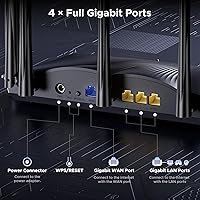
  • Four gigabit LAN ports is unusually generous for a sub-$60 router.
  • Built-in OpenVPN and PPTP support is a standout feature at this price tier.
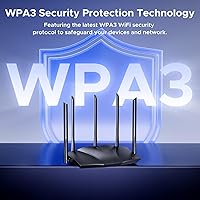
  • WPA3 security puts the RX12 Pro ahead of many budget competitors still defaulting to WPA2.
  • Subscription-free parental controls work reliably for families without ongoing costs.
  • Setup takes most users under fifteen minutes with no technical background required.
  • The Wi-Fi+ feature lets you add a second unit and extend coverage without complex configuration.
  • One-click network diagnostics helps non-technical users troubleshoot dropped connections on their own.
  • Strong 5 GHz throughput handles 4K streaming and casual gaming well in rooms near the router.
  • The web management interface is clean and accessible without being overly simplified.

Cons

  • WireGuard VPN requires a manual firmware update and is not available out of the box.
  • Coverage drops noticeably through multiple walls or across floors in larger homes.
  • The mobile app feels less polished and reliable than the browser-based management interface.
  • No USB port means there is no option for basic network storage or printer sharing.
  • Long-term durability is genuinely unknown given the April 2025 launch date.
  • Firmware updates are not automatic, leaving inattentive users on outdated software without realizing it.
  • Mesh expansion is locked to other RX12 Pro units, limiting flexibility if you want to mix hardware.
  • VPN configuration is not beginner-friendly and may require forum research to complete correctly.
  • Parental controls lack content-category filtering and detailed usage reporting for thorough monitoring.

Ratings

The Tenda RX12 Pro AX3000 WiFi 6 Router has been evaluated across thousands of verified global user reviews, with our AI model actively filtering out incentivized, bot-generated, and duplicate feedback to surface what real buyers actually experience. The scores below reflect a balanced picture — the genuine strengths that make this router stand out in its price tier, alongside the friction points that frustrated a meaningful portion of buyers. Nothing has been polished over.
Value for Money
88%
At its price point, getting a true WiFi 6 router with four gigabit ports, WPA3 security, and built-in VPN support is genuinely hard to beat. Most buyers feel they received significantly more capability than the price tag suggested, especially those upgrading from aging WiFi 5 routers.
A few users noted that paying for a second unit to extend coverage — which the Wi-Fi+ feature requires — nudges the total cost higher than initially expected. At that spending level, some competing brands offer tri-band options worth considering.
Setup & Ease of Use
91%
The out-of-box experience draws consistent praise. Most households report being online within ten minutes using the web interface, with no networking knowledge required. The physical port layout and quick-start guide are clear enough that even less tech-savvy family members handle it without help.
A smaller share of users found the mobile app experience lagging behind the web interface in polish and reliability. Those wanting to configure advanced features like VPN or custom DNS sometimes had to rely on community forums rather than official documentation.
WiFi Speed & Performance
83%
In apartments and smaller homes, the 5 GHz band delivers noticeably faster throughput for streaming and gaming compared to older WiFi 5 routers in the same budget range. Users running 4K video on multiple TVs simultaneously report very few buffering incidents when devices are within reasonable range.
Throughput degrades more than expected at longer distances or through multiple walls. The theoretical AX3000 ceiling is rarely approached in practice, and users in larger homes with tricky layouts found mid-range dead spots persisting even with five antennas in play.
Coverage & Range
71%
29%
For apartments and open-plan homes under roughly 1,500 square feet, the five high-gain antennas do a solid job maintaining a stable signal across the space. Many users report eliminating the dead zones that plagued their previous routers in kitchens and back bedrooms.
Multi-story homes or older construction with dense walls exposed the RX12 Pro's range limitations fairly quickly. Several buyers specifically noted that coverage claims felt optimistic for their specific environment, and signal quality dropped noticeably beyond two rooms or one floor.
VPN Support
79%
21%
Having OpenVPN and PPTP baked in at this price is a meaningful differentiator for remote workers who need a secure tunnel without paying for a separate VPN-capable router. Users who set up OpenVPN report it working stably once configured, with minimal performance hit on typical work traffic.
WireGuard — arguably the most useful modern VPN protocol — requires a manual firmware update and is not available out of the box, which catches some buyers off guard. The configuration interface for VPN features is functional but not beginner-friendly, and a few users reported difficulty generating or importing client certificates.
Multi-Device Handling
84%
OFDMA and MU-MIMO together make a real practical difference in busy households. Users juggling a dozen or more devices — smart plugs, laptops, phones, streaming sticks — report noticeably fewer slowdowns during peak evening hours compared to their previous single-stream routers.
Under heavy simultaneous load involving many high-bandwidth devices, some users noticed intermittent latency spikes. Gaming households with multiple consoles online at once occasionally report the RX12 Pro struggling to maintain consistent ping, particularly on the 5 GHz band.
Parental Controls
74%
26%
The built-in parental controls cover the basics well — website blocking, time scheduling, and per-device rules — all without requiring a paid subscription or cloud account. Parents with younger children find it a genuinely useful layer of protection that works reliably day to day.
Power users expecting category-based content filtering or detailed usage reports will find the feature set limited compared to dedicated parental control platforms. There is no mobile push notification system, so monitoring requires actively logging into the interface.
Build Quality & Design
76%
24%
The all-black finish and five upright antennas give it a purposeful, modern look that does not feel cheap for its tier. The chassis feels reasonably sturdy, vents are well-placed for airflow, and it runs noticeably cooler than some competing models in long sessions.
The plastic housing does flex slightly under pressure and does not convey premium durability. A handful of users also noted the unit gets warm after extended uptime, and since this is a newer product launched in April 2025, there is simply not enough long-term data yet to assess how it holds up over years of continuous use.
Firmware & Software Updates
67%
33%
Tenda has pushed meaningful updates since launch, with WireGuard support added post-release as a notable example. Users who stay current on firmware generally report fewer bugs and improved stability compared to the initial release experience.
The update process is not automatic by default, meaning less attentive users may run outdated firmware without realizing it. Some buyers also reported that a firmware update temporarily broke specific features, requiring a factory reset to resolve — a frustrating experience for households that had already customized their settings.
One-Click Diagnostics
72%
28%
The self-diagnosis tool is a genuinely useful addition for non-technical users who hit connection issues but have no idea where to start troubleshooting. Several buyers credited it with resolving dropped connections that would previously have required a call to their ISP.
The tool is effective for common issues but limited in scope — it cannot diagnose ISP-side problems or more nuanced routing conflicts. Users with complex network setups found it too simplistic to be of real value in diagnosing the root cause of their issues.
Guest Network & Security
81%
19%
WPA3 support is a welcome inclusion at this price level, giving users a more future-proof security baseline than the WPA2-only routers still common in this segment. The guest network feature works as expected, keeping visitor devices cleanly isolated from the main network.
Some users noted that the guest network configuration options are fairly basic, with no bandwidth throttling or time-limit controls available. Advanced users who want per-client firewall rules or VLAN segmentation will quickly find the security toolkit too shallow for their needs.
Wi-Fi+ Mesh Networking
69%
31%
For users who purchase a second unit to extend coverage, the Wi-Fi+ pairing process is genuinely simple — no manual IP configuration or controller app required. The handoff between units in a two-router setup works smoothly in most reported cases.
The mesh-like capability only works with other RX12 Pro units, locking users into the Tenda ecosystem if they want to expand. Performance in a multi-unit setup also lags behind dedicated mesh systems, and total cost quickly makes purpose-built mesh kits look competitive.
Port Selection & Wired Connectivity
86%
Four gigabit LAN ports is generous for this price tier and appreciated by users with wired desktops, NAS devices, or smart TVs. Wired connections are rock-solid and consistently deliver near-ISP-plan speeds with no noticeable bottleneck through the router hardware.
There is no USB port for network-attached storage or printer sharing, which rules this out for users who want a lightweight file-sharing hub. A dedicated WAN/LAN indicator beyond the basic LED setup would also have helped with quick at-a-glance troubleshooting.
Long-Term Reliability
63%
37%
Early adopters report stable uptime across the first several months of use, with most units running continuously without requiring reboots. The hardware thermals appear adequate, and no widespread failure patterns have surfaced in the initial review period.
This router launched in April 2025, so the honest answer is that the long-term reliability picture is genuinely unknown. One-year and two-year durability can only be assessed with time, and buyers should factor this uncertainty in — especially when comparing against established models with multi-year track records.

Suitable for:

The Tenda RX12 Pro AX3000 WiFi 6 Router is a practical choice for households in apartments or mid-sized homes where the priority is dependable, modern wireless performance without a steep price tag. If your current router struggles under the combined weight of smart home devices, a couple of streaming sticks, phones, and work laptops all running at once, this WiFi 6 router addresses exactly that kind of congestion. Remote workers who need a built-in VPN solution — OpenVPN in particular — will find real value here, since most routers in this bracket skip that feature entirely. Families benefit from the subscription-free parental controls, which handle basic scheduling and site blocking without requiring any ongoing payment or account setup. The setup process is genuinely approachable, so buyers who do not want to spend an evening reading networking documentation will feel comfortable getting it running quickly.
Not suitable for:

The Tenda RX12 Pro AX3000 WiFi 6 Router is not the right call for buyers with large, multi-story homes or older construction where thick walls and floor separations demand serious range — five antennas will only go so far, and dedicated mesh systems will serve those layouts better. Power users who want granular control over QoS settings, VLAN configurations, VPN kill switches, or detailed per-device traffic monitoring will hit the ceiling of this router's software fairly fast. WireGuard is not available straight out of the box and requires a manual firmware update, which is an inconvenience for anyone expecting it as a ready-to-go feature. Since this is a newer product with a launch date of April 2025, buyers who specifically need a proven, long-term reliability track record should factor in that the multi-year durability picture is still unknown. Households that want a single router to cover more than roughly 2,000 square feet reliably should look at purpose-built mesh kits, where the cost-per-coverage math often works out better.
Specifications

  • WiFi Standard: The router operates on 802.11ax, commonly known as WiFi 6, providing improved efficiency and throughput compared to the previous WiFi 5 generation.
  • Band Configuration: Dual-band design broadcasts simultaneously on both 2.4 GHz and 5 GHz frequencies to balance range and speed across different devices.
  • 5 GHz Speed: The 5 GHz band delivers a maximum theoretical throughput of 2402 Mbps, best suited for high-bandwidth tasks like 4K streaming and online gaming.
  • 2.4 GHz Speed: The 2.4 GHz band reaches up to 574 Mbps, offering broader range for smart home devices, IoT gadgets, and devices farther from the router.
  • Antennas: Five external 6dBi high-gain antennas work alongside internal signal enhancement modules to extend wireless coverage throughout the home.
  • LAN Ports: Four gigabit Ethernet LAN ports provide wired connectivity for devices such as desktop computers, smart TVs, and NAS drives.
  • VPN Protocols: Supports OpenVPN, PPTP, and L2TP natively; WireGuard support is available via a firmware update and is not enabled out of the box.
  • Security Protocol: WPA3 encryption is supported as the primary wireless security standard, alongside backward-compatible WPA2 for older client devices.
  • Key Technologies: MU-MIMO and OFDMA are both implemented to improve simultaneous multi-device communication and reduce latency under heavy network load.
  • Beamforming: Beamforming technology focuses wireless signal toward connected devices rather than broadcasting omnidirectionally, improving per-device signal quality.
  • Parental Controls: Built-in parental controls support per-device scheduling and website restrictions with no subscription or third-party account required.
  • Guest Network: A dedicated guest network mode isolates visitor devices from the main local network for improved household security.
  • Mesh Capability: The proprietary Wi-Fi+ feature allows multiple RX12 Pro units to be linked into a simple whole-home network without manual configuration.
  • Dimensions: The unit measures 10.51 x 6.54 x 8.74 inches, making it a moderately sized desktop router suitable for shelves or open surfaces.
  • Weight: At 1.7 pounds, the router is lightweight enough to reposition easily during initial placement and setup.
  • Color & Finish: Available in a matte black finish that suits most home and small-office environments without drawing visual attention.
  • Included Contents: The package includes the router unit, a power adapter, one RJ45 Ethernet cable, and a printed quick installation guide.
  • Availability Date: First listed for sale in April 2025, making it a relatively recent product with a still-developing long-term reliability track record.

Related Reviews

Tenda RX2Pro AX1500 WiFi 6 Router
76%
91%
Value for Money
78%
Wireless Performance
72%
Coverage & Range
93%
Ease of Setup
74%
App Experience
More
Cudy WR3000 AX3000 WiFi 6 Router
75%
91%
Value for Money
78%
Wireless Performance
88%
Setup & Ease of Use
58%
App & Software Experience
74%
VPN Functionality
More
Tenda MX12 AX3000 Mesh WiFi 6 System
82%
88%
Performance
79%
Ease of Setup
93%
Coverage Area
85%
Speed & Reliability
82%
Multi-Device Support
More
ASUS RT-AX88U PRO WiFi 6 Router
77%
88%
Wireless Performance
84%
Range & Coverage
91%
Multi-Device Handling
57%
Setup Experience
79%
Build Quality
More
Tenda BE5100 WiFi 7 Router
79%
83%
Wireless Performance
91%
Setup Experience
74%
Signal Coverage
88%
Value for Money
63%
App & Management Interface
More
D-Link AX3000 M30 WiFi 6 Mesh Router
78%
74%
WiFi Coverage & Range
78%
WiFi Speed & Throughput
88%
Setup & Installation
71%
App Experience
83%
Parental Controls
More
TP-Link Archer AX72 Pro WiFi 6 Router
87%
89%
WiFi Performance
92%
Value for Money
94%
Ease of Setup
88%
Security Features
83%
Range and Coverage
More
ASUS EBR63 AX3000 WiFi 6 Business Router
77%
88%
Ease of Setup
84%
App & Remote Management
86%
Guest Portal Customization
83%
Network Segmentation
74%
WiFi Speed & Performance
More
D-Link G530 5G AX3000 WiFi 6 Router
84%
89%
Performance
91%
Wi-Fi Speed & Range
84%
Setup & Installation
87%
Dual-WAN Failover
88%
App Experience & Remote Management
More
ASUS ROG Rapture GT-AX11000 Pro
77%
91%
Wireless Performance
93%
Wired Port Flexibility
82%
Gaming Features
61%
Setup & Configuration
89%
Network Security
More

FAQ

Not at all. The RX12 Pro is designed with straightforward setup in mind — most users report being fully online within ten to fifteen minutes using the web-based management interface. You plug in the router, connect it to your modem, open a browser, and follow the on-screen prompts. No networking background required.

Not immediately. WireGuard support was added through a firmware update after launch, so you will need to update the firmware before that option appears in your VPN settings. OpenVPN, PPTP, and L2TP are available without any update required. Just make sure to check for the latest firmware shortly after setup.

The Tenda RX12 Pro AX3000 WiFi 6 Router is built to manage a busy household network, and the combination of MU-MIMO and OFDMA technology helps it handle many simultaneous connections without the slowdowns you would see on older routers. In practice, most households with fifteen to twenty connected devices report stable performance for typical daily use.
That depends a lot on your floor plan and construction type. In apartments or open single-story homes up to around 1,500 square feet, coverage is generally solid. In multi-story homes or buildings with thick concrete or brick walls, signal can drop off more than expected. The five antennas help, but they are not a substitute for a dedicated mesh system in genuinely large or complex spaces.

Yes, the Wi-Fi+ feature is specifically designed for this. You can pair two RX12 Pro units together without going through any complicated configuration — they link up and create a unified network automatically. The catch is that it only works with other RX12 Pro units, so you cannot mix it with routers from other brands.

No subscription is needed, which is one of the more practical things about this router at its price point. You manage parental controls directly through the web interface, where you can set schedules and block specific sites on a per-device basis. There is no cloud account required and no monthly fee.

Yes, it works as a standard router with any ISP that provides a modem or ONT with an Ethernet output, which covers the vast majority of cable, fiber, and DSL providers. Just connect the WAN port to your modem and you are good to go. If your ISP uses PPPoE, that is configurable in the setup interface.

The router includes a one-click diagnostic tool in the web management interface that runs a self-check and attempts to repair common issues automatically. For most everyday problems like dropped connections or sudden slowdowns, this resolves things without needing to contact support or restart the router. For more persistent issues, a firmware update is often the recommended first step.

No, there is no USB port on this router. If you need network-attached storage or USB printer sharing, you will need a router that specifically includes a USB port, as this is not a feature the RX12 Pro offers.

It launched in April 2025, so it is a relatively recent product. Early user feedback is broadly positive, and no widespread hardware failure patterns have emerged so far. That said, if long-term durability over several years is a priority for you, it is fair to acknowledge that the multi-year track record simply does not exist yet for this specific model.

Where to Buy