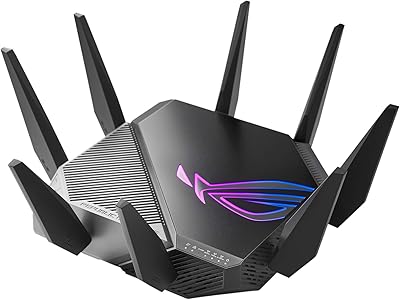
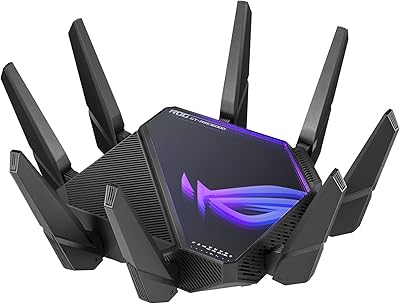
Overview

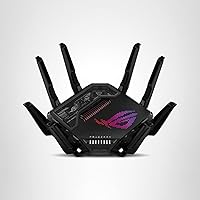
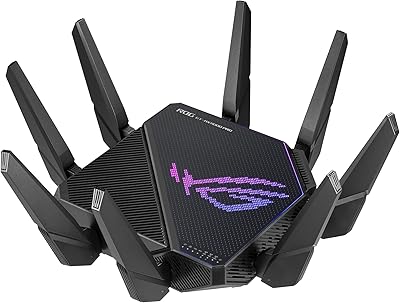
The ASUS ROG Rapture GT-BE98 Pro represents a serious leap into WiFi 7 territory, built for households where network demands never let up. Unlike the incremental jump from WiFi 5 to 6, WiFi 7 introduces genuinely meaningful changes — wider channels, smarter band usage, and far greater capacity under load. The dual 10G wired ports alone set it apart from most consumer routers. This is not a router for the casual user with a few laptops and a smart TV. It targets power users, competitive gamers, and anyone managing a dense home network where lag or congestion actually costs something.

Features & Benefits

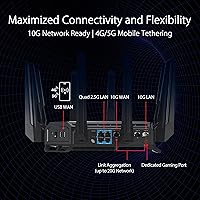
WiFi 7 brings 320MHz channel support in the 6GHz band, which in plain terms means more data moving through the air at once — noticeably better in crowded environments. Multi-Link Operation lets devices connect across multiple bands simultaneously rather than committing to just one, which stabilizes connections during peak usage. The wired side is equally capable, with dual 10G ports ideal for a NAS or a high-end gaming PC and four additional 2.5G ports for everything else. Triple-level game acceleration prioritizes gaming traffic from your device all the way to the server. Security and VPN are built in, with no ongoing subscription required.

Best For

This WiFi 7 router makes the most sense for households juggling 20 or more devices — smart home gear, consoles, laptops, phones — all competing for bandwidth at once. Competitive gamers who genuinely notice a 10ms latency difference will appreciate the dedicated game acceleration and Mobile Game Mode. Content creators or remote workers shuffling large files across a local network will put those 10G ports to real use. It also suits early adopters who want their infrastructure ready before WiFi 7 client devices become widespread. Just know that most current devices cannot yet take full advantage of WiFi 7 speeds.

User Feedback

Across more than 1,000 ratings, the GT-BE98 Pro holds a solid 4.3-star average, which reflects genuine satisfaction with some honest reservations mixed in. Buyers consistently praise the ASUS app setup experience and the build quality, and many report real-world speed improvements over their previous routers. The criticisms are worth noting, though: this router is physically large and heavy, and the interface can overwhelm users who are not networking-savvy. A handful of buyers flagged heat buildup during extended use and occasional friction with firmware updates. Most who invested at this premium price point say the performance justifies the cost — but only if you actually need what it offers.

Pros

  • Quad-band WiFi 7 with 320MHz channels handles congested, device-heavy networks with noticeable headroom to spare.
  • Dual 10G ports make local file transfers dramatically faster for users with compatible NAS or PC hardware.
  • Multi-Link Operation keeps connections stable by linking to multiple bands at once — fewer dropped sessions during peak usage.
  • Triple-level game acceleration reduces latency at the device, ISP, and server level for competitive online play.
  • AiProtection delivers solid network security with no recurring subscription fee attached.
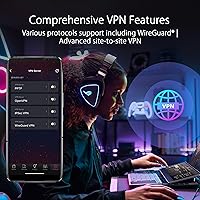
  • Built-in VPN server and client means whole-network VPN routing without installing software on every device.
  • AiMesh support lets you expand coverage by adding compatible ASUS nodes without replacing the entire setup.
  • The ASUS router app makes initial setup accessible, even for users who have never configured a router manually.
  • Mobile Game Mode specifically targets smartphone gaming latency — a niche but real improvement during busy household hours.
  • Build quality is premium and the antennas are solidly constructed, with RGB that can be fully disabled for a cleaner look.

Cons

  • Most current WiFi 7 client devices are still rare, so the headline throughput gains are largely theoretical for average households today.
  • The router is physically large and heavy — finding a practical spot for it requires planning, not just plugging it in.
  • Advanced settings like QoS, VPN, and AiMesh management have a steep learning curve that frustrates non-technical users.
  • Firmware updates have occasionally reset custom configurations, requiring buyers to manually rebuild their settings from scratch.
  • Under sustained high-throughput loads, heat buildup becomes noticeable and a small number of users have reported thermal-related reboots.
  • Band steering does not always make smart automatic decisions, sometimes requiring manual device-to-band assignment for consistent results.
  • Unlocking the full value of the 10G ports requires additional compatible hardware that adds meaningfully to total cost.
  • The GT-BE98 Pro is priced at a tier that only pays off for users with genuinely complex network demands — most buyers do not qualify.
  • VPN throughput under heavy encryption can slow noticeably, requiring trade-offs between security settings and speed.
  • The ASUS ecosystem lock-in is real — AiMesh only works with other ASUS nodes, limiting flexibility if you want to mix hardware brands.

Ratings

The ASUS ROG Rapture GT-BE98 Pro earns an overall 4.3-star consensus drawn from over 1,000 verified global buyers, and the scores below reflect what our AI found after filtering out incentivized, duplicate, and bot-flagged submissions. What remains is an honest cross-section of real user experiences — from network engineers who stress-tested every port to everyday gamers who just wanted faster, more stable connections. Strengths are recognized where earned, and recurring frustrations are called out just as clearly.

Wireless Performance
93%
Users upgrading from WiFi 6 or 6E routers consistently report a tangible difference in throughput, especially in homes where multiple 4K streams, cloud backups, and gaming sessions overlap. The 6GHz band's wider channels handle congestion in apartment buildings and dense neighborhoods far better than predecessors.
The full performance ceiling is only accessible with WiFi 7 client devices, which remain rare in most households as of now. Early adopters running mostly WiFi 6 gear will see improvements, but not the dramatic leap the spec sheet implies.
Wired Connectivity
91%
The dual 10G ports are a genuine differentiator for users with a high-speed NAS, a 10G switch, or a gaming PC that can saturate a gigabit connection. File transfers across a local network that used to take minutes now finish in seconds for those with compatible hardware.
Getting full use of the 10G ports requires additional 10G-capable network cards or switches, which adds cost and complexity. Users without that supporting hardware are essentially paying for ports they cannot fully use yet.
Gaming Performance
89%
Competitive gamers running titles like Valorant or CS2 noted measurably lower and more consistent ping when the router's traffic prioritization was active. The Mobile Game Mode also impressed smartphone gamers who previously dealt with spiking latency during peak household usage hours.
Triple-level game acceleration works best when most of your gaming traffic is routed through a designated LAN port, which requires some manual setup. Users who just plugged it in without configuring QoS settings did not always see the promised latency improvements out of the box.
Setup & App Experience
78%
22%
Most buyers found the initial setup via the ASUS Router app surprisingly painless for a router this complex — guided steps, clear prompts, and automatic band configuration handled the basics well. Non-technical users appreciated not needing to touch a browser-based interface to get online quickly.
Once beyond the basics, the app becomes noticeably harder to navigate. Advanced features like VPN configuration, AiMesh node management, and QoS tuning are buried in menus that assume a certain level of networking knowledge, frustrating users who expected the simplicity to carry through.
Build Quality & Design
86%
The physical construction feels appropriately premium — solid plastic chassis, well-anchored antennas, and a sturdy base that does not shift on a desk or shelf. The ROG aesthetic is aggressive but not garish, and the RGB accent lighting can be dimmed or disabled entirely for those who prefer a low-profile setup.
At 4.4 pounds and nearly 14 inches across, this router demands real estate. Several buyers were caught off guard by its footprint and had to reorganize their home office or entertainment center to accommodate it. It is not a discreet piece of hardware.
Heat Management
67%
33%
Under normal mixed-use loads — streaming, browsing, moderate gaming — the router runs warm but within acceptable limits. The passive cooling design handles everyday traffic without any throttling or performance degradation during typical household hours.
Extended high-throughput sessions, particularly with multiple active 10G transfers or prolonged gaming, pushed surface temperatures higher than some users were comfortable with. A small number of reviewers reported occasional reboots after long periods under heavy sustained load, pointing to thermal limits under extreme conditions.
Range & Signal Coverage
84%
The external dual-feeding antennas do meaningful work in larger homes, pushing reliable signal into rooms that previous routers struggled to reach consistently. Users in two-story homes with thick interior walls were generally satisfied with the coverage without needing to add a mesh node.
In very large properties or homes with challenging layouts — concrete walls, multiple floors, long horizontal footprints — coverage still drops off and a second AiMesh node becomes necessary. The router handles range well for its class, but it is not a substitute for a proper mesh system in sprawling spaces.
AiMesh & Mesh Networking
82%
18%
For users already invested in the ASUS ecosystem, AiMesh integration works reliably and expands coverage without requiring a full system replacement. Backhaul connections between nodes held up well during testing reported by buyers who combined the GT-BE98 Pro with older ASUS routers as satellite nodes.
AiMesh is only useful if you own other compatible ASUS hardware. Buyers coming from a different brand have no plug-and-play mesh path here, and purchasing additional ASUS nodes to build out a mesh adds considerably to an already steep total cost.
Security Features
88%
The subscription-free AiProtection is a genuine value-add that competing routers often lock behind a recurring fee. It handles malicious site blocking, intrusion prevention, and infected device isolation without requiring any account setup or ongoing payment.
AiProtection is powered by Trend Micro technology, and users who prefer open-source or self-hosted security solutions have no alternative within the ASUS interface. The protection is solid for most households but is not customizable enough for security-focused power users.
VPN Capabilities
79%
21%
Having both a VPN server and client built directly into the router is a real convenience for remote workers who need to access home network resources while traveling, or for users who want to route all household traffic through a commercial VPN without configuring each device individually.
VPN throughput, particularly on WireGuard configurations, is adequate but not exceptional at high speeds. Users pushing large amounts of traffic through an active VPN tunnel occasionally reported speed reductions that required adjusting encryption settings to find a workable balance.
Firmware & Software Updates
71%
29%
ASUS has a reasonably active firmware update cadence, and several buyers noted that post-launch updates resolved early stability issues and added feature refinements. The router checks for updates automatically and notifies users without forcing immediate installation.
A recurring complaint involved firmware updates occasionally resetting custom configurations or temporarily breaking specific features, requiring users to reconfigure settings from scratch. The update process itself is not always smooth, and a handful of reviewers experienced brief outages mid-update that required a manual reboot.
Value for Money
63%
37%
For the specific buyer this router is built for — someone with a dense device environment, 10G-capable hardware, and a genuine need for low-latency gaming infrastructure — the feature set delivers real, measurable return on investment that cheaper routers simply cannot match.
For everyone else, the price is difficult to justify. Most households do not yet have the client hardware to unlock WiFi 7 benefits, which means a large portion of what you are paying for sits dormant. Comparable performance for typical home use is achievable at a significantly lower price point.
Multi-Device Handling
87%
Users with smart home ecosystems, multiple gaming consoles, work laptops, and streaming devices running simultaneously reported noticeably fewer slowdowns and dropped connections compared to their previous routers. The quad-band architecture genuinely distributes load more effectively across device categories.
Band steering — the router's ability to automatically assign devices to the optimal band — does not always make ideal decisions, particularly for older or less communicative smart home devices. Some users found they needed to manually assign stubborn devices to specific bands to get consistent performance.
Mobile Game Mode
76%
24%
Smartphone gamers saw real improvements in latency consistency when Mobile Game Mode was active during peak household hours, which is exactly the scenario it is designed for. Users playing mobile titles on a busy home network found it reduced the random lag spikes that typically occur when bandwidth is contested.
The feature requires manual activation and does not automatically detect mobile gaming sessions. Users who are not aware it exists or who forget to toggle it will not benefit from it, and the ASUS app interface does not make it especially prominent or easy to locate.

Suitable for:

The ASUS ROG Rapture GT-BE98 Pro was built for a specific kind of buyer, and it delivers best when that buyer actually shows up. If your household runs 20 or more connected devices simultaneously — smart home gear, multiple consoles, work laptops, 4K streaming boxes — this WiFi 7 router handles that chaos better than virtually anything else in its class. Competitive gamers who feel every millisecond of latency will find the traffic prioritization and dedicated gaming port logic genuinely useful, not just marketing language. Content creators or remote professionals who regularly shift large files between local machines will put the dual 10G ports to real, daily use. It also makes sense for home lab enthusiasts who want a built-in VPN server, AiMesh expansion capability, and subscription-free security without stitching together third-party solutions. Early adopters who want their network infrastructure ready before WiFi 7 client devices become the norm in two or three years will find the investment reasonable — provided they can tolerate some underutilized headroom in the short term.
Not suitable for:

The ASUS ROG Rapture GT-BE98 Pro is a poor match for buyers whose needs do not align precisely with its premium positioning. If your home has fewer than ten devices, a standard ISP-provided router or a mid-range WiFi 6 option will cover your actual usage without the cost or complexity. Casual users who want to plug in a router and forget about it will find the advanced interface and firmware management more burden than benefit — especially if a firmware update ever wipes a custom configuration. Apartment dwellers or renters in smaller spaces are also overpaying for range and capacity they simply cannot use. Buyers without 10G-capable network cards, switches, or NAS devices will find the flagship wired ports wasted on their setup. And anyone on the fence about the price should think carefully: if your current client devices are all WiFi 6 or older, the headline WiFi 7 throughput remains theoretical for your household until you upgrade those devices too.

Specifications

  • WiFi Standard: This router operates on the 802.11be (WiFi 7) standard, the latest generation of wireless networking technology available for consumer hardware.
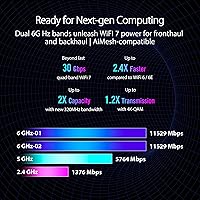
  • Frequency Bands: Quad-band architecture covers 2.4GHz, two separate 5GHz bands, and a 6GHz band, allowing traffic to be distributed across four independent wireless channels simultaneously.
  • Max Throughput: Combined theoretical wireless throughput reaches up to 30 Gbps across all bands under ideal conditions.
  • Channel Width: The 6GHz band supports 320MHz channel widths, doubling the maximum channel size available on WiFi 6E hardware.
  • Modulation: 4096-QAM modulation encodes significantly more data per transmission cycle compared to the 1024-QAM ceiling found on WiFi 6E devices.
  • 10G Ports: Two 10-Gigabit Ethernet ports are included for direct connection to high-speed NAS devices, 10G switches, or compatible gaming PCs.
  • 2.5G Ports: Four 2.5-Gigabit Ethernet ports provide additional wired connectivity for devices that exceed standard gigabit speeds.
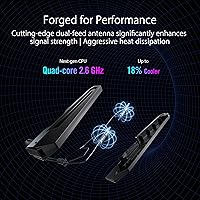
  • Antenna Design: External dual-feeding antennas are used to improve signal efficiency and extend reliable coverage range compared to conventional single-feed antenna designs.
  • Dimensions: The router measures 13.7″ x 8.6″ x 13.7″, requiring a dedicated surface area in any installation environment.
  • Weight: At 4.4 pounds, this is a physically substantial unit that is not well-suited for wall mounting or tight shelf installations.
  • Security: ASUS AiProtection provides real-time network threat blocking, malicious site filtering, and infected device isolation with no subscription fee required.
  • VPN Support: Both a VPN server and VPN client are built into the router firmware, supporting OpenVPN and WireGuard protocols for whole-network routing.
  • Mesh Support: Full AiMesh compatibility allows this router to function as the primary node in a multi-unit ASUS mesh network using compatible ASUS hardware as satellite nodes.
  • Game Acceleration: Triple-level game acceleration prioritizes gaming traffic at the device port, across the ISP connection, and at the game server level through integrated traffic management.
  • Mobile Game Mode: A dedicated Mobile Game Mode reduces latency specifically for smartphone and tablet gaming sessions on the local wireless network.
  • MU-MIMO: Multi-user MIMO support allows the router to communicate with multiple devices simultaneously rather than cycling through them sequentially.
  • Multi-Link Operation: MLO enables compatible WiFi 7 client devices to maintain simultaneous connections across multiple frequency bands for improved stability and redundancy.
  • Connectivity: In addition to wired and wireless connections, the router includes USB ports for network-attached storage sharing or printer server functionality.
  • Color & Finish: The unit ships in black with ROG-branded styling and configurable RGB accent lighting that can be fully disabled through the ASUS app.
  • In the Box: The package includes the GT-BE98 Pro router, a power adapter, a Quick Start Guide, one RJ-45 cable, and a warranty card.

Related Reviews
ASUS ROG Rapture GT-AX11000 Pro
77%
91%
Wireless Performance
93%
Wired Port Flexibility
82%
Gaming Features
61%
Setup & Configuration
89%
Network Security
More
ASUS ROG Rapture GT-AXE16000 WiFi 6E Gaming Router
86%
91%
Performance for Gaming
89%
WiFi Speed & Stability
65%
Ease of Setup
92%
Build Quality
87%
Software & Firmware Features
More
ASUS ROG Rapture GT-AX6000 WiFi 6 Gaming Router
86%
94%
Gaming Performance
91%
Connection Stability
78%
Setup/Installation Ease
88%
Value for Money
85%
Build Quality
More
ASUS ROG Rapture GT-AXE11000 WiFi 6E Gaming Router
81%
91%
Gaming Performance
89%
WiFi Speed & Coverage
87%
Network Stability
85%
Setup & Installation
64%
Compatibility with Older Devices
More
ASUS ROG Rapture GT6 Tri-Band WiFi 6 Gaming Router
87%
94%
Gaming Performance
84%
Setup Ease
91%
Wi-Fi Coverage
89%
Value for Money
87%
Speed Consistency
More
ASUS ROG Maximus Z790 Hero
87%
94%
Overclocking Performance
89%
Cooling Effectiveness
91%
Build Quality
86%
Networking Capabilities
93%
Power Delivery & Stability
More
ASUS Prime X470-Pro Motherboard
86%
89%
Overall Performance
91%
Build Quality
85%
Ease of Setup
88%
Cooling Efficiency
83%
RGB Customization
More
ASUS ROG Strix XG27AQDMG 27″ OLED
88%
96%
Display Quality
94%
Response Time
95%
Refresh Rate Performance
92%
Color Accuracy
89%
Build Quality
More
ASUS ROG Maximus Z890 Hero Motherboard
88%
96%
Performance
94%
Thermal Design & Cooling
92%
Power Delivery & Stability
90%
Connectivity (WiFi 7 & Thunderbolt 4)
89%
AI Features (Overclocking & Cooling)
More
ASUS ROG Hyperion GR701 White Edition
86%
95%
Build Quality
93%
Cooling Performance
87%
Ease of Installation
75%
Size and Weight
92%
Airflow Efficiency
More

FAQ

Not entirely, but your gains will be limited if all your current devices are WiFi 6 or older. You will still see improvements from the better hardware, smarter traffic management, and less congestion across bands — but the full throughput ceiling only unlocks when your client devices also support WiFi 7. Think of it as future-proofing your network so you do not have to replace the router again in two years.

The initial setup through the ASUS Router app is genuinely straightforward — most users are online within 15 minutes following the guided prompts. The complexity shows up later, when you try to configure things like VPN tunnels, AiMesh nodes, or advanced QoS rules. If you only need basic setup, it is manageable. If you want to dig into the advanced features, expect a learning curve and some time spent in the settings menus.

No. AiMesh only works with other compatible ASUS routers, so you cannot pair this with a Netgear, TP-Link, or Eero satellite node. If you want to expand your network using mesh, you will need to add another ASUS router that supports AiMesh as a secondary node.

Honestly, probably not. If your household has fewer than 10 devices and your main activities are browsing, streaming, and occasional gaming, a mid-range WiFi 6 router will cover your needs at a fraction of the cost. This router earns its price in genuinely demanding environments — dense device loads, 10G local networking, or serious competitive gaming setups.

For online gaming against internet servers, not really — your internet connection speed is the limiting factor there, not your LAN port. Where the 10G ports matter is for local network transfers: moving large game libraries, video files, or backups between a NAS and a PC at high speeds. If you do not have a 10G-capable NAS or PC network card, those ports will effectively function at lower speeds.

Under normal mixed loads it runs warm but stable. During extended heavy sessions — particularly if you are pushing multiple 10G transfers alongside active wireless traffic — it gets noticeably hot. A small number of users have reported occasional reboots under sustained extreme loads. Placing it in a well-ventilated spot rather than an enclosed cabinet makes a meaningful difference.

It should not, but it has happened to a portion of users, based on real buyer reports. ASUS does not typically design updates to reset configurations, but some updates have caused settings to revert — particularly advanced routing rules and VPN configurations. It is a good habit to export your settings backup before applying any major firmware update, just in case.

Yes, access point mode is a supported configuration. This is useful if your ISP provides a modem-router combo that you want to keep handling WAN duties while this unit manages the WiFi and wired switching. Setup for this mode is available through the ASUS app and web interface.

AiProtection covers the essentials well — blocking known malicious domains, preventing intrusion attempts, and isolating compromised devices on your network. For a typical household, it is more than adequate. Security researchers or users running sensitive home lab environments may find the lack of deep customization limiting, but for everyday protection it is a legitimate no-cost feature that competing routers often charge for.

No, the RGB lighting is purely cosmetic and has no impact on wireless performance or thermal output. If you prefer a cleaner look, it can be fully disabled through the ASUS Router app without affecting any other functionality. Many users in home office environments choose to turn it off entirely.