Overview

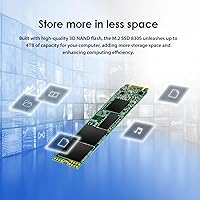
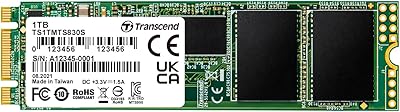
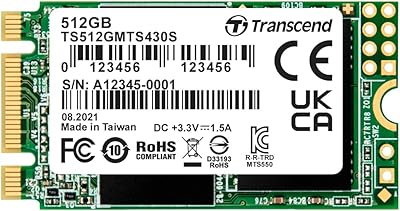
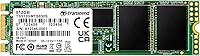
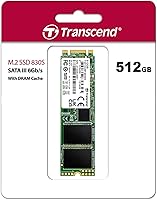
The Transcend MTS830S 512GB M.2 SSD is a straightforward, dependable storage upgrade aimed squarely at people replacing aging hard drives or building budget-conscious systems. It uses the M.2 2280 form factor with a SATA III interface — which means it fits into the vast majority of modern laptops and desktops without compatibility headaches. Transcend has built a quiet reputation for producing reliable, no-nonsense storage, and this drive fits that mold well. It won't compete with NVMe speeds, and it's not trying to. For everyday computing — browsing, office work, light media — this SATA SSD delivers a practical performance step-up without demanding a premium price.
Features & Benefits

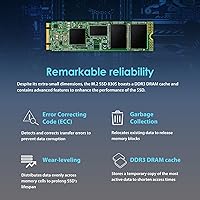
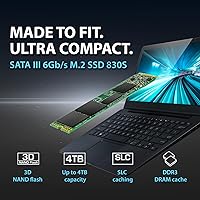
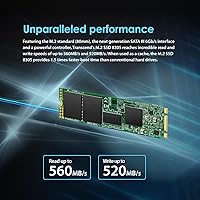
The MTS830S runs on 3D TLC NAND flash, which stacks memory cells vertically rather than spreading them flat — a design that improves both density and longevity compared to older planar NAND. A DDR3 DRAM cache sits alongside the NAND to hold frequently accessed data closer to the controller, reducing latency and keeping read/write performance consistent during typical use. Sequential reads reach up to 560 MB/s and writes up to 520 MB/s — solid figures for a SATA drive, though worth understanding these reflect benchmark peaks, not constant real-world throughput. LDPC error correction adds meaningful data integrity protection, and the B+M Key design ensures compatibility across a wide range of consumer laptops and desktops.

Best For

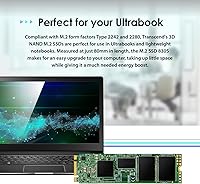
This Transcend M.2 drive makes the most sense for a specific kind of buyer. If you're pulling a slow mechanical hard drive from an older laptop or ultrabook — especially one with an M.2 SATA slot that can't run NVMe — this is a natural fit. Students running an OS and a handful of apps will notice a real difference. Home users wanting faster everyday performance and desktop builders on a tight budget will find it a sensible choice too. It also quietly fills an important niche: systems physically limited to SATA M.2 have no NVMe option anyway, making this SATA SSD a practical default, not just a cheap one.

User Feedback

Buyers consistently highlight the easy installation process — even first-timers doing their first SSD swap found it manageable with basic tools. Boot times and application load speeds draw regular praise, especially from users migrating off traditional spinning drives. On the less positive side, a handful of buyers note that sustained write speeds can taper off under prolonged, heavy workloads — a known behavior of TLC NAND at this tier, not something unique to this drive. A few users also flagged minor compatibility issues with certain laptop models, so confirming your machine's M.2 slot type beforehand is a smart move. Overall, most buyers feel the price-to-performance ratio holds up well against other SATA M.2 options in the same bracket.

Pros

  • Noticeably faster boot times and app launches compared to any mechanical hard drive
  • DDR3 DRAM cache keeps everyday read and write performance consistent, not just impressive in benchmarks
  • LDPC error correction adds a layer of data integrity protection most budget drives skip
  • B+M Key design means broad compatibility across a wide range of laptops, ultrabooks, and desktops
  • 512GB capacity is practical and roomy for students, home users, and light office workloads
  • 3D TLC NAND offers better durability and data retention than older planar NAND technology
  • Installation is straightforward enough for first-time upgraders with basic tools and a tutorial
  • Transcend has a long track record of building reliable, no-drama storage products
  • Compact 2280 form factor slots cleanly into most systems without adapters or extra hardware
  • Solid choice for SATA-only M.2 slots where NVMe simply isn't a viable alternative

Cons

  • Sustained write speeds drop under prolonged heavy workloads, which TLC NAND drives at this tier commonly experience
  • No NVMe performance — the SATA III interface is a hard ceiling that no firmware update can overcome
  • A few users have reported compatibility hiccups with specific laptop models, so confirming slot type beforehand matters
  • Sequential speed figures look strong on paper but real-world throughput in mixed workloads is more modest
  • Not a strong fit for anyone planning to store large media libraries — 512GB fills up faster than expected with video files
  • Warranty terms and endurance ratings are not as generous as some competing drives at a similar price
  • Limited appeal for anyone whose system already supports NVMe, where better options exist for little extra cost
  • No hardware encryption support noted, which may matter to security-conscious business users

Ratings

The ratings below for the Transcend MTS830S 512GB M.2 SSD were generated by our AI system after analyzing verified buyer reviews from multiple global markets, with spam, bot submissions, and incentivized feedback actively filtered out. Scores reflect the honest spread of real-world user experiences — not just the highlights — so both the strengths and the friction points are transparently represented. Where this SATA SSD earns trust, the scores show it; where buyers have run into limits, those are reflected too.
Real-World Speed
82%
18%
For everyday computing tasks — booting Windows, launching Chrome with a dozen tabs, opening Office files — users consistently describe a dramatic step up from mechanical hard drives. The DRAM cache keeps performance stable during typical mixed workloads, which is where many budget drives without cache tend to stutter.
Benchmark numbers look great on paper, but sustained write performance during large file transfers does slow down noticeably once the cache fills. Users doing creative work or moving large folders were more likely to notice this ceiling than those running standard home or student workloads.
Value for Money
88%
Buyers repeatedly describe this Transcend M.2 drive as a smart spend, particularly those upgrading older laptops that were barely usable with spinning hard drives. Getting DRAM cache and LDPC error correction at this price tier is something users genuinely appreciate when they compare notes with similar drives.
A handful of reviewers feel that newer competitors have closed the gap, occasionally offering comparable specs at a similar or lower price. For buyers who shop carefully, the value case is strong but no longer unchallenged in this segment.
Compatibility
79%
21%
The B+M Key design and standard 2280 footprint mean this SATA SSD slots into the vast majority of consumer laptops, ultrabooks, and desktop motherboards without adapters or extra hardware. Most users report a clean, no-fuss physical installation experience.
A recurring minority of buyers flagged detection issues with specific laptop models — particularly some budget ultrabooks and a few older Dell and HP machines — where BIOS didn't recognize the drive immediately. Always worth checking your machine's compatibility list before buying rather than assuming it will just work.
Installation Experience
91%
First-time upgraders consistently call out how straightforward the physical swap is — one screw, a gentle angled insertion, and the drive is seated. Users who had never opened a laptop before describe completing the installation in under 20 minutes with help from online tutorials.
The drive ships without cloning software or any migration utility, which caught some buyers off guard. Those who assumed a data transfer tool was included had to sort out third-party solutions on their own, adding an extra step that felt like an omission at this price point.
Boot & Load Times
89%
This is where buyers get the most visible payoff. Users migrating from HDDs report Windows boot times dropping from over a minute to under 15 seconds, and applications like Photoshop or Visual Studio Code launching in a fraction of their previous time. For students and home office users, this alone justifies the purchase.
While the improvement over HDDs is stark, users coming from 2.5-inch SATA SSDs report a less dramatic difference. The gains are real but modest in that context, which is worth setting expectations around if you're already running any form of SSD.
Build Quality
77%
23%
The drive feels solid and well-manufactured for its weight class. At just 0.282 ounces, it's impressively light without feeling flimsy, and the green PCB finish is a minor but appreciated aesthetic touch that users in enthusiast builds mention with mild fondness.
There's no heatsink included, and the bare PCB design means thermal management is entirely dependent on the host system's airflow. In compact ultrabooks with poor ventilation, a few users noted the drive running warmer than expected under sustained load.
Endurance & Longevity
71%
29%
For typical home, student, and light office use, the 3D TLC NAND holds up reliably over time. Most buyers using it as an OS and application drive report no degradation in performance after a year or more of daily use, which aligns with expected TLC endurance at normal write volumes.
This is not an enterprise-grade drive, and buyers who treat it like one will be disappointed. Heavy write workloads — think daily large database operations or constant video ingest — will push TLC NAND harder than it was designed for, and Transcend's published endurance ratings reflect that ceiling honestly.
Error Correction & Data Integrity
86%
LDPC error correction is a feature buyers rarely think about until they need it, and having it here provides meaningful peace of mind for users storing important documents, coursework, or work files. It actively catches and corrects bit-level errors before they surface as data loss.
LDPC is a standard feature on well-designed drives, so it's less a differentiator and more a baseline expectation. Buyers should not interpret its presence as a substitute for regular backups — it handles controller-level errors, not catastrophic drive failure.
Sustained Write Performance
63%
37%
For routine file operations — saving documents, downloading software updates, syncing a few gigabytes of files — the drive handles the task without any noticeable hesitation. The DRAM cache absorbs short burst writes effectively, keeping the experience smooth for typical users.
Once the write cache is saturated during large transfers, speeds drop to native TLC write rates, which are considerably lower than the advertised peak figures. Users copying multi-gigabyte archives or writing large video files in one go will see this slowdown and may find it frustrating compared to higher-tier alternatives.
Thermal Performance
74%
26%
Under everyday workloads, the MTS830S runs well within safe temperature ranges without any active cooling. Desktop users and laptop owners with decent chassis airflow reported no throttling or heat-related slowdowns during normal use.
In thermally constrained ultrabooks — particularly very thin models with limited internal airflow — temperatures can climb during sustained activity. Without a heatsink option bundled in, buyers in those scenarios are left to manage thermals through their system's own design, which isn't always adequate.
Brand Reliability
83%
Transcend's long track record in the storage market gives buyers a level of confidence that newer or off-brand competitors simply can't match. Users who have owned Transcend products before often cite past positive experiences as a key reason they returned to the brand for this purchase.
Transcend doesn't carry the same brand cachet as Samsung or WD in enthusiast circles, which leads some buyers to overlook it despite its solid reliability history. Support responsiveness for warranty claims, while generally adequate, has drawn occasional criticism for slow turnaround times.
Packaging & Accessories
58%
42%
The drive arrives securely packaged and protected — buyers report it arriving in good condition without any physical damage, even through international shipping. The minimalist packaging is inoffensive and functional.
There's very little in the box beyond the drive itself — no mounting screw, no thermal pad, no cloning software, and no installation guide. Compared to competitors that include even basic accessories, this feels lean, especially for first-time builders who don't yet have a spare M.2 screw on hand.
Capacity Adequacy
81%
19%
For the target buyer — a student or home user running Windows, a browser, productivity software, and moderate media storage — 512GB hits a practical sweet spot that doesn't feel cramped in day-to-day use. Most users in this category report filling only half the drive after a year of normal use.
Anyone with a large Steam library, extensive photo or video archives, or multiple operating systems will bump against 512GB faster than expected. In those cases, the drive works well but forces reliance on external storage earlier than buyers might prefer.

Suitable for:

The Transcend MTS830S 512GB M.2 SSD is an excellent fit for anyone who wants a meaningful, low-hassle performance upgrade without stepping into premium pricing territory. It's particularly well-suited to laptop and ultrabook owners who are still running a mechanical hard drive and want faster boot times and snappier application launches without rebuilding their entire system. Students and home users who store documents, media, and a handful of apps will find 512GB plenty generous for day-to-day needs. It also quietly serves an important practical role for owners of slightly older machines whose M.2 slots are SATA-only — in those cases, an NVMe drive simply isn't an option, and this SATA SSD fills that gap with a trusted brand behind it. Budget desktop builders looking for a reliable OS drive without overspending will also find it a sensible, low-drama choice.
Not suitable for:

The Transcend MTS830S 512GB M.2 SSD is not the right pick for buyers who need the fastest possible storage for demanding workloads. If you're editing large video files, running virtual machines, or doing anything that involves sustained, heavy data throughput, the SATA interface will become a real bottleneck compared to a modern NVMe drive. Power users who regularly move large batches of files should expect write speeds to taper off under prolonged load — this is a known characteristic of TLC NAND at this tier, not a flaw unique to this drive. Creative professionals, gamers loading open-world titles with massive asset streams, or anyone building a high-performance workstation should spend more and go NVMe. If your system already supports PCIe-based M.2 drives, the performance gap between SATA and NVMe is wide enough that paying extra for NVMe makes clear sense.
Specifications

  • Capacity: This drive offers 512 GB of usable storage, suitable for an operating system, applications, and a solid working file library.
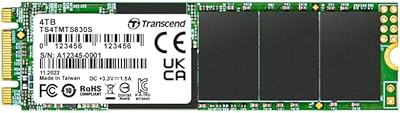
  • Form Factor: It follows the M.2 2280 standard, measuring 3.15 x 0.87 x 0.14 inches — the most common M.2 size found in modern laptops and desktops.
  • Interface: The drive uses a SATA III interface running at up to 6 Gb/s, which is the standard ceiling for all SATA-based solid state drives.
  • Key Type: The B+M Key notch configuration ensures physical compatibility with the widest range of M.2 slots across consumer laptops, ultrabooks, and desktop motherboards.
  • Sequential Read: Peak sequential read speed reaches up to 560 MB/s under optimal, controlled conditions.
  • Sequential Write: Peak sequential write speed reaches up to 520 MB/s, consistent with top-tier SATA class performance.
  • NAND Type: Storage cells use 3D TLC NAND flash, which stacks layers vertically to improve density, endurance, and data retention compared to planar NAND.
  • Cache: A DDR3 DRAM cache module stores frequently accessed data closer to the controller, reducing latency and smoothing performance during mixed workloads.
  • Error Correction: Low-Density Parity Check (LDPC) coding is implemented at the hardware level to detect and correct data errors before they can cause corruption.
  • Series & Model: This drive belongs to Transcend's MTS800 series, with the specific model number TS512GMTS830S.
  • Weight: The drive weighs just 0.282 ounces, light enough to have no meaningful impact on laptop weight or balance.
  • Compatible Devices: Officially compatible with desktop PCs, laptops, and ultrabooks that feature an M.2 slot supporting the SATA interface.
  • Installation Type: Designed for internal installation only; it is not intended for use as an external or portable drive without an additional enclosure.
  • Manufacturer: Transcend Information Inc. is a Taiwan-based storage manufacturer with over three decades of experience producing memory and storage products.
  • Availability: This model was first made available in November 2018 and has not been discontinued by the manufacturer as of the latest product data.

Related Reviews

Transcend MTS830S 1TB M.2 SATA SSD
82%
83%
Read Performance
71%
Write Performance
78%
DRAM Cache Effectiveness
91%
Compatibility
93%
Installation Experience
More
Transcend MTS830S 4TB M.2 SATA III SSD
87%
85%
Overall Performance
90%
Read Speed
78%
Write Speed
92%
Value for Money
88%
Ease of Installation
More
Transcend MTE300S 512GB M.2 2230 SSD
78%
94%
Device Compatibility
83%
Sequential Read Speed
61%
Sustained Write Performance
91%
Installation Experience
86%
Value for Money
More
Transcend MTS430S 512GB M.2 SSD
85%
94%
Form Factor Compatibility
76%
Read & Write Speed
83%
Real-World Responsiveness
91%
Installation Ease
89%
Long-Term Reliability
More
Transcend TS512GMTE220S 512GB M.2 NVMe PCIe Gen3x4 SSD
88%
91%
Performance
95%
Read Speed
88%
Write Speed
72%
Thermal Management
89%
Build Quality
More
fanxiang S201 512GB M.2 SSD
84%
88%
Performance
91%
Value for Money
85%
Compatibility with Older Systems
90%
Ease of Installation
82%
Power Efficiency
More
Transcend 500GB M.2 2280 SSD
86%
92%
Performance (Read/Write Speeds)
89%
Ease of Installation
91%
Reliability
86%
Battery Life Impact (Low Power Consumption)
82%
Software Experience (Transcend SSD Scope)
More
Transcend MTE410S 2TB M.2 NVMe SSD
80%
93%
Device Compatibility
88%
Sequential Read Speed
61%
Sustained Write Performance
86%
Power Efficiency & Battery Impact
91%
Form Factor & Physical Design
More
ORICO M.2 NVMe SSD 512GB with Heatsink
86%
89%
Performance
92%
Cooling Efficiency
85%
Installation Ease
90%
Read/Write Speeds
88%
Capacity for Gaming & Everyday Use
More
DATO DP330 512GB M.2 2230 NVMe SSD
79%
78%
Read/Write Speed
94%
Form Factor Fit
88%
Installation Ease
83%
Value for Money
53%
Thermal Management
More

FAQ

It depends on what type of M.2 slot your laptop has. This Transcend M.2 drive requires a SATA-compatible M.2 slot — if your laptop only supports NVMe over PCIe, it won't work. Check your laptop's manual or the manufacturer's website to confirm whether your M.2 slot supports SATA before buying.

For most people, yes. You need a small Phillips-head screwdriver, and the process typically involves removing the laptop's back panel, locating the M.2 slot, inserting the drive at a slight angle, and securing it with a single screw. There are plenty of model-specific tutorials on YouTube that make the process straightforward even if you've never opened a laptop before.

The difference is very noticeable. Boot times that used to take 60 seconds or more typically drop to under 15 seconds, and apps open much faster. Everyday tasks like browsing, working in documents, or launching software feel significantly more responsive. It's one of the most impactful upgrades you can make to an older machine.

Yes, it works well as a primary boot drive for Windows. macOS compatibility depends on your Mac model — older Macs with M.2 SATA slots can use it, but most modern Macs use proprietary connectors or NVMe, so compatibility is not guaranteed. Always verify your system's storage interface first.

For a typical user — running Windows or a Linux distro, a suite of office apps, a browser, and some media files — 512GB is comfortably sufficient. Where it can feel tight is if you're storing large video libraries, game installations, or raw photo archives. In those cases, you'd want external storage or a larger drive.

Yes, and it matters more than most people realize. Without a DRAM cache, a controller has to constantly read and write a mapping table directly to the NAND, which slows things down under mixed workloads. The DDR3 cache on the MTS830S keeps that table in faster memory, which helps maintain consistent speeds during typical use rather than just during fresh benchmark runs.

For standard home and office workloads, 3D TLC NAND is reliable and will outlast most users' needs before hitting its write endurance limits. It's not an enterprise-grade drive and shouldn't be treated as one, but for storing an OS and running everyday applications, longevity is not a practical concern for the vast majority of buyers.

A small number of buyers have flagged issues with specific laptop models, usually related to the M.2 slot type or BIOS detection. These cases are not the norm, but it's worth doing a quick search for your exact laptop model paired with M.2 SATA SSDs before purchasing. Most mainstream laptops from brands like Dell, Lenovo, HP, and ASUS work without any issues.

If you're replacing your existing drive, you'll need to either clone your current drive to the new one using software like Macrium Reflect or Clonezilla, or do a fresh operating system install. The Transcend MTS830S 512GB M.2 SSD doesn't come with cloning software bundled in the box, so factor in that extra step if you want to keep your existing setup intact.
Under normal workloads, the MTS830S runs cool enough that thermal throttling is not a concern for most users. It does not include a heatsink, which is typical for drives in this class. In very compact or poorly ventilated laptops running sustained heavy workloads, temperatures can climb, but for everyday tasks it operates well within safe limits.