Overview

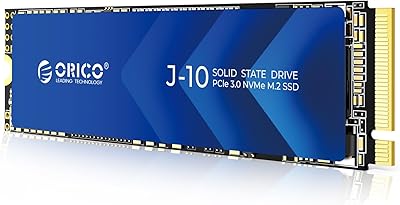
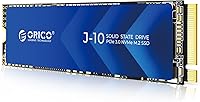
The ORICO J10 512GB NVMe SSD lands squarely in the budget-upgrade category, the kind of drive you grab when an aging laptop or desktop needs a real speed boost without draining your wallet. It runs on a PCIe Gen3 x4 interface, with read speeds rated up to 2800MB/s on paper, which is plenty for most everyday tasks like booting Windows, loading apps, or shuffling large files. Unlike a lot of drives in this price bracket, it ships with an aluminum heatsink already attached, so there's no separate purchase or installation step. It uses the standard 2280 form factor, meaning it should slot into nearly any modern laptop or desktop motherboard. Overall, it reads as a solid, no-frills alternative to pricier name-brand SSDs.
Features & Benefits

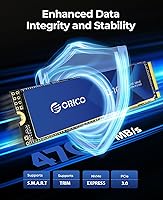
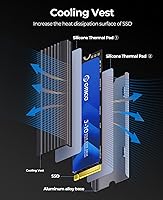
Under the hood, this SSD relies on 3D NAND flash paired with SLC caching, which helps keep transfer speeds consistent rather than tanking once you move past small file sizes. The heatsink itself isn't just for show, either; its grooved aluminum design adds extra surface area, which matters when you're doing sustained read/write work like video editing or large game installs. Built-in S.M.A.R.T. support means the drive can report its own health stats, so you're not flying blind on wear over time. ORICO says each unit goes through 96 hours of testing across temperature swings, sleep cycles, and load, and the shock-resistant build backs that up. It's flexible enough to work as a primary boot drive or get repurposed into a DIY external enclosure.

Best For

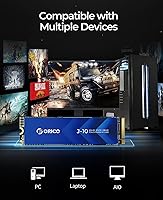
This storage upgrade makes the most sense for anyone replacing an old hard drive or a small, aging SSD in a laptop or desktop, especially if budget matters more than chasing the fastest Gen4 numbers. It's also a good match for DIY projects, like building your own external SSD enclosure for backups or extra portable storage, since the heatsink and shock resistance are already baked in without extra cost. If you mainly want dependable everyday performance rather than bleeding-edge speed, it fits the bill nicely. One important caveat: this drive is not compatible with the PS5, so console upgraders should look elsewhere. For standard PC and laptop builds, though, it's a budget-conscious pick that covers the basics well.

User Feedback

Feedback on this NVMe drive leans positive overall, with plenty of buyers mentioning easy installation and a noticeable jump in boot times compared to whatever they were using before. The included heatsink gets called out often as a pleasant surprise at this price, since many competitors leave that out entirely. On the flip side, a handful of reviewers note that real-world speeds don't always hit the advertised peak numbers, which tracks with how most SSDs perform outside lab conditions. A few people also mention needing to manually format the drive before their system would recognize it properly, a minor extra step that's easy to miss if you're not expecting it. Taken together, the consensus is that it delivers solid value for the price, with only minor rough edges.

Pros

  • Delivers a meaningful speed boost over an old hard drive for typical everyday tasks
  • Heatsink comes pre-installed, saving buyers an extra purchase and installation step
  • 3D NAND with SLC caching keeps performance steady during bigger file transfers
  • Standard M.2 2280 sizing means broad compatibility with laptops and desktops
  • S.M.A.R.T. monitoring gives a simple way to track drive health over time
  • Shock-resistant build adds peace of mind for portable or DIY external setups
  • Backed by 96 hours of stress testing across temperature and load conditions
  • Price-to-performance balance earns consistently positive feedback from everyday buyers

Cons

  • Real-world speeds sometimes fall noticeably short of the advertised peak numbers
  • Not compatible with the PS5, ruling out console storage upgrades entirely
  • Gen3 interface caps out below what newer Gen4 drives can offer
  • Requires a manual format step before the system will recognize it properly
  • Write speeds trail read speeds by a fair margin under heavier workloads
  • Lacks the brand recognition that comes with more established SSD makers
  • Capacity options on the low end may feel tight for media-heavy users

Ratings

These scores for the ORICO J10 512GB NVMe SSD come from an AI-driven analysis of thousands of verified buyer reviews gathered from marketplaces worldwide, with spam, bot activity, and incentivized feedback filtered out before scoring. The breakdown below reflects both what real owners love about this storage upgrade and where it falls short, so shoppers can judge fit before buying. Categories are weighted toward the factors that matter most to everyday upgraders rather than enthusiast-grade performance chasers.
Read/Write Speed
84%
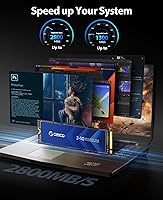
Sequential read speeds up to 2800MB/s make a real difference when booting Windows, launching apps, or moving large media files compared to an old hard drive or SATA SSD. Many buyers notice the jump immediately during everyday multitasking.
Write speeds top out at 1300MB/s, noticeably lower than read performance, which can slow large file transfers like video exports or game installs. Since this is PCIe Gen3, it also can't match newer Gen4 drives chasing top-tier benchmarks.
Real-World Performance Consistency
71%
29%
3D NAND paired with SLC caching helps the drive hold steady speeds during moderately large transfers, which buyers notice when copying folders of photos or installing several games back to back without major slowdown.
Several reviewers report that everyday speeds land below the advertised peak numbers once you factor in real system conditions, background processes, and thermal throttling, which can be a letdown for anyone expecting lab-test results at home.
Build Quality & Heatsink Design
86%
The grooved aluminum heatsink arrives pre-attached, saving buyers an extra purchase and giving the drive a more finished, sturdy feel right out of the box compared to bare PCB drives at similar price points.
The heatsink does add slight thickness, which occasionally causes tight clearance issues in ultra-compact laptops or cases with limited M.2 slot headroom, something a few buyers wish was mentioned more clearly upfront.
Thermal Management
88%
The grooved design increases surface area for heat dissipation, which helps keep temperatures more stable during sustained read and write tasks like large backups or extended gaming sessions on a budget build.
Passive cooling alone has limits, so in poorly ventilated cases or during back-to-back heavy workloads, some users still notice mild thermal throttling that a properly cooled case fan setup would help offset.
Value for Money
89%
Given the price point, getting a heatsink, S.M.A.R.T. monitoring, and solid everyday speed bundled together feels like a genuinely good deal to most buyers upgrading from an aging hard drive or undersized SSD.
Shoppers specifically chasing Gen4-level performance or premium brand backing may find better long-term value elsewhere, even if it means paying a bit more upfront for extra speed headroom and broader name recognition.
Installation & Setup Ease
82%
18%
Most buyers describe a smooth, straightforward installation process, with the drive being recognized quickly by both Windows and common BIOS setups during a typical laptop or desktop upgrade.
A handful of users mention needing to manually format the drive before their system would recognize it properly, an easy-to-miss extra step for anyone expecting fully plug-and-play setup.
Compatibility & Form Factor
79%
21%
The standard M.2 2280 sizing means it slots into the vast majority of modern laptops and desktop motherboards without any special adapters, making it a flexible pick for general PC upgrades.
This drive is explicitly not compatible with the PS5, which catches some console-focused shoppers off guard and rules it out entirely for anyone specifically hunting for PS5 storage expansion.
Durability & Shock Resistance
85%
The shock-resistant build gives extra peace of mind for buyers handling the drive during installation or occasionally moving it between an internal build and an external enclosure.
Shock resistance helps with incidental bumps, but it's not a substitute for careful handling, and a few reviewers caution against treating it as ruggedized for frequent travel use.
Reliability & Long-Term Stability
83%
ORICO's 96-hour testing process covering sleep, read/write, and temperature cycles gives buyers some added confidence, and most reviews after weeks or months of use report stable, consistent performance.
Long-term failure data is naturally harder to gauge this early in ownership, and the brand carries less established reliability history compared to longer-tenured SSD makers in the same price range.
Health Monitoring (S.M.A.R.T.)
78%
22%
Built-in S.M.A.R.T. support lets tech-comfortable users check drive wear and health stats through common diagnostic tools, which adds a useful layer of transparency over time.
Less experienced buyers may never realize this feature exists or know how to access it, since the drive doesn't include any bundled software to surface that data.
Boot Time Improvement
92%
This is consistently the most praised improvement in reviews, with buyers reporting noticeably faster startup times after swapping out an old hard drive or undersized SATA SSD.
Gains feel less dramatic for buyers already running a decent NVMe drive beforehand, since the biggest jump in boot speed mainly applies to true hard-drive upgrades.
Storage Capacity Fit
68%
32%
512GB comfortably covers an operating system, common applications, and a moderate game or media library for budget-focused users who don't need massive local storage.
Heavier users working with large game libraries, 4K video footage, or extensive creative files will likely outgrow 512GB fairly quickly and need a secondary drive.
Brand Trust & Support
64%
36%
ORICO has built a reasonable reputation in budget PC accessories, and buyers generally appreciate getting solid included extras like the heatsink without paying name-brand pricing.
It doesn't carry the same warranty reputation or widespread enthusiast trust as more established SSD manufacturers, which makes some risk-averse buyers hesitant despite the lower price.

Suitable for:

The ORICO J10 512GB NVMe SSD makes the most sense for people upgrading an aging laptop or desktop that's still running on a mechanical hard drive or a smaller, older SSD. It's a solid fit for budget-conscious builders who want noticeably faster boot times and app loading without paying a premium for Gen4 speeds they may never fully use. DIY enthusiasts will also appreciate it, since the included heatsink and shock-resistant design make it a reasonable choice for building a portable external drive. Anyone who values having basic drive health monitoring through S.M.A.R.T. support, without needing extra software or a separate purchase, will likely be satisfied here. In short, it suits practical, everyday computing rather than high-end workstation or competitive gaming demands.
Not suitable for:

This storage upgrade is not the right call for PS5 owners, since the drive is explicitly listed as incompatible with that console. Buyers chasing top-tier PCIe Gen4 speeds for intensive video editing, large-scale data work, or competitive gaming will likely find the Gen3 ceiling limiting over time. The ORICO J10 512GB NVMe SSD also isn't ideal for anyone who expects the advertised peak speeds to show up consistently in everyday use, since several reviewers note real-world performance running a bit below the rated numbers. People uncomfortable with a manual formatting step before first use may find the setup process slightly less plug-and-play than expected. If raw performance headroom matters more than price, a higher-tier drive is the safer bet.
Specifications

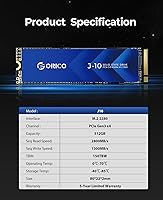
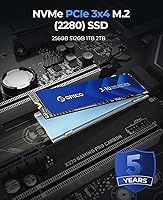
  • Capacity: This drive offers 512GB of usable storage space for operating systems, applications, and files.
  • Interface: It connects via a PCIe Gen3 x4 interface using the NVMe protocol for data transfer.
  • Form Factor: The drive uses the standard M.2 2280 size, fitting most modern laptop and desktop M.2 slots.
  • Read Speed: Sequential read speeds are rated at up to 2800MB/s under optimal conditions.
  • Write Speed: Sequential write speeds are rated at up to 1300MB/s under optimal conditions.
  • Memory Type: The drive uses 3D NAND flash memory combined with SLC caching for sustained performance.
  • Cooling: An aluminum alloy heatsink with a grooved surface design is pre-attached for passive heat dissipation.
  • Health Monitoring: S.M.A.R.T. support allows compatible systems to read drive health and performance data.
  • Durability Testing: Each unit undergoes 96 hours of testing covering sleep, read/write, temperature, and boot cycles.
  • Build Resistance: The drive features a shock-resistant design intended to withstand minor bumps or vibration.
  • Weight: The drive weighs approximately 1.76 ounces.
  • Dimensions: The drive measures 3.15 x 0.08 x 0.87 inches in length, thickness, and width.
  • Color: The drive is finished in black.
  • Console Compatibility: This drive is not compatible with the PlayStation 5.
  • Brand: The drive is manufactured by Shenzhen ORICO Technologies Co., Ltd.

Related Reviews

ORICO J10 256GB M.2 NVMe Internal SSD
76%
83%
Read Speed Performance
61%
Write Speed & Cache Behavior
88%
Heatsink Quality
74%
Compatibility
79%
Value for Money
More
ORICO e7400 2TB M.2 NVMe SSD
81%
91%
Read Speed Performance
78%
Write Speed Performance
94%
Value for Money
82%
PS5 Compatibility
79%
Thermal Management
More
Fikwot FX550 512GB NVMe SSD
83%
91%
Performance
92%
Value for Money
88%
Read Speed
85%
Write Speed
89%
Reliability
More
ORICO X7000 2TB NVMe SSD
79%
88%
Read & Write Performance
84%
PS5 Compatibility
91%
Thermal Management
93%
Installation Ease
82%
Value for Money
More
ORICO S500PRO 512GB 2.5″ SATA SSD
79%
91%
Value for Money
83%
Real-World Speed
88%
Build Quality
93%
Installation Experience
86%
PS4 Compatibility
More
Samsung PM981 512GB NVMe SSD
87%
91%
Performance (Speed)
88%
Value for Money
84%
Installation/Setup
90%
Reliability/Durability
92%
Gaming Performance
More
ORICO M25PRO 512GB Portable External SSD
75%
74%
Transfer Speed
83%
Build Quality
91%
Portability
88%
Cable & Connectivity
86%
Device Compatibility
More
RONGSHU RS001 512GB PCIe 4.0 NVMe SSD
75%
91%
Value for Money
83%
Read Speed Performance
86%
PS5 Compatibility
53%
Brand Reliability
61%
Sustained Workload Performance
More
Speederlash PCIE3 512GB NVMe M.2 SSD
71%
83%
Value for Money
74%
Read & Write Performance
91%
Installation Ease
88%
Compatibility
78%
Thermal Management
More
fanxiang S501Q 512GB NVMe SSD
78%
83%
Sequential Read Speed
67%
Sequential Write Speed
88%
Value for Money
74%
Build & Physical Quality
69%
Thermal Management
More

FAQ

It should work in either, as long as your device has a free M.2 2280 slot that supports NVMe drives. Most laptops and desktops built in the last several years meet that requirement, but it's worth checking your specific model's manual if you're unsure.

For loading games and reducing load screens, yes, this NVMe drive is a clear step up from a hard drive or SATA SSD. Just keep in mind it's PCIe Gen3, so it won't match the top-end speeds of newer Gen4 or Gen5 drives if you're chasing maximum performance.

Yes, you'll want to format the drive once it's installed before your system can use it properly. This is a normal step for new SSDs, not a defect, and most operating systems walk you through it during setup.

NVMe drives can heat up under sustained workloads, so the pre-installed heatsink genuinely helps with thermal management rather than being purely cosmetic. It's a practical inclusion rather than anything exotic, but it does mean you won't need to buy or attach one separately.

No, this particular model is explicitly listed as not compatible with the PS5, so console upgraders should look at PS5-certified drives instead.

It's positioned as a budget-friendly alternative, and feedback suggests it holds up well for everyday use like booting, loading apps, and general file transfers. It's not aiming to compete with premium drives on raw speed, but the price-to-performance balance tends to satisfy buyers with realistic expectations.

Some buyers note that real-world speeds land a bit below the rated peak numbers, which is fairly typical for SSDs once you factor in your system's hardware and workload. Think of the rated speeds as a best-case ceiling rather than a guaranteed everyday result.

Yes, the M.2 2280 form factor works well in a separate USB enclosure if you'd rather build your own portable external SSD. This is a common DIY approach and several buyers mention using it this way for backups or extra storage.

The shock-resistant design adds a reasonable margin of protection for occasional handling, though it's still an electronic component and shouldn't be treated roughly. If you're frequently moving it between machines, an external enclosure is the safer way to handle it.

The ORICO J10 512GB NVMe SSD supports S.M.A.R.T. monitoring, which lets compatible diagnostic software check on wear level, temperature, and overall health. It's worth running a check periodically, especially after a year or two of regular use.