Overview

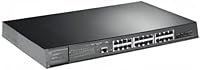
The TP-Link TL-SG3428XMP 24-Port Managed PoE Switch sits in a practical sweet spot for growing businesses that need real network infrastructure without paying enterprise-tier prices. Built into a solid 1U rack-mount metal chassis, it signals professional intent from the moment you install it. The Omada SDN platform adds a layer of approachable centralized management that softens the complexity curve somewhat — but make no mistake, this is not a device you hand to someone without networking experience and expect it to configure itself. If you know your way around VLANs and switch management, the value here is difficult to argue with.
Features & Benefits

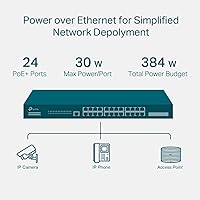
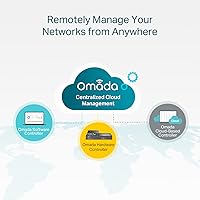
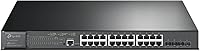
The headline spec of this managed PoE switch is its 384W total PoE budget spread across 24 gigabit ports — in practical terms, that means running a dozen full-power IP cameras, a handful of access points, and several VoIP handsets without babysitting the power math. The four 10GbE SFP+ uplinks handle backbone connections cleanly, so aggregated traffic from all those edge devices doesn't create a ceiling you'll immediately hit. Omada SDN ties everything together with centralized multi-site management, and the built-in L2+ static routing handles basic inter-VLAN traffic efficiently — though it won't replace a dedicated router in complex environments. Security features are thorough without feeling bolted-on.

Best For

This Omada-compatible switch is most at home in SMB and mid-market IT environments where network complexity is real but a full enterprise stack isn't justified yet. Deploying a campus-wide wireless network with 20-plus access points? The PoE budget and port density handle that without strain. IP camera deployments benefit too — security teams running 12 to 16 cameras across a site will appreciate not having to juggle injectors or separate power supplies. Organizations already invested in the Omada ecosystem get the most out of this switch, since centralized multi-site management is where it performs best. Those who just need a simple unmanaged switch should look elsewhere.

User Feedback

Buyers consistently praise the reliable PoE performance under sustained load — users running mixed deployments of cameras, APs, and VoIP phones report the budget holds up well in practice, with no unexpected brownouts. The Omada app earns solid marks for usability, though first-time setup of the controller (especially the software version) draws complaints about its learning curve from reviewers who expected a faster onboarding experience. Fan noise comes up occasionally in quieter server rooms, though most consider it acceptable for rack equipment. Compared to Cisco SG alternatives, several buyers highlight the TL-SG3428XMP's stronger value at this price tier, while Ubiquiti users note the Omada SDN ecosystem as a compelling alternative. The 5-year warranty is a quiet confidence factor.

Pros

  • 384W PoE budget comfortably powers large mixed deployments of cameras, APs, and VoIP phones without port rationing.
  • Four 10GbE SFP+ uplinks prevent backbone bottlenecks as edge device counts grow over time.
  • Omada SDN support enables remote multi-site management from a single dashboard or mobile app.
  • Robust security toolkit — including 802.1X RADIUS and DHCP Snooping — supports compliance-sensitive environments.
  • All-metal 1U chassis feels solid and rack-ready, built for long-term continuous operation.
  • Dual Image firmware redundancy protects against bricked switches during update failures.
  • L2+ static routing handles basic inter-VLAN traffic without requiring a separate routing appliance for simple topologies.
  • Competes strongly on price against comparable Cisco SG models offering similar PoE budget and port count.
  • CLI access via SSH and Console port satisfies engineers who prefer hands-on configuration over GUI-only management.
  • Five-year warranty provides a meaningful long-term assurance for business-critical deployments.

Cons

  • Initial Omada controller setup has a steep learning curve that catches less experienced admins off guard.
  • Third-party SFP+ transceivers can cause link instability — TP-Link-branded optics are often required for reliable operation.
  • Fan noise is audible under load, making this a poor choice for noise-sensitive installation environments.
  • The Omada mobile app is better suited for monitoring than active configuration — complex changes still require the full Web GUI.
  • Cloud-based controller access requires a separate plan through TP-Link, with pricing details not clearly disclosed upfront.
  • PoE port priority logic is not immediately intuitive, and manual scheduling may be needed in high-draw deployments.
  • The included quick installation guide is too thin for complex VLAN or RADIUS configuration scenarios.
  • Firmware updates have occasionally introduced minor behavioral regressions, requiring community forum research to identify stable versions.
  • Rack-mount ear construction feels lighter than the main chassis, which is a minor but noticeable quality inconsistency.
  • Support call quality is inconsistent — complex Layer 2 issues are sometimes resolved faster through community forums than official channels.

Ratings

The scores below are generated by our AI engine after analyzing hundreds of verified buyer reviews for the TP-Link TL-SG3428XMP 24-Port Managed PoE Switch from global sources, with spam, incentivized, and bot-flagged submissions actively filtered out. The result is an honest snapshot of real-world performance across the categories that matter most to IT professionals and SMB network builders. Both the strengths that make this switch a standout in its class and the friction points that have frustrated buyers are reflected transparently in every score.
PoE Performance & Budget Reliability
88%
Buyers running mixed deployments — think 14 IP cameras alongside six wireless access points and a dozen VoIP handsets — consistently report that the 384W budget holds up without unexpected port shutdowns or power throttling. Real-world headroom is generous enough that most SMB setups never approach the ceiling.
A small segment of users deploying high-draw devices simultaneously noted that the switch's internal power allocation logic occasionally prioritizes ports in ways that aren't immediately intuitive, requiring manual PoE scheduling to resolve. Documentation on priority configuration could be clearer.
10G Uplink Throughput
91%
The four SFP+ slots deliver genuine 10GbE backbone performance that prevents aggregated edge traffic from hitting a wall. Buyers connecting this switch to a 10G-capable NAS or core switch report clean, non-throttled throughput that justifies the port count.
SFP+ transceivers are sold separately, and some users were caught off-guard by compatibility nuances with third-party modules — a handful reported needing to source TP-Link-branded optics to avoid link instability, adding unexpected cost to the deployment.
Omada SDN Integration
83%
Once the Omada controller is configured, IT admins managing multiple sites genuinely appreciate the unified dashboard — pushing firmware updates, adjusting VLAN policies, or monitoring port utilization remotely without touching physical hardware is a real operational win for lean IT teams.
The initial controller setup, particularly the software-based variant, draws consistent criticism for its learning curve. Users migrating from simpler managed switches or coming from Ubiquiti's more polished onboarding experience frequently describe the first-time setup as more time-consuming than expected.
Setup & Initial Configuration
67%
33%
For experienced network engineers, the Web GUI and CLI access via SSH or console port feel familiar and functional. The dual management path — Omada SDN or standalone — means professionals can pick the workflow that matches their existing toolkit without compromise.
This is not a beginner-friendly device. Buyers who underestimated the configuration demands have left frustrated reviews describing hours spent troubleshooting VLAN tagging or RADIUS authentication settings. The quick installation guide is genuinely quick — perhaps too quick for complex deployments.
Build Quality & Hardware Durability
86%
The all-metal chassis feels appropriately solid for rack equipment — no flex, no rattling components, and port connectors that accept repeated cable changes without loosening. Buyers who have had it running continuously in server closets for over a year report zero physical degradation.
A few reviewers flagged that the rack-mount ears feel slightly lighter than the main chassis material, and one or two noted minor cosmetic finish inconsistencies out of the box. These are aesthetic gripes rather than functional concerns, but worth noting for detail-oriented buyers.
Fan Noise & Thermal Management
72%
28%
Under typical office or wiring-closet loads, thermal performance is stable and the switch runs within expected temperature ranges without issue. Buyers in dedicated server rooms with proper airflow report no heat-related incidents even under sustained PoE loads.
Fan noise is a recurring complaint among users who installed this switch in open office environments or AV closets near occupied spaces. The fans are audible and ramp up under load — not aggressively loud, but noticeable enough that several buyers wished for a fanless option at this port density.
Security Feature Depth
89%
The security toolkit is genuinely comprehensive for a switch in this tier. IT administrators deploying in environments with compliance requirements — education, healthcare, or multi-tenant retail — appreciate having 802.1X RADIUS, DHCP Snooping, and IP-MAC-Port binding available without paying enterprise licensing fees.
Configuring the more advanced security policies, particularly ACL rules and RADIUS integration, requires comfort with the CLI or careful navigation of the Web GUI. There is no guided setup wizard for security hardening, which means less experienced admins may leave features unconfigured.
L2+ Routing Capability
74%
26%
Static routing handles basic inter-VLAN traffic segmentation cleanly, and for SMBs with straightforward network topologies — a guest VLAN, a management VLAN, and a production VLAN — it removes the need for a separate routing device at the access layer.
Buyers who expected dynamic routing protocols were disappointed — this is static routing only, and anything beyond simple inter-VLAN forwarding will still require a dedicated router or firewall upstream. The feature is useful within its defined scope but easy to overestimate based on the L2+ label.
Omada App Experience
79%
21%
The mobile app earns positive marks for day-to-day monitoring tasks — checking port status, reviewing PoE consumption per device, and receiving alerts on link-down events are all handled competently. Field technicians managing multi-site networks find it genuinely useful for remote triage.
Advanced configuration tasks pushed through the app can feel limited compared to the full Web GUI, and a handful of users reported sync delays between app-applied changes and actual switch behavior. It is better suited as a monitoring companion than a primary configuration tool.
VLAN & Network Segmentation
85%
802.1Q VLAN support is robust and well-implemented. Network admins segmenting traffic for IoT devices, guest Wi-Fi, and corporate data on the same physical infrastructure report consistent, predictable behavior once the tagging rules are established.
Initial VLAN configuration requires a deliberate approach — users who made mistakes during setup found that rolling back changes through the Web GUI was less intuitive than it should be. Saving and exporting a configuration backup before making changes is essentially mandatory.
Value for Money
84%
Against comparable managed switches offering 24 PoE+ ports and 10G uplinks, the TL-SG3428XMP positions itself favorably. Buyers who cross-shopped against Cisco SG series options frequently cite a meaningful price gap for equivalent or better PoE budget, which is a decisive factor for budget-conscious IT procurement.
Ubiquiti users considering a switch to this Omada-compatible switch sometimes factor in the hidden cost of the Omada hardware controller for full feature parity — if that is added to the total, the value calculation tightens. Cloud controller plan pricing is also not fully transparent upfront.
Firmware Stability & Update Reliability
76%
24%
The Dual Image firmware feature — which retains a backup firmware partition — gives administrators a meaningful safety net when pushing updates. Users who have experienced failed firmware updates on other switch brands specifically called this out as a practical reliability feature.
A subset of users reported that certain firmware versions introduced minor behavioral regressions, particularly around PoE port scheduling and SNMP polling intervals. The update cadence is reasonable, but relying on community forums to identify stable firmware versions is not ideal for production environments.
Documentation & Support Quality
63%
37%
TP-Link provides a reasonable volume of online documentation, including configuration guides and CLI reference manuals. For standard deployment scenarios, the available resources are sufficient, and the 5-year warranty provides a baseline level of confidence for long-term deployments.
Telephone support quality receives mixed feedback — some users report efficient resolution while others describe being transferred between tiers without resolution for more complex Layer 2 configuration issues. Forum-based community support is often faster for non-standard setups.
Port Density & Physical Layout
82%
18%
Twenty-four gigabit PoE ports plus four SFP+ uplinks in a single rack unit is a genuinely efficient use of space. Installers working in compact wiring closets or rack-dense environments appreciate not sacrificing a second rack unit for uplink capacity.
Port labeling is functional but small, and in dimly lit server rooms or crowded patch panels, identifying specific ports quickly during live troubleshooting requires either a flashlight or some patience. A few buyers suggested the console port placement could be more accessible.

Suitable for:

The TP-Link TL-SG3428XMP 24-Port Managed PoE Switch is purpose-built for IT administrators and network engineers managing growing SMB or mid-market infrastructure where device density and power delivery actually matter. If you are deploying 15 or more wireless access points across a multi-floor office, running a surveillance system with a dozen or more IP cameras, or consolidating VoIP handsets onto a single managed switch, this device handles all of that simultaneously without the PoE budget drama you get from cheaper alternatives. Organizations already embedded in the Omada ecosystem — or actively planning to standardize on it — will find the centralized multi-site management genuinely useful, especially for lean IT teams supporting several locations from one interface. Network professionals who expect CLI access, SNMP monitoring, and RADIUS authentication as baseline requirements will feel at home here rather than constrained. It also suits buyers who need 10G uplink capacity today to future-proof their backbone connections without stepping up to a full enterprise-tier chassis switch.
Not suitable for:

The TP-Link TL-SG3428XMP 24-Port Managed PoE Switch is a poor fit for anyone expecting plug-and-play simplicity — this is not a device you hand to a non-technical office manager and expect to be running in 20 minutes. Small businesses or home users who just need a handful of powered ports for a camera or two will find the feature depth wasteful and the configuration overhead genuinely frustrating. Buyers who are not planning to use the Omada SDN ecosystem should also think carefully, since unlocking the full value of this switch is tightly tied to that platform; using it purely in standalone mode is functional but leaves a lot on the table. Organizations operating in noise-sensitive environments — broadcast studios, quiet open offices, or AV production spaces — may find the fan noise under load incompatible with their setting. Finally, anyone expecting dynamic routing protocols beyond basic static inter-VLAN forwarding will need a dedicated router upstream regardless, so this should not be purchased as a routing solution.
Specifications

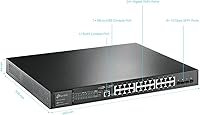
  • PoE Ports: The switch provides 24 PoE+ (802.3at/af) gigabit RJ45 ports, each capable of delivering up to 30W to connected devices.
  • PoE Budget: Total PoE power budget is 384W, distributed across all 24 ports simultaneously based on device demand and configured priority.
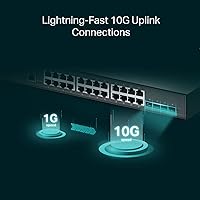
  • Uplink Slots: Four 10GbE SFP+ slots provide high-bandwidth backbone connectivity to core switches, servers, or network-attached storage.
  • Switching Capacity: Non-blocking switching capacity is rated at 128 Gbps, ensuring full wire-speed performance across all ports under load.
  • Layer Support: Operates at Layer 2+ with static routing capability for basic inter-VLAN traffic forwarding without requiring a dedicated upstream router.
  • Management Options: Supports Web GUI, CLI (Console, Telnet, SSH), SNMP, and RMON, plus Omada SDN via hardware, software, or cloud-based controller.
  • VLAN Support: 802.1Q VLAN tagging is fully supported, enabling logical network segmentation across connected devices and uplinks.
  • Security Features: Includes ACL, 802.1X RADIUS authentication, DHCP Snooping, DoS defense, Storm Control, IP-MAC-Port binding, and Port Security.
  • Form Factor: Standard 1U rack-mount chassis, compatible with 19-inch server racks and supplied with a rackmount kit and rubber feet for desktop use.
  • Dimensions: Physical dimensions are 17.32 x 13.27 x 1.73 inches, fitting cleanly into a standard single rack unit without requiring extra clearance hardware.
  • Weight: The unit weighs 11.29 pounds, which is typical for an all-metal 24-port managed switch of this class.
  • Case Material: The enclosure is constructed entirely from metal, providing structural rigidity and improved passive heat dissipation during continuous operation.
  • Max Temperature: The switch is rated for operation up to 45 degrees Celsius, suitable for standard server rooms and wiring closets with adequate ventilation.
  • Firmware Redundancy: Dual Image firmware support retains a backup firmware partition, allowing recovery to the previous version if an update causes instability.
  • Warranty: TP-Link covers this switch with a 5-year limited warranty and provides free technical support Monday through Friday, 6am to 6pm PST.
  • Input Voltage: The switch operates at 48V DC internally, powered via a standard AC input with a supplied power cord.
  • Max Power Draw: Maximum total power consumption is 380W, accounting for both switch operation and full PoE delivery across all active ports.
  • In the Box: The package includes the switch unit, a power cord, a quick installation guide, a rackmount kit, and rubber feet for desktop deployment.

Related Reviews
TP-Link TL-SG2428P Jetstream 24-Port Gigabit Smart Managed PoE Switch
84%
89%
Value for Money
70%
Ease of Setup
93%
PoE+ Performance
85%
Security Features
92%
Network Management (Omada SDN)
More
TP-Link TL-SG1428PE 24-Port Gigabit PoE Switch
86%
89%
Performance
92%
Value for Money
87%
Ease of Setup
93%
PoE Power Output
84%
Build Quality
More
TP-Link TL-SG2218P Smart Managed PoE Switch
82%
78%
PoE Performance
88%
Omada SDN Integration
83%
Web Interface & Usability
86%
Build Quality
81%
Fan Noise
More
TP-Link TL-SG2210P V3 8-Port PoE Switch
83%
91%
Value for Money
74%
PoE Performance
83%
Ease of Setup
86%
Omada SDN Integration
88%
Build Quality
More
TP-Link TL-SG2210MP Jetstream 10-Port Gigabit Smart Managed PoE Switch
86%
91%
Value for Money
88%
Performance
93%
Ease of Setup
85%
Build Quality
89%
PoE Power Delivery
More
TP-Link TL-SL1218MP 16-Port PoE Network Switch
79%
91%
Value for Money
88%
PoE Performance
79%
Extend Mode Reliability
93%
Ease of Setup
62%
Build Quality
More
TP-Link TL-SF1005P
TP-Link TL-SF1005P
82%
96%
Ease of Setup
81%
PoE Power Delivery
88%
Build Quality
94%
Fanless & Noise Level
67%
Extend Mode Performance
More
TP-Link TL-SF1006P 6-Port PoE Switch
88%
88%
Performance
95%
Ease of Setup
92%
Build Quality
89%
Reliability
91%
Power Delivery (PoE)
More
TP-Link TL-SL1311MP 8-Port PoE Switch
88%
92%
Value for Money
95%
Ease of Setup
89%
PoE Range Performance
91%
Build Quality
88%
Customer Support
More
TP-Link TL-SG3428 24-Port Gigabit Switch
87%
85%
Setup & Installation
92%
Performance & Reliability
91%
Value for Money
80%
Software & Firmware Management
89%
Security Features
More
TP-Link TL-SF1009P 9-Port PoE+ Switch
80%
94%
Ease of Setup
78%
PoE Power Delivery
86%
Build Quality
71%
Extend Mode Performance
89%
Value for Money
More

FAQ

You can absolutely use the TL-SG3428XMP in standalone mode without any controller. The Web GUI and CLI are both fully functional for configuration, VLAN setup, security policies, and monitoring. The Omada controller — whether hardware, software, or cloud-based — is optional and primarily adds value if you are managing multiple sites or want centralized visibility across several devices at once.

It depends on what you are powering. Standard wireless access points typically draw 10 to 15W each, so 24 APs would pull roughly 240 to 360W — workable but tight at full load. IP cameras generally draw 7 to 15W, making a full camera deployment well within budget. Where you run into limits is mixing several high-draw devices like PTZ cameras or PoE-powered thin clients simultaneously; in those cases, configuring per-port power limits and PoE priority settings in advance is strongly recommended.

Technically yes, but compatibility is not guaranteed. A notable number of users have reported link instability or failure to negotiate when using off-brand or generic SFP+ modules. TP-Link-branded transceivers and a small list of validated third-party optics are the safer path. If cost is a concern, check the TP-Link compatibility list before purchasing third-party modules to avoid a frustrating troubleshooting session after installation.

The fans are audible — particularly under moderate to heavy PoE load — and several buyers specifically mention this as a drawback in office or AV environments. It is not aggressively loud by server-room standards, but it is not silent either. If the switch will be in a wiring closet or a dedicated rack room with a closed door, fan noise is unlikely to be an issue. For open office environments or quiet studios, this is worth taking seriously before purchasing.

Only for very basic scenarios. The L2+ static routing on this switch handles inter-VLAN forwarding between locally defined subnets — for example, routing traffic between a guest VLAN and a production VLAN without a separate device. It does not support dynamic routing protocols like OSPF or BGP, and it cannot replace a router or firewall for WAN connectivity, NAT, or more complex policy-based routing. Think of it as a convenience feature for simple topologies, not a full routing solution.

Yes, from a hardware perspective. Ubiquiti access points are standard 802.3at PoE+ devices and will power up and operate normally on any of the 24 PoE+ ports. What you lose is the tight integration that Ubiquiti APs have within the UniFi ecosystem — things like automatic AP provisioning or centralized UniFi controller management will not apply here. If you are running a mixed environment, it works fine; if you are building a unified Ubiquiti network, you may find the management experience fragmented.

The Omada cloud-based controller allows you to manage your network remotely through TP-Link's cloud infrastructure without hosting your own software controller or purchasing a hardware controller unit. However, TP-Link does not publicly list the cloud controller pricing upfront — you need to contact them directly for plan details. If you want to avoid any subscription dependency, the software controller (which you self-host on a PC or server) is free and provides nearly equivalent functionality.

Yes, through the Omada app for iOS and Android, but with some caveats. The app is well-regarded for monitoring tasks — checking port status, PoE usage per device, and receiving alerts — but it is not ideal for complex configuration changes. Most IT admins treat the app as a convenient field tool and rely on the full Web GUI or CLI for serious configuration work. You will need an Omada controller (hardware, software, or cloud) set up first before the app can connect to this switch.

This is one area where this Omada-compatible switch handles itself well. The Dual Image firmware feature keeps two separate firmware images on the switch — the active one and a backup. If an update fails or causes problems, you can boot from the previous image through the management interface or console port. It is still a good practice to export a full configuration backup before any firmware update, but the dual-image design removes most of the risk of an unrecoverable situation.

The most common comparison buyers make is against the Cisco SG350X series. In terms of raw PoE budget and 10G uplink slots, this managed PoE switch is competitive and often provides more PoE headroom at a lower price. Cisco's edge is typically in ecosystem maturity, deeper enterprise software integrations, and brand trust in large corporate environments. For SMBs and growing businesses that do not have a strict Cisco infrastructure requirement, most buyers who cross-shopped found the TP-Link option delivered comparable functionality with a more favorable cost-to-feature ratio.

Where to Buy