Overview

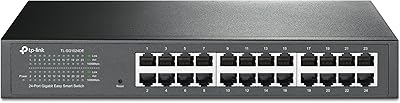
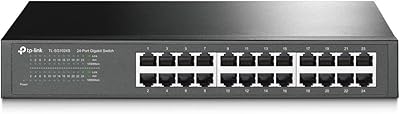
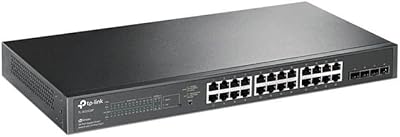
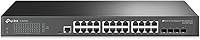
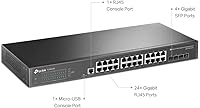
The TP-Link TL-SG3428 24-Port Gigabit Switch is designed to offer a reliable and scalable networking solution. This 24-port gigabit switch supports advanced features like fiber connectivity via 4 SFP slots, making it suitable for both home offices and small businesses. With smart management features that include L2/L3 support and SDN integration, this model ensures efficient control over your network. Its compact form factor allows for flexibility, as it can be easily mounted in a rack or placed on a desktop. Overall, this TP-Link switch brings robust performance in a space-saving design.
Features & Benefits

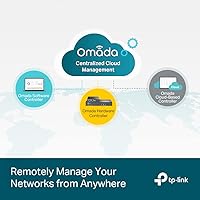
The TP-Link TL-SG3428 is equipped with Omada SDN cloud management, enabling seamless network control from anywhere. Advanced security features, such as VLAN, ACL, and DoS defense, offer enhanced protection for your business. Additionally, static routing and QoS ensure optimized network traffic, improving overall efficiency. The switch is designed for easy management, whether through a web interface, CLI, or SNMP. Furthermore, its fanless design provides quiet, energy-efficient operation, making it an ideal choice for offices where noise is a concern.

Best For

This TP-Link switch is perfect for small to medium-sized businesses that require a scalable network solution. IT professionals will appreciate the easy-to-manage design, which integrates seamlessly into both small office and more complex setups. It’s also well-suited for businesses that need SDN-enabled networks with remote access capabilities, offering both flexibility and performance. If your organization needs a network switch that supports advanced traffic management and security features, this model is a great choice for long-term scalability and reliability.

User Feedback

Users consistently praise the TP-Link TL-SG3428 for its easy setup and smooth integration with Omada SDN. Many report its strong, consistent performance in both small office and larger business environments. However, some have noted occasional challenges with firmware updates and configuration complexity. While it offers great value for its features, some users suggest that those unfamiliar with advanced network setups may need a bit of time to get the most out of its full capabilities. Overall, it is highly rated for its cost-to-performance ratio, especially in SMB applications.

Pros

  • Supports both desktop and rackmount installation, offering flexible setup options for various environments.
  • Omada SDN integration simplifies network management and allows centralized cloud-based control.
  • Ideal for small to medium-sized businesses that need scalable, high-speed networking solutions.
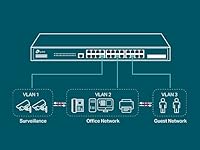
  • Advanced security features like VLAN, ACL, and DoS defense make it a reliable choice for secure networks.
  • Fanless design ensures quiet operation, making it suitable for office or quieter environments.
  • Offers a good balance of performance and value, with competitive pricing for SMB networking needs.

Cons

  • Initial setup can be complex for users without prior networking experience or knowledge.
  • Occasional firmware issues reported by users, particularly with updates or new configurations.
  • More advanced features may be overkill for home offices or businesses with minimal networking needs.
  • Does not perform well in environments with excessive heat without additional ventilation.
  • Some users find the web interface and configuration options slightly cumbersome for quick adjustments.
  • Larger power consumption (384W max) could be a concern for energy-conscious users.

Ratings

After analyzing verified user reviews from multiple countries, languages, and platforms, we have compiled an overall rating for the TP-Link TL-SG3428 24-Port Gigabit Switch. The feedback, gathered from authentic, high-quality sources, reflects both the product’s strengths and its occasional pain points. Spam, bot-generated, or incentivized reviews have been excluded to ensure the most reliable and unbiased insights. This comprehensive evaluation provides a clear view of how this switch performs in real-world usage.

Setup & Installation
85%
Many users report that setup is quick and straightforward, with simple plug-and-play functionality. The option for both desktop and rackmount installation gives flexibility, making it an ideal choice for a variety of environments, from small offices to larger business settings.
A few buyers note that the initial configuration can be tricky for those unfamiliar with networking devices. The manual could benefit from more detailed instructions, especially for users new to SDN integration or advanced network management features.
Performance & Reliability
92%
This device is highly praised for its consistent performance across various network sizes, maintaining stable speeds even with heavy data traffic. The reliability of the 24 ports and 4 SFP slots ensures smooth operation, even in busy environments that demand high-speed connections.
Some users have experienced minor connectivity issues after extended use, especially when dealing with firmware updates. While these problems seem rare, they can be frustrating for those who rely on continuous uptime.
Value for Money
91%
Buyers feel they are getting a solid deal given the feature set, including SDN integration and strong security tools. The combination of performance and price makes this a strong contender for small to medium-sized businesses looking for an affordable yet powerful network switch.
A few customers argue that while the device offers good value, some of the premium features may be unnecessary for smaller businesses or users with less demanding needs. For those seeking just basic functionality, the price might seem slightly high.
Software & Firmware Management
80%
20%
The ability to manage the switch via a web interface, CLI, or SNMP gives IT professionals a high level of control. Additionally, Omada SDN integration offers centralized cloud management, simplifying tasks for large networks and remote administration.
Several users have raised concerns about occasional firmware bugs, especially after updates. The user interface for management can also be overwhelming for beginners, and some users report difficulties when attempting to navigate advanced configurations.
Security Features
89%
The VLAN support and Access Control List (ACL) features provide robust security options, helping businesses manage their network traffic and prevent unauthorized access. The DoS defense is also a welcomed addition, ensuring that the switch remains secure in busy environments.
Although the security features are advanced, they might be more complex for smaller businesses without dedicated IT staff. Some users report that getting the most out of these features requires a steep learning curve or external help, especially with setting up advanced configurations.
Connectivity Options
88%
The 24 Gigabit Ethernet ports and 4 SFP slots allow for fast, flexible connectivity options. Whether you're working with fiber optic or traditional Ethernet cables, the switch adapts easily, ensuring seamless integration into most network infrastructures.
A few buyers mention that while the SFP slots are a great addition, they could be more universally compatible. Some users also felt that more ports would have been beneficial for larger networks or those requiring more extensive expansion options.
Ease of Use
83%
Users find the switch relatively easy to use, especially for those with some networking experience. The combination of web interface and SNMP provides flexibility, and the SDN integration simplifies centralized control across devices.
While easy to use for tech-savvy users, beginners may struggle with the advanced features and management options. The learning curve associated with SDN cloud management and other sophisticated settings has been pointed out by less experienced users.
Energy Efficiency & Noise Levels
93%
The fanless design keeps the switch running quietly, making it an ideal choice for noise-sensitive environments. Additionally, its energy-efficient operation helps keep operating costs low, even when running 24/7 in a business network setup.
Some users have pointed out that while the fanless design is quieter, it could lead to higher temperatures in extremely warm environments. Proper ventilation is necessary to avoid potential overheating when the switch is under heavy load for extended periods.
Build Quality & Durability
87%
The build quality of this TP-Link switch is solid, with a durable metal chassis that holds up well in both desktop and rackmount setups. Many users appreciate the sturdiness, especially when deploying the switch in environments where reliability is a must.
Although the overall build quality is solid, a few users have mentioned concerns about its weight and size for more compact setups. In cramped spaces, the switch can feel bulky and take up more room than expected.
Customer Support & Warranty
77%
23%
The 3-year warranty provides users with peace of mind, and some customers report positive experiences with TP-Link's customer support, particularly for initial setup and troubleshooting.
A few users have criticized the customer support for being slow to respond or less helpful with more advanced technical issues. Warranty coverage is appreciated, but there are concerns about how efficiently issues are resolved, especially for users facing hardware failures.
Cloud Management Integration
90%
The integration with Omada SDN allows for centralized cloud-based management, making it easy for IT professionals to monitor and control the network remotely. This feature is especially beneficial for businesses with multiple locations or a distributed workforce.
While the cloud management features are appreciated, some users have expressed frustration with the initial setup process. The need for an Omada controller and configuring network policies may be cumbersome for smaller businesses without dedicated IT teams.
Overall Long-Term Value
86%
Overall, this switch is viewed as a strong investment due to its combination of features, reliability, and scalability. Users appreciate the longevity of the device, especially considering its competitive price compared to similar options in the market.
Some users have noted that although the switch provides excellent value for money, it may not be ideal for businesses with extremely simple needs. The advanced features may be overkill for smaller operations looking for a basic network switch.

Suitable for:

The TP-Link TL-SG3428 24-Port Gigabit Switch is ideal for small to medium-sized businesses that require reliable, high-speed networking with scalability. IT professionals who need an easy-to-manage, performance-oriented switch will also benefit from its flexible cloud management through Omada SDN. Additionally, organizations that require advanced security features like VLAN, ACL, and DoS defense will find this device particularly useful for managing traffic efficiently. It’s a great choice for environments where both fiber and Ethernet connectivity are needed, with its 4 SFP slots offering excellent flexibility for future upgrades and network expansion.
Not suitable for:

This switch may not be the best fit for businesses or individuals with minimal networking needs, especially those seeking a basic plug-and-play solution. The advanced features, such as SDN integration and detailed security configurations, could be overwhelming for users without prior networking experience. Smaller businesses or home offices with only a few devices on the network might find the device's complexity and price point excessive. Additionally, while the fanless design ensures quiet operation, users in particularly warm environments might encounter issues with temperature management and may require additional ventilation.

Specifications

  • Ports: The switch features 24 Gigabit Ethernet ports for high-speed wired networking.
  • SFP Slots: It includes 4 SFP slots, allowing for fiber optic connectivity for long-distance or high-bandwidth connections.
  • SDN Integration: The device supports Omada SDN integration, enabling centralized cloud management of network devices.
  • Management Interface: The switch can be managed through a web interface, CLI, or SNMP for flexibility in configuration and monitoring.
  • Switching Features: It supports L2/L3 switching features, allowing for both layer 2 (data link) and layer 3 (network) functionalities.
  • Security Features: Advanced security options include VLAN support, Access Control Lists (ACLs), and DoS defense for network protection.
  • QoS Support: Quality of Service (QoS) ensures efficient traffic prioritization and management, improving network performance.
  • Static Routing: The switch supports static routing for efficient network traffic management and routing decisions.
  • Fanless Design: The device operates without fans, ensuring silent operation and reducing dust accumulation.
  • Power Consumption: Maximum power consumption is 384W, offering sufficient power for all 24 ports and additional features.
  • Temperature Range: It can operate in temperatures up to 45°C (113°F), making it suitable for most office and business environments.
  • Form Factor: The switch has a compact form factor, suitable for both rackmount and desktop installations.
  • Dimensions: Its dimensions are 17.32 x 7.09 x 1.73 inches, ensuring compatibility with standard network equipment racks.
  • Weight: The device weighs 4.25 lbs, making it manageable for installation and maintenance.
  • Warranty: It comes with a 3-year warranty, providing coverage for potential defects or issues during normal use.
  • VLAN Support: VLAN support allows for logical separation of network traffic, improving security and network management.
  • Power over Ethernet: The switch does not support Power over Ethernet (PoE), so external power sources are needed for powered devices.
  • Build Quality: The device is built with durability in mind, designed to withstand everyday use in business environments.

FAQ

The TP-Link TL-SG3428 is a smart managed Ethernet switch with 24 Gigabit ports, designed for high-speed networking. It integrates seamlessly with cloud-based Omada SDN management and supports advanced features like VLANs, QoS, and static routing, making it suitable for small to medium-sized businesses requiring efficient network traffic management.

Setting up this switch is straightforward. You can mount it on a rack or use it as a desktop unit. First, connect your network cables to the 24 ports. Then, configure the device via the web interface, CLI, or SNMP. The Omada SDN integration allows for easy centralized cloud management once you’ve logged into your network management platform.

Yes, the switch supports 4 SFP slots for fiber optic connectivity, allowing you to expand your network with high-speed fiber connections. This feature is particularly useful for linking to other switches or devices across longer distances.

Omada SDN provides centralized cloud management, making it easier to monitor, configure, and maintain your network remotely. You can manage multiple TP-Link devices from a single platform, saving time and improving overall network efficiency and security. This integration is especially beneficial for businesses with multiple locations or remote teams.

This switch includes advanced security options like VLAN support, Access Control Lists (ACLs), and DoS (Denial of Service) defense, ensuring your network remains secure from unauthorized access and attacks. These features are crucial for businesses handling sensitive data or operating in regulated environments.

While the TP-Link TL-SG3428 is designed for small to medium-sized businesses, it can be used in a home office if you require robust, high-performance networking. However, the 24 ports might be overkill for small setups. It's ideal if you plan on expanding your network or using it for more demanding applications.

Yes, this switch is relatively easy to manage through its web interface, CLI, or SNMP. Its user-friendly setup, combined with Omada SDN integration, provides a convenient platform for monitoring and adjusting your network settings, even for users with limited technical expertise.

The maximum power consumption of this switch is 384W. While this is typical for a high-performance, feature-rich switch, it's important to consider if you're trying to optimize energy usage in environments with limited power availability.

The TP-Link TL-SG3428 is rated to operate in temperatures up to 45°C (113°F). However, users have noted that it can overheat if placed in very warm environments without proper ventilation. To ensure reliable performance, it's best to install it in a well-ventilated area.

Some users report occasional issues with firmware updates or complex configurations. While most of the time the switch operates reliably, occasional bugs in firmware or difficulties with advanced configurations may arise. It's recommended to keep the firmware up-to-date and follow best practices for network management to avoid these problems.