Overview

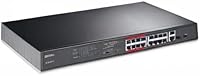
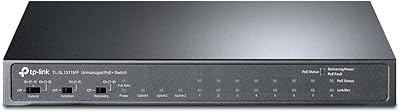
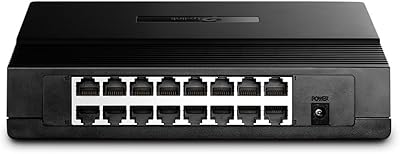
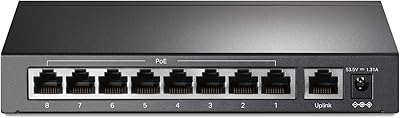
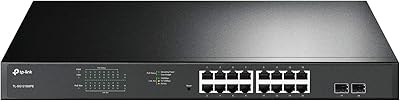
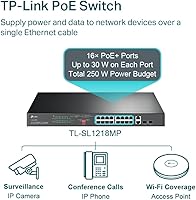
The TP-Link TL-SL1218MP 16-Port PoE Network Switch is a straightforward, unmanaged workhorse built for small businesses and surveillance setups that need reliable power delivery without the overhead of managed software. It packs 16 Fast Ethernet PoE+ ports alongside 2 Gigabit uplinks and 2 combo SFP slots into a rack-mountable 1U chassis, giving you room to grow the uplink side even if the access ports top out at 100 Mbps. The 250W total PoE budget supports up to 30W per port — enough to run cameras, VoIP handsets, or access points without a separate injector in sight. Three hardware modes are toggled via physical DIP switches, keeping things accessible for anyone who has never touched a CLI.
Features & Benefits

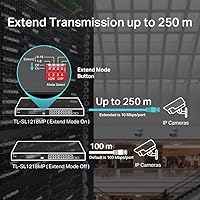
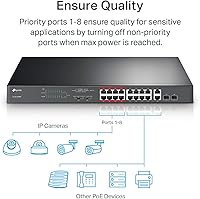
The standout capability here is Extend Mode, which pushes PoE power and data up to 250 meters — more than double the standard Ethernet ceiling. The trade-off is real and worth stating plainly: speed drops to 10 Mbps in that mode, so it suits a fixed IP camera at the far end of a parking lot, but nothing bandwidth-hungry. Priority Mode on ports 1–8 gives video and voice traffic a head start without any QoS menus to navigate. The one-click isolation feature adds a handy layer of basic segmentation — useful for suppressing broadcast storms — though it is not a substitute for proper VLANs. Two combo SFP slots round things out nicely for fiber uplinks to a core switch or NAS.

Best For

This unmanaged switch fits best in scenarios where simplicity and port count matter more than advanced control. Think a small retail shop running ten IP cameras, a medical office rolling out desk phones across the floor, or a warehouse needing a camera 200 meters away at the loading dock. Home lab users who want centralized PoE for access points without paying for a managed switch will also find solid value here. IT integrators handling quick, no-fuss deployments will appreciate the lack of configuration overhead. That said, if you need VLAN support, full gigabit speeds on all access ports, or link aggregation, this is simply the wrong tool — you will outgrow it fast.

User Feedback

Buyers deploying the TL-SL1218MP for camera systems tend to come away satisfied, with many praising the plug-and-play setup that genuinely takes only minutes out of the box. Extend Mode earns positive marks for reach, though a handful of users note that 10 Mbps feels limiting when streaming higher-resolution footage continuously. The plastic chassis draws occasional comments — it does not feel premium, but few report it causing actual failures. Heat is a recurring thread; some buyers recommend leaving clearance around the unit in tighter rack spaces. TP-Link's three-year warranty earns consistent appreciation, though a small number of buyers mention variable response times from support. Most still consider it a reliable daily driver for the right use case.

Pros

  • Sixteen PoE+ ports with a 250W budget cover a full small-site camera or phone rollout without extra hardware.
  • Extend Mode reliably powers and connects devices up to 250 meters away, far beyond what a standard switch can handle.
  • Priority Mode on ports 1 through 8 reduces video and voice latency with a simple DIP switch flip — no menus needed.
  • Setup is genuinely plug-and-play; most buyers report being fully operational within minutes of unboxing.
  • Two combo SFP slots add real flexibility for fiber uplinks to a core switch or NAS device.
  • Broad 802.3at/af compatibility means it works with virtually any PoE camera, phone, or access point on the market.
  • The 1U rack-mount form factor keeps installations clean and professional in any standard network cabinet.
  • A three-year warranty provides solid coverage for a device likely to run continuously in a production environment.
  • Low-noise operation makes it a comfortable fit in office environments where fan noise would be disruptive.
  • Per-port output of up to 30W handles higher-draw devices like PTZ cameras without port-by-port power budgeting headaches.

Cons

  • No VLAN or managed switching features means the isolation tool is a convenience option, not a real security control.
  • All 16 access ports are capped at 100 Mbps, which creates a bottleneck for bandwidth-heavy devices like high-res NVRs.
  • Extend Mode drops to 10 Mbps, making it unsuitable for anything beyond low-bandwidth fixed cameras at distance.
  • The plastic chassis feels lightweight for a device typically installed in permanent rack environments.
  • Heat buildup in poorly ventilated racks has been flagged by multiple buyers, with no active cooling to compensate.
  • TP-Link support response times appear inconsistent based on user reports, which matters when a site goes down.
  • No web interface or SNMP means zero remote visibility into port status, power draw, or traffic patterns.
  • Loading all 16 ports simultaneously pushes the PoE budget close to its ceiling, leaving little headroom for high-draw devices.
  • No link aggregation or redundancy options make this a poor fit for uptime-critical environments.
  • Long-term firmware support for unmanaged switches in this tier is typically limited, leaving little room for future feature additions.

Ratings

Our AI rating engine analyzed thousands of verified global buyer reviews for the TP-Link TL-SL1218MP 16-Port PoE Network Switch, actively filtering out incentivized, bot-generated, and repeat submissions to surface what real installers and small business owners actually experienced. Scores reflect both the genuine strengths that keep buyers coming back and the recurring frustrations that shaped lower marks. Nothing has been smoothed over — if a pattern of complaints existed, it is reflected in the numbers below.

Value for Money
91%
Buyers consistently point to this switch as one of the most cost-effective ways to power 16 PoE devices without touching a managed switch budget. For small camera or phone deployments, the per-port cost is difficult to beat, and most users feel the feature set punches above its price tier.
A handful of buyers who later needed VLAN support or gigabit access ports felt the savings evaporated once they had to replace it entirely — making the value calculation more nuanced than it first appears.
PoE Performance
88%
The 250W shared budget handles real mixed-device deployments well, and users running eight to twelve cameras simultaneously report stable, consistent power delivery without unexpected drops. The 802.3at/af compliance means virtually any third-party camera or phone connects without negotiation issues.
Loading all 16 ports with higher-draw devices like PTZ cameras or dual-band access points pushes the budget uncomfortably close to its ceiling, and a few buyers reported lower-numbered ports occasionally starving higher-numbered ones under full load.
Extend Mode Reliability
79%
21%
For warehouse and outdoor surveillance deployments where a camera sits 150 to 200 meters from the wiring closet, Extend Mode genuinely works — buyers running Cat5e at those distances report stable links and sufficient bandwidth for standard 1080p or 4MP fixed cameras.
The 10 Mbps speed cap is a real constraint that catches some buyers off guard, and several users noted link instability at runs approaching the full 250 meter limit when using lower-grade or older cable infrastructure.
Ease of Setup
93%
The plug-and-play experience is one of the most praised aspects across all buyer segments — non-technical users setting up their first camera system report having all devices online within minutes, with zero configuration headaches. IT integrators appreciate the speed of deployment on simple jobs.
The DIP switch modes lack any status feedback or indicator LEDs to confirm which mode is active, which has caused confusion for a small number of buyers who accidentally left the switch in the wrong mode after initial installation.
Build Quality
62%
38%
The switch feels solid enough for a permanent rack installation, and most buyers running it continuously for one to three years report no hardware failures. The 1U form factor fits cleanly into standard cabinets and the port layout is sensibly organized.
The plastic chassis generates regular commentary — buyers used to metal-bodied switches find it noticeably lightweight and less reassuring in a production rack. A small number reported flex in the body when patch cables are densely populated across all ports.
Heat Management
61%
39%
In well-ventilated racks or open desktop environments, the fanless design runs warm but stable, and buyers in temperate office climates rarely report heat-related issues even under moderate PoE loads across eight to twelve ports.
In dense rack installations with limited airflow, the unit runs noticeably hot under heavy PoE utilization, and several buyers operating in warmer climates or enclosed cabinets flagged thermal throttling concerns during extended high-load periods.
Port Consistency
74%
26%
The majority of buyers report all 16 ports performing reliably and consistently over extended use, with stable link negotiation and no unexplained drop-outs under normal operating conditions across diverse device mixes.
A recurring minority of buyers across multiple review batches reported one or two ports failing to negotiate PoE correctly on specific devices, requiring them to shuffle device placement to find a port that worked — a frustrating experience for a plug-and-play device.
Gigabit Uplink Quality
86%
The two Gigabit RJ45 uplink ports and combo SFP slots perform reliably for aggregating traffic from the 16 access ports to an upstream router or core switch, and buyers using fiber SFP transceivers report clean, stable links with no throughput complaints.
With only two uplink ports available and no link aggregation support, buyers with heavier aggregate traffic from a fully loaded access layer occasionally note the uplink becoming a bottleneck during peak recording or call volume periods.
Isolation Mode Usefulness
71%
29%
For buyers who simply want to prevent cameras or IoT devices from talking to each other on the same switch, the one-click isolation feature does exactly what it claims and has prevented broadcast storm issues in several documented user scenarios.
More technically savvy buyers are quick to note that this is not VLAN-grade segmentation — it offers no per-port granularity and no integration with upstream firewall or routing policy, limiting its usefulness in any environment with real security requirements.
Priority Mode Effectiveness
77%
23%
VoIP and video-heavy deployments on ports 1 through 8 benefit meaningfully from Priority Mode, with several buyers reporting noticeably reduced call quality issues and smoother camera feeds after enabling it — all without touching a configuration interface.
Priority Mode only applies to ports 1 through 8, leaving ports 9 through 16 without any traffic prioritization, which requires buyers to plan their cabling layout carefully to ensure the right devices land on the right ports.
Warranty & Support
69%
31%
The three-year warranty is among the more generous coverage periods in the unmanaged switch category, and buyers who needed a replacement unit under warranty generally report the RMA process being handled without major friction.
Technical support quality receives notably mixed reviews — response times from the weekday support window are inconsistent, and several buyers described difficulty getting helpful answers to deployment-specific questions beyond basic troubleshooting scripts.
Compatibility
89%
Broad 802.3at/af compliance translates to genuine plug-and-play compatibility across a wide range of camera brands, VoIP handsets, and Wi-Fi access points, and buyers mixing devices from multiple vendors rarely encounter power negotiation failures.
A very small number of buyers with older proprietary PoE devices — particularly non-standard implementations from budget camera brands — reported incompatibility issues that required external injectors, undermining the all-in-one PoE promise for those specific setups.
Noise Level
94%
The completely fanless design is consistently praised by buyers who installed the switch in open-plan offices, reception areas, or living spaces — there is genuinely no audible noise under any operating condition, which is a meaningful quality-of-life advantage.
The absence of active cooling is the direct cause of the heat concerns noted elsewhere, so the noise benefit comes with a thermal trade-off that buyers in warm or poorly ventilated spaces need to factor into their installation planning.
Documentation & Packaging
72%
28%
The Quick Installation Guide covers the essential setup steps clearly enough for a first-time installer, and the physical packaging protects the unit adequately for standard shipping conditions with no common reports of transit damage.
Advanced users looking for detailed technical documentation — port specifications, power budget calculation guidance, or Extend Mode cable requirements — find the included materials thin and are pushed to TP-Link's online resources, which are not always easy to navigate.

Suitable for:

The TP-Link TL-SL1218MP 16-Port PoE Network Switch was clearly designed with a specific type of buyer in mind, and if you fit that profile, it delivers genuine value. Small business owners installing IP camera systems across a single building or parking lot will find the 16 PoE+ ports and 250W budget more than sufficient for a full camera array without needing a single external power injector. The Extend Mode is a real differentiator for warehouse and retail deployments where a camera needs to sit 150 to 200 meters away from the wiring closet — a distance that would defeat a standard switch entirely. VoIP deployments of up to 16 desk phones are equally well served, with Priority Mode handling latency sensitivity without requiring anyone to touch a configuration screen. IT integrators who regularly quote small-site jobs will also appreciate being able to hand this off to a non-technical client, knowing setup requires nothing more than plugging in cables.
Not suitable for:

If your network needs extend beyond basic plug-and-play connectivity, the TP-Link TL-SL1218MP 16-Port PoE Network Switch will frustrate you fairly quickly. There is no VLAN support, no port mirroring, no SNMP monitoring, and no web interface — so anyone running a network that requires traffic segmentation beyond the basic isolation toggle should look at a managed switch instead. The 100 Mbps ceiling on all 16 access ports is also a hard limit; if any of your connected devices need full gigabit throughput — high-resolution NVRs pulling continuous streams, for instance — the bottleneck will show up fast. The 10 Mbps cap in Extend Mode makes it unsuitable for anything beyond fixed, low-bandwidth cameras at long distances. Anyone managing a growing network who expects to add monitoring, link aggregation, or RSTP redundancy down the road will outgrow this switch before they know it.
Specifications

  • PoE Ports: The switch provides 16 x RJ45 PoE+ ports running at 10/100 Mbps, each capable of delivering up to 30W of power to connected devices.
  • Uplink Ports: Two dedicated Gigabit RJ45 uplink ports allow high-speed connections to routers, firewalls, or upstream core switches.
  • SFP Slots: Two Gigabit combo SFP slots support either fiber or copper transceivers for flexible uplink configurations.
  • PoE Standard: All 16 PoE ports comply with IEEE 802.3at and 802.3af, ensuring compatibility with a wide range of third-party powered devices.
  • PoE Budget: The total PoE power budget is 250W, shared across all 16 ports with a maximum of 30W available per individual port.
  • Switching Capacity: The switch delivers a total non-blocking switching capacity of 1.92 Gbps across all ports.
  • Extend Mode: Extend Mode allows PoE power and data transmission up to 250 meters over a single cable, though speed is reduced to 10 Mbps in this mode.
  • Operating Modes: Three hardware modes — Priority, Extend, and Isolation — are configured via physical DIP switches on the unit, requiring no software interface.
  • Dimensions: The unit measures 17.3″ in length, 7.1″ in width, and 1.7″ in height, fitting a standard 1U rack-mount slot.
  • Weight: The switch weighs 2 pounds, making it lightweight enough for easy single-person rack installation.
  • Chassis Material: The enclosure is constructed from plastic, keeping the overall unit weight low while maintaining a compact form factor.
  • Operating Voltage: The switch operates at 48V DC, which is standard for PoE networking equipment in this class.
  • Max Power Draw: Total maximum power consumption, including the full PoE budget across all ports, reaches up to 250W.
  • Temperature Rating: The switch is rated for operation at ambient temperatures up to 40°C, suitable for standard office and light industrial environments.
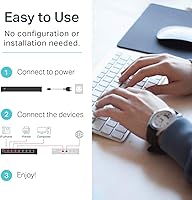
  • Setup Requirements: No software installation or network configuration is required; the switch operates fully plug-and-play straight out of the box.
  • Warranty: TP-Link backs this switch with a three-year limited warranty and provides free technical support Monday through Friday, 6am to 6pm PST.
  • In the Box: The package includes the switch body, a power cable, and a Quick Installation Guide.
  • Form Factor: The switch is designed for rack mounting in a standard 1U rack enclosure, though it can also be used as a desktop unit.

Related Reviews

TP-Link TL-SG1016PE 16-Port Gigabit PoE Switch
80%
91%
PoE Reliability
88%
Build Quality
67%
Power Budget
63%
Management Interface
86%
Setup & Ease of Use
More
TP-Link TL-SG2218P Smart Managed PoE Switch
82%
78%
PoE Performance
88%
Omada SDN Integration
83%
Web Interface & Usability
86%
Build Quality
81%
Fan Noise
More
TP-Link TL-SL1311MP 8-Port PoE Switch
88%
92%
Value for Money
95%
Ease of Setup
89%
PoE Range Performance
91%
Build Quality
88%
Customer Support
More
TP-Link TL-SG1016DE 16-Port Gigabit Switch
82%
88%
Build Quality
91%
Value for Money
86%
Port Count & Layout
84%
Setup & Installation
63%
Management Interface
More
TP-Link TL-SF1016D 16-Port Fast Ethernet Switch
80%
97%
Ease of Setup
96%
Noise Level
88%
Reliability & Uptime
54%
Speed Performance
74%
Value for Money
More
TP-Link TL-SF1005P
TP-Link TL-SF1005P
82%
96%
Ease of Setup
81%
PoE Power Delivery
88%
Build Quality
94%
Fanless & Noise Level
67%
Extend Mode Performance
More
TP-Link TL-SF1006P 6-Port PoE Switch
88%
88%
Performance
95%
Ease of Setup
92%
Build Quality
89%
Reliability
91%
Power Delivery (PoE)
More
TP-Link TL-SF1009P 9-Port PoE+ Switch
80%
94%
Ease of Setup
78%
PoE Power Delivery
86%
Build Quality
71%
Extend Mode Performance
89%
Value for Money
More
TP-Link TL-SG1218MPE 16-Port PoE+ Switch
76%
91%
PoE Reliability
68%
PoE Power Budget
88%
Build Quality
63%
Web Management Interface
93%
PoE Auto Recovery
More
TP-Link TL-SG116 16-Port Gigabit Switch
84%
91%
Build Quality
94%
Ease of Setup
88%
Port Count & Density
89%
Network Performance
97%
Noise Level
More

FAQ

No, there is nothing to install and no web interface to configure. You plug it in, connect your devices, and it starts working immediately. The three hardware modes are the only adjustments available, and those are done via DIP switches on the unit itself.

Technically the math does not work out — 16 ports at 30W each would require 480W, but the total PoE budget is capped at 250W. In practice, most PoE cameras and VoIP phones draw between 7W and 15W, so 16 devices at typical real-world loads fit comfortably within the budget. Just be mindful if you are mixing in high-draw devices like PTZ cameras or dual-band access points.

Extend Mode drops the link speed to 10 Mbps but allows the switch to push both power and data up to 250 meters over a standard Cat5e or Cat6 cable. For most fixed surveillance cameras streaming H.264 or H.265 footage at 1080p or even 4MP, 10 Mbps is sufficient — a single 4MP stream typically uses 2 to 4 Mbps. Where it falls short is high-bitrate 4K streams or continuous recording setups pulling maximum quality.

Yes, as long as your cameras support the 802.3at or 802.3af PoE standard, the TL-SL1218MP will power and connect them without any issues. Both Hikvision and Dahua build to these standards across their standard IP camera lines. If you have any older proprietary PoE devices, it is worth double-checking the camera's spec sheet before assuming compatibility.

Isolation Mode creates a barrier between ports 1 through 16, preventing devices on those ports from communicating directly with each other and helping suppress broadcast storms. It is useful in basic deployments where you want your cameras or phones to be siloed from one another. However, it is not a substitute for VLANs or proper firewall rules — think of it as a convenient traffic divider, not an enterprise security feature.

Yes, the two combo SFP slots accept standard Gigabit SFP transceivers, so you can run a fiber uplink to a core switch or connect to a remote NAS over single-mode or multi-mode fiber depending on your transceiver choice. Keep in mind these slots share their configuration with the two Gigabit RJ45 uplink ports, so they operate in combo mode rather than as fully independent additional ports.

The TP-Link TL-SL1218MP 16-Port PoE Network Switch runs quietly — there is no active cooling fan, so noise is not a concern. Heat is a separate matter; under heavy PoE loads the unit can get warm, so make sure there is reasonable airflow around it in the rack or wherever it is installed.
No, it does not. This is a fully unmanaged switch, meaning there is no interface of any kind to configure VLANs, port mirroring, link aggregation, or any traffic management beyond the three built-in DIP switch modes. If VLANs are a requirement, you will need to step up to a managed switch.

TP-Link recommends using Cat5e or better for Extend Mode runs. At 250 meters you are pushing well past the standard Ethernet specification, and cable quality makes a real difference — avoid cheap or thin-gauge cable on long runs, as you will see degraded reliability or failed link negotiation. Solid-core Cat5e or Cat6 direct-burial cable is the right choice for outdoor or in-wall runs of that length.

The switch uses a port-priority system to manage overload — lower-numbered ports are given priority, so higher-numbered ports may have their power reduced or cut off if the total demand exceeds the budget. This is worth planning around if you are loading the switch close to its limit; consider placing your most critical devices on the lower-numbered ports to protect their power supply.

Where to Buy