Overview

The TP-Link TL-SG1008MP 8-Port PoE+ Gigabit Switch is a plug-and-play unmanaged switch built for small businesses and prosumer home networks that need straightforward Power over Ethernet without the complexity of a managed device. What sets it apart at this price point is that every port delivers PoE+ — not just a handful — so you're not rationing power delivery across your deployment. The metal chassis feels noticeably more substantial than the plastic-bodied alternatives that crowd this segment, and it can sit on a desk or slide into a rack with equal ease. There's no management interface, no VLAN support, no SFP uplink. That's not a flaw; it's the entire point.
Features & Benefits

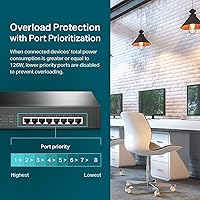
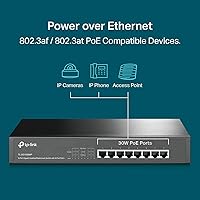
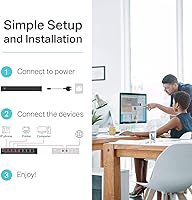
Every one of the eight RJ45 ports supports 802.3at/af PoE+, meaning each can push up to 30W — enough for a PTZ camera or a dual-radio access point without needing an external injector. The shared power budget sits at 153W total, and the switch handles overload situations intelligently: when demand exceeds the ceiling, lower-priority ports are disabled rather than the whole unit dropping. Gigabit speeds run on every port simultaneously, backed by IEEE 802.3X flow control, which helps prevent packet loss when multiple high-bandwidth devices are active. The shielded RJ45 connectors are a thoughtful touch in cluttered cable environments. Setup is genuinely instant — plug it in, connect your devices, and everything just works.

Best For

This TP-Link PoE+ switch is a natural fit for anyone deploying four to eight IP security cameras and wanting to eliminate the mess of individual power injectors. IT installers who drop switches into small client sites will appreciate the zero-configuration nature — there's nothing to misconfigure and nothing to explain to a client. Home lab users running a few wireless access points will also find it a quiet, fanless option that doesn't take up much space. That said, if you need VLANs to segment traffic, link aggregation for uplink redundancy, or any form of remote monitoring, this unmanaged gigabit switch simply isn't built for that — and there's no workaround. Know what you need before buying.

User Feedback

Buyers consistently point to easy out-of-box setup and build quality as standout positives — the metal case earns specific mentions from people used to plastic-chassis competitors like the Netgear GS308P. Power delivery to cameras and access points is widely reported as rock-solid over months of use. On the other side, a few users running six or more high-draw devices hit the 153W ceiling sooner than expected and had to rethink their device prioritization. Some also wish for per-port activity LEDs that are more readable at a glance. Long-term reliability feedback is largely positive, though TP-Link support experience gets mixed marks in edge cases. Overall sentiment leans strongly favorable for the price tier.

Pros

  • Every single port delivers PoE+, which is genuinely uncommon at this price point.
  • Zero configuration required — plug it in and connected devices power up immediately.
  • The all-metal chassis feels noticeably more durable than plastic-bodied rivals in the same category.
  • Port-priority overload protection prevents full system crashes when the power budget is exceeded.
  • Gigabit speeds on all eight ports mean bandwidth is never the bottleneck for cameras or access points.
  • Shielded RJ45 connectors add a layer of reliability in electrically noisy or cable-dense environments.
  • Ships with both a rackmount kit and rubber feet, so it fits a rack or a desk without extra purchases.
  • Fanless operation keeps it completely silent — useful in office or living-space installations.
  • The TL-SG1008MP holds a top-tier Best Sellers rank in its category, reflecting broad, sustained buyer confidence.
  • Compact footprint makes it easy to tuck into tight network closets or shallow rack enclosures.

Cons

  • The 153W shared PoE budget requires careful planning when running six or more high-draw devices simultaneously.
  • No management interface means there is no way to diagnose port issues, view traffic stats, or adjust behavior remotely.
  • Per-port activity LEDs are not the most readable at a glance, making quick visual troubleshooting harder than it should be.
  • No SFP uplink port limits how cleanly this switch connects to fiber-based infrastructure.
  • Heat buildup under sustained full-load PoE use has been noted by some users in poorly ventilated spaces.
  • Eight ports is a hard ceiling — there is no expansion path if your device count grows beyond that.
  • No VLAN or traffic segmentation support makes it unsuitable for networks where security isolation is required.
  • TP-Link customer support quality has received inconsistent reviews in edge-case warranty situations.
  • No QoS controls, so latency-sensitive traffic like VoIP competes equally with everything else on the switch.
  • Unmanaged design means no way to disable unused ports, which can be a minor security concern in shared environments.

Ratings

The scores below for the TP-Link TL-SG1008MP 8-Port PoE+ Gigabit Switch were produced by AI analysis of thousands of verified global buyer reviews, with spam, bot-generated, and incentivized submissions actively filtered out before scoring. Each category reflects the honest weight of real user experiences — the wins that made buyers recommend it and the frustrations that made others hesitate. Both sides are represented without bias.
Ease of Setup
96%
Buyers across skill levels — from first-time home networkers to seasoned IT pros — consistently report that the switch is operational within minutes of unboxing. There is nothing to configure, no app to download, and no driver conflicts to troubleshoot. Plug in power, connect devices, and everything negotiates automatically.
The simplicity that earns high marks here is also a ceiling: users who expected even basic LED-based port diagnostics or a setup wizard for prioritization found the experience abrupt. A small number of reviewers wished for a quick-start guide that explained the port-priority behavior more clearly.
PoE Coverage
93%
Having every single port deliver PoE+ is the feature buyers cite most often when recommending this switch over competitors. Installers deploying six or eight IP cameras report eliminating a tangle of individual power injectors entirely, which simplifies cabinet layouts and reduces points of failure considerably.
A handful of users deploying eight high-draw devices simultaneously discovered the 153W shared budget is a real constraint, not just a footnote. When several PTZ cameras activate pan-tilt motors at once, some noticed lower-priority ports temporarily dropping — something that requires upfront device planning to avoid.
Build Quality
91%
The all-metal enclosure earns repeated praise, particularly from buyers who previously owned plastic-chassis switches in the same price range. Several IT installers noted the unit feels solid enough to trust in a client-facing rack without worrying about flex or cracking over time.
A small number of users noted that the surface finish scratches more easily than expected during rack installation, and the front panel labeling can wear with repeated handling. Nothing structurally concerning, but cosmetically it is not as refined as premium managed switches costing significantly more.
Value for Money
89%
Buyers consistently frame this switch as punching above its weight class, largely because full PoE+ on every port at this price tier is genuinely rare. Home lab users and small office deployers frequently compare it favorably to alternatives that offer PoE on only four of eight ports, making the per-port cost calculation compelling.
A segment of reviewers feel the value equation weakens for buyers who eventually need management features and must upgrade entirely, rather than building on this unit. A few also noted that competitors occasionally run sales that narrow the price gap enough to warrant comparison shopping before committing.
Reliability & Uptime
88%
Long-term owners — many reporting 12 to 24 months of continuous operation — describe rock-solid uptime with no spontaneous reboots or port failures. Security camera installers in particular note that cameras stay online through overnight periods and weather events without the switch requiring any intervention.
A small cluster of reviews mention units developing intermittent port issues after extended use under sustained heavy PoE load, which some attribute to thermal stress in enclosed spaces. These cases are a minority, but they underscore the importance of ensuring adequate ventilation when the switch runs near its power ceiling.
Thermal Management
71%
29%
Fanless operation is universally appreciated for keeping the switch completely silent, which makes it a good fit for office environments, home labs, and any space where fan noise would be noticeable. Under moderate loads — four to six devices with typical power draws — the chassis stays only mildly warm.
Under sustained full-load PoE conditions, multiple users report the chassis becoming noticeably hot to the touch, and a few noted performance impacts in poorly ventilated enclosures. The switch has no internal fan to compensate, so placement in a sealed or cramped cabinet is genuinely inadvisable.
Port Indicator LEDs
63%
37%
The link and activity LEDs do their basic job — you can confirm a device is connected and active at a glance — which satisfies most users with simple setups where each port's purpose is already known.
A recurring complaint is that the LEDs do not distinguish between PoE active, link speed, or error states in any granular way, making quick troubleshooting in a multi-device rack frustrating. Several IT professionals specifically called out the lack of a dedicated PoE-active indicator as a practical shortcoming during installations.
Mounting Flexibility
87%
Shipping with both a rackmount kit and rubber feet in the box means buyers can deploy it in a rack or on a shelf without sourcing additional hardware. Installers appreciate not having to order mounting ears separately, which is a common hidden cost with competing brands at this tier.
The rackmount kit is functional but basic — it fits standard 19-inch racks cleanly, but the mounting screws provided are thin and a couple of reviewers stripped them during installation. The 1U height also means it can look somewhat shallow in a rack populated with thicker managed switches.
Port Density & Scalability
58%
42%
For deployments that max out at eight PoE+ devices, the port count is perfectly matched to the use case, and there is no wasted capacity. Buyers who purchase this knowing they have exactly six cameras or access points report no frustration with the eight-port ceiling.
There is absolutely no expansion path: no stacking support, no uplink SFP port, and no way to add capacity without replacing the unit entirely. Users whose deployments grew from six to nine devices quickly found themselves shopping for a replacement, which some felt negated the initial value.
Noise Level
97%
Completely silent operation is one of the most praised aspects among home office and living-space deployers. Unlike managed switches with active cooling fans, this unit produces zero audible output regardless of load, which matters significantly in quiet work or sleep environments.
The only reason this is not a perfect score is that silence comes at the cost of thermal control — some users would actually prefer an optional low-speed fan mode for hot climates or enclosed installations, even if it meant minor noise.
Compatibility
86%
Broad 802.3at/af compliance means the TL-SG1008MP works with virtually every mainstream PoE device on the market, including cameras from Hikvision, Dahua, and Axis, as well as access points from Ubiquiti, TP-Link Omada, and Cisco Meraki. Non-PoE devices connect and operate normally without any configuration.
A small number of users with older or off-brand PoE devices reported negotiation quirks, particularly with devices that technically claim 802.3af compliance but draw power inconsistently. These edge cases are rare, but buyers running legacy hardware should verify compatibility before assuming seamless interoperability.
TP-Link Support Experience
67%
33%
Standard inquiries — basic setup questions, replacement requests for DOA units, and simple warranty claims — tend to be resolved without major friction according to the majority of support-related reviews. US-based support availability during business hours is appreciated by domestic buyers.
Reviews referencing more complex warranty situations or hardware failures outside the initial return window paint a more inconsistent picture, with some users reporting slow response times and difficulty reaching resolution. The support experience appears to vary meaningfully by region and case complexity.
Power Budget Transparency
62%
38%
Buyers who researched the 153W shared budget before purchasing generally set up their deployments without issue, planning their device priority accordingly. The overload protection behavior — gracefully dropping lower-priority ports — is functionally sound and prevents total switch failure under overload conditions.
A notable share of negative reviews stem specifically from buyers who did not fully understand the shared nature of the budget before purchase, expecting each port to independently deliver its full 30W simultaneously. Better in-box documentation explaining port priority behavior and load planning would prevent a significant portion of buyer frustration.

Suitable for:

The TP-Link TL-SG1008MP 8-Port PoE+ Gigabit Switch is a strong fit for anyone who needs to power multiple network devices without the headache of individual power injectors or adapters. Small business owners setting up IP camera systems, retail spaces adding access control, or homeowners building out a security network with four to eight cameras will find the all-port PoE+ design genuinely useful rather than just a marketing checkbox. IT installers who regularly drop unmanaged switches into small client environments — a dental office, a boutique, a small warehouse — will appreciate that there is nothing to configure, nothing to explain, and very little to go wrong. Home lab enthusiasts running a cluster of wireless access points also fit naturally here, especially those who want a fanless, quiet unit that tucks into a rack or sits cleanly on a shelf. If your network is straightforward — devices in, power delivered, data flowing — this unmanaged gigabit switch covers the job without unnecessary complexity.
Not suitable for:

The TP-Link TL-SG1008MP 8-Port PoE+ Gigabit Switch is a deliberate dead-end for anyone whose network requires more than basic connectivity. If you need to segment traffic with VLANs, prioritize voice calls over video streams with QoS controls, monitor port-level statistics remotely, or set up link aggregation for uplink redundancy, this switch simply has none of those capabilities — and no firmware update will ever add them, because it is unmanaged by design. Buyers planning to run eight high-draw devices simultaneously should also do the math carefully: the 153W shared PoE budget sounds generous until you realize that eight ports each pulling near their 30W maximum will exceed it, forcing the switch to cut power to lower-priority ports. Larger deployments that have already outgrown eight ports will need a different platform entirely, since there is no expansion or stacking option here. If network visibility and control matter to your setup, stepping up to a managed switch is the honest recommendation.
Specifications

  • Model: This switch is manufactured by TP-Link under the model designation TL-SG1008MP.
  • Total Ports: The unit provides 8 RJ45 ports, all of which are PoE+ capable with no non-PoE fallback ports.
  • PoE Standard: All 8 ports comply with IEEE 802.3at (PoE+) and the older 802.3af standard, ensuring broad device compatibility.
  • Per-Port Power: Each individual port can supply a maximum of 30W to a connected powered device.
  • PoE Budget: The total shared PoE power budget across all active ports is 153W.
  • Data Rate: Every port operates at full gigabit speeds, supporting 10/100/1000 Mbps auto-negotiation.
  • Flow Control: IEEE 802.3X flow control is implemented across all ports to reduce packet loss under heavy simultaneous load.
  • Switch Type: This is an unmanaged switch with no web interface, CLI, or software utility of any kind.
  • Port Shielding: All RJ45 connectors are shielded to reduce electromagnetic interference in dense cabling environments.
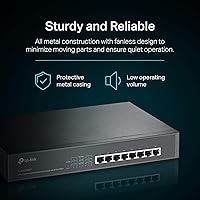
  • Chassis Material: The enclosure is constructed from metal, providing greater rigidity and heat dissipation than plastic-bodied alternatives.
  • Cooling: The switch uses passive fanless cooling, producing zero acoustic noise during operation.
  • Mounting: The unit supports both desktop placement via included rubber feet and 19-inch rack installation via the included rackmount kit.
  • Dimensions: Physical dimensions are 11.57″ long by 7.09″ wide by 1.73″ tall, occupying 1U of rack space.
  • Weight: The switch weighs approximately 14.8 oz (0.93 lbs), making it lightweight for a full-metal unit.
  • Operating Temp: Rated for operation between 0°C and 40°C, suitable for typical indoor office and home environments.
  • Overload Protection: When total PoE demand meets or exceeds the 153W budget, lower-priority ports are automatically disabled to protect higher-priority connections.
  • Compatible Devices: The switch is designed to power IP cameras, wireless access points, VoIP phones, and other 802.3at/af-compliant devices.
  • In the Box: Package includes the TL-SG1008MP switch, a power cord, installation guide, rackmount kit, and rubber feet.

Related Reviews

TP-Link TL-SG108PE
TP-Link TL-SG108PE
84%
88%
Build Quality
83%
PoE Performance
91%
Ease of Setup
79%
Management Interface
87%
Value for Money
More
TP-Link TL-SG2210P V3 8-Port PoE Switch
83%
91%
Value for Money
74%
PoE Performance
83%
Ease of Setup
86%
Omada SDN Integration
88%
Build Quality
More
TP-Link TL-SG108E 8-Port Gigabit Switch
87%
93%
Ease of Setup
88%
Performance & Reliability
94%
Fanless Design (Noise Levels)
85%
Smart Management Features
89%
Build Quality & Durability
More
TP-Link TL-SL1311MP 8-Port PoE Switch
88%
92%
Value for Money
95%
Ease of Setup
89%
PoE Range Performance
91%
Build Quality
88%
Customer Support
More
TP-Link LS108GP
TP-Link LS108GP
81%
96%
Ease of Setup
62%
PoE Power Budget
78%
Extend Mode Performance
93%
Silent Operation
84%
Build Quality
More
TP-Link TL-SG3452P 48-Port Gigabit PoE+ Switch
84%
92%
Performance
94%
PoE Capabilities
85%
Cloud Management Experience
88%
Build Quality
82%
Ease of Setup
More
TP-Link TL-SG105PE 5-Port Gigabit PoE Switch
79%
91%
Value for Money
84%
PoE Performance
93%
Ease of Setup
76%
Network Management
62%
Web Interface
More
TP-Link TL-SG1005P
TP-Link TL-SG1005P
85%
96%
Ease of Setup
83%
PoE Power Delivery
91%
Build Quality
98%
Noise Level
89%
Gigabit Throughput
More
TP-Link TL-SG1428PE 24-Port Gigabit PoE Switch
86%
89%
Performance
92%
Value for Money
87%
Ease of Setup
93%
PoE Power Output
84%
Build Quality
More
TP-Link TL-SG1016PE 16-Port Gigabit PoE Switch
80%
91%
PoE Reliability
88%
Build Quality
67%
Power Budget
63%
Management Interface
86%
Setup & Ease of Use
More

FAQ

Every single port on this switch is PoE+ capable — there are no data-only ports. That is actually one of its strongest practical advantages over competitors that reserve PoE for only a subset of ports.

The switch handles this through port-priority overload protection. When total demand hits the 153W ceiling, it automatically cuts power to the lowest-priority ports first, keeping higher-priority devices running. You can influence priority by connecting your most critical devices to the lower-numbered ports, which typically hold higher priority in unmanaged TP-Link switches, but you should verify this in the installation guide since it is not user-configurable via software.

Possibly, but you need to check your cameras' actual power draw first. PTZ cameras can pull anywhere from 12W to 25W+ depending on the model. If all eight are drawing near 20W each, you are already at 160W — above the 153W budget. Plan your device mix carefully and leave some headroom rather than assuming the worst case.

No, and there is no workaround for this. The TP-Link TL-SG1008MP 8-Port PoE+ Gigabit Switch is fully unmanaged, meaning there is no web UI, no SNMP, no app, and no command-line access. If remote monitoring or configuration is a requirement for your setup, you will need a managed switch instead.
It does not support VLANs in any form. If you need to isolate your camera network from your general LAN — which is a sensible security practice — you will need either a managed switch or a router that handles VLAN segmentation upstream of this unit.

Yes. PoE+ switches automatically detect whether a connected device needs power or not. A regular laptop, NAS, or desktop will connect and transfer data normally without any power being sent to it — the switch negotiates this automatically and safely.

Completely silent. The TL-SG1008MP uses passive fanless cooling, so there are no moving parts and no noise whatsoever. Under sustained heavy PoE load the chassis can get warm to the touch, so just make sure it has reasonable airflow around it and is not buried inside a sealed cabinet.

Yes, the included rackmount kit is designed for a standard 19-inch rack and the switch occupies 1U of space. The rubber feet are also included if you prefer to set it on a shelf or desk. You do not need to buy any additional mounting hardware.

The Netgear GS308P is a common alternative, but it only provides PoE on four of its eight ports, with a lower total power budget. If you need PoE on all eight ports, the TL-SG1008MP is the more capable option at a similar price tier. The Netgear unit may suit you fine if half your devices are non-PoE and you want a slightly smaller form factor.

TP-Link markets this product with a limited lifetime protection warranty, though the exact terms and conditions are worth verifying directly on TP-Link's website at time of purchase, as warranty programs can change. US-based technical support is available by phone and chat during business hours. User experiences with support tend to be adequate for standard issues, though complex or edge-case claims can occasionally take longer to resolve.

Where to Buy