Overview

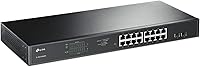
The TP-Link TL-SG1218MPE 16-Port PoE+ Switch occupies a practical middle ground — more capable than a basic unmanaged switch, but nowhere near the complexity of a full enterprise CLI-managed device. You get 16 PoE+ RJ45 ports, two standard gigabit ports, and two combo SFP slots for fiber or copper uplinks, all packed into a 1U rackmount metal chassis that feels legitimately business-grade. The 250W total PoE budget is enough to run a modest mix of IP cameras, access points, and VoIP phones — but tally your device power draws carefully before assuming it covers everything without compromise. This switch is built for IT generalists, not enterprise architects.
Features & Benefits

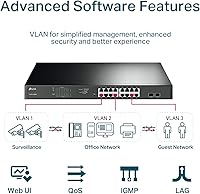
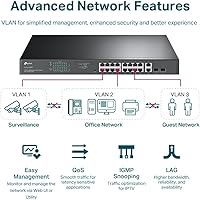
The standout here is PoE Auto Recovery — the switch monitors connected devices and automatically reboots anything that goes unresponsive, which is a genuine time-saver for remote camera or access point deployments. Port priority and overload protection kick in when total draw approaches the ceiling, gracefully disabling lower-priority ports rather than causing unpredictable outages. The web-based Easy Smart interface requires no command-line knowledge, and the desktop utility makes initial configuration quick for non-specialists. VLAN segmentation, QoS prioritization, IGMP snooping, and link aggregation round out a feature set that punches above its price tier. The combo SFP uplink slots add real flexibility for connecting to a core switch via fiber.

Best For

This TP-Link easy smart switch is a strong fit for small businesses and branch offices that need to power and manage a fleet of IP cameras, access points, or VoIP handsets without a dedicated network engineer on staff. Home lab users will appreciate the VLAN and QoS support without paying for enterprise licensing. Installers and MSPs will find the PoE auto-recovery particularly useful at unattended sites where a frozen camera would otherwise mean a truck roll. If you are replacing a basic unmanaged switch and want meaningful traffic controls without touching a command line, this is a logical step up. It also mounts cleanly in a standard rack, which matters in organized equipment rooms.

User Feedback

Buyers consistently praise the TL-SG1218MPE for its solid build and reliable PoE delivery, with the metal chassis drawing repeated approval even from non-engineers who expected a flimsier product. The Auto Recovery feature is regularly called out as a practical lifesaver in camera deployments. On the downside, the web management interface draws criticism for feeling dated and occasionally sluggish in certain browsers. Third-party SFP module compatibility is inconsistent — sticking to TP-Link's own modules avoids headaches. Some long-term users have flagged a slow firmware update cadence as a lingering concern. The 250W power budget also fills up faster than buyers anticipate once higher-draw access points enter the mix alongside cameras.

Pros

  • Sixteen PoE+ ports in a single 1U unit covers most small office or retail deployments without needing a second switch.
  • PoE auto-recovery silently reboots frozen cameras or access points — a real operational advantage at unstaffed locations.
  • The web-based Easy Smart interface requires no CLI knowledge, making setup accessible to non-specialist IT staff.
  • VLAN, QoS, IGMP snooping, and link aggregation offer genuine traffic control at a price most small businesses can justify.
  • Combo SFP uplink slots support both fiber and copper connections to a core switch or router.
  • Metal chassis and rackmount design feel solidly business-grade rather than consumer-tier.
  • Port priority and overload protection gracefully sheds low-priority ports instead of causing full outages when power draw peaks.
  • A three-year manufacturer warranty with weekday technical support is stronger coverage than many rivals in this segment offer.
  • Plug-and-play operation out of the box means you can start using it before diving into management settings.

Cons

  • The 250W total PoE budget runs out faster than expected when mixing high-draw access points and outdoor cameras.
  • The web management interface looks dated and can respond slowly depending on the browser used.
  • Third-party SFP module compatibility is inconsistent — non-TP-Link optics may not be recognized at all.
  • Firmware updates are infrequent, which is a concern for buyers planning to run this hardware for five or more years.
  • No command-line access means advanced users hit a hard ceiling when troubleshooting or scripting configurations.
  • The desktop configuration utility requires a Windows environment, which limits initial setup options for Linux or macOS users.
  • SNMP support is limited compared to full managed switches, making integration with professional monitoring tools harder.
  • Rackmount kit is included, but the switch ships without rack screws, which can catch first-time installers off guard.

Ratings

The scores below were generated by our AI engine after analyzing thousands of verified buyer reviews worldwide for the TP-Link TL-SG1218MPE 16-Port PoE+ Switch, with spam, bot activity, and incentivized feedback actively filtered out before scoring. This analysis reflects genuine user experiences across small business deployments, home labs, and installer use cases — strengths and frustrations weighted equally. Where real-world performance diverges from marketing claims, the scores reflect that honestly.

PoE Reliability
91%
Users consistently report that PoE delivery is stable and predictable across all 16 ports, even in deployments running cameras and APs simultaneously for months without interruption. Installers in particular praise the consistency of power delivery as one of the strongest arguments for recommending this switch to clients.
A handful of users noted occasional port negotiation issues with older or non-standard PoE devices, requiring a manual port reset to resolve. These cases appear isolated rather than systemic, but they do surface in longer-running deployments.
PoE Power Budget
68%
32%
For deployments running standard indoor cameras or basic access points, the 250W shared budget is workable and gives enough headroom to avoid constant prioritization decisions. Users who planned their device power draw in advance report no surprises.
This is the most frequently cited frustration in verified reviews: buyers underestimate how quickly the shared budget fills when mixing high-draw Wi-Fi 6 APs with multiple outdoor cameras. Running near-full capacity triggers port shedding, and users report discovering this limitation only after installation.
Build Quality
88%
The all-metal chassis earns consistent praise from buyers who expected a plasticky feel at this price point. Both IT pros and MSP installers comment that the unit feels genuinely rack-ready, with solid port construction that holds up well after months in an active equipment room.
A few users noted that the fan noise is audible in quieter environments like a home office or small reception area. The unit runs warm under heavy PoE loads, and airflow clearance in tight rack spaces becomes a real consideration.
Web Management Interface
63%
37%
Non-engineers repeatedly describe the Easy Smart web UI as approachable and logical enough to configure VLANs and QoS without outside help. For buyers stepping up from unmanaged switches, the learning curve is described as minimal.
The interface looks and feels dated, and multiple users report sluggish load times in Chrome and Firefox. Some buyers noted that the UI occasionally requires a hard refresh or browser change to behave correctly, which is a persistent annoyance during active configuration sessions.
PoE Auto Recovery
93%
This feature receives some of the most enthusiastic praise in the entire review pool. Users managing cameras at remote or unstaffed locations describe it as eliminating a meaningful percentage of service calls, with frozen cameras self-resolving overnight without any manual intervention.
The recovery cycle time is not user-configurable in current firmware versions, which frustrates buyers who want tighter control over how quickly or how many times a reboot attempt is made before alerting them.
Setup & Installation
84%
The switch is genuinely plug-and-play for basic deployments — out of the box it forwards traffic and delivers PoE without touching any settings. The included rackmount kit and rubber feet cover both installation scenarios, and the physical setup process draws almost no complaints.
The desktop configuration utility only runs on Windows, which creates friction for macOS and Linux users who need to access initial setup options outside the browser. A few buyers also noted the resource CD is essentially useless in 2024 and wished the documentation were more prominently hosted online.
VLAN & Traffic Management
79%
21%
VLAN support, IGMP snooping, and QoS configuration are functional and accessible without CLI knowledge, which genuinely differentiates this switch from unmanaged alternatives at a similar price. Home lab users in particular appreciate being able to segment IoT devices from primary networks without buying a more expensive switch.
Power users quickly find the management depth limiting — there is no support for advanced ACLs, routing, or granular per-port policy controls found on fully managed switches. Buyers who grow into more complex network needs will outgrow this switch's software capabilities before its hardware wears out.
SFP Uplink Compatibility
54%
46%
When using TP-Link branded SFP modules, the combo uplink slots work without issue and provide genuine flexibility for fiber or copper uplink scenarios. Buyers who standardized on TP-Link optics from the start report zero problems.
Third-party SFP modules are a consistent source of frustration, with multiple verified buyers reporting that modules from reputable brands go unrecognized entirely. This forces buyers to either source TP-Link optics specifically or accept compatibility uncertainty, which is a meaningful constraint in environments with existing fiber infrastructure.
Firmware & Software Updates
57%
43%
The firmware that ships with the switch is stable enough for most deployments, and buyers rarely report bugs or crashes that require an update to resolve. For straightforward installations, the out-of-box firmware is adequate.
Long-term owners flag the slow update cadence as a real concern, particularly around security patches. Several buyers noted that months pass between firmware releases, and some feature requests from the community remain unaddressed across multiple firmware versions.
Value for Money
86%
Buyers consistently identify this 16-port PoE+ switch as one of the most cost-effective options in its category for small business and installer use cases. The combination of metal build, VLAN support, auto-recovery, and SFP uplinks at this price tier is difficult to match from competing brands.
A subset of buyers who later needed more advanced management features felt the value calculation shifted unfavorably when they had to replace it sooner than expected. The savings upfront can be offset by an earlier-than-planned upgrade if network complexity grows.
Port Priority & Overload Protection
77%
23%
The overload protection mechanism prevents the kind of unpredictable total-switch outage that can occur on cheaper unmanaged PoE switches when power budget is exceeded. Users who deliberately configured port priorities report the system behaves as expected when load spikes.
Buyers who did not configure port priorities before hitting the power ceiling discovered that the default priority behavior was not intuitive, causing unexpected devices to lose power. Better default priority documentation and clearer UI warnings would prevent most of these incidents.
Warranty & Support
82%
18%
A 3-year manufacturer warranty is meaningfully longer than the 1-year coverage common among competitors at this price level, and buyers who needed warranty service reported a generally smooth replacement process. Weekday phone and email access to TP-Link support is seen as a genuine differentiator for business buyers.
Weekend support availability is nonexistent, which creates problems for businesses that run into failures during Saturday or Sunday deployments. Some users also noted that support quality varies by representative, with basic queries handled well but more technical edge cases sometimes deflected.
Thermal Management
72%
28%
Under normal operating loads the switch maintains stable temperatures and the fans are not excessively loud compared to other rackmount switches in this class. The metal chassis aids passive heat dissipation during lighter PoE loads.
Running at or near full PoE capacity for extended periods causes the unit to run noticeably warm, and buyers in poorly ventilated equipment closets have reported fan speed increases that add up to a consistent background hum. Adequate rack ventilation is not optional at full load.
Documentation & Onboarding
71%
29%
The quick-start guide covers enough ground to get non-specialists through basic setup, and TP-Link's online knowledge base fills in most gaps for common configurations like VLAN tagging and QoS. Video tutorials from the community make the onboarding experience more accessible than the printed docs alone.
The included resource CD is outdated as a delivery mechanism, and buyers on modern laptops without optical drives cannot use it. The printed installation guide does not cover more advanced scenarios well, pushing users to forums or third-party guides for anything beyond a basic flat-network setup.

Suitable for:

The TP-Link TL-SG1218MPE 16-Port PoE+ Switch is built squarely for small businesses, branch offices, and serious home lab users who need to power and manage a meaningful number of network devices without the complexity or cost of enterprise-grade equipment. If you are deploying a mix of IP cameras, wireless access points, and VoIP handsets — say, eight to twelve devices across a small office or retail space — this switch gives you the port count and power budget to handle it without requiring a dedicated network engineer. Installers and MSPs will find it particularly practical for unattended sites, since the PoE auto-recovery feature can automatically reboot a frozen camera or AP without anyone touching the hardware. The web-based management interface is approachable enough for IT generalists who understand basic networking concepts like VLANs and QoS but have no interest in learning command-line syntax. The 1U rackmount form factor and metal chassis also make it a clean fit for any organized equipment room or server rack.

Not suitable for:

The TP-Link TL-SG1218MPE 16-Port PoE+ Switch is not the right tool for environments that require deep enterprise management features — if your team expects OSPF routing, advanced ACLs, SNMP trap support, or granular CLI control, this switch will fall short. Organizations running a high density of power-hungry devices should also approach carefully: the total PoE budget fills up faster than many buyers anticipate, and if your access points or outdoor cameras draw near their maximum wattage, you could run out of headroom with fewer than sixteen devices connected. Anyone planning to use third-party fiber SFP modules may run into compatibility frustrations, as this switch plays more reliably with TP-Link's own optics. It is also not ideal for buyers who need robust, frequent firmware updates or long-term software lifecycle commitments, since TP-Link's update cadence on easy-smart devices has drawn criticism from users who keep hardware for many years. If your workload has outgrown the easy-smart tier and your team is ready for a fully managed Layer 3 switch, this 16-port PoE+ switch is simply not in that category.
Specifications

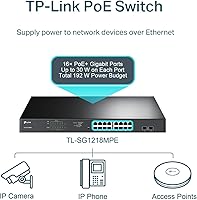
  • Total Ports: The switch provides 18 total ports: 16 PoE+ RJ45 gigabit ports, 2 standard gigabit RJ45 ports, and 2 combo SFP slots.
  • PoE Standard: All 16 PoE ports support IEEE 802.3at (PoE+) and 802.3af, delivering up to 30W per port for connected powered devices.
  • PoE Budget: The total shared PoE power budget across all 16 powered ports is 250W.
  • Switching Capacity: The switch operates with a non-blocking switching capacity of 36 Gbps, supporting full gigabit throughput across all ports simultaneously.
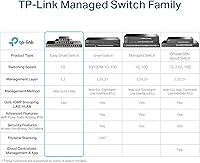
  • Management Type: The switch uses TP-Link's Easy Smart platform, accessible via a web browser or a Windows-based desktop configuration utility — no CLI required.
  • Supported Features: Network management features include 802.1Q VLAN, port-based QoS with 802.1p and DSCP prioritization, IGMP snooping, and 802.3ad link aggregation (LAG).
  • SFP Uplinks: Two combo SFP slots support either fiber or copper SFP transceivers for flexible uplink connectivity to a core switch or router.
  • Form Factor: The unit is a standard 1U rackmount switch compatible with 19-inch equipment racks; a rackmount kit is included in the box.
  • Chassis Material: The enclosure is constructed from metal, providing durability and passive heat dissipation suited to equipment room or rack deployment.
  • Dimensions: The switch measures 17.3″ long by 7.1″ wide by 1.7″ tall, fitting a standard 1U rack slot.
  • Weight: The unit weighs 5.34 pounds, making rack installation manageable without additional hardware support.
  • Max Temperature: The switch is rated for operation in environments up to 50°C (122°F), suitable for most equipment closets with adequate ventilation.
  • PoE Auto Recovery: An integrated PoE watchdog function automatically detects unresponsive powered devices and reboots them without manual intervention.
  • Overload Protection: When aggregate device power draw reaches the 250W ceiling, the switch disables lower-priority ports to protect higher-priority connected devices.
  • Warranty: TP-Link backs this switch with a 3-year manufacturer warranty and free technical support available Monday through Friday, 6am to 6pm PST.
  • In the Box: Package includes the switch, a power cord, installation guide, resource CD, rackmount kit, and rubber feet for desktop placement.

Related Reviews
TP-Link TL-SL1218MP 16-Port PoE Network Switch
79%
91%
Value for Money
88%
PoE Performance
79%
Extend Mode Reliability
93%
Ease of Setup
62%
Build Quality
More
TP-Link TL-SG1016PE 16-Port Gigabit PoE Switch

80%
91%
PoE Reliability
88%
Build Quality
67%
Power Budget
63%
Management Interface
86%
Setup & Ease of Use
More
TP-Link TL-SG2218P Smart Managed PoE Switch
82%
78%
PoE Performance
88%
Omada SDN Integration
83%
Web Interface & Usability
86%
Build Quality
81%
Fan Noise
More
TP-Link TL-SF1016D 16-Port Fast Ethernet Switch
80%
97%
Ease of Setup
96%
Noise Level
88%
Reliability & Uptime
54%
Speed Performance
74%
Value for Money
More
TP-Link TL-SF1009P 9-Port PoE+ Switch
80%
94%
Ease of Setup
78%
PoE Power Delivery
86%
Build Quality
71%
Extend Mode Performance
89%
Value for Money
More
TP-Link TL-SL1311MP 8-Port PoE Switch
88%
92%
Value for Money
95%
Ease of Setup
89%
PoE Range Performance
91%
Build Quality
88%
Customer Support
More
TP-Link TL-SF1005P
TP-Link TL-SF1005P
82%
96%
Ease of Setup
81%
PoE Power Delivery
88%
Build Quality
94%
Fanless & Noise Level
67%
Extend Mode Performance
More
TP-Link TL-SF1006P 6-Port PoE Switch
88%
88%
Performance
95%
Ease of Setup
92%
Build Quality
89%
Reliability
91%
Power Delivery (PoE)
More
TP-Link TL-SG1016DE 16-Port Gigabit Switch
82%
88%
Build Quality
91%
Value for Money
86%
Port Count & Layout
84%
Setup & Installation
63%
Management Interface
More
TP-Link TL-SG1008MP 8-Port PoE+ Gigabit Switch
81%
96%
Ease of Setup
93%
PoE Coverage
91%
Build Quality
89%
Value for Money
88%
Reliability & Uptime
More

FAQ

It depends entirely on your devices' actual power draw, not just their count. A typical indoor IP camera pulls around 7–10W, while a high-end Wi-Fi 6 access point can draw 20–25W. With a 250W shared budget, you could run around 16 low-draw cameras comfortably, but mix in several power-hungry APs and you may hit the ceiling well before filling all 16 ports. Always add up your devices' maximum wattage before assuming you have headroom to spare.

Not much. The web interface walks you through the basics without requiring any command-line knowledge, and the desktop utility makes initial discovery simple. If you understand concepts like VLANs and IP addressing at a basic level, you will be comfortable. Total beginners may want to spend an hour reading the quick-start guide, but experienced home lab users and IT generalists will feel right at home.

Sometimes, but it is a known pain point. The TL-SG1218MPE tends to work most reliably with TP-Link-branded SFP transceivers. Some third-party modules from reputable vendors do work, but compatibility is not guaranteed and troubleshooting an unrecognized module can be frustrating. If your fiber uplink is critical infrastructure, buy TP-Link optics and save yourself the headache.

The switch has built-in overload protection with port priority. When total draw approaches the 250W limit, it starts disabling lower-priority ports first rather than shutting everything down or behaving unpredictably. You can assign port priorities in the management interface, so your most important devices — like a primary access point or an alarm camera — stay powered when things get tight.

You can access the web interface from anywhere on the same network, and with proper firewall or VPN configuration, remotely as well. There is no cloud management portal like you get with Ubiquiti or some enterprise systems, so remote management requires that you handle network access yourself. The PoE auto-recovery feature does reduce the need for physical site visits when powered devices freeze up.

This switch does include fans, so it is not silent. In a quiet home office environment the fan noise may be noticeable, but in a server closet or equipment room it is unlikely to matter. It is not rated as a fanless or low-noise design, so plan accordingly if acoustic environment is a concern.

SNMP support on easy-smart switches from TP-Link is limited compared to fully managed enterprise switches. Basic monitoring is possible through the web interface, but if you need deep SNMP trap integration or compatibility with platforms like PRTG or SolarWinds at a professional level, this switch will likely frustrate you. It is better suited to simpler monitoring workflows.

Both options work. The package includes rubber feet for flat desktop or shelf placement, and the rackmount kit for 19-inch rack installation. Plenty of small office and home lab users run it on a shelf without ever touching the rack hardware.

Firmware updates for TP-Link easy-smart switches are infrequent compared to their fully managed product lines. The switch works reliably out of the box, but buyers who prioritize ongoing security patches and feature updates over the long term have noted that updates can be slow to arrive. Check the TP-Link support site for the latest firmware before deployment, and set a calendar reminder to check again periodically.

It acts like a built-in watchdog for your powered devices. The switch periodically pings each connected PoE device, and if it stops responding, the switch cuts and restores power to that port — effectively force-rebooting the device. For anyone managing IP cameras at a remote site, this means a frozen camera often fixes itself overnight rather than requiring a site visit to pull and re-plug the cable. It is a small feature that saves a disproportionate amount of time in real deployments.

Where to Buy