Overview

The TP-Link TL-SG1024S 24-Port Gigabit Switch has quietly become the default answer for anyone who needs to expand their network without wrestling with configuration menus or management software. It holds the top spot in its Amazon category, backed by well over 100,000 verified ratings sitting at 4.7 stars — that's not a fluke. Plug it in, connect your devices, done. No software to install, no CLI to learn. The metal chassis and fanless design set it apart from the flimsy plastic boxes crowding the budget end of this market. One important caveat: being unmanaged means no VLANs, no port prioritization, no traffic monitoring. For many buyers, that's exactly the point.
Features & Benefits

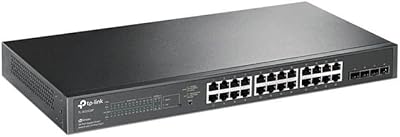
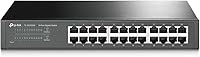
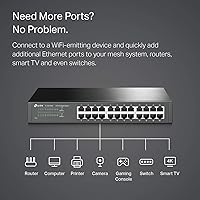
All 24 ports on this gigabit switch negotiate speed automatically — whether you're plugging in a 10Mbps IP camera or a 1Gbps NAS, it adapts without manual intervention, and Auto MDI/MDIX means you'll never need a crossover cable. The fanless passive cooling is a genuine selling point: no moving parts means near-zero chance of fan failure and absolute silence in operation. Shielded ports and the all-metal enclosure help reject electromagnetic interference, which matters in dense hardware environments. The energy-efficient chipset scales power draw based on actual cable length and link status, so idle ports aren't burning unnecessary electricity. At 11.6″ x 7.1″ x 1.7″, it fits a standard 1U rack slot and ships with both a rackmount kit and rubber feet for desktop use.

Best For

This TP-Link unmanaged switch suits anyone who has maxed out the ports on their router and just needs more wired connections — fast. Home office workers, small retail setups, and recording studios all share the same requirement: reliable gigabit throughput with zero ongoing maintenance. Home lab users will especially appreciate the silence; rack it next to a server and you won't hear a thing. IT staff deploying it as an access-layer switch will find the 1U form factor and included mounting hardware genuinely practical. If you're still running a 10/100 switch and wondering why file transfers feel sluggish, the improvement will be immediate. The 3-year warranty and weekday tech support add confidence that budget-tier rivals rarely provide.

User Feedback

With well over 100,000 ratings and a score hovering at 4.7 out of 5, the TL-SG1024S enjoys buyer satisfaction that's rare even among category leaders. Long-term reviewers consistently praise build quality and report units running continuously for years without a hiccup. Common real-world deployments mentioned include home media servers, multi-bay NAS setups, and small office expansions. The honest criticisms are worth knowing: buyers who need VLANs or port mirroring will find this switch lacking by design, not defect — it's simply not built for that. A handful of users flag the external power brick as less tidy than a built-in IEC connector, and the absence of SFP uplink ports is occasionally noted. Overall, verified complaints are genuinely uncommon.

Pros

  • Completely silent operation thanks to fanless passive cooling — ideal for offices, bedrooms, and shared spaces.
  • All 24 ports negotiate speed automatically, so mixed-speed devices connect without any manual setup.
  • The all-metal chassis dissipates heat effectively and feels substantially more durable than plastic-bodied rivals.
  • Plug it in and it works — no software, no login page, no configuration required whatsoever.
  • Shielded RJ45 ports reduce electromagnetic interference, a real advantage in dense hardware environments.
  • Energy-efficient chipset scales power draw per port based on cable length and link activity.
  • Ships with both a rackmount kit and rubber feet, covering desktop and rack deployments out of the box.
  • Backed by a 3-year manufacturer warranty, which is unusually generous for this product category.
  • Rated 4.7 out of 5 across well over 100,000 verified buyers — long-term reliability is well documented.
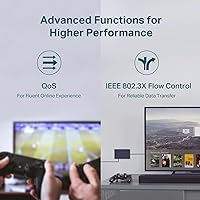
  • IEEE 802.3x flow control helps prevent packet loss during sudden spikes in simultaneous traffic.

Cons

  • No management interface whatsoever — VLANs, port mirroring, and QoS are completely off the table.
  • External power brick rather than a built-in IEC connector makes cable management slightly messier in a rack.
  • No SFP or fiber uplink ports, limiting integration with upstream switches in larger network infrastructures.
  • Unmanaged design means there is no way to monitor traffic, diagnose port issues, or view link statistics.
  • Cannot isolate guest devices or segment traffic at the switch level, which limits use in security-conscious environments.
  • Only one power input with no redundant power supply option, which may concern always-on business deployments.
  • No console or out-of-band management port for troubleshooting in headless or remote-access scenarios.

Ratings

The scores below were generated by our AI after analyzing tens of thousands of verified global buyer reviews for the TP-Link TL-SG1024S 24-Port Gigabit Switch, with spam, bot-submitted, and incentivized feedback actively filtered out before any scoring took place. The result is an honest, data-driven breakdown that captures what real users love about this switch — and where it genuinely falls short. Both strengths and recurring frustrations are reflected transparently across every category.

Build Quality
93%
The all-metal chassis is one of the most consistently praised aspects across the entire buyer base. Users who have handled cheaper plastic switches immediately notice the difference — the TL-SG1024S feels solid and substantial, and long-term owners frequently report units running without issue after three or more years of continuous operation.
A small number of buyers note that the external power brick feels slightly out of character with the otherwise premium build. A built-in IEC connector would have made the overall package feel more cohesive, particularly for rack deployments where cable management matters.
Ease of Setup
97%
Virtually every reviewer agrees: plug it in and it works. There is no app to download, no web interface to navigate, and no configuration steps to follow. Users with minimal networking knowledge report having their entire network expanded and running within minutes of opening the box.
The simplicity is also a ceiling — buyers who later discover they need to assign a static IP to a specific port, set up a guest network isolation, or monitor bandwidth per device quickly realize there is nothing to configure at all. That realization can be frustrating if it arrives after purchase.
Port Performance
91%
Full gigabit throughput on all 24 ports performs exactly as advertised in real-world use. Home lab users transferring large files between NAS drives and workstations, and small offices running VoIP alongside file sharing, report consistent speeds without any noticeable slowdown under simultaneous multi-device load.
There are no SFP or fiber uplink ports, which limits integration with upstream switches in more complex network setups. Users managing larger infrastructure who expected at least one fiber-capable uplink port have noted this as a meaningful omission.
Noise Level
98%
The fanless design delivers on its promise completely. Users who placed this switch in bedrooms, recording studios, and open-plan home offices specifically highlight the total absence of fan noise as a deciding factor in their purchase — and confirm that even under sustained heavy load the unit remains inaudible.
The passive cooling means the chassis itself becomes warm under load, which is expected and by design. A very small number of users in hot climates or poorly ventilated closets expressed mild concern about long-term heat management, though reported failures from overheating remain extremely rare.
Value for Money
89%
For a 24-port gigabit switch with a metal chassis, fanless cooling, and a 3-year warranty, the price-to-performance ratio draws consistent praise from buyers who compared it against rivals. IT administrators deploying multiple units across a small business environment frequently cite it as the most cost-effective unmanaged option they evaluated.
Buyers who later need management features — even basic ones like port-based VLANs — find themselves needing to replace it entirely, since there is no upgrade path. If there is any realistic chance those features will be needed within a year or two, the value calculation shifts considerably.
Heat Management
82%
18%
The metal enclosure acts as a passive heat sink effectively enough that the vast majority of long-term users report zero thermal problems. Buyers who have run the switch continuously for two or more years in home server closets confirm it handles sustained load without throttling or unexpected shutdowns.
The unit does run noticeably warm to the touch during heavy traffic periods, and there is no internal temperature monitoring or automatic protection reporting that users can access. In enclosed or poorly ventilated spaces, particularly in warm climates, a few buyers have recommended leaving extra clearance around the unit.
Port Count & Density
88%
Twenty-four ports in a 1U chassis gives home lab builders and small offices a substantial number of wired connections in a compact form factor. Users migrating from 8- or 16-port switches frequently comment that having room to grow without daisy-chaining additional hardware is immediately noticeable.
For users who eventually grow beyond 24 devices, there is no stacking capability or expansion option — a second switch must be added. The lack of any uplink-designated port also means one of the 24 ports is consumed connecting to the upstream router, leaving 23 usable downstream.
EMI & Signal Integrity
86%
The shielded RJ45 ports and metal enclosure are specifically appreciated by users who work in electrically noisy environments — workshops with motors, recording studios with audio gear, and server rooms with dense cabling all appear in reviews as contexts where signal stability was noticeably improved over unshielded plastic alternatives.
This benefit is largely invisible to users in typical home or small office environments, making it difficult to quantify for the average buyer. Those who do not experience EMI issues may not notice any difference compared to a cheaper unshielded option.
Energy Efficiency
84%
The adaptive power technology that scales consumption based on cable length and link status is genuinely appreciated by buyers running the switch continuously. Users who measured power draw report the unit consumes noticeably less than older or cheaper switches handling the same port count, which adds up meaningfully over months of 24/7 operation.
The energy savings are real but modest in absolute terms for home users. Buyers with only a handful of active devices may not notice a meaningful difference on their electricity bill, making this feature more relevant to businesses running multiple units than to individual consumers.
Rackmount Usability
81%
19%
Including both the rackmount kit and rubber feet in the box means the switch is genuinely dual-purpose out of the box — no additional purchases required. IT administrators who rack it report the 1U form factor fits cleanly alongside standard server and networking equipment without modification.
The external power adapter creates a cable management challenge in rack environments where a built-in power connector would allow for neater routing. Some users also report the included rackmount ears feel slightly lighter in construction than the main chassis, though no structural failures have been widely reported.
Long-Term Reliability
92%
Durability over multi-year continuous use is one of the most frequently volunteered observations in longer reviews. Users who have run the TL-SG1024S in home server racks and small business closets for three or more years consistently report no port failures, no connectivity drops, and no hardware degradation.
As with any networking hardware, a small percentage of buyers report dead-on-arrival units or early port failures — this is not unique to this switch but worth acknowledging. TP-Link's warranty claim process receives generally positive feedback, though weekday-only support hours can be a limitation for urgent business needs.
Warranty & Support
78%
22%
A 3-year warranty is meaningfully longer than what many competitors offer at this price tier, and buyers who have needed to use it generally report straightforward replacement experiences. Free phone support being available at all is appreciated in a product category where rivals often offer documentation-only assistance.
Support hours are limited to weekdays, 6am to 6pm PST, which creates a gap for users in other time zones or those who experience problems over a weekend. Some buyers also report longer-than-expected wait times during peak periods, which is a friction point when a network is down.
Compatibility
94%
Universal Ethernet compatibility means this switch works with essentially every wired device ever made, from decade-old printers to the latest gaming consoles and NAS units. Auto MDI/MDIX eliminates crossover cable confusion entirely, a small but consistently appreciated convenience mentioned by less technical buyers.
The copper-only design means it cannot integrate directly with fiber-connected devices or infrastructure without an external media converter. Organizations transitioning to fiber backbones will find this switch sits at a compatibility boundary that requires additional hardware to bridge.

Suitable for:

The TP-Link TL-SG1024S 24-Port Gigabit Switch is purpose-built for anyone who needs to multiply wired network connections without touching a configuration screen. Home office workers who run NAS drives, desktop PCs, VoIP phones, and smart home hubs simultaneously will find 24 ports more than sufficient to wire everything cleanly without relying on Wi-Fi. Home lab enthusiasts get the added bonus of completely silent operation, which matters when the switch sits in a living space or shared room. Small businesses — a boutique, a dental office, a creative studio — benefit from the plug-and-play approach because there's no IT specialist required to get it running. IT administrators deploying it as an access-layer switch in a tidy server rack will appreciate the included rackmount hardware and the compact 1U footprint. Anyone still limping along on an older 10/100 switch will notice an immediate and tangible improvement in file transfer speeds across their entire wired network.
Not suitable for:

Buyers who need any form of network management should look elsewhere before purchasing the TP-Link TL-SG1024S 24-Port Gigabit Switch. Being unmanaged is not a defect, but it is a hard boundary: there are no VLANs, no port mirroring, no QoS prioritization, no traffic monitoring, and no way to isolate devices at the switch level. If you're running a network where guest traffic needs to be separated from internal traffic, or where you need to prioritize VoIP packets over bulk file transfers, this switch simply cannot do that. Organizations with compliance requirements that demand network segmentation will need a managed alternative. Users who prefer a clean rack build with a built-in IEC power connector may find the external power brick slightly untidy. And if your infrastructure demands fiber uplinks or SFP slots to connect to upstream switches, this unit offers none — it's copper-only, all the way.

Specifications

  • Ports: 24 shielded RJ45 ports support 10/100/1000Mbps speeds with automatic negotiation on every connection.
  • Switching Capacity: Total non-blocking switching capacity is 48 Gbps, ensuring no bottlenecks even under simultaneous full-load traffic.
  • Auto MDI/MDIX: All ports support Auto MDI/MDIX, eliminating the need for crossover cables in any wiring scenario.
  • Flow Control: IEEE 802.3x flow control is supported on all ports to reduce packet loss during high-traffic bursts.
  • Management: This is a fully unmanaged switch with no software interface, web GUI, or CLI — it requires zero configuration.
  • Cooling: Fanless passive cooling design produces no audible noise and eliminates the risk of fan-related mechanical failure.
  • Chassis Material: The enclosure is constructed entirely from metal, providing structural durability, heat dissipation, and EMI shielding.
  • Dimensions: The unit measures 11.6″ L x 7.1″ W x 1.7″ H, fitting a standard 1U rackmount slot.
  • Weight: The switch weighs 3.44 pounds, making it manageable for both desktop placement and single-person rack installation.
  • Rack Compatibility: Ships with a rackmount kit for 1U rack installation and rubber feet for flat desktop deployment.
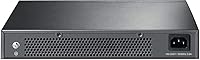
  • Power Supply: Operates at 127V AC with an external power adapter included; there is no built-in IEC power connector.
  • Power Consumption: An energy-efficient chipset dynamically reduces power per port based on detected cable length and link status.
  • EMI Protection: Shielded RJ45 ports reduce electromagnetic interference, which is particularly beneficial in environments with dense cabling or nearby electrical equipment.
  • Warranty: Backed by a 3-year limited manufacturer warranty with weekday technical support available from 6am to 6pm PST.
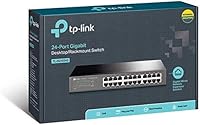
  • In the Box: Package includes the switch, power cord, installation guide, rackmount kit, and rubber feet — no additional accessories are required to get started.

Related Reviews

TP-Link TL-SG3428 24-Port Gigabit Switch
87%
85%
Setup & Installation
92%
Performance & Reliability
91%
Value for Money
80%
Software & Firmware Management
89%
Security Features
More
TP-Link TL-SG1024DE 24-Port Gigabit Switch

82%
91%
Build Quality
93%
Port Performance & Reliability
63%
Management Interface (Web UI)
82%
VLAN Configuration
78%
QoS Effectiveness
More
TP-Link TL-SG1428PE 24-Port Gigabit PoE Switch
86%
89%
Performance
92%
Value for Money
87%
Ease of Setup
93%
PoE Power Output
84%
Build Quality
More
TP-Link TL-SG2428P Jetstream 24-Port Gigabit Smart Managed PoE Switch
84%
89%
Value for Money
70%
Ease of Setup
93%
PoE+ Performance
85%
Security Features
92%
Network Management (Omada SDN)
More
TP-Link TL-SG1218MPE 16-Port PoE+ Switch
76%
91%
PoE Reliability
68%
PoE Power Budget
88%
Build Quality
63%
Web Management Interface
93%
PoE Auto Recovery
More
TP-Link TL-SG108E 8-Port Gigabit Switch
87%
93%
Ease of Setup
88%
Performance & Reliability
94%
Fanless Design (Noise Levels)
85%
Smart Management Features
89%
Build Quality & Durability
More
TP-Link TL-SG1016DE 16-Port Gigabit Switch
82%
88%
Build Quality
91%
Value for Money
86%
Port Count & Layout
84%
Setup & Installation
63%
Management Interface
More
TP-Link TL-SG3452P 48-Port Gigabit PoE+ Switch
84%
92%
Performance
94%
PoE Capabilities
85%
Cloud Management Experience
88%
Build Quality
82%
Ease of Setup
More
TP-Link TL-SG1048 48-Port Gigabit Ethernet Switch
83%
89%
Performance
93%
Ease of Setup
88%
Reliability
90%
Build Quality
91%
Noise Level (Fanless Design)
More
TP-Link TL-SG1005P
TP-Link TL-SG1005P
85%
96%
Ease of Setup
83%
PoE Power Delivery
91%
Build Quality
98%
Noise Level
89%
Gigabit Throughput
More

FAQ

No, not at all. You simply plug in the power cable, connect your devices with Ethernet cables, and the switch starts working immediately. There is no app, no web interface, and no configuration required — or even available.

Yes, in virtually all cases. You connect one port to your router using a standard Ethernet cable, and all remaining ports become available as wired network connections. It works with any brand of router.

No. Being unmanaged means there is no mechanism to create VLANs, set QoS rules, or prioritize any type of traffic. If you need those features, you will need a managed switch instead. For straightforward port expansion, however, this switch handles the job well.

Completely silent. The fanless passive cooling design means there are no moving parts, so it produces zero audible noise regardless of how heavily it is being used.

Yes, this is actually one of the most common use cases for this switch. Full gigabit speeds on every port give you ample bandwidth for multiple simultaneous 4K streams, NAS transfers, and regular internet traffic at the same time.

Yes, the unit is 1U in height and the rackmount kit is included in the box. It fits standard 19-inch equipment racks without needing to purchase anything extra.

It runs warm to the touch under sustained load, which is normal for a fanless metal-chassis design — the case itself acts as a heat sink. Long-term owners consistently report no thermal issues or unexpected shutdowns even after years of continuous operation.

Yes, a power cord is included. The switch uses an external power adapter rather than a built-in IEC connector, which a small number of users find less convenient for clean rack cable management — it is worth being aware of if a tidy build is a priority.

Absolutely. Every port auto-negotiates independently, so a 100Mbps device and a gigabit device can coexist on the same switch without any manual configuration. Each port runs at the fastest speed both ends support.

It comes with a 3-year limited warranty from TP-Link. Free technical support is available by phone Monday through Friday, 6am to 6pm PST. TP-Link has a solid reputation for honoring warranty claims without excessive hassle.

Where to Buy