Overview

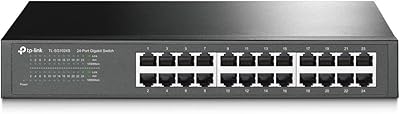
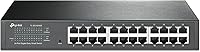
The TP-Link TL-SG1024DE 24-Port Gigabit Switch sits in a sweet spot that many network buyers overlook: genuine management features without the complexity or cost of enterprise gear. Built around a sturdy metal chassis, it can live flat on a desktop or slide into a server rack — flexibility that cheaper plastic alternatives simply don't offer. The Easy Smart interface hands you meaningful control over your network without demanding CLI knowledge or certifications. It is not a full Layer 3 switch, so dynamic routing is off the table. But for small businesses and serious home users who want more visibility than a dumb switch provides, it has held up reliably for well over a decade.
Features & Benefits

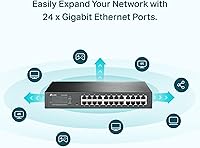
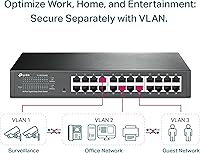
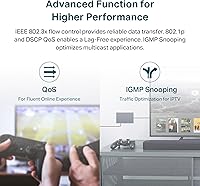
All 24 ports run at full gigabit speeds with auto MDI/MDIX, so you can plug in any cable without worrying about crossover compatibility. For anyone running a NAS or regularly pushing large file transfers, the 9K Jumbo Frame support makes a measurable difference in throughput efficiency. VLAN support — both port-based and 802.1Q tagged — lets you isolate traffic cleanly, whether that means separating IP cameras from your main LAN or keeping guest devices away from internal servers. IGMP Snooping cuts unnecessary multicast flooding, which surveillance and AV setups will benefit from immediately. QoS controls help keep VoIP calls clear even when other devices are hammering the connection.

Best For

This TP-Link managed switch punches above its weight for small business owners who need structured networking without enterprise-level spending. Home lab enthusiasts will find it genuinely useful for learning VLAN segmentation and QoS in a real environment rather than a simulator. IT admins overseeing IP cameras, VoIP handsets, or NAS devices get practical multicast and traffic management tools at a price that is hard to argue with. It also holds its own in rack-mounted server rooms — the compact 1U-compatible footprint and all-metal build are things you rarely find at this price tier, and they matter when hardware needs to last.

User Feedback

With a rating above 4.6 stars across well over a thousand reviews, the TL-SG1024DE has clearly earned sustained buyer trust. Most owners highlight easy initial setup and the solid, no-flex enclosure as consistent strengths — many report years of uninterrupted uptime without a single restart. The recurring criticism is the management web interface: it functions, but it looks like something from an earlier era, and that does create friction for new users. Buyers on older firmware have also flagged the absence of HTTPS access to the management panel, which is a fair security concern. Advanced users occasionally note missing features like SNMP v3 or dynamic routing, though those belong to a more expensive class of hardware entirely.

Pros

  • All 24 ports deliver consistent full gigabit speeds with zero throttling under real-world mixed traffic loads.
  • The all-metal chassis holds up in rack and desktop environments far better than plastic-bodied rivals at this price.
  • VLAN segmentation works reliably for separating cameras, guest devices, and internal servers without complex configuration.
  • 9K Jumbo Frame support gives NAS users a tangible throughput boost on large file transfers.
  • Years of owner reports confirm this switch simply runs — many users cite multiple years of zero downtime.
  • QoS controls keep VoIP calls clear even when other devices are saturating the connection simultaneously.
  • Port Mirroring lets you analyze traffic without buying external network taps or dedicated monitoring hardware.
  • Desktop and rackmount flexibility means it fits naturally in a home lab shelf or a proper 1U rack slot.
  • The 3-year warranty and free technical support provide real peace of mind for a business-critical device.
  • IGMP Snooping noticeably reduces unnecessary multicast traffic, benefiting IP camera and AV distribution setups immediately.

Cons

  • The web management interface looks and behaves like software from a much earlier era, creating unnecessary friction for new users.
  • Older firmware versions expose the management panel over plain HTTP, which is a legitimate security concern in professional environments.
  • Firmware updates arrive infrequently, meaning known issues can linger unresolved for extended periods.
  • IGMP v3 is not supported, limiting compatibility with newer multicast applications that rely on source-specific filtering.
  • There is no real-time bandwidth monitoring or traffic visualization, making it harder to spot congestion at a glance.
  • VLAN configuration offers no setup wizard, so first-time users almost always need external guides or community forum help.
  • Rack-mount ear installation is fiddlier than it should be, with screw alignment requiring more patience than expected.
  • No SNMP v3 support rules it out for environments where secure network monitoring is a compliance requirement.
  • The management session handling is inconsistent — timeouts and login loops frustrate users during longer configuration sessions.
  • Port labeling can wear away over time in high-churn cabling environments, making port identification harder in dense setups.

Ratings

The TP-Link TL-SG1024DE 24-Port Gigabit Switch has been scored across 13 specific categories by our AI system after analyzing thousands of verified global buyer reviews, with spam, bot activity, and incentivized feedback actively filtered out. The scores reflect the full picture — what this switch genuinely does well and where real-world buyers have run into friction. Both the strengths that keep users recommending it and the limitations that frustrate more demanding users are transparently represented below.
Build Quality
91%
The all-metal enclosure stands out sharply in a market segment flooded with plastic-bodied switches. Users running it in small server rooms and network closets consistently report that the chassis feels dense and well-assembled, with no flex or rattle even when rack-mounted for extended periods.
A handful of users noted that the port labeling can wear off over time with heavy cable-swap environments. The ventilation design also draws some criticism for being passive-only, which can be a concern in poorly ventilated enclosed racks during summer months.
Port Performance & Reliability
93%
All 24 ports consistently deliver full gigabit throughput with no reported bottlenecking under sustained load. NAS users transferring large media libraries and IT admins pushing backup traffic simultaneously report stable, unthrottled performance across the board.
A small number of buyers reported individual ports failing after extended use, though this appears to be a minority experience. There are occasional reports of auto-negotiation quirks with older legacy devices that do not fully support modern standards.
Management Interface (Web UI)
63%
37%
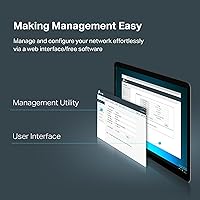
For users coming from a fully unmanaged switch, the Easy Smart web interface opens up a practical range of controls — VLAN setup, QoS rules, and port mirroring — without requiring any command-line experience. Getting basic segmentation running takes under an hour for most users.
The interface looks and behaves like it was designed over a decade ago, because it largely was. Navigation is clunky, session handling is inconsistent, and older firmware versions expose the management panel over plain HTTP rather than HTTPS — a security gap that bothers security-conscious admins significantly.
VLAN Configuration
82%
18%
Both port-based and 802.1Q tagged VLANs work reliably once configured, and small business users report that isolating guest networks or separating camera traffic from primary LAN devices is entirely achievable without professional assistance.
The VLAN setup process through the web UI is non-intuitive enough that first-time users frequently report needing to consult forum guides or TP-Link community threads. There is no configuration wizard, so users who expect hand-holding will find the learning curve steeper than anticipated.
QoS Effectiveness
78%
22%
Port-based and DSCP-based QoS controls are functional and noticeably effective in environments running VoIP alongside heavy data traffic. Office users report that call quality improved measurably after enabling QoS rules to prioritize their handsets.
The QoS implementation is fairly basic compared to higher-tier managed switches. Users with complex traffic shaping requirements find the options limited, and there is no real-time traffic monitoring to help verify that QoS rules are behaving as intended.
IGMP Snooping & Multicast Handling
81%
19%
For users running IP camera systems or AV distribution over the network, IGMP Snooping v1/v2 support delivers a real and immediate improvement by eliminating unnecessary multicast flooding to ports that do not need the traffic.
IGMP v3 is not supported, which is a limitation for environments using newer multicast applications that rely on source-specific multicast filtering. This is unlikely to affect most small business users but is worth knowing upfront.
Setup & Initial Configuration
88%
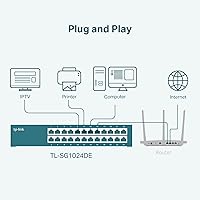
Out of the box, the switch works as a plug-and-play unmanaged device — cables in, traffic flowing, no configuration required. Users who want to go further report that accessing the web UI and making basic changes is straightforward enough for non-specialists.
The default management IP address occasionally conflicts with existing network setups, requiring users to temporarily reconfigure their computer's IP to access the panel. Documentation, while adequate, could do more to guide first-timers through initial access.
Firmware & Software Support
58%
42%
TP-Link has released firmware updates for the TL-SG1024DE over its long product life, and the device remains actively supported rather than abandoned — which is more than can be said for some competitors in this segment.
Firmware release frequency is slow, and the gap between reported issues and available fixes frustrates users who follow networking security practices closely. The HTTPS concern in particular lingered for a long time before being addressed in newer firmware revisions.
Jumbo Frame Support
84%
9K Jumbo Frame support is a genuine differentiator at this price level. Users running Synology or QNAP NAS devices report measurable improvements in large-file transfer speeds after enabling Jumbo Frames across connected ports.
Enabling Jumbo Frames requires that every device on the relevant network segment supports them — a fact that catches some buyers off guard. Mixed-frame environments can cause packet loss if not configured carefully across all connected endpoints.
Network Troubleshooting Tools
76%
24%
Port Mirroring, Loop Prevention, and Cable Diagnostics give IT admins a useful baseline of diagnostic capability without needing external tools. Being able to mirror traffic to a monitoring device from within the web UI is practical for small teams without dedicated network analyzers.
The tools are functional but fairly rudimentary. There is no real-time bandwidth graph, no syslog integration that works cleanly, and the cable diagnostics provide only basic fault detection rather than detailed distance-to-fault measurements that higher-end gear offers.
Form Factor & Installation Flexibility
89%
The compact 1U-compatible profile and included mounting hardware make this switch genuinely flexible. Users in both home lab server racks and small office network closets report that installation is straightforward with the hardware provided.
Rack-mount ears are included but the physical installation of them requires some patience — a few users found the screw alignment fiddly. Desktop rubber feet are present, but they are thin enough that the switch can slide slightly on smooth surfaces.
Value for Money
92%
At its price point, there are very few alternatives that offer 24 full-gigabit ports, metal construction, and a functional Layer 2 management feature set under one roof. Long-term owners frequently describe it as one of the best networking purchases they have made for the money.
As newer competitors have entered the market with cleaner interfaces and more modern security features at similar prices, the value case has become slightly less absolute than it once was. Buyers who prioritize UI modernity or advanced protocol support may find the price-to-feature ratio less compelling than it appears.
Long-Term Reliability
94%
This is where the TL-SG1024DE earns some of its most enthusiastic reviews. Users running it continuously in offices and home labs for three, four, and five-plus years report zero hardware failures, with the switch simply running in the background without intervention.
With such a long product history, some older units show port wear after years of frequent cable changes in high-churn environments. Long-term buyers also note that the aging firmware architecture means future security vulnerabilities may eventually outpace the update cycle.

Suitable for:

The TP-Link TL-SG1024DE 24-Port Gigabit Switch is a strong fit for small business owners who need to bring real structure to their office network without hiring a network engineer or spending enterprise-level money. If you are running a mix of IP cameras, VoIP handsets, a NAS, and general workstations, the ability to segment traffic with VLANs and keep multicast flooding under control with IGMP Snooping makes a genuine, day-to-day difference. Home lab users who want to move beyond plug-and-play and actually learn how managed switching works will find the Easy Smart interface approachable enough to experiment with without feeling thrown in the deep end. IT generalists managing small office environments — where uptime matters but a full enterprise stack is overkill — will also appreciate the metal build and rackmount flexibility, which signal this is hardware built to stay in a rack for years rather than be replaced annually. Anyone stepping up from a basic unmanaged switch and wanting more visibility into their traffic without a steep learning curve will feel right at home here.
Not suitable for:

The TP-Link TL-SG1024DE 24-Port Gigabit Switch is not the right tool for network engineers or larger IT teams who need the full feature set of a true enterprise-managed switch. If your environment depends on dynamic routing protocols, SNMP v3 for secure monitoring, or advanced Layer 3 functions like inter-VLAN routing at the switch level, this hardware will hit a hard ceiling quickly. Security-focused administrators running sensitive environments should also be aware that older firmware versions do not enforce HTTPS on the management panel, which is a meaningful gap in an era where management-plane security is non-negotiable. Organizations scaling beyond a single location, or those that need deep integration with network management platforms, will find the TL-SG1024DE too limited in its reporting and automation capabilities. If you are chasing the latest web interface design or expect a polished, modern management experience, the dated UI will likely frustrate you from the very first session.
Specifications

  • Total Ports: The switch provides 24 RJ45 ports, each supporting 10/100/1000 Mbps speeds with automatic speed negotiation.
  • Port Standard: Every port supports Auto MDI/MDIX, eliminating the need for crossover cables in any connection scenario.
  • Jumbo Frames: The switch supports Jumbo Frames up to 9,000 bytes, improving throughput efficiency for large data transfers over the network.
  • VLAN Support: Both port-based and 802.1Q tag-based VLANs are supported, enabling flexible traffic segmentation for security and network organization.
  • Multicast Control: IGMP Snooping v1 and v2 are supported, allowing the switch to intelligently manage multicast traffic and reduce unnecessary flooding.
  • QoS: Quality of Service is configurable via port-based priority and DSCP-based tagging, giving administrators control over latency-sensitive traffic like VoIP.
  • Diagnostics: Port Mirroring, Loop Prevention, and Cable Diagnostics are built in for network monitoring and basic fault-finding without external tools.
  • Management: The switch is managed through a web-based Easy Smart interface accessible via any modern browser on the local network.
  • Chassis Material: The enclosure is constructed from metal, providing durability and passive heat dissipation suitable for continuous operation.
  • Mounting Options: The unit supports both flat desktop placement and standard rack mounting, with rack-mount hardware included in the box.
  • Dimensions: The switch measures 11.6″L x 7.1″W x 1.7″H, fitting comfortably in a 1U rack slot or on a desktop shelf.
  • Weight: The unit weighs 3.75 pounds, making it manageable for a single person to install or reposition without assistance.
  • Data Transfer Rate: Maximum data transfer rate per port is 1,000 Mbps (1 Gbps), delivered consistently across all 24 ports simultaneously.
  • Voltage Input: The switch operates at up to 240 volts with a current draw of 0.5 amps under normal operating conditions.
  • Operating Temp: The device is rated for operation at ambient temperatures up to 40 degrees Celsius, suitable for most indoor environments.
  • Warranty: TP-Link covers this switch with a 3-year limited hardware warranty backed by free technical support during business hours.
  • In the Box: The package includes the network switch, rack-mount hardware, a power cable, and basic setup documentation.
  • Switch Type: This is a Layer 2 Easy Smart managed switch, offering more control than an unmanaged switch without the full complexity of enterprise Layer 3 hardware.

Related Reviews

TP-Link TL-SG3428 24-Port Gigabit Switch
87%
85%
Setup & Installation
92%
Performance & Reliability
91%
Value for Money
80%
Software & Firmware Management
89%
Security Features
More
TP-Link TL-SG1024S 24-Port Gigabit Switch
89%
93%
Build Quality
97%
Ease of Setup
91%
Port Performance
98%
Noise Level
89%
Value for Money
More
TP-Link TL-SG1428PE 24-Port Gigabit PoE Switch
86%
89%
Performance
92%
Value for Money
87%
Ease of Setup
93%
PoE Power Output
84%
Build Quality
More
TP-Link TL-SG2428P Jetstream 24-Port Gigabit Smart Managed PoE Switch
84%
89%
Value for Money
70%
Ease of Setup
93%
PoE+ Performance
85%
Security Features
92%
Network Management (Omada SDN)
More
TP-Link TL-SG1218MPE 16-Port PoE+ Switch
76%
91%
PoE Reliability
68%
PoE Power Budget
88%
Build Quality
63%
Web Management Interface
93%
PoE Auto Recovery
More
TP-Link TL-SG1016DE 16-Port Gigabit Switch
82%
88%
Build Quality
91%
Value for Money
86%
Port Count & Layout
84%
Setup & Installation
63%
Management Interface
More
TP-Link TL-SG108E 8-Port Gigabit Switch
87%
93%
Ease of Setup
88%
Performance & Reliability
94%
Fanless Design (Noise Levels)
85%
Smart Management Features
89%
Build Quality & Durability
More
TP-Link TL-SG105PE 5-Port Gigabit PoE Switch
79%
91%
Value for Money
84%
PoE Performance
93%
Ease of Setup
76%
Network Management
62%
Web Interface
More
TP-Link TL-SG3452P 48-Port Gigabit PoE+ Switch
84%
92%
Performance
94%
PoE Capabilities
85%
Cloud Management Experience
88%
Build Quality
82%
Ease of Setup
More
TP-Link TL-SG1048 48-Port Gigabit Ethernet Switch
83%
89%
Performance
93%
Ease of Setup
88%
Reliability
90%
Build Quality
91%
Noise Level (Fanless Design)
More

FAQ

No dedicated software is required. The TP-Link TL-SG1024DE 24-Port Gigabit Switch is managed entirely through a web browser — just connect a computer to the network, type in the switch's default IP address, and the management interface loads up. It works on any modern browser without plugins.
Absolutely. It functions as a standard plug-and-play switch the moment you power it on and connect your cables — all 24 ports will pass traffic automatically. The management features are there when you need them, but you are not forced to touch the web interface to get basic connectivity working.

No, it cannot. This is a Layer 2 switch, which means it can segment traffic into separate VLANs but cannot route traffic between them on its own. If you need inter-VLAN routing, you would need a router or a Layer 3 switch sitting above it in your network topology.

Yes, it is a solid choice for camera setups. IGMP Snooping keeps multicast video streams from flooding every port on the network, which reduces unnecessary bandwidth usage and keeps the rest of your network running smoothly alongside the camera feeds. Many users run NVR systems through this switch without any issues.

Honest answer: it takes some learning. The web interface is functional but does not walk you through the process, so first-timers usually end up consulting TP-Link's support documentation or community forums to get the 802.1Q tagging right. Once you understand the logic, the actual configuration is not complicated — it just is not particularly guided.

It depends on which firmware version is installed. Older firmware versions used plain HTTP for the management panel, which is a meaningful security gap. Newer firmware revisions added HTTPS support, so updating to the latest firmware as soon as you set the switch up is strongly recommended, especially in business environments.

Yes, rack-mount ears are included in the box and the switch fits a standard 1U slot in a 19-inch rack. The physical installation is straightforward, though a few users find aligning the mounting screws takes a bit of patience. It also sits flat on a desktop shelf if you prefer.

Yes, Jumbo Frames need to be enabled on every device participating in that traffic path — the switch alone is not enough. If you enable 9K frames on the switch but a NAS or workstation on the same segment is still set to the standard 1,500-byte MTU, you can end up with packet loss or degraded performance. Make sure all endpoints match before enabling it network-wide.

In practice, QoS is most noticeable when VoIP phones or video conferencing is sharing bandwidth with heavy data users. Without it, a large file upload or backup job can degrade call quality noticeably. With QoS rules in place prioritizing your VoIP traffic, calls stay clear even when the rest of the network is under load. The setup requires some manual configuration, but it is not overly complex once you know which ports or DSCP values to prioritize.

Based on the volume of long-term owner reports, it is not unusual for this switch to run continuously for five or more years without hardware failure. The metal chassis handles heat passively and holds up well in both rack and desktop environments. The 3-year warranty covers you through the early life of the device, and the community track record suggests most units go well beyond that.

Where to Buy