Overview

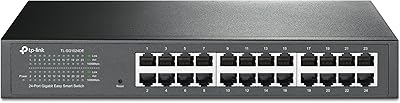
The TP-Link TL-SG1016DE 16-Port Gigabit Switch sits in an interesting spot — it gives small business owners and home lab builders meaningful network control without forcing them to wrestle with full enterprise complexity. The all-metal chassis feels sturdy and purposeful, and the included rackmount kit means it can live in a proper rack or just sit flat on a desk. It has been around since 2014, which in networking gear terms is actually reassuring. Products that stick around that long tend to do so because they work reliably and get decent ongoing support. For the price, it punches well above what a basic unmanaged switch can offer.
Features & Benefits

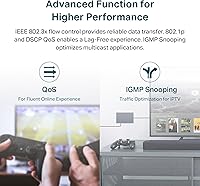
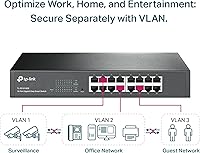
All 16 ports run at full gigabit speeds with auto MDI/MDIX, so you never have to think about crossover cables. The 9K Jumbo Frame support is genuinely useful if you are moving large files between a NAS and workstations — throughput stays consistent under load. VLAN support lets you segment traffic, keeping IoT devices or guest networks isolated from sensitive data. IGMP Snooping helps with multicast traffic, which matters if you run IP cameras or media servers. Port-based QoS handles VoIP or video calls cleanly. Toss in port mirroring and cable diagnostics, and you have solid day-to-day network visibility without needing separate tools.

Best For

This gigabit switch makes the most sense for small office environments where a basic switch has become a bottleneck but a fully managed enterprise unit feels like overkill. Home lab users who want to experiment with VLANs or QoS without a steep financial commitment will find it genuinely approachable. IT admins handling a modest office footprint — maybe 10 to 15 active devices — will appreciate the traffic control features without the overhead of a complex CLI. It is also a strong pick for anyone running a NAS-heavy setup or a small IP camera system where multicast optimization and jumbo frame support directly improve day-to-day performance.

User Feedback

People who buy this TP-Link managed switch tend to come away happy with how quickly it gets up and running — the web-based interface is simple enough that non-specialists can configure VLANs without reading the manual twice. The build quality draws consistent praise; the metal body runs cool and feels durable. That said, the management UI does show its age next to newer competitors, and a handful of buyers note that advanced routing features are simply absent — this is a smart switch, not a Layer 3 device. For most buyers, though, value for the feature set outweighs those limitations by a comfortable margin.

Pros

  • All 16 ports run at full gigabit speed with auto MDI/MDIX, eliminating cable compatibility headaches entirely.
  • The solid metal chassis runs cool around the clock, making it a reliable choice for always-on environments.
  • VLAN support lets you cleanly separate IoT devices, guest networks, and business traffic without extra hardware.
  • Jumbo Frame support up to 9K makes a real difference in NAS-heavy setups with large file transfers.
  • QoS configuration is accessible enough that non-specialist IT staff can prioritize VoIP traffic in minutes.
  • The included rackmount kit means it fits neatly into a proper rack without needing additional accessories.
  • Port mirroring and cable diagnostics give you practical troubleshooting tools without needing separate monitoring hardware.
  • A three-year warranty at this price tier is genuinely reassuring for hardware running in a production environment.
  • IGMP Snooping keeps multicast traffic from flooding unnecessary ports, noticeably improving IP camera and media server performance.
  • Long-term buyers consistently report years of uninterrupted uptime, which speaks volumes for a product at this price point.

Cons

  • The web management interface looks and feels noticeably dated compared to newer competitors in the same price range.
  • No SFP uplink port means fiber connectivity is completely off the table, limiting integration with larger networks.
  • Firmware development appears to have slowed significantly, with meaningful updates becoming increasingly rare over recent years.
  • There is no mobile-friendly management view, which is a real inconvenience for admins who work remotely.
  • Link aggregation support is limited to static configurations — full dynamic LACP negotiation is not available.
  • Session timeouts in the web GUI are aggressive and interrupt workflow during longer configuration sessions.
  • No Layer 3 routing means you cannot replace or consolidate a router with this device, even partially.
  • IGMP v3 is unsupported, which creates compatibility gaps in more advanced or demanding multicast deployments.
  • Technical support is only available during weekday business hours in Pacific Time, leaving international users underserved.
  • Buyers who expand past 16 devices have no upgrade path within this unit — a second switch is the only option.

Ratings

The TP-Link TL-SG1016DE 16-Port Gigabit Switch has been stress-tested by a wide range of buyers — from home lab tinkerers to small business IT admins — and our AI has analyzed verified purchase feedback from across global markets, actively filtering out incentivized and bot-driven reviews to surface what real users actually experience. The scores below reflect a transparent picture of where this gigabit switch genuinely earns its place and where it shows its limits.
Build Quality
88%
The all-metal chassis earns consistent praise from buyers who have placed it in working rack environments or under desks running 24/7. It runs cool even under sustained load, and the shielded ports add a level of physical robustness that plastic-bodied competitors at this price tier simply cannot match.
A few users note the unit feels slightly lighter than expected for a rack-mounted device, raising minor concerns about long-term port wear with frequent cable swapping. The front panel LEDs, while functional, are not particularly bright in well-lit server rooms.
Value for Money
91%
For what you get — VLAN support, QoS, IGMP Snooping, and port mirroring all in one box — buyers widely agree that the price-to-feature ratio is hard to beat in this segment. Home lab users especially appreciate getting managed switch capabilities without paying enterprise prices.
A handful of buyers feel the value proposition weakens slightly when compared to newer competitors that offer similar features with a more modern management interface included. If you need Layer 3 routing, the value calculation shifts entirely since you would need a separate device.
Port Count & Layout
86%
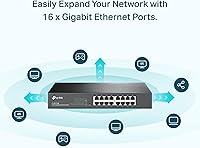
Sixteen gigabit ports in a single 1U-compatible chassis covers the needs of most small offices and home labs without requiring a stacking solution. The physical port spacing is comfortable enough that even bulky patch cables do not crowd neighboring ports.
There is no SFP uplink port, which limits fiber connectivity options for users wanting to connect to a larger network backbone. Buyers expanding beyond 16 devices will need a second switch rather than a simple upgrade path.
Setup & Installation
84%
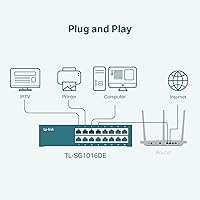
Most buyers report being up and running within minutes — plug in the switch, connect to the web GUI, and basic configurations like VLANs and QoS are accessible without reading through dense documentation. The auto MDI/MDIX on every port eliminates crossover cable headaches entirely.
The initial IP discovery step trips up a small number of users who are unfamiliar with managed switch setup, requiring TP-Link's utility software to locate the device on the network. A clearer out-of-box IP addressing label would help first-timers.
Management Interface
63%
37%
The web-based Easy Smart interface covers all the core managed switch features — VLAN assignment, QoS rules, port mirroring — in a layout that is straightforward enough for IT generalists. For users who just need to set it and forget it, the interface does the job reliably.
This is probably the most consistent complaint across buyer feedback: the management UI looks and feels dated compared to what newer switches in the same price range offer. There is no mobile-friendly view, session timeouts feel aggressive, and the overall experience lacks the polish buyers now expect from modern networking gear.
Network Performance
93%
Under real-world conditions — NAS transfers, simultaneous VoIP calls, and IP camera feeds running in parallel — the switch handles full gigabit throughput across all ports without noticeable bottlenecking. The 9K Jumbo Frame support makes a tangible difference in large file transfer environments.
Performance is exactly what it should be for a Layer 2 smart switch, but buyers expecting any routing intelligence will find the hardware offers none. In congested environments with poorly configured QoS, a small number of users have noted minor latency spikes.
VLAN Support
87%
Both port-based and 802.1Q tag-based VLAN configurations work reliably, making it practical to isolate IoT devices, guest networks, or surveillance systems from the primary LAN. IT admins managing mixed-device offices find this feature alone justifies the purchase over an unmanaged alternative.
The VLAN feature set is solid for a smart switch but stops short of what fully managed switches offer — no dynamic VLAN assignment or RADIUS-based authentication is supported. For straightforward static VLAN setups, this is not an issue, but growing networks may outgrow it.
QoS Capabilities
81%
19%
Port-based and 802.1p tag-based QoS give users enough control to prioritize VoIP traffic or video conferencing reliably over lower-priority bulk transfers. In practice, buyers running VoIP phones and video calls alongside heavy file transfers report noticeably smoother call quality after enabling QoS rules.
The QoS implementation is relatively basic — there are no per-flow or DSCP-based policies available. Power users who need granular traffic shaping will find the options too limited compared to fully managed switches in the next price tier.
IGMP Snooping
79%
21%
For users running IP cameras, IPTV setups, or multicast-heavy media servers, IGMP Snooping v1/v2 support reduces unnecessary broadcast flooding across all ports, keeping the network cleaner. Buyers managing small surveillance networks mention it works reliably out of the box.
IGMP v3 is not supported, which can be a limitation in more advanced multicast environments. For standard small-office or home-lab multicast use cases this rarely matters, but it is worth knowing before purchasing for more demanding deployments.
Reliability & Uptime
92%
Long-term buyers — some running the TL-SG1016DE for several years continuously — consistently report zero unplanned outages or port failures. The metal chassis and conservative thermal design appear to contribute to genuinely stable long-run operation in always-on environments.
A small number of users report needing to reboot the switch after firmware updates to restore full functionality, suggesting the update process could be more polished. There are also occasional anecdotal reports of the web GUI becoming unresponsive after extended uptime, requiring a quick reboot.
Firmware & Software Updates
61%
39%
TP-Link does provide firmware updates for the TL-SG1016DE, and the update process itself is straightforward through the web interface. Buyers who apply updates report improved stability and occasionally expanded minor feature sets.
Update frequency has slowed noticeably as the product matures, and several buyers feel the firmware development has effectively stalled. The management software companion app has not seen meaningful improvements in years, which compounds the dated interface issue.
Rackmount & Form Factor
83%
The included rackmount kit is a genuine addition — not an afterthought — and buyers who rack-mount it report a clean, secure fit in standard 19-inch racks. The rubber feet included for desktop use are equally practical, giving buyers real flexibility in deployment.
At 15.75 inches long, it occupies a full 1U slot but does not include rear cable management options. Buyers in tight rack setups note that cable routing to the front-facing ports can get messy without additional management accessories.
Warranty & Support
77%
23%
The three-year warranty is notably strong for networking hardware at this price point, and buyers who have needed to use it report the replacement process was handled without excessive friction. Free technical support during business hours adds genuine peace of mind for non-specialist buyers.
Support hours are limited to weekday business hours in Pacific Time, which frustrates international buyers and those who encounter issues outside those windows. Community forum support is available as a fallback, but response quality varies considerably.
Compatibility & Interoperability
85%
The auto-negotiation and auto MDI/MDIX on all 16 ports mean it plays well with virtually any network device — routers, NAS units, IP cameras, wireless access points — without compatibility headaches. Buyers integrating it into mixed-brand environments report no meaningful issues.
The lack of an SFP port limits integration with fiber uplinks, and buyers trying to connect it to advanced managed switches via link aggregation report that LACP support is limited to basic static configurations rather than full dynamic negotiation.

Suitable for:

The TP-Link TL-SG1016DE 16-Port Gigabit Switch is a strong fit for small business owners and home lab enthusiasts who have outgrown basic unmanaged switches but have no desire to manage a full enterprise-grade system. If you are running a small office where you need to segment guest Wi-Fi traffic from internal devices, prioritize VoIP calls over background downloads, or isolate an IP camera network from sensitive business data, this gigabit switch gives you exactly the right tools without overwhelming complexity. IT generalists who handle a mixed-device environment — think NAS boxes, access points, VoIP phones, and workstations all on one network — will find the VLAN and QoS features genuinely practical and accessible. It also suits home lab builders who want hands-on experience with managed networking concepts without committing to enterprise hardware prices. Anyone running surveillance systems or media servers who needs reliable multicast control will appreciate the IGMP Snooping support working quietly in the background.
Not suitable for:

The TP-Link TL-SG1016DE 16-Port Gigabit Switch is not the right tool if your network demands are growing toward Layer 3 routing, dynamic routing protocols, or RADIUS-based authentication — this is a smart switch, not a fully managed one, and that distinction matters as infrastructure scales. Organizations that need fiber uplink connectivity will immediately hit a wall since there are no SFP ports available, limiting how this switch integrates with larger backbone networks. If a polished, modern management interface is important to your team or your clients, the dated web GUI will likely frustrate anyone accustomed to the cleaner dashboards offered by newer competitors. Power users who require granular per-flow traffic shaping, DSCP-based QoS policies, or IGMP v3 support for complex multicast environments should look at a higher-tier managed switch instead. Similarly, buyers anticipating rapid network growth beyond 16 devices should plan for a more scalable solution from the outset rather than doubling up on units later.

Specifications

  • Ports: The switch provides 16 x 10/100/1000Mbps RJ45 ports, all supporting auto-negotiation and auto MDI/MDIX for automatic cable type detection.
  • Switching Capacity: Total switching capacity is 32Gbps, supporting non-blocking wire-speed forwarding across all 16 gigabit ports simultaneously.
  • Jumbo Frames: Supports Jumbo Frames up to 9216 bytes (9K), improving throughput efficiency for large file transfers and NAS-connected environments.
  • VLAN Support: Both port-based and 802.1Q tag-based VLANs are supported, enabling traffic segmentation across up to 32 VLAN groups.
  • QoS: Port-based and 802.1p tag-based Quality of Service controls allow prioritization of latency-sensitive traffic such as VoIP and video conferencing.
  • IGMP Snooping: IGMP Snooping v1 and v2 are supported to reduce unnecessary multicast flooding and optimize performance for media streaming and IP camera deployments.
  • Network Monitoring: Port mirroring, loop prevention, and cable diagnostics are available for ongoing network health monitoring and basic fault detection.
  • Management Interface: Managed via TP-Link's Easy Smart web-based GUI, accessible through any standard browser without requiring dedicated management software after initial discovery.
  • Form Factor: The unit supports both desktop and 19-inch rackmount installation, with a rackmount kit and rubber feet included in the box.
  • Dimensions: The chassis measures 15.75″ long by 9.84″ wide by 3.15″ high, occupying a single 1U rack space when mounted.
  • Weight: The unit weighs 2 pounds, reflecting its all-metal chassis construction while remaining manageable for solo installation.
  • Case Material: The enclosure is constructed from metal, providing durability, passive heat dissipation, and shielded RJ45 ports for interference resistance.
  • Operating Temperature: The switch is rated for operation in environments up to 40 degrees Celsius, suitable for standard office or home lab conditions.
  • Power Input: The unit uses an external power adapter with an AC input range of 100–240V at 50/60Hz, accommodating both North American and international power supplies.
  • Warranty: Backed by TP-Link's industry-standard 3-year limited hardware warranty, with free technical support available Monday through Friday during business hours PST.
  • Link Aggregation: Static link aggregation (LAG) is supported, allowing two ports to be bonded together for increased bandwidth or redundancy between compatible devices.
  • Package Contents: The box includes the TL-SG1016DE switch unit, a power cord, installation guide, resource CD, rackmount kit, and rubber feet for desktop placement.
  • First Available: The TL-SG1016DE was first made available in May 2014, giving it over a decade of field-proven deployment history across global markets.

Related Reviews
TP-Link TL-SG1218MPE 16-Port PoE+ Switch
76%
91%
PoE Reliability
68%
PoE Power Budget
88%
Build Quality
63%
Web Management Interface
93%
PoE Auto Recovery
More
TP-Link TL-SG116 16-Port Gigabit Switch
84%
91%
Build Quality
94%
Ease of Setup
88%
Port Count & Density
89%
Network Performance
97%
Noise Level
More
TP-Link TL-SG1016PE 16-Port Gigabit PoE Switch
80%
91%
PoE Reliability
88%
Build Quality
67%
Power Budget
63%
Management Interface
86%
Setup & Ease of Use
More
TP-Link TL-SG2218P Smart Managed PoE Switch

82%
78%
PoE Performance
88%
Omada SDN Integration
83%
Web Interface & Usability
86%
Build Quality
81%
Fan Noise
More
TP-Link TL-SL1218MP 16-Port PoE Network Switch
79%
91%
Value for Money
88%
PoE Performance
79%
Extend Mode Reliability
93%
Ease of Setup
62%
Build Quality
More
TP-Link TL-SG108E 8-Port Gigabit Switch
87%
93%
Ease of Setup
88%
Performance & Reliability
94%
Fanless Design (Noise Levels)
85%
Smart Management Features
89%
Build Quality & Durability
More
TP-Link TL-SG1024DE 24-Port Gigabit Switch
82%
91%
Build Quality
93%
Port Performance & Reliability
63%
Management Interface (Web UI)
82%
VLAN Configuration
78%
QoS Effectiveness
More
TP-Link TL-SF1016D 16-Port Fast Ethernet Switch
80%
97%
Ease of Setup
96%
Noise Level
88%
Reliability & Uptime
54%
Speed Performance
74%
Value for Money
More
TP-Link TL-SG3428 24-Port Gigabit Switch
87%
85%
Setup & Installation
92%
Performance & Reliability
91%
Value for Money
80%
Software & Firmware Management
89%
Security Features
More
TP-Link TL-SG3452P 48-Port Gigabit PoE+ Switch
84%
92%
Performance
94%
PoE Capabilities
85%
Cloud Management Experience
88%
Build Quality
82%
Ease of Setup
More

FAQ

You can manage it entirely through a standard web browser once it is connected to your network. The first-time setup uses TP-Link's Easy Smart Discovery utility to locate the switch on your network and assign an IP address, but after that the web GUI handles everything directly — no ongoing software installation required.

Yes, and this is actually one of the TL-SG1016DE's stronger points. The VLAN configuration in the web GUI is laid out in a way that most technically aware users can follow without deep networking knowledge. Assigning ports to VLANs or setting up 802.1Q tagged VLANs takes maybe 10 to 15 minutes once you understand the basic concept.

In virtually all cases, yes. All 16 ports use standard gigabit Ethernet with auto-negotiation and auto MDI/MDIX, which means it works with any router, access point, NAS, or device that has an RJ45 Ethernet port — regardless of brand.

Both options are fully supported. The box includes a rackmount kit for fitting it into a standard 19-inch rack, and rubber feet are also included if you want to sit it on a desk or shelf. The hardware is designed for either deployment without any modification.

It supports static link aggregation, which lets you bond two ports together for higher throughput or basic redundancy. It does not support full dynamic LACP (802.3ad) negotiation, so both sides of the connection need to be configured manually. For most small office or home lab use cases this is sufficient.

Absolutely — this is actually one of the most common reasons people choose this switch. You can put your IP cameras on a dedicated VLAN and keep them completely isolated from your main LAN, which improves both security and network performance. The IGMP Snooping feature also helps manage multicast traffic from cameras more efficiently.

There is no fan in this switch — it operates passively with no moving parts, which means it runs completely silently. This is one of the things buyers specifically mention appreciating, particularly for home office or home lab use where fan noise would be disruptive.

The interface is functional and gets the job done, but it does feel dated compared to newer switches. That said, the feature layout is logical enough that first-timers who are comfortable with basic networking concepts can navigate it without much trouble. The main frustration most beginners report is the initial IP discovery step, not the configuration screens themselves.

It cannot do inter-VLAN routing on its own — this is a Layer 2 smart switch, not a Layer 3 device. If you need traffic to flow between VLANs, you will need a router or Layer 3 switch to handle that routing. For most small setups, you can configure your existing router to do this using a trunk port connected to the switch.

This switch has been on the market since 2014 and is still sold as a current product, which is a good indicator of its continued relevance. TP-Link still provides firmware updates, though the pace of updates has slowed over the years as the product has matured. The 3-year warranty and free weekday technical support remain available for new purchases.

Where to Buy