Overview

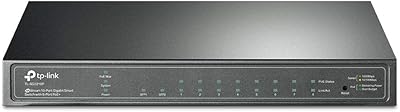
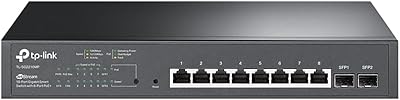
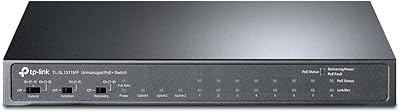
The TP-Link TL-SG2008 8-Port Gigabit Managed Switch sits in a practical sweet spot — capable enough for small business IT teams and home lab enthusiasts, yet compact and affordable enough to avoid the complexity of enterprise-grade core switches. What separates it from cheaper unmanaged alternatives is the Omada SDN integration, which turns a simple 8-port box into part of a broader, centrally managed network ecosystem. The metal chassis is slim and solid, and the dual power input adds genuine installation flexibility. That said, if you just need to share internet access between a few devices and have no interest in VLANs or traffic prioritization, this is probably more switch than you need.
Features & Benefits

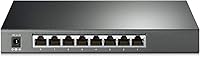
Every port on this managed gigabit switch runs at full gigabit speed — no half-speed ports hiding on the back. QoS support spans Layer 2, 3, and 4, meaning you can prioritize VoIP calls or video conferencing traffic over routine file transfers with real precision, not just rough categories. The security feature set is genuinely impressive for this price tier: 802.1Q VLAN segmentation, ACL rules, DHCP Snooping, DoS protection, and 802.1X RADIUS authentication give IT admins meaningful control over who accesses what. One important clarification: Port 8 supports PoE input — meaning the switch itself can be powered via PoE — but it does not supply PoE power to connected devices. The 5-year warranty and cloud management via the Omada app round out a strong value package.

Best For

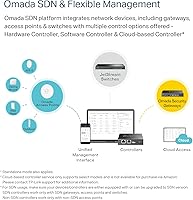
The TL-SG2008 makes the most sense for anyone already working within the Omada ecosystem — or planning to build one. Pair it with an Omada gateway and access points, and you get centralized cloud management across your entire network from a single app, without needing expensive proprietary hardware. It is also a solid pick for home lab users who want to practice real-world concepts like VLAN segmentation, link aggregation (bonding two connections for higher throughput), or IGMP Snooping (controlling multicast traffic efficiently). Small offices, clinics, and retail environments that need traffic isolation between staff and guest networks will find it fits well. If you need remote visibility into a branch location without deploying a full-rack setup, this Omada-compatible switch is worth a serious look.

User Feedback

With a 4.6 out of 5 rating across over 560 reviews, buyers are largely satisfied — but the feedback tells a more nuanced story. The most consistent praise centers on build quality, reliable throughput, and how smoothly the TL-SG2008 integrates into existing Omada setups. Where things get complicated is firmware compatibility: TP-Link's SDN and non-SDN controller versions do not mix, and several buyers report confusion when their existing controller did not match the switch's firmware. The PoE-in design also catches people off guard — some expect to power downstream devices from Port 8, which it simply does not do. On the positive side, the 5-year warranty earns frequent mentions as a genuine confidence builder, especially compared to competitors offering only one or two years.

Pros

  • All eight ports deliver full gigabit speeds with no half-speed compromise on any port.
  • The security feature set — including VLAN, ACL, DHCP Snooping, and 802.1X RADIUS — rivals switches costing significantly more.
  • Omada SDN integration makes centralized multi-site management genuinely practical for small IT teams.
  • L2/L3/L4 QoS gives real granularity for prioritizing VoIP and video traffic over background file transfers.
  • The all-metal chassis feels solid and runs cool, even in enclosed shelf or rack deployments.
  • Port 8 supports PoE input, allowing flexible cable-free power in locations with an existing PoE uplink.
  • A five-year warranty at this price tier is rare and meaningfully reduces long-term ownership risk.
  • Standalone mode means the TL-SG2008 can operate and be managed locally without any cloud dependency.
  • Link aggregation support lets users bond two ports for higher throughput to a NAS or uplink switch.
  • The compact footprint — just over 8 inches long — fits easily into tight spaces without sacrificing functionality.

Cons

  • SDN and non-SDN firmware tracks do not mix, and mismatched controllers cause adoption failures that are hard to diagnose for beginners.
  • Full cloud management requires a separate Omada hardware or software controller, which adds cost and setup complexity.
  • No PoE output on any port — buyers expecting to power cameras or access points from this switch will be disappointed.
  • No SFP uplink or multi-gig port options limit scalability for users whose bandwidth needs grow quickly.
  • The standalone web interface is functional but not intuitive, especially for first-time managed switch users.
  • Weekday-only phone support leaves international users and weekend administrators without live assistance when issues arise.
  • Rack mounting requires purchasing separate ears — they are not included in the box despite the professional use case.
  • 802.1X RADIUS authentication requires an external RADIUS server, which adds infrastructure overhead smaller teams may not anticipate.
  • Official documentation does not go deep enough for advanced multicast or inter-VLAN routing scenarios, pushing users toward community forums.
  • The included rubber feet are flimsy and have been reported to detach during normal handling.

Ratings

The TP-Link TL-SG2008 8-Port Gigabit Managed Switch earned its scores through AI analysis of verified global buyer reviews, with spam, bot-submitted, and incentivized feedback actively filtered out before scoring. Across hundreds of real-world deployments — from small business server rooms to home lab racks — both the strengths and the genuine frustrations are reflected in these numbers. Nothing has been softened to flatter the product.
Ease of Setup
74%
26%
For buyers already running Omada hardware, getting the TL-SG2008 online is genuinely quick — the Omada app walks you through adoption in a few minutes, and the switch appears in your topology without digging through menus. Experienced network admins consistently praise how little friction there is getting it adopted into an existing controller.
First-time managed switch buyers frequently hit a wall with initial configuration, especially around controller pairing and firmware version matching. Several reviewers spent hours troubleshooting what turned out to be an SDN vs non-SDN firmware mismatch — a problem that better onboarding documentation could have prevented entirely.
SDN & Cloud Management
81%
19%
When it works within a matched Omada ecosystem, the centralized management experience is genuinely useful — admins can push VLAN changes, monitor port traffic, and adjust QoS rules remotely from a phone or browser without being on-site. For small businesses managing a second location, that kind of visibility without a dedicated IT visit is a real operational advantage.
The cloud management experience is not truly plug-and-play; it requires either a software controller running on a dedicated machine or a separate Omada hardware controller to unlock full functionality. Users who assumed the switch could be managed entirely from the cloud without additional infrastructure were caught off guard.
Port Performance & Throughput
93%
All eight ports deliver consistent full-gigabit throughput with no throttling or speed tiering — a point buyers specifically call out when comparing against cheaper switches that quietly half-speed certain ports. In NAS backup scenarios and high-traffic office environments, the switch handles sustained loads without dropped packets or slowdowns.
There are no SFP or 2.5G uplink options, which is a limitation for users who later want to connect a multi-gig NAS or uplink to a faster aggregation switch. At this port count and price point the ceiling is real, and a few reviewers noted they outgrew it faster than expected.
VLAN & Network Segmentation
88%
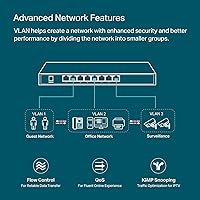
802.1Q VLAN support is fully implemented and works reliably across all ports, making it straightforward to separate guest Wi-Fi traffic from internal business systems or isolate IoT devices on their own segment. IT admins in clinic and retail environments specifically praise how cleanly traffic segmentation holds up under real workloads.
Configuring VLANs through the standalone web interface rather than the Omada controller is noticeably less intuitive, and the interface labeling is not always self-explanatory for users new to managed switching. A few buyers had to cross-reference the CLI guide to get inter-VLAN routing behaving as expected.
Security Features
86%
The security toolkit — ACL rules, DHCP Snooping, DoS protection, and 802.1X RADIUS authentication — is unusually comprehensive for a switch at this price tier. Small offices that need to enforce network access policies without deploying a full enterprise stack consistently describe this as one of the TL-SG2008's strongest selling points.
Implementing 802.1X RADIUS authentication requires an external RADIUS server, which adds infrastructure complexity that some smaller teams are not prepared for. The feature set is powerful on paper, but the documentation assumes a baseline of networking knowledge that casual users may not have.
QoS & Traffic Prioritization
83%
L2/L3/L4 QoS gives admins granular control over traffic prioritization — VoIP calls and video conferencing sessions stay crisp even when a file backup is saturating the network in the background. Users running mixed traffic environments, like offices with simultaneous Zoom calls and large file transfers, report noticeably more stable call quality after enabling QoS rules.
Setting up QoS beyond basic port-based prioritization requires a solid understanding of traffic classification, and the interface does not guide users through the logic intuitively. A handful of reviewers configured rules that had no effect because they misunderstood the queue hierarchy, and troubleshooting it without vendor support was time-consuming.
Build Quality & Hardware
89%
The all-metal chassis feels noticeably more substantial than plastic-bodied competitors in the same price range, and buyers regularly comment that it runs cool and quiet even in enclosed rack or shelf deployments. The compact footprint — just over 8 inches long — makes it easy to tuck into tight spaces without sacrificing airflow.
The included rubber feet are reported as flimsy by a minority of users, and the switch does not ship with rack-mount ears, which means an additional purchase is needed for proper 19-inch rack installation. For a product marketed partly at professional environments, that omission is a minor but real inconvenience.
PoE Flexibility
58%
42%
The ability to power the switch itself via 802.3at/af PoE on Port 8 is genuinely useful in deployments where running a separate power cable to the switch is awkward — think ceiling-mount installations or remote closets with a PoE-capable uplink already in place.
A significant number of buyers purchase this switch expecting to power downstream devices like IP cameras or access points from it, only to discover it is a PoE-in device, not PoE-out. This is a fundamental mismatch with buyer intent and accounts for a disproportionate share of the negative reviews, making it the single most common source of post-purchase disappointment.
Firmware & Compatibility
62%
38%
Once the correct firmware version is confirmed and matched to the right controller type, the switch operates stably over long periods without requiring reboots or manual intervention. Users who took the time to verify SDN compatibility before purchasing report very few firmware-related issues.
TP-Link's parallel SDN and non-SDN firmware tracks cause genuine confusion — SDN controllers only work with SDN-firmware devices, and mixing them results in the switch not being adoptable at all. This is a recurring complaint in reviews and represents a documentation and product communication failure more than a hardware flaw.
Link Aggregation (LAG)
79%
21%
802.3ad LACP link aggregation works as expected, letting users bond two ports together for higher bandwidth to a NAS or uplink switch — a feature home lab users particularly appreciate when transferring large media libraries or VM disk images across the network.
Link aggregation configuration is only available through the web interface or controller and is not surfaced prominently for new users. A couple of reviewers noted that misconfigured LAG settings caused intermittent connectivity drops that took time to diagnose, especially without a clear interface warning about port compatibility requirements.
IGMP Snooping & Multicast Control
77%
23%
IGMP Snooping — which prevents multicast video or streaming traffic from flooding every port unnecessarily — functions reliably and is straightforward to enable from the management interface. Users running IP cameras or IPTV systems on segmented networks specifically mention this as a feature that measurably improved their network efficiency.
Multicast configuration beyond basic IGMP Snooping is not well documented for this model, and users trying to implement more advanced multicast routing had to piece together guidance from third-party forums. The feature works, but the official support materials do not go deep enough for edge-case deployments.
Warranty & Support
91%
The five-year manufacturer warranty is one of the most frequently praised aspects across all reviews — buyers treat it as a meaningful signal of product confidence, and it consistently tips purchase decisions in favor of this switch over competitors with shorter coverage windows. Free technical support on weekdays adds a layer of reassurance for less experienced buyers.
Support is only available Monday through Friday during Pacific business hours, which leaves international buyers and weekend administrators without live assistance when issues arise. A few users reported that support response quality was inconsistent, with some agents unfamiliar with edge-case configuration scenarios.
Value for Money
87%
For a managed switch with a full security feature set, L2/L3/L4 QoS, and cloud management capability, the TL-SG2008 delivers a feature-per-dollar ratio that is hard to match at this tier. Buyers comparing it against similarly priced alternatives from Netgear or Cisco regularly conclude it offers more software capability for the spend.
The value calculation shifts if you factor in needing a separate Omada controller to unlock full management features — either a hardware controller or a dedicated machine running the software controller. For buyers who did not anticipate that additional cost or complexity, the effective price of a complete managed setup is higher than the switch price alone implies.
Documentation & Learning Curve
61%
39%
The included quick-start guide covers physical setup competently, and TP-Link's online knowledge base has improved over recent years with more detailed configuration walkthroughs for common Omada scenarios. Experienced network engineers typically find enough reference material to get up and running without contacting support.
For buyers new to managed switches, the documentation leaves too many gaps — particularly around firmware compatibility, VLAN tagging logic, and controller prerequisites. The learning curve is steeper than the product's approachable price tag implies, and several reviewers specifically wished for a more guided initial setup experience tailored to non-experts.

Suitable for:

The TP-Link TL-SG2008 8-Port Gigabit Managed Switch is a strong fit for small business owners, IT administrators, and serious home lab users who want enterprise-level network control without enterprise-level spending. If you are already building within the Omada ecosystem — or planning to add Omada access points and a gateway down the line — this switch slots in naturally and gives you centralized visibility across your entire network from a single app. It works particularly well in environments where traffic separation genuinely matters: think a dental clinic keeping patient check-in tablets on a separate VLAN from back-office systems, or a small retail shop isolating customer Wi-Fi from its point-of-sale network. Network admins managing a remote or secondary site will also find value in being able to push configuration changes and monitor port activity without an on-site visit. Home lab enthusiasts who want to practice real-world concepts like RADIUS authentication, link aggregation, or IGMP-based multicast control will get a lot of mileage out of the feature set here.
Not suitable for:

The TP-Link TL-SG2008 8-Port Gigabit Managed Switch is not the right choice for buyers who just want to plug in devices and forget the switch exists. If your only goal is expanding the number of wired ports in a home without any interest in VLANs, QoS rules, or cloud dashboards, a simpler unmanaged switch will cost less and require zero configuration. Buyers expecting to power IP cameras, access points, or other PoE devices directly from this switch should look elsewhere — Port 8 accepts PoE input to power the switch itself, but the switch does not supply PoE output to connected devices, a distinction that catches many buyers off guard. If your infrastructure needs more than eight ports at the access layer, or if you require multi-gig uplinks or SFP fiber connections, this compact unit will hit its ceiling quickly. Finally, anyone who wants full Omada cloud management but is not prepared to also set up a software or hardware controller should temper expectations — the switch alone does not provide the full cloud management experience without that additional component in place.
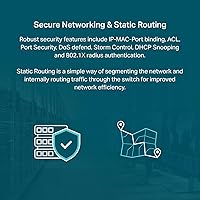
Specifications

  • Model: TP-Link TL-SG2008 V3, a Layer 2+ smart managed switch in the Omada SDN product line.
  • Port Count: 8 x RJ45 ports, each supporting 10/100/1000 Mbps auto-negotiation with no speed-tiered ports.
  • Switching Capacity: The switch provides a non-blocking 16 Gbps switching fabric, ensuring full wire-speed throughput across all ports simultaneously.
  • Dimensions: The chassis measures 8.23″ long, 4.96″ wide, and 1.02″ tall, fitting easily on a shelf or in a shallow rack space.
  • Weight: The unit weighs 1.3 lbs (0.59 kg), making it light enough for ceiling or wall-adjacent mounting in flexible deployments.
  • Case Material: The outer enclosure is all-metal, providing passive heat dissipation and added durability compared to plastic-bodied alternatives.
  • Power Input: Accepts either a 12V/1A DC adapter (included) or 802.3at/af PoE input on Port 8 — the switch draws power via PoE but does not supply it.
  • Max Temperature: Rated for operating environments up to 131°F (55°C), suitable for standard office, retail, or light industrial spaces.
  • Management Modes: Supports three management modes: Omada SDN cloud management via app or web controller, and standalone mode via local web interface.
  • QoS Support: Implements Layer 2, Layer 3, and Layer 4 Quality of Service rules, enabling granular prioritization of VoIP, video, or other latency-sensitive traffic.
  • VLAN Support: Supports 802.1Q tagged VLANs for logical network segmentation across all eight ports.
  • Security Features: Includes ACL rules, IP-MAC-Port binding, DoS defense, DHCP Snooping, Storm Control, and 802.1X RADIUS port authentication.
  • Multicast Control: IGMP Snooping is supported, allowing the switch to intelligently direct multicast traffic only to ports with active listeners, reducing unnecessary broadcast load.
  • Link Aggregation: Supports 802.3ad LACP link aggregation, enabling users to bond two ports together for increased bandwidth to a server or upstream switch.
  • Included Contents: Package includes the TL-SG2008 switch unit, a 12V/1A power adapter, rubber feet, and a printed installation guide.
  • Warranty: Backed by a 5-year manufacturer warranty with free weekday technical support available 6am–6pm PST, Monday through Friday.
  • Protocol Support: Supports STP/RSTP for loop prevention, Flow Control (802.3x), IGMP Snooping, and LACP in addition to standard Ethernet protocols.
  • ASIN: The Amazon identifier for this product is B08TR19PTD, corresponding to the V3 hardware revision of the TL-SG2008.

Related Reviews

TP-Link TL-SG2210P V3 8-Port PoE Switch
83%
91%
Value for Money
74%
PoE Performance
83%
Ease of Setup
86%
Omada SDN Integration
88%
Build Quality
More
TP-Link TL-SG108E 8-Port Gigabit Switch
87%
93%
Ease of Setup
88%
Performance & Reliability
94%
Fanless Design (Noise Levels)
85%
Smart Management Features
89%
Build Quality & Durability
More
TP-Link TL-SG1008MP 8-Port PoE+ Gigabit Switch
81%
96%
Ease of Setup
93%
PoE Coverage
91%
Build Quality
89%
Value for Money
88%
Reliability & Uptime
More
TP-Link TL-SG108PE
TP-Link TL-SG108PE
84%
88%
Build Quality
83%
PoE Performance
91%
Ease of Setup
79%
Management Interface
87%
Value for Money
More
TP-Link TL-SG2218P Smart Managed PoE Switch
82%
78%
PoE Performance
88%
Omada SDN Integration
83%
Web Interface & Usability
86%
Build Quality
81%
Fan Noise
More
TP-Link TL-SG2210MP Jetstream 10-Port Gigabit Smart Managed PoE Switch
86%
91%
Value for Money
88%
Performance
93%
Ease of Setup
85%
Build Quality
89%
PoE Power Delivery
More
TP-Link TL-SG2428P Jetstream 24-Port Gigabit Smart Managed PoE Switch
84%
89%
Value for Money
70%
Ease of Setup
93%
PoE+ Performance
85%
Security Features
92%
Network Management (Omada SDN)
More
TP-Link TL-SG108-M2 8-Port 2.5G Multi-Gigabit Network Switch
89%
93%
Ease of Setup
89%
Network Performance
91%
Build Quality
96%
Noise Level (Fanless Design)
87%
Compatibility with Cat5e Cables
More
TP-Link TL-SG1024DE 24-Port Gigabit Switch
82%
91%
Build Quality
93%
Port Performance & Reliability
63%
Management Interface (Web UI)
82%
VLAN Configuration
78%
QoS Effectiveness
More
TP-Link T1500G-8T 8-Port Gigabit Switch
85%
88%
Performance
91%
Ease of Setup
90%
PoE Functionality
89%
Reliability
85%
Security Features
More

FAQ

You can use it right out of the box in standalone mode — just connect it and access the built-in web interface through a browser to configure VLANs, QoS, and other settings. However, if you want full Omada cloud management with remote access, app control, and multi-device visibility, you will need either an Omada hardware controller or a machine running the free Omada Software Controller. The switch itself does not provide cloud management independently.

No — and this is one of the most important things to clarify before buying. The TP-Link TL-SG2008 8-Port Gigabit Managed Switch supports PoE input on Port 8, meaning it can receive power from a PoE-capable uplink instead of using the DC adapter. It does not supply PoE power to any connected devices. If you need to power cameras or access points, you will need a dedicated PoE switch.

TP-Link runs two parallel firmware tracks for Omada devices: SDN and non-SDN. SDN-firmware switches only work with SDN-compatible controllers, and non-SDN controllers only work with older non-SDN devices — they do not cross-communicate. The TL-SG2008 V3 ships with SDN firmware, so you need to make sure any controller you are pairing it with is also on the SDN track. If you try to adopt it with a non-SDN controller, the switch simply will not be discovered. Check TP-Link's compatibility page before mixing hardware generations.

Yes, the TL-SG2008 is completely fanless and relies on its metal chassis for passive cooling. It produces no noise during operation, which makes it a good fit for home offices, living room media setups, or any environment where fan noise would be disruptive.

The switch is compact enough to fit in a rack physically, but rack-mount ears are not included in the box. You would need to purchase a compatible mounting bracket separately if proper 1U rack installation is important to you. Many users simply shelf-mount it inside a rack or use a small desktop stand.

The TL-SG2008 supports up to 4,094 VLAN IDs per the 802.1Q standard, which is far more than most small business or home lab deployments will ever need. In practice, you can easily segment guest Wi-Fi, IoT devices, staff systems, and a management network all on separate VLANs without running into any limits.

Honestly, if you have no interest in concepts like VLANs, traffic prioritization, or access control, this is probably more switch than you need and an unmanaged gigabit switch would serve you better at a lower cost. That said, if you are willing to spend a few hours learning the basics, the Omada ecosystem has decent documentation and a helpful community. It is not designed for plug-and-play home use, so go in with realistic expectations.

Remote cloud management requires an active internet connection at the switch's location. If the internet goes down there, you lose remote visibility and control until connectivity is restored. You can still manage it locally via the web interface if you are on the same network, but cloud-based access will not work offline.

TP-Link's 5-year warranty covers manufacturing defects and hardware failures under normal operating conditions. It does not cover physical damage, misuse, or modifications. For most users this is a non-issue — the warranty is primarily there to protect you if a port, power input, or internal component fails during the coverage window, and TP-Link's support team handles replacements through their standard RMA process.

The switch works fine at a basic level with any vendor's hardware — it is a standard Ethernet switch and will pass traffic regardless of what is connected. However, the Omada cloud management features only apply to Omada-compatible devices. If you connect a non-TP-Link access point, it will function normally but will not appear in the Omada dashboard or be manageable through the Omada app. For a fully integrated managed experience, sticking within the Omada ecosystem makes the most sense.

Where to Buy