Overview

The TP-Link TL-SG108PE has been a steady presence in the PoE switch market since 2016, and its continued popularity says something real about its staying power. It occupies a practical middle ground — more capable than a basic unmanaged switch, yet far less intimidating than a full enterprise unit. The all-metal fanless design keeps it quiet and sturdy enough to run continuously without complaint. For home labs or small offices that need PoE management without overcomplicating things, this easy-smart switch hits a genuinely useful spot in the market.

Features & Benefits

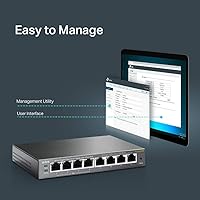
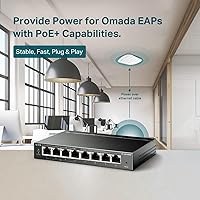
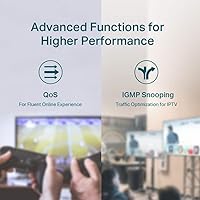
Split across its eight ports, this PoE switch gives you four PoE+ ports (802.3at/af) capable of up to 30W each, sharing a total budget of 64W — workable for a couple of access points and IP cameras running simultaneously. The remaining four ports handle standard gigabit traffic for uplinks or non-powered devices. A web-based management interface lets you configure VLANs, QoS prioritization, and IGMP Snooping without a networking degree. Arguably the most underrated feature is PoE Auto Recovery, which silently detects and reboots unresponsive powered devices — genuinely useful when the switch is tucked away somewhere inconvenient.

Best For

This easy-smart switch is a natural fit for home lab enthusiasts adding wireless access points or security cameras on a modest budget. Small offices that want basic network segmentation through VLANs — without bringing in outside IT help — will find the interface approachable. AV installers appreciate the fanless, compact build in noise-sensitive spaces like conference rooms or media closets. It also suits anyone already using TP-Link gear who wants a consistent management experience. Where it may fall short is for anyone needing more than four PoE ports without stepping up to a larger unit.

User Feedback

Owners consistently highlight how painless the initial setup is, with many noting they had devices powered and running within minutes. The build quality draws repeated praise given the price tier — it feels more substantial than competing plastic-bodied alternatives. That said, the 64W shared power budget surfaces as a genuine frustration when all four PoE ports are loaded simultaneously; it is a real constraint worth planning around. A small number of users have encountered VLAN configuration confusion on older firmware, though updating typically resolves it. Long-term reliability appears strong, with multi-year deployments frequently mentioned as trouble-free.

Pros

  • Silent fanless operation makes this PoE switch ideal for living rooms, AV closets, and open offices.
  • The all-metal housing feels noticeably more durable than plastic rivals at a comparable price point.
  • PoE Auto Recovery automatically reboots locked-up cameras or access points without any manual intervention.
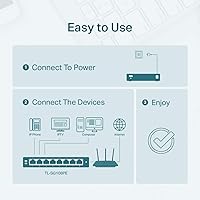
  • Plug-and-play functionality gets most users up and running in under five minutes, no software required.
  • VLAN, QoS, and IGMP Snooping are accessible through a web interface that does not require a networking background.
  • Shielded RJ45 ports improve signal integrity, a small but meaningful detail for permanent installations.
  • Long-term owners consistently report years of trouble-free continuous operation.
  • Compact dimensions make it easy to tuck into tight spaces or mount inside shallow wall enclosures.
  • Standard 802.3at/af compliance ensures broad compatibility with cameras, phones, and access points from any brand.

Cons

  • The shared 64W PoE budget becomes a genuine constraint when all four powered ports are heavily loaded.
  • Firmware updates must be applied manually — there is no automatic or scheduled update mechanism.
  • VLAN configuration has a steeper learning curve than the rest of the interface, especially on older firmware.
  • No rack-mount ears are included, making clean rackmount installation require additional hardware and cost.
  • The web management interface looks dated and has seen limited visual or structural improvements over the years.
  • Hardware version differences can create confusion when searching for the correct firmware file on the support site.
  • Four PoE ports out of eight is a fixed split that cannot be adjusted to suit heavier PoE-dependent setups.
  • The chassis can become noticeably warm in poorly ventilated enclosures during sustained heavy traffic.

Ratings

The TP-Link TL-SG108PE scores here reflect AI-driven analysis of thousands of verified global buyer reviews, with spam, bot activity, and incentivized feedback actively filtered out. The result is an honest snapshot of where this easy-smart switch genuinely excels and where real-world users have run into friction. Both the strengths and the recurring frustrations are weighted transparently so you can make a genuinely informed decision.

Build Quality
88%
The all-metal housing consistently impresses buyers who are used to plastic-bodied switches at this price tier. Shielded RJ45 ports add a layer of durability that home lab and small office users notice immediately, especially in installations that rarely get touched once deployed.
A handful of users have noted that the port labeling can wear off over time in dusty environments. The unit is solid overall, but the rubber feet have occasionally been reported as insufficiently adhesive on smooth shelf surfaces.
PoE Performance
83%
Running access points, IP cameras, and VoIP phones off the four PoE+ ports works reliably in most typical deployments. The 30W-per-port ceiling handles the majority of 802.3at devices without issue, and installers appreciate consistent power delivery across long cable runs.
The shared 64W total power budget is the single most-cited limitation in user reviews. Anyone planning to max out all four PoE ports simultaneously — think four high-draw outdoor cameras — will hit the ceiling and need to plan device loads carefully.
Ease of Setup
91%
The plug-and-play experience is genuinely one of the strongest aspects of this switch. Most buyers report having devices powered and traffic flowing within minutes, with no mandatory software installation required to get basic functionality running straight out of the box.
Users who venture into VLAN configuration on older firmware versions have occasionally described the interface as confusing or inconsistent. The learning curve is mild compared to full managed switches, but it is not entirely frictionless for complete networking beginners.
Management Interface
79%
21%
The web-based management console strikes a practical balance for users who want more control than a dumb switch offers without the complexity of enterprise firmware. QoS prioritization and IGMP Snooping are genuinely accessible through the interface, which is more than can be said for most competing units at this tier.
The interface looks dated compared to newer TP-Link products, and navigation can feel unintuitive when configuring port-based VLANs for the first time. Firmware updates have improved stability, but the UI refresh cycle lags behind the hardware's lifespan.
Value for Money
87%
Among mid-range PoE switches with smart management features, this easy-smart switch delivers a feature set that would have cost considerably more just a few years ago. Long-term owners frequently cite multi-year trouble-free operation as strong justification for the purchase price.
Buyers needing more than four PoE ports will find themselves outgrowing this switch quickly and stepping up to a pricier model. For that specific scenario, the value calculation shifts noticeably.
Fanless & Noise Level
94%
Zero fan noise is a genuine selling point for AV installers and anyone putting a switch in a bedroom, media room, or open-plan office. The passive cooling design runs completely silent under sustained loads, which is consistently praised in reviews from noise-sensitive environments.
Fanless operation means the chassis does get warm during prolonged heavy use. In poorly ventilated enclosures, a few users have noted the metal body becoming noticeably hot to the touch, though no performance failures were widely reported as a result.
PoE Auto Recovery
86%
This feature repeatedly earns quiet praise from installers managing remote or hard-to-access deployments. When a camera or access point locks up, the switch detects the unresponsive device and reboots it automatically — eliminating the need for a physical site visit in many cases.
The auto-recovery detection interval is not user-configurable on all firmware versions, which frustrates more advanced users who want tighter control over timing. In rare cases, false positives have caused devices to reboot unexpectedly.
Port Count & Layout
71%
29%
Eight ports in a compact footprint covers the majority of small office and home lab use cases comfortably. The physical port spacing is generous enough that bulky connectors and right-angle plugs sit without blocking adjacent ports.
Four PoE ports out of eight is a 50/50 split that not every buyer finds ideal. Users who anticipated powering more than four devices had to introduce a second switch or rethink their network design entirely.
Long-Term Reliability
89%
Multi-year deployment stories are common in the review base, with units running continuously for three or more years without requiring intervention. The metal construction appears to contribute meaningfully to longevity compared to plastic competitors in the same category.
A small but consistent subset of reviews mentions unit failures just outside the warranty window, which is worth noting for buyers planning very long-horizon deployments. Component variance appears low but not absent.
Firmware & Software Updates
67%
33%
TP-Link does provide firmware updates that have addressed known VLAN and stability issues over the product's lifespan. Users who keep firmware current generally report a smoother experience than those running factory versions on older hardware revisions.
The update process is not automatic, and locating the correct firmware version for a specific hardware revision on TP-Link's support site has frustrated multiple reviewers. The cadence of meaningful updates has also slowed noticeably in recent years.
Physical Footprint
92%
At just over six inches long and under an inch tall, this PoE switch fits almost anywhere — on a shelf, in a shallow wall cabinet, or zip-tied inside an AV rack. The one-pound weight makes mounting flexible without requiring dedicated hardware in most situations.
No rack-mount ears are included in the box, which is a minor but recurring complaint from users who want a clean rackmount installation. Third-party bracket solutions exist but add cost and installation effort.
Compatibility
85%
Standard 802.3at/af compliance means this switch works reliably with cameras, access points, and VoIP handsets from virtually any major brand. Users running mixed-vendor environments consistently report no meaningful interoperability issues.
A small number of users powering non-standard or high-draw PoE devices have encountered compatibility edge cases, particularly with certain PTZ cameras that draw close to the per-port maximum. Checking device power requirements beforehand is advisable.
VLAN & Network Segmentation
74%
26%
For a switch in this category, the VLAN implementation is genuinely functional and covers the segmentation needs of most small office and home lab setups. Users separating IoT devices from main network traffic report the feature working as expected once configured correctly.
The VLAN configuration process has a steeper learning curve than the rest of the interface, and documentation quality is inconsistent. Users without prior VLAN experience have described the setup as trial-and-error, particularly on hardware version 3.

Suitable for:

The TP-Link TL-SG108PE is a strong match for anyone who needs to power a small cluster of network devices without running separate power cables to each one. Home lab enthusiasts building out a modest IP camera or wireless access point setup will find the four PoE+ ports more than adequate for typical configurations. Small business owners who want basic VLAN segmentation to separate guest traffic from internal systems — without hiring a network consultant — will appreciate the approachable web interface. AV integrators and installers working in noise-sensitive environments like conference rooms or home theaters get a genuinely silent switch that does not introduce fan hum into the space. It also fits naturally into existing TP-Link ecosystems, where the management experience stays consistent across devices and reduces the learning overhead for anyone already familiar with the brand.

Not suitable for:

Buyers who need to power more than four PoE devices simultaneously will hit a hard wall with this easy-smart switch, and no amount of configuration workarounds will change that hardware reality. The shared 64W power budget sounds reasonable on paper, but anyone running four higher-draw devices — such as PTZ cameras or dual-band access points — near their individual power maximums will find the total budget exhausted faster than expected. Network administrators who require advanced managed switch features like 802.1X port authentication, MSTP, or granular CLI access should look at a full managed unit instead; this easy-smart tier was never designed for that level of control. Organizations with strict firmware compliance requirements may also find the TL-SG108PE’s slower update cadence and lack of automated patching a liability. Finally, anyone needing true rackmount installation out of the box will need to source third-party brackets, since none are included.

Specifications

  • Total Ports: The switch provides 8 x 10/100/1000 Mbps RJ45 ports with auto-negotiation and auto MDI/MDIX support.
  • PoE Ports: Ports 1 through 4 support 802.3at/af PoE+, delivering up to 30W per port for powered devices.
  • PoE Budget: The total shared PoE power budget across all four PoE+ ports is 64W.
  • Non-PoE Ports: Ports 5 through 8 are standard gigabit ports intended for uplinks or non-powered network devices.
  • Data Transfer Rate: All ports support a maximum data transfer rate of 1000 Mbps (1 Gigabit per second).
  • Dimensions: The unit measures 6.22″ in length, 3.98″ in width, and 0.98″ in height.
  • Weight: The switch weighs approximately 1 pound, making it easy to mount or reposition as needed.
  • Case Material: The enclosure is constructed from metal, providing durability and passive heat dissipation without a fan.
  • Cooling: The switch uses fully passive fanless cooling, producing zero acoustic noise during operation.
  • Input Voltage: The unit operates at 54V DC supplied via the included power adapter.
  • Maximum Power: Total maximum power draw for the unit, including PoE output, is 75W.
  • Operating Temperature: The switch is rated for operating temperatures up to 104°F (40°C).
  • Management: Network configuration is handled through a web-based GUI and TP-Link’s Smart Configuration Utility, with no mandatory software installation.
  • VLAN Support: The switch supports 802.1Q tag-based VLANs and port-based VLANs for basic traffic segmentation.
  • QoS: Port-based and 802.1p/DSCP QoS policies are supported to prioritize time-sensitive traffic such as VoIP or video.
  • Multicast: IGMP Snooping v1/v2 is supported to manage and optimize multicast traffic across the network.
  • PoE Recovery: The PoE Auto Recovery feature automatically detects and reboots unresponsive powered devices without manual intervention.
  • Port Shielding: All RJ45 ports are shielded to reduce electromagnetic interference and improve signal integrity in dense installations.
  • In the Box: The package includes the switch unit, a power adapter, an installation guide, and four rubber feet.
  • Warranty: TP-Link covers this switch with a 3-year limited warranty and offers free technical support Monday through Friday.

Related Reviews
TP-Link TL-SG3428XMP
88%
91%
Performance
88%
Build Quality
90%
Cloud Management & Software
87%
Ease of Setup
85%
Power Efficiency
More
TP-Link N300 WiFi Extender TL-WA855RE
82%
91%
Value for Money
96%
Ease of Setup
75%
WiFi Performance (Range)
80%
Build Quality
88%
Compatibility with Devices
More
TP-Link TL-MR6400 4G LTE Router
82%
88%
Setup & Installation
91%
4G LTE Performance
83%
Wi-Fi Speed & Reliability
85%
Portability
82%
Bandwidth Management (QoS)
More
TP-Link TL-WA1201 Wireless Access Point
85%
91%
Ease of Installation
88%
Wi-Fi Performance
85%
Signal Range & Coverage
89%
Multi-Device Performance
81%
Build Quality
More
TP-Link TL-PA411KIT Powerline Network Adapter
85%
91%
Setup and Installation
84%
Connection Stability
87%
Power Efficiency
89%
Speed and Performance
80%
Build Quality
More
TP-Link TL-SF1016D 16-Port Ethernet Switch
86%
91%
Ease of Setup
87%
Performance & Speed
92%
Energy Efficiency
80%
Build Quality
94%
Fanless Design (Noise Level)
More
TP-Link TL-WPA8631P Powerline WiFi Extender Kit
84%
92%
Ease of Setup
85%
Performance & Speed
88%
WiFi Coverage
78%
Build Quality
90%
Compatibility with Devices
More
TP-Link TL-SG1024DE 24-Port Gigabit Switch
85%
94%
Ease of Setup
89%
Performance & Speed
91%
Quiet Operation
88%
Reliability & Durability
83%
VLAN Features
More
TP-Link TL-SL1311MP 8-Port PoE Switch
88%
92%
Value for Money
95%
Ease of Setup
89%
PoE Range Performance
91%
Build Quality
88%
Customer Support
More
TP-Link TL-SG1218MPE 16-Port Gigabit Switch
84%
87%
Value for Money
91%
PoE Power Handling
88%
Ease of Use
90%
Reliability
78%
Build Quality
More

FAQ

Yes, but you need to be mindful of the shared 64W total budget. If your four devices are low-draw — like compact wireless access points or basic IP cameras — you will be fine. Where people run into trouble is powering four higher-draw devices simultaneously, such as PTZ cameras or certain dual-radio APs that each pull close to the 30W per-port maximum. Add up your devices’ actual power draws before assuming the budget is sufficient.

No software installation is required to get basic connectivity up and running. For management features like VLANs and QoS, you access the built-in web interface directly through your browser by entering the switch’s IP address. TP-Link also offers an optional Smart Configuration Utility if you prefer a desktop app, but it is not mandatory.

Yes, it supports the industry-standard 802.3at and 802.3af protocols, which means it works with PoE-powered devices from virtually any major manufacturer. Whether you are running Ubiquiti access points, Hikvision cameras, or Grandstream VoIP phones, compatibility is rarely an issue as long as the device draws within the per-port power limits.

Completely silent. There is no fan in this switch — it uses passive cooling through the metal chassis. It is one of the genuinely useful reasons to choose this easy-smart switch for noise-sensitive spaces like a home office, living room AV cabinet, or conference room.

The PoE Auto Recovery feature handles that automatically. The switch periodically pings each connected PoE device, and if it stops responding, the switch cuts and restores power to that port to force a reboot. For remote installations like outdoor cameras or entry systems, this can save a physical site visit.

Yes, the switch supports both port-based and 802.1Q tag-based VLANs, which is exactly what you need to isolate IoT gadgets or guest traffic from your main network. The setup is manageable for someone with basic networking knowledge, though it can take a little trial and error if you have never configured VLANs before.

No, rack-mount ears are not included in the box. The switch ships with rubber feet for desktop or shelf placement. If you want a clean rackmount installation, you will need to source a compatible third-party bracket separately, which is a minor but real extra step for anyone building out a tidy equipment rack.

The metal chassis does get warm, which is expected for a fanless design — the housing itself acts as a heat sink. In open air or a well-ventilated shelf, this is a non-issue. Where it can become a concern is in sealed or poorly ventilated enclosures during sustained heavy traffic, so make sure there is some airflow around the unit.

TP-Link does periodically release firmware updates for this switch, and doing so has resolved known VLAN and stability issues for many users. That said, the update cadence has slowed over the years given how long the product has been on the market. Updates are not automatic — you need to download and apply them manually through the web interface.

An unmanaged switch is pure plug-and-play with zero configuration options — every port behaves the same way and you have no visibility into what is happening on your network. This easy-smart switch adds a meaningful layer of control: you can create VLANs to segment traffic, apply QoS rules to prioritize video or voice data, and monitor port activity through the web interface. It is a significant step up in flexibility without requiring the expertise or cost of a full enterprise managed switch.