Overview

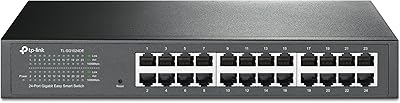
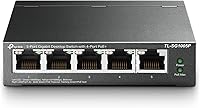
The TP-Link TL-SG1005P is one of those rare networking accessories that does exactly what it promises without asking much of you in return. It's a compact, unmanaged PoE switch built for home offices and small business setups where simplicity and reliability matter more than advanced configuration menus. The fanless metal chassis keeps it completely silent and sturdy enough to sit on a desk or mount on a wall. Plug it in, connect your devices, and it works — no software, no login screen, no fuss. That straightforward approach, combined with full gigabit speeds across all five ports, helps explain why this little PoE switch has stayed near the top of its category for years.

Features & Benefits

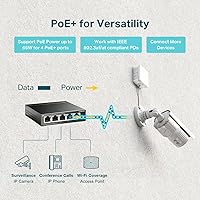
The standout selling point here is the four PoE+ ports, each capable of delivering up to 30W — enough to power most IP cameras, VoIP phones, or wireless access points without needing a separate power injector. That said, keep the shared 65W total budget in mind: if you plan to run four power-hungry devices simultaneously, you may not have full 30W available to each. The fifth port handles your uplink to a router or larger switch at full gigabit speed. On top of that, this five-port gigabit switch includes port-based QoS and IGMP Snooping, which quietly prioritizes video and voice traffic in the background — useful without requiring you to touch a single setting.

Best For

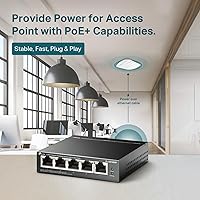
This little PoE switch is a natural fit for anyone who wants to add PoE capability to a small network without buying a bulky or expensive managed switch. Think: a home office with a couple of IP cameras, a VoIP phone, and a ceiling-mounted access point. It also works well in noise-sensitive spaces — a bedroom lab, a small recording setup, a clinic waiting room — where a loud fan would be a genuine problem. IT generalists and installers who want something they can deploy once and forget will appreciate the zero-maintenance nature of the TL-SG1005P. Budget-conscious buyers who still want a metal build over cheap plastic get solid value here.

User Feedback

Across thousands of reviews, the pattern is consistent: people love how fast this five-port gigabit switch gets them up and running, and they appreciate the silence. Long-term owners in particular keep coming back to the fanless operation as a quality-of-life win. Where things get more nuanced is the power budget — a handful of reviewers discovered the 65W ceiling the hard way after connecting four higher-draw PoE devices and finding not everything got the wattage it needed. Heat in enclosed cabinets comes up occasionally too, not a deal-breaker, just worth knowing if you plan to box it in. Overall, the 4.7-star average across a large review base reflects genuine, durable satisfaction.

Pros

  • Completely silent operation makes it ideal for quiet offices, bedrooms, and studios.
  • Plug-and-play setup means most buyers are fully operational within minutes of unboxing.
  • Metal chassis feels genuinely premium and durable compared to plastic alternatives at this price.
  • Four PoE+ ports eliminate the need for separate power injectors for cameras or access points.
  • Full gigabit speeds on all five ports keep data transfer fast for cameras, NAS devices, and VoIP.
  • Built-in QoS quietly prioritizes voice and video traffic without any user configuration required.
  • Compact footprint lets it fit behind a monitor, on a shelf, or flush-mounted on a wall.
  • Three-year warranty provides meaningful long-term coverage that is above average for this category.
  • Shielded RJ45 ports reduce interference in environments with electrical noise nearby.
  • The TL-SG1005P has maintained top bestseller status for years, reflecting consistent real-world reliability.

Cons

  • The shared 65W power budget can fall short when all four PoE ports are running high-draw devices.
  • No VLAN, port isolation, or any network segmentation capability whatsoever.
  • Heat buildup in enclosed or poorly ventilated installations is a documented concern from real users.
  • Only five ports total — buyers with modest but growing networks may outgrow it faster than expected.
  • No SFP uplink port limits clean integration into larger or more structured network environments.
  • The external power adapter adds cable clutter in already tight installation spots.
  • Weekend and international buyers get limited support options due to weekday-only PST service hours.
  • Passive PoE devices that do not conform to 802.3af/at standards may not work reliably with this switch.

Ratings

The TP-Link TL-SG1005P has accumulated thousands of verified purchases worldwide, and the scores below reflect what real buyers actually experienced — not marketing copy. Our AI analyzed global user reviews, actively filtering out incentivized, bot-generated, and outlier feedback to surface honest patterns. Both the strengths that keep this little PoE switch near the top of its category and the friction points that affect a minority of buyers are reflected transparently in every score.

Ease of Setup
96%
Buyers across all technical skill levels report being up and running within minutes of opening the box. There is no app to download, no web interface to navigate, and no configuration required — you plug it in and your PoE devices simply start working. For someone setting up a home camera system for the first time, that immediacy is genuinely appreciated.
Because there is no configuration interface at all, users who later want to do something like isolate a port or monitor traffic have no options. A small number of buyers only realized the full extent of its unmanaged nature after purchase, which led to some disappointment.
PoE Power Delivery
83%
Running a couple of IP cameras and a wireless access point off this five-port gigabit switch works reliably in real-world installs. The 30W per-port ceiling comfortably handles most 802.3af and 802.3at devices, and buyers deploying it in home security or small office Wi-Fi setups report consistent, stable power delivery over months of use.
The shared 65W total budget becomes a real constraint when all four PoE ports are occupied by power-hungry devices. Users who connected four higher-draw access points or PTZ cameras found that some devices received less power than expected, causing intermittent resets or reduced functionality.
Build Quality
91%
The metal chassis consistently surprises buyers who expect plastic at this price point. It feels solid in hand, the shielded RJ45 ports give it a more professional look than most competitors in its tier, and long-term owners report no warping, cracking, or port loosening even after years of continuous operation.
The unit does get noticeably warm under sustained heavy PoE load, and the lack of any ventilation slots means heat has nowhere to go. Buyers who installed it inside a closed cabinet or enclosure occasionally flagged thermal concerns, though outright failures from heat remain rare in the feedback.
Noise Level
98%
Completely silent operation is one of the most frequently praised qualities across all long-term reviews. Buyers who placed this switch in a bedroom, small studio, or quiet clinic waiting room found it genuinely undetectable by ear — something you cannot say about even mid-range switches with small high-RPM fans.
There is essentially no downside here for the vast majority of users. The only trade-off is that fanless passive cooling means the chassis absorbs heat directly, which matters only in poorly ventilated spots — but that is a placement issue, not a noise issue.
Gigabit Throughput
89%
All five ports run at full 10/100/1000 Mbps speeds, and buyers transferring large files between NAS devices or streaming high-bitrate security footage report no bottlenecks under typical small-office loads. The auto-negotiation handles mixed-speed devices cleanly without any manual intervention.
A small number of users in electrically noisy environments reported occasional link drops before realizing their cabling was the culprit. The switch itself performed fine once the cable issue was addressed, but the shielded ports are only as good as the cables connected to them.
Value for Money
93%
For what you get — gigabit PoE+ on four ports, a metal case, QoS, and a three-year warranty — this five-port gigabit switch sits at a price point that is hard to argue with. Buyers who previously paid significantly more for PoE injectors per device quickly do the math and find this switch the more economical path.
Buyers who need more than four PoE ports, or who want VLAN support, will need to spend considerably more on a managed switch. At its price, you are accepting real limitations, and users who later outgrow it sometimes feel they should have invested in a managed unit from the start.
Traffic Prioritization (QoS)
74%
26%
Port-based QoS and IGMP Snooping work quietly in the background, and buyers running VoIP phones alongside heavier data traffic report noticeably fewer call quality issues compared to a basic dumb switch. For a device at this price tier, having any QoS capability at all is a genuine bonus.
The QoS here is automatic and non-configurable — you cannot fine-tune priorities or assign policies the way you would on a managed switch. Power users who expected rule-based traffic shaping were left underwhelmed, and the IGMP Snooping, while useful for multicast control, cannot be toggled or monitored.
Port Count & Layout
71%
29%
Five ports in a package this small is a practical sweet spot for adding PoE to a small existing network. The physical spacing between ports accommodates most standard RJ45 connectors without crowding, and the single non-PoE uplink port keeps the design clean and intentional.
Five ports is a hard ceiling, and buyers who started with two cameras and an access point sometimes found themselves back shopping within a year as their needs grew. There is no SFP uplink option, which limits how cleanly it integrates into larger structured wiring setups.
Heat Management
63%
37%
Under light to moderate PoE loads — say, two or three cameras and one access point — the chassis stays warm but not hot, and most buyers in open-air desktop or wall-mount installations report no issues whatsoever over extended periods of continuous use.
Under maximum sustained PoE draw, the top surface of the metal case becomes genuinely hot to the touch. Buyers who tucked the unit into a closed AV cabinet or rack without airflow saw thermal warnings from connected devices or experienced unexplained reboots, pointing back to the switch overheating.
Compatibility
88%
Broad 802.3af/at compliance means this little PoE switch works reliably with an extensive range of IP cameras, access points, and VoIP phones from major brands. Buyers mixing devices from different manufacturers report clean detection and stable power negotiation without any manual intervention.
A small number of buyers with older or non-standard PoE devices encountered compatibility quirks, particularly with certain passive PoE accessories that do not conform strictly to 802.3af/at. The switch cannot be configured to accommodate these edge cases given its unmanaged nature.
Physical Footprint
92%
At roughly 4 inches square and under an inch tall, this switch fits almost anywhere — behind a monitor, on a shelf bracket, mounted behind a wall plate. Buyers consistently remark that the small size was a deciding factor when desk or rack space was at a premium.
The compact size means the power adapter is external and adds to the cable clutter. A handful of buyers wished the power brick were smaller or that the unit supported PoE passthrough from an upstream switch to eliminate the adapter entirely.
Long-Term Reliability
87%
Units that have been running continuously for two, three, or even four years appear regularly in reviews, with owners reporting zero failures or performance degradation. The metal build and passive design remove the most common failure points — fans and plastic fatigue — found in cheaper alternatives.
A small but consistent subset of reviews describe units failing between one and two years of use, typically under heavy continuous PoE load. Whether these represent genuine early failures or installation factors like heat accumulation is unclear, but the pattern surfaces often enough to mention.
Warranty & Support
79%
21%
A three-year warranty is genuinely above average for a switch at this price tier, and buyers who contacted TP-Link support for replacement or troubleshooting generally describe the process as straightforward and responsive within the stated support hours.
Support is only available Monday through Friday during Pacific business hours, which leaves weekend incidents and international buyers with limited real-time options. A few users also noted that warranty claims required more documentation than expected for what is an inexpensive device.

Suitable for:

The TP-Link TL-SG1005P is a natural fit for anyone who needs to add PoE capability to a small network without overcomplicating things or overspending. If you are setting up a home security system with a couple of IP cameras and a wireless access point, this little PoE switch lets you power all of them over the same Ethernet cables that carry their data — no separate power bricks, no PoE injectors cluttering the setup. Small business owners running a handful of VoIP desk phones alongside a camera or two will find the plug-and-play experience refreshingly low-drama. It also suits installers and IT generalists who want something they can mount on a wall, connect to an existing router or upstream switch, and walk away from confidently. Anyone working in a noise-sensitive space — a home studio, a bedroom lab, a small medical office — will particularly appreciate that this five-port gigabit switch produces absolutely no fan noise under any operating condition. The metal build and three-year warranty add a layer of confidence that is not always available at this price point.

Not suitable for:

Buyers who need more control over their network traffic should look elsewhere before committing to the TP-Link TL-SG1005P. This is an unmanaged switch at its core — there is no web interface, no VLAN support, no port mirroring, and no way to isolate devices from each other on the network. If you are running four high-draw PoE devices simultaneously, such as PTZ cameras or dual-radio access points that each approach their 30W maximum, you will likely run into the 65W shared power budget ceiling and face unstable device behavior. Anyone planning to install it inside a sealed AV cabinet or enclosed rack without adequate airflow should be cautious, as sustained heavy PoE loads can push the chassis temperature high enough to cause problems. Network engineers or IT professionals managing anything beyond a very small deployment will quickly find the lack of management features frustrating. And if you already anticipate needing six or more ports within the next year, buying a more scalable switch now will save you the hassle of replacing this one sooner than expected.

Specifications

  • Total Ports: The switch provides 5 RJ45 ports in total: 4 PoE+ ports for powered devices and 1 non-PoE gigabit port for uplink to a router or larger switch.
  • Port Speed: All five ports support 10/100/1000 Mbps auto-negotiation, delivering full gigabit throughput on every connection.
  • PoE Standard: PoE delivery complies with IEEE 802.3at (PoE+) and IEEE 802.3af, supporting a wide range of compliant powered devices from major manufacturers.
  • PoE Per Port: Each of the four PoE+ ports can supply up to 30W of power to a connected device, subject to the total power budget.
  • PoE Budget: The total shared PoE power budget across all four powered ports is 65W, which must be distributed among active PoE devices.
  • Cooling: The switch uses fully passive fanless cooling with no moving parts, relying entirely on the metal chassis to dissipate heat.
  • Chassis Material: The enclosure is constructed from metal with shielded RJ45 port connectors, offering better durability and electrical interference resistance than plastic alternatives.
  • Dimensions: The unit measures 3.94″ long by 3.86″ wide by 0.98″ tall, making it one of the more compact options in its port class.
  • Weight: The switch weighs 1.76 pounds (approximately 0.8 kg), light enough for wall mounting without heavy-duty fixings.
  • Input Voltage: The included external power adapter operates at 48V DC with a rated current of 1.25A.
  • Max Temperature: The switch is rated for operation in ambient temperatures up to 40°C (104°F), suitable for most indoor environments.
  • Mounting Options: Supports both desktop placement and wall mounting, with mounting hardware included in the box for flexible installation.
  • Flow Control: IEEE 802.3X flow control is supported on all ports to reduce packet loss under heavy or bursty network traffic conditions.
  • Traffic Management: Port-based QoS using 802.1p and DSCP priority marking is built in, along with IGMP Snooping for efficient multicast traffic handling.
  • Configuration: The switch is fully unmanaged and requires no software installation, web interface login, or manual configuration of any kind.
  • Switching Capacity: The switch provides a non-blocking switching fabric with a forwarding rate sufficient to support full wire-speed traffic on all ports simultaneously.
  • Included Items: The box includes the TL-SG1005P switch unit, an external power adapter, a mounting kit, and a printed installation guide.
  • Warranty: TP-Link backs this switch with a 3-year limited warranty and provides free technical support by phone Monday through Friday, 6am to 6pm PST.

Related Reviews
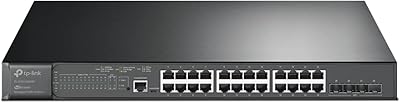
TP-Link TL-SG3428XMP
88%
91%
Performance
88%
Build Quality
90%
Cloud Management & Software
87%
Ease of Setup
85%
Power Efficiency
More
TP-Link N300 WiFi Extender TL-WA855RE
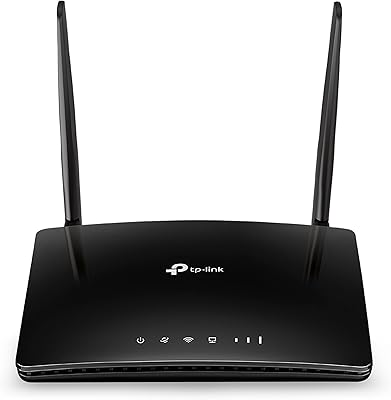
82%
91%
Value for Money
96%
Ease of Setup
75%
WiFi Performance (Range)
80%
Build Quality
88%
Compatibility with Devices
More
TP-Link TL-WA1201 Wireless Access Point
85%
91%
Ease of Installation
88%
Wi-Fi Performance
85%
Signal Range & Coverage
89%
Multi-Device Performance
81%
Build Quality
More
TP-Link TL-MR6400 4G LTE Router
82%
88%
Setup & Installation
91%
4G LTE Performance
83%
Wi-Fi Speed & Reliability
85%
Portability
82%
Bandwidth Management (QoS)
More
TP-Link TL-PA411KIT Powerline Network Adapter
85%
91%
Setup and Installation
84%
Connection Stability
87%
Power Efficiency
89%
Speed and Performance
80%
Build Quality
More
TP-Link TL-SL1218MP 16-Port PoE Switch
85%
92%
Value for Money
88%
Ease of Setup
90%
PoE+ Performance
82%
Build Quality
75%
Long-Distance Transmission (Extend Mode)
More
TP-Link TL-SG108E 8-Port Gigabit Switch
87%
93%
Ease of Setup
88%
Performance & Reliability
94%
Fanless Design (Noise Levels)
85%
Smart Management Features
89%
Build Quality & Durability
More
TP-Link TL-SF1006P 6-Port PoE Switch
88%
88%
Performance
95%
Ease of Setup
92%
Build Quality
89%
Reliability
91%
Power Delivery (PoE)
More
TP-Link TL-SG3428 24-Port Gigabit Switch
87%
85%
Setup & Installation
92%
Performance & Reliability
91%
Value for Money
80%
Software & Firmware Management
89%
Security Features
More
TP-Link TL-SF1005P
TP-Link TL-SF1005P
82%
96%
Ease of Setup
81%
PoE Power Delivery
88%
Build Quality
94%
Fanless & Noise Level
67%
Extend Mode Performance
More

FAQ

Not at all. This is a plug-and-play device in the truest sense — you power it on, connect your devices, and everything starts working automatically. There is no app, no web dashboard, and no configuration file to deal with.

You can absolutely run all four PoE ports simultaneously, but the 65W total budget is shared across them. If each device draws close to its maximum, the combined demand could exceed what the switch can supply. For typical setups — standard IP cameras, VoIP phones, or single-radio access points — you will usually stay well within budget, but high-draw devices like PTZ cameras or dual-radio APs deserve a quick power calculation before you commit.

In most cases, yes. The TP-Link TL-SG1005P supports IEEE 802.3af and 802.3at standards, which cover the vast majority of PoE cameras, access points, and VoIP phones sold today. If your device uses passive PoE or a proprietary power standard, compatibility is not guaranteed, so it is worth checking the spec sheet of your specific device first.

It is genuinely silent — there is no fan at all, which means zero noise at any point during operation. The metal case handles heat passively. You could put it in a bedroom or recording studio and never know it was there.

It will work, but you should make sure there is at least some airflow around it. Under heavy PoE loads, the metal chassis absorbs a fair amount of heat, and in a sealed enclosure with no ventilation, temperatures can climb enough to cause instability. If you are mounting it in a tight spot, leaving the front and back faces unobstructed helps significantly.

No, it does not. This is an unmanaged switch, which means there is no VLAN support, no port isolation, and no way to separate traffic between devices at the switch level. If network segmentation is important for your setup — for example, isolating cameras from the rest of your network — you would need a managed switch instead.

The QoS on this switch operates automatically based on 802.1p and DSCP priority tags that are already embedded in your network traffic by your router or the devices themselves. The switch reads those tags and prioritizes accordingly, without you needing to set anything up. It is not as flexible as managed-switch QoS, but it does make a real difference for VoIP call quality on a busy network.

You get the switch itself, an external DC power adapter, a set of rubber feet and wall-mount screws, and a quick installation guide. Everything you need for a basic desktop or wall-mount installation is in the box.

It has been on the market since late 2017 and remains in active production — TP-Link has not discontinued it. The fact that it has maintained a top-five bestseller ranking in its category for several years is a reasonable signal that it continues to be actively supported and stocked.

TP-Link covers this switch with a three-year limited warranty, so if it fails under normal operating conditions within that window you can contact their support team for a replacement. Support is available by phone Monday through Friday during Pacific business hours, which is worth noting if you are outside the US or need weekend assistance.