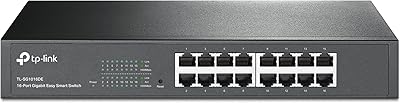
TP-Link TL-SF1016D 16-Port Fast Ethernet Switch
TP-Link TL-SF1016D 16-Port Fast Ethernet Switch — image 1
TP-Link TL-SF1016D 16-Port Fast Ethernet Switch — image 2
TP-Link TL-SF1016D 16-Port Fast Ethernet Switch — image 3
TP-Link TL-SF1016D 16-Port Fast Ethernet Switch — image 4
80%
20%

Overview

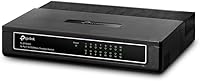
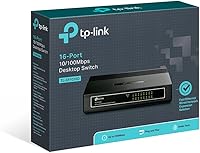
The TP-Link TL-SF1016D 16-Port Fast Ethernet Switch has been quietly doing its job since 2010 — and the fact that it still ranks near the top of its category says a lot about what buyers actually want: something that works without fuss. This 16-port switch is compact enough to sit on a desk or mount on a wall, built around a fanless plastic chassis that keeps things simple and silent. One thing worth stating clearly upfront: it tops out at 100Mbps, not Gigabit speeds. That distinction matters, so go in with the right expectations and you will likely be very satisfied.

Features & Benefits

Every port on this TP-Link desktop switch handles auto-negotiation and AUTO MDI/MDIX, which in plain terms means you plug in any standard Ethernet cable and it figures the rest out — no crossover cables, no manual settings. The fanless design is genuinely useful; there is no hum, no whir, just a quiet box doing its work. It supports 9K jumbo frames, which helps when you are moving large files around a local network, and its 3.2Gbps switching capacity keeps traffic flowing without bottlenecks. Power consumption scales automatically based on how many ports are active and how long the cables are — a small detail that adds up meaningfully over time.

Best For

This 16-port switch shines in situations where you simply need more wired ports without any complexity. Think home setups where you are connecting a NAS, a few desktop PCs, smart TVs, and gaming consoles all in one spot. It also works well in small offices or classrooms that have outgrown the four-port router. Noise-sensitive spaces — a bedroom media center, a shared workspace — will appreciate the silent operation. That said, if your use case involves frequent large file transfers between drives or you have already moved to Gigabit internet, the 100Mbps cap will become a real frustration. This is a switch for practical, everyday wired connectivity — not high-throughput networking.

User Feedback

Long-term owners of the TL-SF1016D tend to praise three things above all: how simple it is to set up, how quiet it stays, and how reliably it runs year after year without needing any attention. The plastic housing does feel light in hand — no one would call it premium — but the ports hold up well with regular use. Heat comes up occasionally, though most users report the unit stays warm rather than hot after extended operation. The main gripe is predictable: buyers who later move to Gigabit internet or NAS setups find 100Mbps limiting. For those who know what they are buying, though, value satisfaction remains consistently high.

Pros

  • Plug-and-play setup takes under a minute — no software, no login, no configuration needed.
  • Completely silent operation makes this TP-Link desktop switch a great fit for living rooms and quiet workspaces.
  • 16 ports give you substantial device capacity without stepping up to a more expensive managed switch.
  • Auto MDI/MDIX on every port means any standard Ethernet cable works — no hunting for crossover cables.
  • Energy-efficient circuitry adjusts power draw based on active ports, keeping long-term running costs low.
  • Compact footprint fits easily on a desk shelf or mounts flush to a wall to stay out of the way.
  • The TL-SF1016D has maintained bestseller status for years, reflecting consistent real-world satisfaction.
  • Ports are reported as sturdy and reliable even after years of regular cable swapping and use.
  • 9K jumbo frame support helps large local file transfers move more smoothly than the raw speed suggests.
  • Straightforward LED indicators give instant visual confirmation that each connection is live and active.

Cons

  • The 100Mbps speed cap will frustrate anyone who upgrades to Gigabit internet or a fast NAS later.
  • No management interface means zero control over traffic prioritization, VLANs, or port-level diagnostics.
  • The plastic housing feels noticeably lightweight and does not inspire confidence in rougher environments.
  • Passively cooled units can run warm during extended heavy use, which may concern users in hot rooms.
  • No Gigabit uplink port limits the switch if you want to connect it to a faster backbone network.
  • At its price point, Gigabit alternatives have become competitive, making the 100Mbps ceiling harder to justify.
  • No rack-mount option exists, limiting deployment flexibility in more structured network installations.
  • Power adapter is external, adding one more cable to manage in an already busy network corner.

Ratings

The scores below reflect our AI-driven analysis of thousands of verified purchase reviews for the TP-Link TL-SF1016D 16-Port Fast Ethernet Switch, sourced globally and actively filtered to exclude incentivized, duplicate, and bot-generated submissions. Each category is scored to honestly represent both where this switch earns genuine praise and where real buyers have run into frustration. Nothing is glossed over — the limitations are scored just as transparently as the strengths.

Ease of Setup
97%
Users across all technical skill levels consistently report that getting this 16-port switch running takes under two minutes. There is nothing to configure, no app to download, and no account to create — you connect a cable to your router, plug in your devices, and the switch handles everything automatically from that point forward.
Because there is genuinely nothing to set up, technically advanced users sometimes feel underwhelmed by the lack of any initial feedback or confirmation beyond the LED lights. A small handful of buyers wished for even a basic status page to verify port activity without physical inspection.
Noise Level
96%
The fanless design is one of the most consistently praised aspects of the TL-SF1016D across years of user feedback. Buyers who place it in bedrooms, home studios, living room AV setups, or quiet office environments specifically call out how it simply disappears into the background — no hum, no whir, nothing.
A very small number of users in warm climates or enclosed cabinet setups have noted that while the switch remains silent, passive heat buildup with no airflow can become a minor concern over extended continuous operation. This is more of a placement issue than a product flaw, but worth noting for enclosed installs.
Reliability & Uptime
88%
Long-term owners — many reporting two, three, or even five-plus years of continuous use — describe the TL-SF1016D as the kind of device you install and simply forget about. It handles sustained network loads in home and small office environments without requiring reboots or interventions, which is exactly what you want from infrastructure hardware.
There is a subset of reviews where units failed within the first year, suggesting some variability in manufacturing consistency across production batches. These cases are not the majority experience, but they exist in enough volume to temper an otherwise very strong reliability narrative.
Speed Performance
54%
46%
Within its 100Mbps design envelope, this TP-Link desktop switch delivers consistent, non-throttled throughput to all 16 ports simultaneously. For standard web browsing, streaming at HD quality, casual gaming, and light file sharing, it handles simultaneous connections without perceptible lag or packet loss.
The 100Mbps hard ceiling is the single most divisive aspect of this switch and the source of its most critical buyer reviews. Users who later upgrade to Gigabit internet plans or set up a NAS for large media libraries quickly find this bottleneck painful, and many feel they should have spent a little more upfront for a Gigabit-capable model.
Value for Money
74%
26%
For buyers who genuinely need 16 wired ports at a minimal cost and are working in networks where 100Mbps is sufficient, this switch delivers strong value. Its longevity on the market without major reliability complaints gives it credibility that cheaper, lesser-known alternatives simply cannot match.
The value proposition has eroded meaningfully over recent years as Gigabit unmanaged switches have dropped in price. Buyers who research alternatives post-purchase sometimes feel the TL-SF1016D sits in an awkward position — not cheap enough to be a throwaway buy and not fast enough to be future-proof.
Build Quality
67%
33%
The ports themselves are the standout element of the physical build — users report they remain firm and secure after years of repeated cable swapping, which is the part of the hardware that actually matters most in daily use. The unit sits flat and stable on a desktop surface without any wobble.
The plastic chassis feels noticeably lightweight and hollow when picked up, which does not inspire confidence at first impression. Several buyers mention that the casing flexes slightly under pressure and that the overall shell feels like it belongs on a cheaper device, even if the internal performance tells a different story.
Energy Efficiency
83%
The adaptive power technology built into this 16-port switch is a genuinely thoughtful feature that scales energy consumption based on how many ports are active and the actual length of cables attached. Users running it continuously in home setups appreciate that it does not run warm to the touch under light loads.
Under full 16-port load in a warm environment, passive heat management means the unit does get noticeably warm, and there is no way to verify power draw short of using a smart plug with energy monitoring. Some environmentally conscious buyers would appreciate clearer published power consumption data across load levels.
Port Density
91%
Sixteen ports in a chassis this compact is the entire reason many buyers choose this switch over alternatives. Home theater rooms, small server closets, and classroom deployments benefit enormously from having enough ports to connect every device without a secondary switch or messy cable compromises.
While 16 ports is generous for most home use cases, users with larger deployments note there is no 24-port version in the same unmanaged Fast Ethernet tier from TP-Link, meaning they need a second unit or step up to a different product line entirely if their needs grow.
Thermal Management
71%
29%
Under typical mixed loads in a well-ventilated space, the fanless passive cooling keeps the switch operating comfortably within its rated temperature range. Most users in temperate climates running it in open-air desktop placements report no heat-related issues even after months of continuous uptime.
Buyers who mount this switch inside enclosed AV cabinets or stack it with other networking equipment report it running noticeably hotter than comfortable. Without a fan as a fallback, poor placement choices can shorten the unit's lifespan in ways that would not affect an actively cooled switch.
Compatibility
93%
AUTO MDI/MDIX across all 16 ports means the TL-SF1016D plays nicely with virtually any Ethernet-capable device without cable type restrictions. From older 10Mbps hardware to modern 100Mbps endpoints, it negotiates the right speed automatically every time, which makes mixed-device home networks much easier to manage.
Compatibility with Gigabit-only infrastructure is technically functional but practically limiting — the switch will negotiate down to 100Mbps on any Gigabit device, which can catch buyers off guard if they assumed the switch would step up to meet faster equipment.
LED Indicators
79%
21%
Each of the 16 ports has its own dedicated activity LED, which makes it straightforward to confirm at a glance whether a connection is live and active. For home users troubleshooting a dropped device or verifying a new cable run, this simple visual feedback is genuinely useful.
The LEDs only show link status and activity — there is no indicator for current speed negotiation, so you cannot visually confirm whether a port has connected at 10Mbps or 100Mbps without using a separate network diagnostic tool. This is a minor but recurring complaint among more technically inclined buyers.
Mounting Flexibility
76%
24%
The option to wall-mount the switch is a practical bonus that many buyers take advantage of, particularly in home offices where desk space is limited or in small office environments where the switch can be tucked neatly above a cable raceway. The mounting footprint is small enough not to require much wall real estate.
The wall-mount bracket system is functional but basic, and the lightweight plastic housing means it does not feel particularly secure once mounted — a few users noted the unit shifts slightly when cables are plugged or unplugged if the mount is not installed into a solid surface.
Long-Term Durability
72%
28%
The market track record here is genuinely encouraging — this switch has been sold since 2010 and a meaningful share of reviewers are reporting on units that are several years old and still running without issue. For an entry-level unmanaged switch, that longevity is above the category average.
The plastic construction inevitably means some units show physical wear — discoloration, port edge wear, and minor cracking near wall-mount screw holes — after several years of use. These are cosmetic issues rather than functional ones, but they reinforce the sense that this is an entry-level product rather than a durable infrastructure investment.

Suitable for:

The TP-Link TL-SF1016D 16-Port Fast Ethernet Switch is an excellent fit for anyone who needs to expand their wired network quickly and without any technical overhead. Home users juggling multiple devices — desktop computers, smart TVs, gaming consoles, a NAS box, maybe a printer — will find 16 ports more than enough breathing room without paying for features they will never use. Small offices, classrooms, or shared workspaces that have simply run out of router ports will appreciate how instantly this switch integrates: plug it in and it works, full stop. The fanless build makes it particularly well-suited for quiet environments like bedrooms, home studios, or libraries where even a low hum from a cooled switch would be unwelcome. Budget-conscious buyers who prioritize stable, long-term connectivity over cutting-edge speeds will consistently find this 16-port switch punches above its weight class.

Not suitable for:

If your network demands Gigabit speeds, the TP-Link TL-SF1016D 16-Port Fast Ethernet Switch is not the right tool for the job — full stop. Users who regularly transfer large files between local machines, stream 4K content from a NAS, or work with Gigabit internet plans will quickly find the 100Mbps ceiling a genuine bottleneck rather than a minor inconvenience. Network administrators or power users who need VLANs, port mirroring, QoS controls, or any form of traffic management will also need to look elsewhere, as this is a fully unmanaged switch with no configuration options whatsoever. The lightweight plastic chassis, while functional, is not built for demanding environments — this is not a switch for a server rack or a setting where physical durability under stress is a real requirement. Anyone already invested in a Gigabit ecosystem should consider that similarly priced Gigabit alternatives now exist and may offer better long-term value.

Specifications

  • Port Count: This switch provides 16 RJ45 ports, each supporting 10/100Mbps connections with automatic speed negotiation.
  • Switching Capacity: The non-blocking switching fabric runs at 3.2Gbps, ensuring no single port can create a traffic bottleneck under normal load.
  • Max Speed: Each port maxes out at 100Mbps — this is a Fast Ethernet device, not a Gigabit switch.
  • Jumbo Frames: The switch supports jumbo frames up to 9K bytes, which helps maintain efficiency when moving large files across a local network.
  • Cable Compatibility: All 16 ports feature AUTO MDI/MDIX, meaning the switch works with both standard and crossover Ethernet cables without any manual adjustment.
  • Cooling System: The unit uses fully passive, fanless cooling — there are no moving parts and no noise generated during operation.
  • Management: This is a fully unmanaged switch with no configuration interface, web console, or software — it operates entirely plug-and-play.
  • MAC Learning: The switch automatically learns and ages MAC addresses on each port, keeping local traffic routing efficient without any user input.
  • Dimensions: The chassis measures 7.87 x 5.59 x 1.57 inches, compact enough for a desktop surface or wall-mount bracket installation.
  • Weight: The unit weighs 8 ounces, making it easy to position or mount without additional structural support.
  • Chassis Material: The outer housing is constructed from plastic, keeping the unit lightweight but placing it firmly in the entry-level build tier.
  • Power Input: The switch operates at up to 240V and draws a maximum of 0.6 amps under full load.
  • Energy Efficiency: Adaptive power technology automatically reduces consumption based on active port count and connected cable length, cutting idle energy use significantly.
  • Operating Temperature: The switch is rated for environments up to 40 degrees Celsius, suitable for typical indoor home and office conditions.
  • Mounting Options: The unit supports both flat desktop placement and wall mounting, giving users flexibility in how they route and organize their cabling.
  • Indicator Lights: Each port has a dedicated LED indicator that shows link status and activity, making it easy to confirm live connections at a glance.
  • Manufacturer: This switch is designed and sold by TP-Link, a networking hardware brand with broad global distribution and long product support history.
  • Model Number: The official model designation is TL-SF1016D, which remains an active, non-discontinued product in TP-Link's unmanaged switch lineup.

Related Reviews
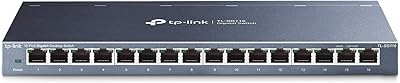
TP-Link TL-SG116 16-Port Gigabit Switch
84%
91%
Build Quality
94%
Ease of Setup
88%
Port Count & Density
89%
Network Performance
97%
Noise Level
More
TP-Link TL-SL1218MP 16-Port PoE Network Switch
79%
91%
Value for Money
88%
PoE Performance
79%
Extend Mode Reliability
93%
Ease of Setup
62%
Build Quality
More
TP-Link TL-SG1016DE 16-Port Gigabit Switch
82%
88%
Build Quality
91%
Value for Money
86%
Port Count & Layout
84%
Setup & Installation
63%
Management Interface
More
TP-Link TL-SG1218MPE 16-Port PoE+ Switch
76%
91%
PoE Reliability
68%
PoE Power Budget
88%
Build Quality
63%
Web Management Interface
93%
PoE Auto Recovery
More
D-Link DES-1016D 16-Port Fast Ethernet Switch
78%
96%
Ease of Setup
88%
Build Quality
97%
Noise Level
84%
Port Count & Layout
61%
Network Speed
More
TP-Link TL-SG1024S 24-Port Gigabit Switch
89%
93%
Build Quality
97%
Ease of Setup
91%
Port Performance
98%
Noise Level
89%
Value for Money
More
TP-Link TL-SG1048 48-Port Gigabit Ethernet Switch
83%
89%
Performance
93%
Ease of Setup
88%
Reliability
90%
Build Quality
91%
Noise Level (Fanless Design)
More
TP-Link TL-SG1016PE 16-Port Gigabit PoE Switch
80%
91%
PoE Reliability
88%
Build Quality
67%
Power Budget
63%
Management Interface
86%
Setup & Ease of Use
More
TP-Link TL-SG2218P Smart Managed PoE Switch
82%
78%
PoE Performance
88%
Omada SDN Integration
83%
Web Interface & Usability
86%
Build Quality
81%
Fan Noise
More
D-Link DES-1008PA 8-Port PoE Fast Ethernet Switch
82%
94%
Ease of Setup
88%
PoE Port Reliability
91%
Build Quality & Durability
58%
Network Speed & Throughput
97%
Noise Level
More

FAQ

Not at all. You plug it into your router or modem with an Ethernet cable, connect your devices to the remaining ports, and it starts working immediately. There is no app, no web interface, and no configuration of any kind required.

It will work in the sense that your devices will get online, but the switch itself caps each port at 100Mbps — so your Gigabit internet speed will not carry through it. If passing full Gigabit speeds to your wired devices matters to you, you should look at a Gigabit switch instead.

Yes, you can daisy-chain it to an existing switch or router using any standard Ethernet cable. Because all ports are AUTO MDI/MDIX, no special uplink cable is needed — just plug one port into your existing network and you are good to go.

Completely silent. The TP-Link TL-SF1016D 16-Port Fast Ethernet Switch has no fan, no moving parts, and produces no audible noise under any load. It is one of the genuinely good reasons to choose this unit for a bedroom or quiet home office setup.

It will get warm to the touch after extended use, which is normal for a passively cooled device. Most long-term users report no issues leaving it running continuously, but you should make sure it has a little airflow around it and is not enclosed in a tight cabinet with no ventilation.

Yes, the unit supports wall mounting. TP-Link includes the necessary mounting hardware, and the compact size means it stays fairly unobtrusive when mounted near a cable run or patch panel location.

Standard Cat5e or Cat6 Ethernet cables are ideal and will get you the full 100Mbps per port. The switch accepts both straight-through and crossover cables thanks to AUTO MDI/MDIX, so you do not need to sort your cable types before plugging in.

No. This is a fully unmanaged switch, which means there is no way to configure VLANs, QoS, port isolation, or any other traffic management feature. What you get is simple, shared bandwidth across all 16 ports. If you need any of those controls, you need a managed switch.

That is honestly the key question to ask before buying. Gigabit unmanaged switches have dropped in price considerably in recent years, so the gap is smaller than it used to be. If you have any plans to upgrade your internet plan or use a NAS for large transfers, spending a little more on a Gigabit option is likely the smarter long-term move. If 100Mbps genuinely meets your needs, this 16-port switch remains a solid, reliable choice.

TP-Link typically backs their unmanaged switches with a limited two-year warranty, though you should confirm current terms directly with TP-Link or the retailer at the time of purchase. Their support is reachable via phone and online ticket, and given how long this product has been on the market, documentation and community help threads are widely available.

Where to Buy