Overview

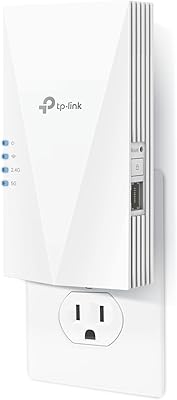
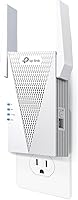
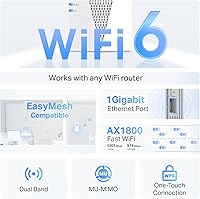
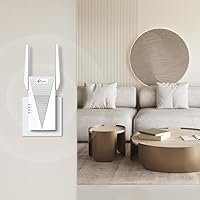
The TP-Link RE615X is a dual-band WiFi 6 range extender that arrived in late 2023 targeting the middle of a crowded market — not the cheapest option available, but well clear of premium territory. It is built to push coverage into dead zones across homes up to roughly 2,100 square feet without forcing you to rethink your entire network setup. That said, real-world reach depends heavily on wall materials, interference, and where your router sits, so treat that figure as a ceiling rather than a guarantee. What genuinely sets this WiFi 6 extender apart at this price tier is the built-in Gigabit Ethernet port — a feature many competing units quietly omit. EasyMesh compatibility rounds things out for anyone who might eventually want to grow toward a proper mesh network.

Features & Benefits

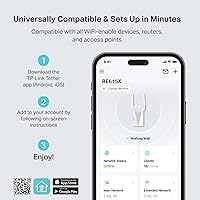
WiFi 6's biggest practical advantage over older AC standards is not raw speed — it is how gracefully it handles congestion when several devices are active at once. This range extender runs 1,201 Mbps on the 5 GHz band and 574 Mbps on 2.4 GHz, combining for a theoretical ceiling of 1.8 Gbps. Two directional antennas with Beamforming technology focus the signal rather than broadcasting it broadly in all directions, which meaningfully improves reliability at range. MU-MIMO support lets multiple devices pull data streams simultaneously instead of taking turns. Setup runs through TP-Link's Tether app — no browser login required — and Smart Adaptive Roaming automatically connects your phone or laptop to whichever band offers the stronger signal as you move through the house.

Best For

This extender hits a practical sweet spot for people who want better coverage but are not ready to invest in a full mesh system. Renters especially benefit — plug it in, configure it in minutes, unplug it when you move. Remote workers needing a stable wired connection in a distant office or garage will appreciate the Ethernet port more than most. Smart home households running dozens of IoT devices will find WiFi 6's efficiency handles the load more cleanly than older extenders ever could. If you already own an EasyMesh-compatible router, this extender slots in as an affordable additional node. Casual streamers and gamers in a weak-signal zone are well served here, though serious competitive players should look at a dedicated mesh or fully wired solution instead.

User Feedback

With nearly 9,500 ratings and a 4.3-star average, this WiFi 6 extender has earned broadly positive marks from a wide range of buyers. The Tether app setup is a consistent highlight — most people describe it as genuinely quick, even without technical experience. The Gigabit Ethernet port comes up repeatedly as a deciding factor over similarly priced rivals. On the downside, some users have encountered the throughput reduction that all extenders produce by design — this is not a flaw unique to this unit, but it does catch buyers off guard if they expected a speed increase. Placement sensitivity is the other recurring complaint: positioning matters more than most people anticipate, and a poorly placed unit can underperform noticeably. Long-term reliability is generally solid, with a small number flagging occasional firmware hiccups.

Pros

  • The Gigabit Ethernet port lets you hardwire a laptop or desktop anywhere in the home — a rare feature at this price.
  • WiFi 6 support means the TP-Link RE615X handles dozens of simultaneous devices far more efficiently than older AC extenders.
  • Tether app setup takes most users under ten minutes with no browser login or manual configuration required.
  • EasyMesh compatibility allows this extender to integrate into a unified mesh network if your router supports the standard.
  • Smart Adaptive Roaming keeps phones and laptops connected to the stronger band automatically as you move around.
  • Beamforming and MU-MIMO together improve signal focus and reduce the congestion common in device-heavy households.
  • The plug-in form factor is compact enough to avoid blocking adjacent outlets on most power strips.
  • A 4.3-star average across nearly 9,500 reviews reflects consistently positive real-world experiences from a large buyer pool.
  • Long-term owners report stable uptime with minimal reboots required under normal residential conditions.

Cons

  • Throughput is inherently cut by the shared backhaul — expect noticeably lower speeds than your router delivers directly.
  • Placement sensitivity is a real issue; a poorly positioned unit can underperform significantly and finding the sweet spot takes trial and error.
  • Only one Ethernet port means wired connections are limited to a single device without adding a separate switch.
  • The Tether app lacks advanced controls like detailed traffic monitoring or manual band steering options.
  • EasyMesh is only useful if your existing router supports the standard — many ISP-supplied routers do not.
  • Firmware updates have caused temporary connectivity drops for a subset of users, requiring a factory reset to resolve.
  • The unit runs warmer than expected during sustained use, which matters if installed in an enclosed or confined space.
  • Coverage claims assume near-ideal open conditions that older homes with dense walls or multiple floors rarely provide.

Ratings

The TP-Link RE615X scores below are generated by AI after analyzing thousands of verified global user reviews, with spam, bot-submitted, and incentivized feedback actively filtered out. This range extender earns strong marks in several areas but also carries real trade-offs that buyers deserve to know before purchasing. Both the highlights and the frustrations are reflected honestly in each category score.

Ease of Setup
91%
The Tether app setup is one of the most consistently praised aspects across the entire review pool. Most buyers report being fully connected within five to ten minutes — no browser login, no manual IP entry, no frustrating configuration screens. Even users with minimal technical confidence describe the process as genuinely painless.
A small number of Android users report the Tether app failing to detect the extender on the first attempt, requiring a restart or manual WPS pairing as a fallback. iOS users tend to have a smoother experience overall, suggesting minor platform inconsistencies in the app.
WiFi Coverage
76%
24%
In open-plan homes and single-story layouts, this extender reliably pushes a usable signal into rooms and outdoor spaces that previously had none. Users in medium-sized homes frequently report dropping bars in a dead-zone room going from one or two up to four after placement near a hallway or central wall.
The advertised 2,100 square foot figure assumes near-ideal conditions that most real homes do not have. Buyers in older homes with dense walls, metal framing, or multiple floor levels often find effective coverage falls noticeably short of that ceiling, and placement trial-and-error can take considerable time.
Throughput Performance
63%
37%
For everyday tasks — video calls, 4K streaming, smart home polling — the RE615X delivers consistent enough speeds that most users notice the dead zone is genuinely gone. On the 5 GHz band with a clean line of sight to the router, speeds hold up reasonably well for a single-hop extender.
Like every traditional range extender, this unit shares bandwidth between receiving the signal from the router and rebroadcasting it, which typically cuts usable throughput roughly in half. Users expecting a speed boost rather than a coverage extension frequently leave disappointed, and this is the most common source of one-star reviews in the pool.
Ethernet Port Utility
93%
The Gigabit Ethernet port is a standout feature at this price point and buyers who use it are among the most satisfied in the entire review pool. Remote workers plugging in a laptop or desktop in a far room or garage consistently report stable, low-latency connections that wireless-only extenders simply cannot match.
There is only one Ethernet port, which limits wired connections to a single device unless a small switch is added downstream. A small number of users also note the port can run slightly warm during sustained transfers, though no failures have been widely reported.
Signal Stability
71%
29%
When placed in the right spot — typically within a clear line of sight of the main router and roughly halfway between the router and the dead zone — the RE615X holds a stable connection reliably. Smart Adaptive Roaming works as advertised for most users, keeping laptops and phones connected without manual band switching.
Placement sensitivity is the most polarizing aspect of the hardware. Users who position it too far from the router, around a corner, or near a microwave or cordless phone base station report frustratingly inconsistent signal drops. Finding the optimal placement can take multiple attempts and is not always intuitive.
Build Quality & Design
78%
22%
The plug-in form factor is compact and unobtrusive — it does not block adjacent outlets on most power strips, which is a practical advantage over bulkier desktop extenders. The plastic casing feels solid enough for a device that stays plugged in permanently, and the LED indicators are informative without being obnoxiously bright.
The antennas are fixed and non-adjustable, which limits physical fine-tuning options. A handful of users also report the unit runs warmer than expected during extended operation, which is worth noting if it will be plugged into an enclosed power strip or behind furniture.
App & Remote Management
82%
18%
The Tether app doubles as both a setup wizard and an ongoing management dashboard, letting users check connected devices, run speed tests, and adjust settings without touching the extender itself. Remote access via the app works reliably for most users, which is a genuinely useful feature for managing coverage in a second home or rental property.
The app interface, while functional, has not been updated with the same polish as competing platforms. Some users find the navigation slightly dated, and advanced options like band steering controls or detailed traffic monitoring are absent compared to what dedicated mesh apps offer.
EasyMesh Compatibility
79%
21%
For users who already own a TP-Link EasyMesh-compatible router, this extender drops into a unified mesh network with minimal configuration. The ability to manage everything under one app and one network name is a meaningful quality-of-life upgrade over running a separate SSID for the extended network.
EasyMesh compatibility is only relevant if your existing router supports the standard — and many ISP-provided routers do not. Buyers who discover this after purchase sometimes feel the feature was over-marketed, and the benefit is effectively zero in those scenarios.
Value for Money
84%
At its price point, the combination of WiFi 6 support, Beamforming, MU-MIMO, and a Gigabit Ethernet port is genuinely competitive. Buyers comparing it to similarly priced WiFi 5 extenders or bare-bones WiFi 6 units without Ethernet consistently rate the value favorably.
A small step up in budget opens the door to entry-level mesh systems that eliminate the throughput halving problem entirely. For buyers primarily motivated by performance rather than simplicity or portability, the value equation shifts away from this extender fairly quickly.
Device Capacity (64 Devices)
74%
26%
The ability to handle up to 64 connected devices is a real advantage for smart home-heavy households running thermostats, cameras, bulbs, plugs, and sensors alongside phones and laptops. WiFi 6's OFDMA technology means those devices compete for airtime more efficiently than they would on an older AC extender.
Supporting 64 devices in theory does not mean all 64 will get usable bandwidth simultaneously. In dense IoT environments, the shared backhaul throughput becomes a bottleneck before the device count limit is ever reached, which is a nuance the spec sheet does not communicate well.
Long-Term Reliability
77%
23%
The majority of long-term owners — those who have used the extender for six months or more — report no major hardware failures or unexplained disconnects. The unit handles extended uptime well in typical residential environments without needing frequent reboots, which is more than can be said for some budget alternatives.
A recurring thread in newer reviews involves firmware updates causing temporary connectivity drops or requiring a factory reset to resolve. These issues appear to be the exception rather than the rule, but they are consistent enough across independent reviewers to be worth flagging for buyers who rely on uninterrupted connectivity.
Roaming & Handoff
67%
33%
Smart Adaptive Roaming performs adequately for typical household movement — walking from a bedroom to a living room with a phone or tablet generally results in a clean handoff without dropping a video call or streaming session mid-play.
Handoff lag is noticeable in some environments, particularly when transitioning from the main router band to the extended band. Users who move quickly between coverage zones, or who work in buildings with rapid device movement, occasionally experience a one-to-three second reconnection gap that more sophisticated mesh systems handle more gracefully.
Security Features
69%
31%
TP-Link's participation in the CISA Secure-by-Design pledge is a meaningful public commitment and a step above what many competitors formally offer at this price tier. WPA3 support and automatic firmware update capability give the extender a reasonable baseline security posture for a home network device.
Security-conscious buyers, particularly those familiar with past scrutiny of Chinese networking hardware, will want to review TP-Link's data practices independently before deploying this on a sensitive home network. The CISA pledge addresses design principles rather than data sovereignty concerns, and that distinction matters to a segment of informed buyers.

Suitable for:

The TP-Link RE615X is a strong fit for renters and homeowners who have one persistent dead zone they want to fix without overhauling their entire network. If you work from a back bedroom, a basement office, or a detached garage and need a reliable connection — especially a wired one — this extender addresses that problem directly and affordably. Households running a growing collection of smart home devices will appreciate that WiFi 6 handles congestion more gracefully than older AC extenders, keeping thermostats, cameras, and voice assistants from competing badly for airtime. It also suits buyers who already own an EasyMesh-compatible router and want to extend their network under a single managed interface without paying mesh node prices. Casual streamers, video callers, and anyone who just needs a stable signal in a room that currently has none will find this range extender more than capable for those everyday demands.

Not suitable for:

The TP-Link RE615X is not the right tool for anyone whose primary complaint is slow internet speeds rather than poor coverage — extending a weak or congested signal does not make it faster, and the backhaul bandwidth sharing inherent to traditional extenders will often make peak throughput noticeably lower than what the main router delivers. Buyers in large multi-story homes with thick concrete or brick walls should approach the 2,100 square foot coverage claim cautiously; real-world results in those environments frequently fall short. Competitive online gamers or anyone running latency-sensitive applications who needs every millisecond of performance would be better served by a wired connection or a dedicated mesh system with a wireless backhaul. Users whose ISP-provided router does not support EasyMesh will find that particular feature irrelevant to them entirely. And if privacy or data sovereignty around networking hardware is a concern for you, this extender warrants the same independent scrutiny you would apply to any connected home device from a Chinese manufacturer before deploying it on a sensitive network.

Specifications

  • WiFi Standard: This extender uses WiFi 6 (802.11ax), which is backward-compatible with older 802.11a/b/g/n/ac devices.
  • Frequency Bands: Dual-band operation covers both 2.4 GHz and 5 GHz simultaneously for flexible device connectivity.
  • 5 GHz Speed: The 5 GHz band delivers a theoretical maximum of 1,201 Mbps, suited for bandwidth-intensive tasks at closer range.
  • 2.4 GHz Speed: The 2.4 GHz band provides up to 574 Mbps, offering broader reach for lower-bandwidth devices and smart home peripherals.
  • Combined Throughput: Total theoretical combined throughput across both bands reaches 1,800 Mbps under ideal lab conditions.
  • Coverage Area: TP-Link rates coverage at up to 2,100 sq ft, though real-world reach varies with wall density, building layout, and interference sources.
  • Max Devices: The extender supports up to 64 simultaneously connected wireless devices, aided by WiFi 6 efficiency improvements.
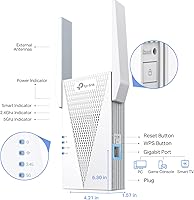
  • Ethernet Port: One Gigabit Ethernet port (10/100/1000 Mbps) enables a wired connection for a single device such as a desktop, smart TV, or gaming console.
  • Antennas: Two internal high-gain directional antennas with Beamforming technology focus the wireless signal toward connected client devices.
  • MU-MIMO: Multi-User MIMO support allows the extender to communicate with multiple devices simultaneously rather than sequentially.
  • EasyMesh: Full EasyMesh compatibility enables integration into a unified mesh network when paired with a compatible EasyMesh router.
  • Roaming: Smart Adaptive Roaming automatically transitions connected devices to the strongest available signal band without manual intervention.
  • Setup Methods: Initial configuration is supported via the TP-Link Tether mobile app or traditional WPS button pairing.
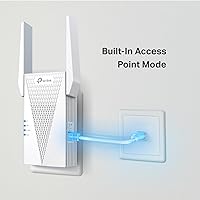
  • Operating Modes: The device supports Range Extender mode and Access Point mode, providing flexibility depending on existing network infrastructure.
  • Dimensions: The unit measures 4.21 x 1.57 x 6.3 inches, designed to plug directly into a standard wall outlet.
  • Weight: The extender weighs 13.4 oz, which is typical for a plug-in unit with internal directional antennas.
  • Security Protocol: Supports WPA3 and WPA2 encryption standards for wireless network security.
  • Model Number: The official model designation is RE615X, released by TP-Link in October 2023.

Related Reviews
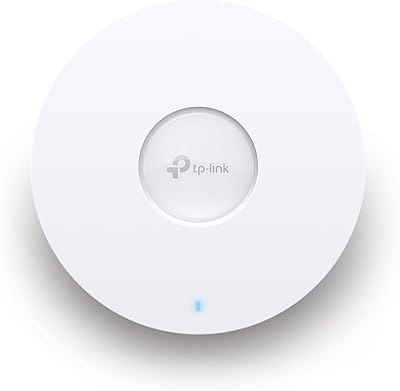
TP-Link EAP610 V2
TP-Link EAP610 V2
82%
86%
Wireless Performance
91%
Setup & Installation
88%
Cloud Management & App
83%
Multi-Device Handling
79%
Range & Coverage
More
TP-Link TL-SG3428XMP
88%
91%
Performance
88%
Build Quality
90%
Cloud Management & Software
87%
Ease of Setup
85%
Power Efficiency
More
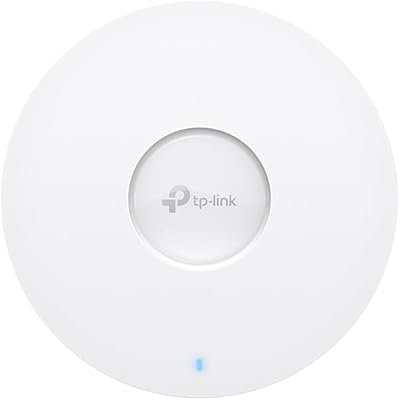
TP-Link EAP670 V2
TP-Link EAP670 V2
90%
96%
WiFi Performance
94%
Coverage Consistency
90%
Setup & Installation
92%
Ease of Management
91%
Mesh & Roaming Reliability
More
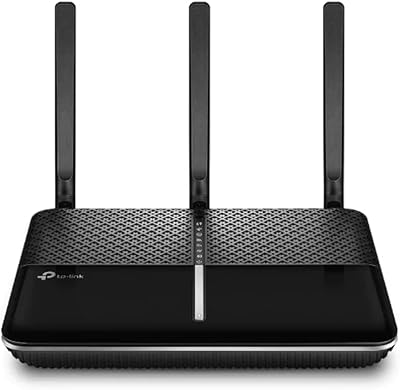
TP-Link Archer VR2100
84%
86%
Wi-Fi Performance
92%
Setup & Installation
87%
Value for Money
72%
Range
90%
Wired Performance
More
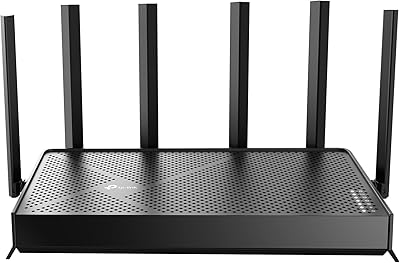
TP-Link Archer BE600
90%
96%
Wi-Fi Speed
91%
Coverage Area
94%
Device Capacity
89%
Stability & Reliability
87%
Setup & Installation
More
TP-Link ER7212PC Omada Router
86%
88%
Ease of Installation
84%
VPN Performance
91%
Cloud Management Experience
87%
PoE+ Port Performance
85%
Build Quality
More
TP-Link EAP110-Outdoor V3
87%
89%
Wi-Fi Range
94%
Ease of Setup
92%
Weatherproofing
85%
Speed & Stability
80%
App & Cloud Management
More
TP-Link Deco X50-Outdoor
89%
95%
Outdoor Coverage
92%
WiFi Performance
88%
Setup & Installation
93%
Durability & Weatherproofing
90%
PoE & Power Options
More
TP-Link RE500X WiFi Extender
86%
89%
Setup and Installation
85%
WiFi Performance
90%
Coverage Area
87%
App Experience
92%
Value for Money
More
TP-Link AC1750 WiFi Extender RE450
86%
91%
Setup and Installation
88%
Wi-Fi Coverage
94%
Compatibility
86%
Performance with Multiple Devices
80%
Signal Stability
More

FAQ

No, and it is important to set that expectation before buying. The TP-Link RE615X is designed to extend WiFi coverage into areas where the signal is weak or absent — it does not increase the speed delivered by your ISP. In fact, because the extender shares bandwidth between receiving and rebroadcasting the signal, usable throughput in the extended zone is typically lower than what you get right next to your main router.

It works with virtually any router as a standard range extender — brand does not matter for basic setup. The EasyMesh integration feature, however, requires a router that supports the EasyMesh standard. Many ISP-supplied routers do not support EasyMesh, so if that unified mesh management is important to you, check your router specs first.

Most users find it very straightforward. You download the TP-Link Tether app, plug the extender into an outlet, and follow the on-screen steps to connect it to your existing network. The whole process typically takes under ten minutes. If the app has trouble detecting the unit, a WPS button pairing is available as a quick fallback.

Placement makes a significant difference with any range extender. The general rule is to position it roughly halfway between your router and the dead zone you want to reach — close enough to the router to receive a strong signal, but far enough to actually extend coverage into the problem area. Avoid placing it behind large appliances, inside cabinets, or in rooms with thick concrete or brick walls between it and the router.

Yes, and this is one of the more useful features on this extender. The single Gigabit Ethernet port lets you hardwire one device — a desktop PC, a smart TV, a NAS drive, or a gaming console — and get a more stable, lower-latency connection than WiFi alone would provide. If you need to connect more than one wired device, you would need to add a small Ethernet switch downstream.

That is the intent of the Smart Adaptive Roaming feature, and for most users it works reasonably well for everyday movement within a home. The handoff is not always instantaneous — some users notice a brief reconnection pause when crossing between coverage zones — but for video calls and streaming it is generally smooth enough not to cause interruptions.

By default in Range Extender mode it can be configured to broadcast the same SSID as your existing network, which means devices connect to whichever signal is stronger without you manually switching. If you use EasyMesh mode with a compatible router, the whole network is managed as one unified system under a single name.

Yes, WiFi 6 is fully backward-compatible with older WiFi standards including 802.11a, b, g, n, and ac. Your older devices will connect and work normally — they just will not benefit from the WiFi 6 efficiency improvements that newer devices take advantage of.

Long-term reliability is generally positive based on owner feedback. Most users report stable uptime without frequent reboots under normal home conditions. The most commonly reported long-term issue involves firmware updates occasionally causing connectivity disruptions, which have sometimes required a factory reset to resolve. These cases appear to be a minority rather than a widespread pattern.

This range extender supports WPA3 and WPA2 encryption, and TP-Link has signed the CISA Secure-by-Design pledge in the US, which reflects a commitment to building security into the product from the ground up. That said, buyers with heightened concerns about network security or data privacy related to hardware manufactured in China should review TP-Link's data practices independently, as the CISA pledge addresses design principles rather than data residency or sovereignty questions.