Overview

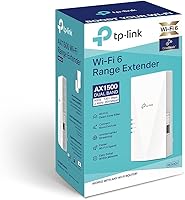
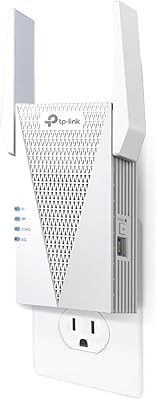
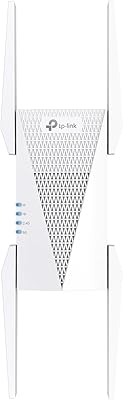
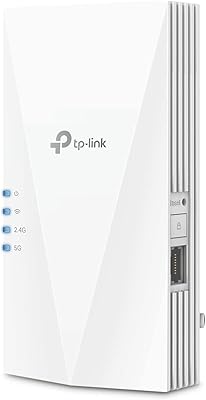
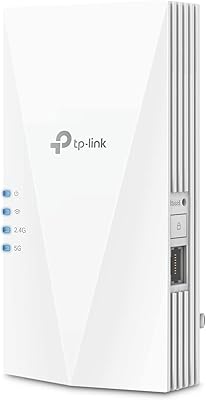
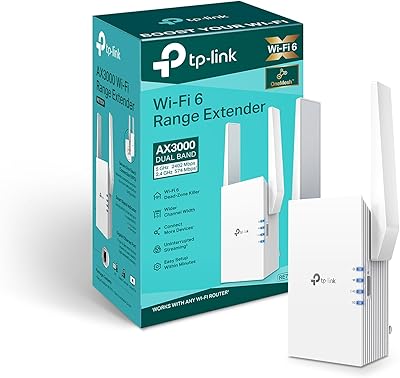
The TP-Link RE500X WiFi 6 Range Extender sits in an interesting spot — capable enough to handle a genuinely connected household, yet priced well below what a full mesh system would cost. With over 3,300 ratings and a #1 ranking in its Amazon category, the RE500X has earned real-world credibility from actual buyers. WiFi 6 matters here in practical terms: it handles more devices simultaneously with less congestion, not necessarily raw speed. Worth knowing upfront — this range extender operates on 2.4 GHz and 5 GHz bands only; there's no 6 GHz support, so if your router and devices are already WiFi 6E capable, keep that in mind before buying.
Features & Benefits

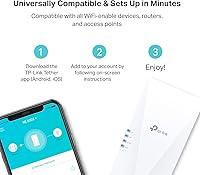
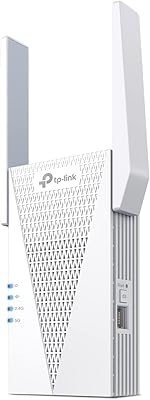
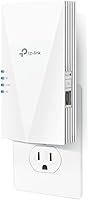
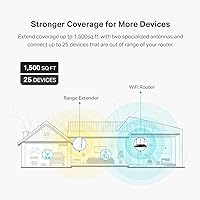
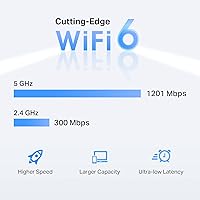
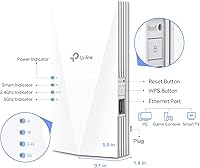
The RE500X covers up to 1,500 square feet and supports up to 25 devices at once — which maps roughly to a two-bedroom apartment running laptops, phones, a smart TV, and a handful of smart home gadgets without constant drop-offs. On the 5 GHz band, theoretical throughput hits 1,201 Mbps, though real-world usage will be lower — that's just how extenders work, and this WiFi 6 extender is no exception. The standout practical addition is the Gigabit Ethernet port, which lets you hardwire a gaming console or desktop in a room your router can't reach. Setup runs through TP-Link's Tether app, which most users find straightforward, and an Access Point mode adds flexibility if you ever want to use it with a wired connection instead.

Best For

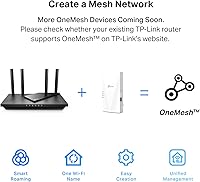
This WiFi 6 extender makes the most sense for renters and homeowners dealing with dead zones in a home roughly 1,000 to 1,500 square feet — think back bedrooms, home offices on the far end of a floor, or anywhere a thick wall kills your signal. It's also a good fit for households running 10 to 25 connected devices that want better coverage without the cost and complexity of a full mesh upgrade. If you're already using a compatible TP-Link router, the OneMesh feature is a genuine perk — it keeps your devices on one network name as you move around, though it only works within TP-Link's ecosystem. Larger homes or power users would likely benefit more from a dedicated mesh system.

User Feedback

Among buyers, the most consistent praise centers on how noticeably signal improves in previously dead areas, and most report the app-based setup taking under 10 minutes. Build quality draws positive mentions too — it doesn't feel cheap for the price point. That said, the recurring criticism is speed. Extenders by design split bandwidth between the router connection and your devices, so expect real throughput to land well below the advertised maximums — that's an industry-wide reality, not unique to the RE500X. Some users on non-TP-Link routers report occasional drop-offs and placement sensitivity. Long-term firmware stability has been mixed in a handful of reviews, but buyers who go in with realistic expectations tend to come away satisfied.

Pros

  • Noticeably eliminates dead zones in apartments and small homes without complicated setup.
  • The Gigabit Ethernet port lets you hardwire consoles or smart TVs in rooms your router can't reach.
  • WiFi 6 support means better performance in households juggling 15 or more connected devices at once.
  • Setup via the Tether app is quick — most users are up and running in under 10 minutes.
  • OneMesh compatibility removes the hassle of manually switching networks when moving through a TP-Link home.
  • Access Point mode adds flexibility if you ever want to repurpose the unit with a wired connection.
  • Compact and unobtrusive — plugs directly into an outlet without eating up shelf or desk space.
  • Backed by over 3,300 buyer ratings and a top category ranking, giving it a credible real-world track record.
  • CISA Secure-by-Design pledge signals a stronger-than-average commitment to firmware security for a budget device.

Cons

  • Real-world speeds through the RE500X drop significantly compared to your main router — expect roughly half or less.
  • OneMesh roaming only works with compatible TP-Link routers, leaving users of other brands without that feature.
  • No 6 GHz band support limits future-proofing for households moving toward WiFi 6E devices.
  • Placement is finicky — position it too far from the router and performance drops; too close and coverage gain shrinks.
  • Some long-term users report occasional firmware stability issues requiring reboots to restore connectivity.
  • Users with ISP-supplied gateway routers sometimes encounter compatibility headaches that require extra troubleshooting.
  • A single unit won't adequately cover homes above 1,500 square feet, especially with multiple floors or thick concrete walls.
  • The 2.4 GHz band tops out at 300 Mbps — older or budget devices connecting there will feel the ceiling quickly.

Ratings

The scores below were generated by our AI after analyzing thousands of verified global buyer reviews for the TP-Link RE500X WiFi 6 Range Extender, with spam, bot activity, and incentivized feedback actively filtered out before any scoring was applied. Both the genuine strengths and the recurring frustrations surfaced in real user experiences are transparently reflected in each category. Where buyers consistently agreed — positive or negative — the scores move accordingly.

Coverage & Dead Zone Elimination
86%
The majority of users in apartments and compact two-story homes report a meaningful improvement in signal reach after placing the RE500X at a midpoint between their router and the dead zone. Back bedrooms, home offices behind thick walls, and garages see the most dramatic before-and-after differences according to buyer accounts.
Users in larger homes above 1,500 square feet often find that a single unit isn't enough to fully blanket the space, particularly on different floors with concrete subfloors. Placement sensitivity is real — a few feet in the wrong direction can noticeably reduce how much coverage gain you actually see.
Real-World Speed Performance
61%
39%
For everyday tasks like streaming HD video, casual browsing, and smart home device polling, the throughput is adequate and noticeably better than connecting to a faint router signal from a distance. Users who previously dealt with buffering in far rooms report a smoother experience after installing this range extender.
The half-duplex bandwidth reality hits hard for speed-sensitive users — actual throughput through the extender regularly lands at 40 to 55 percent of main router speeds, which disappoints buyers who expected near-full performance. Video calls and large file transfers in extended areas can still feel sluggish compared to being on the primary network.
Setup & Installation Experience
89%
The Tether app-guided setup is consistently praised as one of the smoothest among extenders at this price tier — most users report completing the process in under 10 minutes without needing to touch a web browser or memorize any IP addresses. The visual signal strength indicator during placement is a practical touch that helps users avoid poor positioning from the start.
A portion of users with ISP-provided gateway routers — particularly certain modem-router combos from major cable providers — run into connectivity issues that the app does not clearly explain or help resolve. In those edge cases, completing setup through the web interface requires more technical confidence than the average buyer expects.
Multi-Device Handling
78%
22%
WiFi 6's OFDMA technology gives this range extender a real edge over older extenders when multiple devices are connected simultaneously — households running 12 to 18 devices across smart speakers, phones, laptops, and streaming sticks report fewer slowdowns during peak usage hours. Light-to-moderate concurrent use is where it performs most reliably.
When a higher number of devices push active, bandwidth-heavy tasks at the same time — think three simultaneous 4K streams plus a video call — users notice congestion more than the spec sheet suggests they should. The 2.4 GHz band's 300 Mbps ceiling becomes a bottleneck for older or budget devices that default to it.
Gigabit Ethernet Port Utility
91%
Buyers who use the Ethernet port for a gaming console or desktop PC in a hard-to-wire room consistently rate this as the standout feature — wired connections through the RE500X deliver noticeably more stable latency than wireless extension alone. For online gaming and 4K streaming via a wired device, the performance improvement over pure wireless extension is tangible.
The single port is a limitation for users who want to hardwire more than one device in the same location, which forces them to add a separate switch. A small number of users also report that the port occasionally requires a cable reseat after the extender reboots to re-establish a clean connection.
OneMesh Roaming Performance
72%
28%
For households running a compatible TP-Link OneMesh router, the single-network roaming experience works as advertised — devices transition between the router and extender without needing manual network switching, which is a genuine quality-of-life improvement for open-plan homes. Users who move between floors frequently find it particularly useful.
OneMesh is entirely off the table for the large share of buyers using non-TP-Link routers, leaving them with two separate network names to manage manually. Even within the TP-Link ecosystem, device handoff timing is not instantaneous — some users notice a brief drop when moving between coverage zones.
Build Quality & Design
83%
The compact plug-in form factor is consistently described as solid and unobtrusive — it doesn't block adjacent outlets on most standard wall plates, and the matte white finish holds up well without yellowing or scuffing under normal indoor conditions. Users appreciate that it doesn't look out of place in living spaces.
A handful of long-term users report that the unit runs noticeably warm during extended operation, which raises minor concern about longevity in always-on environments. The wall-mount-only design also means you can't reposition it on a shelf or desk if outlet placement in your home is inconvenient.
Firmware & Long-Term Stability
67%
33%
The majority of users report stable day-to-day operation without needing to intervene, and TP-Link has pushed firmware updates to this model since launch, which is more than can be said for some competitors at this price point. For most buyers who set it up and leave it running, it works reliably in the background.
A recurring pattern in longer-term reviews involves the extender requiring periodic reboots — some users set up automatic restarts as a workaround. A smaller subset of buyers report that specific firmware versions introduced connectivity drops that required rolling back or waiting for a follow-up patch.
Compatibility with Third-Party Routers
69%
31%
In standard Range Extender mode, the RE500X connects to routers from most major brands without significant issues, and the setup process is straightforward enough for non-technical users even when pairing with non-TP-Link hardware. Buyers using routers from ASUS, Netgear, and similar brands generally report a functional experience.
ISP-supplied gateway routers remain the most common source of compatibility complaints — certain models require non-obvious configuration changes that the app does not surface clearly. Users on these gateways are also the most likely to miss out on advanced features, leaving them with a more basic extension experience.
Value for Money
84%
For buyers who enter with accurate expectations about extender-based speed limitations, the RE500X delivers a genuinely competitive package — WiFi 6 support, a Gigabit Ethernet port, and OneMesh compatibility at a price point that undercuts mesh systems by a wide margin. It's a practical fix for dead zones without requiring a full network overhaul.
Buyers who expect near-router speeds and full mesh-like performance feel the value proposition weakens considerably once real-world throughput limitations become apparent. Those in larger homes who eventually realize one unit isn't sufficient end up spending more to add a second device, at which point a budget mesh system starts to look like the smarter initial investment.
App & Interface Usability
81%
19%
The Tether app is one of the cleaner mobile interfaces in the extender category — real-time signal strength feedback, connected device lists, and basic network controls are accessible without digging through nested menus. Non-technical users consistently highlight the app as a strong point compared to browser-based alternatives they've used before.
Advanced users looking for granular controls — such as band steering settings, custom DHCP options, or detailed traffic monitoring — will find the app frustratingly limited and may need to fall back on the web interface. A few users also report that the app occasionally loses connection to the extender and requires a re-login to re-establish management access.
Signal Stability Under Load
63%
37%
Under light to moderate load — a couple of video streams, background device syncing, and general browsing — the RE500X holds a consistent connection without frequent drops. Users in smaller, open-plan spaces with clear line-of-sight between the router and extender report the most stable sustained performance.
Under heavier simultaneous load, signal consistency degrades more noticeably than marketing materials suggest, with some users experiencing brief disconnections during peak household usage hours. Users farther from the extender's sweet-spot placement zone are significantly more susceptible to intermittent drops compared to those positioned closer.
Future-Proofing & WiFi 6E Readiness
54%
46%
WiFi 6 support does provide meaningful headroom for device growth over a standard 2–3 year ownership window — most consumer devices entering the market today are still primarily WiFi 6 rather than 6E, so the RE500X remains relevant for the near term in most households.
The complete absence of 6 GHz band support is a genuine limitation as WiFi 6E routers and devices become more common — users who upgrade their router to a 6E model will find the extender unable to extend that band. For buyers thinking more than two years ahead, this is a notable ceiling on the hardware's longevity.

Suitable for:

The TP-Link RE500X WiFi 6 Range Extender is a practical pick for renters and homeowners in spaces roughly 1,000 to 1,500 square feet where a single router simply can't reach every corner — think back bedrooms, home offices separated by thick walls, or a second floor that gets no signal. If your household runs a mix of phones, laptops, smart TVs, streaming sticks, and smart home devices simultaneously, this range extender handles that kind of multi-device load better than older WiFi 5 extenders thanks to WiFi 6's improved efficiency. The built-in Gigabit Ethernet port is a genuine asset for anyone who wants to hardwire a gaming console, desktop PC, or smart TV in a room that would otherwise rely entirely on wireless. Existing TP-Link router owners will get the most out of it — the OneMesh feature keeps everything under one network name so devices hand off automatically as you move around the house. For households that want meaningfully better coverage without committing to the cost and complexity of a full mesh system, this range extender hits a solid value point.
Not suitable for:

The TP-Link RE500X WiFi 6 Range Extender is not the right tool if you're expecting it to boost your internet speeds — all extenders operate at reduced throughput by design, and real-world speeds through this unit will typically land at 50% or less of what your main router delivers. Anyone with a home larger than 1,500 square feet, or a multi-story house with several dead zones spread across different areas, will likely find a single extender insufficient and would be better served by a dedicated mesh system. If your current router or devices are WiFi 6E capable and you're counting on 6 GHz band support, the RE500X won't deliver — it operates on 2.4 GHz and 5 GHz only. Users on non-TP-Link routers will also miss out on OneMesh functionality entirely, which means manual network switching remains a reality as you move through the house. Power users, remote workers dependent on consistently fast upload speeds for video calls, or anyone running a home NAS or bandwidth-heavy workstation remotely should consider a mesh system or a wired access point installation instead.
Specifications

  • WiFi Standard: Operates on WiFi 6 (802.11ax), with backward compatibility for 802.11ac, 802.11n, 802.11g, and 802.11b devices.
  • Frequency Bands: Dual-band device supporting 2.4 GHz and 5 GHz; the 6 GHz band is not supported.
  • Max Throughput: Combined theoretical bandwidth of 1.5 Gbps — up to 1201 Mbps on the 5 GHz band and up to 300 Mbps on the 2.4 GHz band.
  • Coverage Area: Designed to extend WiFi coverage across areas up to 1,500 square feet under typical home conditions.
  • Device Capacity: Supports up to 25 simultaneously connected wireless devices across both bands.
  • Ethernet Port: Includes one Gigabit LAN port for wired connections to devices such as gaming consoles, smart TVs, or desktop computers.
  • Dimensions: Physical footprint measures 5.87 x 3.07 x 1.42 inches, designed to plug directly into a standard wall outlet.
  • Weight: Unit weighs 7.4 oz, making it compact and light enough to reposition easily between outlets as needed.
  • Operating Modes: Supports two modes: Range Extender mode for expanding existing WiFi coverage, and Access Point mode for creating a new wireless access point via a wired connection.
  • Mesh Support: Compatible with TP-Link OneMesh, allowing seamless network roaming when paired with a supported TP-Link OneMesh router.
  • Setup Method: Can be configured via the TP-Link Tether smartphone app or through a standard web browser interface.
  • Security: TP-Link is a signatory of the CISA Secure-by-Design pledge, committing to security-first firmware design and ongoing vulnerability management.
  • Antennas: Equipped with internal high-gain antennas optimized to extend signal range and reduce dead zones in typical residential layouts.
  • WiFi Protocols: Supports WPA3 and WPA2 wireless security protocols to protect the extended network from unauthorized access.
  • Power Input: Powers directly from a standard AC wall outlet with no external power adapter or cable required.
  • Model Number: Official model designation is RE500X, manufactured by TP-Link under its range extender product line.

Related Reviews

TP-Link RE815X AX5400 WiFi 6 Range Extender
85%
88%
Performance
91%
Setup & Installation
82%
Coverage Area
77%
Speed Stability
89%
App & Software Experience
More
TP-Link RE700X AX3000 WiFi 6 Range Extender
85%
91%
Setup & Installation
88%
WiFi Performance
85%
Coverage Range
80%
Build Quality
90%
App & Software Experience
More
TP-Link RE615X
TP-Link RE615X
77%
91%
Ease of Setup
76%
WiFi Coverage
63%
Throughput Performance
93%
Ethernet Port Utility
71%
Signal Stability
More
TP-Link RE715X
TP-Link RE715X
75%
88%
Signal Coverage
91%
Setup Experience
63%
WiFi Speed in Extended Zones
79%
EasyMesh & Roaming
72%
Build Quality & Design
More
TP-Link RE600X WiFi 6 Extender
87%
87%
Performance
93%
Ease of Setup
85%
WiFi Coverage
89%
Dual-Band Speed
84%
Reliability
More
TP-Link RE200 AC750 Dual-Band WiFi Extender
70%
88%
Setup & Installation
72%
Signal Coverage
61%
Wireless Speed
79%
2.4GHz Performance
58%
5GHz Performance
More
TP-Link RE550 Wi-Fi Range Extender
78%
86%
Coverage & Range
91%
Setup & Installation
62%
Throughput & Speed Performance
78%
Build Quality & Design
88%
Gigabit Ethernet Port
More
TP-Link RE705X AX3000 Wi-Fi 6 Range Extender
79%
88%
Setup & Installation
79%
Signal Coverage
74%
Wi-Fi Speed Performance
71%
OneMesh Roaming
91%
Ethernet Port Utility
More
TP-Link RE300 WiFi Range Extender
76%
88%
Ease of Setup
82%
Signal Coverage
61%
Throughput & Speed Performance
78%
Device Capacity
84%
Build Quality & Form Factor
More
TP-Link RE190 AC750 WiFi Range Extender
73%
93%
Ease of Setup
76%
Signal Coverage
61%
Throughput & Speed
88%
Signal Placement Indicator
84%
Value for Money
More

FAQ

Honestly, yes — and this applies to all range extenders, not just this one. Because the unit has to communicate with your router and your devices over the same radio, available bandwidth gets split in the process. In practice, expect real-world speeds through the extender to land at roughly half of what your main router delivers. It's a trade-off for coverage, not a flaw.

No, the TP-Link RE500X WiFi 6 Range Extender works with routers from other brands in standard Range Extender mode. That said, OneMesh — the feature that lets your devices roam between the router and extender on one network name without switching manually — is exclusive to compatible TP-Link routers. If you're using a non-TP-Link router, you'll get two separate network names and will need to switch manually as you move around.
The ideal spot is roughly halfway between your router and the dead zone you're trying to fix — close enough to still pick up a solid signal from the router, but far enough to actually push coverage into the problem area. A good rule of thumb: if your phone shows only one bar of WiFi at that outlet, the extender is probably too far from the router. The Tether app includes a signal indicator during setup that helps you find a decent location.

Yes, and this is one of the more useful features on the RE500X. The Gigabit LAN port lets you run a cable directly to a console, desktop PC, or smart TV that sits in a room your router can't reach wirelessly. Wired connections through the extender are more stable than wireless ones, so it's a solid option for anything that needs a consistent connection for streaming or online gaming.

No. This range extender operates on the 2.4 GHz and 5 GHz bands only — there is no 6 GHz support. If you have a WiFi 6E router and devices that are designed to use the 6 GHz band, this extender won't be able to extend those connections. It's worth keeping in mind if you're already invested in 6E hardware.

For most people, yes. The Tether app walks you through the process step by step, and most users are done in under 10 minutes without needing to touch a browser or log into any settings pages. The main hiccup some users run into is with ISP-provided gateway routers, which occasionally require a few extra steps to establish the connection properly.

Access Point mode turns the extender into a wireless access point by connecting it to your router via an Ethernet cable instead of wirelessly. This setup avoids the speed loss that comes with standard Range Extender mode since there's no wireless backhaul involved. It's a great option if you have an Ethernet jack in a room that needs better WiFi — just plug in the RE500X and it creates a full-strength wireless network in that space.

The spec sheet says up to 25 devices, and WiFi 6's OFDMA technology does help the extender handle multiple simultaneous connections more efficiently than older standards. That said, if many of those devices are actively streaming or downloading at the same time, you'll feel the bandwidth constraints more acutely given the extender's throughput ceiling. For light to moderate usage across 10 to 20 devices, it holds up well.

It depends on the size and layout. For a compact two-story home under 1,500 square feet total, placing the extender near the stairs or in a central location on the second floor typically works well. In larger two-story homes or those with thick concrete or brick walls, a single unit may not be enough and you might find yourself still dealing with weak spots. A mesh system would be a more reliable long-term solution in that case.

TP-Link generally does push firmware updates for its extenders, and the RE500X has received updates since launch. Long-term user reviews are mixed on stability — some report smooth sailing, while a smaller number mention needing to reboot the unit periodically after firmware changes. Checking the TP-Link support page for the latest firmware version before and after setup is a good habit.

Where to Buy