Overview

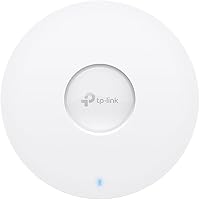
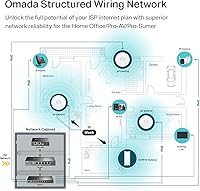
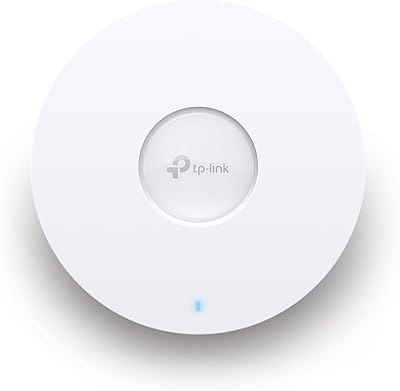
The TP-Link EAP610 V2 has quietly become one of the more sensible Wi-Fi 6 access points you can buy for a small or medium-sized business — which probably explains its climb to the #1 bestseller spot in its category. This is not a consumer router or a mesh kit you plug into a spare outlet; it is a proper ceiling- or wall-mounted access point designed for commercial spaces like cafés, hotel lobbies, and open-plan offices. It ships with mounting hardware and a power adapter, so you can have it running the same day. Just keep in mind that one unit covers one zone — scaling up means buying more.

Features & Benefits

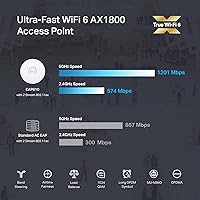
The EAP610 V2 runs on 802.11ax, the Wi-Fi 6 standard, across both 2.4 GHz and 5 GHz bands with a combined theoretical ceiling of 1800 Mbps — though real-world throughput, as with any access point, depends heavily on your environment and client devices. What makes it genuinely useful in busy spaces is OFDMA and MU-MIMO support, which lets the AP juggle many clients at once rather than serving them one at a time. Power delivery is flexible: PoE+, passive PoE, or the included DC adapter all work. The free Omada cloud management is worth highlighting — no monthly fee, no separate controller box needed for basic cloud access. WPA3 and beamforming round out a solid overall feature set.

Best For

This Omada AP is a natural fit for anyone running a small business that needs dependable multi-device coverage without hiring a network engineer. Think cafés with a dozen tablets and phones competing for bandwidth, hotel corridors where guests expect fast Wi-Fi without dead zones, or classrooms rolling out shared laptops. IT admins managing multiple sites will appreciate the centralized cloud dashboard, which lets you monitor and configure everything from one screen regardless of location. If you are already using other Omada gear, adding this access point is straightforward. Home users can also make it work, though the AP-style setup does assume some comfort with basic networking concepts.

User Feedback

Across more than 9,000 ratings, this access point holds a solid 4.4-star average, and reading through the reviews reveals a consistent pattern. Most buyers are happy with how quickly the Omada app gets things running, and many report noticeably better range compared to the Wi-Fi 5 gear they replaced. The 5-year warranty and free weekday technical support are mentioned as genuine reassurances, not just fine print. On the critical side, some first-time AP buyers are caught off guard discovering that full mesh roaming actually requires a separate Omada SDN controller — that detail deserves a careful read before purchasing. A smaller group has flagged firmware updates occasionally causing temporary connectivity drops. Nothing catastrophic, but worth knowing.

Pros

  • Free cloud management with no subscription fees makes ongoing costs predictable for small businesses.
  • Wi-Fi 6 support delivers meaningfully better performance in crowded, multi-device environments versus older hardware.
  • Flexible PoE+, passive PoE, and DC power options simplify installation in almost any building setup.
  • The Omada app setup process is fast and approachable, even for buyers with limited networking experience.
  • WPA3 security and VLAN support give businesses proper traffic segmentation without enterprise-level spending.
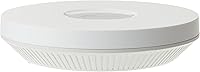
  • The slim, discreet design mounts cleanly on ceilings without looking like an eyesore in a customer-facing space.
  • A 5-year warranty and free weekday technical support provide solid long-term peace of mind.
  • OFDMA and MU-MIMO handle simultaneous connections well in busy environments like classrooms or open offices.
  • Mounting hardware and a power adapter are included, so the unit is ready to install straight from the box.

Cons

  • Full mesh roaming requires a separate Omada SDN controller, which adds unexpected cost for first-time buyers.
  • Firmware updates occasionally cause brief outages and, in rare cases, require a factory reset to recover.
  • The Omada app navigation for advanced settings feels unnecessarily complex compared to consumer-grade interfaces.
  • Real-world throughput on the 2.4 GHz band is considerably lower than the advertised combined speed figure.
  • Coverage through multiple solid walls degrades faster than the business-class positioning implies.
  • Managing this access point alongside non-TP-Link networking hardware is cumbersome and lacks flexibility.
  • The mounting clip mechanism feels less secure during installation compared to higher-tier access point designs.
  • WPA3 compatibility issues with older IoT devices often require setting up a separate legacy SSID as a workaround.

Ratings

The TP-Link EAP610 V2 has been put through its paces by thousands of real-world buyers — from café owners wiring up their first commercial space to IT admins managing multi-site deployments. Our AI has analyzed verified global user reviews, actively filtering out incentivized and bot-generated feedback, to produce scores that honestly reflect where this access point excels and where it falls short. Both the strengths and the genuine frustrations are represented here.

Wireless Performance
86%
Most buyers report a clear and noticeable throughput improvement over the Wi-Fi 5 gear this access point typically replaces. In dense environments like open-plan offices or hotel corridors with 20-plus connected devices, users note that the connection stays stable where older hardware would start to degrade.
The 1800 Mbps figure is a theoretical ceiling, and real-world speeds on the 2.4 GHz band are considerably lower. Users in environments with significant wall interference or older client devices see more modest gains than the spec sheet suggests.
Setup & Installation
91%
The Omada app walkthrough is consistently praised as one of the smoothest onboarding experiences in this product class. Scanning the serial number on the box and having the unit online within minutes is a common theme in positive reviews, even from buyers with limited networking backgrounds.
The physical mounting step can be fiddly for a solo installer, particularly on ceiling tiles. A handful of buyers also note that the initial firmware on some units is outdated and requires an immediate update before the device behaves as expected.
Cloud Management & App
88%
The free cloud management tier is a genuine differentiator at this price point — no ongoing subscription, no hardware controller box collecting dust. IT admins managing multiple locations appreciate being able to check signal maps and push SSID changes from a phone without being on-site.
The Omada app, while functional, lacks some of the polish users expect from consumer-grade apps. Navigating advanced settings like VLAN configuration or traffic shaping requires more taps than it should, and a few users report the app occasionally losing connection to the cloud portal.
Multi-Device Handling
83%
OFDMA and MU-MIMO make a tangible difference in environments where many devices connect simultaneously. Classroom deployments with 30 student devices, or cafés during peak lunch hours, are scenarios where buyers specifically call out this access point as handling the load without the slowdowns they experienced before.
Performance under extreme client density — think 50-plus active devices all streaming — starts to show strain. This is expected at this tier, but buyers coming from higher-end enterprise hardware may find the ceiling lower than anticipated.
Range & Coverage
79%
21%
For a single-floor open space like a restaurant dining area or a medium-sized office, the coverage radius is genuinely solid. Buyers regularly report reliable signal reaching corners that their previous consumer routers could not serve consistently.
Coverage through multiple walls or across floors drops off more than some users expect from a business-class AP. In older buildings with thick concrete walls, a second unit becomes necessary sooner than the product positioning implies.
Build Quality & Design
82%
18%
The slim, circular white enclosure blends into modern ceilings without drawing attention — several hotel and café owners specifically mention that guests do not notice the hardware at all. At 13.7 oz it feels solid, not hollow, and the included mounting bracket is straightforward metal construction.
The plastic casing, while clean-looking, does pick up scuff marks during handling. A few installers note that the mounting clip mechanism requires a firm, precise twist that feels less confidence-inspiring than the locking mechanisms found on higher-tier access points.
Power Options & PoE Support
87%
Supporting 802.3at PoE+, passive PoE, and a standard DC adapter gives installers real flexibility. Buyers in older buildings without PoE infrastructure appreciate having the DC adapter option without needing to purchase additional hardware to get started.
The included passive PoE adapter is a separate purchase recommendation rather than a box inclusion, which catches some buyers off guard. Users who assumed full PoE passthrough capability for downstream devices were disappointed to find that feature is not present.
Firmware & Software Stability
67%
33%
For users who leave the firmware alone after a stable release, the access point runs reliably for months without manual intervention. Automatic background updates have worked without incident for many buyers, particularly those on newer router and switch combinations.
This is one of the more frequently mentioned pain points in critical reviews. Firmware updates occasionally cause the unit to drop offline briefly, and on rare occasions have required a factory reset to restore normal operation. The issue is not universal but appears consistently enough to be taken seriously.
Mesh & Roaming Capability
71%
29%
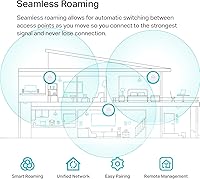
When integrated into a proper Omada SDN environment with a controller, the roaming behavior between multiple access points is smooth and unobtrusive. Users in larger deployments — multi-room offices or multi-floor retail spaces — running Omada controllers report clients handing off cleanly.
The confusion here is real and well-documented in reviews. Buyers expecting out-of-the-box mesh networking similar to consumer mesh kits are surprised to discover that an Omada SDN controller is required to unlock that functionality. Solo units in standalone mode do not offer true seamless roaming.
Security Features
84%
WPA3 support alongside WPA2 compatibility gives network administrators a forward-looking security posture without forcing client device upgrades immediately. Band steering and VLAN support let small business owners segment guest and internal traffic, which matters in any commercial deployment.
WPA3 transition mode occasionally causes compatibility issues with older smart home or IoT devices, requiring users to manually configure separate SSIDs. This is partly a client-side limitation, but buyers mention it as an unexpected troubleshooting step.
Value for Money
89%
At its price point, the combination of Wi-Fi 6 hardware, free cloud management, a 5-year warranty, and weekday technical support is hard to beat in this category. Buyers frequently compare it favorably against competing brands that charge subscription fees for equivalent management features.
The value calculation changes if you factor in the cost of an Omada hardware controller to unlock the full feature set. For buyers who need true mesh and seamless roaming, the total system cost climbs notably above the single-unit price.
Compatibility & Ecosystem Integration
81%
19%
Buyers already using TP-Link Omada switches or routers find this access point drops into their existing setup with minimal configuration. The SDN platform genuinely works as advertised when the full ecosystem is in play, which is a reason many Omada users cite for sticking with the brand.
Outside the Omada ecosystem, integration options are limited. Users trying to manage this access point alongside non-TP-Link networking gear through third-party platforms find the experience more cumbersome, and OpenWrt-based customization has a steep learning curve for most buyers.
Documentation & Support
74%
26%
The 5-year warranty is among the most generous in this product category, and the availability of free technical support on weekdays provides genuine reassurance for business buyers who cannot afford extended downtime. Online documentation covers most common setup scenarios.
Phone and chat support quality gets mixed reviews — straightforward questions are handled well, but complex firmware or SDN configuration issues sometimes require multiple contacts to resolve. Community forum resources are helpful but can feel scattered for first-time AP buyers.

Suitable for:

The TP-Link EAP610 V2 is built for small and medium-sized business operators who need reliable, manageable Wi-Fi without paying for an enterprise-grade system or a dedicated network administrator. A café owner who wants to offer fast guest Wi-Fi while keeping internal POS traffic separate, a hotel manager looking to blanket a floor with consistent coverage, or a school IT coordinator rolling out access points across multiple classrooms will all find this a practical and well-priced solution. IT admins who oversee several sites genuinely benefit from the Omada cloud dashboard, which lets them monitor and adjust settings remotely without traveling on-site for routine changes. Buyers already running Omada switches or routers will find the integration straightforward and the ecosystem cohesive. Even technically minded home users who want proper network segmentation, WPA3 security, and real traffic management tools — rather than the simplified controls on a typical consumer router — will get a lot of value out of this access point.

Not suitable for:

Buyers expecting a plug-and-play mesh system similar to consumer kits like Eero or Google Nest should look elsewhere, because the TP-Link EAP610 V2 is an access point, not a self-contained mesh solution. True seamless roaming across multiple units requires an Omada SDN controller — either a hardware device or software installation — which adds cost and setup complexity that many first-time buyers do not anticipate. If your goal is simply to extend Wi-Fi coverage in a home without any additional infrastructure, a consumer mesh node will be far less frustrating to set up and maintain. Users in multi-story buildings with thick concrete or brick walls should also temper their coverage expectations; a single unit will not blanket an entire floor under those conditions. Anyone who relies heavily on IoT or older smart home devices may run into WPA3 compatibility headaches that require extra configuration to resolve. Finally, buyers who need 24/7 phone support or same-day hardware replacement should note that technical support is only available on weekdays during specific hours.

Specifications

  • Wi-Fi Standard: This access point uses the 802.11ax (Wi-Fi 6) standard, supporting both 2.4 GHz and 5 GHz dual-band operation simultaneously.
  • Max Speed: Combined theoretical maximum throughput is 1800 Mbps (AX1800), achieved via 1024-QAM and Long OFDM Symbol technology.
  • Spatial Streams: Four spatial streams are supported across both bands, increasing multi-user throughput in environments with many connected devices.
  • MIMO Technology: MU-MIMO and OFDMA are both supported, allowing the access point to serve multiple clients concurrently rather than sequentially.
  • Security Protocols: Supports WPA3 and WPA2 security standards, with WPA3 transition mode available for mixed-device environments.
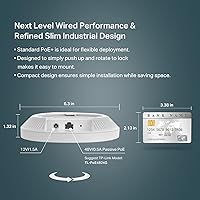
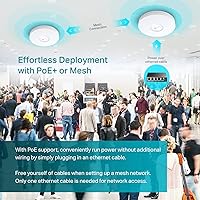
  • Power Input: Three power delivery methods are supported: 802.3at PoE+, 48V passive PoE, and a 12V/1.5A DC power adapter included in the box.
  • Dimensions: The unit measures 6.3 x 6.3 x 1.32 inches, making it one of the slimmer ceiling-mount access points in its class.
  • Weight: The EAP610 V2 weighs 13.7 oz, which is light enough for single-person ceiling or wall mounting without additional support hardware.
  • Operating System: Runs on an OpenWrt-based firmware platform, providing a stable and widely understood foundation for network configuration.
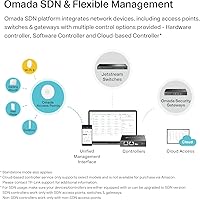
  • Management Options: Can be managed via the Omada cloud controller (free), Omada hardware controller, Omada software controller, or in standalone mode without any controller.
  • Mounting: Ceiling and wall mounting kits are included in the box, and installation requires no additional brackets or third-party hardware.
  • Advanced Wireless: Supports Beamforming, Band Steering, Airtime Fairness, and Seamless Roaming (the latter requiring an Omada SDN controller to activate).
  • Mesh Support: Omada Mesh networking is supported but requires an active Omada SDN controller — standalone units cannot form a mesh independently.
  • Ethernet Port: Equipped with one Gigabit RJ45 port that doubles as the PoE input and the uplink connection to your network switch or router.
  • Warranty: Backed by a 5-year limited hardware warranty, with free technical support available Monday through Friday, 6am to 6pm PST.
  • Included Contents: The box includes the EAP610 V2 unit, a 12V/1.5A DC power adapter, ceiling and wall mounting kits, and a printed installation guide.
  • Compatibility: Fully compatible with the TP-Link Omada SDN ecosystem, including Omada-series switches, routers, and controllers for unified network management.

Related Reviews
TP-Link EAP670 V2
TP-Link EAP670 V2
90%
96%
WiFi Performance
94%
Coverage Consistency
90%
Setup & Installation
92%
Ease of Management
91%
Mesh & Roaming Reliability
More
TP-Link ER605 V2 VPN Router
80%
93%
Value for Money
89%
Multi-WAN Reliability
71%
VPN Performance
82%
Ease of Setup
91%
Omada SDN Integration
More
TP-Link Archer BE600
90%
96%
Wi-Fi Speed
91%
Coverage Area
94%
Device Capacity
89%
Stability & Reliability
87%
Setup & Installation
More
TP-Link TL-SG3428XMP
88%
91%
Performance
88%
Build Quality
90%
Cloud Management & Software
87%
Ease of Setup
85%
Power Efficiency
More
TP-Link Archer VR2100
84%
86%
Wi-Fi Performance
92%
Setup & Installation
87%
Value for Money
72%
Range
90%
Wired Performance
More
TP-Link EAP110-Outdoor V3
87%
89%
Wi-Fi Range
94%
Ease of Setup
92%
Weatherproofing
85%
Speed & Stability
80%
App & Cloud Management
More
TP-Link Deco X50-Outdoor
89%
95%
Outdoor Coverage
92%
WiFi Performance
88%
Setup & Installation
93%
Durability & Weatherproofing
90%
PoE & Power Options
More
TP-Link ER7212PC Omada Router
86%
88%
Ease of Installation
84%
VPN Performance
91%
Cloud Management Experience
87%
PoE+ Port Performance
85%
Build Quality
More
TP-Link RE500X WiFi Extender
86%
89%
Setup and Installation
85%
WiFi Performance
90%
Coverage Area
87%
App Experience
92%
Value for Money
More
TP-Link LS1008G Gigabit Ethernet Switch
86%
94%
Ease of Setup
88%
Reliability
90%
Energy Efficiency
85%
Build Quality
91%
Quiet Operation
More

FAQ

Not for basic use. You can set it up in standalone mode or use the free Omada cloud management through the app without any additional hardware. The catch is that features like seamless roaming and true mesh networking between multiple units do require an Omada SDN controller — either a hardware device or the software version installed on a local machine or server.

No — this is an access point, not a router. It still needs to be connected to an existing router or gateway that handles your internet connection and DHCP. Think of it as the device that broadcasts your Wi-Fi signal, while your router handles the actual internet traffic management behind the scenes.

TP-Link rates it for up to 128 simultaneous client connections. In practice, real-world performance in a busy environment — say a café at peak hours with 30 to 40 active devices — is very solid. Beyond that, you may start to see throughput per device drop, and adding a second unit becomes worth considering.

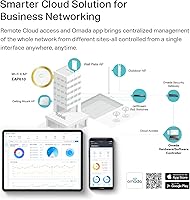
Yes, and this is one of the stronger selling points of the Omada ecosystem. Through the Omada cloud portal or app, you can manage multiple access points across one or several physical locations from a single interface. It is a genuinely useful feature for anyone running more than one site.

It supports mesh in the technical sense, but not in the plug-and-play way that consumer systems like Eero or Google Nest work. To create a mesh network with multiple EAP units and get seamless client handoff between them, you need an Omada SDN controller running on your network. Without that, each unit operates independently.

In an open-plan office or a single-floor commercial space without many obstructions, coverage up to about 2,500 to 3,000 square feet is realistic. Add thick concrete walls or multiple floor transitions and that range shrinks noticeably. For larger or more complex spaces, plan on deploying more than one unit.

It will work in standalone mode connected to any router or switch, regardless of brand. However, the advanced management features — cloud dashboard, VLAN configuration, roaming, and mesh — are all tied to the Omada ecosystem. If your switches and router are from another manufacturer, you will only get the basics out of this access point.

A small number of users have reported that firmware updates caused temporary connectivity drops, and in rare cases required a factory reset to restore normal operation. It is a good idea to schedule updates during off-hours if this is deployed in a business environment, and to note the current firmware version before updating so you have a reference point if something goes wrong.

Yes, the included mounting kit supports both ceiling and wall installation. Wall mounting works fine, though the antenna pattern is optimized for ceiling placement in the center of a coverage area. For most commercial deployments, ceiling mounting gives you the most even signal distribution.

It is genuinely free with no ongoing subscription for the core Omada cloud management features. There is no paid tier you get pushed toward after a trial period. This is a meaningful difference compared to some competing access point brands that charge monthly or annual fees for cloud management access.