Overview

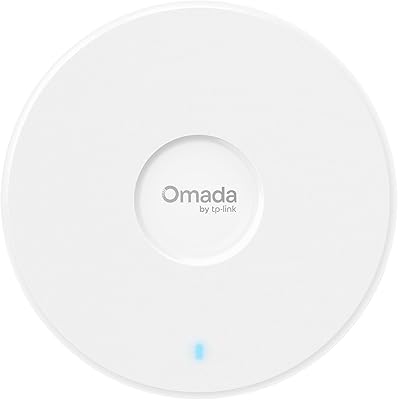
The TP-Link EAP110-Outdoor V3 Outdoor Access Point is a no-frills, budget-conscious solution for anyone who needs reliable Wi-Fi pushed beyond their front door. Now in its third revision since launching in 2017, this outdoor access point has matured quietly — tighter firmware, better app support, and a box that includes everything you need: a PoE injector, mounting hardware, and waterproof antennas. It sits within TP-Link's Omada ecosystem, a management platform that lets you control multiple access points from a single app or web dashboard — no networking degree required. Single-band N300 is not cutting-edge, but at this price tier, that is entirely the point.

Features & Benefits

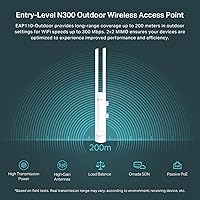
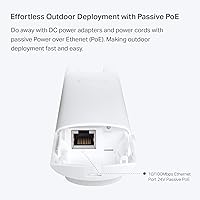
The weatherproof enclosure is genuinely built for the outdoors — not just splash-resistant, but designed to handle sustained rain, dust, and the kind of temperature swings that would kill a standard indoor AP within a season. Power delivery runs through passive PoE, meaning one Ethernet cable handles both data and power with no separate adapter needed at the mounting point. The rated 300 Mbps on 2.4 GHz sounds modest on paper, but the 2x2 MIMO setup and high-gain antennas push signal impressively far — up to 200 meters in open space, though realistically expect closer to half that once walls, trees, or buildings enter the picture. The Omada app lets you set per-SSID bandwidth caps and monitor traffic without touching a command line.

Best For

This TP-Link outdoor AP is a strong pick for homeowners trying to push a stable signal out to a backyard patio, a detached garage, or a barn across the property. It also suits small hospitality operators — campground owners, outdoor café managers, anyone running a guest network at a pool area — where keeping costs low matters as much as keeping the Wi-Fi on. IT admins already running an Omada deployment will appreciate having an affordable outdoor node in the same management stack. That said, if your devices are all dual-band capable or you regularly stream heavy video, the single-band limit will eventually become a friction point. Older devices and IoT hardware on 2.4 GHz are exactly what this AP was designed around.

User Feedback

With a 4.2-star average across more than 4,000 ratings, the EAP110-Outdoor has clearly found its audience. Praise consistently clusters around physical installation — reviewers note the included mount hardware and clear instructions had them up and running in under an hour. Long-term owners in hot, humid climates report the enclosure holding up well after two or more years, which is genuinely reassuring at this price. On the other side, firmware update friction surfaces often enough to flag, and buyers migrating from dual-band systems sometimes hit the 2.4 GHz ceiling as their network demands grow. Several reviewers specifically noted that stepping up to a dual-band alternative is worth it if 5 GHz support is a real priority for your setup.

Pros

  • Ships with a PoE injector included — many competing units charge extra for this essential accessory.
  • One Ethernet cable handles both power and data, keeping outdoor installation clean and straightforward.
  • Weatherproof build holds up well in rain, heat, and humidity based on long-term owner reports.
  • The Omada app makes managing multiple access points genuinely accessible, even for non-technical users.
  • High-gain external antennas push a solid 2.4 GHz signal across large open areas like yards and courtyards.
  • Per-SSID rate limiting lets you cap guest bandwidth without touching your main network.
  • Mounting hardware is included and multiple reviewers report a sub-one-hour installation from unboxing.
  • Ranked among the top sellers in its category, backed by over 4,000 real-world ratings.
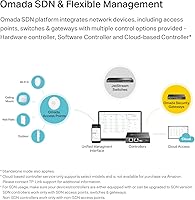
  • Fits natively into the broader Omada SDN ecosystem for centralized multi-site management.
  • Compact and lightweight at 4.2 ounces, making pole or wall mounting easy without heavy hardware.

Cons

  • No 5 GHz band means modern dual-band devices cannot connect at faster speeds.
  • The 200-meter range is achievable only in open fields; trees, fences, and buildings cut it significantly.
  • Firmware updates have caused connectivity issues for some users and require manual attention to resolve.
  • Not a standalone plug-and-play unit — getting the most out of it involves the Omada controller setup.
  • Passive PoE at 48V means you cannot use a standard active PoE switch without the included injector.
  • No Wi-Fi 5 or Wi-Fi 6 support makes this a poor long-term investment if your devices are rapidly modernizing.
  • Buyers used to mesh systems may find the single-AP range limiting in larger or irregular properties.
  • Customer support responsiveness from TP-Link has been flagged as slow by a portion of reviewers.
  • The EAP110-Outdoor is getting long in the tooth design-wise, with no major radio upgrade since launch.

Ratings

The scores below for the TP-Link EAP110-Outdoor V3 Outdoor Access Point were generated by our AI engine after analyzing thousands of verified global buyer reviews, actively filtering out incentivized, duplicated, and bot-generated submissions. Both the genuine strengths and the recurring frustrations are reflected here without bias, so you get an honest picture of what real-world ownership actually looks like.
Value for Money
91%
Buyers consistently point out that few outdoor access points at this price tier ship with a PoE injector, mounting kit, and weatherproof antennas already in the box. The all-in value proposition lands well — you spend less out of pocket to get a functioning outdoor Wi-Fi node than with most comparable units.
A small segment of reviewers who later upgraded to dual-band alternatives felt the savings were partially offset by having to replace the unit sooner than expected as their network demands grew. For users who need 5 GHz, the value equation shifts noticeably.
Build Quality
84%
Long-term owners in humid, rainy, and freezing climates frequently mention that the enclosure holds up without cracking, yellowing excessively, or letting moisture into the connections. Several buyers in coastal and subtropical regions report two or more years of outdoor use with no hardware failures.
A handful of reviewers note the plastic housing feels lighter and less premium than they expected, and a few report antenna connector threads that felt fragile during initial setup. The build is functional rather than robust, which matters if the unit will face extreme wind or direct sun for years.
Installation Ease
89%
The combination of a lightweight body, a clear installation guide, and a pre-included mounting kit means most buyers report completing the full physical setup in under an hour without professional help. The single-cable PoE power method eliminates the need to route a separate power line to the mounting point, which owners of barns, garages, and fence posts particularly appreciate.
A recurring complaint involves the initial network configuration rather than the physical mount — users unfamiliar with access point setups occasionally struggle with IP assignment and getting the unit to talk to their existing router. TP-Link's documentation assumes a baseline of networking comfort that not every homeowner has.
Wireless Range
76%
24%
In genuinely open environments — large flat yards, open campsites, parking areas, agricultural land — the high-gain antennas and elevated transmit power deliver impressive reach for a unit at this price. Users covering patios, detached garages, and poolside areas from a single mounting point regularly report clean, stable signal without dead spots.
The 200-meter range claim falls apart quickly in real-world suburban and semi-rural settings where trees, fences, and outbuildings interrupt the signal path. Multiple reviewers noted effective range closer to 50 to 80 meters in their actual environments, which can be disappointing if the purchase decision was based on the headline spec.
Signal Stability
78%
22%
For the devices it was designed to serve — smart home sensors, security cameras, older laptops, and IoT hardware on 2.4 GHz — the EAP110-Outdoor holds a steady connection well. Buyers running it as a dedicated IoT or guest network node report very few spontaneous drops under normal load.
In environments with significant 2.4 GHz channel congestion, such as dense neighborhoods or apartment complexes, performance degrades more noticeably than it would on a dual-band unit with a clean 5 GHz fallback. Heavy simultaneous device loads can also push the N300 radio into visible throughput drops.
Throughput Performance
67%
33%
For everyday tasks — web browsing, video calls, music streaming, and smart home device traffic — the real-world throughput is more than adequate. Users who set accurate expectations going in, particularly those replacing a dead router or extending an existing network outdoors, report satisfaction with the practical speeds they see.
The 300 Mbps rated speed is a ceiling that real-world conditions rarely approach, and the single 2.4 GHz radio means throughput is shared across all connected devices simultaneously. Users attempting to stream 4K content or run multiple high-bandwidth sessions concurrently hit a noticeable ceiling.
Software & App Experience
73%
27%
Buyers who commit to the Omada ecosystem tend to praise the app for making multi-AP management accessible without needing to touch a command line. For small business owners managing a guest network at a café or campground, the ability to monitor connected clients and adjust bandwidth caps from a phone is a genuine practical benefit.
Users running the EAP110-Outdoor as a standalone unit without the Omada controller find the app less useful than advertised, since its best features require controller mode. The browser-based standalone interface is functional but dated, and a few reviewers flagged confusing menu labels during initial configuration.
Firmware Reliability
61%
39%
When the firmware is stable and up to date, the unit runs reliably for extended periods without requiring attention. Several long-term owners report months of continuous uptime without a single manual reboot, which is a reasonable baseline expectation for a managed outdoor AP.
Firmware update friction is one of the most consistent negative themes across buyer reviews. Some users report that pushing an update caused connectivity loss that required a factory reset to resolve, and a few note that TP-Link's update release cycle for this model has slowed noticeably as it ages.
Weather Resistance
86%
Owners in genuinely demanding climates — heavy seasonal rainfall, prolonged frost, high summer heat — regularly report that the unit survives where cheaper consumer-grade hardware has failed. The waterproof antenna connectors and the included rubber cable insert are small but practically important details that hold up over time.
A small subset of buyers in extremely high UV environments report cosmetic fading and surface chalking on the white enclosure after 18 to 24 months of direct sun exposure. This is primarily aesthetic, but worth noting if appearance matters in a visible mounting location.
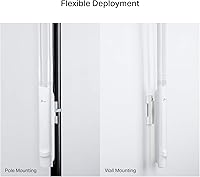
Mounting & Flexibility
88%
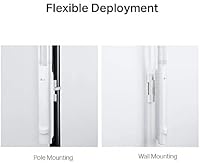
The included mounting kit supports both pole and flat-wall installation, which covers the majority of real-world deployment scenarios homeowners and small business operators face. At just over 4 oz, the unit is light enough that standard wall anchors handle the load without any reinforcing hardware.
The mounting bracket does not allow for fine angular adjustment once locked in, which means cable routing and antenna orientation need to be thought through before final installation. A small number of users wished for a more articulated mount to optimize signal direction post-installation.
Band & Device Compatibility
58%
42%
For households and venues where most connected devices are 2.4 GHz — smart home hubs, older tablets, IoT sensors, budget Android devices — the single-band radio is genuinely sufficient and performs reliably without any compatibility friction.
The absence of a 5 GHz radio is the most cited source of buyer regret, particularly among users who discovered post-purchase that their primary devices preferred or required 5 GHz for acceptable performance. This limitation is not a design flaw for the intended use case, but it disqualifies the unit for a meaningful portion of modern households.
Security Features
82%
18%
WPA2-Enterprise support with 802.1X RADIUS authentication puts this outdoor AP in a different security tier than most budget units, which typically max out at WPA2-Personal. For small business operators running a guest network, the rogue AP detection feature adds a practical layer of protection that buyers in that segment specifically call out as useful.
Setting up RADIUS authentication requires an external authentication server, which is not something a typical homeowner will have or want to configure. Most residential users will default to standard WPA2-Personal and leave the enterprise security features unused, making them largely irrelevant for that segment.
Long-Term Durability
79%
21%
The volume of multi-year ownership reviews is encouraging — a meaningful portion of ratings come from buyers who have run this outdoor access point through at least two full seasonal cycles without hardware failure. That track record at this price point is stronger than category averages.
As the product ages, the pace of firmware support and security patches from TP-Link has reportedly slowed, which is a legitimate concern for buyers planning a 4-to-5-year deployment window. Hardware longevity and software longevity are two different things, and the latter is less certain here.
Customer Support
54%
46%
TP-Link does maintain an active community forum and knowledge base for the Omada product line, which has helped a number of buyers troubleshoot firmware and configuration issues without needing to contact support directly. Documentation quality has improved with the V3 revision.
Direct support response times draw consistent criticism in buyer reviews, with some users reporting multi-day waits for replies on warranty or technical issues. For a product often deployed in business-critical outdoor settings, slow support turnaround is a meaningful operational risk that potential buyers should factor in.

Suitable for:

The TP-Link EAP110-Outdoor V3 Outdoor Access Point is a practical fit for homeowners who need Wi-Fi extended to a backyard, detached garage, barn, or workshop without running a complicated cable setup or spending a lot of money. Small hospitality operators — think campground managers, outdoor café owners, or anyone running a seasonal pool-area guest network — will find the per-SSID bandwidth controls and cloud-based management surprisingly capable for the price. Because it runs on a single Ethernet cable that carries both power and data, installation is far simpler than most people expect; no electrician, no separate power outlet at the mount point. Existing Omada users who need to add an affordable outdoor node to their managed network will also find this a natural, low-friction addition to their setup. Devices that only operate on 2.4 GHz — older laptops, smart home sensors, security cameras, and most IoT hardware — are exactly what this access point was built to serve well.
Not suitable for:

Buyers who regularly stream 4K video, game online, or rely heavily on modern dual-band devices will quickly run into the ceiling that comes with a single-band 2.4 GHz radio, and no amount of antenna gain changes that fundamental constraint. The TP-Link EAP110-Outdoor V3 Outdoor Access Point is also not the right call if your outdoor coverage area is dense with walls, thick foliage, or multiple structures — the 200-meter range claim assumes open space, and real-world performance in cluttered environments can fall well short of that. Users who are not part of the Omada ecosystem and want a standalone plug-and-play AP with a simple browser interface may find the setup process a little more involved than expected, particularly around firmware updates, which have drawn consistent complaints from reviewers. If your household has already moved to Wi-Fi 6 or even Wi-Fi 5 devices expecting faster throughput and lower latency, this EAP110-Outdoor will feel like a step backward rather than an extension of your network.
Specifications

  • Wireless Standard: Operates on 802.11b/g/n (single-band 2.4 GHz only), with no 5 GHz radio included.
  • Max Data Rate: Rated at up to 300 Mbps under ideal conditions using N300 technology.
  • MIMO Config: Uses a 2x2 MIMO antenna configuration to improve signal reliability and throughput consistency.
  • Antenna Type: Ships with external, waterproof high-gain antennas designed to withstand outdoor environmental exposure.
  • Coverage Range: TP-Link claims up to 200 meters of range in open, unobstructed outdoor environments.
  • Power Method: Powered via passive Power over Ethernet at 48V DC, eliminating the need for a separate power outlet at the mount point.
  • PoE Injector: A passive PoE injector adapter and power cord are included in the box at no extra cost.
  • Weatherproofing: The enclosure is purpose-built for outdoor deployment, rated to handle rain, dust, and significant temperature variation.
  • Management: Supports TP-Link Omada SDN with access via the Omada cloud controller and the Omada smartphone app.
  • Security: Supports WPA/WPA2-Enterprise encryption, 802.1X authentication with RADIUS, and rogue access point detection.
  • Bandwidth Control: Per-SSID rate limiting allows administrators to cap download and upload speeds for individual wireless networks.
  • Dimensions: Measures 3.7 x 8.2 x 1.7 inches, making it compact enough for pole or wall mounting without bulky hardware.
  • Weight: Weighs 4.2 oz, light enough that the included mounting kit handles installation without additional reinforcement.
  • In-Box Contents: Includes the access point unit, passive PoE adapter, power cord, mounting kit, waterproof rubber insert, waterproof antennas, and an installation guide.
  • Voltage Input: Accepts 48V DC input delivered through the supplied passive PoE injector.
  • Best Sellers Rank: Ranked #3 in the Computer Networking Wireless Access Points category on Amazon at time of review.
  • Model Revision: This is the V3 iteration of the EAP110-Outdoor line, which has been available on the market since March 2017.
  • Compatibility: Works with Windows XP through Windows 10, Linux, and is compatible with standard 802.11b/g/n client devices.

Related Reviews

TP-Link Omada EAP225-Outdoor
82%
88%
Outdoor Range
91%
Build Quality & Weatherproofing
84%
Wi-Fi Performance & Stability
67%
Setup & Installation
83%
Omada Ecosystem Integration
More
TP-Link EAP650-Outdoor WiFi 6 Outdoor Access Point
80%
91%
Wireless Range
88%
Wi-Fi 6 Performance
93%
Build & Weather Resistance
67%
Ease of Setup
84%
Omada SDN Integration
More
TP-Link EAP620 HD V3 Wireless Access Point
75%
78%
Network Performance
84%
Ease of Installation
81%
Management Software
58%
Controller Dependency
83%
Build Quality
More
TP-Link Festa F65-Outdoor AX3000 Wi-Fi 6 Access Point
84%
88%
Performance
94%
Outdoor Durability
85%
Ease of Setup
82%
Signal Strength
79%
Cloud Management & App
More
TP-Link EAP653 Wi-Fi 6 Access Point
83%
88%
Wireless Performance
79%
Setup & Installation
83%
Omada App & Controller Experience
91%
Build Quality & Design
84%
Range & Coverage
More
TP-Link TL-WA1201 AC1200 Wireless Access Point
75%
88%
Value for Money
81%
Wi-Fi Coverage & Range
83%
Ease of Setup
86%
Multi-Mode Flexibility
58%
PoE Implementation
More
TP-Link EAP615-Wall AX1800 In-Wall Access Point
80%
91%
Ease of Installation
84%
Wi-Fi Performance
93%
Wired Port Versatility
88%
PoE Power & Pass-Through
79%
Omada SDN Integration
More
TP-Link EAP770 WiFi 7 Wireless Access Point
85%
91%
Wireless Performance
87%
WiFi 7 & MLO Implementation
88%
Setup & Onboarding
89%
Management Platform
86%
Multi-AP Roaming
More
TP-Link EAP660 HD WiFi 6 Access Point
79%
88%
Wireless Performance Under Load
91%
Network Capacity & Device Density
84%
Omada SDN Integration
86%
2.5G Uplink Value
89%
PoE+ Installation Experience
More
TP-Link Omada EAP720 WiFi 7 Access Point
81%
88%
Wireless Performance
91%
Value for Money
83%
Setup & Installation
79%
Build Quality & Design
86%
Omada Ecosystem Integration
More

FAQ

Everything you need to get it powered is included. The box comes with a passive PoE injector, so you just run a standard Ethernet cable from your router or switch to the injector, then from the injector up to the access point. No separate power outlet is needed at the mounting location, which makes outdoor installation a lot cleaner.

That 200-meter figure is a best-case measurement in an open field with no obstructions. In a typical backyard or property with fences, trees, walls, or other structures, expect somewhere closer to 50 to 100 meters of usable range. It is still impressive for the price tier, but plan your mounting location accordingly to get the most out of it.

This is an important one to get right. The EAP110-Outdoor uses passive PoE at 48V, which is different from standard active PoE (802.3af/at) that most managed switches provide. Using an active PoE switch without proper compatibility can damage the unit. Stick with the included injector unless you are confident your switch supports passive PoE at 48V.

Yes, you can manage it through a local web browser interface without ever touching the Omada app or cloud. The app and controller are optional extras that become more useful when you are running multiple access points. For a single-unit home setup, the browser-based admin panel is straightforward enough.

It will work, but trees and solid structures do absorb 2.4 GHz signal noticeably. Mounting the TP-Link EAP110-Outdoor V3 Outdoor Access Point at a higher point — on a roofline, eave, or tall pole — helps get the signal above ground-level obstructions and extends practical reach. The high-gain antennas compensate reasonably well, but placement matters more than the hardware spec in dense environments.
Real-world owners in cold climates generally report solid durability through multiple winters. The outdoor enclosure is designed for temperature extremes, and the unit does not have moving parts that freeze or degrade. Just make sure any cable entry points are sealed properly with the included waterproof inserts to keep moisture out of connections.

Yes, and it handles this better than most units at this price point. You can set individual bandwidth caps per SSID, so your guest network can be capped at a reasonable speed while your management network remains unrestricted. If you add the Omada controller (free software), you get even more granular control across multiple access points.

Your 5 GHz-capable devices can still connect to this AP, but they will do so over the 2.4 GHz band only. The EAP110-Outdoor has no 5 GHz radio, so devices that prefer 5 GHz will fall back to 2.4 GHz automatically. For basic browsing, streaming music, or smart home devices, that is usually fine. For 4K streaming or low-latency applications, you will feel the limitation.

Most buyers report completing the full installation — including cable routing and mounting — in under an hour with basic tools. The included mounting kit supports both pole and wall attachment, the unit is lightweight at around 4 oz, and the installation guide is practical rather than cryptic. No electrician needed since power runs through the Ethernet cable.

The most common complaint across buyer reviews involves firmware updates — a small but consistent group of users report that updates occasionally require a manual reset or cause temporary connectivity drops. It is not a dealbreaker, but it is worth noting that keeping the firmware current requires a little more attention than a typical home router. Outside of that, long-term owners are generally satisfied with reliability and build quality.

Where to Buy