Overview

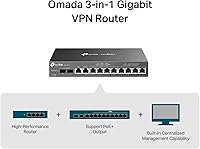
The TP-Link ER7212PC 3-in-1 Gigabit VPN Router arrived in early 2023 with a clear pitch: collapse a router, a PoE switch, and a hardware controller into one compact black box. That consolidation matters most if you are already familiar with the Omada ecosystem, which ties TP-Link switches, access points, and routers under a single cloud management interface. The fanless passive design keeps the unit completely silent — genuinely useful in open offices or home labs where a constantly spinning fan would be a real irritant. Buying three separate mid-range devices to replicate this functionality would cost noticeably more, which partly explains this integrated network appliance's growing foothold among small business adopters.
Features & Benefits

The eight PoE+ LAN ports are where this 3-in-1 Omada router earns its keep day-to-day. Picture running four IP cameras, two access points, and a couple of VoIP handsets simultaneously — the 110W total PoE budget handles that load comfortably, with each port capped at 30W. On the WAN side, two SFP slots plus two RJ45 ports deliver genuine multi-WAN flexibility for load balancing or automatic failover. The built-in controller manages up to 10 access points and 2 switches with no separate hardware required. VPN options span IPsec, OpenVPN, and L2TP/PPTP, and the five-year warranty with included weekday support rounds out a feature set that punches well above its price point.

Best For

This integrated network appliance suits small business owners who need a properly managed network but lack a server closet or dedicated IT staff. If you are running a small office with IP cameras and a handful of Omada access points, the ER7212PC covers most needs without a standalone controller. Home lab users chasing real routing features — VLANs, VPN tunnels, multi-WAN failover — in a quiet, compact unit will appreciate the tight footprint. One critical caveat: there is no built-in Wi-Fi, so wireless coverage still requires at least one Omada AP. Anyone already building out an Omada-based stack will find this a logical and cost-efficient centerpiece.

User Feedback

Sitting at 3.9 out of 5 across roughly 90 reviews, this 3-in-1 Omada router lands in respectable but not universally praised territory. Buyers consistently highlight how straightforward the Omada onboarding process is, and many appreciate consolidating three devices into one for real cost savings. Where opinions split: the 10-AP controller ceiling frustrates anyone planning to grow beyond a small single-floor deployment, and a notable subset of users has flagged firmware update hiccups requiring reboots to recover. Several reviewers also find the 110W PoE budget tight when all eight ports carry heavier devices simultaneously. The absence of built-in Wi-Fi continues to catch first-time buyers off guard — a gap worth clarifying before purchasing.

Pros

  • Combines router, PoE switch, and Omada hardware controller into one compact unit, saving real money versus buying separately.
  • Eight PoE+ ports with a 110W budget comfortably powers cameras, access points, and VoIP phones in typical small office deployments.
  • Four WAN ports including two SFP slots enable genuine multi-WAN load balancing and automatic failover without extra hardware.
  • The fanless design runs completely silently — a genuine advantage in open offices, reception areas, and quiet home labs.
  • Built-in Omada controller supports up to 10 APs and 2 switches with no separate controller device required.
  • IPsec, OpenVPN, and L2TP/PPTP VPN support covers nearly every remote-access scenario small businesses actually encounter.
  • Remote management via cloud dashboard and mobile app means configuration changes do not require a site visit.
  • A five-year warranty is unusually generous for this product category and adds meaningful long-term peace of mind.
  • SFP WAN ports for fiber connectivity are a practical bonus that most consumer-grade competitors simply do not offer.

Cons

  • No built-in Wi-Fi whatsoever — misleading product metadata has caught multiple buyers off guard after purchase.
  • The 10-access-point controller ceiling is a hard limit that forces a disruptive infrastructure rethink if you need to scale.
  • Firmware updates have caused feature regressions and failover issues for a notable subset of real-world buyers.
  • The 110W shared PoE budget runs tight when all eight ports are loaded with power-hungry devices simultaneously.
  • OpenVPN throughput underperforms expectations under concurrent tunnel load, frustrating high-bandwidth remote teams.
  • Weekday-only support hours leave international users and weekend troubleshooters without a live contact option.
  • The plastic chassis feels less premium than the price point suggests compared to metal-bodied alternatives.
  • Advanced configuration — VLANs, VPN policies, WAN failover rules — has a steeper learning curve than consumer routers.
  • Passive cooling keeps it silent but allows the unit to run noticeably warm in poorly ventilated or stacked installations.

Ratings

The scores below are generated by AI after analyzing verified buyer reviews worldwide for the TP-Link ER7212PC 3-in-1 Gigabit VPN Router, with spam, bot-submitted, and incentivized feedback actively filtered out before scoring. This integrated network appliance draws a genuinely mixed crowd — small business owners, home lab tinkerers, and Omada ecosystem adopters — and their experiences vary enough to make honest scoring worthwhile. Both the standout strengths and the friction points that caused real buyers to hesitate are reflected transparently in every category below.

Value for Money
83%
Buyers consistently note that purchasing a standalone router, a managed PoE switch, and a hardware controller separately would cost considerably more. For small offices standing up a structured network on a tight budget, the consolidation alone justifies the price tag for most.
A few reviewers feel the savings argument weakens if you only need one or two of the three functions — paying for an integrated appliance when you already own a capable switch feels like overspending on redundant hardware.
PoE Power Delivery
74%
26%
Running a mix of IP cameras, VoIP handsets, and a couple of Omada access points across the eight PoE+ ports works reliably in moderate deployments. The per-port cap of 30W covers nearly all mainstream powered devices without any configuration tweaks.
The 110W shared budget becomes a genuine constraint once all eight ports are occupied by power-hungry devices simultaneously. Several buyers running high-wattage PTZ cameras or multi-radio APs on every port hit throttling issues and had to rethink their device layout.
Omada Controller Integration
86%
Having the hardware controller baked directly into the unit removes the need to run a separate Raspberry Pi, software controller, or cloud key — a real convenience for small deployments. The Omada dashboard is well-regarded for its clarity, and pairing compatible APs and switches takes only a few minutes.
The hard ceiling of 10 managed access points and 2 switches is a meaningful limitation for anyone planning to grow. Buyers who later discovered they needed an 11th AP had to retrofit a standalone controller, partially negating the original consolidation benefit.
Multi-WAN & Failover
81%
19%
Having two SFP slots alongside two RJ45 WAN ports gives real flexibility for combining a fiber connection with a cable backup, or load-balancing across two ISPs. Business buyers in areas with unreliable single-ISP service particularly praised this capability as a quiet insurance policy.
Configuring WAN failover policies requires navigating menus that are not immediately intuitive for users coming from consumer routers. A handful of reviewers reported that failover did not trigger automatically as expected after a firmware update, requiring a manual reboot to restore.
VPN Performance
77%
23%
Support for IPsec, OpenVPN, and L2TP/PPTP covers the most common remote-access scenarios for small businesses, including site-to-site tunnels for multi-location setups. Remote workers connecting back to the office LAN found the setup process reasonably guided through the Omada interface.
OpenVPN throughput in particular has drawn criticism for being noticeably slower than expected given the hardware, with some buyers reporting speeds that felt bottlenecked under concurrent tunnel load. Users running high-bandwidth encrypted transfers between sites may find performance underwhelming.
Setup & Initial Configuration
79%
21%
For anyone with even modest networking experience, the initial setup through the Omada app is guided and fairly painless. The quick installation guide included in the box covers the essentials clearly, and the cloud onboarding flow is more polished than most competitors at this price level.
Complete networking newcomers have reported feeling lost once they move past basic setup and into VPN configuration or VLAN segmentation. The documentation assumes a baseline familiarity with managed networking concepts that not every small business buyer has.
Firmware Stability
62%
38%
When running on a stable firmware version, the ER7212PC operates reliably for weeks without attention. Buyers who flashed the device and left it alone on a tested release generally reported no connectivity issues or unexpected reboots during normal operation.
Firmware updates have been a recurring sore point in reviews, with several buyers experiencing loss of specific features or degraded failover behavior after applying a new release. The update process itself occasionally requires a factory reset to resolve post-update anomalies, which is disruptive in a live business environment.
Cloud Remote Management
78%
22%
The ability to check device status, push configuration changes, or reboot the unit remotely via the Omada cloud portal is practical for IT managers overseeing multiple small sites. The mobile app mirrors most of the web dashboard functions and works smoothly on both major mobile platforms.
Cloud dependency is a real concern for buyers in privacy-sensitive environments — some are uncomfortable with network telemetry flowing through TP-Link servers. Others noted that cloud portal response times can lag during peak hours, making real-time troubleshooting slightly frustrating.
Build Quality & Form Factor
76%
24%
The chassis feels appropriately solid for a rack-adjacent business device, and the compact 8.9-inch footprint means it fits on a shelf or inside a small wall-mount enclosure without fuss. The all-black finish looks professional in office settings without drawing attention.
A few buyers noted the plastic housing feels less premium than the price might suggest, especially compared to metal-chassis alternatives. Port labeling, while functional, is small and difficult to read in low-light wiring closets without a flashlight.
Fanless Noise Level
91%
Zero fan noise is not a small thing when this device sits on a reception desk or inside a quiet creative studio. Buyers in noise-sensitive environments consistently called out the completely silent operation as a deciding factor over competing units with audible cooling fans.
The passive cooling design does mean the unit runs warm to the touch under sustained PoE load. In poorly ventilated closets or stacked enclosures during summer months, a small number of buyers reported unexpected reboots that they attributed to thermal buildup.
Port Density & Flexibility
73%
27%
Eight PoE+ LAN ports is a generous count at this integration level, and the WAN/LAN combo port adds practical flexibility for reconfiguring the network topology without buying additional hardware. SFP WAN support for fiber connections is a bonus most consumer-grade competitors skip entirely.
There are no dedicated non-PoE LAN ports, which means connecting a standard wired workstation technically burns a PoE port. Buyers who need to wire more than eight LAN devices immediately hit a wall and must add a downstream switch, partially defeating the consolidation premise.
Wireless Capability
29%
71%
This is not a wireless router, so scoring it here is a matter of setting expectations accurately. For buyers who already plan to deploy dedicated Omada access points, the absence of integrated Wi-Fi is entirely intentional and not a drawback in practice.
The product listing references dual-band wireless standards in its metadata, which has genuinely misled buyers expecting a Wi-Fi router out of the box. Multiple reviewers expressed frustration upon discovering there is no antenna or wireless radio of any kind — a clarity failure that TP-Link has not adequately addressed.
Warranty & Support
84%
A five-year warranty on networking hardware is genuinely uncommon and signals confidence in the platform's longevity. Buyers who contacted TP-Link support for configuration assistance generally reported helpful responses within a reasonable timeframe on weekdays.
Support hours limited to weekdays during Pacific business hours leave international buyers and weekend troubleshooters without a live contact option. A couple of reviewers also noted that advanced configuration questions occasionally received generic responses rather than specific technical guidance.
Scalability Ceiling
55%
45%
For its intended audience — a single small office or a compact retail environment — the ER7212PC covers the realistic network scope without ever needing to be outgrown. Buyers with 5 to 8 APs and a handful of switches find the ceiling completely invisible in daily operation.
Any organization planning to expand beyond 10 access points will need to migrate to a dedicated controller or a higher-tier Omada gateway, making this device a temporary solution rather than a long-term anchor. Buyers who discovered this ceiling post-deployment expressed frustration at having to revisit their infrastructure investment sooner than expected.

Suitable for:

The TP-Link ER7212PC 3-in-1 Gigabit VPN Router is a strong fit for small business owners who want a properly managed network without filling a rack with three separate devices. Think of a dental office, a boutique hotel lobby, or a small retail location — somewhere that needs IP cameras, a couple of access points, and reliable VPN access for remote staff, all managed from a single dashboard. Home lab enthusiasts who want real routing features like VLANs, multi-WAN failover, and site-to-site VPN tunnels — without the noise of a server fan running constantly — will find the fanless design and Omada feature set genuinely appealing. It also makes particular sense for anyone already building out an Omada ecosystem, since the built-in hardware controller removes the need for a separate Omada controller device entirely. Multi-site operators who want to check in on remote locations through a cloud dashboard or the Omada mobile app, rather than driving out for every configuration change, are also well-served here.
Not suitable for:

The TP-Link ER7212PC 3-in-1 Gigabit VPN Router is the wrong choice for anyone expecting integrated Wi-Fi — despite some confusing metadata in the product listing, there is no wireless radio of any kind inside this unit, so you will still need to budget for and deploy at least one separate access point. Buyers planning to grow beyond 10 access points should also look elsewhere from the start, because the built-in controller hard caps at that number and migrating to a standalone controller later is a disruptive and potentially costly process. Organizations with demanding OpenVPN throughput requirements — such as remote teams constantly transferring large files over encrypted tunnels — may find the VPN performance underwhelming compared to dedicated routing hardware at a similar price point. Anyone running all eight PoE ports at near-maximum wattage simultaneously, such as a deployment full of high-power PTZ cameras, risks running into the 110W shared budget ceiling. Finally, buyers who have no familiarity with managed networking concepts and expect a plug-and-play experience similar to a consumer router may find the configuration depth frustrating rather than empowering.
Specifications

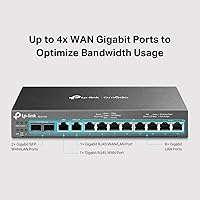
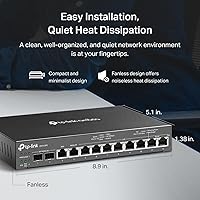
  • WAN Ports: Includes 2× Gigabit SFP WAN/LAN ports, 1× Gigabit RJ45 dedicated WAN port, and 1× Gigabit RJ45 WAN/LAN combo port for flexible multi-WAN configurations.
  • LAN Ports: Eight 10/100/1000 Mbps RJ45 LAN ports, all PoE+ enabled under the 802.3at and 802.3af standards.
  • PoE Per Port: Each of the eight LAN ports delivers up to 30W of PoE+ power, suitable for access points, IP cameras, and VoIP phones.
  • PoE Budget: Total shared PoE power budget across all eight ports is 110W, which must be managed carefully when powering multiple high-draw devices simultaneously.
  • VPN Protocols: Supports IPsec, OpenVPN, and L2TP/PPTP VPN protocols for encrypted remote access and site-to-site tunnel configurations.
  • Controller Capacity: The built-in Omada hardware controller manages up to 10 Omada access points and up to 2 Omada switches without requiring a separate controller device.
  • Cooling System: Uses fully passive fanless cooling with no moving parts, resulting in completely silent operation under normal load conditions.
  • Dimensions: The unit measures 8.9 × 5.17 × 1.38 inches, making it compact enough for shelf mounting or placement inside a small wall-mount enclosure.
  • Remote Management: Managed remotely via the Omada cloud web portal or the Omada mobile app, both of which provide centralized control across multiple network sites.
  • Wireless: This device contains no integrated wireless radio and does not broadcast Wi-Fi; wireless coverage requires separate Omada access points.
  • Operating Systems: Compatible with Mac OS, Linux/Unix, and Microsoft Windows versions from 98SE through Windows 10 for management access.
  • Input Voltage: Powered via an included power adapter operating at 9 volts DC with the power cord included in the box.
  • Warranty: Backed by a 5-year limited warranty, which is notably longer than the industry standard for managed network hardware at this price tier.
  • Technical Support: Free technical support is available by phone from 6am to 6pm PST, Monday through Friday, for the lifetime of the warranty period.
  • Color & Finish: Available in a matte black finish that suits professional office and wiring-closet environments without drawing visual attention.
  • In the Box: Package includes the ER7212PC unit, a power adapter, a power cord, and a printed quick installation guide.
  • Product Rating: Holds a 3.9 out of 5-star rating based on 91 verified buyer reviews, ranking #234 in the Computer Routers category on Amazon.

Related Reviews

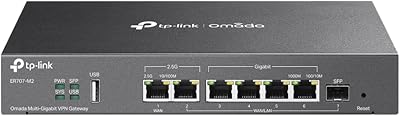
TP-Link ER707-M2 Omada Multi-Gigabit VPN Router
86%
92%
Network Performance
80%
Ease of Setup
89%
Cloud Management (Omada SDN)
85%
Security Features
88%
Build Quality
More
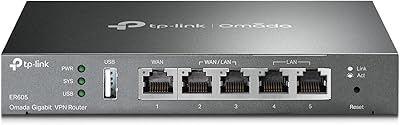
TP-Link ER605 V2 VPN Router
80%
93%
Value for Money
89%
Multi-WAN Reliability
71%
VPN Performance
82%
Ease of Setup
91%
Omada SDN Integration
More
TP-Link ER7206 Multi-WAN VPN Router
86%
91%
Network Performance
94%
Security Features
88%
Cloud Management Experience
89%
VPN Support
82%
Setup & Installation
More
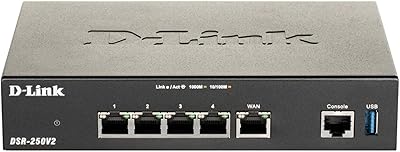
D-Link DSR-250V2 Gigabit VPN Router
81%
85%
Reliability & Connectivity
62%
Ease of Setup
91%
Security Features
89%
Dual WAN Failover Performance
84%
VPN Tunnel Support
More
TP-Link Deco M5 Mesh WiFi Router 1-Pack
86%
88%
Performance
93%
Setup Ease
85%
Coverage Range
91%
Security Features
77%
App Experience
More
TP-Link LS105G 5-Port Gigabit Ethernet Switch
85%
97%
Ease of Setup
91%
Build Quality
96%
Noise Level
89%
Port Performance
93%
Value for Money
More
TP-Link LS1008G Gigabit Ethernet Switch
86%
94%
Ease of Setup
88%
Reliability
90%
Energy Efficiency
85%
Build Quality
91%
Quiet Operation
More
TP-Link Archer AC1750 WiFi Router
85%
88%
WiFi Performance
91%
Setup & Installation
80%
Range & Coverage
85%
Value for Money
89%
Alexa Integration
More
TP-Link TD-W9970 Modem Router
83%
91%
Value for Money
95%
Ease of Setup
76%
Wi-Fi Performance
84%
Build Quality
87%
USB Port Functionality
More
TP-Link Archer C59 AC1350 WiFi Router
82%
88%
Setup & Installation
72%
Wi-Fi Range & Coverage
81%
Overall Performance
92%
Value for Money
78%
Build Quality
More

FAQ

No, it does not. The TP-Link ER7212PC 3-in-1 Gigabit VPN Router is a wired routing and switching device with no integrated wireless radio. Some product listings reference dual-band Wi-Fi standards in the metadata, which is misleading — you will need at least one separate Omada access point to provide wireless coverage in your space.
Yes, local management is possible through the Omada web interface on your local network without creating a cloud account. That said, cloud registration unlocks remote access via the Omada app and web portal, which is one of the more useful features for managing the device when you are off-site.

The built-in hardware controller supports up to 10 Omada access points and 2 Omada switches. If you anticipate needing more than 10 APs in the future, it is worth factoring in that you would need to migrate to a standalone Omada controller later — a process that is manageable but not trivial.

For most small offices running a mix of standard access points, IP cameras, and VoIP handsets, 110W is comfortable. Where it gets tight is if you fill all eight ports with high-draw devices like PTZ cameras or tri-radio APs simultaneously. It is worth adding up the wattage of your planned devices before committing to verify you have headroom.

The routing and PoE switching functions work with any standard network equipment. However, the built-in Omada controller only manages compatible Omada-branded devices — non-TP-Link switches and APs will not appear in the Omada dashboard. For a mixed-brand environment, you would manage those non-Omada devices separately through their own interfaces.

The Omada interface includes a guided VPN setup section that supports IPsec, OpenVPN, and L2TP/PPTP. For most remote-work scenarios, IPsec or OpenVPN is the recommended choice. If you are comfortable with basic networking concepts, the setup takes about 20 to 30 minutes. Complete beginners may want to reference TP-Link's online documentation or community forum, which covers the process step by step.

It does run warm under sustained PoE load, which is normal for passive cooling. In a well-ventilated spot on a shelf or desk, this is not a concern. Problems have been reported by a small number of buyers who placed the unit inside enclosed cabinets or stacked it tightly with other hardware in warm conditions — in those situations, occasional thermal reboots have been documented.

Your network keeps running normally — the cloud connection is only used for remote management access, not for routing traffic. You would simply lose the ability to make configuration changes remotely until connectivity is restored, but all local traffic, VPN tunnels, and PoE devices continue operating without interruption.

It depends entirely on what you want to do at home. For a standard household that just needs internet and Wi-Fi, this is significant overkill and would require additional access points on top of the purchase price. For a home lab enthusiast who wants VLANs, multi-WAN failover, VPN tunnels, and centralized network management, it is a very capable and space-efficient unit at a reasonable cost.

If you have set up a managed switch or business router before, the Omada onboarding process is straightforward — most people have it operational within 30 to 45 minutes. The included quick installation guide covers the basics, and the Omada app walks you through the core configuration steps. Where complexity increases is in advanced features like VPN policies and multi-WAN rules, which assume you understand fundamental networking concepts.

Where to Buy